remote control HONDA ACCORD COUPE 2016 9.G Quick Guide
[x] Cancel search | Manufacturer: HONDA, Model Year: 2016, Model line: ACCORD COUPE, Model: HONDA ACCORD COUPE 2016 9.GPages: 84, PDF Size: 19.4 MB
Page 3 of 84
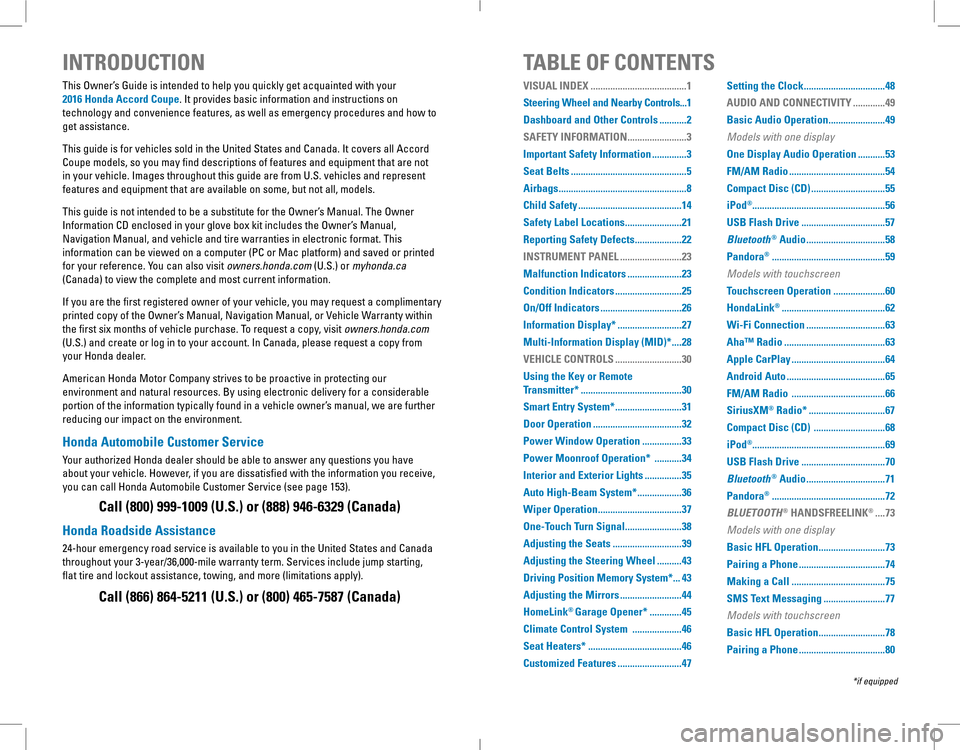
INTRODUCTIONTABLE OF CONTENTS
This Owner’s Guide is intended to help you quickly get acquainted with your
2016 Honda Accord Coupe. It provides basic information and instructions on
technology and convenience features, as well as emergency procedures and\
how to
get assistance.
This guide is for vehicles sold in the United States and Canada. It covers all Accord
Coupe models, so you may find descriptions of features and equipment that are not
in your vehicle. Images throughout this guide are from U.S. vehicles and represent
features and equipment that are available on some, but not all, models.
This guide is not intended to be a substitute for the Owner’s Manual. The Owner
Information CD enclosed in your glove box kit includes the Owner’s Manual,
Navigation Manual, and vehicle and tire warranties in electronic format.\
This
information can be viewed on a computer (PC or Mac platform) and saved or printed
for your reference. You can also visit owners.honda.com (U.S.) or myhonda.ca
(Canada) to view the complete and most current information.
If you are the first registered owner of your vehicle, you may request a complimentary
printed copy of the Owner’s Manual, Navigation Manual, or Vehicle Warranty within
the first six months of vehicle purchase. To request a copy, visit owners.honda.com
(U.S.) and create or log in to your account. In Canada, please request a copy from
your Honda dealer.
American Honda Motor Company strives to be proactive in protecting our
environment and natural resources. By using electronic delivery for a considerable
portion of the information typically found in a vehicle owner’s manual, we are further
reducing our impact on the environment.
Honda Automobile Customer Service
Your authorized Honda dealer should be able to answer any questions you have
about your vehicle. However, if you are dissatisfied with the information you receive,
you can call Honda Automobile Customer Service (see page 153).
Call (800) 999-1009 (U.S.) or (888) 946-6329 (Canada)
Honda Roadside Assistance
24-hour emergency road service is available to you in the United States and Canada
throughout your 3-year/36,000-mile warranty term. Services include jump starting,
flat tire and lockout assistance, towing, and more (limitations apply\
).
Call (866) 864-5211 (U.S.) or (800) 465-7587 (Canada)
*if equipped
VISUAL INDEX .......................................1
Steering Wheel and Nearby Controls...1
Dashboard and Other Controls ...........2
SAFETY INFORMATION ........................3
Important Safety Information ..............3
Seat Belts ...............................................5
Airbags ....................................................8
Child Safety ..........................................14
Safety Label Locations .......................21
Reporting Safety Defects ...................22
INSTRUMENT PANEL .........................23
Malfunction Indicators ......................23
Condition Indicators ...........................25
On/Off Indicators .................................26
Information Display* ..........................27
Multi-Information Display (MID)* ....28
VEHICLE CONTROLS ...........................30
Using the Key or Remote
Transmitter* .........................................30
Smart Entry System* ...........................31
Door Operation ....................................32
Power Window Operation ................33
Power Moonroof Operation* ...........34
Interior and Exterior Lights ...............35
Auto High-Beam System* ..................36
Wiper Operation ..................................37
One-Touch Turn Signal .......................38
Adjusting the Seats ............................39
Adjusting the Steering Wheel ..........43
Driving Position Memory System* ...43
Adjusting the Mirrors .........................44
HomeLink® Garage Opener* .............45
Climate Control System ....................46
Seat Heaters* ......................................46
Customized Features ..........................47
Setting the Clock .................................48
AUDIO AND CONNECTIVITY .............49
Basic Audio Operation .......................49
Models with one display
One Display Audio Operation ...........53
FM/AM Radio .......................................54
Compact Disc (CD) ..............................55
iPod®......................................................56
USB Flash Drive ..................................57
Bluetooth® Audio ................................58
Pandora® ..............................................59
Models with touchscreen
Touchscreen Operation .....................60
HondaLink® ..........................................62
Wi-Fi Connection ................................63
Aha™ Radio .........................................63
Apple CarPlay ......................................64
Android Auto ........................................65
FM/AM Radio ......................................66
SiriusXM® Radio* ...............................67
Compact Disc (CD) .............................68
iPod®......................................................69
USB Flash Drive ..................................70
Bluetooth® Audio ................................71
Pandora® ..............................................72
BLUETOOTH® HANDSFREELINK® ....73
Models with one display
Basic HFL Operation ...........................73
Pairing a Phone ...................................74
Making a Call ......................................75
SMS Text Messaging .........................77
Models with touchscreen
Basic HFL Operation ...........................78
Pairing a Phone ...................................80
Page 4 of 84
| 1
VISUAL INDEX
1 Lights/turn signals/LaneWatch
button* p. 35, p. 38, p. 112
2 SEL/RESET knob p. 27
Brightness control p. 35
3 Wipers/washers p. 37
4 Cruise control buttons* p. 107
Adaptive Cruise Control (ACC)
buttons* p. 108
Lane Keeping Assist System (LKAS)
button* p. 111
5 Horn
6 Voice recognition buttons p. 73,
p. 78, p. 86
7 Instrument panel p. 23
8 Information display* p. 27
Multi-information display* p. 28
9 Info (p/q) buttons* p. 28
SEL/RESET button* p. 28
10 Audio controls p. 51
11 Tire Pressure Monitoring System
(TPMS) button* p. 122
12 Lane Keeping Assist System (LKAS)
button* p. 111
13 ENGINE START/STOP button* p. 100
14 Vehicle Stability Assist (VSA®) oFF
button p. 106
Collision Mitigation Braking System™
(CMBS™) OFF button* p. 113
road Departure Mitigation (rDM)
button* p. 110
Parking sensor system button*
p. 114
15 ECON button* p. 106
VISUAL INDEX
*if equipped*if equipped
Quickly locate items in the vehicle’s interior.
Steering Wheel and Nearby Controls
12
5
107415
116
38
9121314
Making a Call ......................................81
SMS Text Messaging and E-Mail* ...83
HondaLink® Assist ..............................84
Siri™ Eyes Free ...................................85
NAVIGATION* ......................................86
Basic Navigation Operation .............86
Entering a Destination .......................88
Routing ..................................................91
DRIVING ................................................93
Before Driving .....................................93
Maximum Load Limit ..........................95
Towing a Trailer ..................................97
Remote Engine Start* .........................98
Starting to Drive ..................................99
Shifting ................................................100
Braking ...............................................105
Eco Assist System .............................106
Vehicle Stability Assist (VSA®), aka
Electronic Stability Control (ESC)
System .................................................106
Cruise Control* ..................................107
Adaptive Cruise Control (ACC)* .....108
Road Departure Mitigation
(RDM)* ................................................110
Lane Keeping Assist System
(LKAS)* ................................................111
LaneWatch™* ...................................112
Collision Mitigation Braking
System™ (CMBS™)* ........................113
Parking Sensor System* ..................114
Multi-View Rear Camera .................115
Refueling ............................................116
HANDLING THE UNEXPECTED .......117
Smart Entry Remote Battery
Strength* ............................................117
Shift Lever Does Not Move* ...........117
Jump Starting ....................................118
Overheating ........................................120
Emergency Engine Stop* .................121
Emergency Towing ...........................121
Tire Pressure Monitoring System
(TPMS) ................................................122
Changing a Flat Tire ..........................124
Fuse Locations ...................................127
MAINTENANCE .................................130
Safety Precautions ...........................130
Maintenance Minder™....................131
Under the Hood ..................................133
Engine Oil ...........................................135
Engine Coolant ..................................138
Brake Fluid .........................................139
Clutch Fluid* ......................................139
Checking the Battery ........................140
Window Washer Fluid .....................140
Changing Wiper Blades ...................141
Tire Information .................................142
Tire Labeling ......................................145
DOT Tire Quality Grading .................146
Testing of Readiness Codes ............148
SPECIFICATIONS ...............................149
CUSTOMER INFORMATION .............152
Frequently Asked Questions/
Troubleshooting ................................152
Contact Us ..........................................153
Honda Roadside Assistance ...........153
Warranty Coverages .........................154
VOICE COMMAND INDEX ................155
INDEX ..................................................157
Page 17 of 84
26 || 27
INSTRUMENT PANELINSTRUMENT PANEL
Immobilizer
Your key or remote transmitter cannot be recognized by the vehicle. If the
indicator blinks, you may not be able to start the engine. Turn the vehicle off,
and then on again. If it continues to blink, there may be a problem with the
system. See your dealer.
On/Off Indicators
These indicators remind you when an item is on or off.
*if equipped
vSA off
VSA engaged (blinking)
CRUISE MAIN on
CRUISE CONTROL on
ACC* on
LKAS* on
CMBS™* off
Turn signals/hazards on
Fog lights* on
High beams on
exterior lights on
Auto High-Beam System* on
ECON mode* on
Information Display*
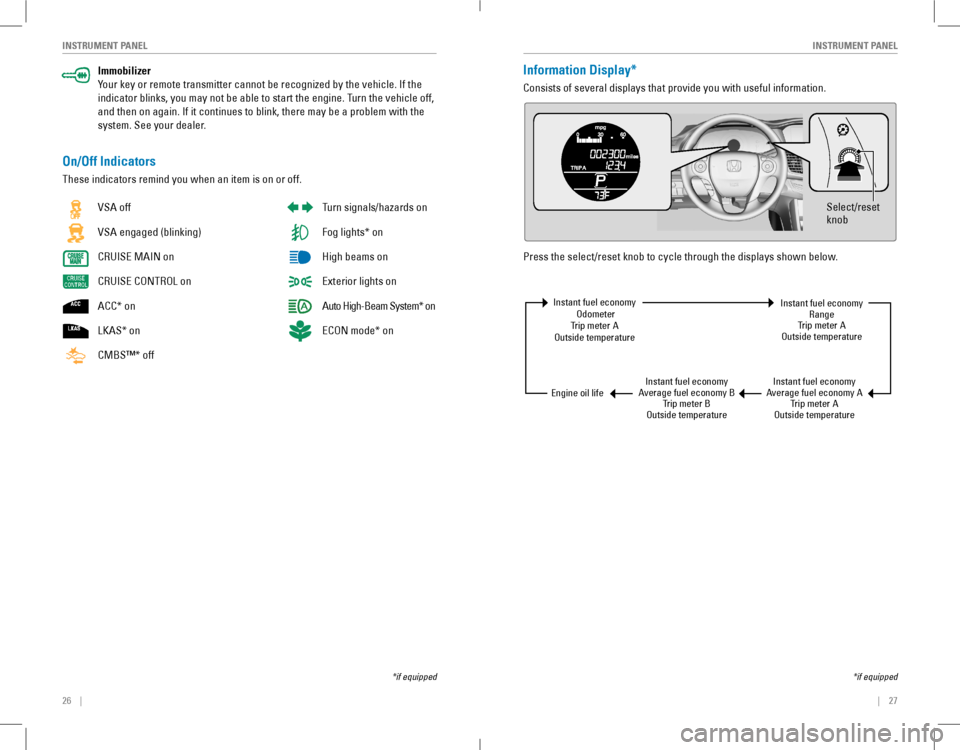
Consists of several displays that provide you with useful information.
Press the select/reset knob to cycle through the displays shown below.
Select/reset
knob
Instant fuel economy odometerTrip meter Aoutside temperature
Instant fuel economyAverage fuel economy BTrip meter Boutside temperature
Instant fuel economyAverage fuel economy ATrip meter Aoutside temperature
Instant fuel economyrangeTrip meter Aoutside temperature
engine oil life
*if equipped
Page 19 of 84
30 || 31
VEHICLE CONTROLSVEHICLE CONTROLS
VEHICLE CONTROLS
*if equipped
Learn about the various controls necessary for operating and driving the vehicle.
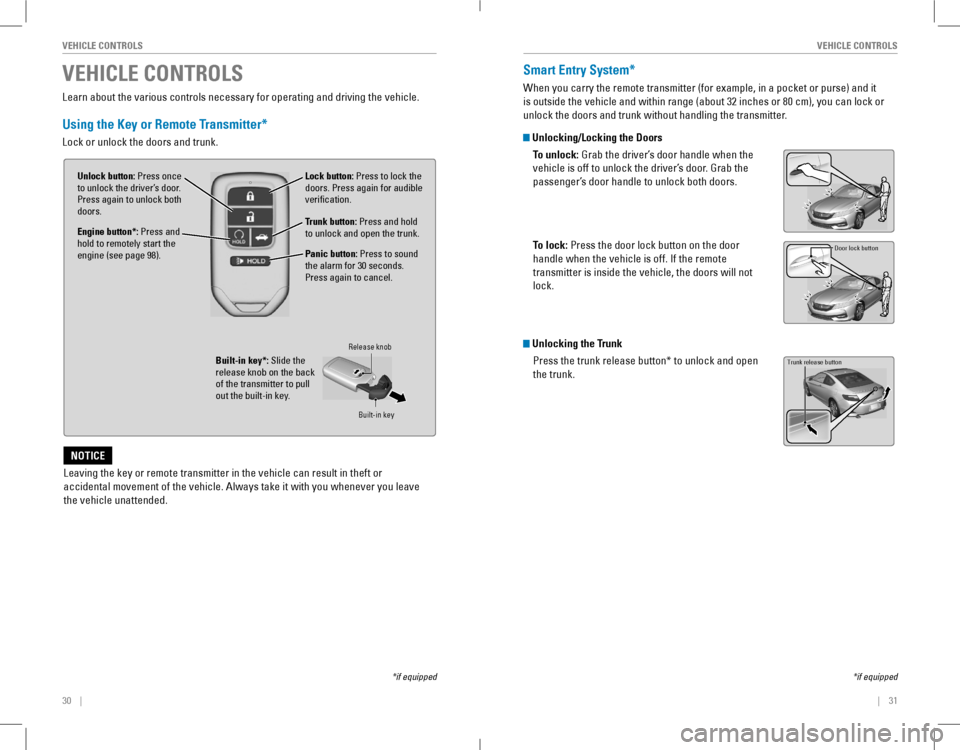
Using the Key or Remote Transmitter*
Lock or unlock the doors and trunk.
Unlock button: Press once to unlock the driver’s door. Press again to unlock both doors.Trunk button: Press and hold to unlock and open the trunk.
Lock button: Press to lock the doors. Press again for audible verification.
Panic button: Press to sound the alarm for 30 seconds. Press again to cancel.
Built-in key*: Slide the release knob on the back of the transmitter to pull out the built-in key.
Release knob
Built-in key
Leaving the key or remote transmitter in the vehicle can result in theft\
or
accidental movement of the vehicle. Always take it with you whenever you\
leave
the vehicle unattended.
NOTICE
Engine button*: Press and hold to remotely start the engine (see page 98).
Smart Entry System*
When you carry the remote transmitter (for example, in a pocket or purse) and it
is outside the vehicle and within range (about 32 inches or 80 cm), you can lock or
unlock the doors and trunk without handling the transmitter.
Unlocking/Locking the Doors
To unlock: Grab the driver’s door handle when the
vehicle is off to unlock the driver’s door. Grab the
passenger’s door handle to unlock both doors.
To lock: Press the door lock button on the door
handle when the vehicle is off. If the remote
transmitter is inside the vehicle, the doors will not
lock.
Unlocking the Trunk
Press the trunk release button* to unlock and open
the trunk.
*if equipped
Door lock button
Trunk release button
Page 25 of 84
42 || 43
VEHICLE CONTROLSVEHICLE CONTROLS
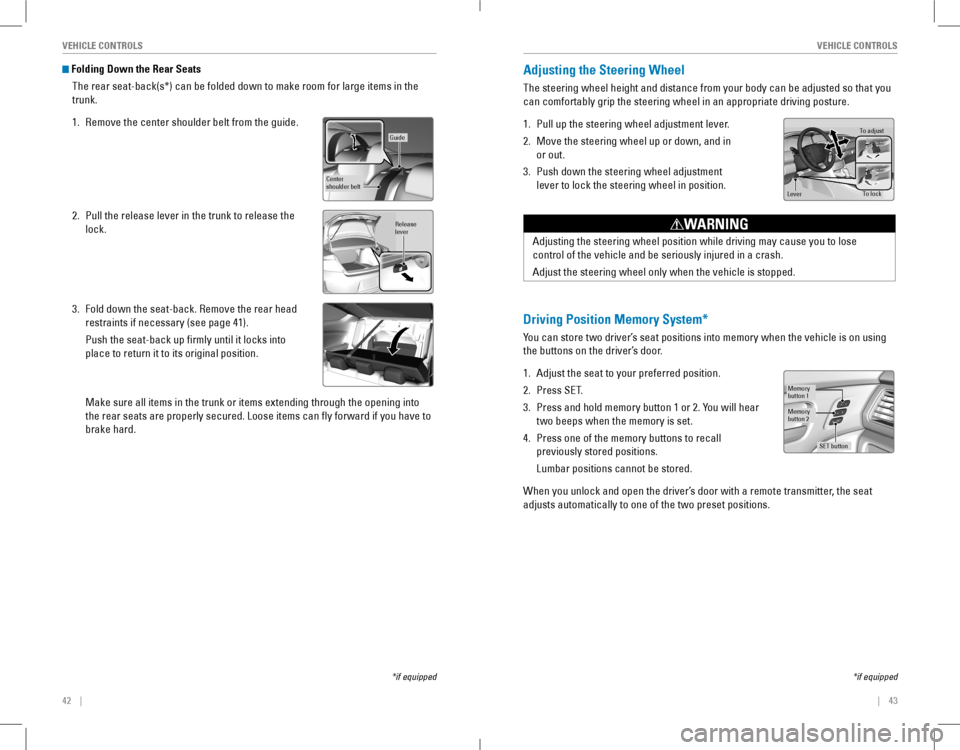
Folding Down the Rear Seats
The rear seat-back(s*) can be folded down to make room for large items in the
trunk.
1. Remove the center shoulder belt from the guide.
2. Pull the release lever in the trunk to release the
lock.
3. Fold down the seat-back. Remove the rear head
restraints if necessary (see page 41).
Push the seat-back up firmly until it locks into
place to return it to its original position.
Make sure all items in the trunk or items extending through the opening \
into
the rear seats are properly secured. Loose items can fly forward if yo\
u have to
brake hard.
*if equipped
Guide
Center
shoulder belt
Release
lever
Adjusting the Steering Wheel
The steering wheel height and distance from your body can be adjusted so that you
can comfortably grip the steering wheel in an appropriate driving posture.
1. Pull up the steering wheel adjustment lever.
2. Move the steering wheel up or down, and in
or out.
3. Push down the steering wheel adjustment
lever to lock the steering wheel in position.
To adjus t
To lock
Lever
Adjusting the steering wheel position while driving may cause you to los\
e
control of the vehicle and be seriously injured in a crash.
Adjust the steering wheel only when the vehicle is stopped.
WARNING
Driving Position Memory System*
You can store two driver’s seat positions into memory when the vehicle is on using
the buttons on the driver’s door.
1. Adjust the seat to your preferred position.
2. Press SeT.
3. Press and hold memory button 1 or 2. You will hear
two beeps when the memory is set.
4. Press one of the memory buttons to recall
previously stored positions.
Lumbar positions cannot be stored.
When you unlock and open the driver’s door with a remote transmitter, the seat
adjusts automatically to one of the two preset positions.
Memory
button 1
Memory
button 2
SET button
*if equipped
Page 26 of 84
44 || 45
VEHICLE CONTROLSVEHICLE CONTROLS
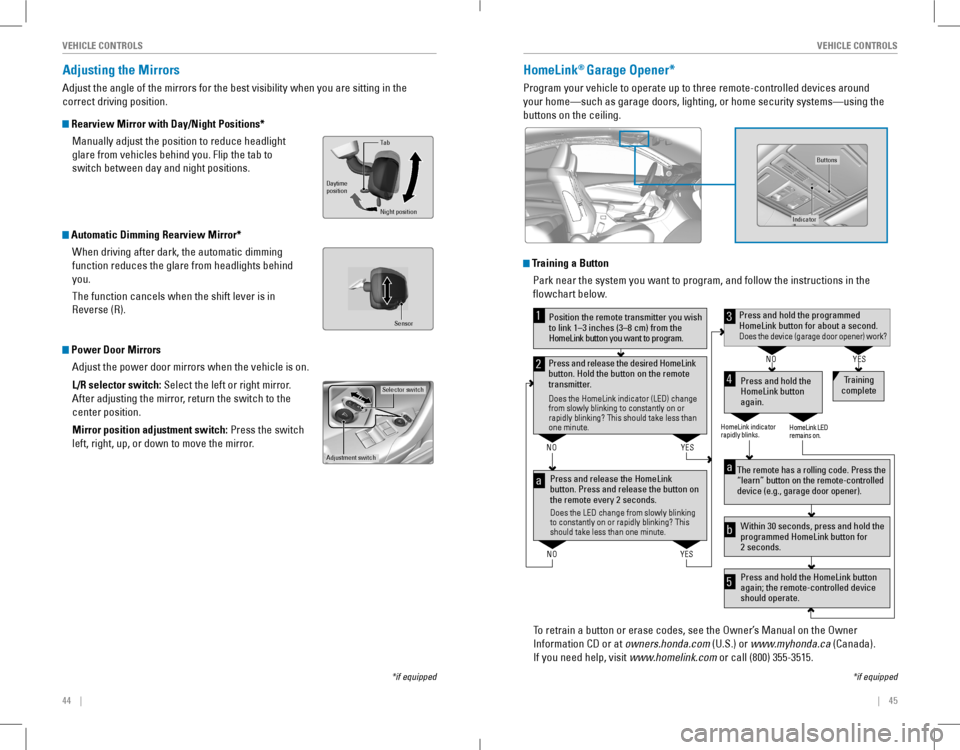
Adjusting the Mirrors
Adjust the angle of the mirrors for the best visibility when you are sitting in the
correct driving position.
Rearview Mirror with Day/Night Positions*
Manually adjust the position to reduce headlight
glare from vehicles behind you. Flip the tab to
switch between day and night positions.
Automatic Dimming Rearview Mirror*
When driving after dark, the automatic dimming
function reduces the glare from headlights behind
you.
The function cancels when the shift lever is in
reverse (r).
Power Door Mirrors
Adjust the power door mirrors when the vehicle is on.
L/R selector switch: Select the left or right mirror.
After adjusting the mirror, return the switch to the
center position.
Mirror position adjustment switch: Press the switch
left, right, up, or down to move the mirror.
Selector switch
Adjustment switch
Tab
Daytime
position
Night position
HomeLink® Garage Opener*
Program your vehicle to operate up to three remote-controlled devices ar\
ound
your home—such as garage doors, lighting, or home security systems—\
using the
buttons on the ceiling.
Training a Button
Park near the system you want to program, and follow the instructions in\
the
flowchart below.
To retrain a button or erase codes, see the Owner’s Manual on the Owner
Information CD or at owners.honda.com (U.S.) or www.myhonda.ca (Canada).
If you need help, visit www.homelink.com or call (800) 355-3515.
Press and release the HomeLink
button. Press and release the button on
the remote every 2 seconds.
Does the LED change from slowly blinking
to constantly on or rapidly blinking? This
should take less than one minute.
Press and hold the
HomeLink button
again. T
raining
complete
YES
NO
HomeLink indicator
rapidly blinks. HomeLink LED
remains on.
YES
NO
YES
NO
Position the remote transmitter you wish
to link 1–3 inches (3–8 cm) from the
HomeLink button you want to program.1
Press and release the desired HomeLink
button. Hold the button on the remote
transmitter .
Does the HomeLink indicator (LED) change
from slowly blinking to constantly on or
rapidly blinking? This should take less than
one minute.
2
aThe remote has a rolling code. Press the
“learn” button on the remote-controlled
device (e.g., garage door opener) .
Press and hold the HomeLink button
again; the remote-controlled device
should operate. Within 30 seconds, press and hold the
programmed HomeLink button for
2 seconds.a
Press and hold the programmed HomeLink button for about a second.Does the device (garage door opener) work?
3
b
4
5
*if equipped
Indicato r
Buttons
Sensor
*if equipped
Page 33 of 84
58 || 59
AUDIO AND CONNECTIVITYAUDIO AND CONNECTIVITY
Models with one display
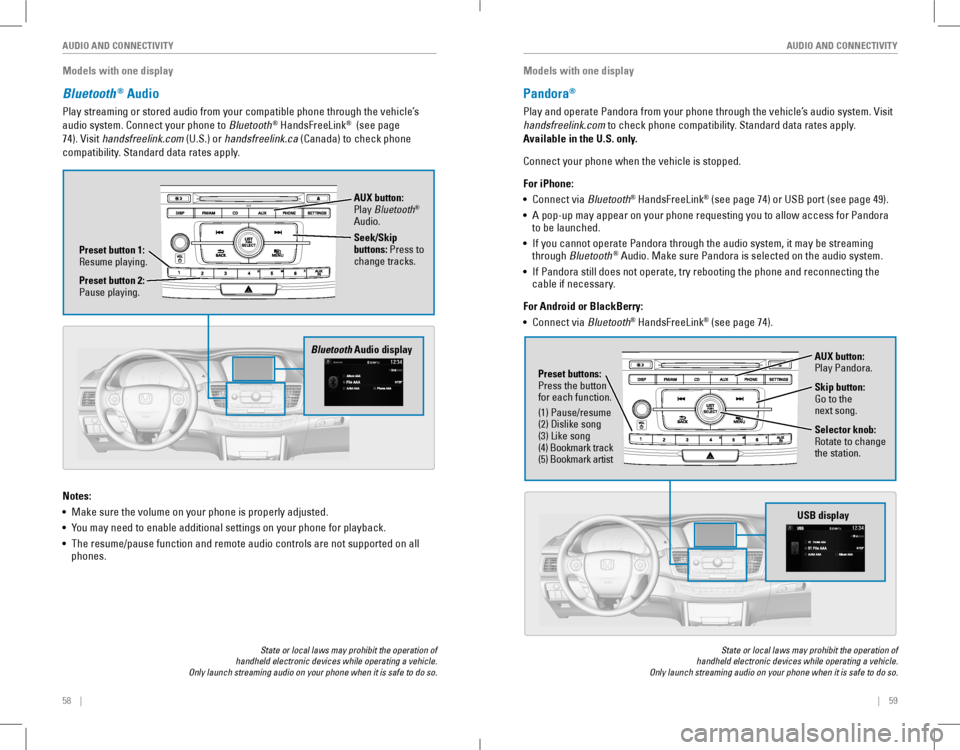
Bluetooth® Audio
Play streaming or stored audio from your compatible phone through the vehicle’s
audio system. Connect your phone to Bluetooth® HandsFreeLink® (see page
74). visit handsfreelink.com (U.S.) or handsfreelink.ca (Canada) to check phone
compatibility. Standard data rates apply.
State or local laws may prohibit the operation of handheld electronic devices while operating a vehicle. Only launch streaming audio on your phone when it is safe to do so.
Notes:
• Make sure the volume on your phone is properly adjusted.
• You may need to enable additional settings on your phone for playback.
• The resume/pause function and remote audio controls are not supported on all phones.
Bluetooth Audio display
Preset button 1: resume playing.
AUX button: Play Bluetooth® Audio.
Seek/Skip buttons: Press to change tracks.
Preset button 2: Pause playing.
Models with one display
Pandora®
Play and operate Pandora from your phone through the vehicle’s audio system. visit
handsfreelink.com to check phone compatibility. Standard data rates apply.
Available in the U.S. only.
Connect your phone when the vehicle is stopped.
For iPhone:
• Connect via Bluetooth® HandsFreeLink® (see page 74) or USB port (see page 49).
• A pop-up may appear on your phone requesting you to allow access for Pandora to be launched.
• If you cannot operate Pandora through the audio system, it may be streaming through Bluetooth® Audio. Make sure Pandora is selected on the audio system.
• If Pandora still does not operate, try rebooting the phone and reconnecting the cable if necessary.
For Android or BlackBerry:
• Connect via Bluetooth® HandsFreeLink® (see page 74).
State or local laws may prohibit the operation of handheld electronic devices while operating a vehicle. Only launch streaming audio on your phone when it is safe to do so.
Selector knob: rotate to change the station.
USB display
AUX button: Play Pandora.
Skip button: Go to the next song.
Preset buttons: Press the button for each function.
(1) Pause/resume(2) Dislike song(3) Like song(4) Bookmark track(5) Bookmark artist
Page 53 of 84
98 || 99
DRIVINGDRIVING
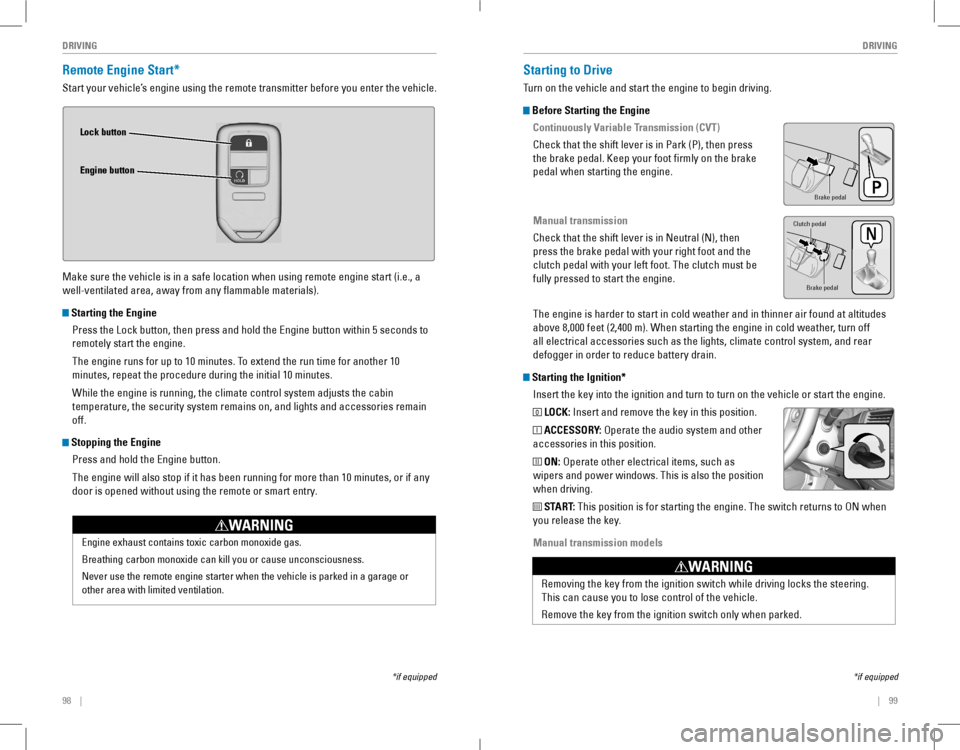
Remote Engine Start*
Start your vehicle’s engine using the remote transmitter before you enter the vehicle.
Make sure the vehicle is in a safe location when using remote engine start (i.e., a
well-ventilated area, away from any flammable materials).
Starting the Engine
Press the Lock button, then press and hold the Engine button within 5 seconds to
remotely start the engine.
The engine runs for up to 10 minutes. To extend the run time for another 10
minutes, repeat the procedure during the initial 10 minutes.
While the engine is running, the climate control system adjusts the cabin
temperature, the security system remains on, and lights and accessories remain
off.
Stopping the Engine
Press and hold the Engine button.
The engine will also stop if it has been running for more than 10 minutes, or if any
door is opened without using the remote or smart entry.
Engine exhaust contains toxic carbon monoxide gas.
Breathing carbon monoxide can kill you or cause unconsciousness.
Never use the remote engine starter when the vehicle is parked in a gara\
ge or
other area with limited ventilation.
WARNING
Lock button
Engine button
*if equipped
Starting to Drive
Turn on the vehicle and start the engine to begin driving.
Before Starting the Engine
Continuously Variable Transmission (CVT)
Check that the shift lever is in Park (P), then press
the brake pedal. Keep your foot firmly on the brake
pedal when starting the engine.
Manual transmission
Check that the shift lever is in Neutral (N), then
press the brake pedal with your right foot and the
clutch pedal with your left foot. The clutch must be
fully pressed to start the engine.
The engine is harder to start in cold weather and in thinner air found a\
t altitudes
above 8,000 feet (2,400 m). When starting the engine in cold weather, turn off
all electrical accessories such as the lights, climate control system, a\
nd rear
defogger in order to reduce battery drain.
Starting the Ignition*
Insert the key into the ignition and turn to turn on the vehicle or start the engine.
0 LOCK: Insert and remove the key in this position.
I ACCESSORY: operate the audio system and other
accessories in this position.
II ON: operate other electrical items, such as
wipers and power windows. This is also the position
when driving.
III START: This position is for starting the engine. The switch returns to oN when
you release the key.
Manual transmission models
*if equipped
Brake peda l
Brake pedal
Clutch pedal
removing the key from the ignition switch while driving locks the steerin\
g.
This can cause you to lose control of the vehicle.
remove the key from the ignition switch only when parked.
WARNING
Page 62 of 84
116 || 117
HANDLING THE UNEXPECTEDDRIVING
Refueling
Use the proper fuel and refueling procedure to ensure the best performance and
safety of your vehicle.
Fuel Information
Use of unleaded gasoline of 87 octane or higher is recommended.
• Honda recommends TOP TIER Detergent Gasoline where available.
• Do NOT use gasoline containing more than 15% ethanol.
• Do NoT use gasoline containing methanol.
• Do NoT use gasoline containing MMT.
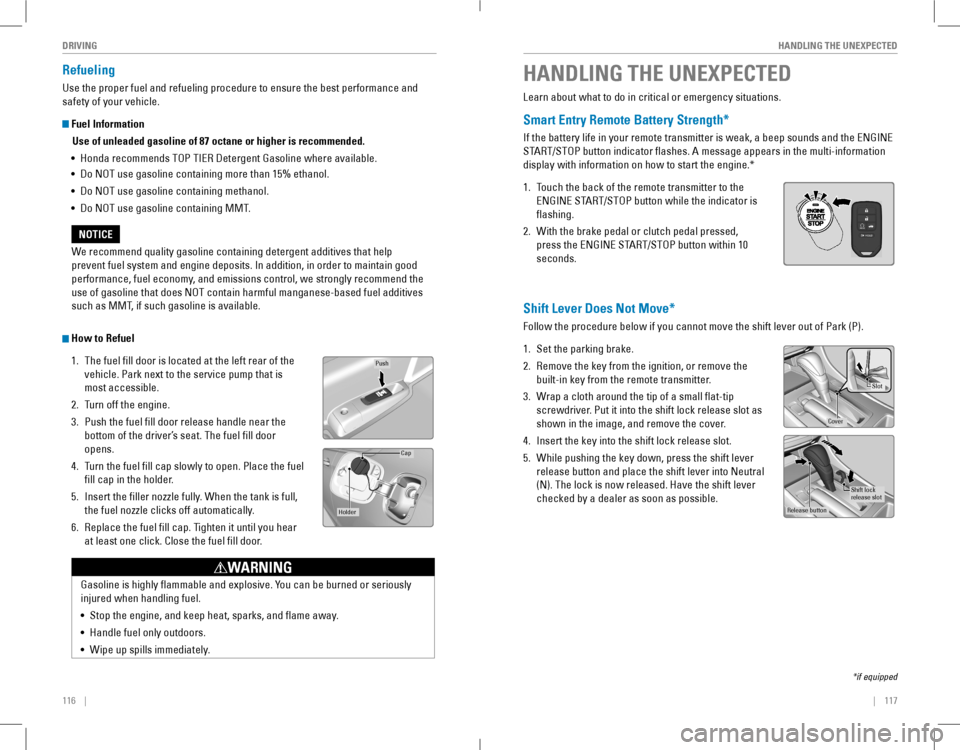
How to Refuel
1. The fuel fill door is located at the left rear of the
vehicle. Park next to the service pump that is
most accessible.
2. Turn off the engine.
3. Push the fuel fill door release handle near the
bottom of the driver’s seat. The fuel fill door
opens.
4. Turn the fuel fill cap slowly to open. Place the fuel
fill cap in the holder.
5. Insert the filler nozzle fully. When the tank is full,
the fuel nozzle clicks off automatically.
6. replace the fuel fill cap. Tighten it until you hear
at least one click. Close the fuel fill door.
Push
Cap
Holder
Gasoline is highly flammable and explosive. You can be burned or seriously
injured when handling fuel.
• Stop the engine, and keep heat, sparks, and flame away.
• Handle fuel only outdoors.
• Wipe up spills immediately.
WARNING
We recommend quality gasoline containing detergent additives that help
prevent fuel system and engine deposits. In addition, in order to maintain good
performance, fuel economy, and emissions control, we strongly recommend the
use of gasoline that does NOT contain harmful manganese-based fuel additives
such as MMT, if such gasoline is available.
NOTICE
HANDLING THE UNEXPECTED
Learn about what to do in critical or emergency situations.
Smart Entry Remote Battery Strength*
If the battery life in your remote transmitter is weak, a beep sounds and the ENGINE
START/STOP button indicator flashes. A message appears in the multi-information
display with information on how to start the engine.*
1. Touch the back of the remote transmitter to the
ENGINE START/STOP button while the indicator is
flashing.
2. With the brake pedal or clutch pedal pressed,
press the ENGINE START/STOP button within 10
seconds.
Shift Lever Does Not Move*
Follow the procedure below if you cannot move the shift lever out of Park (P).
1. Set the parking brake.
2. remove the key from the ignition, or remove the
built-in key from the remote transmitter.
3. Wrap a cloth around the tip of a small flat-tip
screwdriver. Put it into the shift lock release slot as
shown in the image, and remove the cover.
4. Insert the key into the shift lock release slot.
5. While pushing the key down, press the shift lever
release button and place the shift lever into Neutral
(N). The lock is now released. Have the shift lever
checked by a dealer as soon as possible.
*if equipped
Slot
Cove r
Release button
Shift lock
release slo t
FPO
Page 83 of 84
158 || 159
INDEXINDEX
LaneWatch™ ..............................................112Manual Transmission ................................104Maximum Load Limit ....................................95Multi-view rear Camera ..........................115Paddle Shifters ...................................101, 103Parking Sensor System .............................114Power Mode ...............................................100refueling ......................................................116remote engine Start ....................................98road Departure Mitigation (rDM) ..........110Shifting .........................................................100Towing a Trailer ............................................97Vehicle Stability Assist (VSA®) ................106Wiper Blades ..............................................141Driving Position Memory System ..................43eco Assist System..........................................106eCoN Button ...................................................106eCoN mode .......................................................26electric Power Steering (ePS) .......................24Electronic Stability Control (ESC) ................106e-Mail .............................................................83emergency engine Stop ................................121emergency Towing ........................................121engine and Fuel ......................................149, 151engine Coolant................................................138engine oil.........................................................135ENGINE START/STOP button .......................100exterior lights ..............................................26, 35Fastening a Seat Belt ........................................7Flat Tire ...........................................................124Floor Mats .........................................................40Fluids ...................................................150, 151FM/AM Radio ..............................................54, 66FM/AM Radio Commands .............................156Fog lights ...........................................................26Foot Brake .......................................................105Frequently Asked Questions ........................152Front Airbags (SRS) ...........................................8Fuel Information .............................................116Fuse Locations................................................127Garage opener .................................................45Hazards .............................................................26Headlight-Wiper Integration ..........................37Head restraints ................................................41High beams .......................................................26Home Address ..................................................88HomeLink® Garage opener ............................45HondaLink® .......................................................62HondaLink® Assist ...........................................84Honda roadside Assistance ........................153Hood ...........................................................133Ignition .............................................................99Immobilizer ........................................................26Information Display..........................................27Instrument Panel ..............................................23
Interior Lights....................................................35Intermittent Wipers..........................................37iPod® .......................................................56, 69iPod® Commands ...........................................156Jump Starting .................................................118Key .............................................................30Lane Keeping Assist System (LKAS)...................................25, 26, 111LaneWatch™ ..................................................112Lap/Shoulder Seat Belts ...................................5LATCH-Compatible Child Seat ........................17Light Bulbs...............................................149, 151Light control ......................................................24Lights .......................................................26, 35Lock Tab .............................................................32Low fuel .............................................................25Low oil pressure ...............................................23Low tire pressure .............................................25Maintenance...................................................130Battery .........................................................140Brake Fluid ..................................................139Clutch Fluid ..................................................139engine Coolant ............................................138engine oil .....................................................135Maintenance Minder™ .............................131Service Codes .............................................132Under the Hood ..........................................133Window Washer Fluid ...............................140Wiper Blades ..............................................141Making a Call ..............................................75, 81Malfunction indicator lamp ............................24Malfunction Indicators....................................23Manual Seats....................................................40Manual Transmission ....................................104Map Legend ......................................................91Master Door Lock Switch ...............................32Maximum Load Limit........................................95Mirrors .............................................................44Moonroof ...........................................................34Multi-Information Display (MID)....................28Multi-view rear Camera ..............................115Music search ..................................................156Navigation .........................................................86Display and Controls ....................................87entering a Destination .................................88Home Address ..............................................88Map Legend ..................................................91Place Category .............................................89recent Places ...............................................89routing ...........................................................91Saved Places ................................................90Steering Wheel Controls .............................86Street Address ..............................................88System Guidance v olume ...........................86Talk Button Tips ............................................86
Traffic .............................................................92Turn-by-turn directions ...............................91Navigation Commands ..................................155one Display Audio operation .........................53one-Touch Turn Signal ....................................38On/Off Indicators ..............................................26opening the Hood ..........................................134overheating.....................................................120Paddle Shifters .......................................101, 103Pairing a Phone ..........................................74, 80Pandora® .....................................................59, 72Pandora® Commands ....................................156Parking brake............................................25, 105Parking sensor system ............................24, 114Passenger Airbag Off Indicator .....................11Phone .......................................................74, 80Phonebook ..................................................76, 82Phone Commands ..........................................155Place Category .................................................89Power Door Mirrors.........................................44Power Driver’s Seat .........................................39Power Mode ...................................................100Power Moonroof operation ...........................34Power Window Operation ..............................33radio .............................................................66Rain-Sensing Wipers.......................................38readiness Codes............................................148rear Camera ...................................................115rear Seats .........................................................42rearview Mirror ...............................................44recent Places...................................................89refueling..........................................................116remote Battery Strength ..............................117remote engine Start ........................................98remote Transmitter .........................................30reporting Safety Defects................................22road Departure Mitigation (rDM) ........25, 110roadside Assistance .....................................153routing .............................................................91Safety Information .............................................3Airbags .............................................................8Child Safety ...................................................14reporting Safety Defects ............................22Safety Label Locations ................................21Safety Messages ...........................................3Seat Belts ........................................................5Saved Places ....................................................90Seat Belts ............................................................5Fastening a Seat Belt ....................................7Seat Belt Inspection ......................................6Seat Belt reminder ......................................25Seat Heaters .....................................................46Seats .............................................................39Select/reset knob .............................................27Sequential Shift Mode...................................103
Service Codes.................................................132Settings .......................................................29, 47Setting the Clock ..............................................48Shifting ...........................................................100Shift Lever Does Not Move ..........................117Side Airbags........................................................9Side Curtain Airbags..........................................9Siri eyes Free ....................................................85SiriusXM® radio ...............................................67SiriusXM® radio Commands ........................156Smart entry system ....................................23, 31SMS Text Messaging ................................77, 83Song By v oice™ Commands ........................156Sound .............................................................52Specifications .................................................149Speed Dial ...................................................75, 81SrS (Supplemental restraint System) Indicator.............................................10Starter system ..................................................24Steering Wheel.................................................43Steering Wheel and Nearby Controls ............1Steering Wheel Controls...........................51, 86Street Address..................................................88Supplemental restraint System (SrS) .........23System Guidance v olume ...............................86System message ..............................................25Talk Button Tips ..........................................79, 86Text Messaging ..........................................77, 83Tire Information ..............................................142DoT Tire Quality Grading ..........................146Inflation Guidelines ....................................142Tire and Loading Information Label ........143Tire and Wheel Replacement ...................143Tire Chains ...................................................144Tire Identification Number (TIN) ..............145Tire Labeling ................................................145Tire Service Life ..........................................144Tire Terminology .........................................145Wear Indicators .........................................142Winter Tires .................................................144Tire Pressure Monitoring System (TPMS) .......................................24, 122Tires ...................................................149, 151Touchscreen operation ..................................60Towing ...........................................................121Towing a Trailer ................................................97Traffic .............................................................92Trip Computer ...................................................29Troubleshooting ..............................................152Trunk .............................................................31Trunk opener ....................................................32Turn-by-turn directions ...................................91Turn Signal ..................................................26, 38Under the Hood ..............................................133USB Commands..............................................156