transmission HONDA ACCORD COUPE 2017 9.G Quick Guide
[x] Cancel search | Manufacturer: HONDA, Model Year: 2017, Model line: ACCORD COUPE, Model: HONDA ACCORD COUPE 2017 9.GPages: 84, PDF Size: 7.3 MB
Page 15 of 84

22 || 23
I
NSTRUMENT PANELSAFETY
INSTRUMENT PANELReporting Safety Defects
In the U.S.
If you believe that your vehicle has a defect which could cause a crash \
or could
cause injury or death, you should immediately inform the National Highway Traffic
Safety Administration (NHTSA) in addition to notifying American Honda \
Motor Co.,
Inc.
If NHTSA receives similar complaints, it may open an investigation, and \
if it finds
that a safety defect exists in a group of vehicles, it may order a recal\
l and remedy
campaign. However, NHTSA cannot become involved in individual problems
between you, your dealer, or American Honda Motor Co., Inc.
To contact NHTSA, you may call the
vehicle Safety Hotline toll-free at 1-888-327-
4236 (TTY: 1-800-424-9153); go to
http://www.safercar.gov; or write to: Administrator,
NHTSA, 1200 New Jersey Avenue, S
e., W
ashington, DC 20590. You can also obtain
other information about motor vehicle safety from http://www.safercar.gov.
In Canada
If you believe that your vehicle has a defect which could cause a crash \
or could
cause injury or death, you should immediately inform Honda Canada, Inc.,\
and you
may also inform Transport Canada.
If Transport Canada receives similar complaints, it may open an investigation, and if
it finds that a safety defect exists in a group of vehicles, it may le\
ad to a recall and
remedy campaign. However, Transport Canada cannot become involved in individual
problems between you, your dealer, or Honda Canada, Inc.
To contact Transport Canada’s Defect Investigations and
recalls Division, you may
call 1-800-333-0510. For more information on reporting safety defects or\
about motor
vehicle safety, go to http://www.tc.gc.ca/roadsafety. Learn about the indicators, gauges, and displays related to driving the \
vehicle.
Indicators briefly appear with each engine start and then go out.
red and amber
indicators are most critical. Blue and green indicators are used for gen\
er
al
information.
Malfunction Indicators
These are the most critical indicators. If they come on and stay lit whi\
le driving or at
any other time, there may be a problem. See your dealer if necessary.
Brake system
• Brake fluid is low.
• The brake system has a problem.
Press the brake pedal lightly to check pedal pressure. If normal, check \
the brake fluid level when you stop. If abnormal, take immediate actio\
n. If
necessary, downshift the transmission to slow the vehicle using engine
braking. Have your vehicle repaired immediately.
Low oil pressure
engine oil pressure is low
. Stop in a safe place.
open the hood. Check the oil
level, and add oil if necessary (see page 135). If the indicator does \
not tur
n
off, have your vehicle repaired immediately.
Charging system
The battery is not charging. Turn off all electrical items, but do not turn off
the vehicle to prevent further battery discharge. Have your vehicle repa\
ired
immediately.
Supplemental Restraint System (SRS)
There is a problem with one of the airbag systems or seat belt tensioner\
s.
Smart Entry system*
There is a problem with the smart entry system.
U.S.
Canada
*if equipped
Page 36 of 84
64 || 65
AUDIO AND CONNECTIVITY
AUDIO AND CONNECTIVITY
Models with touchscreen
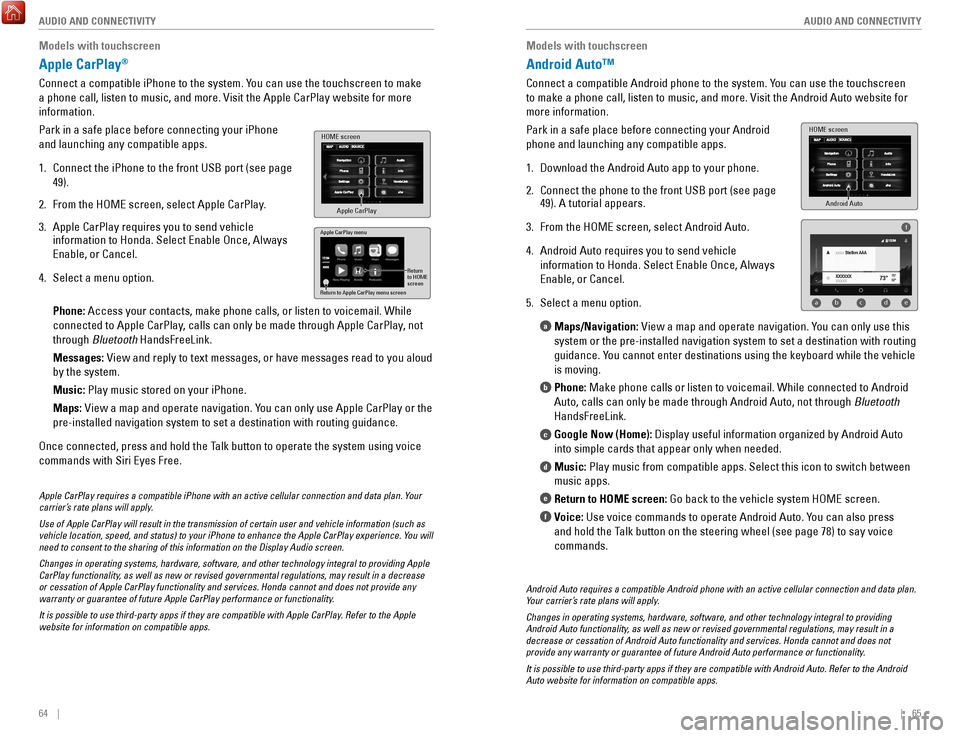
Apple CarPlay®
Connect a compatible iPhone to the system. You can use the touchscreen to make
a phone call, listen to music, and more.
visit the Apple CarPlay website f
or more
information.
Park in a safe place before connecting your iPhone
and launching any compatible apps.
1.
Connect the iPhone to the front USB port (see page
49).
2.
From the HoMe screen, select Apple CarPlay
.
3.
Apple CarPlay requires you to send vehicle
information to Honda. Select enable once, Always
enable, or Cancel.
4.
Select a menu option.
Phone: Access your contacts, make phone calls, or listen to voicemail. W
hile
connected to Apple CarPlay, calls can only be made through Apple CarPlay, not
through Bluetooth HandsFreeLink.
Messages:
view and reply to text messages, or have messages read to you aloud
by the system.
Music:
Play music stored on your iPhone.
Maps:
view a map and operate navigation. Y
ou can only use Apple CarPlay or the
pre-installed navigation system to set a destination with routing guidan\
ce.
once connected, press and hold the T
alk button to operate the system using voice
commands with Siri
eyes Free.
HOME screen
Apple CarPlay
Apple CarPlay menu
Return
to HOME
screen
Return to Apple CarPlay menu screen
Apple CarPlay requires a compatible iPhone with an active cellular conne\
ction and data plan. Your
carrier’s rate plans will apply.
Use of Apple CarPlay will result in the transmission of certain user and\
vehicle information (such as
vehicle location, speed, and status) to your iPhone to enhance the Appl\
e CarPlay experience. You will
need to consent to the sharing of this information on the Display Audio \
screen.
Changes in operating systems, hardware, software, and other technology i\
ntegral to providing Apple
CarPlay functionality, as well as new or revised governmental regulations, may result in a de\
crease
or cessation of Apple CarPlay functionality and services. Honda cannot a\
nd does not provide any
warranty or guarantee of future Apple CarPlay performance or functionali\
ty.
It is possible to use third-party apps if they are compatible with Apple\
CarPlay. Refer to the Apple
website for information on compatible apps.
Models with touchscreen
Android Auto™
Connect a compatible Android phone to the system. You can use the touchscreen
to make a phone call, listen to music, and more.
visit the Android Auto webs
ite for
more information.
Park in a safe place before connecting your Android
phone and launching any compatible apps.
1.
Download the Android Auto app to your phone.
2.
Connect the phone to the front USB port (see page
49). A tutorial appears.
3.
From the HoMe screen, select Android Auto.
4.
Android Auto requires you to send vehicle
information to Honda. Select
enable once, Always
enable, or Cancel.
5.
Select a menu option. Maps/Navigation:
view a map and operate navigation. Y
ou can only use this
system or the pre-installed navigation system to set a destination with \
routing
guidance. You cannot enter destinations using the keyboard while the vehicle
is moving.
Phone: Make phone calls or listen to voicemail. While connected to Android
Auto, calls can only be made through Android Auto, not through Bluetooth
HandsFreeLink.
Google Now (Home): Display useful information organized by Android Auto
into simple cards that appear only when needed.
Music: Play music from compatible apps. Select this icon to switch between
music apps.
Return to HOME screen: Go back to the vehicle system H
oMe screen.
V
oice: Use voice commands to operate Android Auto. You can also press
and hold the Talk button on the steering wheel (see page 78) to say voice
commands.
a
b
c
d
e
f
Android Auto
HOME screen
f
ab cde
Android Auto requires a compatible Android phone with an active cellular\
connection and data plan.
Your carrier’s rate plans will apply.
Changes in operating systems, hardware, software, and other technology i\
ntegral to providing
Android Auto functionality, as well as new or revised governmental regulations, may result in a
decrease or cessation of Android Auto functionality and services. Honda \
cannot and does not
provide any warranty or guarantee of future Android Auto performance or \
functionality.
It is possible to use third-party apps if they are compatible with Andro\
id Auto. Refer to the Android
Auto website for information on compatible apps.
Page 53 of 84
98 || 99
DRIVING
DRIVING
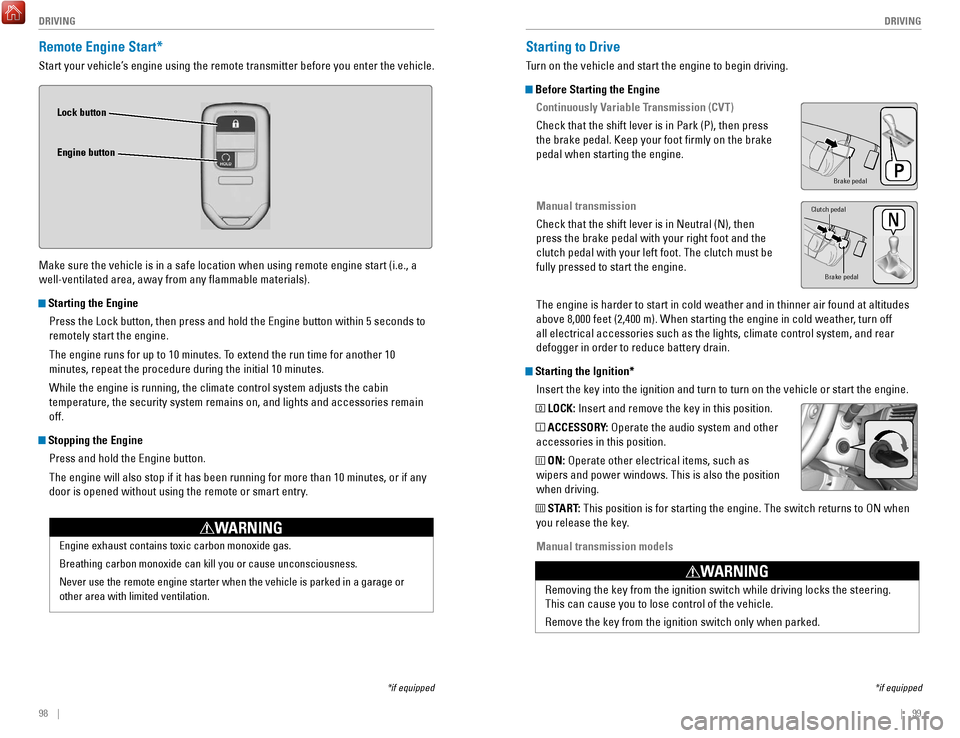
Remote Engine Start*
Start your vehicle’s engine using the remote transmitter before you enter the vehicle.
Make sure the vehicle is in a safe location when using remote engine start (i.e., a
well-ventilated area, away from any flammable materials).
Starting the Engine
Press the Lock button, then press and hold the
engine button within 5 seconds to
remotely start the engine.
The engine runs for up to 10 minutes. T
o extend the run time for another 10
minutes, repeat the procedure during the initial 10 minutes.
While the engine is running, the climate control system adjusts the cabi\
n
temperature, the security system remains on, and lights and accessories remain
off.
Stopping the Engine
Press and hold the
engine button.
The engine will also stop if it has been running for more than 10 minute\
s
, or if any
door is opened without using the remote or smart entry.
engine exhaust contains toxic carbon monoxide gas.
Breathing carbon monoxide can kill you or cause unconsciousness.
Never use the remote engine starter when the vehicle is parked in a gara\
ge or
other area with limited ventilation.
WARNING
Lock button
Engine button
*if equipped
Starting to Drive
Turn on the vehicle and start the engine to begin driving.
Before Starting the Engine Continuously Variable Transmission (CVT)
Check that the shift lever is in Park (P), then press
the brake pedal. Keep your foot firmly on the brake
pedal when starting the engine.
Manual transmission
Check that the shift lever is in Neutral (N), then
press the brake pedal with your right foot and the
clutch pedal with your left foot. The clutch must be
fully pressed to start the engine.
The engine is harder to start in cold weather and in thinner air found a\
t altitudes
above 8,000 feet (2,400 m). When starting the engine in cold weather, turn off
all electrical accessories such as the lights, climate control system, a\
nd rear
defogger in order to reduce battery drain.
Starting the Ignition*Insert the key into the ignition and turn to turn on the vehicle or star\
t the engine.
0 LOCK: Insert and remove the key in this position.
I ACCESSORY: operate the audio system and other
accessories in this position.
II ON: operate other electrical items, such as
wipers and power windows. This is also the position
when driving.
III START: This position is for starting the engine. The switch returns to oN when
you release the key.
Manual transmission models
*if equipped
Brake peda l
Brake pedal
Clutch pedal
removing the key from the ignition switch while driving locks the steerin\
g.
This can cause you to lose control of the vehicle.
remove the key from the ignition switch only when parked.
WARNING
Page 54 of 84
100 || 101
DRIVING
DRIVING
Changing the Power Mode*
Use the
eNGINe ST
A
rT/SToP button to cycle through power modes or start the
engine.
Accessory or On mode:
Press the
eNGINe ST
A
rT/
ST
oP button once without pressing the brake pedal
for Accessory mode. Press it again for
on mode.
Starting the engine:
Press and hold the brake pedal
or clutch, then press the
eNGINe ST
A
rT/SToP button.
Keep your foot firmly on the brake pedal when starting
the engine.
T
urning the vehicle off: Shift to Park (P) or apply the parking brake, then press the
eNGINe ST
A
rT/SToP button. If you press the button and the shift lever is not in
Park (P), the vehicle goes into Accessory mode.
*if equipped
Shifting
Change the shift position based on your driving needs.
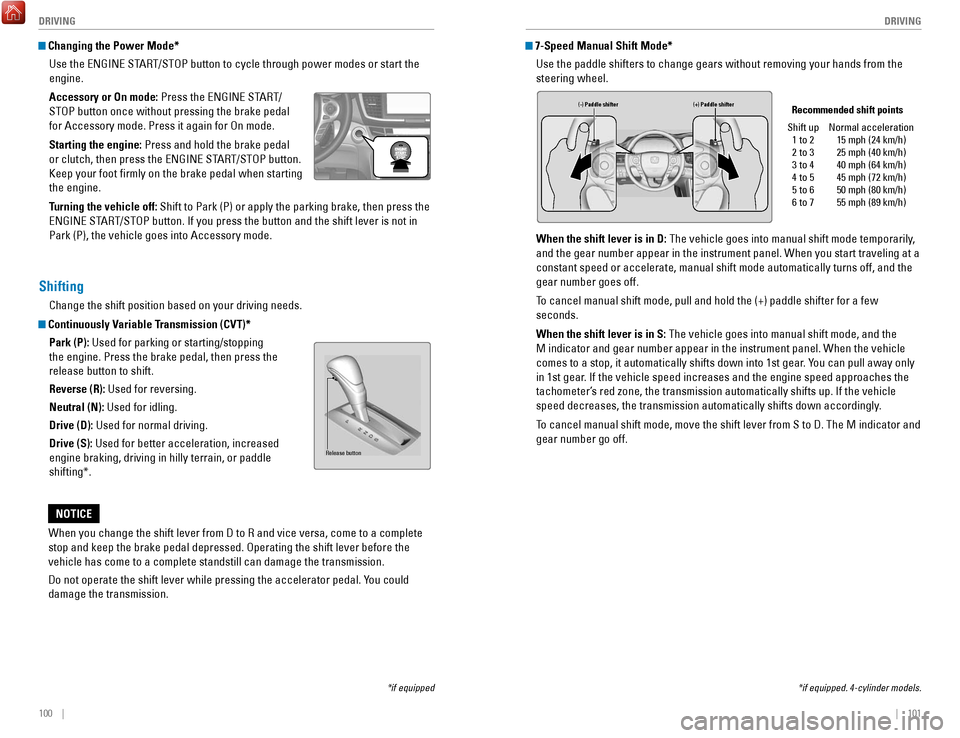
Continuously Variable Transmission (CVT)*
Park (P): Used for parking or starting/stopping
the engine. Press the brake pedal, then press the
release button to shift.
Reverse (R): Used for reversing.
Neutral (N): Used for idling.
Drive (D): Used for normal driving.
Drive (S): Used for better acceleration, increased
engine braking, driving in hilly terrain, or paddle
shifting*.
When you change the shift lever from D to
r and vice versa, come to a complet
e
stop and keep the brake pedal depressed.
operating the shift lever before the
vehicle has come to a complete standstill can damage the transmission.
Do not operate the shift lever while pressing the accelerator pedal. Y
ou could
damage the transmission.
NOTICE
Release button
7-Speed Manual Shift Mode*
Use the paddle shifters to change gears without removing your hands from\
the
steering wheel.
When the shift lever is in D: The vehicle goes into manual shift mode temporarily,
and the gear number appear in the instrument panel. When you start trave\
ling at a
constant speed or accelerate, manual shift mode automatically turns off,\
and the
gear number goes off.
To cancel manual shift mode, pull and hold the (+) paddle shifter for a\
few
seconds.
When the shift lever is in S: The vehicle goes into manual shift mode, and the
M indicator and gear number appear in the instrument panel. When the veh\
icle
comes to a stop, it automatically shifts down into 1st gear. You can pull away only
in 1st gear. If the vehicle speed increases and the engine speed approaches the
tachometer’s red zone, the transmission automatically shifts up. If the vehicle
speed decreases, the transmission automatically shifts down accordingly.
To cancel manual shift mode, move the shift lever from S to D. The M indi\
cator and
gear number go off.
(-) Paddle shifter (+) Paddle shifter Recommended shift points
Shift up 1 to 2
2 to 3
3 to 4
4 to 5
5 to 6
6 to 7 Normal acceleration
15 mph (24 km/h)
25 mph (40 km/h)
40 mph (64 km/h)
45 mph (72 km/h)
50 mph (80 km/h)
55 mph (89 km/h)
*if equipped. 4-cylinder models.
Page 55 of 84
102 || 103
DRIVING
DRIVING
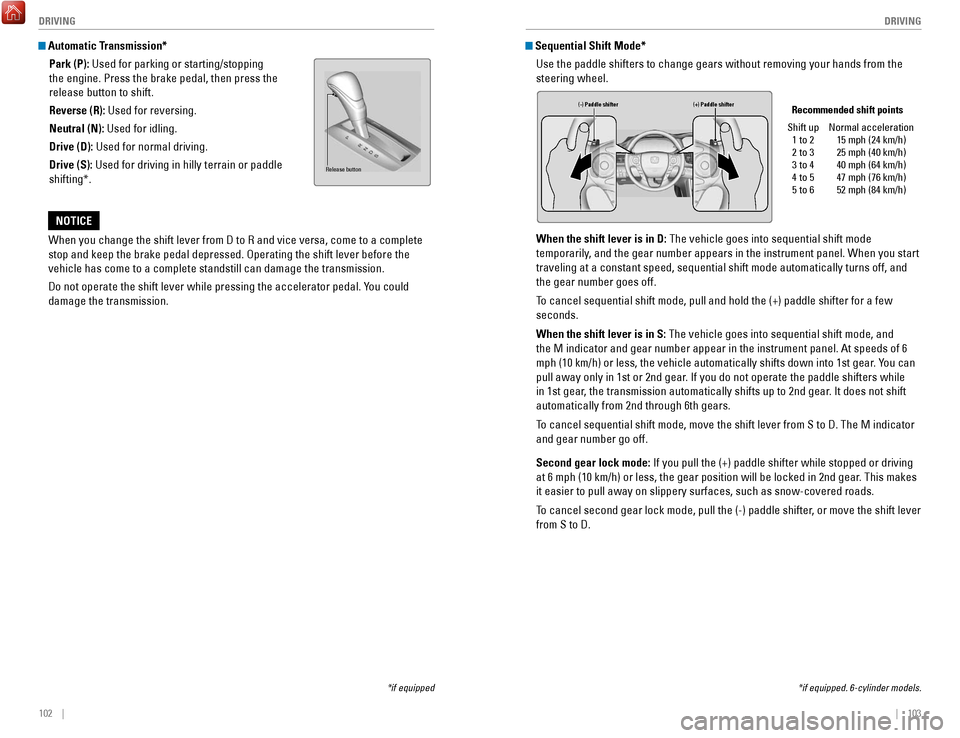
Automatic Transmission*
Park (P): Used for parking or starting/stopping
the engine. Press the brake pedal, then press the
release button to shift.
Reverse (R): Used for reversing.
Neutral (N): Used for idling.
Drive (D): Used for normal driving.
Drive (S): Used for driving in hilly terrain or paddle
shifting*.
When you change the shift lever from D to
r and vice versa, come to a complet
e
stop and keep the brake pedal depressed.
operating the shift lever before the
vehicle has come to a complete standstill can damage the transmission.
Do not operate the shift lever while pressing the accelerator pedal. Y
ou could
damage the transmission.
NOTICE
Release button
*if equipped *if equipped. 6-cylinder models.
Sequential Shift Mode*
Use the paddle shifters to change gears without removing your hands from\
the
steering wheel.
When the shift lever is in D: The vehicle goes into sequential shift mode
temporarily, and the gear number appears in the instrument panel. When you start
traveling at a constant speed, sequential shift mode automatically turns\
off, and
the gear number goes off.
To cancel sequential shift mode, pull and hold the (+) paddle shifter f\
or a few
seconds.
When the shift lever is in S: The vehicle goes into sequential shift mode, and
the M indicator and gear number appear in the instrument panel. At speed\
s of 6
mph (10 km/h) or less, the vehicle automatically shifts down into 1st \
gear. You can
pull away only in 1st or 2nd gear. If you do not operate the paddle shifters while
in 1st gear, the transmission automatically shifts up to 2nd gear. It does not shift
automatically from 2nd through 6th gears.
To cancel sequential shift mode, move the shift lever from S to D. The M \
indicator
and gear number go off.
Second gear lock mode: If you pull the (+) paddle shifter while stopped or driving
at 6 mph (10 km/h) or less, the gear position will be locked in 2nd ge\
ar. This makes
it easier to pull away on slippery surfaces, such as snow-covered roads.\
To cancel second gear lock mode, pull the (-) paddle shifter, or move the shift lever
from S to D.
(-) Paddle shifter (+) Paddle shifter Recommended shift points
Shift up 1 to 2
2 to 3
3 to 4
4 to 5
5 to 6 Normal acceleration
15 mph (24 km/h)
25 mph (40 km/h)
40 mph (64 km/h)
47 mph (76 km/h)
52 mph (84 km/h)
Page 56 of 84
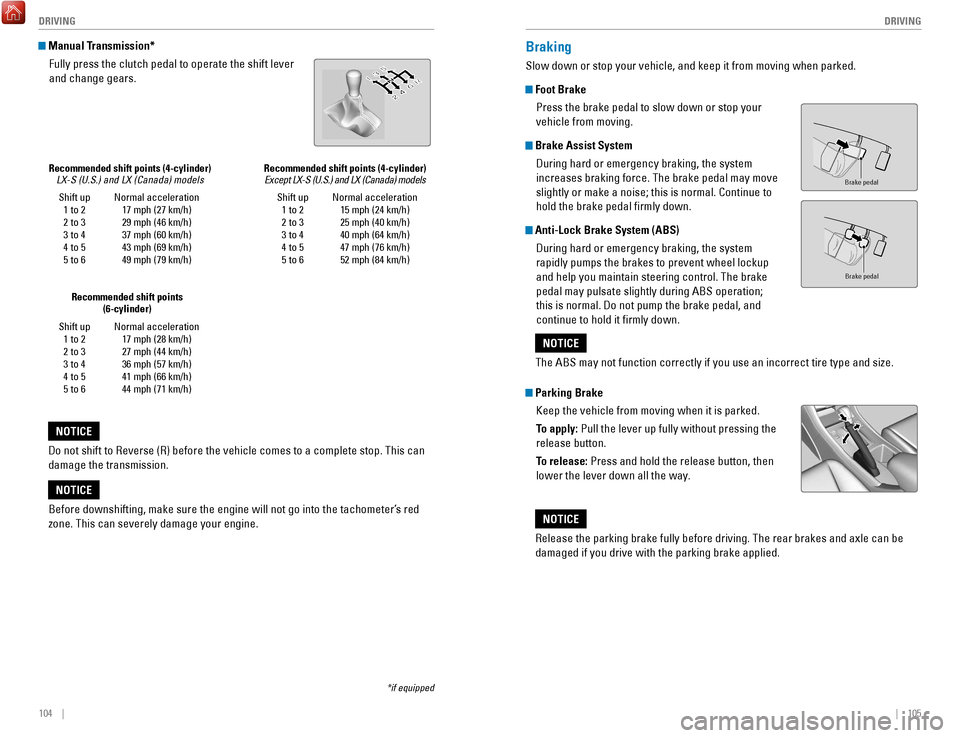
104 || 105
DRIVING
DRIVING
*if equipped
Shift up
1 to 2
2 to 3
3 to 4
4 to 5
5 to 6 Normal acceleration
17 mph (27 km/h)
29 mph (46 km/h)
37 mph (60 km/h)
43 mph (69 km/h)
49 mph (79 km/h)
Recommended shift points (4-cylinder)
LX-S (U.S.) and LX (Canada) models
Manual Transmission*
Fully press the clutch pedal to operate the shift lever
and change gears.
Do not shift to
reverse (r) before the vehicle comes to a complete stop. This can
damage the transmission.
NOTICE
Shift up 1 to 2
2 to 3
3 to 4
4 to 5
5 to 6 Normal acceleration
17 mph (28 km/h)
27 mph (44 km/h)
36 mph (57 km/h)
41 mph (66 km/h)
44 mph (71 km/h)
Recommended shift points
(6-cylinder)
Before downshifting, make sure the engine will not go into the tachomete\
r’s red
zone. This can severely damage your engine.
NOTICE
Braking
Slow down or stop your vehicle, and keep it from moving when parked.
Foot Brake
Press the brake pedal to slow down or stop your
vehicle from moving.
Brake Assist System During hard or emergency braking, the system
increases braking force. The brake pedal may move
slightly or make a noise; this is normal. Continue to
hold the brake pedal firmly down.
Anti-Lock Brake System (ABS) During hard or emergency braking, the system
rapidly pumps the brakes to prevent wheel lockup
and help you maintain steering control. The brake
pedal may pulsate slightly during ABS operation;
this is normal. Do not pump the brake pedal, and
continue to hold it firmly down.
Parking BrakeKeep the vehicle from moving when it is parked.
To apply: Pull the lever up fully without pressing the
release button.
To release: Press and hold the release button, then
lower the lever down all the way.
Brake peda l
Brake pedal
The ABS may not function correctly if you use an incorrect tire type and\
size.
NOTICE
release the parking brake fully before driving. The rear brakes and axle \
can be
damaged if you drive with the parking brake applied.
NOTICE
Shift up 1 to 2
2 to 3
3 to 4
4 to 5
5 to 6 Normal acceleration
15 mph (24 km/h)
25 mph (40 km/h)
40 mph (64 km/h)
47 mph (76 km/h)
52 mph (84 km/h)
Recommended shift points (4-cylinder)
Except LX-S (U.S.) and LX (Canada) models
Page 57 of 84

106 || 107
DRIVING
DRIVING
Eco Assist System
Can help improve fuel economy by adjusting the performance of the engine\
,
transmission, climate control system, and cruise control.
ECON Button
Press the
eCoN button to turn the system on or off.
The
eCoN Mode indicator and a message in the
multi-information display* appear when the system
is turned on.
Ambient Meter
Color-coded bars change based on your driving
style and brake or accelerator pedal operation.
Green: Fuel-efficient driving
Light green: Moderate acceleration/deceleration
White: Aggressive acceleration/deceleration
Ambient meter
Vehicle Stability Assist (VSA®)
Also known as electronic Stability Control (eSC), vSA helps to stabilize the vehicle
during cornering if the vehicle turns more or less than what was intende\
d. It
assists in maintaining traction on slippery surfaces by regulating engin\
e
output and
selectively applying the brakes.
Turning VSA On or Off
vSA is turned on every time you start the engine,
even if you previously turned it off. If you turn
vSA
off, your vehicle has normal braking and cornering
ability
, but
vSA traction and stability enhancement
become less effective.
Press and hold the
vSA oFF button until you hear a
beep to turn
vSA on or off. The vSA oFF indicator
appears when the system is off.
T
raction control becomes less effective, which may make it easier when trying to
free your vehicle if it is stuck in mud or snow.
VSA OFF indicator
*if equipped
Cruise Control*
Maintain a constant vehicle speed without having to keep your foot on th\
e
accelerator pedal. Use cruise control on freeways or open roads where yo\
u can
travel at a constant speed with little acceleration or deceleration.
Activating and Setting the Vehicle Speed
1.
Press the CrUISe button. The CrUISe MAIN indicator
appears.
2.
Accelerate to the desired speed (above 25 mph/
40 km/h). T
ake your foot off the pedal and press the -/
S
eT button to set the speed. The CrUISe CoNTroL
indicator appears.
Adjusting the Vehicle Speed
Press the
reS/+ button to increase speed, or the -/SeT
button to decrease speed.
each time you press the button, the vehicle speed is
increased or decreased by about 1 mph (1.6 km/h). If you
keep the button pressed, the vehicle speed increases or
decreases until you release it.
Canceling Cruise Control
Press the CANC
eL or CrUISe buttons, or the brake pedal.
The C
rUISe CoNTroL indicator goes off.
After cruise control has been canceled, you can still
resume the prior set speed by pressing the
reS/+ button
while driving at a speed of at least 25 mph (40 km/h).
Press the C
rUISe button to turn the system off.
*if equipped
Improper use of cruise control can lead to a crash.
Use cruise control only when traveling on open highways in good weather.
WARNING
CrUISe button
reS/+ button
-/S
eT button
CANC
eL button
Page 64 of 84

120 || 121
HANDLING THE UNEXPECTED
HANDLING THE UNEXPECTED
Overheating
If the temperature gauge needle is at the H mark, the engine suddenly lo\
ses power,
or steam or spray comes out from under the hood, your engine is overheat\
ing.
1.
Immediately park the vehicle in a safe place. Turn
off all accessories and turn on the hazard warning
lights.
2.
If steam or spray is not present: Keep the engine
running and open the hood.
If steam or spray is present: T
urn off the engine and
wait until it subsides. Then, open the hood.
3.
Check that the cooling fan is operating and stop the engine once the tem\
perature
gauge needle goes down. If the cooling fan is not operating, immediately\
stop the
engine.
4.
o
nce the engine has cooled down, inspect the coolant level and check the \
cooling system components for leaks. If the coolant level in the reserve\
t
ank
is low, add coolant until it reaches the MAX mark. If there is no coolant in t\
he
reserve tank, make sure the radiator is cool, then cover the radiator ca\
p with a
heavy cloth and open the cap. If necessary, add coolant up to the base of the
filler neck, and put the cap back on.
once the engine has cooled sufficiently
, restart it and check the temperature gauge.
If the temperature gauge needle has gone down, resume driving. If it has\
not gone
down, contact a dealer for repairs.
MAX
Reserve tank
MIN
Steam and spray from an overheated engine can seriously scald you.
Do not open the hood if steam is coming out.
WARNING
removing the radiator cap while the engine is hot can cause the coolant t\
o
spray out, seriously scalding you.
Always let the engine and radiator cool down before removing the radiato\
r cap.
WARNING
Continuing to drive with the temperature gauge needle at the H mark may \
damage
the engine.
NOTICE
Emergency Engine Stop*
The eNGINe STArT/SToP button may be used to stop the engine due to an
emergency situation even while driving. If you must stop the engine, cho\
ose one of
the following operations:
•
Press and hold the eNGINe ST
A
rT/SToP button for
two seconds, or
•
Firmly press the eNGINe ST
A
rT/SToP button two
times.
The steering wheel will not lock. Because turning off the engine also di\
s
ables the
power assist the engine provides to the steering and braking systems, it\
will require
significantly more physical effort and time to steer and slow the vehi\
cle. Downshift
gears and use both feet on the brake pedal, if necessary, to slow the vehicle and
stop immediately in a safe place.
Do not press the button while driving unless it is absolutely necessary \
for the engine
to be switched off.
*if equipped
Trying to lift or tow your vehicle by the bumpers will cause serious dama\
ge. The
bumpers are not designed to support the vehicle’s weight.
Improper towing such as towing behind a motorhome or other motor vehicle\
can
damage the transmission.
NOTICE
Emergency Towing
Call a professional towing service if you need to tow your vehicle.
Flat bed equipment: The operator loads your vehicle on the back of a tru\
ck. This is
the best way to transport your vehicle.
Wheel lift equipment: The tow truck uses two pivoting arms that go under\
the front
tires and lift them off the ground. The rear tires remain on the ground.\
This is an
acceptable way to tow your vehicle.
Page 70 of 84
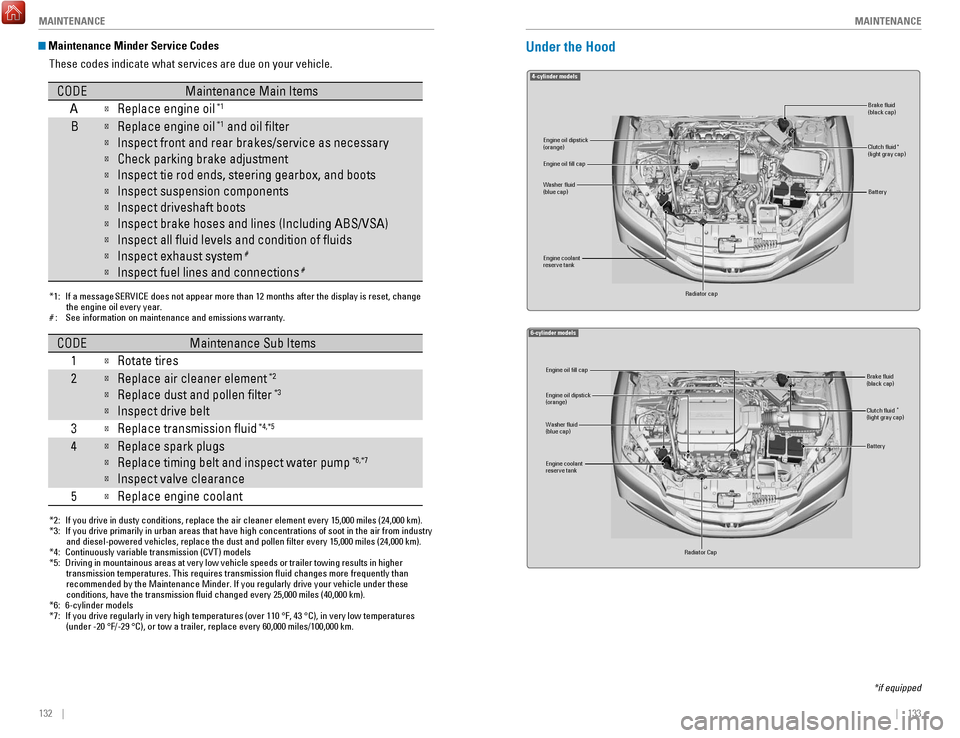
132 || 133
M
AINTENANCEMAINTENANCE
Maintenance Minder Service Codes
These codes indicate what services are due on your vehicle.
*1: If a message SERVICE does not appear more than 12 months after the display is reset, change the engine oil every year.
#: See information on maintenance and emissions warranty.
CODEMaintenance Main Items
A
Replace engine oi l*1
BReplace engine oil*1 and oil lter
Inspect front and rear brakes/service as necessary
Check parking brake adjustment
Inspect tie rod ends, steering gearbox, and boots
Inspect suspension components
Inspect driveshaft boots
Inspect brake hoses and lines (Including ABS/VSA)
Inspect all uid levels and condition of uid s
Inspect exhaust system#
Inspect fuel lines and connections#
*2: If you drive in dusty conditions, replace the air cleaner element every \
15,000 miles (24,000 km).
*3: If you drive primarily in urban areas that have high concentrations of s\
oot in the air from industryand diesel-powered vehicles, replace the dust and pollen lter every \
15,000 miles (24,000 km).
*4: Continuously variable transmission (CVT) models
*5: Driving in mountainous areas at very low vehicle speeds or trailer towing results in higher
transmission temperatures. This requires transmission uid changes mo\
re frequently than
recommended by the Maintenance Minder. If you regularly drive your vehic\
le under these
conditions, have the transmission uid changed every 25,000 miles (4\
0,000 km).
*6: 6-cylinder models
*7: If you drive regularly in very high temperatures (over 110 °F, 43 °C), in very low temperatures
(under -20 °F/-29 °C), or tow a trailer, replace every 60,000 mi\
les/100,000 km.
CODEMaintenance Sub Items
1
Rotate tires
2Replace air cleaner element*2
Replace dust and pollen lter*3
Inspect drive belt
3
Replace transmission ui d*4,*5
4Replace spark plugs
Replace timing belt and inspect water pum p*6,*7
Inspect valve clearance
5
Replace engine coolant
Under the Hood
4-cylinder model s
Brake uid
(black cap)
Engine coolant
reserve tank Radiator cap
Washer uid
(blue cap) Engine oil dipstick
(orange) Clutch uid
(light gray cap)
Engine oil ll cap
Battery
*
6-cylinder model s
Engine oil dipstick
(orange)
Washer uid
(blue cap)
Engine coolant
reserve tank
Radiator Cap Brake uid
(black cap)
Engine oil ll cap
Battery
Clutch uid
(light gray cap )*
*if equipped
Page 78 of 84

148 || 149
SPECIFICATIONS
M
AINTENANCE
Testing of Readiness Codes
Your vehicle has readiness codes as part of the onboard self-diagnostic s\
ystem.
Some states use these codes for testing to verify whether your vehicle’\
s emissions
components are working properly. The codes may not be read if you go through the
testing just after the battery has gone dead or been disconnected.
To check if they are set, turn the vehicle on without starting the engine\
. The
malfunction indicator lamp will come on for several seconds. If it goes \
off, the
readiness codes are set. If it blinks five times, the readiness codes \
are not set.
If you are required to have your vehicle tested before the readiness cod\
es are set,
prepare the vehicle for retesting by doing the following:
1.
Fill the gas tank to approximately 3/4 full.
2.
Park the vehicle and leave the engine off for 6 hours or more.
3.
Make sure the ambient temperature is between 40°F and 95°F (4°\
C and 35°C).
4.
Start the engine without touching the accelerator pedal, and let it idle\
for 20
seconds.
5.
Keep the vehicle in Park (P) or Neutral for manual transmission. Incre\
ase the
engine speed to 2,000 rpm, and hold it there for about 3 minutes.
6.
Let the engine idle with your foot off the accelerator for 20 seconds.
7.
Select a nearby, lightly traveled major highway where you can maintain a speed
of 50 to 60 mph (80 to 97 km/h) for at least 20 minutes. Drive on the \
highw
ay
with the vehicle in Drive (D) or 5th gear. Do not use cruise control. When traffic
allows, drive for 90 seconds without using the accelerator pedal. (
vehicle speed
may vary slightly; this is
oK.) If you cannot do this for a continuous 90 seconds
because of traffic conditions, drive for at least 30 seconds, then rep\
eat two more
times (for a total of 90 seconds).
8.
Drive in city or suburban traffic for at least 10 minutes. When traffi\
c conditions
allow
, let the vehicle coast for several seconds without using the accelerator
pedal or the brake pedal.
9.
Park the vehicle and leave the engine off for 30 minutes.
The readiness codes are erased when the battery is disconnected, and set\
again
only after several days of driving under a variety of conditions.
If a testing facility determines that the readiness codes are not set, y\
ou may be
requested to return at a later date to complete the test, or see your de\
aler
.SPECIFICATIONS
4-cylinder models
Vehicle
Engine and Fuel
Light Bulbs
*1: LX-S models
*2: Except LX-S models
*3: LX models
*4: Except LX models
ModelHonda Accord CoupeNo. of Passengers:
Front 2
Rear 3
Tota l5
Weights:Gross Vehicle
Weight Rating U.S.: 4,189 lbs (1,900 kg )*1 4,255 lbs (1,930 kg)*2Canada: 1,900 kg*3 1,930 kg*4Gross Axle Weight
Rating (Front )U.S.: 2,271 lbs (1,030 kg )*1 2,315 lbs (1,050 kg)*2Canada: 1,040 kg*3 1,055 kg*4Gross Axle Weight
Rating (Rear)U.S.: 1,962 lbs (890 kg )*1 2,006 lbs (910 kg)*2Canada: 890 kg*3 910 kg*4Air Conditioning:Refrigerant Type
Charge Quantity
Lubricant Type
Quantity HFC-134a (R-134a
)
15.0 – 16.8 oz (425 – 475 g) ND-OIL 8
4.3 – 5.0 cu-in (70 – 82 cm
3)
Engine
FuelDisplacemen t144 cu-in (2,356 cm3)
Spark Plugs NG
K DILKAR7G11GS
DILKAR7H11GS
DENSO DXE22HQR-D11 S
Fuel:
TypeUnleaded gasoline
Pump octane number of 87 or higher
Fuel Tank Capacity 17.2 US gal (65 )
*1:Models with halogen headlights*2:Models with LED headlights*3:Models with bulb type parking lights*4: Models with LED type parking/daytime running lights
Headlights (Low Beam)55W (H11)*1LED*2
Headlights (High Beam) 60W (HB3)*1LE
D*2Fog Lights*LEDFront Turn Si gnal/Side Marker/Parking Ligh ts*1, *3Front Turn Signal/Side Marker Lights*1, *428/8W (Amber )
Front Turn Signal Light s*2LED
Front Side Marker Lights*2LE DSide Turn Signal Lights
(on Door Mirrors)*LE D
W12
sthgiL ekarB
Rear Side Marker/Taillight sLED
W61
sthgiL pU-kcaB
Rear Turn Signal Lights21W (Amber)
High-M ount Brake Light
Rear License Plate Light s5W
W5
thgiL knurT
In terior LightsMap Lights8WCeiling Light8WVanity Mirror Light s1.4W
LED