change time HONDA ACCORD HYBRID 2014 9.G User Guide
[x] Cancel search | Manufacturer: HONDA, Model Year: 2014, Model line: ACCORD HYBRID, Model: HONDA ACCORD HYBRID 2014 9.GPages: 561, PDF Size: 20.3 MB
Page 111 of 561
110
Controls
Clock
Adjusting the Clock
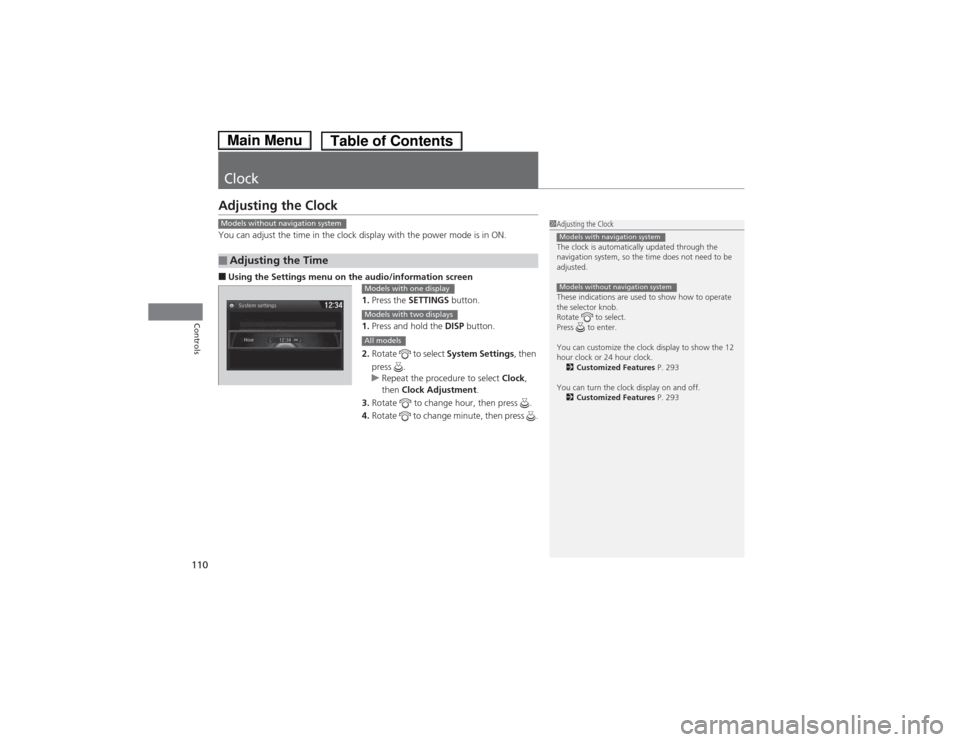
You can adjust the time in the clock display with the power mode is in ON. ■Using the Settings menu on th e audio/information screen
1. Press the SETTINGS button.
1. Press and hold the DISP button.
2. Rotate to select System Settings, then
press .
uRepeat the procedure to select Clock,
then Clock Adjustment .
3. Rotate to change hour, then press .
4. Rotate to change minute, then press .
■Adjusting the Time
1Adjusting the Clock
The clock is automatically updated through the
navigation system, so the time does not need to be
adjusted.
These indications are used to show how to operate
the selector knob.
Rotate to select.
Press to enter.
You can customize the clock display to show the 12
hour clock or 24 hour clock.
2 Customized Features P. 293
You can turn the clock display on and off. 2 Customized Features P. 293
Models with navigation system
Models without navigation system
Models without navigation system
Models with one display
Models with two displays
All models
Main MenuTable of Contents
Page 115 of 561
114
uuLocking and Unlocking the DoorsuLocking/Unlocking the Doors from the Outside
Controls
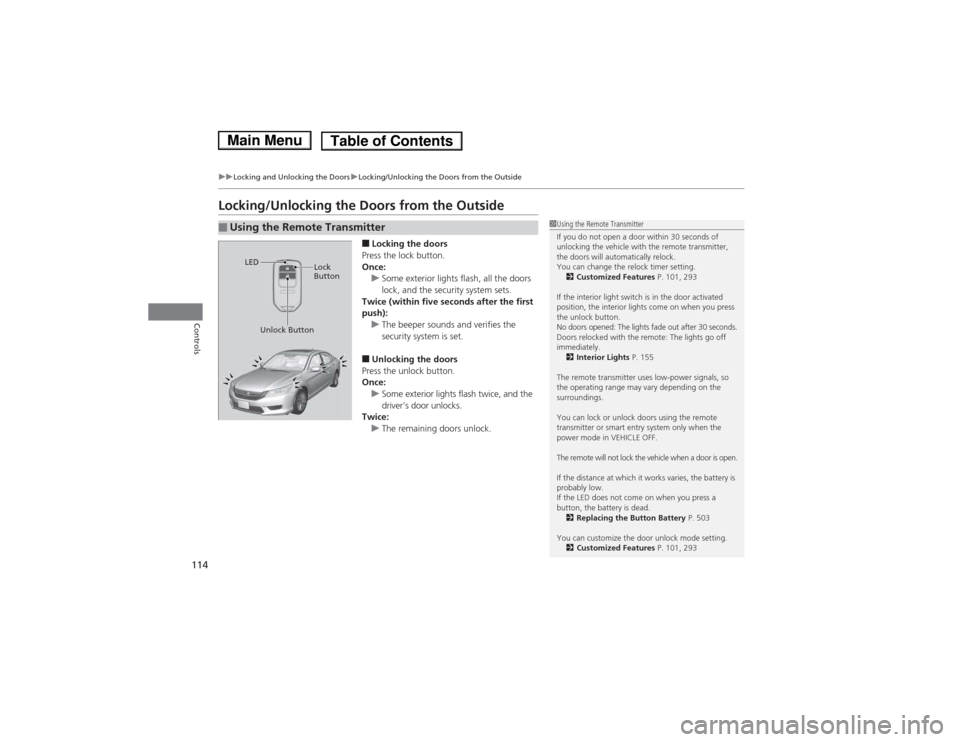
Locking/Unlocking the Doors from the Outside■Locking the doors
Press the lock button.
Once:
uSome exterior lights flash, all the doors
lock, and the security system sets.
Twice (within five seconds after the first
push):
uThe beeper sounds and verifies the
security system is set.
■ Unlocking the doors
Press the unlock button.
Once:
uSome exterior lights flash twice, and the
driver's door unlocks.
Twice:
uThe remaining doors unlock.
■Using the Remote Transmitter1Using the Remote Transmitter
If you do not open a door within 30 seconds of
unlocking the vehicle with the remote transmitter,
the doors will automatically relock.
You can change the relock timer setting. 2 Customized Features P. 101, 293
If the interior light switch is in the door activated
position, the interior lights come on when you press
the unlock button.
No doors opened: The lights fade out after 30 seconds.
Doors relocked with the remote: The lights go off immediately. 2 Interior Lights P. 155
The remote transmitter uses low-power signals, so
the operating range may vary depending on the
surroundings.
You can lock or unlock doors using the remote
transmitter or smart entry system only when the
power mode in VEHICLE OFF.
The remote will not lock the vehicle when a door is open.
If the distance at which it works varies, the battery is probably low.
If the LED does not come on when you press a
button, the battery is dead. 2 Replacing the Button Battery P. 503
You can customize the door unlock mode setting. 2 Customized Features P. 101, 293
LED
Unlock Button Lock
Button
Main MenuTable of Contents
Page 128 of 561
Continued127
uuSecurity SystemuSecurity System Alarm
Controls
■Setting the security system alarm
The security system alarm automatically sets when the following conditions have
been met: • The power mode is in VEHICLE OFF (LOCK).
• The hood and trunk are closed.
• All doors are locked from outside with the key, the remote transmitter, or smart entry system.
■ When the security system alarm sets
The security system alarm indicator in the instrument panel blinks. When the
blinking interval changes after about 15 seconds, the security system is set. ■ To cancel the security system alarm
The security system alarm is canceled when the vehicle is unlocked using the key,
remote transmitter, or smart entry system. The security system indicator goes off at
the same time.1Security System Alarm
Do not set the security system alarm when someone
is in the vehicle or a window is open. The system can
accidentally activate when:• Unlocking the door with the lock tab.
• Opening the trunk with the trunk release or the
emergency trunk opener.
If the 12-volt battery goes dead after you have set the
security system alarm, the security alarm may go off
once the 12-volt battery is recharged or replaced.
If this occurs, deactivate the security system alarm by
unlocking a door using the key or remote transmitter.
Do not attempt to alter this system or add another device to it.
Main MenuTable of Contents
Page 137 of 561
136
uuOperating the Switches Around the Steering WheeluTurn Signals
Controls
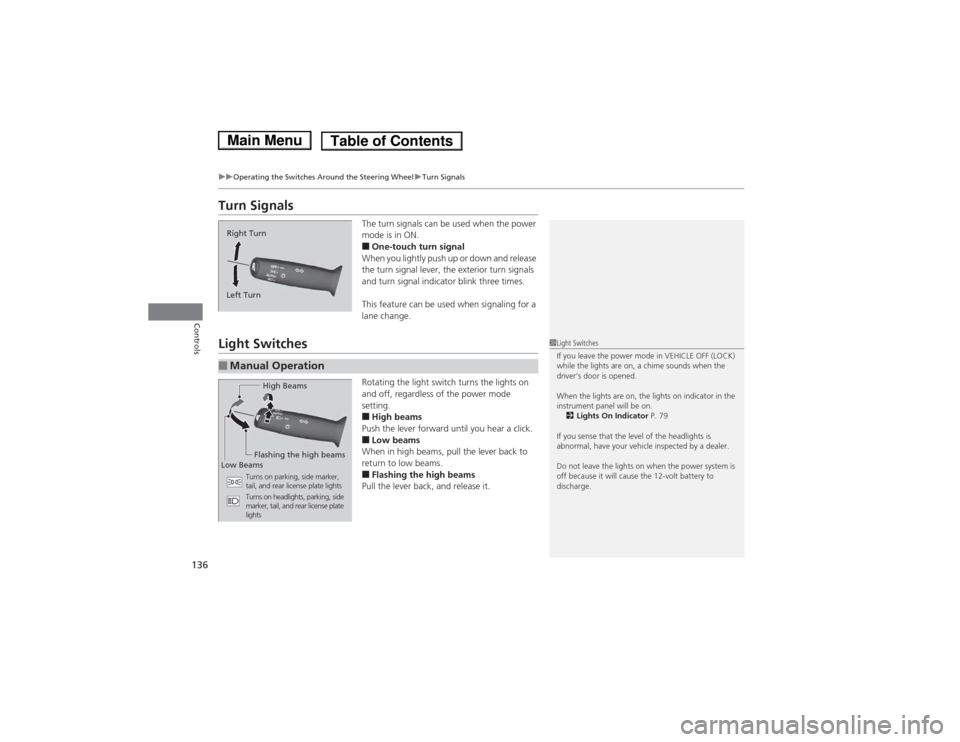
Turn SignalsThe turn signals can be used when the power
mode is in ON. ■One-touch turn signal
When you lightly push up or down and release
the turn signal lever, the exterior turn signals
and turn signal indicator blink three times.
This feature can be used when signaling for a lane change.
Light Switches
Rotating the light switch turns the lights on
and off, regardless of the power mode setting.■High beams
Push the lever forward until you hear a click.■ Low beams
When in high beams, pull the lever back to
return to low beams. ■ Flashing the high beams
Pull the lever back, and release it.
Right Turn
Left Turn
■Manual Operation
1Light Switches
If you leave the power mode in VEHICLE OFF (LOCK)
while the lights are on, a chime sounds when the
driver’s door is opened.
When the lights are on, the lights on indicator in the
instrument panel will be on. 2 Lights On Indicator P. 79
If you sense that the level of the headlights is
abnormal, have your vehicle inspected by a dealer.
Do not leave the lights on when the power system is
off because it will cause the 12-volt battery to
discharge.
High Beams
Flashing the high beams
Low Beams
Turns on parking, side marker,
tail, and rear license plate lights
Turns on headlights, parking, side
marker, tail, and rear license plate
lights
Main MenuTable of Contents
Page 139 of 561
uuOperating the Switches Around the Steering WheeluLight Switches
138
Controls
The headlights automatically come on when the wipers are used several times within
a certain number of intervals with the headlight switch in AUTO.
The headlights automatically go off a few minutes later if the wipers are stopped.
The headlights, all other exterior lights, and the instrument panel lights turn off 15
seconds after you set the power mode to VEHICLE OFF (LOCK), take the remote with
you, and close the driver’s door.
uYou can change the headlight auto off timer setting.
2 Customized Features P. 101, 293
If you set the power mode to VEHICLE OFF (LOCK) with the headlight switch on, but
do not open the door, the lights turn off after 10 minutes (three minutes, if the
switch is in the AUTO position).
The lights turn on again when you unlock or open the driver's door. If you unlock
the door, but do not open it within 15 seconds, the lights go off. If you open the
driver's door, you will hear a lights on reminder chime.
■Headlight Integration with Wipers *
■Automatic Lighting Off Feature
1Headlight Integration with Wipers
*
This feature activates while the headlights are off in
AUTO .
The instrument panel brightness does not change
when the headlights come on.
At dark ambient light levels, the automatic lighting
control feature turns on the headlights, regardless of
the number of wiper sweeps.
* Not available on all models
Main MenuTable of Contents
Page 141 of 561
140
uuOperating the Switches Around the Steering WheeluWipers and Washers
Controls
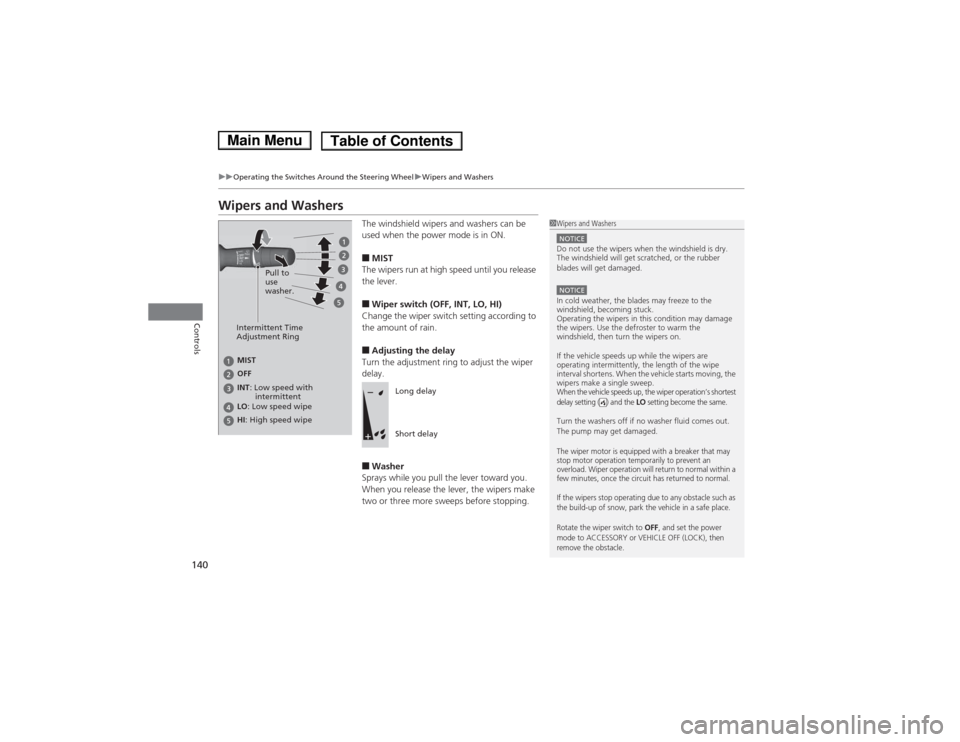
Wipers and WashersThe windshield wipers and washers can be
used when the power mode is in ON. ■MIST
The wipers run at high speed until you release the lever. ■ Wiper switch (OFF, INT, LO, HI)
Change the wiper switch setting according to
the amount of rain. ■ Adjusting the delay
Turn the adjustment ring to adjust the wiper delay. ■ Washer
Sprays while you pull the lever toward you.
When you release the lever, the wipers make
two or three more sweeps before stopping.
1Wipers and Washers
NOTICEDo not use the wipers when the windshield is dry.
The windshield will get scratched, or the rubber
blades will get damaged.
NOTICEIn cold weather, the blades may freeze to the
windshield, becoming stuck.
Operating the wipers in this condition may damage
the wipers. Use the defroster to warm the
windshield, then turn the wipers on.
If the vehicle speeds up while the wipers are
operating intermittently, the length of the wipe
interval shortens. When the vehicle starts moving, the
wipers make a single sweep.
When the vehicle speeds up, the wiper operation’s shortest
delay setting ( ) and the LO setting become the same.
Turn the washers off if no washer fluid comes out.
The pump may get damaged.
The wiper motor is equipped with a breaker that may
stop motor operation temporarily to prevent an
overload. Wiper operation will return to normal within a
few minutes, once the circuit has returned to normal.
If the wipers stop operating due to any obstacle such as
the build-up of snow, park the vehicle in a safe place.
Rotate the wiper switch to
OFF, and set the power
mode to ACCESSORY or VEHICLE OFF (LOCK), then
remove the obstacle.
Intermittent Time
Adjustment Ring
MIST
INT : Low speed with
intermittent
OFF LO
: Low speed wipe
HI : High speed wipe Pull to
use
washer.
Long delay
Short delay
Main MenuTable of Contents
Page 156 of 561
155
Continued
Controls
Interior Lights/Interior Convenience Items
Interior Lights
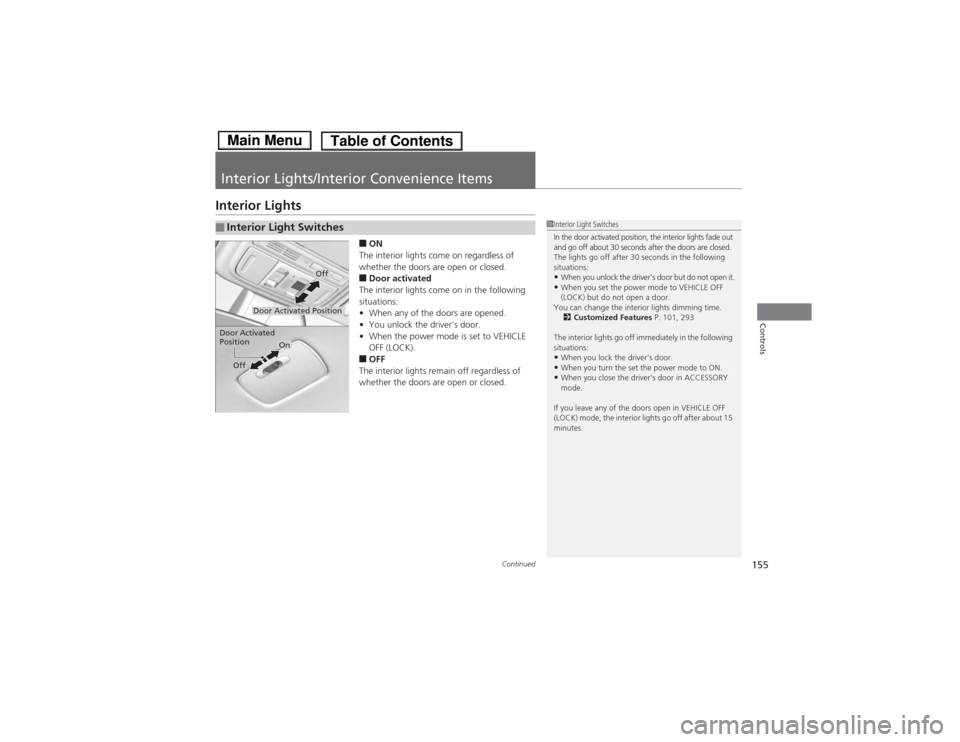
■ON
The interior lights come on regardless of
whether the doors are open or closed. ■ Door activated
The interior lights come on in the following situations: • When any of the doors are opened.
• You unlock the driver's door.
• When the power mode is set to VEHICLE
OFF (LOCK).
■ OFF
The interior lights remain off regardless of
whether the doors are open or closed.
■Interior Light Switches1Interior Light Switches
In the door activated position, the interior lights fade out
and go off about 30 seconds after the doors are closed.
The lights go off after 30 seconds in the following
situations: • When you unlock the driver's door but do not open it.
• When you set the power mode to VEHICLE OFF
(LOCK) but do not open a door.
You can change the interior lights dimming time. 2 Customized Features P. 101, 293
The interior lights go off immediately in the following
situations:
• When you lock the driver's door.
• When you turn the set the power mode to ON.
• When you close the driver's door in ACCESSORY
mode.
If you leave any of the doors open in VEHICLE OFF
(LOCK) mode, the interior lights go off after about 15
minutes.
Door Activated Position
Off
Door Activated Position
On
Off
Main MenuTable of Contents
Page 176 of 561
175
Features
Audio System Basic Operation
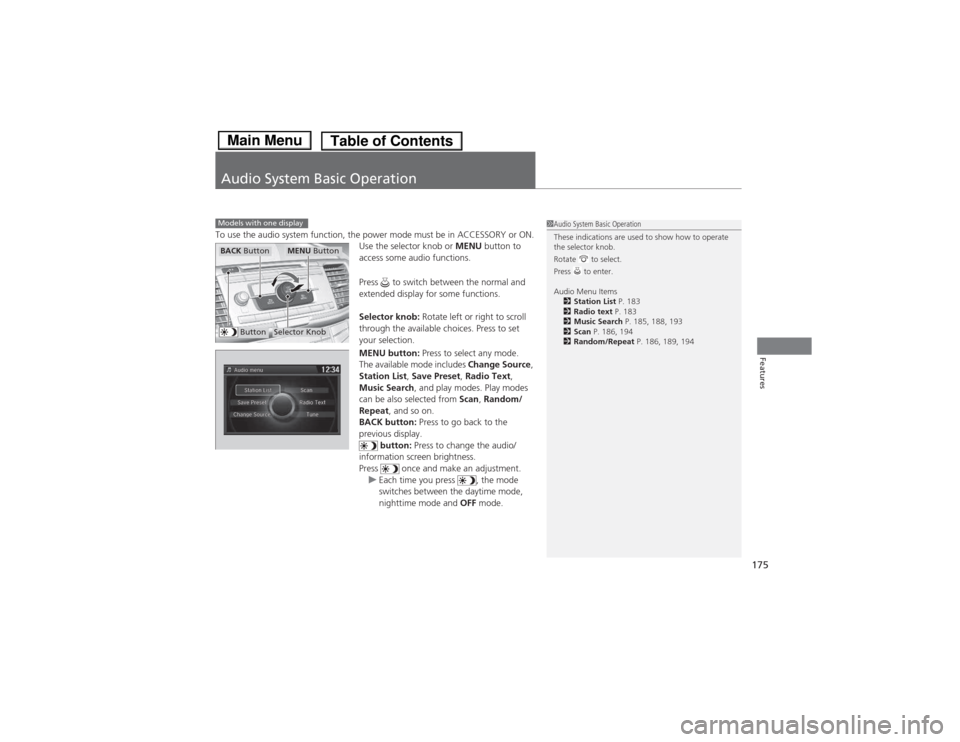
To use the audio system function, the power mode must be in ACCESSORY or ON.Use the selector knob or MENU button to
access some audio functions.
Press to switch between the normal and
extended display for some functions.
Selector knob: Rotate left or right to scroll
through the available choices. Press to set
your selection.
MENU button: Press to select any mode.
The available mode includes Change Source,
Station List , Save Preset , Radio Text ,
Music Search , and play modes. Play modes
can be also selected from Scan, Random/
Repeat , and so on.
BACK button: Press to go back to the
previous display.
button: Press to change the audio/
information screen brightness.
Press once and make an adjustment.
uEach time you press , the mode
switches between the daytime mode,
nighttime mode and OFF mode.
Models with one display1Audio System Basic Operation
These indications are used to show how to operate
the selector knob.
Rotate to select.
Press to enter.
Audio Menu Items
2 Station List P. 183
2 Radio text P. 183
2 Music Search P. 185, 188, 193
2 Scan P. 186, 194
2 Random/Repeat P. 186, 189, 194
ButtonSelector Knob
MENU ButtonBACK Button
Main MenuTable of Contents
Page 179 of 561
uuAudio System Basic OperationuAudio/Information Screen
178
Features
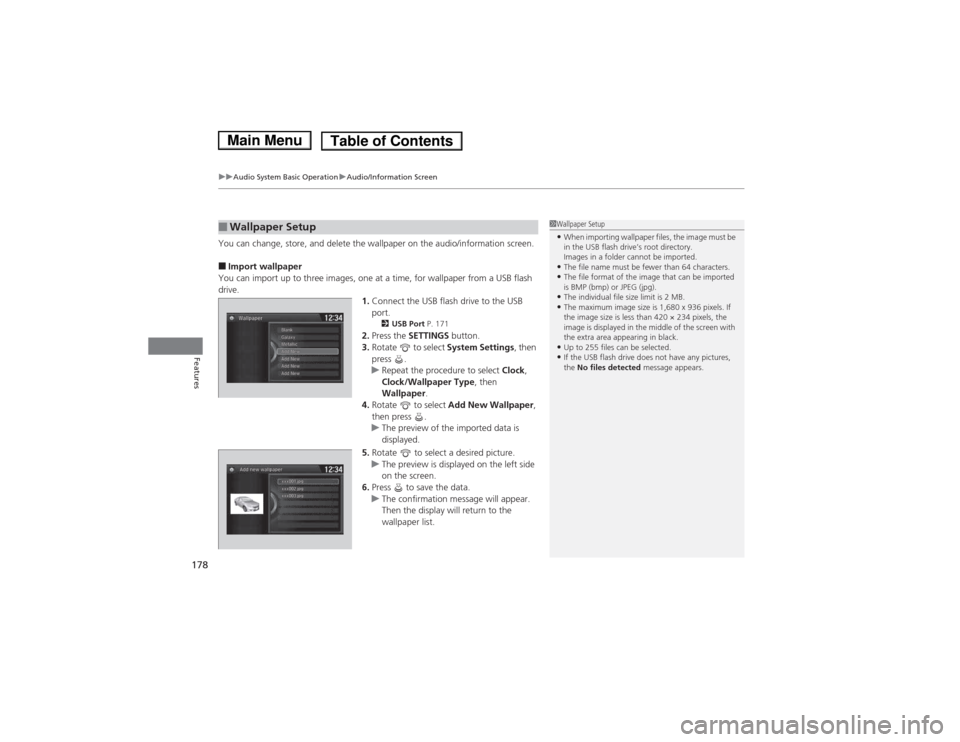
You can change, store, and delete the wallpaper on the audio/information screen. ■ Import wallpaper
You can import up to three images, one at a time, for wallpaper from a USB flash
drive. 1.Connect the USB flash drive to the USB port.
2 USB Port P. 171
2. Press the SETTINGS button.
3. Rotate to select System Settings, then
press .
uRepeat the procedure to select Clock,
Clock/Wallpaper Type , then
Wallpaper .
4. Rotate to select Add New Wallpaper ,
then press .
uThe preview of the imported data is
displayed.
5. Rotate to select a desired picture.
uThe preview is displayed on the left side
on the screen.
6. Press to save the data.
uThe confirmation message will appear.
Then the display will return to the
wallpaper list.
■Wallpaper Setup1Wallpaper Setup •When importing wallpaper files, the image must be
in the USB flash drive’s root directory.
Images in a folder cannot be imported.
• The file name must be fewer than 64 characters.
• The file format of the image that can be imported
is BMP (bmp) or JPEG (jpg).
• The individual file size limit is 2 MB.
• The maximum image size is 1,680 x 936 pixels. If
the image size is less than 420 × 234 pixels, the
image is displayed in the middle of the screen with
the extra area appearing in black.
• Up to 255 files can be selected.
• If the USB flash drive does not have any pictures, the No files detected message appears.
Main MenuTable of Contents
Page 184 of 561
183
uuAudio System Basic OperationuPlaying AM/FM Radio
Features
Provides text data information related to your selected RDS-capable FM station. ■To find an RDS station from Station List
1. Press while listening to an FM station.
2. Rotate to select the station, then press .
■ Manual update
Updates your available station list at any time. 1. Press while listening to an FM station.
2. Rotate to select Refresh, then press .
■ Radio text
Displays the radio text information of the selected RDS station. 1. Press the MENU button.
2. Rotate to select Radio Text, then press .
■ Scan
Samples each of the strongest stations on the selected band for 10 seconds. 1. Press the MENU button.
2. Rotate to select Scan, then press .
To turn off scan, press to select Stop, or press the BACK button.
■Radio Data System (RDS)1Playing AM/FM Radio
The ST indicator appears on the display indicating
stereo FM broadcasts.
Stereo reproduction in AM is not available.
Switching the Audio Mode
Press the SOURCE button on the steering wheel.
2 Audio Remote Controls P. 174
You can also switch the mode by pressing the MENU
button and selecting Change Source on the MENU
screen.
You can store 6 AM stations and 12 FM stations into
the preset memory.
1Radio Data System (RDS)
When you select an RDS-capable FM station, the RDS
automatically turns on, and the frequency display
changes to the station name. However, when the
signals of that station become weak, the display
changes from the station name to the frequency.
Main MenuTable of Contents