engine HONDA ACCORD HYBRID 2019 Owners Manual
[x] Cancel search | Manufacturer: HONDA, Model Year: 2019, Model line: ACCORD HYBRID, Model: HONDA ACCORD HYBRID 2019Pages: 727, PDF Size: 24.78 MB
Page 656 of 727
654
Maintenance Climate Control Sy stem MaintenanceAir Conditioning To ensure proper and safe operation, th e Society of Automotive Engineers (SAE
J2845) recommends that the refrigerant system only be serviced by trained and
certified technicians.
Never repair or replace the air conditioni ng evaporator (coo ling coil) with one
removed from a used or salvaged vehicle.
New replacement mobile air conditioning evaporators must be certified (and
labeled) as meeting SAE Standard J2842.
Dust and Pollen Filter The climate control system is equipped wi th a dust and pollen filter that collects
pollen, dust, and other debris in the air. The Maintenance Minder TM
messages will let
you know when to replace the filter.
We recommend that you replace the dust and pollen filter sooner when using your
vehicle in areas with high concentrations of dust. 1 Air Conditioning NOTICE
Vented refrigerant is harmful to the environment.
To avoid refrigerant from venting, never replace the
evaporator with one re moved from a used or
salvaged vehicle.
Refrigerant in your vehicle’s air conditioning system is
flammable and can be igni ted during servicing if
proper procedures are not followed.
The air conditioner labe l is found under the hood:
2 Safety Labels P. 76
2 Specifications P. 700, 702Canadian models
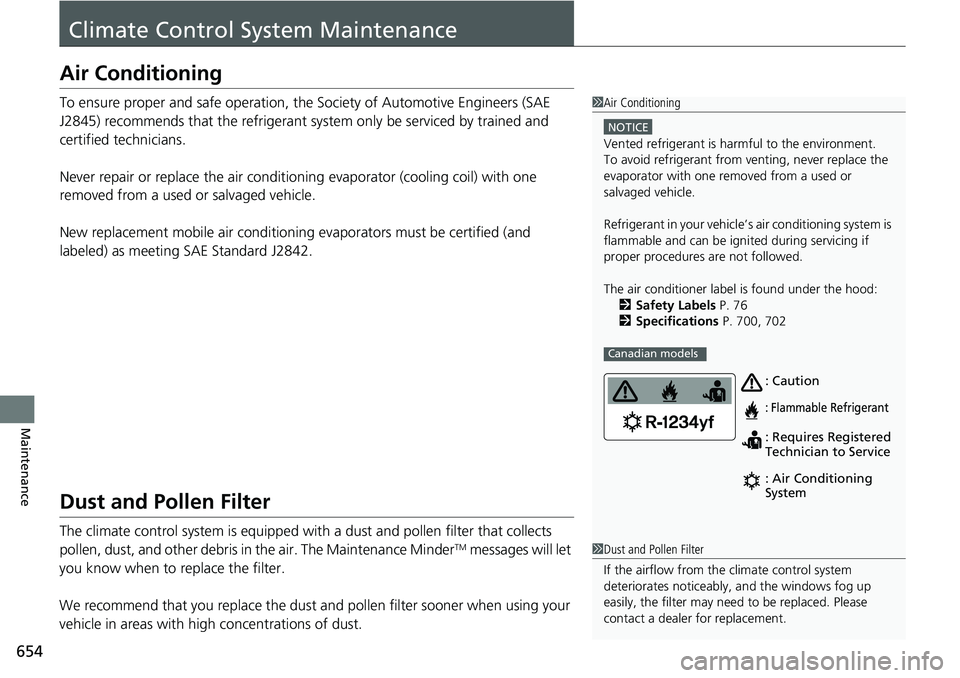
: Caution
: Flammable Refrigerant
: Requires Registered
Technician to Service
: Air Conditioning
System
1 Dust and Pollen Filter
If the airflow from the climate control system
deteriorates noticeably, and the windows fog up
easily, the filter may need to be replaced. Please
contact a dealer for replacement.
Page 659 of 727
657 uu Cleaning u Exterior Care
Continued
Maintenance
Exterior Care Dust off the vehicle body after you drive.
Regularly inspect your vehicle for scra tches on painted surfaces. A scratch on a
painted surface can result in body rust. If you find a scratch, promptly repair it.
Wash the vehicle regularly. Wash more frequently when driving in the following
conditions:
• If driving on roads with road salt.
• If driving in coastal areas.
• If tar, soot, bird droppings, insects, or tree sap are stuck to painted surfaces.
• Make sure to follow the instructions indicated on the automated car wash.
• Fold in the door mirrors.
• Automatic intermittent wiper equipmen t vehicles, wipers switch to OFF.
• Keep sufficient distance between the cleaning nozzle and the vehicle body.
• Take particular care around the windows. Standing too close may cause water to
enter the vehicle interior.
• Do not spray high pressure water directly into the engine co mpartment. Instead,
use low pressure water and a mild detergent.■ Washing the Vehicle
■ Using an Automated Car Wash
■ Using High Pressure Cleaners 1 Washing the Vehicle
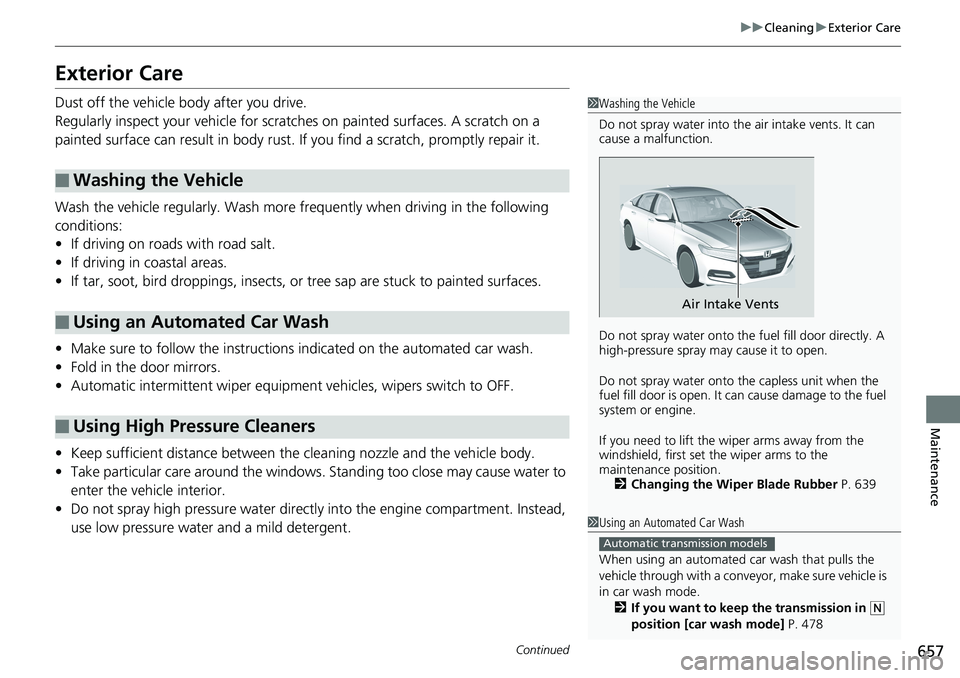
Do not spray water into the air intake vents. It can
cause a malfunction.
Do not spray water onto the fuel fill door directly. A
high-pressure spray ma y cause it to open.
Do not spray water onto the capless unit when the
fuel fill door is open. It ca n cause damage to the fuel
system or engine.
If you need to lift the wiper arms away from the
windshield, first set the wiper arms to the
maintenance position.
2 Changing the Wiper Blade Rubber P. 639Air Intake Vents
1 Using an Automated Car Wash
When using an automated car wash that pulls the
vehicle through with a convey or, make sure vehicle is
in car wash mode.
2 If you want to keep the transmission in ( N
position [car wash mode] P. 478Automatic transmission models
Page 660 of 727
uu Cleaning u Exterior Care
658
Maintenance A good coat of automotive body wax helps protect your vehicle’s paint from the
elements. Wax will wear off over time an d expose your vehicle’s paint to the
elements, so reapply as necessary.
If you get gasoline, oil, engine coolant, or battery fluid on resin coated parts, they
may be stained or the coating may peel. Prom ptly wipe it away using a soft cloth and
clean water.
Wipe using a glass cleaner.
Aluminum is susceptible to deteriorat ion caused by salt and other road
contaminants. When necessary, as early as possible use a sponge and mild detergent
to wipe away these contaminants. Do no t use a stiff brush or harsh chemicals
(including some commercial wheel cleaners). These can damage the protective finish
on aluminum alloy wheels, resulting in corrosion. Depending on the type of finish,
the wheels also may lose their luster or appear burnished. To avoid water stains,
wipe the wheels dry with a cloth while they are still wet.■ Applying Wax
■ Maintaining the Bumpers and Other Resin Coated Parts
■ Cleaning the Window
■ Maintaining Aluminum Wheels 1 Applying Wax NOTICE
Chemical solvents and strong cleaners can damage
the paint, metal, and plasti c on your vehicle. Wipe
away spills immediately.
1 Maintaining the Bumpers an d Other Resin Coated Parts
Ask a dealer about the corr ect coating material when
you want to repair the pa inted surface of the parts
made of resin.
Page 665 of 727
663Handling the Unexpected This chapter explains how to handle unexpected troubles.
Tools
Types of Tools .................................. 664
If a Tire Goes Flat
Changing a Flat Tire ......................... 665
Engine Does Not Start
Checking the Engine ........................ 671
If the Remote Battery is Weak ....... 672
Emergency Engine Stop ................... 673
Jump Starting .................................... 674
Shift Lever Does Not Move .............. 677
Overheating
How to Handle Overheating ............. 679 Indicator, Coming On/Blinking
If the Low Oil Pressure Warning Appears ... 681
If the Charging System Indicator Comes
On ................................................. 681
If the Malfunction Indicator Lamp Comes
On or Blinks ................................... 682
If the Brake System Indicator (Red) Comes
On or Blinks ................................... 683
If the Brake System Indicator (Red) Comes On
or Blinks at the Same Time When the Brake
System Indicator (Amber) Comes On.... 684
If the Electric Power Steering (EPS) System
Indicator Comes On ....................... 685 If the Low Tire Pressure/TPMS Indicator
Comes On or Blinks ....................... 686
If the Transmission I ndicator Blinks along
with the Warning Message ............ 687
Fuses
Fuse Locations ................................. 688
Inspecting and Changing Fuses ........ 692
Emergency Towing ........................... 693
When You Cannot Unlock the Fuel Fill
Door ................................................. 694
When You Cannot Open the Trunk ... 695
Refueling ........................................... 697
Page 670 of 727
uu If a Tire Goes Flat u Changing a Flat Tire
668
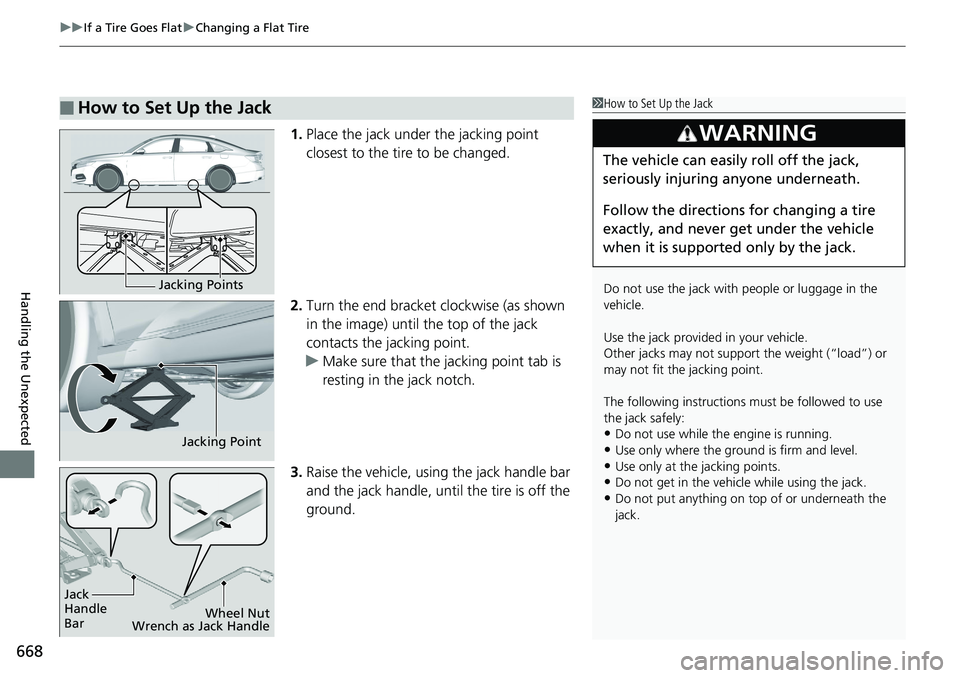
Handling the Unexpected 1. Place the jack under the jacking point
closest to the tire to be changed.
2. Turn the end bracket clockwise (as shown
in the image) until the top of the jack
contacts the jacking point.
u Make sure that the jacking point tab is
resting in the jack notch.
3. Raise the vehicle, using the jack handle bar
and the jack handle, until the tire is off the
ground.■ How to Set Up the Jack 1 How to Set Up the Jack
Do not use the jack with people or luggage in the
vehicle.
Use the jack provided in your vehicle.
Other jacks may not support the weight (“load”) or
may not fit the jacking point.
The following instructions must be followed to use
the jack safely:
• Do not use while the engine is running.
• Use only where the ground is firm and level.
• Use only at the jacking points.
• Do not get in the vehicl e while using the jack.
• Do not put anything on top of or underneath the
jack.3
WARNING The vehicle can easily roll off the jack,
seriously injuring anyone underneath.
Follow the directions for changing a tire
exactly, and never get under the vehicle
when it is supported only by the jack.Jacking Points
Jacking Point
Jack
Handle
Bar Wheel Nut
Wrench as Jack Handle
Page 673 of 727
671
Handling the Unexpected
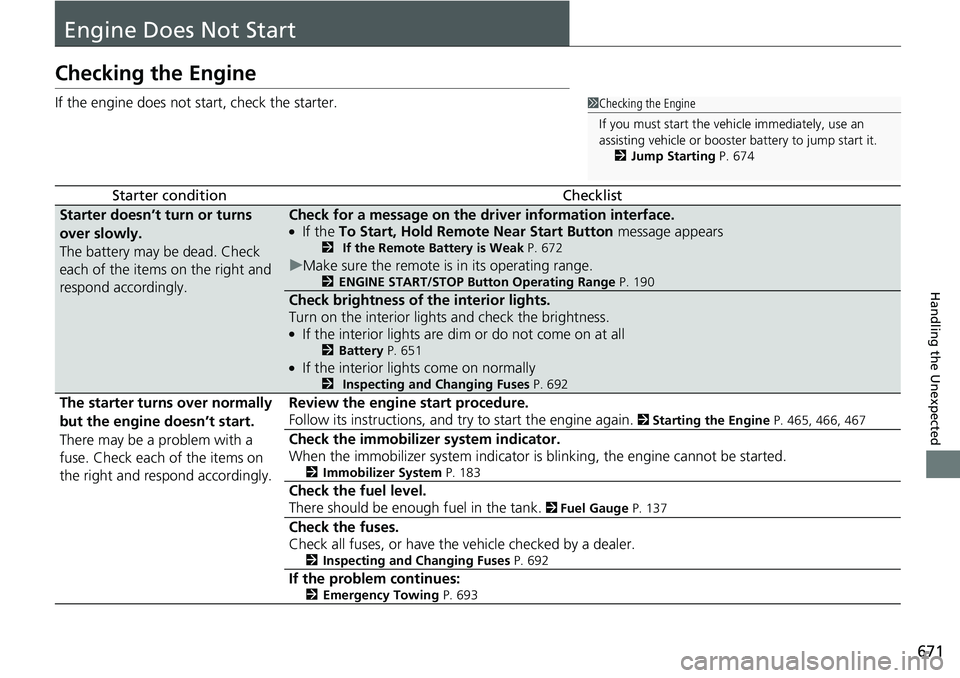
Engine Does Not StartChecking the Engine If the engine does not start, check the starter.
Starter condition Checklist
Starter doesn’t turn or turns
over slowly.
The battery may be dead. Check
each of the items on the right and
respond accordingly. Check for a message on the dr iver information interface. ●
If the To Start, Hold Remote Near Start Button message appears2 If the Remote Battery is Weak P. 672
u Make sure the remote is in its operating range. 2 ENGINE START/STOP Button Operating Range P. 190
Check brightness of the interior lights.
Turn on the interior lights and check the brightness. ●
If the interior lights are dim or do not come on at all 2 Battery P. 651 ●
If the interior lights come on normally 2 Inspecting and Changing Fuses P. 692
The starter turns over normally
but the engine doesn’t start.
There may be a problem with a
fuse. Check each of the items on
the right and respond accordingly. Review the engine start procedure.
Follow its instructions, and try to start the engine again. 2 Starting the Engine P. 465, 466, 467
Check the immobilize r system indicator.
When the immobilizer system indicator is blinking, the engine cannot be started. 2 Immobilizer System P. 183
Check the fuel level.
There should be enough fuel in the tank. 2 Fuel Gauge P. 137
Check the fuses.
Check all fuses, or have the vehicle checked by a dealer.
2 Inspecting and Changing Fuses P. 692
If the problem continues:
2 Emergency Towing P. 693 1 Checking the Engine
If you must start the vehi cle immediately, use an
assisting vehicle or booster battery to jump start it.
2 Jump Starting P. 674
Page 674 of 727
672 uu Engine Does Not Start u If the Remote Battery is Weak
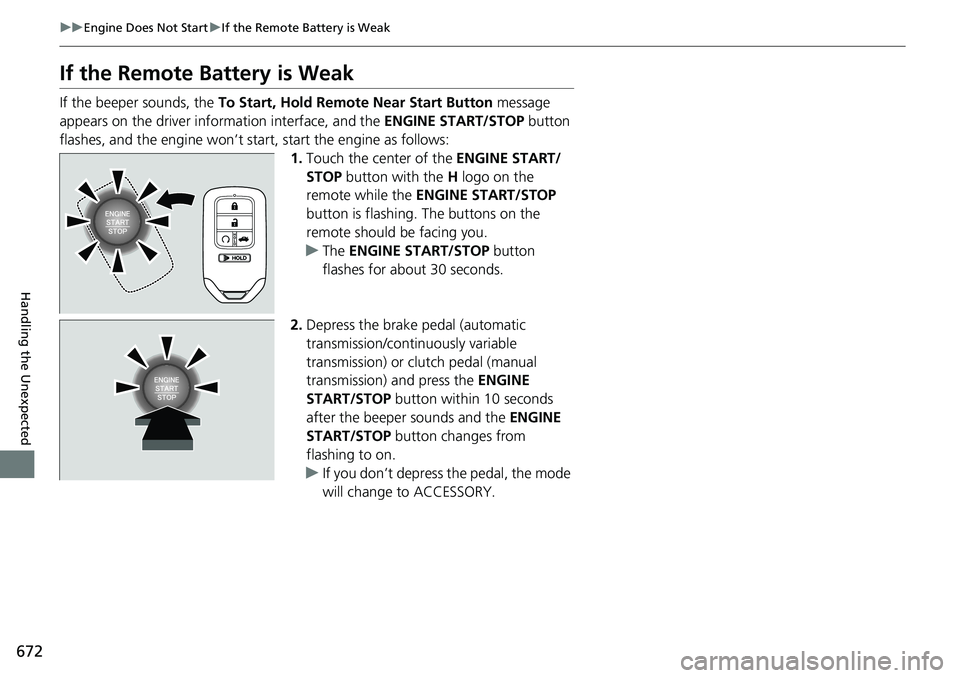
Handling the Unexpected If the Remote Battery is Weak If the beeper sounds, the To Start, Hold Remote Near Start Button message
appears on the driver information interface, and the ENGINE START/STOP button
flashes, and the engine won’t star t, start the engine as follows:
1. Touch the center of the ENGINE START/
STOP button with the H logo on the
remote while the ENGINE START/STOP
button is flashing. The buttons on the
remote should be facing you.
u The ENGINE START/STOP button
flashes for about 30 seconds.
2. Depress the brake pedal (automatic
transmission/continuously variable
transmission) or clutch pedal (manual
transmission) and press the ENGINE
START/STOP button within 10 seconds
after the beeper sounds and the ENGINE
START/STOP button changes from
flashing to on.
u If you don’t depress the pedal, the mode
will change to ACCESSORY.
Page 675 of 727
673uu Engine Does Not Start u Emergency Engine Stop
Handling the Unexpected
Emergency Engine Stop The ENGINE START/STOP button may be used to stop the engine due to an
emergency situation even while driving. If you must stop the engine, do either of the
following operations:
• Press and hold the ENGINE START/STOP button for about two seconds.
• Firmly press the ENGINE START/STOP button three times.
The steering wheel will not lock. However, because turning off the engine disables
the power assist the engine provides to the steering and braking systems, it will
require significantly more physical effort an d time to steer and sl ow the vehicle. Use
both feet on the brake pedal to slow down the vehicle and stop immediately in a
safe place. With manual transmission models you can al so downshift the
transmission to utilize engine braking.
The transmission automa tically changes to ( P
after the vehicle comes to a complete
stop. Then, the power mode changes to VEHICLE OFF.
The power mode is in ACCESSORY when the engine is stopped.
To change the mode to VEHICLE OFF, put the transmission into ( P
after the vehicle
comes to a complete stop.
Then press the ENGINE START/STOP button twice without depressing the brake
pedal.
The power mode changes to VEHICLE OFF. 1 Emergency Engine Stop
Do not press the button while driving unless it is
absolutely necessary for the engine to be turned off.
Automatic transmission models
Continuously variable transmission models
Continuously variable transmission models for Canadian models
Manual transmission models
Page 676 of 727
674
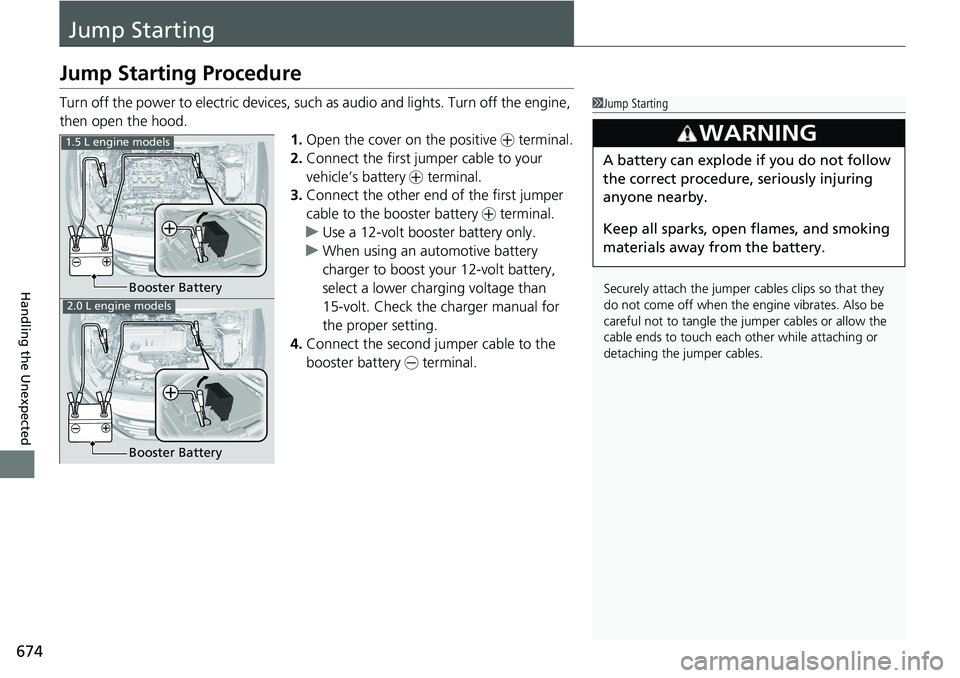
Handling the Unexpected Jump StartingJump Starting Procedure Turn off the power to electric devices, such as audio and lights. Turn off the engine,
then open the hood.
1. Open the cover on the positive + terminal.
2. Connect the first jump er cable to your
vehicle’s battery + terminal.
3. Connect the other end of the first jumper
cable to the booster battery + terminal.
u Use a 12-volt booster battery only.
u When using an automotive battery
charger to boost your 12-volt battery,
select a lower charging voltage than
15-volt. Check the charger manual for
the proper setting.
4. Connect the second jumper cable to the
booster battery - terminal. 1 Jump Starting
Securely attach the jumper cables clips so that they
do not come off when the e ngine vibrates. Also be
careful not to tangle the ju mper cables or allow the
cable ends to touch each other while attaching or
detaching the jumper cables.3
WARNING A battery can explode if you do not follow
the correct procedure, seriously injuring
anyone nearby.
Keep all sparks, open flames, and smoking
materials away from the battery.Booster Battery1.5 L engine models
2.0 L engine models
Booster Battery
Page 677 of 727
Continued
675uu Jump Starting u Jump Starting Procedure
Handling the Unexpected
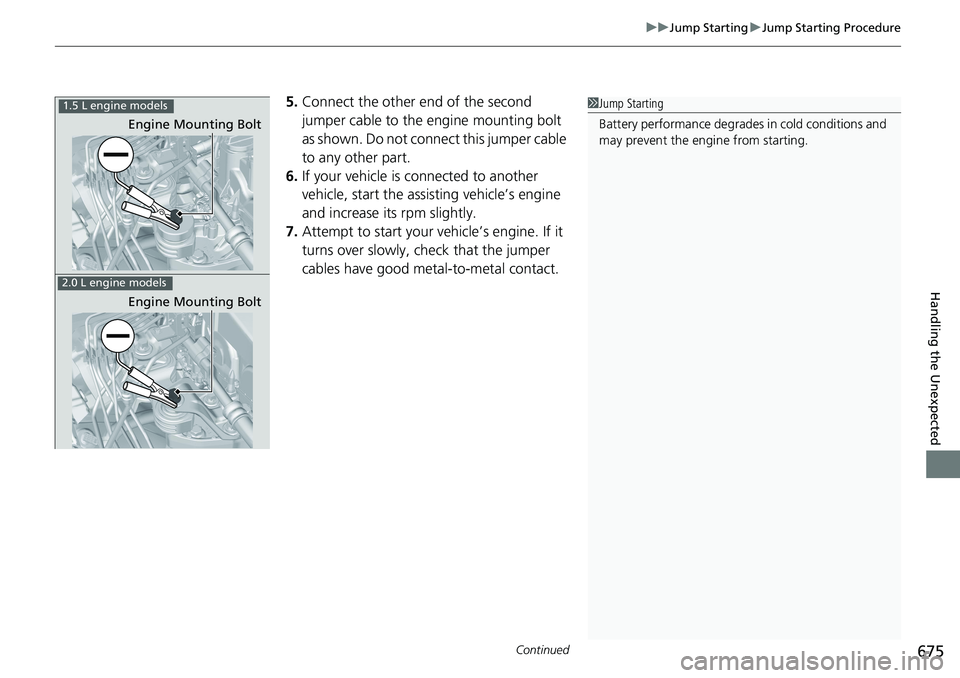
5. Connect the other end of the second
jumper cable to the engine mounting bolt
as shown. Do not connect this jumper cable
to any other part.
6. If your vehicle is connected to another
vehicle, start the assisting vehicle’s engine
and increase its rpm slightly.
7. Attempt to start your ve hicle’s engine. If it
turns over slowly, check that the jumper
cables have good metal-to-metal contact. 1 Jump Starting
Battery performance degrades in cold conditions and
may prevent the engi ne from starting.1.5 L engine models
2.0 L engine models Engine Mounting Bolt
Engine Mounting Bolt