light HONDA ACCORD HYBRID 2019 Repair Manual
[x] Cancel search | Manufacturer: HONDA, Model Year: 2019, Model line: ACCORD HYBRID, Model: HONDA ACCORD HYBRID 2019Pages: 727, PDF Size: 24.78 MB
Page 369 of 727
367uu General Information on the Audio System u License Information *
Continued
Features
“Made for iPod,” and “Made for iPhone,” mean that an electronic accessory has
been designed to connect specifically to iP od, or iPhone, respectively, and has been
certified by the developer to meet Appl e performance standards. Apple is not
responsible for the operation of this device or its co mpliance with safety and
regulatory standards. Please no te that the use of this accessory with iPod, or iPhone,
may affect wireless performance.
Apple, the Apple Logo, iPod touch are trademarks of Apple Inc., registered in the
U.S. and other countries. Apple CarPlay, and Lightning are trademarks of Apple Inc.
App Store is a service mark of Apple Inc.■ Apple
Page 374 of 727
372 uu Customized Features u
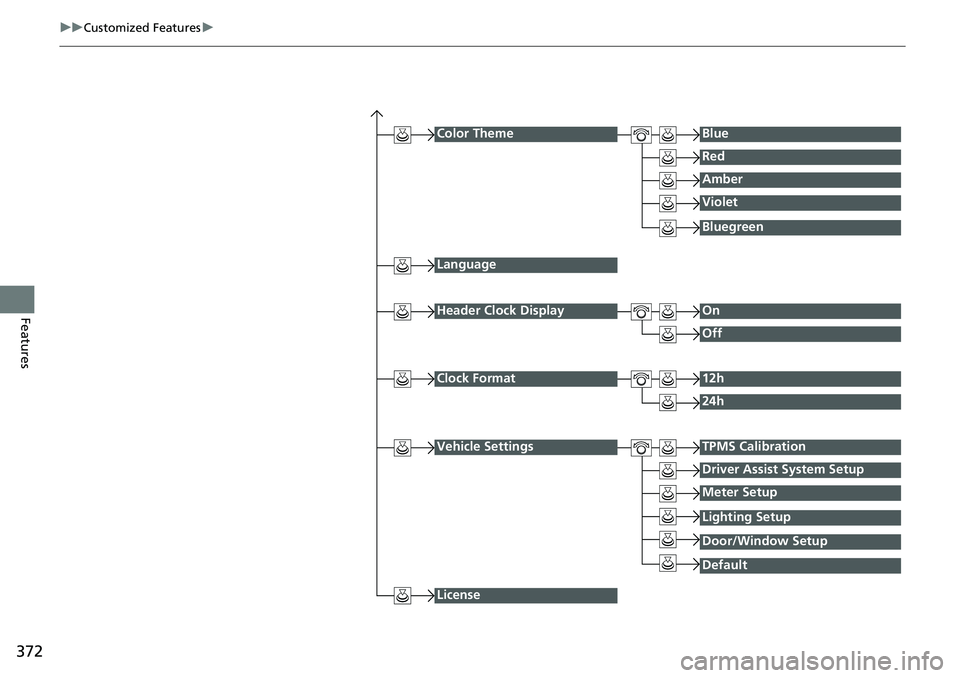
Features Color Theme Blue
Red
Amber
Violet
Language
Clock Format 12h
24h
License Bluegreen
Header Clock Display On
Off
Vehicle Settings TPMS Calibration
Driver Assist System Setup
Meter Setup
DefaultLighting Setup
Door/Window Setup
Page 379 of 727
377 uu Customized Features u
Continued
Features
*1:Default Setting Setup
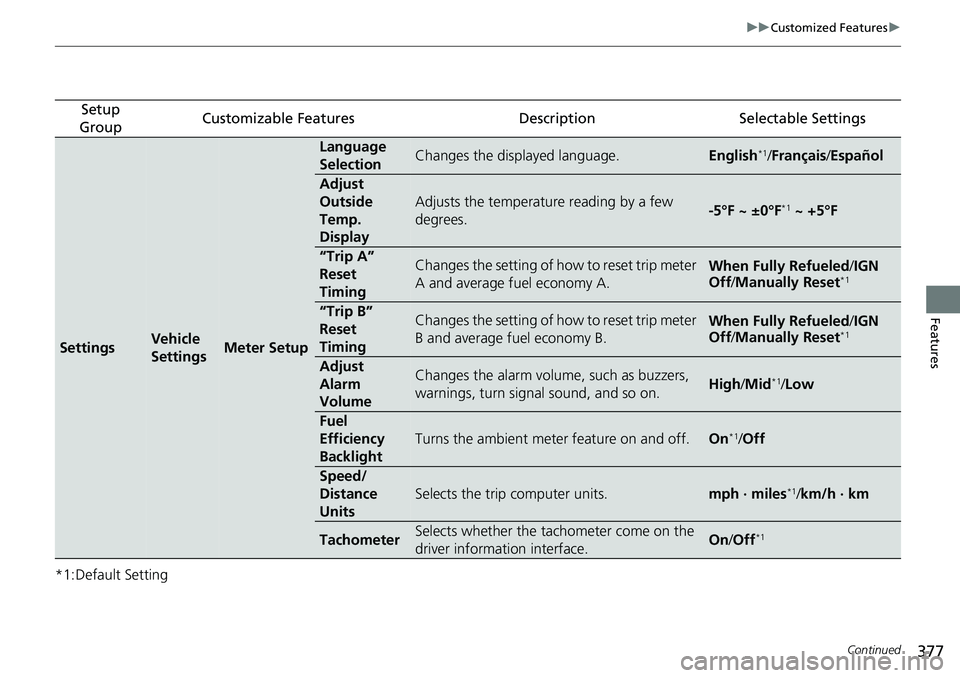
Group Customizable Features Description Selectable Settings
Settings Vehicle
Settings Meter Setup Language
Selection Changes the displayed language. English *1
/ Français / Español
Adjust
Outside
Temp.
Display Adjusts the temperature reading by a few
degrees. -5°F ~ ±0°F *1
~ +5°F
“Trip A”
Reset
Timing Changes the setting of how to reset trip meter
A and average fuel economy A. When Fully Refueled / IGN
Off / Manually Reset *1
“Trip B”
Reset
Timing Changes the setting of how to reset trip meter
B and average fuel economy B. When Fully Refueled / IGN
Off / Manually Reset *1
Adjust
Alarm
Volume Changes the alarm volume, such as buzzers,
warnings, turn signal sound, and so on. High / Mid *1
/ Low
Fuel
Efficiency
Backlight Turns the ambient meter feature on and off. On *1
/ Off
Speed/
Distance
Units Selects the trip computer units. mph · miles *1
/ km/h · km
Tachometer Selects whether the tachometer come on the
driver information interface. On / Off *1
Page 380 of 727
378 uu Customized Features u
Features *1:Default Setting Setup
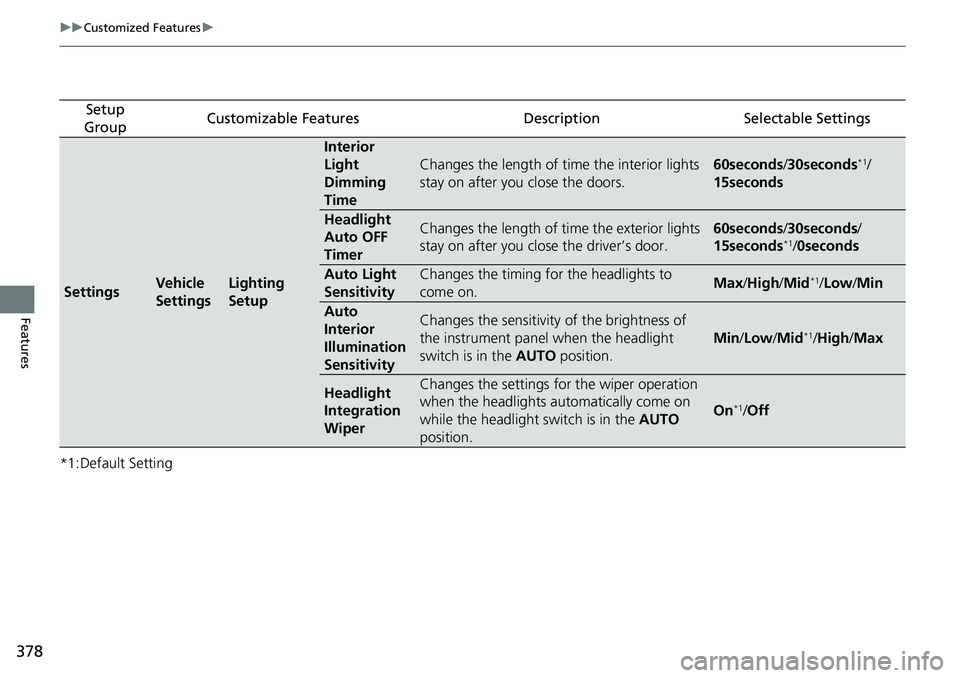
Group Customizable Features Description Selectable Settings
Settings Vehicle
Settings Lighting
Setup Interior
Light
Dimming
Time Changes the length of time the interior lights
stay on after you close the doors. 60seconds / 30seconds *1
/
15seconds
Headlight
Auto OFF
Timer Changes the length of time the exterior lights
stay on after you close the driver’s door. 60seconds / 30seconds /
15seconds *1
/ 0seconds
Auto Light
Sensitivity Changes the timing for the headlights to
come on. Max / High / Mid *1
/ Low / Min
Auto
Interior
Illumination
Sensitivity Changes the sensitivity of the brightness of
the instrument panel when the headlight
switch is in the AUTO position. Min / Low / Mid *1
/ High / Max
Headlight
Integration
Wiper Changes the settings for the wiper operation
when the headlights automatically come on
while the headlight switch is in the AUTO
position. On *1
/ Off
Page 381 of 727
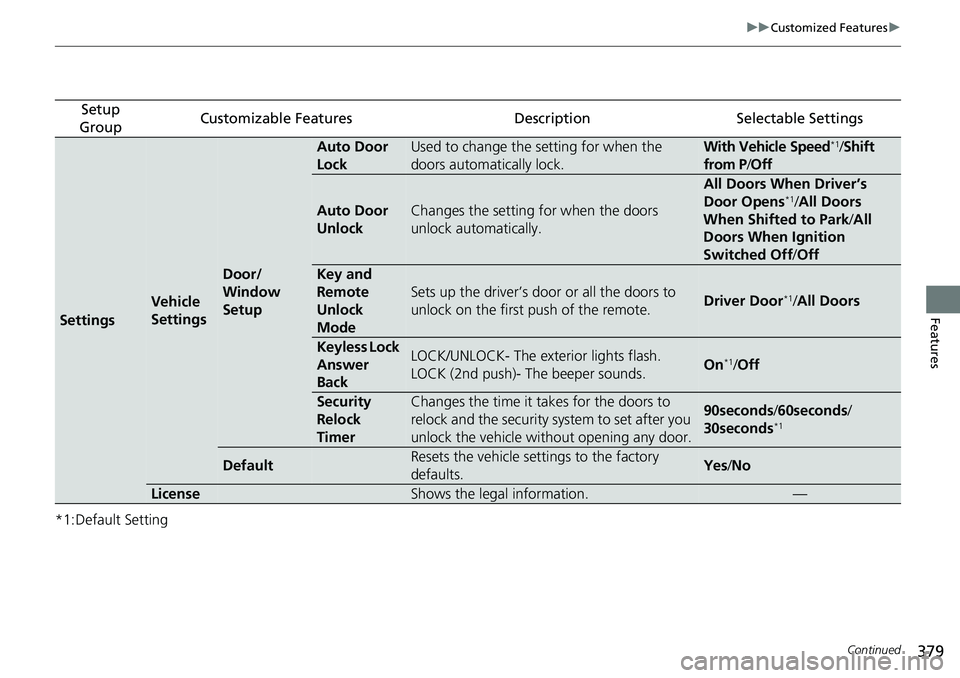
379 uu Customized Features u
Continued
Features
*1:Default Setting Setup
Group Customizable Features Description Selectable Settings
Settings Vehicle
Settings Door/
Window
Setup Auto Door
Lock Used to change the setting for when the
doors automatically lock. With Vehicle Speed *1
/ Shift
from P / Off
Auto Door
Unlock Changes the setting for when the doors
unlock automatically. All Doors When Driver’s
Door Opens *1
/ All Doors
When Shifted to Park / All
Doors When Ignition
Switched Off / Off
Key and
Remote
Unlock
Mode Sets up the driver’s door or all the doors to
unlock on the first push of the remote. Driver Door *1
/ All Doors
Keyless Lock
Answer
Back LOCK/UNLOCK- The exterior lights flash.
LOCK (2nd push)- The beeper sounds. On *1
/ Off
Security
Relock
Timer Changes the time it takes for the doors to
relock and the security system to set after you
unlock the vehicle without opening any door. 90seconds / 60seconds /
30seconds *1
Default Resets the vehicle settings to the factory
defaults. Yes / No
License Shows the legal information. —
Page 384 of 727
382 uu Customized Features u
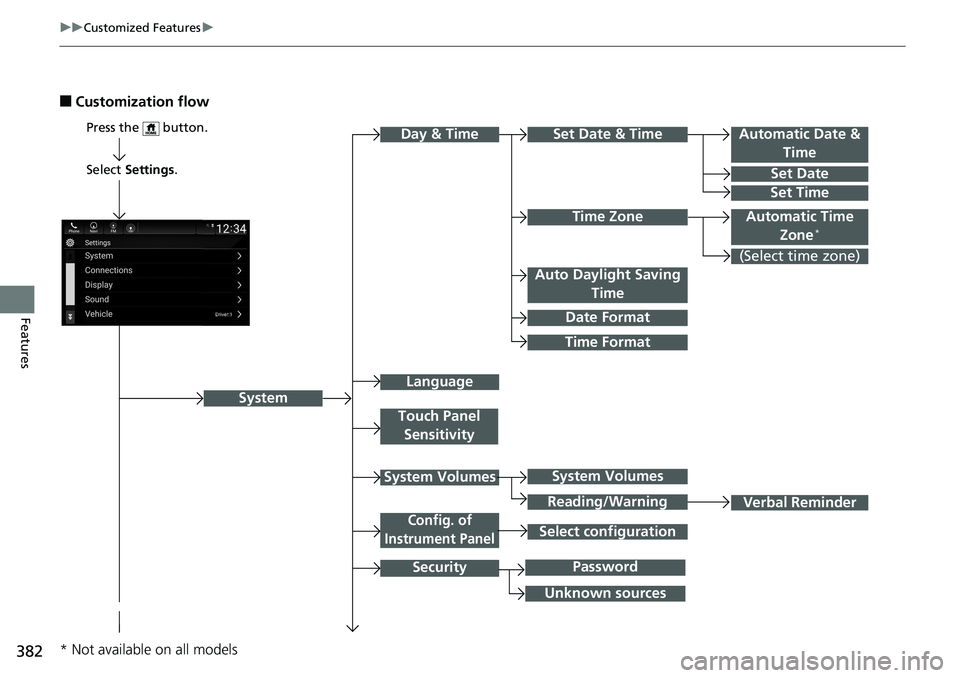
Features ■ Customization flow
Select Settings .
Automatic Date &
Time
Set Date
Set Time
SystemPress the button.
Automatic Time
Zone *
Time Format Time ZoneSet Date & Time
Touch Panel
Sensitivity
System Volumes
Config. of
Instrument Panel
SecurityDay & Time
(Select time zone)
Language Auto Daylight Saving
Time
Date Format
Verbal ReminderSystem Volumes
Reading/Warning
Unknown sources PasswordSelect configuration
* Not available on all models
Page 387 of 727
385 uu Customized Features u
Continued
Features
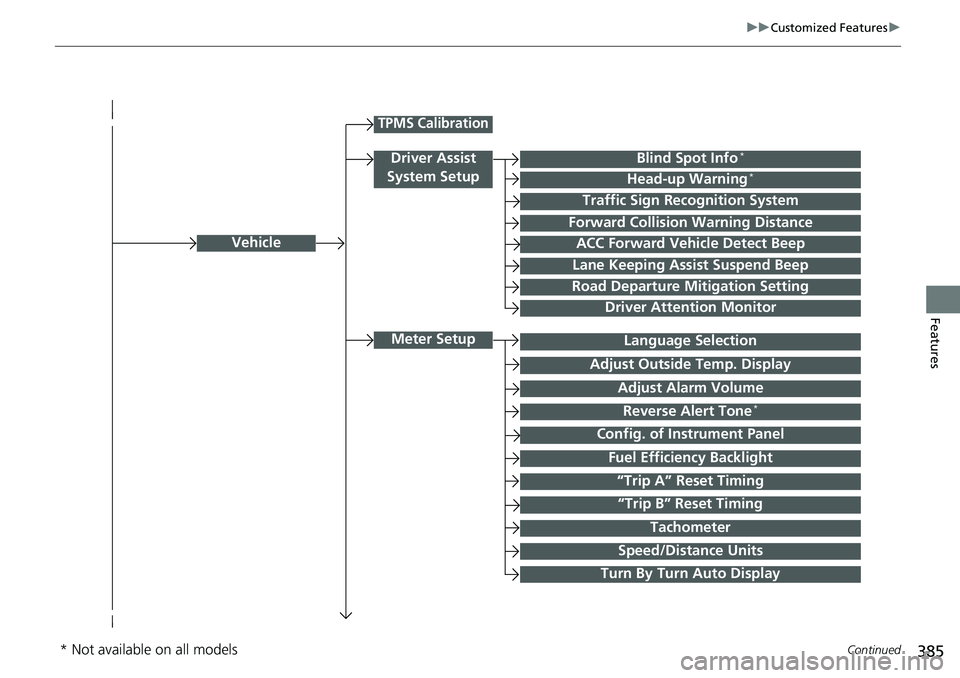
Vehicle
Meter Setup
Adjust Outside Temp. Display
“Trip A” Reset Timing
“Trip B” Reset Timing Reverse Alert Tone *
Config. of Instrument Panel Adjust Alarm Volume
Turn By Turn Auto Display Fuel Efficiency BacklightTPMS Calibration
Driver Assist
System Setup Blind Spot Info *
Head-up Warning *
Traffic Sign Recognition System
Forward Collision Warning Distance
ACC Forward Vehicle Detect Beep
Lane Keeping Assist Suspend Beep
Road Departure Mitigation Setting
Driver Attention Monitor
Speed/Distance Units TachometerLanguage Selection
* Not available on all models
Page 388 of 727
386 uu Customized Features u
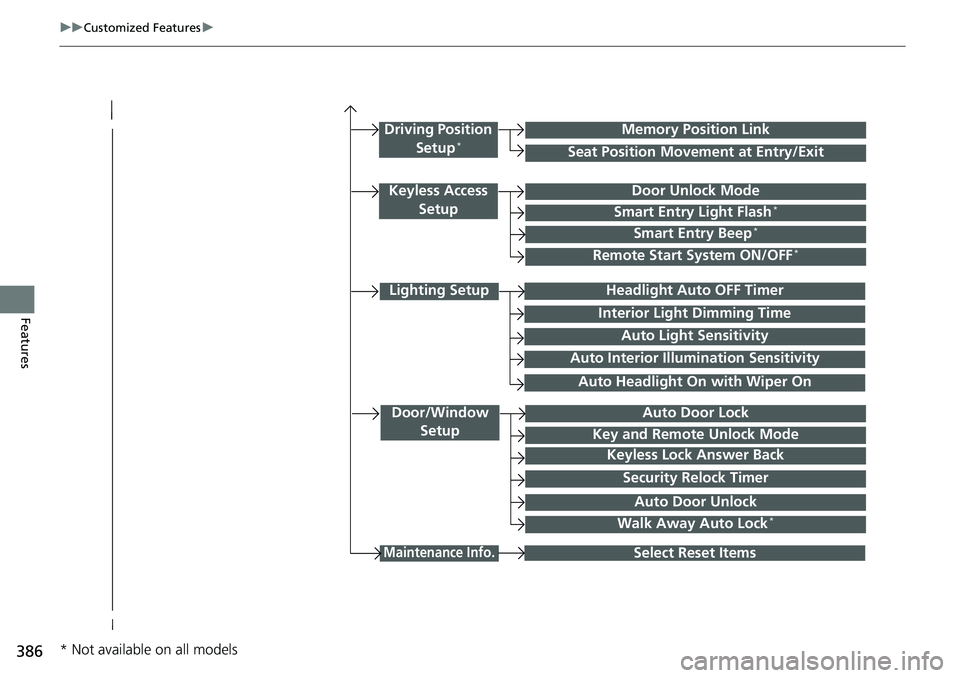
Features Lighting Setup
Interior Ligh t Dimming TimeHeadlight Auto OFF Timer
Auto Light Sensitivity
Door/Window
Setup Auto Door Lock
Auto Door UnlockKey and Remote Unlock Mode
Keyless Lock Answer Back
Security Relock Timer
Maintenance Info.
Select Reset ItemsWalk Away Auto Lock *Driving Position
Setup *
Seat Position Movement at Entry/Exit Memory Position Link
Keyless Access
Setup Door Unlock Mode
Smart Entry Light Flash *
Smart Entry Beep *
Remote Start System ON/OFF *
Auto Headlight On with Wiper OnAuto Interior Illumi nation Sensitivity
* Not available on all models
Page 390 of 727
388 uu Customized Features u
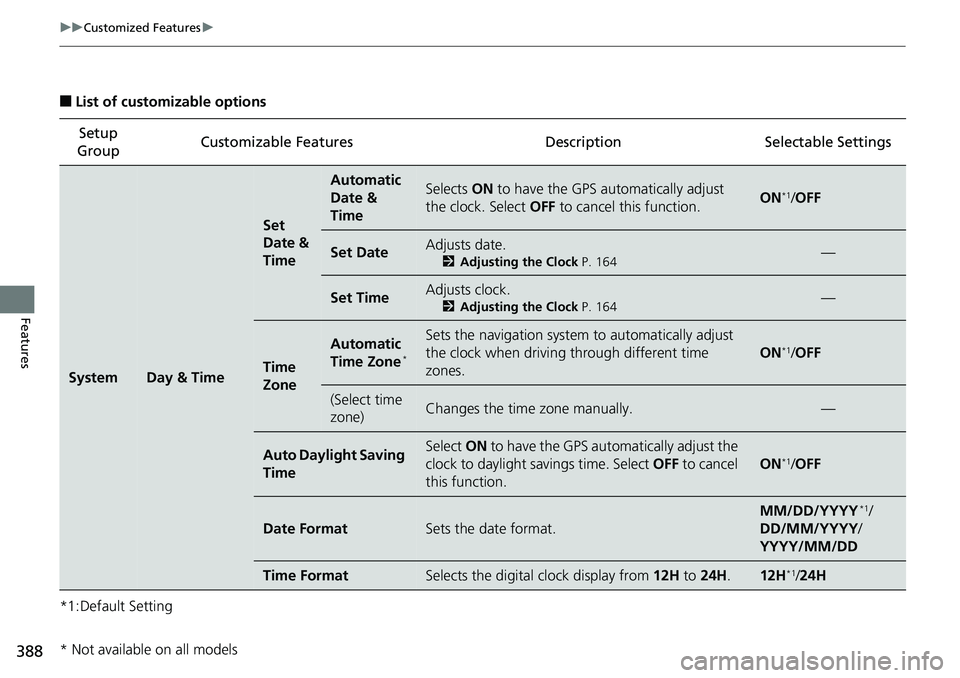
Features ■ List of customizable options
*1:Default Setting Setup
Group Customizable Features Description Selectable Settings
System Day & Time Set
Date &
Time Automatic
Date &
Time Selects ON to have the GPS automatically adjust
the clock. Select OFF to cancel this function. ON *1
/ OFF
Set Date Adjusts date. 2 Adjusting the Clock P. 164
—
Set Time Adjusts clock. 2 Adjusting the Clock P. 164
—
Time
Zone Automatic
Time Zone *
Sets the navigation system to automatically adjust
the clock when driving through different time
zones. ON *1
/ OFF
(Select time
zone) Changes the time zone manually. —
Auto Daylight Saving
Time Select ON to have the GPS automatically adjust the
clock to daylight savings time. Select OFF to cancel
this function. ON *1
/ OFF
Date Format Sets the date format. MM/DD/YYYY *1
/
DD/MM/YYYY /
YYYY/MM/DD
Time Format Selects the digital clock display from 12H to 24H . 12H *1
/ 24H
* Not available on all models
Page 396 of 727
394 uu Customized Features u
Features *1:Default Setting Setup
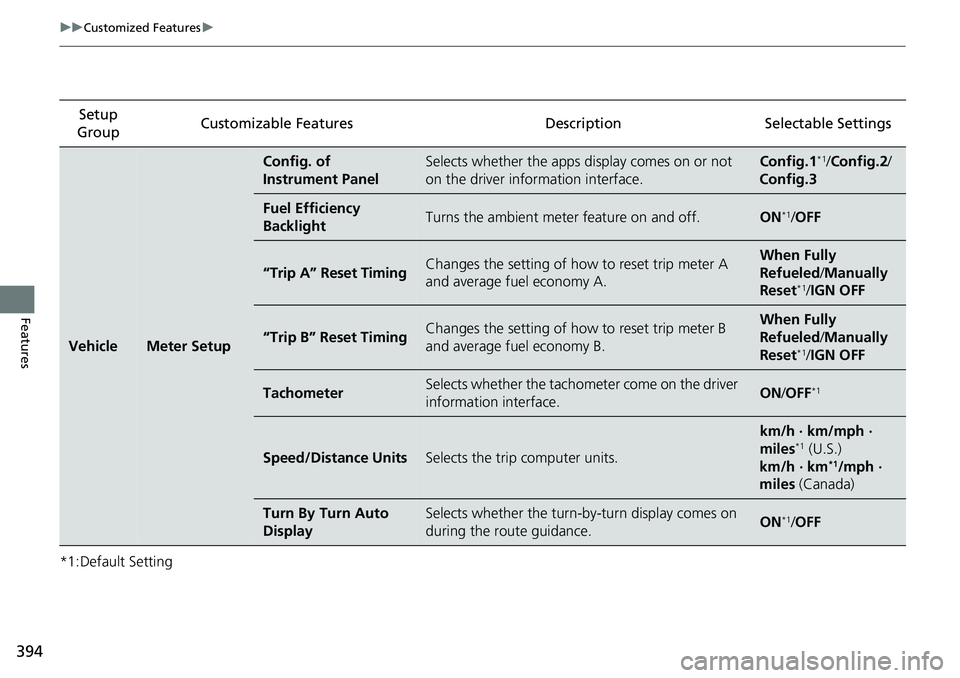
Group Customizable Features Description Selectable Settings
Vehicle Meter Setup Config. of
Instrument Panel Selects whether the apps display comes on or not
on the driver info rmation interface. Config.1 *1
/ Config.2 /
Config.3
Fuel Efficiency
Backlight Turns the ambient meter feature on and off. ON *1
/ OFF
“Trip A” Reset Timing Changes the setting of how to reset trip meter A
and average fuel economy A. When Fully
Refueled / Manually
Reset *1
/ IGN OFF
“Trip B” Reset Timing Changes the setting of how to reset trip meter B
and average fuel economy B. When Fully
Refueled / Manually
Reset *1
/ IGN OFF
Tachometer Selects whether the tachometer come on the driver
information interface. ON / OFF *1
Speed/Distance Units Selects the trip computer units. km/h · km/mph ·
miles *1
(U.S.)
km/h · km *1
/mph ·
miles (Canada)
Turn By Turn Auto
Display Selects whether the turn-b y-turn display comes on
during the route guidance. ON *1
/ OFF