mirror HONDA ACCORD HYBRID 2019 Owners Manual
[x] Cancel search | Manufacturer: HONDA, Model Year: 2019, Model line: ACCORD HYBRID, Model: HONDA ACCORD HYBRID 2019Pages: 727, PDF Size: 24.78 MB
Page 5 of 727
ContentsChild Safety P. 61 Exhaust Gas Hazard P. 75 Safety Labels P. 76
Opening and Closing the Trunk P. 180 Security System P. 183 Opening and Closing the Windows P. 186
Operating the Switches Around the Steering Wheel P. 190 Adjusting the Mirrors P. 208
Interior Lights/Interior Convenience It ems P. 221 Climate Control System P. 239
Audio Error Messages P. 343 General Information on the Audio System P. 348
Bluetooth ® HandsFreeLink ® P. 403, 427 Refuel Recommend P. 452
When Driving P. 465 Braking P. 571 Parking Your Vehicle P. 583
Fuel Economy and CO 2
Emissions P. 600 Turbo Engine Vehicle P. 601
Maintenance Under the Hood P. 614 Replacing Light Bulbs P. 631
Checking and Maintaining Tires P. 642 Battery P. 651 Remote Transmitter Care P. 653
Cleaning P. 655 Accessories and Modifications P. 660
Engine Does Not Start P. 671 Jump Starti ng P. 674 Shift Lever Does Not Move P. 677
Fuses P. 688 Emergency Towing P. 693 When You Cannot Unlock the Fuel Fill Door P. 694
Refueling P. 697
Devices that Emit Radio Waves P. 705 Reporting Safety Defects P. 706
Authorized Manuals P. 711 Customer Service Information P. 712 Quick Reference Guide
P. 4 Safe Driving
P. 33 Instrument Panel
P. 77 Controls
P. 163 Features
P. 243 Driving
P. 453 Maintenance
P. 603 Handling the Unexpected
P. 663
Information
P. 699
Index
P. 713
Page 6 of 727
4
Quick Reference Guide Quick Reference Guide
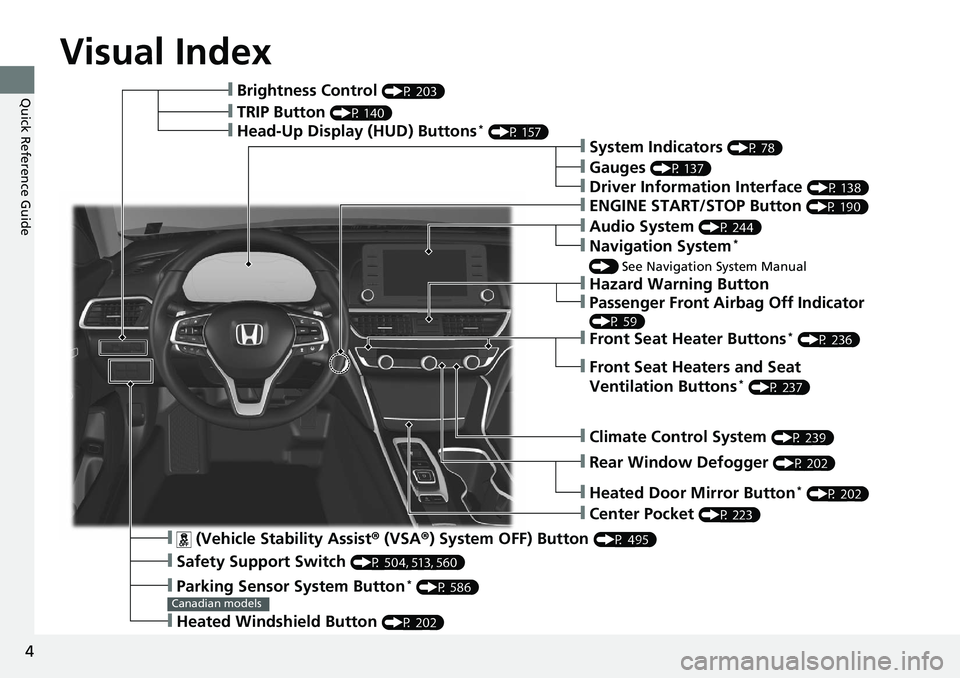
Visual Index
❙ (Vehicle Stability Assist ® (VSA ® ) System OFF) Button (P 495)
❙ Safety Support Switch (P 504, 513, 560)
❙ Parking Sensor System Button *
(P 586)
❙ Heated Windshield Button (P 202)Canadian models❙ Brightness Control (P 203)
❙ Head-Up Display (HUD) Buttons *
(P 157)
❙ System Indicators (P 78)
❙ Gauges (P 137)
❙ Driver Information Interface (P 138)
❙ ENGINE START/STOP Button (P 190)
❙ Climate Control System (P 239)
❙ Rear Window Defogger (P 202)
❙ Heated Door Mirror Button *
(P 202)
❙ Center Pocket (P 223)
❙ Hazard Warning Button❙ TRIP Button (P 140)
❙ Audio System (P 244)
❙ Navigation System *
() See Navigation System Manual
❙ Front Seat Heater Buttons *
(P 236)
❙ Front Seat Heaters and Seat
Ventilation Buttons *
(P 237)
❙ Passenger Front Airbag Off Indicator (P 59)
Page 8 of 727
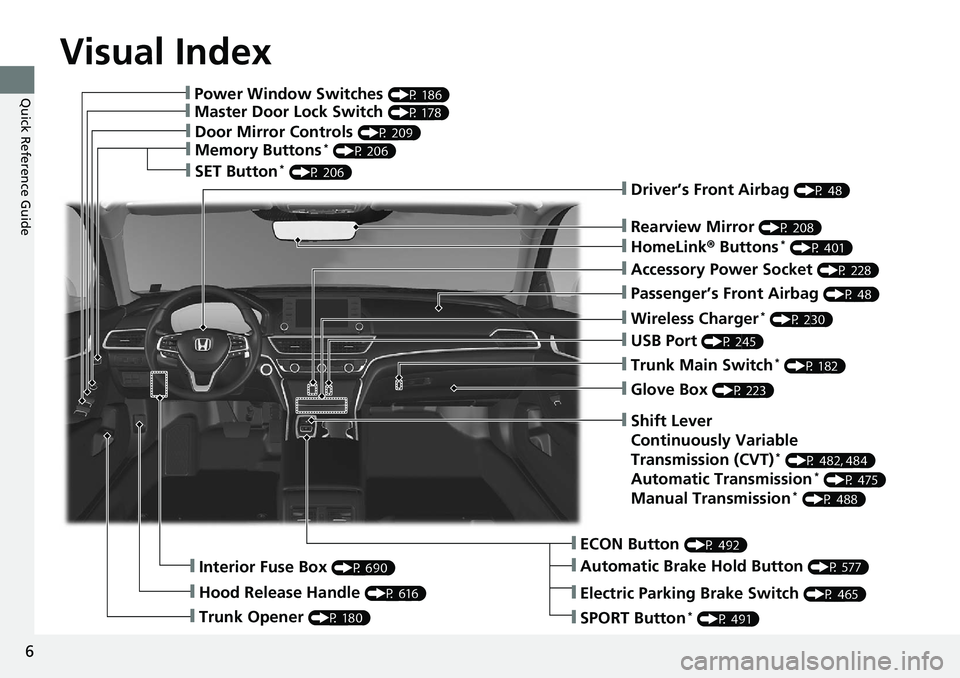
Visual Index
6
Quick Reference Guide ❙ Power Window Switches (P 186)
❙ Master Door Lock Switch (P 178)
❙ Door Mirror Controls (P 209)
❙ Memory Buttons *
(P 206)
❙ SET Button *
(P 206)
❙ Trunk Opener (P 180)❙ Interior Fuse Box (P 690)
❙ Hood Release Handle (P 616) ❙ Driver’s Front Airbag (P 48)
❙ Rearview Mirror (P 208)
❙ HomeLink ® Buttons *
(P 401)
❙ Accessory Power Socket (P 228)
❙ Passenger’s Front Airbag (P 48)
❙ Wireless Charger *
(P 230)
❙ USB Port (P 245)
❙ Trunk Main Switch *
(P 182)
❙ Glove Box (P 223)
❙ ECON Button (P 492)
❙ Automatic Brake Hold Button (P 577)❙ Shift Lever
Continuously Variable
Transmission (CVT) *
(P 482, 484)
Automatic Transmission *
(P 475)
Manual Transmission *
(P 488)
❙ Electric Parking Brake Switch (P 465)
❙ SPORT Button *
(P 491)
Page 9 of 727
7
Quick Reference Guide
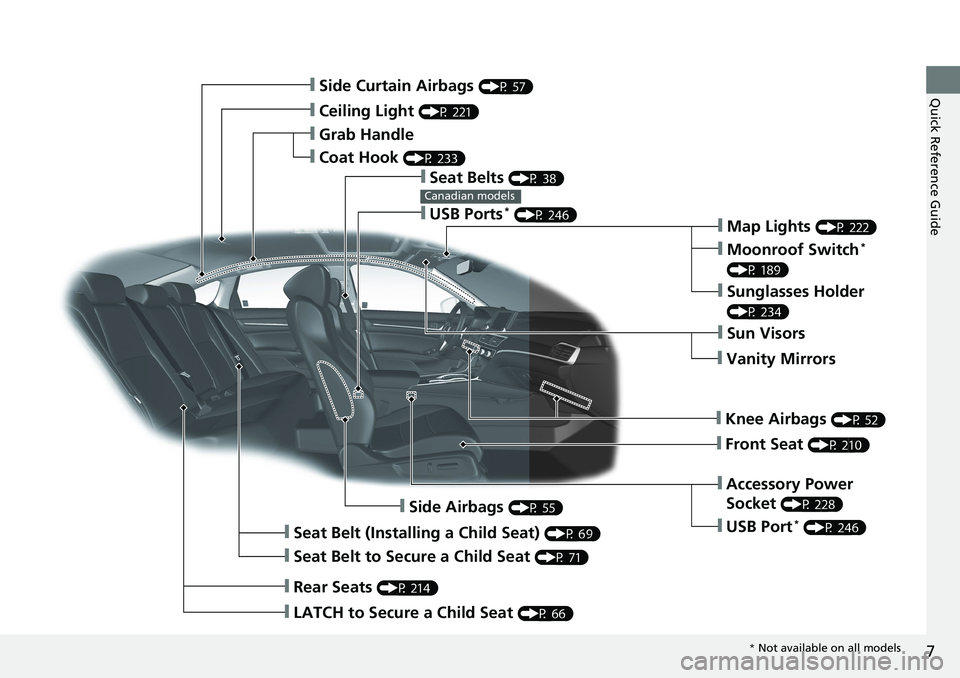
❙ Side Curtain Airbags (P 57)
❙ Ceiling Light (P 221)
❙ Grab Handle
❙ Coat Hook (P 233)
❙ Seat Belts (P 38)
❙ Map Lights (P 222)
❙ Moonroof Switch *
(P 189)
❙ Sunglasses Holder (P 234)
❙ Sun Visors
❙ Vanity Mirrors
❙ Knee Airbags (P 52)
❙ Front Seat (P 210)
❙ Accessory Power
Socket (P 228)
❙ Side Airbags (P 55)
❙ Seat Belt (Installing a Child Seat) (P 69)
❙ Seat Belt to Secure a Child Seat (P 71)
❙ LATCH to Secure a Child Seat (P 66)
❙ Rear Seats (P 214)❙ USB Ports *
(P 246)Canadian models
❙ USB Port *
(P 246)
* Not available on all models
Page 10 of 727
Visual Index
8
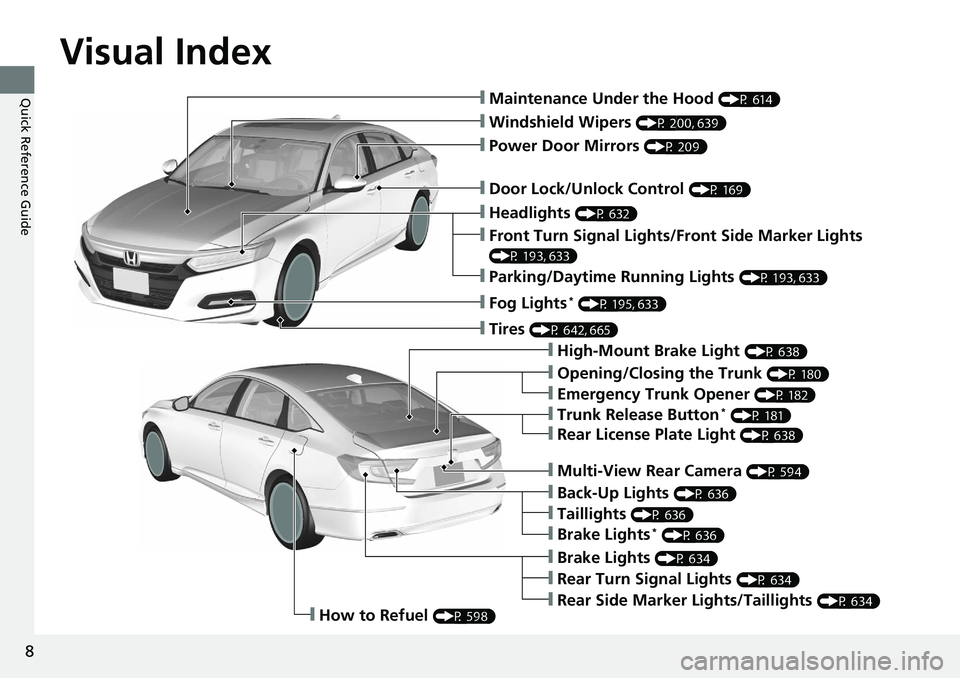
Quick Reference Guide ❙ Maintenance Under the Hood (P 614)
❙ Windshield Wipers (P 200, 639)
❙ Door Lock/Unlock Control (P 169)
❙ Power Door Mirrors (P 209)
❙ Headlights (P 632)
❙ High-Mount Brake Light (P 638)
❙ Emergency Trunk Opener (P 182)
❙ Opening/Closing the Trunk (P 180)
❙ Parking/Daytime Running Lights (P 193, 633)
❙ Front Turn Signal Lights/Front Side Marker Lights (P 193, 633)
❙ Fog Lights *
(P 195, 633)
❙ Trunk Release Button *
(P 181)
❙ Brake Lights (P 634)
❙ Rear Side Marker Lights/Taillights (P 634)
❙ Rear Turn Signal Lights (P 634)❙ Back-Up Lights (P 636)
❙ How to Refuel (P 598)❙ Tires (P 642, 665)
❙ Brake Lights *
(P 636)
❙ Taillights (P 636)
❙ Multi-View Rear Camera (P 594)
❙ Rear License Plate Light (P 638)
Page 12 of 727
10
Quick Reference Guide Safe Driving (P 33)
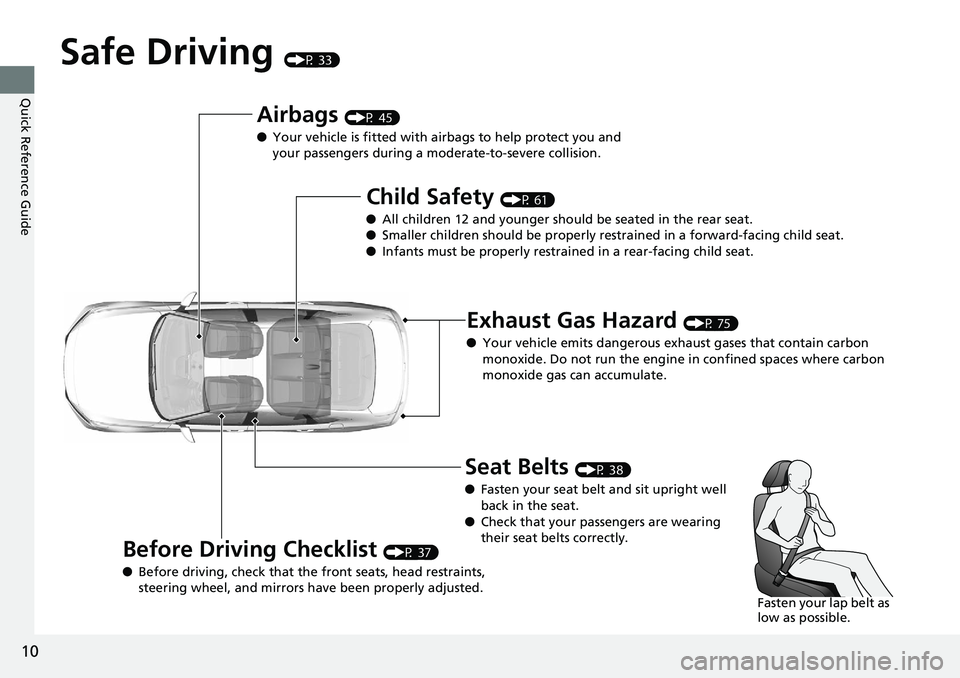
Airbags (P 45)
● Your vehicle is fitted with ai rbags to help protect you and
your passengers during a moderate-to-severe collision.
Child Safety (P 61)
● All children 12 and younger should be seated in the rear seat.
● Smaller children should be properly restra ined in a forward-facing child seat.
● Infants must be properly restraine d in a rear-facing child seat.
Exhaust Gas Hazard (P 75)
● Your vehicle emits dangerous exhaust gases that contain carbon
monoxide. Do not run the engine in confined spaces where carbon
monoxide gas can accumulate.
Before Driving Checklist (P 37)
● Before driving, check that the front seats, head restraints,
steering wheel, and mirrors have been properly adjusted. Seat Belts (P 38)
● Fasten your seat belt and sit upright well
back in the seat.
● Check that your passengers are wearing
their seat belts correctly.
Fasten your lap belt as
low as possible.
Page 16 of 727
14
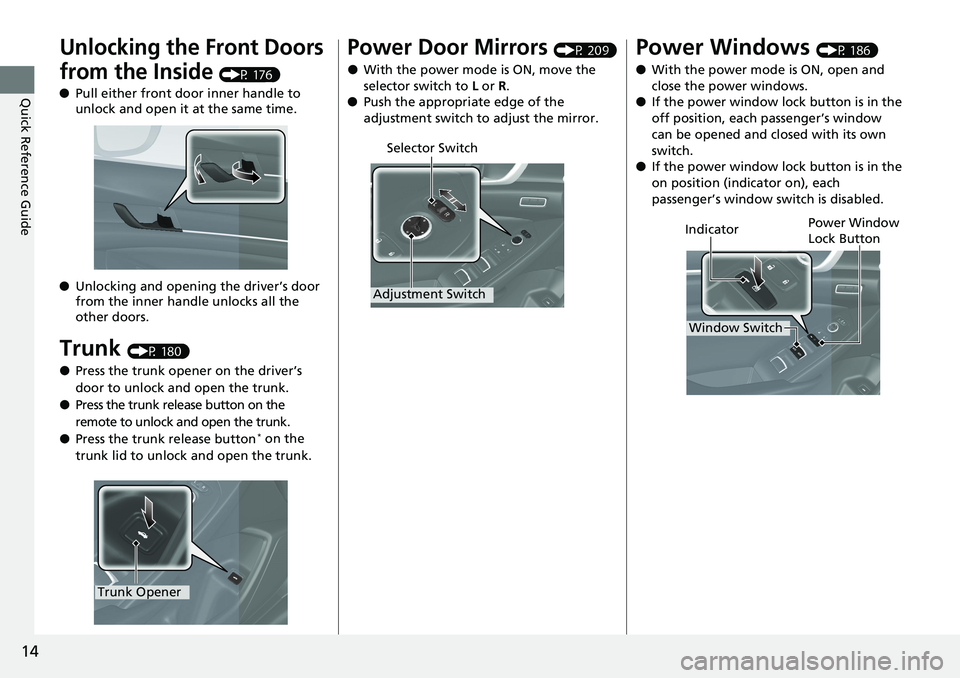
Quick Reference Guide Unlocking the Front Doors
from the Inside (P 176)
● Pull either front door inner handle to
unlock and open it at the same time.
● Unlocking and opening the driver’s door
from the inner handle unlocks all the
other doors.
Trunk (P 180)
● Press the trunk opener on the driver’s
door to unlock and open the trunk.
● Press the trunk release button on the
remote to unlock and open the trunk.
● Press the trunk release button *
on the
trunk lid to unlock and open the trunk.
Trunk Opener Power Door Mirrors (P 209)
● With the power mode is ON, move the
selector switch to L or R .
● Push the appropriate edge of the
adjustment switch to adjust the mirror.
Selector Switch
Adjustment Switch
Power Windows (P 186)
● With the power mode is ON, open and
close the power windows.
● If the power window lock button is in the
off position, each passenger’s window
can be opened and closed with its own
switch.
● If the power window lock button is in the
on position (indicator on), each
passenger’s window switch is disabled.
Power Window
Lock Button
Window SwitchIndicator
Page 27 of 727
25
Quick Reference Guide
Honda Sensing ® (P 507)
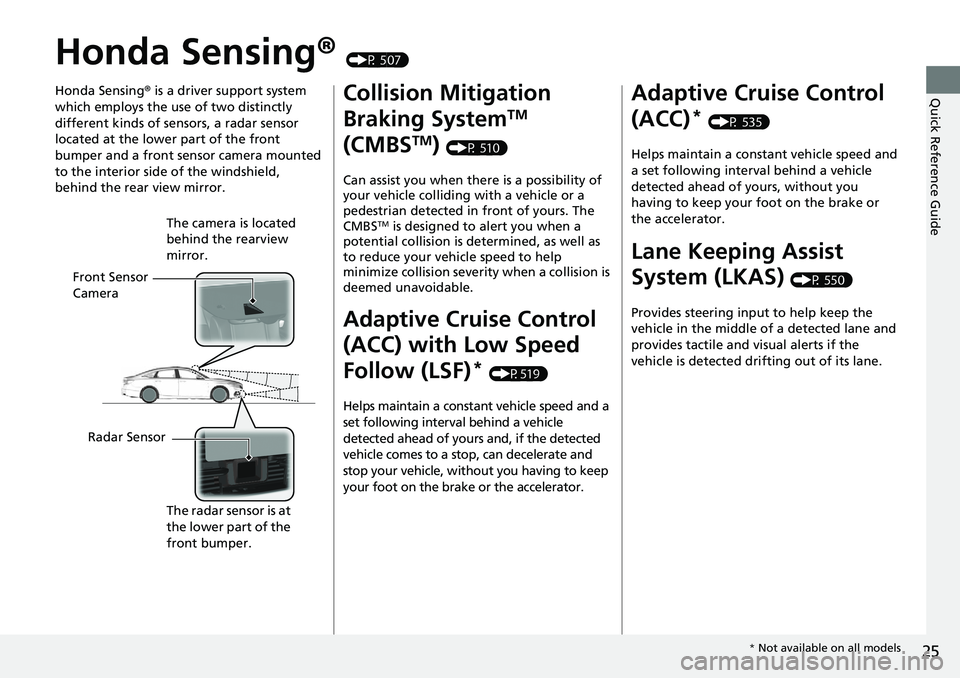
Honda Sensing ® is a driver support system
which employs the use of two distinctly
different kinds of sensors, a radar sensor
located at the lower part of the front
bumper and a front sensor camera mounted
to the interior side of the windshield,
behind the rear view mirror.
Front Sensor
Camera The camera is located
behind the rearview
mirror.
Radar Sensor
The radar sensor is at
the lower part of the
front bumper. Collision Mitigation
Braking System TM
(CMBS TM
) (P 510)
Can assist you when there is a possibility of
your vehicle colliding with a vehicle or a
pedestrian detected in front of yours. The
CMBS TM
is designed to alert you when a
potential collision is determined, as well as
to reduce your vehicle speed to help
minimize collision severity when a collision is
deemed unavoidable.
Adaptive Cruise Control
(ACC) with Low Speed
Follow (LSF) *
(P519)
Helps maintain a constant vehicle speed and a
set following interval behind a vehicle
detected ahead of yours and, if the detected
vehicle comes to a stop, can decelerate and
stop your vehicle, without you having to keep
your foot on the brake or the accelerator. Adaptive Cruise Control
(ACC) *
(P 535)
Helps maintain a constant vehicle speed and
a set following interval behind a vehicle
detected ahead of yours, without you
having to keep your foot on the brake or
the accelerator.
Lane Keeping Assist
System (LKAS) (P 550)
Provides steering input to help keep the
vehicle in the middle of a detected lane and
provides tactile and visual alerts if the
vehicle is detected drifting out of its lane.
* Not available on all models
Page 165 of 727
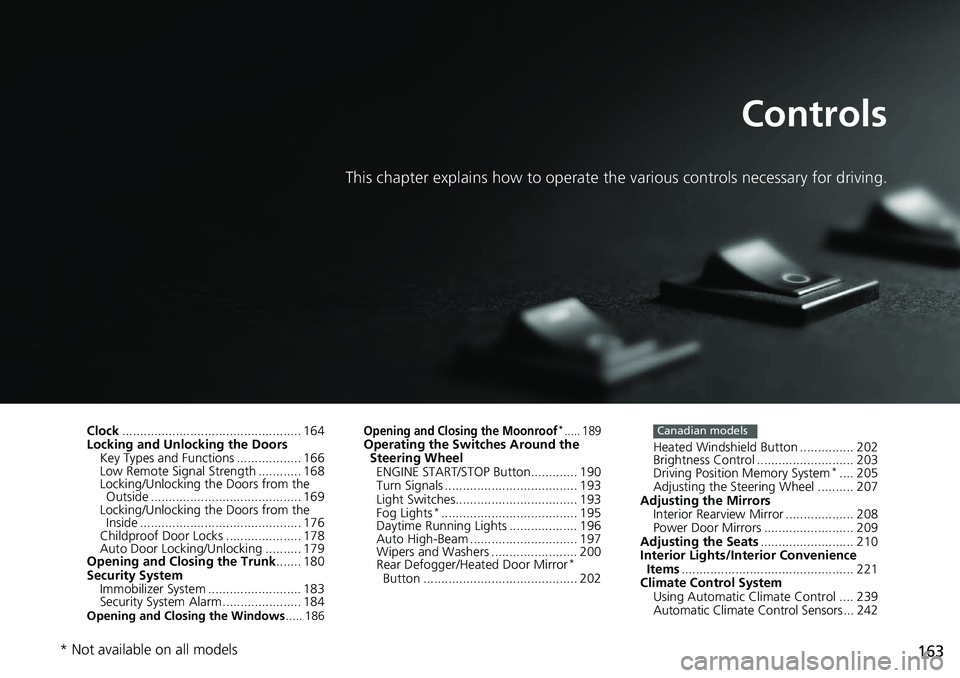
163Controls This chapter explains how to operate th e various controls necessary for driving.
Clock .................................................. 164
Locking and Unlocking the Doors
Key Types and Functions .................. 166
Low Remote Signal Strength ............ 168
Locking/Unlocking the Doors from the
Outside .......................................... 169
Locking/Unlocking the Doors from the
Inside ............................................. 176
Childproof Door Locks ..................... 178
Auto Door Locking/Unlocking .......... 179
Opening and Closing the Trunk ....... 180
Security System
Immobilizer System .......................... 183
Security System Alarm ...................... 184
Opening and Closing the Windows ..... 186 Opening and Closing the Moonroof *
..... 189
Operating the Switches Around the
Steering Wheel
ENGINE START/STOP Button............. 190
Turn Signals ..................................... 193
Light Switches.................................. 193
Fog Lights *
...................................... 195
Daytime Running Lights ................... 196
Auto High-Beam .............................. 197
Wipers and Washers ........................ 200
Rear Defogger/Heat ed Door Mirror *
Button ........................................... 202 Heated Windshield Button ............... 202
Brightness Control ........................... 203
Driving Position Memory System *
.... 205
Adjusting the Steering Wheel .......... 207
Adjusting the Mirrors
Interior Rearview Mirror ................... 208
Power Door Mirrors ......................... 209
Adjusting the Seats .......................... 210
Interior Lights/Interior Convenience
Items ................................................ 221
Climate Control System
Using Automatic Climate Control .... 239
Automatic Climate Control Sensors ... 242 Canadian models
* Not available on all models
Page 204 of 727
202 uu Operating the Switches Around the Steering Wheel u Rear Defogger/Heated Door Mirror *
Button
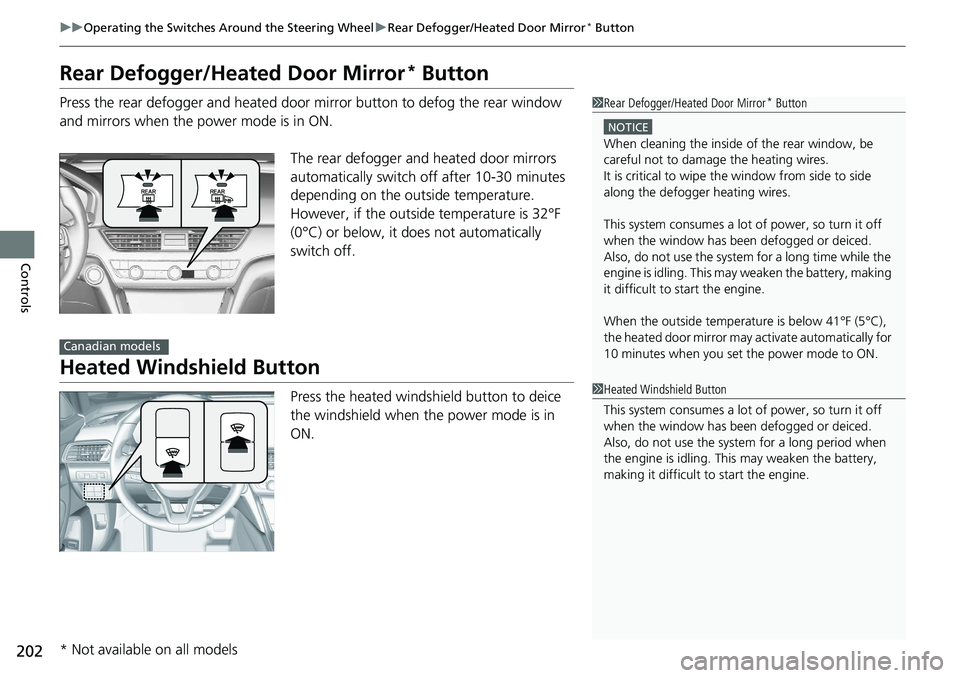
Controls Rear Defogger/Heated Door Mirror *
ButtonPress the rear defogger and heated door mirror button to defog the rear window
and mirrors when the power mode is in ON.
The rear defogger and heated door mirrors
automatically switch off after 10-30 minutes
depending on the outside temperature.
However, if the outsid e temperature is 32°F
(0°C) or below, it does not automatically
switch off.
Heated Windshield Button Press the heated windshield button to deice
the windshield when the power mode is in
ON. 1 Rear Defogger/Heated Door Mirror *
ButtonNOTICE
When cleaning the inside of the rear window, be
careful not to damage the heating wires.
It is critical to wipe th e window from side to side
along the defogger heating wires.
This system consumes a lot of power, so turn it off
when the window has been defogged or deiced.
Also, do not use the system for a long time while the
engine is idling. This may weaken the battery, making
it difficult to start the engine.
When the outside temperature is below 41