key HONDA ACCORD SEDAN 2015 9.G Technology Reference Guide
[x] Cancel search | Manufacturer: HONDA, Model Year: 2015, Model line: ACCORD SEDAN, Model: HONDA ACCORD SEDAN 2015 9.GPages: 15, PDF Size: 1.73 MB
Page 4 of 15
45
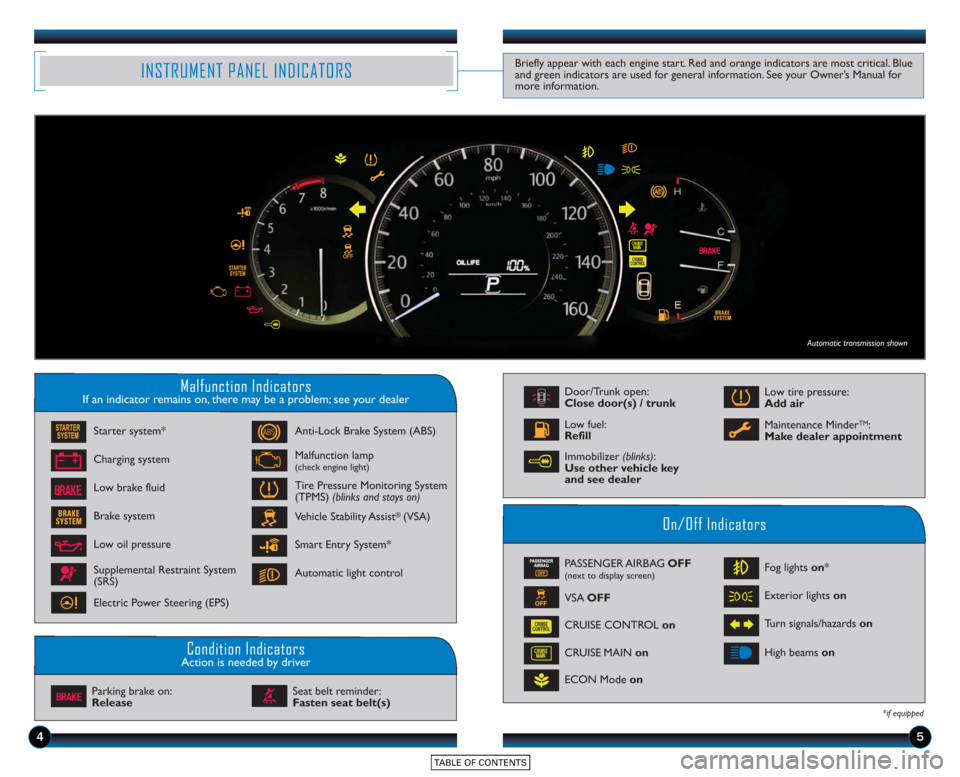
Malfunction IndicatorsIf an indicator remains on, there may be a problem; see your dealer
On/Off Indicators
Condition IndicatorsAction is needed by driver
PASSENGER AIRBAG OFF(next to display screen)
VSA OFF
CRUISE CONTROL on
ECON Mode on Fog lights
on*
Exterior lights on
Turn signals/hazards on
CRUISE MAIN on High beams
on
*if equipped
Charging system
Low brake fluid Anti-Lock Brake System (ABS)
Malfunction lamp(check engine light)
Tire Pressure Monitoring System
(TPMS) (blinks and stays on)
Vehicle Stability Assist
®(VSA)
Parking brake on:
Release Seat belt reminder:
Fasten seat belt(s)
INSTRUMENT PANEL INDICATORSBriefly appear with each engine start. Red and orange indicators are most critical. Blue
and green indicators are used for general information. See your Owner’s Manual for
more information.
Starter system*
Brake system
Smart Entry System*
Automatic light control
Low oil pressure
Supplemental Restraint System
(SRS)
Electric Power Steering (EPS)
Door/Trunk open:
Close door(s) / trunk
Low tire pressure:
Add air
Maintenance Minder
TM:
Make dealer appointmentLow fuel:
Refill
Automatic transmission shown
Immobilizer (blinks):
Use other vehicle key
and see dealer
Page 7 of 15
10
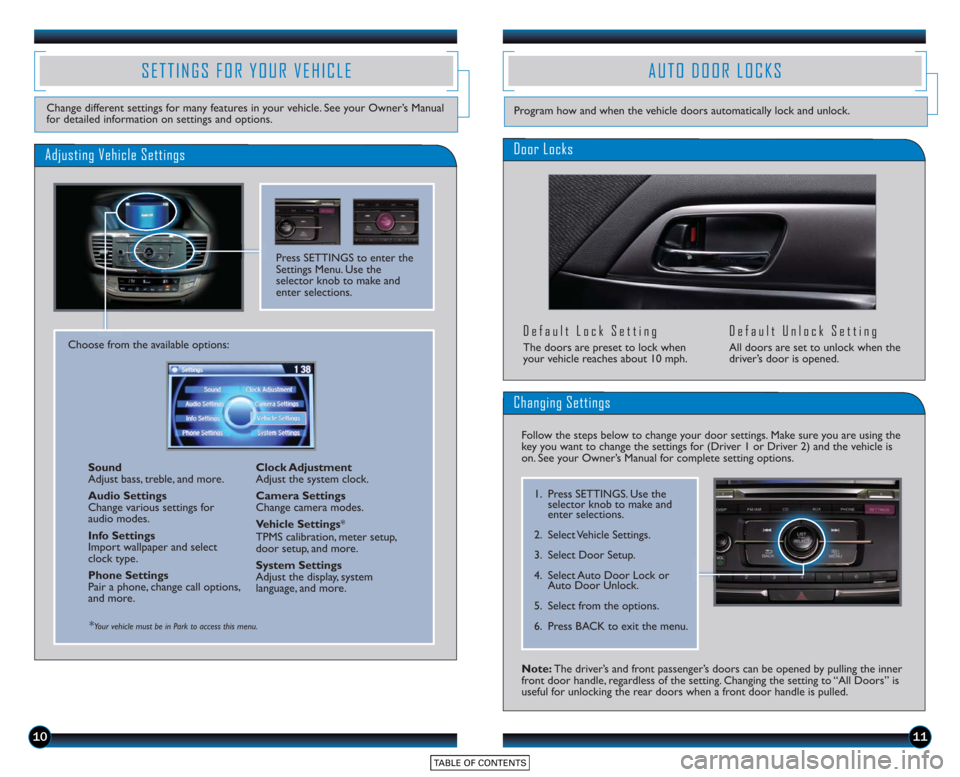
SETTINGS FOR YOUR VEHICLE
Change different settings for many features in your vehicle. See your Owner’s Manual
for detailed information on settings and options.
Adjusting Vehicle Settings
Press SETTINGS to enter the
Settings Menu. Use the
selector knob to make and
enter selections.
Choose from the available options:Sound
Adjust bass, treble, and more.
Audio Settings
Change various settings for
audio modes.
Info Settings
Import wallpaper and select
clock type.
Phone Settings
Pair a phone, change call options,
and more. Clock Adjustment
Adjust the system clock.
Camera Settings
Change camera modes.
Vehicle Settings
*
TPMS calibration, meter setup,
door setup, and more.
System Settings
Adjust the display, system
language, and more.
*Your vehicle must be in Park to access this menu.
AUTO DOOR LOCKS
Door Locks
Default Lock Setting
The doors are preset to lock when
your vehicle reaches about 10 mph.
Default Unlock Setting
All doors are set to unlock when the
driver’s door is opened.
11
Program how and when the vehicle doors automatically lock and unlock.
Note: The driver’s and front passenger’s doors can be opened by pulling the inner
front door handle, regardless of the setting. Changing the setting to “All Doors” is
useful for unlocking the rear doors when a front door handle is pulled.
Changing Settings
Follow the steps below to change your door settings. Make sure you are using the
key you want to change the settings for (Driver 1 or Driver 2) and the vehicle is
on. See your Owner’s Manual for complete setting options.
1. Press SETTINGS. Use the selector knob to make and
enter selections.
2. Select Vehicle Settings.
3. Select Door Setup.
4. Select Auto Door Lock or Auto Door Unlock.
5. Select from the options.
6. Press BACK to exit the menu.