phone HONDA ACCORD SEDAN 2015 9.G Technology Reference Guide
[x] Cancel search | Manufacturer: HONDA, Model Year: 2015, Model line: ACCORD SEDAN, Model: HONDA ACCORD SEDAN 2015 9.GPages: 15, PDF Size: 1.73 MB
Page 7 of 15
10
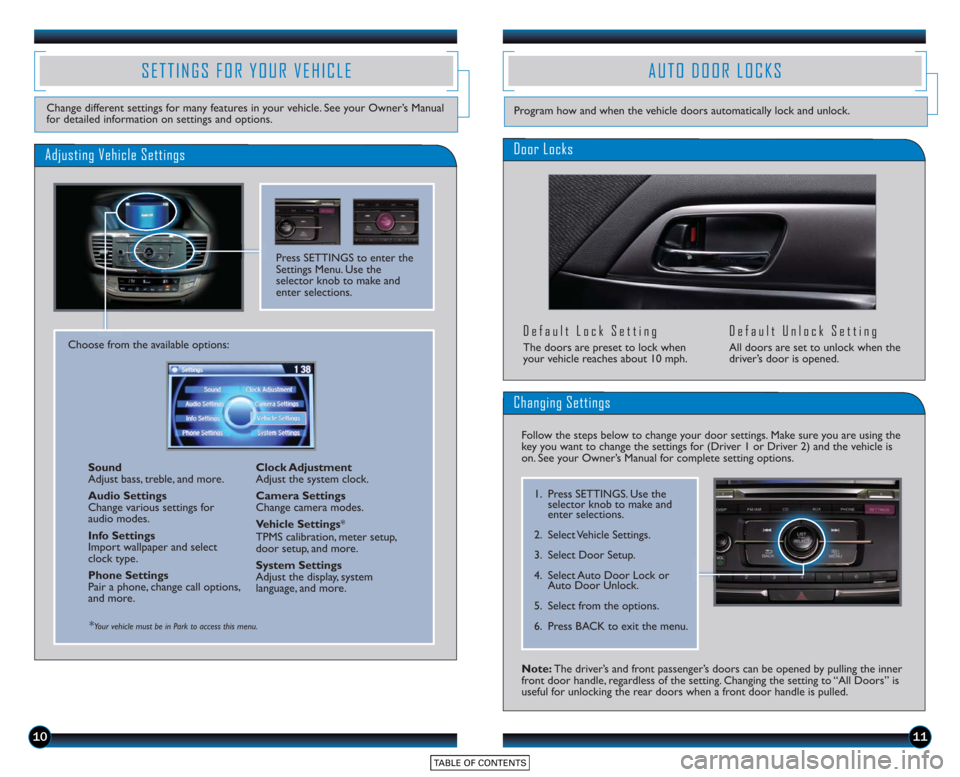
SETTINGS FOR YOUR VEHICLE
Change different settings for many features in your vehicle. See your Owner’s Manual
for detailed information on settings and options.
Adjusting Vehicle Settings
Press SETTINGS to enter the
Settings Menu. Use the
selector knob to make and
enter selections.
Choose from the available options:Sound
Adjust bass, treble, and more.
Audio Settings
Change various settings for
audio modes.
Info Settings
Import wallpaper and select
clock type.
Phone Settings
Pair a phone, change call options,
and more. Clock Adjustment
Adjust the system clock.
Camera Settings
Change camera modes.
Vehicle Settings
*
TPMS calibration, meter setup,
door setup, and more.
System Settings
Adjust the display, system
language, and more.
*Your vehicle must be in Park to access this menu.
AUTO DOOR LOCKS
Door Locks
Default Lock Setting
The doors are preset to lock when
your vehicle reaches about 10 mph.
Default Unlock Setting
All doors are set to unlock when the
driver’s door is opened.
11
Program how and when the vehicle doors automatically lock and unlock.
Note: The driver’s and front passenger’s doors can be opened by pulling the inner
front door handle, regardless of the setting. Changing the setting to “All Doors” is
useful for unlocking the rear doors when a front door handle is pulled.
Changing Settings
Follow the steps below to change your door settings. Make sure you are using the
key you want to change the settings for (Driver 1 or Driver 2) and the vehicle is
on. See your Owner’s Manual for complete setting options.
1. Press SETTINGS. Use the selector knob to make and
enter selections.
2. Select Vehicle Settings.
3. Select Door Setup.
4. Select Auto Door Lock or Auto Door Unlock.
5. Select from the options.
6. Press BACK to exit the menu.
Page 10 of 15
1617
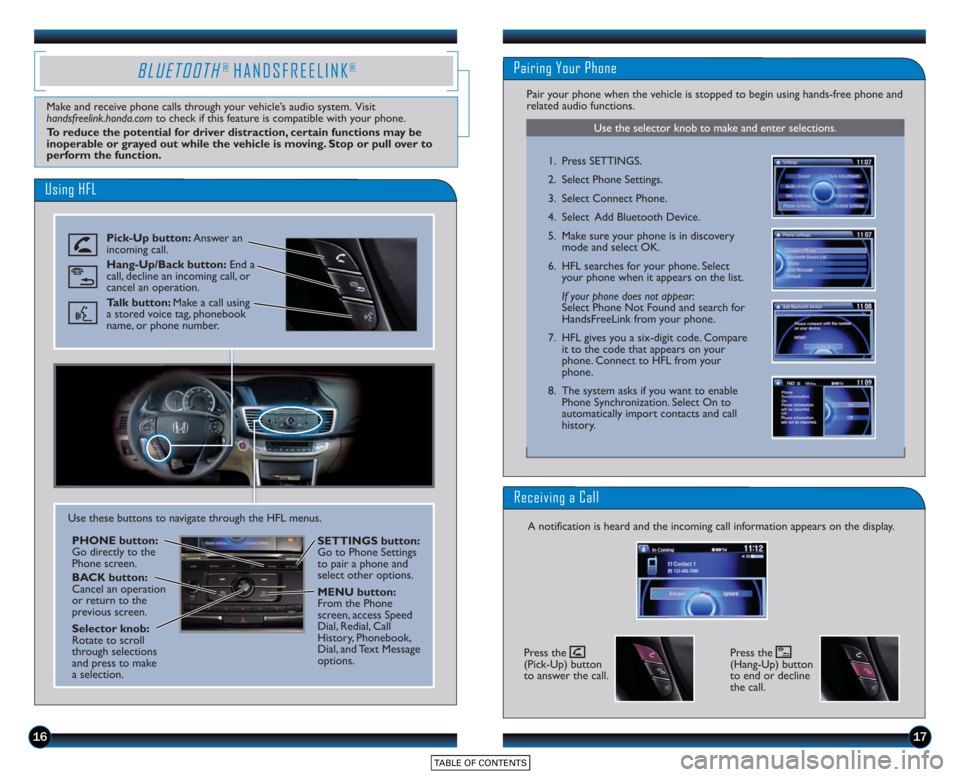
Using HFL
Pick-Up button:Answer an
incoming call.
Hang-Up/Back button: End a
call, decline an incoming call, or
cancel an operation.
Talk button: Make a call using
a stored voice tag, phonebook
name, or phone number.
BLUETOOTH® HANDSFREELINK®
Make and receive phone calls through your vehicle’s audio system. Visit
handsfreelink.honda.com to check if this feature is compatible with your phone.
To reduce the potential for driver distraction, certain functions may be
inoperable or grayed out while the vehicle is moving. Stop or pull over to
perform the function.
Use these buttons to navigate through the HFL menus.
PHONE button:
Go directly to the
Phone screen.
BACK button:
Cancel an operation
or return to the
previous screen.
Selector knob:
Rotate to scroll
through selections
and press to make
a selection. SETTINGS button:
Go to Phone Settings
to pair a phone and
select other options.
MENU button:
From the Phone
screen, access Speed
Dial, Redial, Call
History, Phonebook,
Dial, and Text Message
options.
Use the selector knob to make and enter selections.
Pairing Your Phone
Pair your phone when the vehicle is stopped to begin using hands-free phone and
related audio functions.
1. Press SETTINGS.
2. Select Phone Settings.
3. Select Connect Phone.
4. Select Add Bluetooth Device.
5. Make sure your phone is in discovery
mode and select OK.
6. HFL searches for your phone. Select your phone when it appears on the list.
If your phone does not appear :
Select Phone Not Found and search for
HandsFreeLink from your phone.
7. HFL gives you a six-digit code. Compare it to the code that appears on your
phone. Connect to HFL from your
phone.
8. The system asks if you want to enable Phone Synchronization. Select On to
automatically import contacts and call
history.
Receiving a Call
A notification is heard and the incoming call information appears on the display.
Press the
(Pick-Up) button
to answer the call.Press the
(Hang-Up) button
to end or decline
the call.
Page 11 of 15
1819
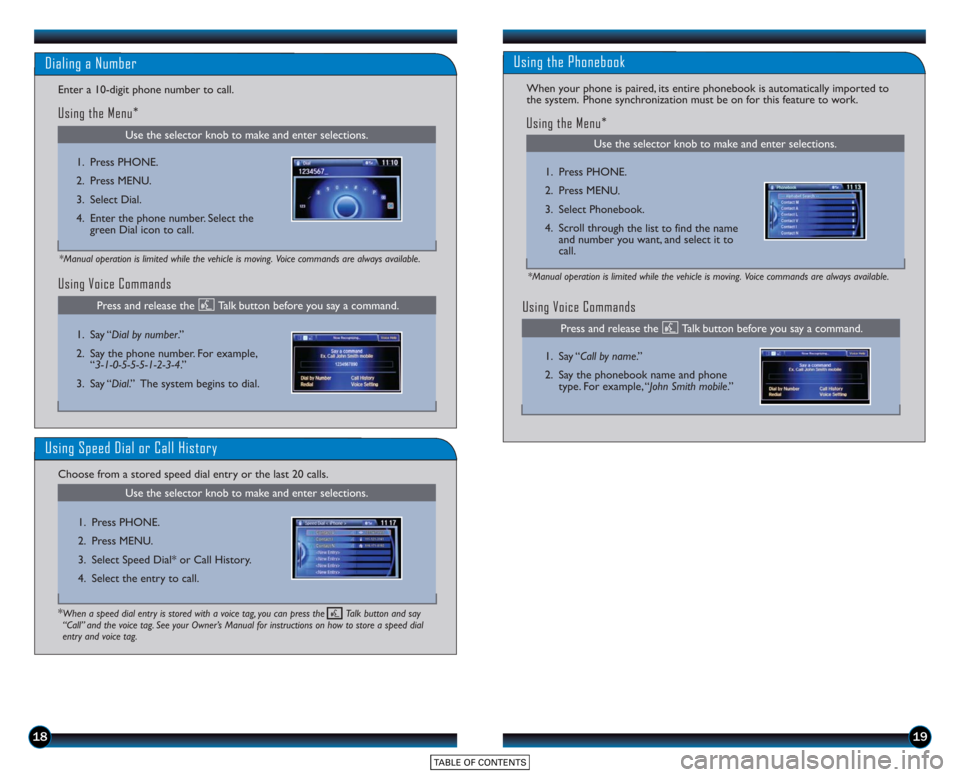
Using Voice Commands
Use the selector knob to make and enter selections.
Dialing a Number
Enter a 10-digit phone number to call.
Using the Menu*
*Manual operation is limited while the vehicle is moving. Voice commands are always available.
1. Press PHONE.
2. Press MENU.
3. Select Dial.
4. Enter the phone number. Select thegreen Dial icon to call.
1. Say “Dial by number .”
2. Say the phone number. For example, “3-1-0-5-5-5-1-2-3-4.”
3. Say “Dial.” The system begins to dial.
Using Speed Dial or Call History
Choose from a stored speed dial entry or the last 20 calls.
Use the selector knob to make and enter selections.
1. Press PHONE.
2. Press MENU.
3. Select Speed Dial* or Call History.
4. Select the entry to call.
*When a speed dial entry is stored with a voice tag, you can press the Talk button and say
“Call” and the voice tag. See your Owner’s Manual for instructions on how to store a speed dial
entry and voice tag.
Press and release the Talk button before you say a command.
Use the selector knob to make and enter selections.
Using the Phonebook
When your phone is paired, its entire phonebook is automatically imported to
the system. Phone synchronization must be on for this feature to work.
Using Voice Commands
Using the Menu*
*Manual operation is limited while the vehicle is moving. Voice commands are always available.
1. Press PHONE.
2. Press MENU.
3. Select Phonebook.
4. Scroll through the list to find the name and number you want, and select it to
call.
1. Say “ Call by name .”
2. Say the phonebook name and phone type. For example, “John Smith mobile .”
Press and release the Talk button before you say a command.
Page 12 of 15
2021
SMS TEXT MESSAGING
Use the selector knob to make and enter selections.
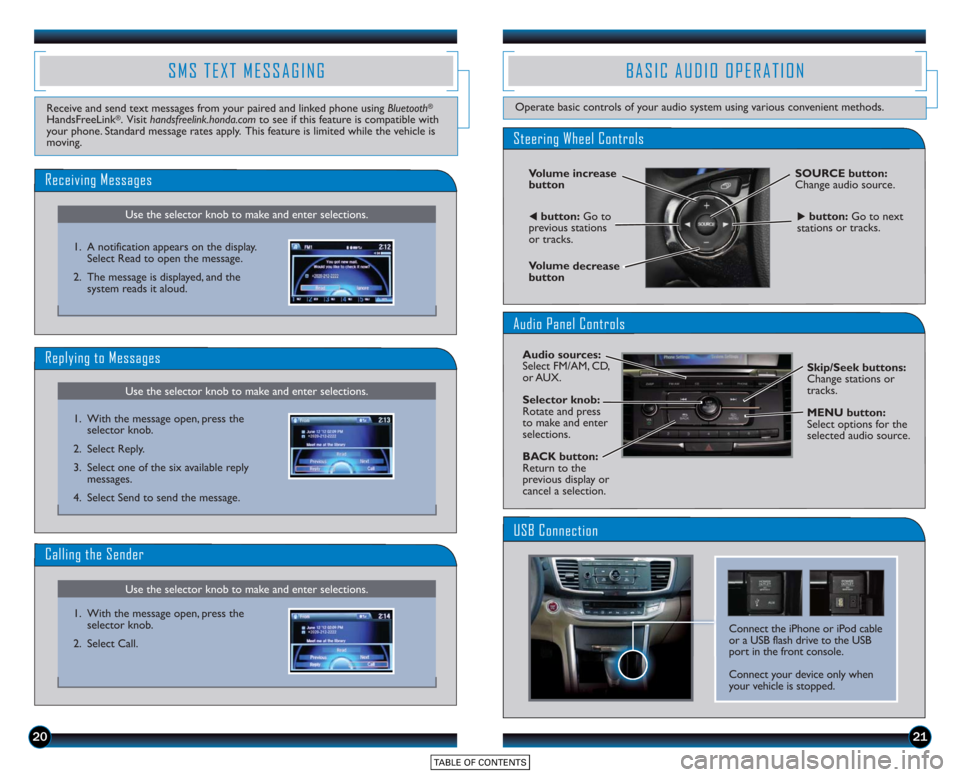
Receiving Messages
Use the selector knob to make and enter selections.
Replying to Messages
Receive and send text messages from your paired and linked phone using Bluetooth®
HandsFreeLink®. Visit handsfreelink.honda.comto see if this feature is compatible with
your phone. Standard message rates apply. This feature is limited while the vehicle is
moving.
1. A notification appears on the display.Select Read to open the message.
2. The message is displayed, and the system reads it aloud.
1. With the message open, press the selector knob.
2. Select Reply.
3. Select one of the six available reply messages.
4. Select Send to send the message.
Use the selector knob to make and enter selections.
Calling the Sender
1. With the message open, press the selector knob.
2. Select Call.
BASIC AUDIO OPERATION
Operate basic controls of your audio system using various convenient methods.
Steering Wheel Controls
Volume increase
button
Volume decrease
button
SOURCE button:
Change audio source.
tbutton: Go to
previous stations
or tracks.ubutton: Go to next
stations or tracks.
Audio Panel Controls
Audio sources:
Select FM/AM, CD,
or AUX.
Selector knob:
Rotate and press
to make and enter
selections.
BACK button:
Return to the
previous display or
cancel a selection. Skip/Seek buttons:
Change stations or
tracks.
MENU button:
Select options for the
selected audio source.
Connect the iPhone or iPod cable
or a USB flash drive to the USB
port in the front console.
Connect your device only when
your vehicle is stopped.
USB Connection
Page 13 of 15
2223
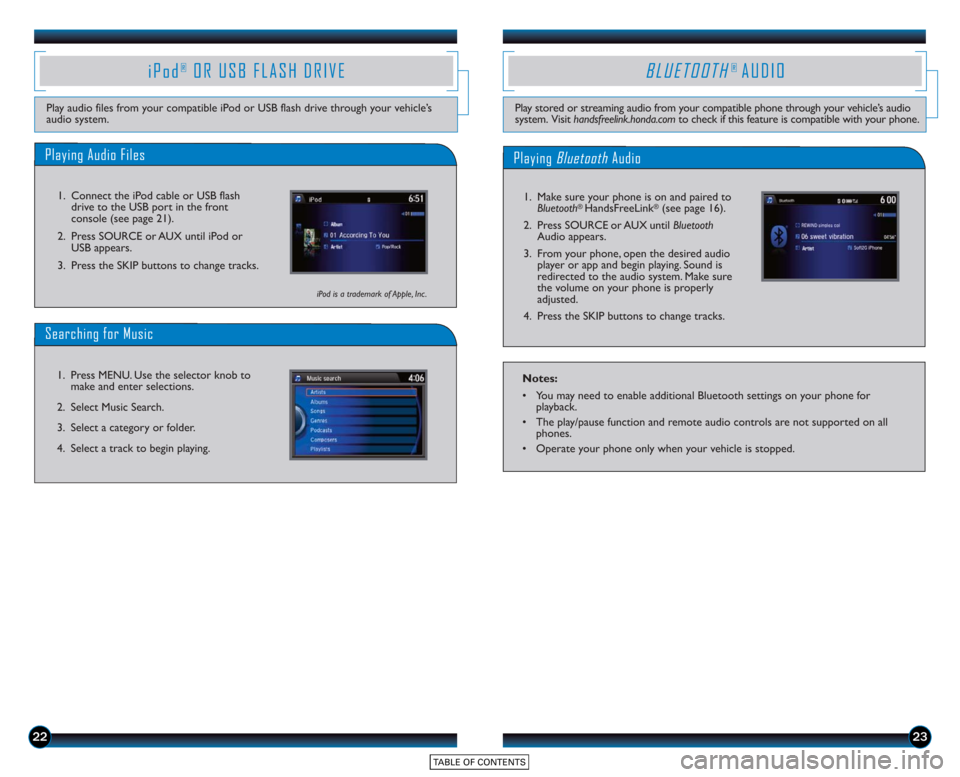
Playing Audio Files
iPod®OR USB FLASH DRIVE
Play audio files from your compatible iPod or USB flash drive through your vehicle’s
audio system.1. Connect the iPod cable or USB flash drive to the USB port in the front
console (see page 21).
2. Press SOURCE or AUX until iPod or USB appears.
3. Press the SKIP buttons to change tracks.
Searching for Music
1. Press MENU. Use the selector knob to make and enter selections.
2. Select Music Search.
3. Select a category or folder.
4. Select a track to begin playing.
iPod is a trademark of Apple, Inc .
BLUETOOTH® AUDIO
Play stored or streaming audio from your compatible phone through your vehicle’s audio
system. Visit handsfreelink.honda.com to check if this feature is compatible with your phone.
Playing BluetoothAudio
1. Make sure your phone is on and paired to
Bluetooth® HandsFreeLink®(see page 16).
2. Press SOURCE or AUX until Bluetooth
Audio appears.
3. From your phone, open the desired audio player or app and begin playing. Sound is
redirected to the audio system. Make sure
the volume on your phone is properly
adjusted.
4. Press the SKIP buttons to change tracks.
Notes:
• You may need to enable additional Bluetooth settings on your phone for playback.
• The play/pause function and remote audio controls are not supported on all phones.
• Operate your phone only when your vehicle is stopped.
Page 14 of 15
2425
Play and operate Pandora from your compatible phone through your vehicle’s audio
system. Visit handsfreelink.honda.com to check if this feature is compatible with your
phone. Standard data rates apply.
PANDORA®
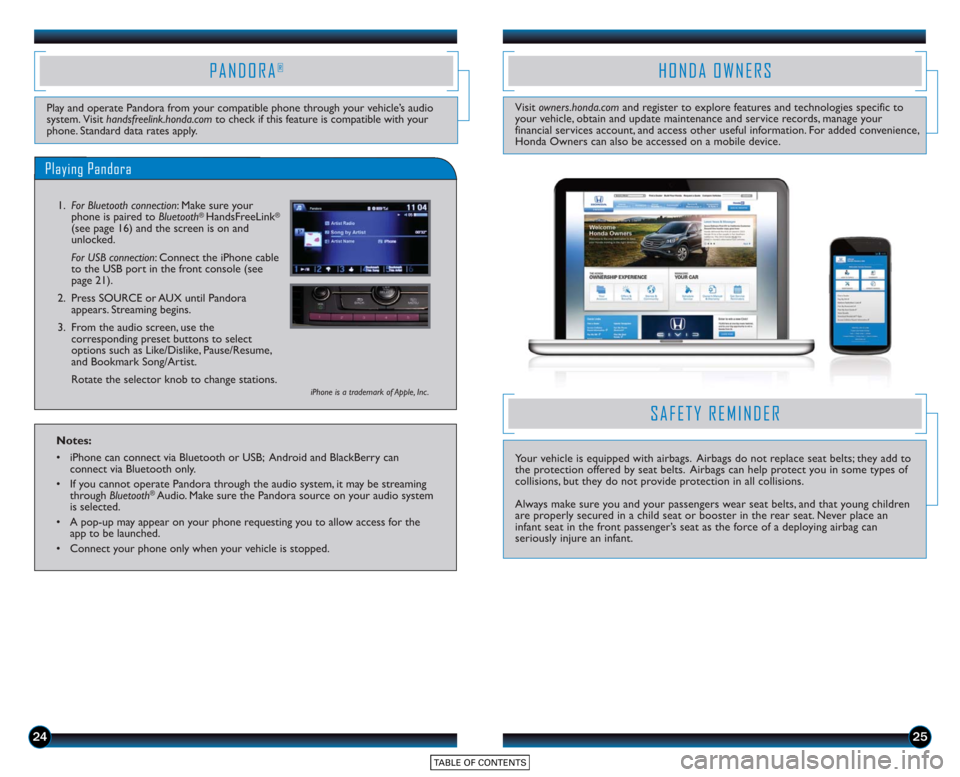
Playing Pandora
1.For Bluetooth connection : Make sure your
phone is paired to Bluetooth® HandsFreeLink®
(see page 16) and the screen is on and
unlocked.
For USB connection: Connect the iPhone cable
to the USB port in the front console (see
page 21).
2. Press SOURCE or AUX until Pandora appears. Streaming begins.
3. From the audio screen, use the corresponding preset buttons to select
options such as Like/Dislike, Pause/Resume,
and Bookmark Song/Artist.
Rotate the selector knob to change stations.
iPhone is a trademark of Apple, Inc .
Notes:
• iPhone can connect via Bluetooth or USB; Android and BlackBerry canconnect via Bluetooth only.
• If you cannot operate Pandora through the audio system, it may be streaming through Bluetooth
®Audio. Make sure the Pandora source on your audio system
is selected.
• A pop-up may appear on your phone requesting you to allow access for the app to be launched.
• Connect your phone only when your vehicle is stopped.
HONDA OWNERS
Visit owners.honda.com and register to explore features and technologies specific to
your vehicle, obtain and update maintenance and service records, manage your
financial services account, and access other useful information. For added convenience,
Honda Owners can also be accessed on a mobile device.
SAFETY REMINDER
Your vehicle is equipped with airbags. Airbags do not replace seat belts; they add to
the protection offered by seat belts. Airbags can help protect you in some types of
collisions, but they do not provide protection in all collisions.
Always make sure you and your passengers wear seat belts, and that young children
are properly secured in a child seat or booster in the rear seat. Never place an
infant seat in the front passenger’s seat as the force of a deploying airbag can
seriously injure an infant.