tire pressure HONDA ACCORD SEDAN 2015 9.G Technology Reference Guide
[x] Cancel search | Manufacturer: HONDA, Model Year: 2015, Model line: ACCORD SEDAN, Model: HONDA ACCORD SEDAN 2015 9.GPages: 15, PDF Size: 1.73 MB
Page 2 of 15
........................................................................\
16
SMS Text Messaging ........................................................................")
Bluetooth®HandsFreeLink®(HFL)........................................................................\
16
SMS Text Messaging ........................................................................\
........................20
Basic Audio Operation ........................................................................\
..................21
iPod
®or USB Flash Drive ........................................................................\
.............22
Bluetooth
®Audio ........................................................................\
..............................23
Pandora
®........................................................................\
...........................................24
Honda Owners ........................................................................\
...............................25
Safety Reminder ........................................................................\
..............................25
Fuel Recommendation........................................................................\
...................26
Honda Roadside Assistance........................................................................\
..........26
Smart Entry with Push Button Start* ...................................................................2
Instrument Panel Indicators ........................................................................\
...........4
Information Display ........................................................................\
..........................6
Eco Assist
TM........................................................................\
........................................8
Tire Pressure Monitoring System (TPMS)...........................................................9
Settings for Your Vehicle ........................................................................\
................10
Auto Door Locks ........................................................................\
...........................11
One-Touch Turn Signal..................................................................\
.........................12
Auto Headlights with Wiper Integration...........................................................12
Rearview Camera ........................................................................\
...........................13
LaneWatch
TM* ........................................................................\
.................................14
Intelligent Multi-Information Display (i-MID) ...................................................15
TECHNOLOGY REFERENCE GUIDE
This Technology Reference Guide is designed to help you
get acquainted with your 2015 Honda Accord Sedan LX,
Sport, or EX and provide basic instructions on some of its
technology and convenience features.
This guide is not intended to be a substitute for the
Owner’s Manual. For more detailed information on vehicle
controls and operation, please refer to the respective
sections in the Owner’s Manual.
*EX only
AUDIO p. 21
BLUETOOTH®
HANDSFREELINK®p. 16
ECO
ASSIST
TMp. 8
INSTRUMENT
PANEL p. 4
i-MID p. 15
EX shown
Page 4 of 15
45
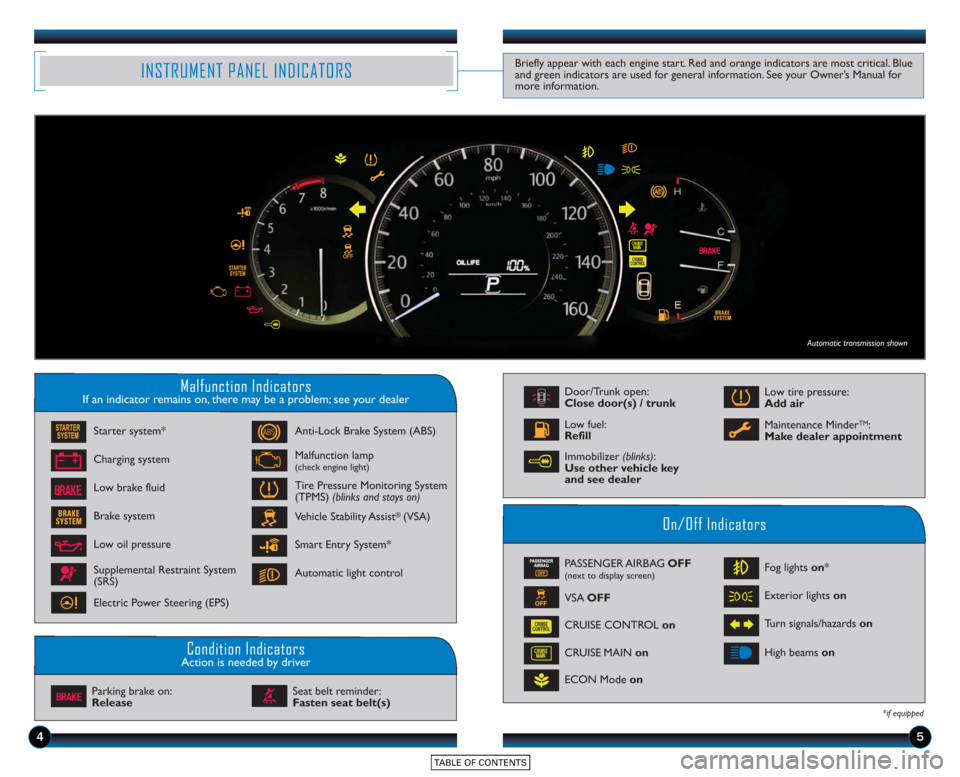
Malfunction IndicatorsIf an indicator remains on, there may be a problem; see your dealer
On/Off Indicators
Condition IndicatorsAction is needed by driver
PASSENGER AIRBAG OFF(next to display screen)
VSA OFF
CRUISE CONTROL on
ECON Mode on Fog lights
on*
Exterior lights on
Turn signals/hazards on
CRUISE MAIN on High beams
on
*if equipped
Charging system
Low brake fluid Anti-Lock Brake System (ABS)
Malfunction lamp(check engine light)
Tire Pressure Monitoring System
(TPMS) (blinks and stays on)
Vehicle Stability Assist
®(VSA)
Parking brake on:
Release Seat belt reminder:
Fasten seat belt(s)
INSTRUMENT PANEL INDICATORSBriefly appear with each engine start. Red and orange indicators are most critical. Blue
and green indicators are used for general information. See your Owner’s Manual for
more information.
Starter system*
Brake system
Smart Entry System*
Automatic light control
Low oil pressure
Supplemental Restraint System
(SRS)
Electric Power Steering (EPS)
Door/Trunk open:
Close door(s) / trunk
Low tire pressure:
Add air
Maintenance Minder
TM:
Make dealer appointmentLow fuel:
Refill
Automatic transmission shown
Immobilizer (blinks):
Use other vehicle key
and see dealer
Page 6 of 15
89
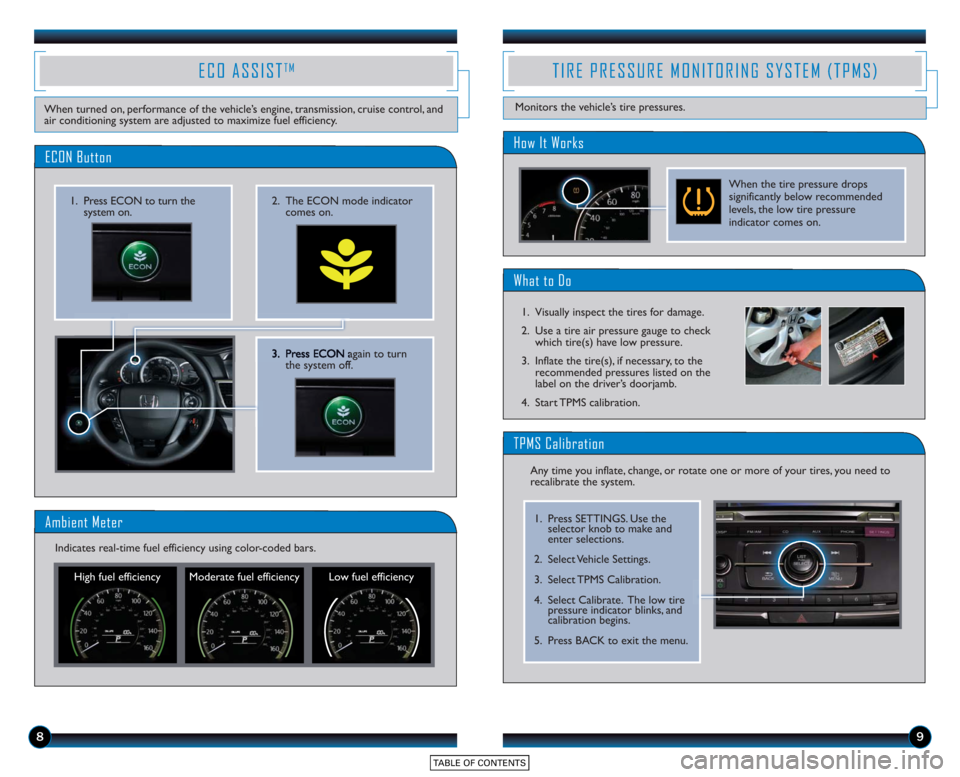
3. Press ECONagain to turn
the system off.
2. The ECON mode indicator comes on.1. Press ECON to turn thesystem on.
ECON Button
ECO ASSISTTM
When turned on, performance of the vehicle’s engine, transmission, cruise control, and
air conditioning system are adjusted to maximize fuel efficiency.
Ambient Meter
High fuel efficiency Moderate fuel efficiency Low fuel efficiency
Indicates real-time fuel efficiency using color-coded bars.
What to Do
How It Works
TIRE PRESSURE MONITORING SYSTEM (TPMS)
Monitors the vehicle’s tire pressures.
When the tire pressure drops
significantly below recommended
levels, the low tire pressure
indicator comes on.
1. Visually inspect the tires for damage.
2. Use a tire air pressure gauge to check which tire(s) have low pressure.
3. Inflate the tire(s), if necessary, to the recommended pressures listed on the
label on the driver’s doorjamb.
4. Start TPMS calibration.
Any time you inflate, change, or rotate one or more of your tires, you need to
recalibrate the system.
TPMS Calibration
1. Press SETTINGS. Use the selector knob to make and
enter selections.
2. Select Vehicle Settings.
3. Select TPMS Calibration.
4. Select Calibrate. The low tire pressure indicator blinks, and
calibration begins.
5. Press BACK to exit the menu.