cruise control HONDA ACCORD SEDAN 2019 (in English) Workshop Manual
[x] Cancel search | Manufacturer: HONDA, Model Year: 2019, Model line: ACCORD SEDAN, Model: HONDA ACCORD SEDAN 2019Pages: 727, PDF Size: 34.1 MB
Page 548 of 727
uuHonda Sensing ®u Adaptive Cruise Control (ACC)*
546
Driving
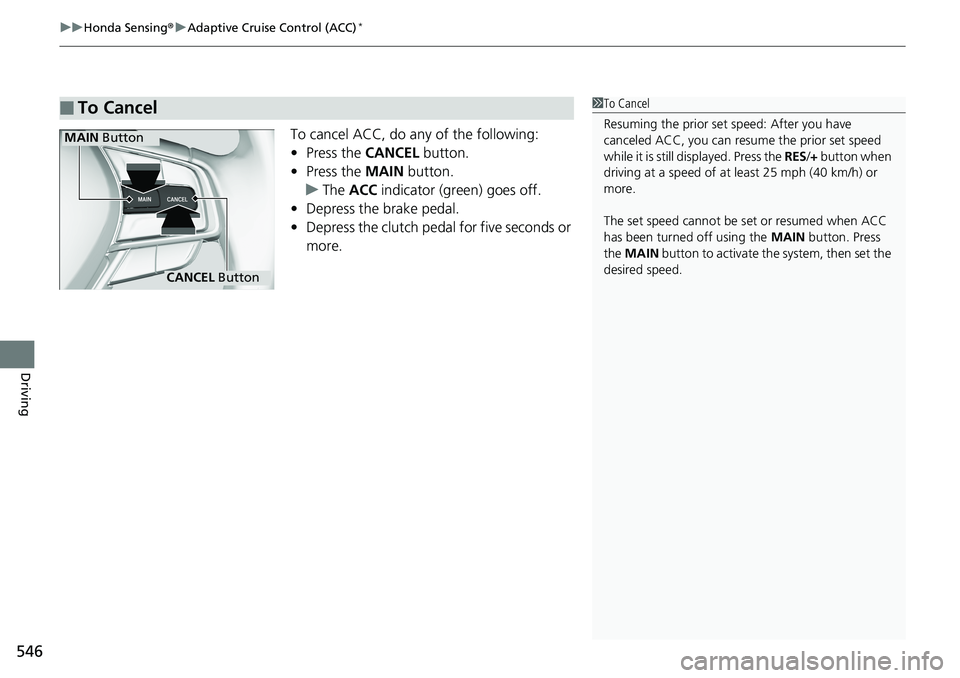
To cancel ACC, do any of the following:
• Press the CANCEL button.
• Press the MAIN button.
u The ACC indicator (green) goes off.
• Depress the brake pedal.
• Depress the clutch pedal for five seconds or
more.
■To Cancel1To Cancel
Resuming the prior set speed: After you have
canceled ACC, you can resume the prior set speed
while it is still displayed. Press the RES/+ button when
driving at a speed of at least 25 mph (40 km/h) or
more.
The set speed cannot be set or resumed when ACC
has been turned off using the MAIN button. Press
the MAIN button to activate the system, then set the
desired speed.
CANCEL Button
MAIN Button
Page 549 of 727
Continued547
uuHonda Sensing ®u Adaptive Cruise Control (ACC)*
Driving
■Automatic ca ncellation
The beeper sounds and a message appears on the driver information interface when
ACC is automatically cancel ed. Any of these conditions may cause the ACC to
automatically cancel:
• Bad weather (rain, fog, snow, etc.)
• When the radar sensor at the lower part of the front bumper gets dirty.
• The vehicle ahead of yo u cannot be detected.
• An abnormal tire condition is de tected, or the tires are skidding.
• Driving on a mountainous road, or driving off road for extended periods.
• Abrupt steering wheel movement.
• When the ABS, VSA ® or CMBS
TM is activated.
• When the ABS or VSA ® system indicator comes on.
• When you manually apply the parking brake.
• When the detected vehicle within the AC C range is too close to your vehicle.
• The camera behind the rearview mirror, or the area around the camera, including
the windshield, gets dirty.
• When the Maximum Load Limit is exceeded.
• When passing through an enclos ed space, such as tunnel.
• Ignoring shift down indication shown in the tachometer display will cancel the
ACC after about 10 seconds.
• The engine speed goes into the tachometer’s red zone.
• The engine speed goes to below 1,000 rpm.
• You shift into neutral temporarily when shifting into a higher or lower gear.
In the following cases, a buzzer sounds, ACC is deactivated, and the Cruise
Cancelled: Slope Too Steep. Watch Downhill Speed message appears in the
driver information interface.
• The vehicle has repeatedly applied the brakes to maintain the set speed (for
example, you are descending a long slope).
1 Automatic cancellation
Even though ACC has been automatically canceled,
you can still resume the prior set speed.
Wait until the condition that caused ACC to cancel
improves, then press the SET/– button.
Page 550 of 727
uuHonda Sensing ®u Adaptive Cruise Control (ACC)*
548
Driving
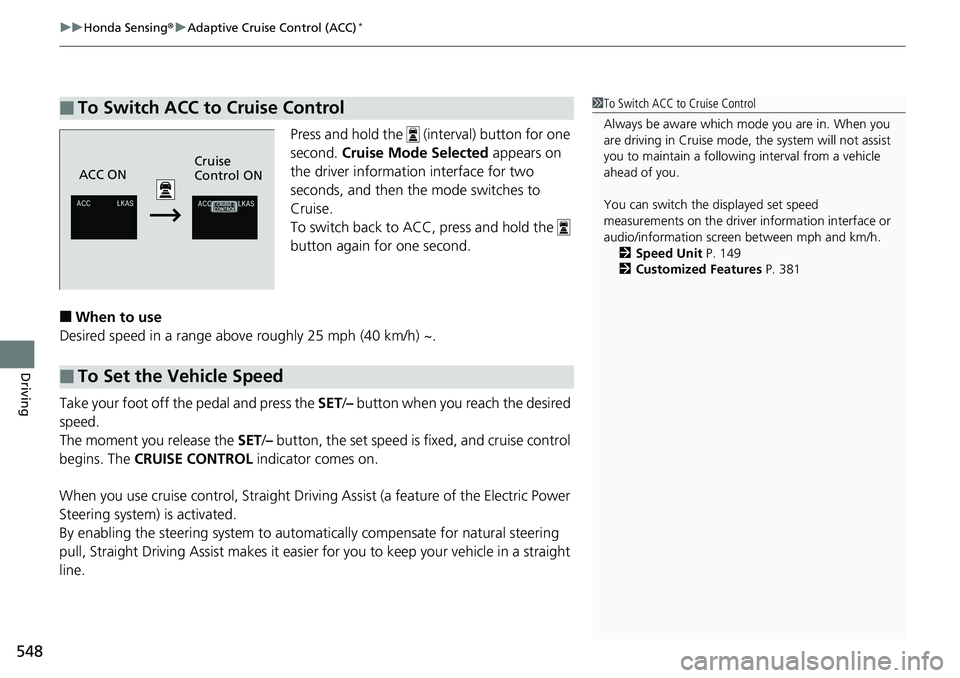
Press and hold the (interval) button for one
second. Cruise Mode Selected appears on
the driver information interface for two
seconds, and then th e mode switches to
Cruise.
To switch back to ACC, press and hold the
button again for one second.
■When to use
Desired speed in a range above roughly 25 mph (40 km/h) ~.
Take your foot off the pedal and press the SET/– button when you reach the desired
speed.
The moment you release the SET /– button, the set speed is fixed, and cruise control
begins. The CRUISE CONTROL indicator comes on.
When you use cruise control, Straight Driv ing Assist (a feature of the Electric Power
Steering system) is activated.
By enabling the steering system to automa tically compensate for natural steering
pull, Straight Driving Assist makes it easier for you to keep your vehicle in a straight
line.
■To Switch ACC to Cruise Control1 To Switch ACC to Cruise Control
Always be aware which mode you are in. When you
are driving in Cruise mode, the system will not assist
you to maintain a followi ng interval from a vehicle
ahead of you.
You can switch the displayed set speed
measurements on the driver information interface or
audio/information screen between mph and km/h. 2 Speed Unit P. 149
2 Customized Features P. 381
ACC ONCruise
Control ON
■To Set the Vehicle Speed
Page 551 of 727
549
uuHonda Sensing ®u Adaptive Cruise Control (ACC)*
Driving
• Each time you press the RES/+ or SET /– button, the vehicle speed is increased or
decreased by about 1 mph (1.6 km/h).
• If you keep the RES/+ or SET/ – button pressed, the vehicle speed increases or
decreases until you release it. This speed is then set.
To cancel cruise control, do any of the following:
• Press the CANCEL button.
• Press the MAIN button.
• Depress the brake pedal.
• Depress the clutch pedal for five seconds or more.
The CRUISE CONTROL indicator goes off.
■To Adjust the Vehicle Speed
■To Cancel1To Cancel
Resuming the prior set speed:
After cruise control has be en canceled, you can still
resume the prior set speed by pressing the RES/+
button while driving at a speed of at least 25 mph (40
km/h) or more.
You cannot set or resume in the following situations:
•When vehicle speed is less than 25 mph (40 km/h)
•When the MAIN button is turned off.
At vehicle speeds of 22 m ph (35 km/h) or less, cruise
control canceled automatically.
Page 562 of 727
uuHonda Sensing ®u Road Departure Mitigation (RDM) System
560
Driving
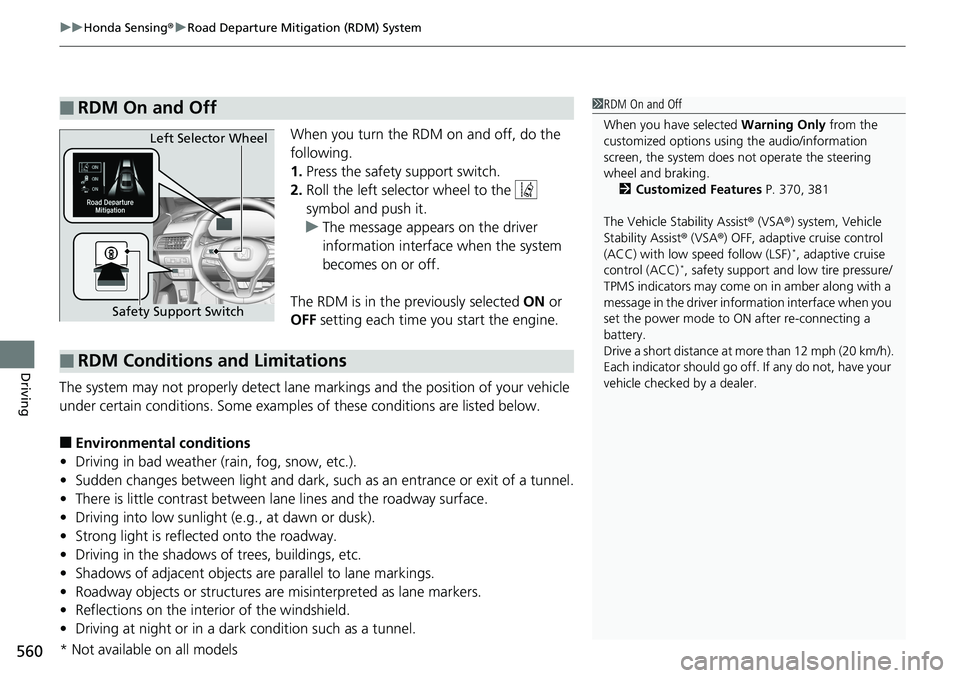
When you turn the RDM on and off, do the
following.
1. Press the safety support switch.
2. Roll the left selector wheel to the
symbol and push it.
u The message appears on the driver
information interface when the system
becomes on or off.
The RDM is in the previously selected ON or
OFF setting each time you start the engine.
The system may not properly detect lane ma rkings and the position of your vehicle
under certain conditions. Some examples of these conditions are listed below.
■Environmental conditions
• Driving in bad weather (rain, fog, snow, etc.).
• Sudden changes between light and dark, such as an entrance or exit of a tunnel.
• There is little contrast between la ne lines and the roadway surface.
• Driving into low sunlight (e.g., at dawn or dusk).
• Strong light is reflected onto the roadway.
• Driving in the shadows of trees, buildings, etc.
• Shadows of adjacent objects are parallel to lane markings.
• Roadway objects or structures are misinterpreted as lane markers.
• Reflections on the interi or of the windshield.
• Driving at night or in a dark condition such as a tunnel.
■RDM On and Off1RDM On and Off
When you have selected Warning Only from the
customized options using the audio/information
screen, the system does not operate the steering
wheel and braking. 2 Customized Features P. 370, 381
The Vehicle Stability Assist ® (VSA ®) system, Vehicle
Stability Assist ® (VSA ®) OFF, adaptive cruise control
(ACC) with low speed follow (LSF)
*, adaptive cruise
control (ACC)*, safety support and low tire pressure/
TPMS indicators may come on in amber along with a
message in the driver information interface when you
set the power mode to ON after re-connecting a
battery.
Drive a short distance at mo re than 12 mph (20 km/h).
Each indicator should go off. If any do not, have your
vehicle checked by a dealer.
Safety Support Switch Left Selector Wheel
■RDM Conditions and Limitations
* Not available on all models
Page 654 of 727
652
uuBattery uCharging the Battery
Maintenance
Charging the Battery
Disconnect both battery cables to prevent da maging your vehicle’s electrical system.
Always disconnect the negative (–) cable first, and reconnect it last.1 Charging the Battery
When replacing the battery, the replacement must be
of the same specifications.
Consult a dealer for more information.
The Vehicle Stability Assist ® (VSA ®) system, Vehicle
Stability Assist ® (VSA ®) OFF, adaptive cruise control
(ACC) with low speed follow (LSF)
*, adaptive cruise
control (ACC)*, safety support and low tire pressure/
TPMS indicators may come on in amber along with a
message in the driver information interface when you
set the power mode to ON after re-connecting a
battery.
Drive a short distance at more than 12 mph (20 km/
h). Each indicator should go off. If any do not, have
your vehicle checked by a dealer.
* Not available on all models
Page 678 of 727
uuJump Starting uJump Starting Procedure
676
Handling the Unexpected
Once your vehicle’s engine has started, re move the jumper cables in the following
order.
1. Disconnect the jumper cable from your vehicle’s ground.
2. Disconnect the other end of the jumper cable from the booster battery -
terminal.
3. Disconnect the jumper cable from your vehicle’s battery + terminal.
4. Disconnect the other end of the jumper cable from the booster battery +
terminal.
Have your vehicle inspected by a n earby service station or a dealer.
■What to Do After the Engine Starts1What to Do After the Engine Starts
The Vehicle Stability Assist ® (VSA ®) system, Vehicle
Stability Assist ® (VSA ®) OFF, adaptive cruise control
(ACC) with low speed follow (LSF)
*, adaptive cruise
control (ACC)*, safety support and low tire pressure/
TPMS indicators may come on in amber along with a
message in the driver information interface when you
set the power mode to ON after re-connecting a
battery.
Drive a short distance at more than 12 mph (20 km/h).
Each indicator should go off. If any do not, have your
vehicle checked by a dealer.
* Not available on all models
Page 710 of 727
708
uuEmissions Testing uTesting of Readiness Codes
Information
7. Select a nearby, lightly traveled major hi ghway where you can maintain a speed
of 50 to 60 mph (80 to 97 km/h) for at least 20 minutes. Drive on the highway in
(D (automatic transmission/continuously va riable transmission) or 5th (manual
transmission). Do not use cruise control. When traffic allows, drive for 90 seconds
without moving the accelerator pedal. (Veh icle speed may vary slightly; this is
okay.) If you cannot do this for a continuous 90 seconds because of traffic
conditions, drive for at least 30 seconds, th en repeat it two more times (for a total
of 90 seconds).
8. Drive in city or suburban traffic for at le ast 10 minutes. When traffic conditions
allow, let the vehicle coast for several se conds without using the accelerator pedal
or the brake pedal.
9. Park the vehicle and leave the engine off for 30 minutes.
Page 715 of 727
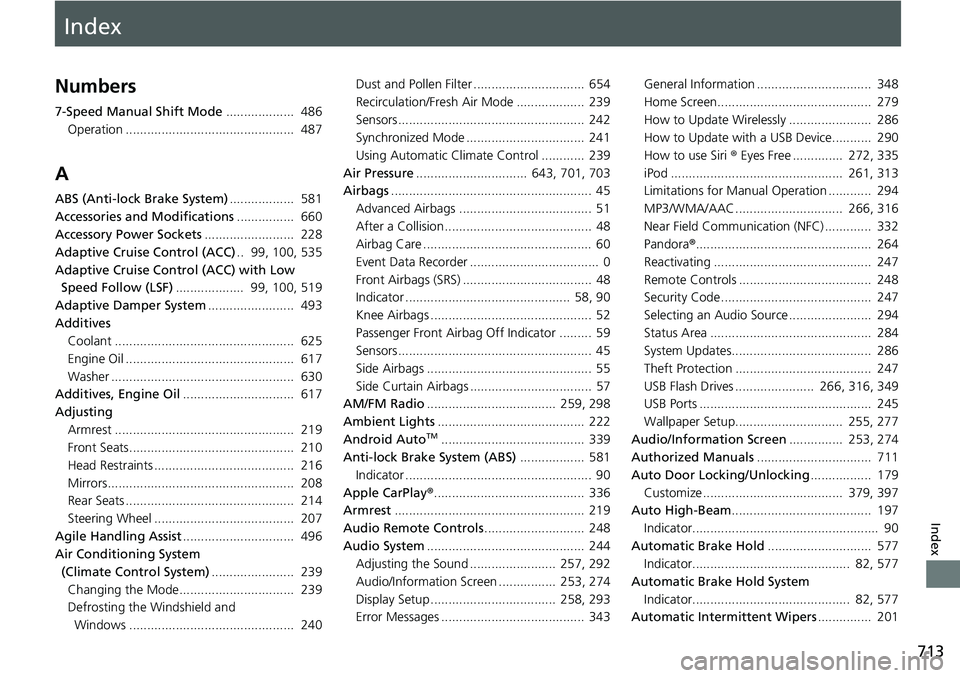
Index
713
Index
Index
Numbers
7-Speed Manual Shift Mode................... 486
Operation ............................................... 487
A
ABS (Anti-lock Brake System) .................. 581
Accessories and Modifications ................ 660
Accessory Power Sockets ......................... 228
Adaptive Cruise Control (ACC) .. 99, 100, 535
Adaptive Cruise Control (ACC) with Low Speed Follow (LSF) ................... 99, 100, 519
Adaptive Damper System ........................ 493
Additives Coolant .................................................. 625
Engine Oil ............................................... 617
Washer ................................................... 630
Additives, Engine Oil ............................... 617
Adjusting Armrest .................................................. 219
Front Seats.............................................. 210
Head Restraints ....................................... 216
Mirrors.................................................... 208
Rear Seats ............................................... 214
Steering Wheel ....................................... 207
Agile Handling Assist ............................... 496
Air Conditioning System
(Climate Control System) ....................... 239
Changing the Mode................................ 239
Defrosting the Windshield and
Windows .............................................. 240 Dust and Pollen Filter ............................... 654
Recirculation/Fresh Air Mode ................... 239
Sensors .................................................... 242
Synchronized Mode ................................. 241
Using Automatic Climate Control ............ 239
Air Pressure ............................... 643, 701, 703
Airbags ........................................................ 45
Advanced Airbags ..................................... 51
After a Collision ......................................... 48
Airbag Care ............................................... 60
Event Data Recorder .................................... 0
Front Airbags (SRS) .................................... 48
Indicator .............................................. 58, 90
Knee Airbags ............................................. 52
Passenger Front Airbag Off Indicator ......... 59
Sensors ...................................................... 45
Side Airbags .............................................. 55
Side Curtain Airbags .................................. 57
AM/FM Radio .................................... 259, 298
Ambient Lights ......................................... 222
Android Auto
TM........................................ 339
Anti-lock Brake System (ABS) .................. 581
Indicator .................................................... 90
Apple CarPlay ®.......................................... 336
Armrest ..................................................... 219
Audio Remote Controls ............................ 248
Audio System ............................................ 244
Adjusting the Sound ........................ 257, 292
Audio/Information Screen ................ 253, 274
Display Setup ................................... 258, 293
Error Messages ........................................ 343 General Information ................................ 348
Home Screen........................................... 279
How to Update Wirelessly ....................... 286
How to Update with a USB Device........... 290
How to use Siri
® Eyes Free .............. 272, 335
iPod ................................................ 261, 313
Limitations for Manual Operation ............ 294
MP3/WMA/AAC .............................. 266, 316
Near Field Communication (NFC) ............. 332
Pandora ®................................................. 264
Reactivating ............................................ 247
Remote Controls ..................................... 248
Security Code .......................................... 247
Selecting an Audio Source ....................... 294
Status Area ............................................. 284
System Updates....................................... 286
Theft Protection ...................................... 247
USB Flash Drives ...................... 266, 316, 349
USB Ports ................................................ 245
Wallpaper Setup.............................. 255, 277
Audio/Information Screen ............... 253, 274
Authorized Manuals ................................ 711
Auto Door Locking/Unlocking ................. 179
Customize ....................................... 379, 397
Auto High-Beam ....................................... 197
Indicator.................................................... 90
Automatic Brake Hold ............................. 577
Indicator............................................ 82, 577
Automatic Brake Hold System Indicator............................................ 82, 577
Automatic Intermittent Wipers ............... 201
Page 719 of 727
717
Index
Headlights................................................ 193
Aiming.................................................... 631
Auto High-Beam ..................................... 197
Automatic Operation .............................. 194
Dimming......................................... 193, 196
Operating ............................................... 193
Head-Up Display ...................................... 157
Heated Steering Wheel ........................... 235
Heated Windshield Button ...................... 202
Heaters (Seat) ........................... 236, 237, 238
HFL (HandsFreeLink ®) ...................... 403, 427
High Beam Indicator .................................. 94
Hill Start Assist System ............................. 472
HomeLink ® Universal Transceiver ........... 400
Honda App License Agreement .............. 350
Honda Sensing ®................................. 25, 507
HondaLink ®.............................................. 321
I
Identification Numbers
Engine and Transmission ......................... 704
Vehicle Identification............................... 704
Illumination Control
Dial ......................................................... 203
Immobilizer System .................................. 183
Indicator ................................................... 95
Indicators .................................................... 78
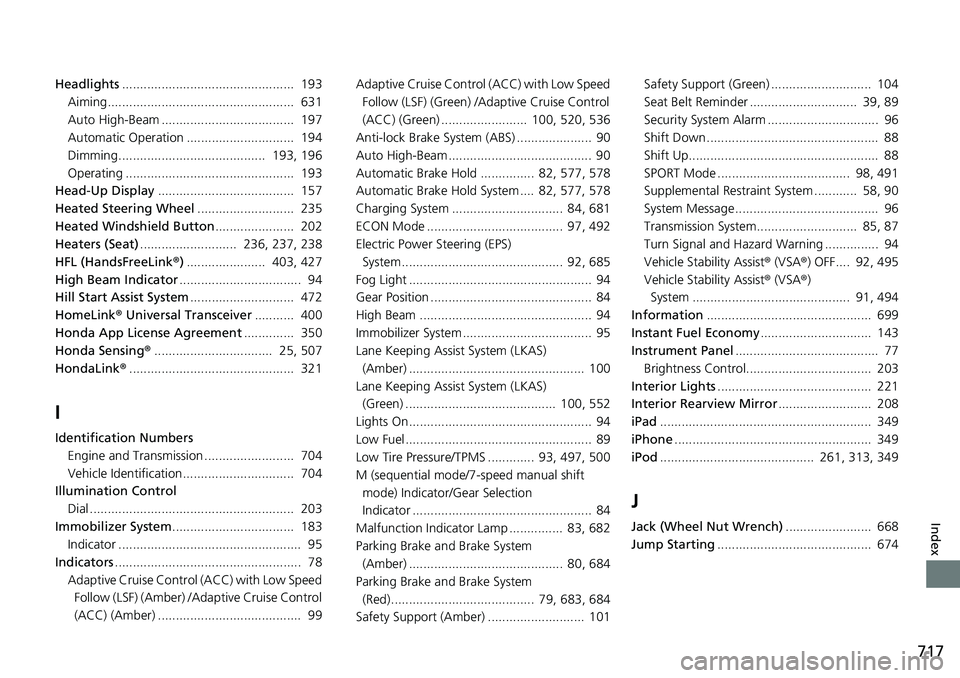
Adaptive Cruise Control (ACC) with Low Speed Follow (LSF) (Amber) /A daptive Cruise Control
(ACC) (Amber) ........................................ 99 Adaptive Cruise Control (ACC) with Low Speed
Follow (LSF) (Green) /Adaptive Cruise Control
(ACC) (Green) ........................ 100, 520, 536
Anti-lock Brake System (ABS) ..................... 90
Auto High-Beam ........................................ 90
Automatic Brake Hold ............... 82, 577, 578
Automatic Brake Hold System .... 82, 577, 578
Charging System ............................... 84, 681
ECON Mode ...................................... 97, 492
Electric Power Steering (EPS) System............................................. 92, 685
Fog Light ................................................... 94
Gear Position ............................................. 84
High Beam ................................................ 94
Immobilizer System .................................... 95
Lane Keeping Assist System (LKAS) (Amber) ................................................. 100
Lane Keeping Assist System (LKAS) (Green) .......................................... 100, 552
Lights On ................................................... 94
Low Fuel .................................................... 89
Low Tire Pressure/TPMS ............. 93, 497, 500
M (sequential mode/7 -speed manual shift
mode) Indicator/Gear Selection
Indicator .................................................. 84
Malfunction Indicator Lamp ............... 83, 682
Parking Brake and Brake System (Amber) ........................................... 80, 684
Parking Brake and Brake System (Red)........................................ 79, 683, 684
Safety Support (Amber) ........................... 101 Safety Support (Green) ............................ 104
Seat Belt Reminder .............................. 39, 89
Security System Alarm ............................... 96
Shift Down ................................................ 88
Shift Up..................................................... 88
SPORT Mode ..................................... 98, 491
Supplemental Restraint System ............ 58, 90
System Message ........................................ 96
Transmission System............................ 85, 87
Turn Signal and Hazard Warning ............... 94
Vehicle Stability Assist
® (VSA ®) OFF.... 92, 495
Vehicle Stability Assist ® (VSA ®)
System ............................................ 91, 494
Information .............................................. 699
Instant Fuel Economy ............................... 143
Instrument Panel ........................................ 77
Brightness Control................................... 203
Interior Lights ........................................... 221
Interior Rearview Mirror .......................... 208
iPad ........................................................... 349
iPhone ....................................................... 349
iPod ........................................... 261, 313, 349
J
Jack (Wheel Nut Wrench) ........................ 668
Jump Starting ........................................... 674