glove box HONDA ACCORD SEDAN 2019 Owner's Manual (in English)
[x] Cancel search | Manufacturer: HONDA, Model Year: 2019, Model line: ACCORD SEDAN, Model: HONDA ACCORD SEDAN 2019Pages: 727, PDF Size: 34.1 MB
Page 8 of 727
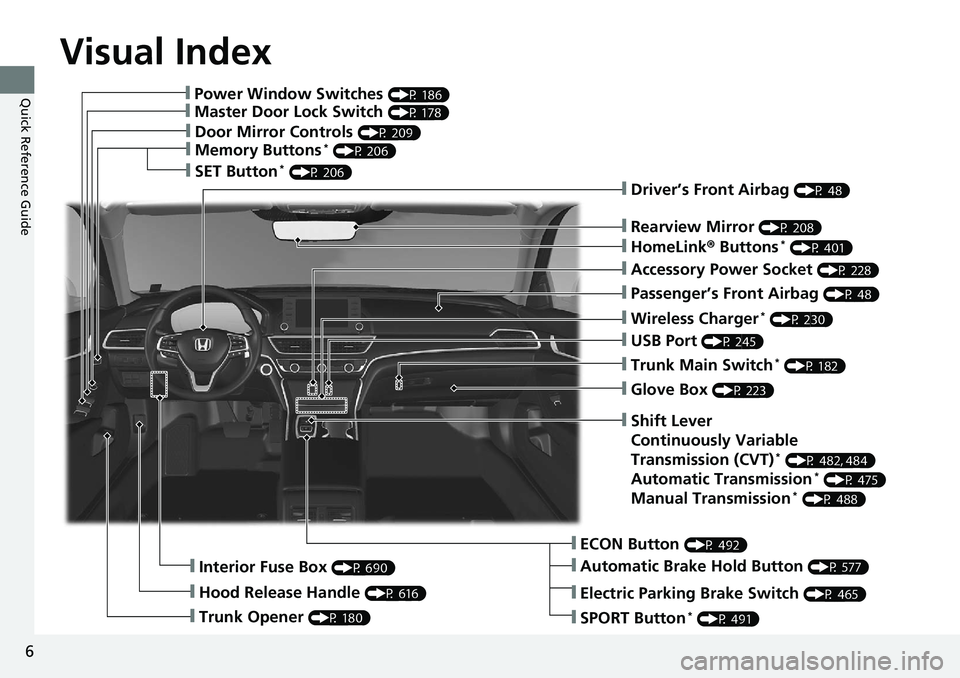
Visual Index
6
Quick Reference Guide❙Power Window Switches (P 186)
❙Master Door Lock Switch (P 178)
❙Door Mirror Controls (P 209)
❙Memory Buttons* (P 206)
❙SET Button* (P 206)
❙Trunk Opener (P 180)
❙Interior Fuse Box (P 690)
❙Hood Release Handle (P 616)
❙Driver’s Front Airbag (P 48)
❙Rearview Mirror (P 208)
❙HomeLink® Buttons* (P 401)
❙Accessory Power Socket (P 228)
❙Passenger’s Front Airbag (P 48)
❙Wireless Charger* (P 230)
❙USB Port (P 245)
❙Trunk Main Switch* (P 182)
❙Glove Box (P 223)
❙ECON Button (P 492)
❙Automatic Brake Hold Button (P 577)
❙Shift Lever
Continuously Variable
Transmission (CVT)
* (P 482, 484)
Automatic Transmission* (P 475)
Manual Transmission* (P 488)
❙Electric Parking Brake Switch (P 465)
❙SPORT Button* (P 491)
Page 48 of 727
46
uuAirbags uAirbag System Components
Safe Driving
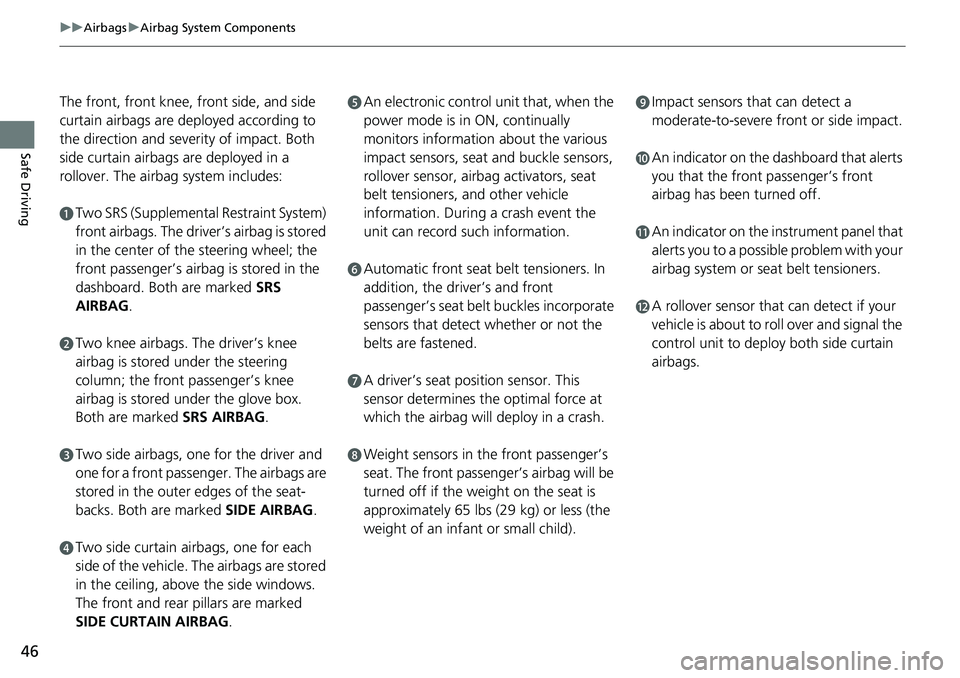
The front, front knee, front side, and side
curtain airbags are deployed according to
the direction and severity of impact. Both
side curtain airbags are deployed in a
rollover. The airbag system includes:
aTwo SRS (Supplemental Restraint System)
front airbags. The driver’s airbag is stored
in the center of the steering wheel; the
front passenger’s airbag is stored in the
dashboard. Both are marked SRS
AIRBAG.
bTwo knee airbags. Th e driver’s knee
airbag is stored under the steering
column; the front passenger’s knee
airbag is stored under the glove box.
Both are marked SRS AIRBAG.
cTwo side airbags, one for the driver and
one for a front passenger. The airbags are
stored in the outer edges of the seat-
backs. Both are marked SIDE AIRBAG .
dTwo side curtain airbags, one for each
side of the vehicle. The airbags are stored
in the ceiling, above the side windows.
The front and rear pillars are marked
SIDE CURTAIN AIRBAG.
eAn electronic control unit that, when the
power mode is in ON, continually
monitors information about the various
impact sensors, seat and buckle sensors,
rollover sensor, airbag activators, seat
belt tensioners, and other vehicle
information. During a crash event the
unit can record such information.
fAutomatic front seat belt tensioners. In
addition, the driver’s and front
passenger’s seat belt buckles incorporate
sensors that detect whether or not the
belts are fastened.
gA driver’s seat position sensor. This
sensor determines the optimal force at
which the airbag will deploy in a crash.
hWeight sensors in the front passenger’s
seat. The front passenger’s airbag will be
turned off if the weight on the seat is
approximately 65 lbs (29 kg) or less (the
weight of an infant or small child).
iImpact sensors that can detect a
moderate-to-severe front or side impact.
jAn indicator on the dashboard that alerts
you that the front passenger’s front
airbag has been turned off.
kAn indicator on the instrument panel that
alerts you to a possible problem with your
airbag system or seat belt tensioners.
lA rollover sensor that can detect if your
vehicle is about to roll over and signal the
control unit to deploy both side curtain
airbags.
Page 50 of 727
48
uuAirbags uTypes of Airbags
Safe Driving
Types of Airbags
Your vehicle is equipped with four types of airbags:
• Front airbags: Airbags in front of the driver ’s and front passenger’s seats.
• Front knee airbags: Airbags under the steering co lumn and under the glove
box.
• Side airbags: Airbags in the driver’s and front passenger’s seat-backs.
• Side curtain airbags: Airbags above the side windows.
Each is discussed in the following pages.
Front Airbags (SRS)
The front SRS airbags inflate in a moderate-to -severe frontal collision to help protect
the head and chest of the driver and/or front passenger.
SRS (Supplemental Restraint System) indica tes that the airbags are designed to
supplement seat belts, not replace them. Seat belts are the occupant’s primary
restraint system.
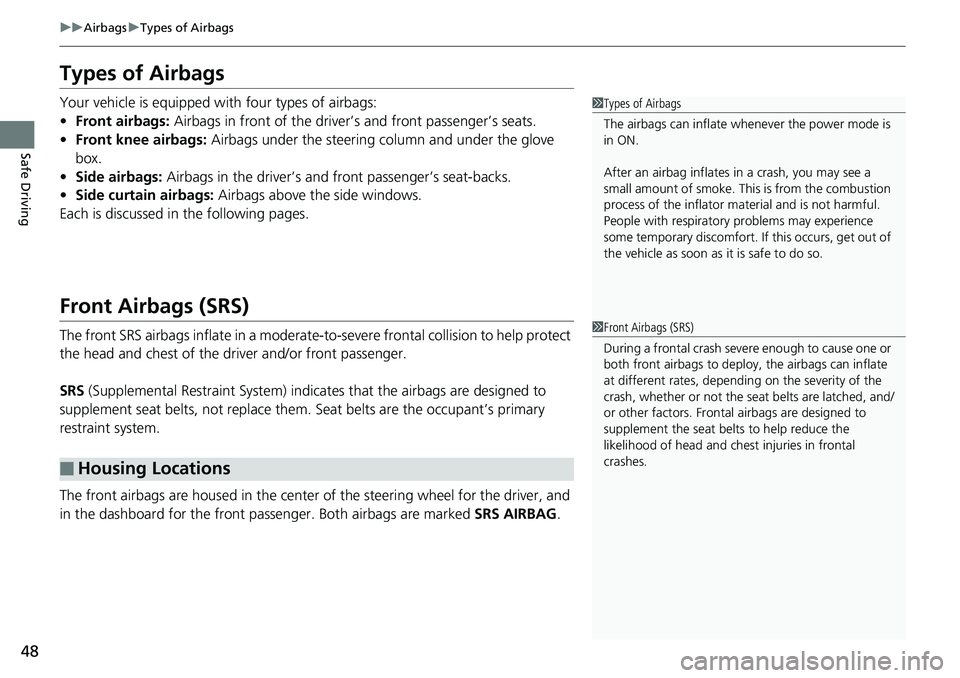
The front airbags are housed in the center of the steering wheel for the driver, and
in the dashboard for the front pass enger. Both airbags are marked SRS AIRBAG.
■Housing Locations
1Types of Airbags
The airbags can inflate whenever the power mode is
in ON.
After an airbag inflates in a crash, you may see a
small amount of smoke. This is from the combustion
process of the infl ator material and is not harmful.
People with respiratory pr oblems may experience
some temporary discomfort. If this occurs, get out of
the vehicle as soon as it is safe to do so.
1 Front Airbags (SRS)
During a frontal crash severe enough to cause one or
both front airbags to deploy, the airbags can inflate
at different rates, dependi ng on the severity of the
crash, whether or not the se at belts are latched, and/
or other factors. Frontal airbags are designed to
supplement the seat belts to help reduce the
likelihood of head and chest injuries in frontal
crashes.
Page 54 of 727
52
uuAirbags uKnee Airbags
Safe Driving
Knee Airbags
The knee SRS airbags inflates in a moderate -to-severe frontal collision to help keep
the driver and/or front passenger in the proper position and to help maximize the
benefit provided by the vehicle’s other safety features.
SRS (Supplemental Restraint System) indica tes that the airbags are designed to
supplement seat belts, not replace them. Seat belts are the occupant’s primary
restraint system.
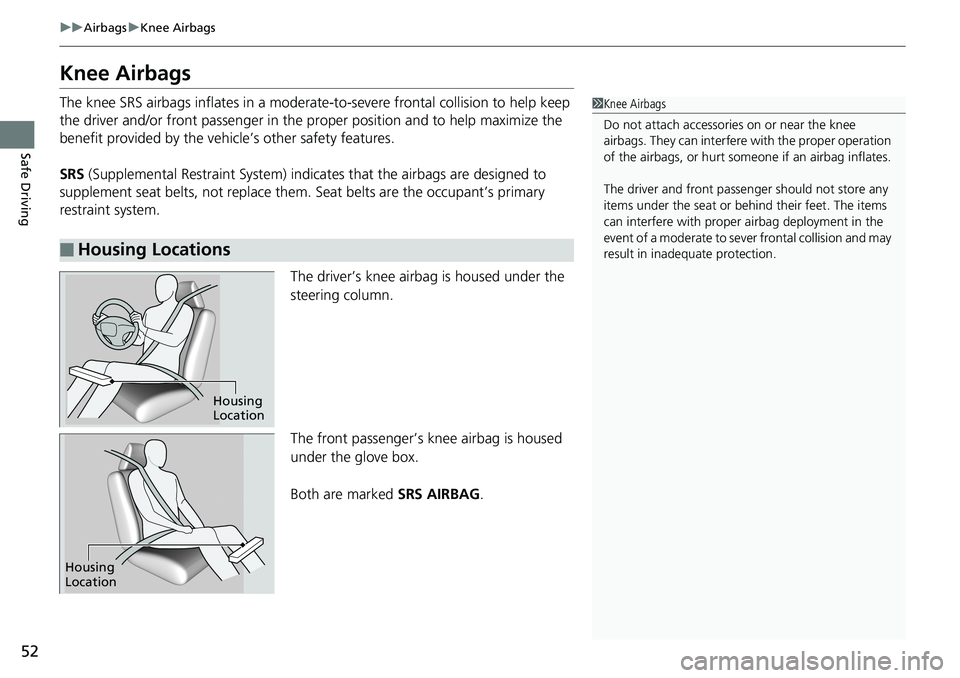
The driver’s knee airbag is housed under the
steering column.
The front passenger’s knee airbag is housed
under the glove box.
Both are marked SRS AIRBAG.
■Housing Locations
1Knee Airbags
Do not attach accessories on or near the knee
airbags. They can interfer e with the proper operation
of the airbags, or hurt someone if an airbag inflates.
The driver and fr ont passenger should not store any
items under the seat or be hind their feet. The items
can interfere with proper airbag deployment in the
event of a moderate to se ver frontal collision and may
result in inadequate protection.
Housing
Location
Housing
Location
Page 184 of 727
182
uuOpening and Closing the Trunk uTrunk Main Switch*
Controls
Trunk Main Switch*
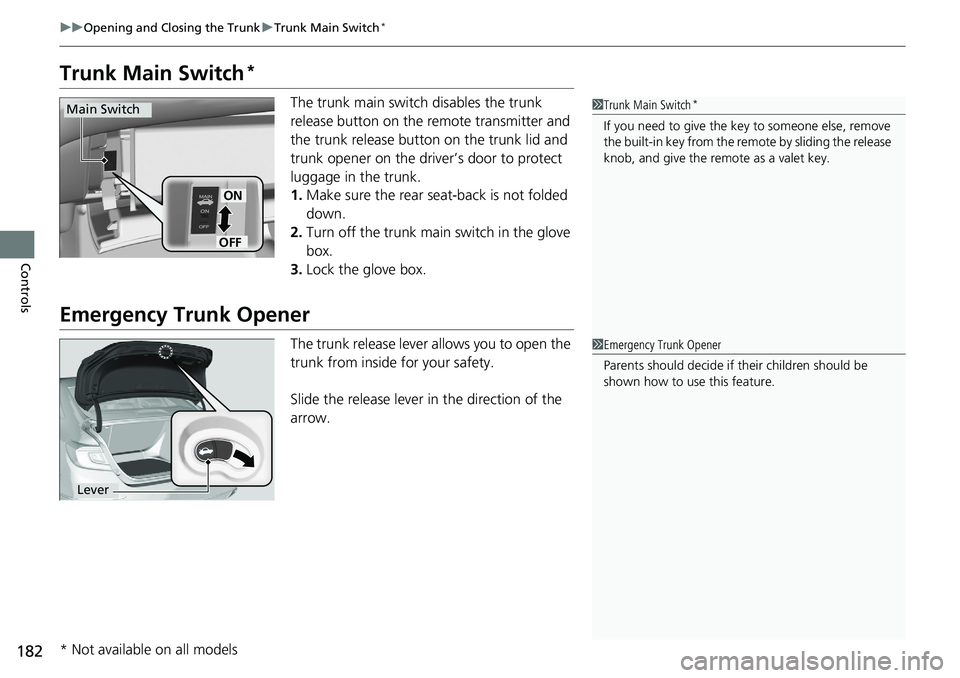
The trunk main switch disables the trunk
release button on the remote transmitter and
the trunk release button on the trunk lid and
trunk opener on the driver’s door to protect
luggage in the trunk.
1. Make sure the rear seat-back is not folded
down.
2. Turn off the trunk main switch in the glove
box.
3. Lock the glove box.
Emergency Trunk Opener
The trunk release lever allows you to open the
trunk from inside for your safety.
Slide the release lever in the direction of the
arrow.
1Trunk Main Switch*
If you need to give the ke y to someone else, remove
the built-in key from the remote by sliding the release
knob, and give the remote as a valet key.
ON
OFF
Main Switch
1 Emergency Trunk Opener
Parents should deci de if their children should be
shown how to use this feature.
Lever
* Not available on all models
Page 194 of 727
uuOperating the Switches Around the Steering Wheel uENGINE START/STOP Button
192
Controls
Warning buzzers may sound from inside and/
or outside the vehicle to remind you that the
remote is out of the vehicle. If the buzzer
continues even after the remote is put back
inside, place it to be within its operational
range.
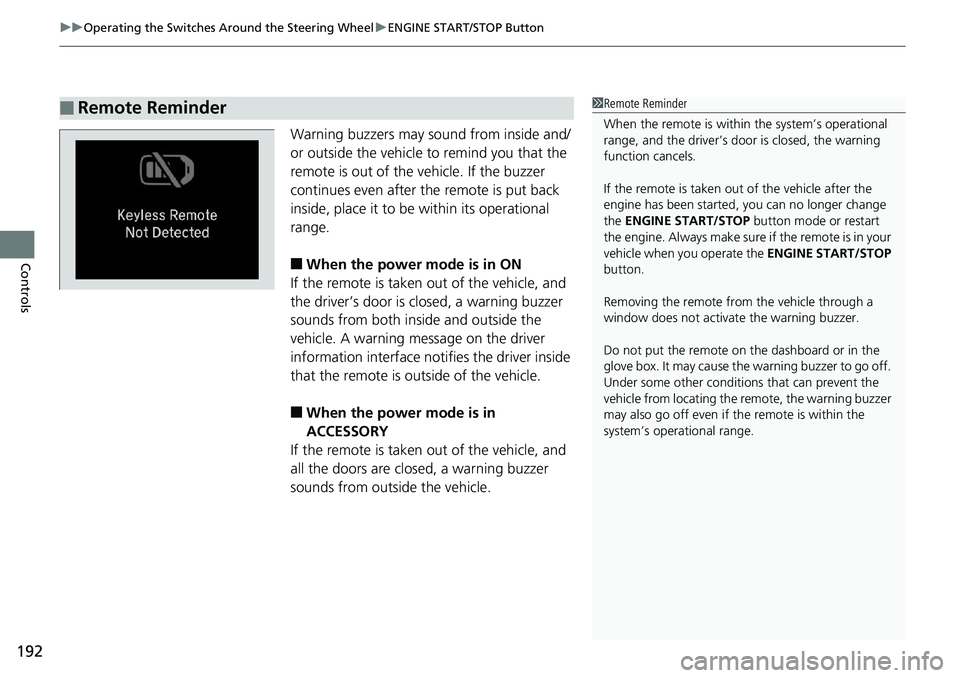
■When the power mode is in ON
If the remote is taken out of the vehicle, and
the driver’s door is closed, a warning buzzer
sounds from both inside and outside the
vehicle. A warning me ssage on the driver
information interface notifies the driver inside
that the remote is outside of the vehicle.
■When the power mode is in
ACCESSORY
If the remote is taken out of the vehicle, and
all the doors are closed, a warning buzzer
sounds from outside the vehicle.
■Remote Reminder1 Remote Reminder
When the remote is within the system’s operational
range, and the driver’s door is closed, the warning
function cancels.
If the remote is taken out of the vehicle after the
engine has been started, you can no longer change
the ENGINE START/STOP button mode or restart
the engin e. Always make sure if the remote is in your
vehicle when you operate the ENGINE START/STOP
button.
Removing the remote fr om the vehicle through a
window does not activate the warning buzzer.
Do not put the remote on the dashboard or in the
glove box. It may cause the warning buzzer to go off.
Under some other conditions that can prevent the
vehicle from locating the remote, the warning buzzer
may also go off even if the remote is within the
system’s operational range.
Page 225 of 727
223
uuInterior Lights/Interior Convenience Items uInterior Convenience Items
Continued
Controls
Interior Convenience Items
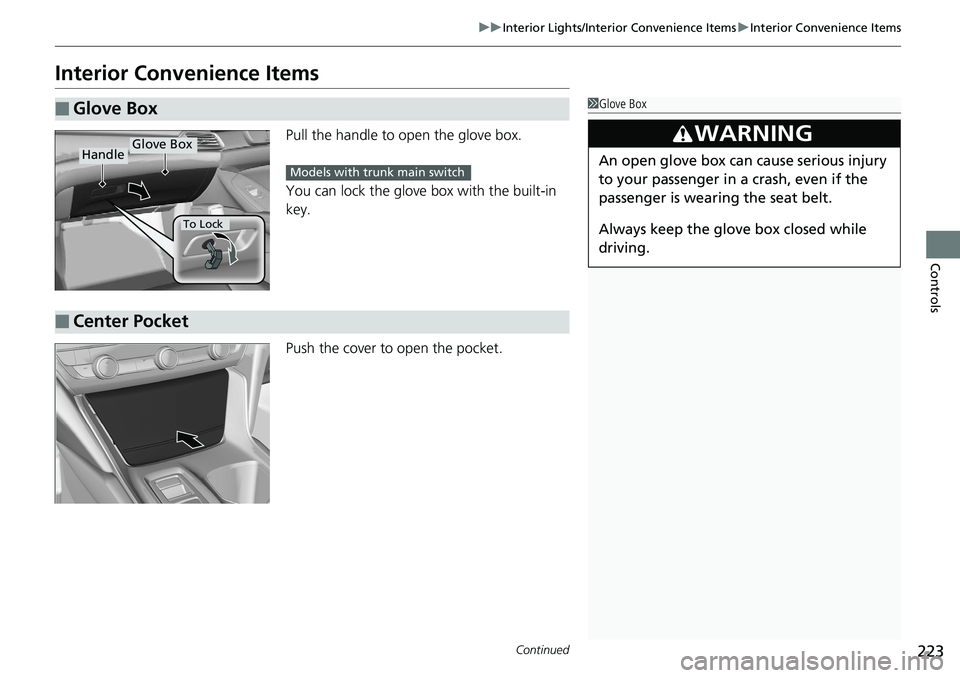
Pull the handle to op en the glove box.
You can lock the glove box with the built-in
key.
Push the cover to open the pocket.
■Glove Box1 Glove Box
3WARNING
An open glove box can cause serious injury
to your passenger in a crash, even if the
passenger is wearing the seat belt.
Always keep the glove box closed while
driving.
Glove BoxHandle
To Lock
Models with trunk main switch
■Center Pocket
Page 335 of 727
Continued333
uuAudio System Basic Operation uNear Field Communication (NFC)*
Features
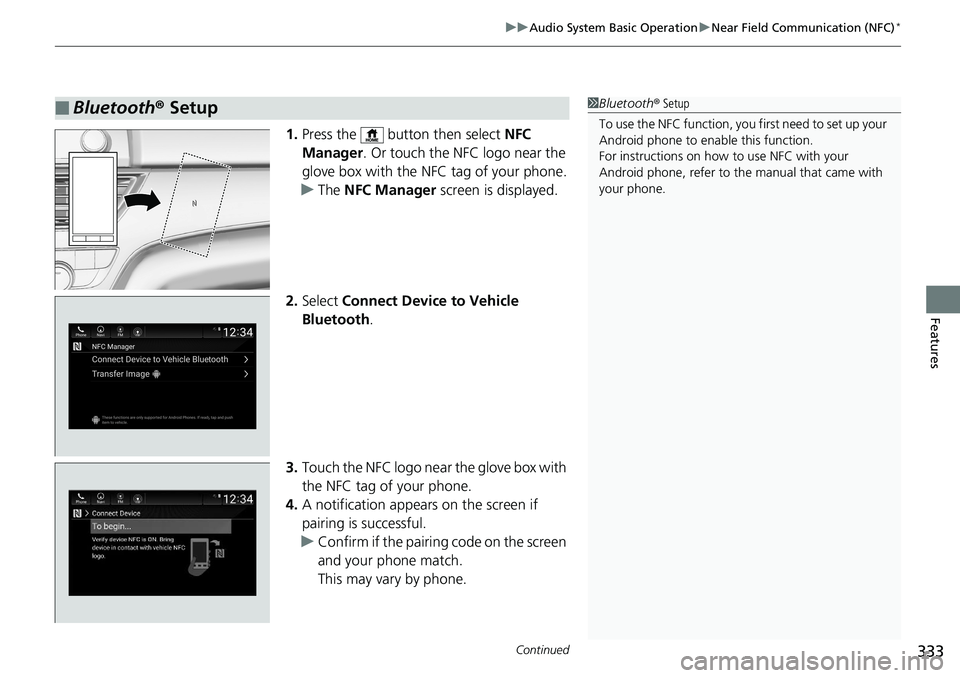
1. Press the button then select NFC
Manager . Or touch the NFC logo near the
glove box with the NFC tag of your phone.
u The NFC Manager screen is displayed.
2. Select Connect Device to Vehicle
Bluetooth .
3. Touch the NFC logo near the glove box with
the NFC tag of your phone.
4. A notification appears on the screen if
pairing is successful.
u Confirm if the pairing code on the screen
and your phone match.
This may vary by phone.
■Bluetooth ® Setup1 Bluetooth ® Setup
To use the NFC function, you first need to set up your
Android phone to enable this function.
For instructions on how to use NFC with your
Android phone, refer to the manual that came with
your phone.
Page 336 of 727
uuAudio System Basic Operation uNear Field Communication (NFC)*
334
Features
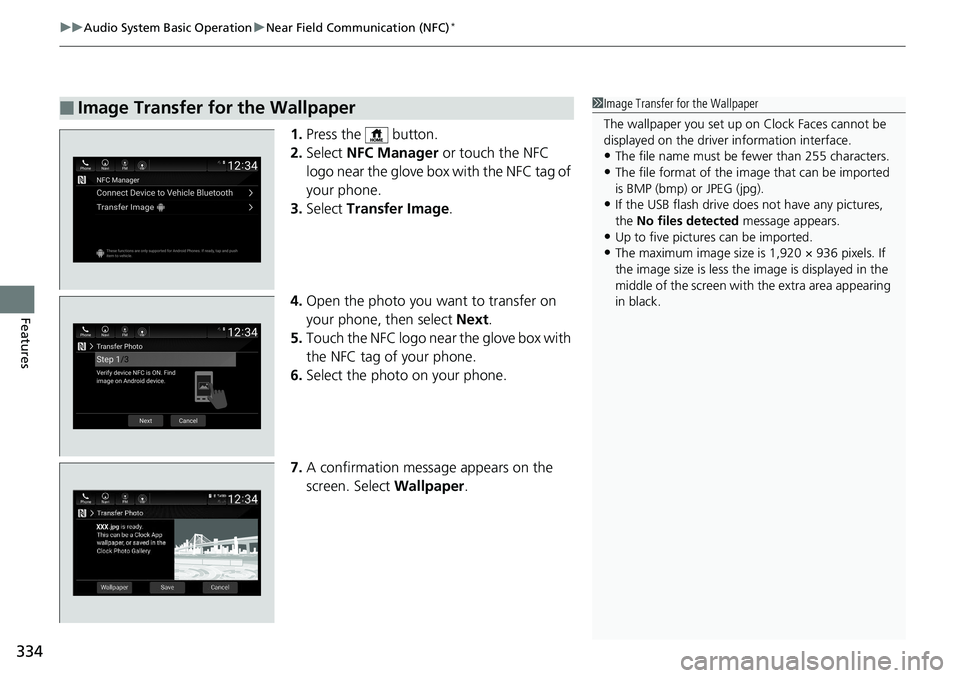
1. Press the button.
2. Select NFC Manager or touch the NFC
logo near the glove box with the NFC tag of
your phone.
3. Select Transfer Image .
4. Open the photo you want to transfer on
your phone, then select Next.
5. Touch the NFC logo near the glove box with
the NFC tag of your phone.
6. Select the photo on your phone.
7. A confirmation message appears on the
screen. Select Wallpaper.
■Image Transfer for the Wallpaper1Image Transfer for the Wallpaper
The wallpaper you set up on Clock Faces cannot be
displayed on the driver information interface.
•The file name must be fewer than 255 characters.
•The file format of the im age that can be imported
is BMP (bmp) or JPEG (jpg).
•If the USB flash drive doe s not have any pictures,
the No files detected message appears.
•Up to five pictur es can be imported.
•The maximum image size is 1,920 × 936 pixels. If
the image size is less the image is displayed in the
middle of the screen with the extra area appearing
in black.
Page 718 of 727
716
Index
Exterior Care (Cleaning)........................... 657
Exterior Mirrors ......................................... 209
F
Features..................................................... 243
Filters
Dust and Pollen ....................................... 654
Oil ........................................................... 621
Flat Tire ..................................................... 665
Floor Mats ................................................. 656
Fluids Automatic Transmission ........................... 628
Brake/Clutch ............................................ 629
Continuously Variable Transmission ......... 627
Engine Coolant ........................................ 625
Manual Transmission ............................... 627
Windshield Washer .................................. 630
FM/AM Radio .................................... 259, 298
Fog Lights .................................................. 195
Indicator .................................................... 94
Folding Down the Rear Seat .................... 214
Foot Brake ................................................. 576
Front Airbags (SRS) ..................................... 48
Front Seat Heaters .................................... 236
Front Seat Heaters and Seat Ventilation .............................................. 237
Front Seats Adjusting ................................................. 210
Front Sensor Camera ................................ 568
Fuel ...................................................... 24, 597 Economy ................................................. 600
Gauge ..................................................... 137
Instant Fuel Economy .............................. 143
Low Fuel Indicator ..................................... 89
Range ..................................................... 143
Recommendation .................................... 597
Refueling................................................. 597
Fuel Economy and CO
2 Emissions ............ 600
Fuel Fill Door ...................................... 24, 598
Unable to Unlock .................................... 694
Fuses .......................................................... 688
Inspecting and Changing......................... 692
Locations......................................... 688, 690
G
Gasoline (Fuel) Economy ................................................. 600
Gauge ..................................................... 137
Information ............................................. 597
Instant Fuel Economy .............................. 143
Low Fuel Indicator ..................................... 89
Refueling................................................. 597
Gauges ...................................................... 137
Gear Position Indicator .............................. 84
Gear Shift Lever Positions Continuously Variable
Transmission.................................. 482, 484
Manual Transmission ............................... 488
Glass (care) ........................................ 655, 658
Glove Box .................................................. 223
H
Halogen Bulbs .......................................... 631
Handling the Unexpected ....................... 663
HandsFreeLink® (HFL)...................... 403, 427
Automatic Import of Cellular Phonebook and
Call History ................................... 417, 436
Automatic Transferring ................... 415, 435
Displaying Messages ............................... 446
Favorite Contacts .................................... 437
HFL Buttons .................................... 403, 427
HFL Menus...................................... 405, 430
HFL Status Display ........................... 404, 429
In Case of Emergency ..................... 325, 450
Limitations for Manual Operation .... 404, 429
Making a Call ................................. 421, 439
Options During a Call...................... 426, 442
Phone Setup ................................... 409, 432
Receiving a Call............................... 425, 442
Receiving a Text Message........................ 444
Ring Tone ....................................... 415, 435
Selecting a Phone ................................... 445
Speed Dial .............................................. 418
To Clear the System ................................ 416
To Set Up a Text Message Options .......... 443
Hazard Warning Button .............................. 4
HD Radio
TM............................................... 301
Head Restraints ........................................ 216