reset HONDA ACCORD SEDAN 2020 (in English) Owner's Guide
[x] Cancel search | Manufacturer: HONDA, Model Year: 2020, Model line: ACCORD SEDAN, Model: HONDA ACCORD SEDAN 2020Pages: 728, PDF Size: 34.06 MB
Page 351 of 728
349
uuAudio Error Messages uAndroid/Apps
Features
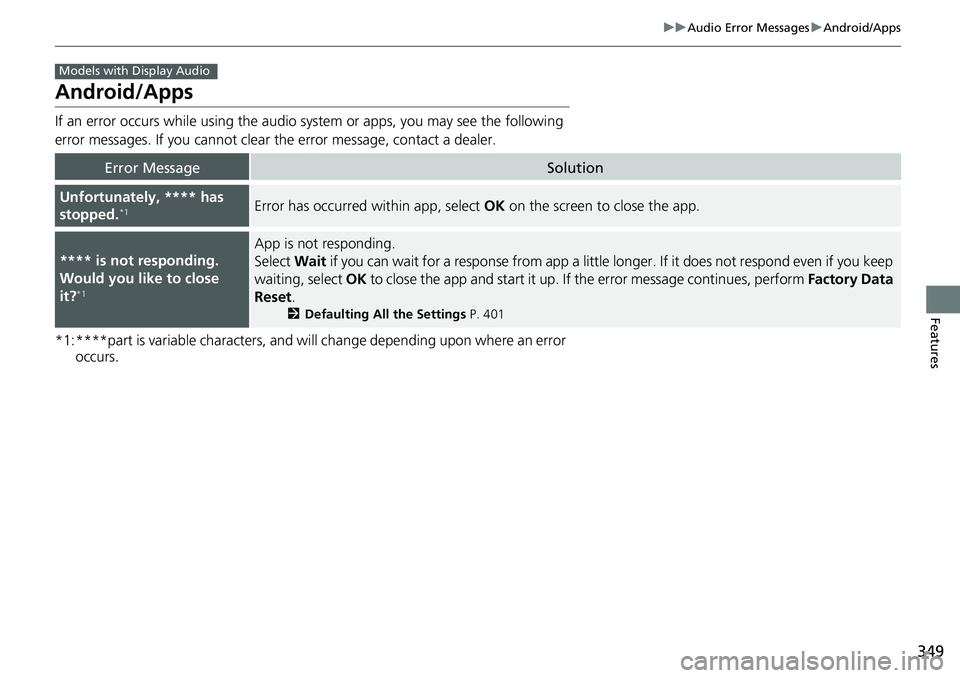
Android/Apps
If an error occurs while using the audio system or apps, you may see the following
error messages. If you cannot clear the error message, contact a dealer.
*1:****part is variable characters, and will change depending upon where an error
occurs.
Error MessageSolution
Unfortunately, **** has
stopped.*1Error has occurred within app, select OK on the screen to close the app.
**** is not responding.
Would you like to close
it?
*1
App is not responding.
Select Wait if you can wait for a response from app a little longer. If it does not respond even if you keep
waiting, select OK to close the app and start it up. If the error message continues, perform Factory Data
Reset .
2Defaulting All the Settings P. 401
Models with Display Audio
Page 379 of 728
377
uuCustomized Features u
Continued
Features
*1:Default Setting
*2:Appears only when you select the History of Trip A of the Display Change .
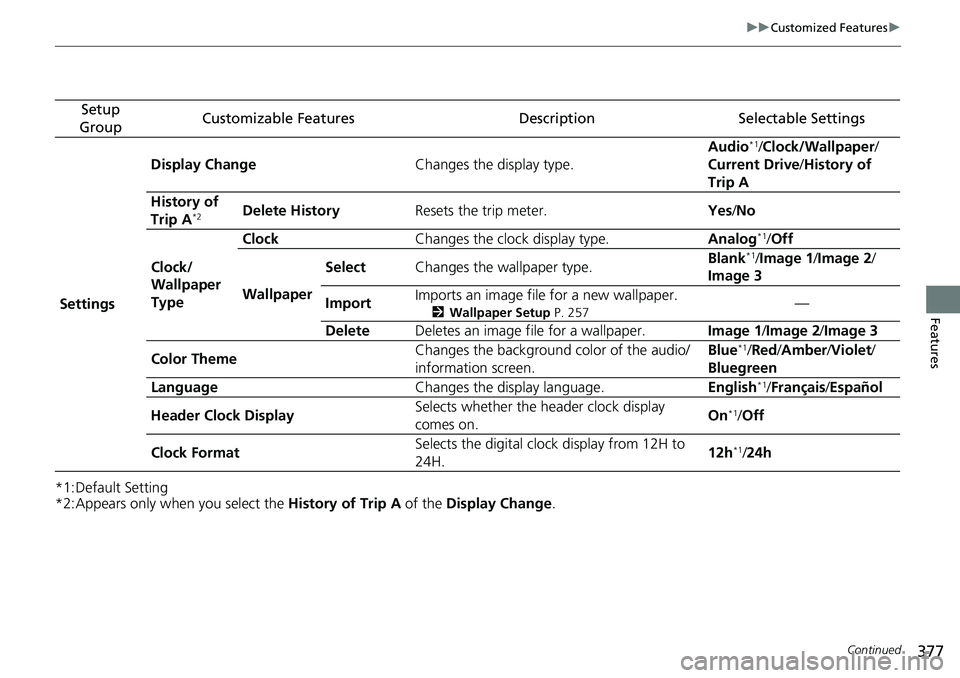
Setup
GroupCustomizable FeaturesDescriptionSelectable Settings
Settings Display Change
Changes the display type. Audio
*1/
Clock/Wallpaper /
Current Drive /History of
Trip A
History of
Trip A
*2Delete History Resets the trip meter. Yes/No
Clock/
Wallpaper
Type Clock
Changes the clock display type. Analog
*1/Off
Wallpaper Select
Changes the wallpaper type. Blank*1/
Image 1/ Image 2/
Image 3
Import Imports an image file for a new wallpaper.
2
Wallpaper Setup P. 257—
Delete Deletes an image file for a wallpaper. Image 1/Image 2/ Image 3
Color Theme Changes the background color of the audio/
information screen. Blue
*1/
Red /Amber /Violet/
Bluegreen
Language Changes the display language. English
*1/Français /Español
Header Clock Display Selects whether the header clock display
comes on. On
*1/
Off
Clock Format Selects the digital clock display from 12H to
24H. 12h
*1/
24h
Page 381 of 728
379
uuCustomized Features u
Continued
Features
*1:Default Setting
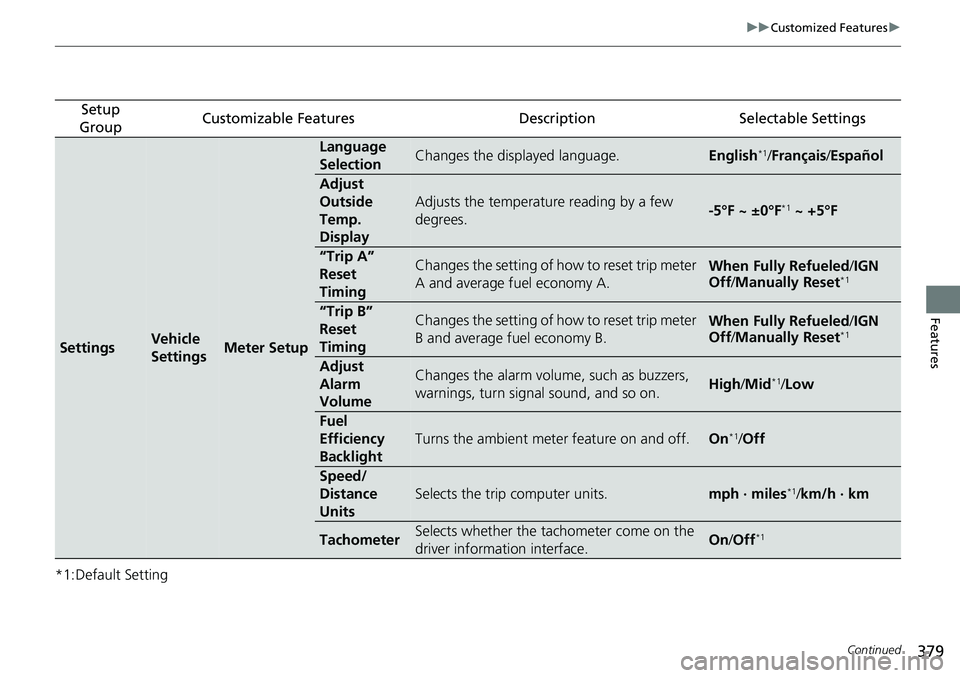
Setup
GroupCustomizable FeaturesDescriptionSelectable Settings
SettingsVehicle
SettingsMeter Setup
Language
SelectionChanges the displayed language.English*1/ Français /Español
Adjust
Outside
Temp.
Display
Adjusts the temperature reading by a few
degrees.-5°F ~ ±0°F*1 ~ +5°F
“Trip A”
Reset
TimingChanges the setting of how to reset trip meter
A and average fuel economy A.When Fully Refueled /IGN
Off /Manually Reset*1
“Trip B”
Reset
TimingChanges the setting of how to reset trip meter
B and average fuel economy B.When Fully Refueled /IGN
Off /Manually Reset*1
Adjust
Alarm
VolumeChanges the alarm volume, such as buzzers,
warnings, turn signal sound, and so on.High /Mid*1/Low
Fuel
Efficiency
Backlight
Turns the ambient meter feature on and off.On*1/Off
Speed/
Distance
Units
Selects the trip computer units.mph · miles*1/ km/h · km
TachometerSelects whether the tachometer come on the
driver information interface.On /Off*1
Page 383 of 728
381
uuCustomized Features u
Continued
Features
*1:Default Setting
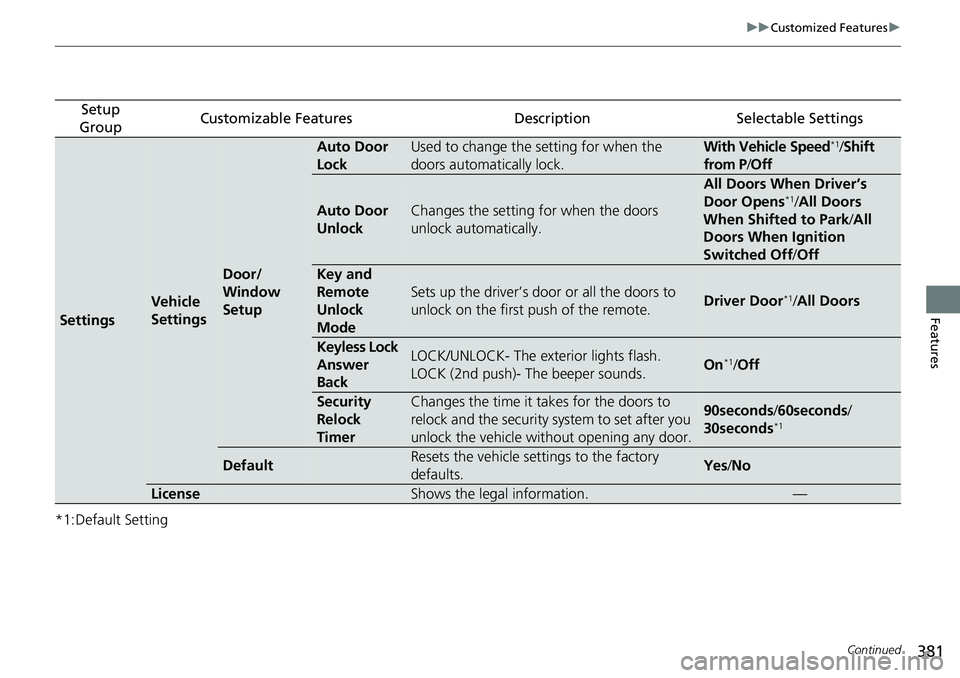
Setup
GroupCustomizable FeaturesDescriptionSelectable Settings
Settings
Vehicle
Settings
Door/
Window
Setup
Auto Door
LockUsed to change the setting for when the
doors automatically lock.With Vehicle Speed*1/ Shift
from P/ Off
Auto Door
UnlockChanges the setting for when the doors
unlock automatically.
All Doors When Driver’s
Door Opens*1/All Doors
When Shifted to Park /All
Doors When Ignition
Switched Off /Off
Key and
Remote
Unlock
Mode
Sets up the driver’s door or all the doors to
unlock on the first push of the remote.Driver Door*1/All Doors
Keyless Lock
Answer
BackLOCK/UNLOCK- The exterior lights flash.
LOCK (2nd push)- The beeper sounds.On*1/Off
Security
Relock
TimerChanges the time it takes for the doors to
relock and the security system to set after you
unlock the vehicle without opening any door.90seconds /60seconds/
30seconds*1
DefaultResets the vehicle settings to the factory
defaults.Yes /No
LicenseShows the legal information.—
Page 384 of 728
382
uuCustomized Features u
Features
*1:Default Setting
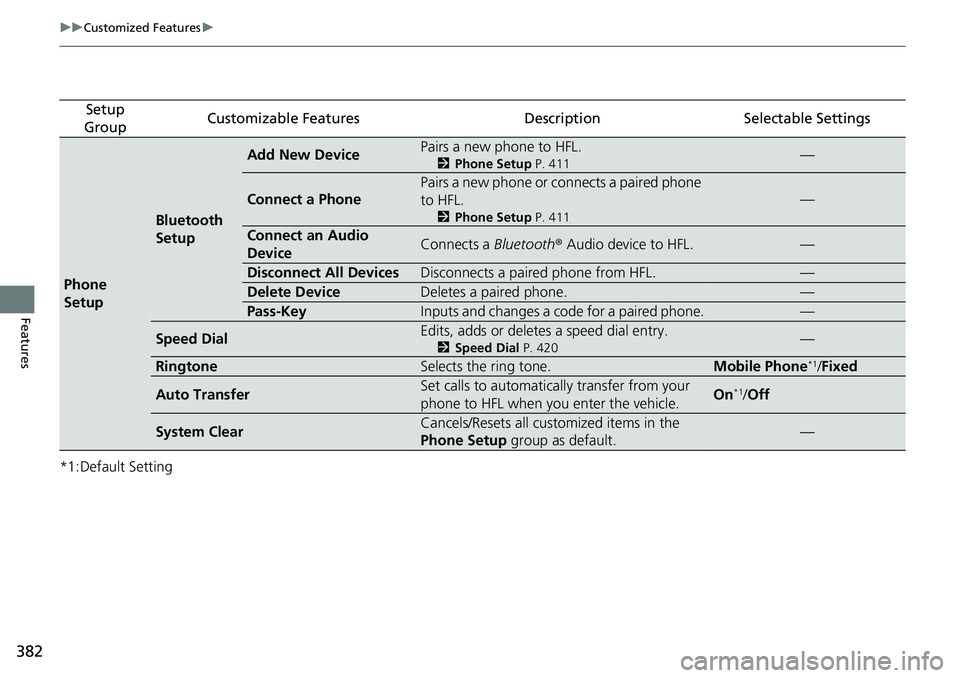
Setup
GroupCustomizable FeaturesDescriptionSelectable Settings
Phone
Setup
Bluetooth
Setup
Add New DevicePairs a new phone to HFL.
2 Phone Setup P. 411—
Connect a Phone
Pairs a new phone or connects a paired phone
to HFL.
2Phone Setup P. 411
—
Connect an Audio
DeviceConnects a Bluetooth® Audio device to HFL.—
Disconnect All DevicesDisconnects a paired phone from HFL.—
Delete DeviceDeletes a paired phone.—
Pass-KeyInputs and changes a code for a paired phone.—
Speed DialEdits, adds or deletes a speed dial entry.
2Speed Dial P. 420—
RingtoneSelects the ring tone.Mobile Phone*1/Fixed
Auto TransferSet calls to automatically transfer from your
phone to HFL when you enter the vehicle.On*1/Off
System ClearCancels/Resets all customized items in the
Phone Setup group as default.—
Page 387 of 728
385
uuCustomized Features u
Continued
Features
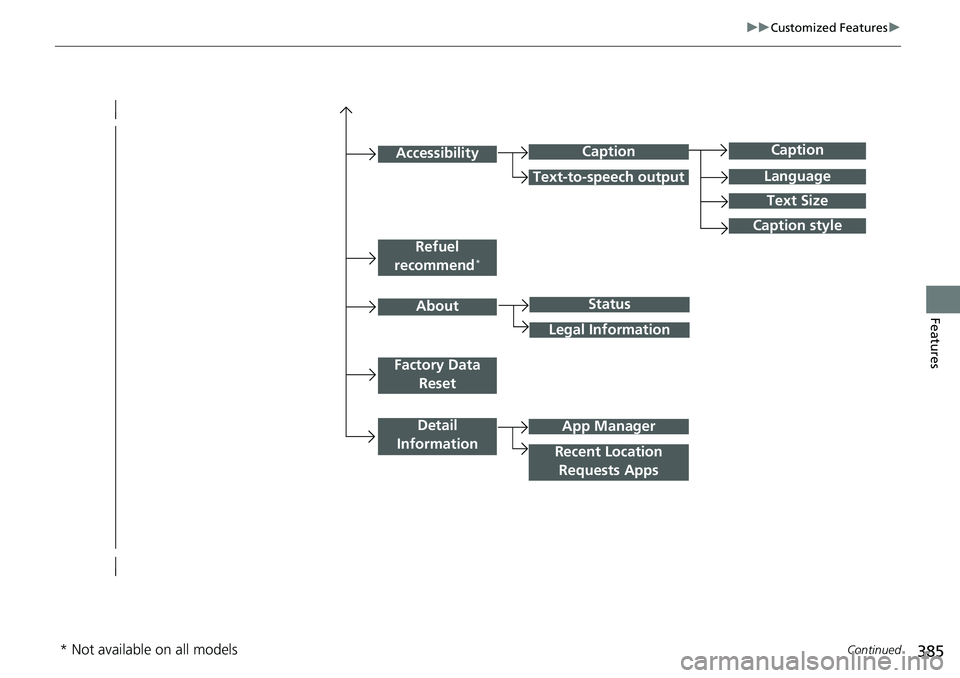
Caption
Language
Caption style
Detail
Information
Factory Data Reset
About
Refuel
recommend*
Accessibility
Status
Legal Information
App Manager
Recent Location Requests Apps
Caption
Text-to-speech output
Text Size
* Not available on all models
Page 389 of 728
387
uuCustomized Features u
Continued
Features
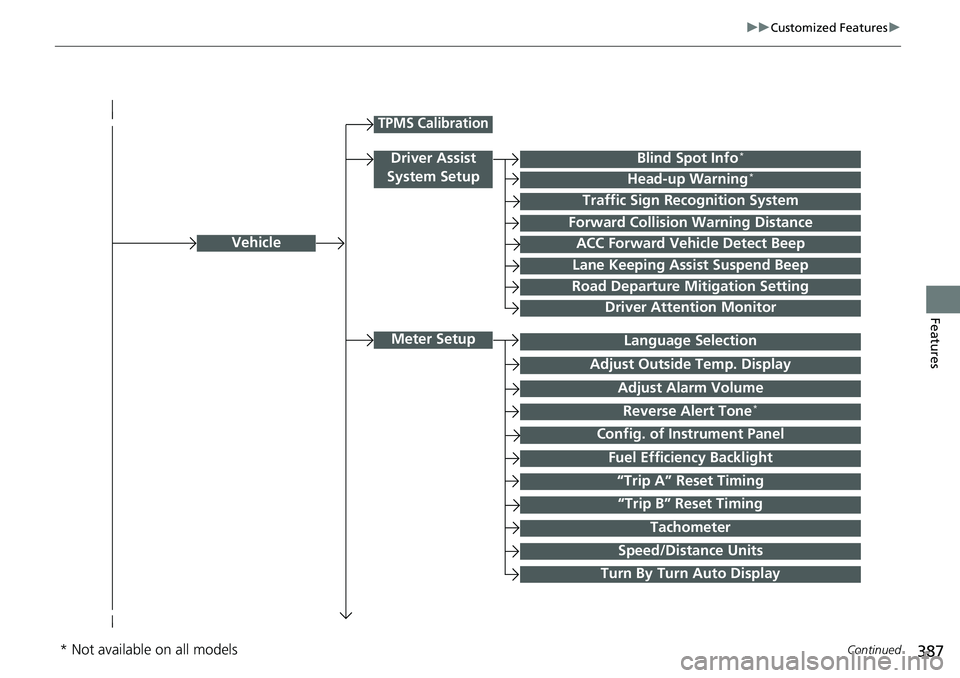
Vehicle
Meter Setup
Adjust Outside Temp. Display
“Trip A” Reset Timing
“Trip B” Reset Timing
Reverse Alert Tone*
Config. of Instrument Panel
Adjust Alarm Volume
Turn By Turn Auto Display
Fuel Efficiency Backlight
TPMS Calibration
Driver Assist
System SetupBlind Spot Info*
Head-up Warning*
Traffic Sign Recognition System
Forward Collision Warning Distance
ACC Forward Vehicle Detect Beep
Lane Keeping Assist Suspend Beep
Road Departure Mitigation Setting
Driver Attention Monitor
Speed/Distance Units
Tachometer
Language Selection
* Not available on all models
Page 390 of 728
388
uuCustomized Features u
Features
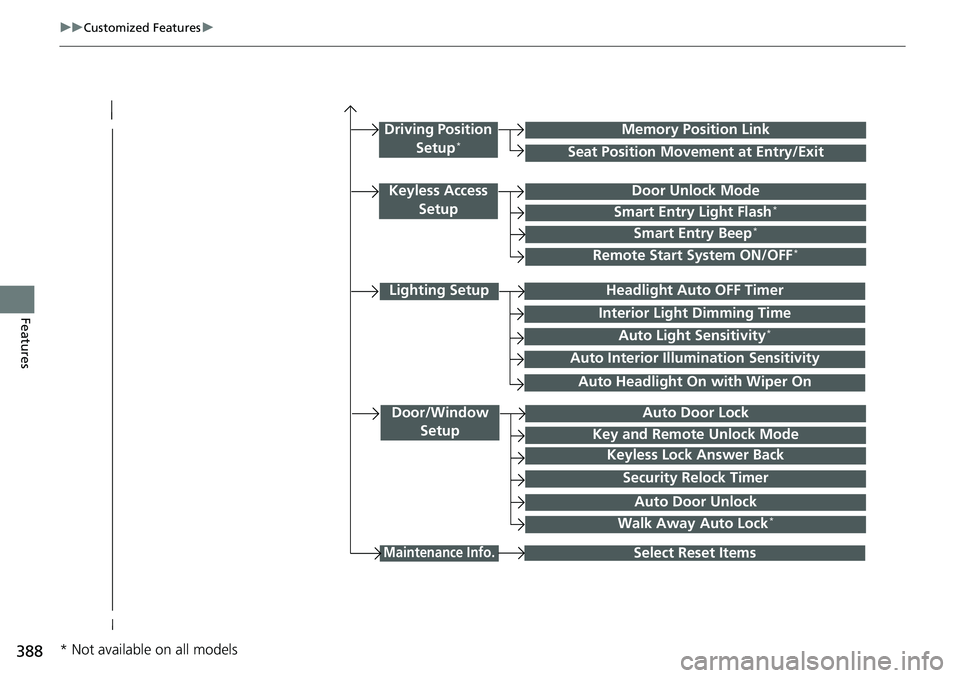
Lighting Setup
Interior Light Dimming Time
Headlight Auto OFF Timer
Auto Light Sensitivity*
Door/Window
SetupAuto Door Lock
Auto Door Unlock
Key and Remote Unlock Mode
Keyless Lock Answer Back
Security Relock Timer
Maintenance Info.Select Reset Items
Walk Away Auto Lock*
Driving Position
Setup*Seat Position Movement at Entry/Exit
Memory Position Link
Keyless Access SetupDoor Unlock Mode
Smart Entry Light Flash*
Smart Entry Beep*
Remote Start System ON/OFF*
Auto Headlight On with Wiper On
Auto Interior Illu mination Sensitivity
* Not available on all models
Page 395 of 728
393
uuCustomized Features u
Continued
Features
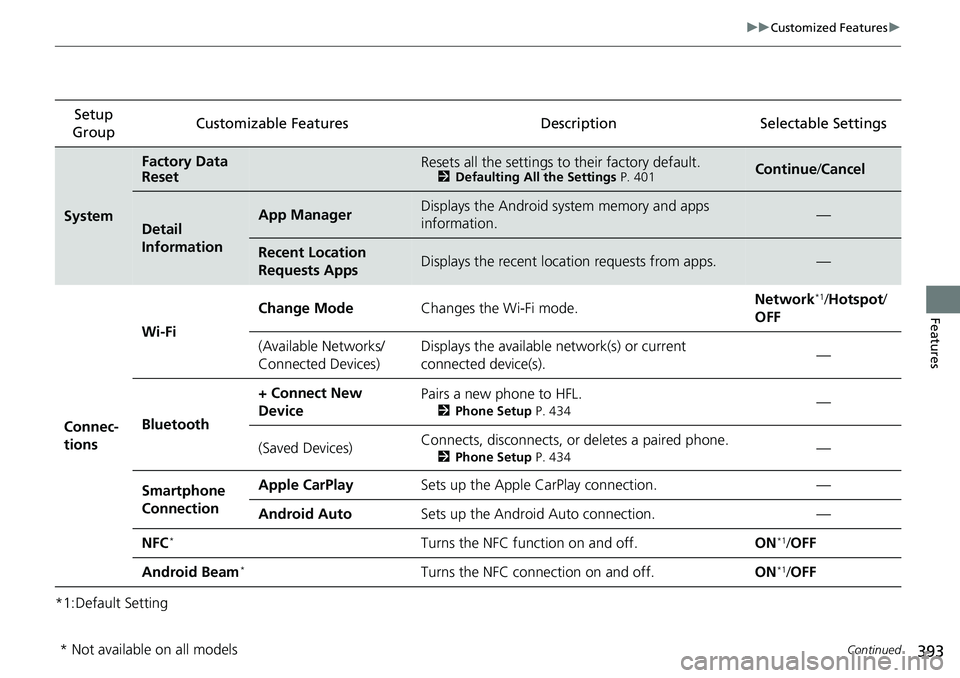
*1:Default SettingSetup
Group Customizable Features Desc
ription Selectable Settings
System
Factory Data
ResetResets all the settings to their factory default.2Defaulting All the Settings P. 401Continue/Cancel
Detail
InformationApp ManagerDisplays the Android system memory and apps
information.—
Recent Location
Requests AppsDisplays the recent locati on requests from apps.—
Connec-
tions Wi-Fi
Change Mode
Changes the Wi-Fi mode. Network
*1/
Hotspot /
OFF
(Available Networks/
Connected Devices) Displays the available network(s) or current
connected device(s).
—
Bluetooth + Connect New
Device
Pairs a new phone to HFL.
2
Phone Setup P. 434—
(Saved Devices) Connects, disconnects, or deletes a paired phone.
2
Phone Setup P. 434—
Smartphone
Connection Apple CarPlay
Sets up the Apple CarPlay connection. —
Android Auto Sets up the Android Auto connection. —
NFC
*Turns the NFC function on and off. ON*1/OFF
Android Beam
*Turns the NFC connection on and off. ON*1/OFF
* Not available on all models
Page 398 of 728
396
uuCustomized Features u
Features
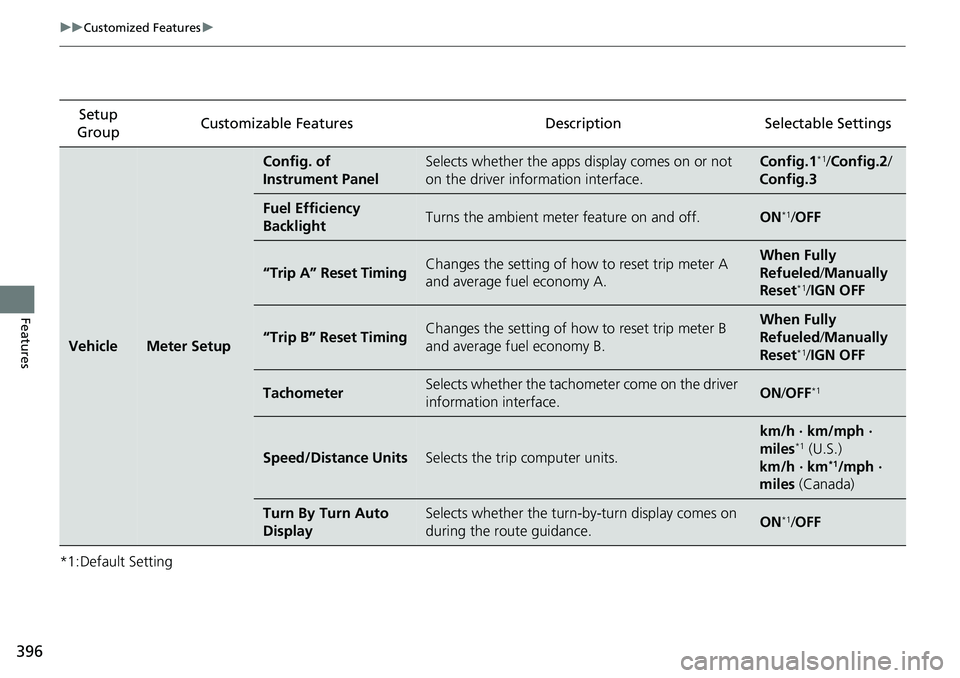
*1:Default SettingSetup
Group Customizable Features Description Selectable Settings
VehicleMeter Setup
Config. of
Instrument PanelSelects whether the apps display comes on or not
on the driver information interface.Config.1*1/
Config.2 /
Config.3
Fuel Efficiency
BacklightTurns the ambient meter feature on and off.ON*1/ OFF
“Trip A” Reset TimingChanges the setting of how to reset trip meter A
and average fuel economy A.When Fully
Refueled /Manually
Reset
*1/ IGN OFF
“Trip B” Reset TimingChanges the setting of how to reset trip meter B
and average fuel economy B.When Fully
Refueled /Manually
Reset
*1/ IGN OFF
TachometerSelects whether the tachometer come on the driver
information interface.ON /OFF*1
Speed/Distance UnitsSelects the trip computer units.
km/h · km/mph ·
miles*1 (U.S.)
km/h · km*1/mph ·
miles (Canada)
Turn By Turn Auto
DisplaySelects whether the turn-b y-turn display comes on
during the route guidance.ON*1/ OFF