reset HONDA ACCORD SEDAN 2020 Owner's Manual (in English)
[x] Cancel search | Manufacturer: HONDA, Model Year: 2020, Model line: ACCORD SEDAN, Model: HONDA ACCORD SEDAN 2020Pages: 728, PDF Size: 34.06 MB
Page 18 of 728
16
Quick Reference Guide
Features (P 245)
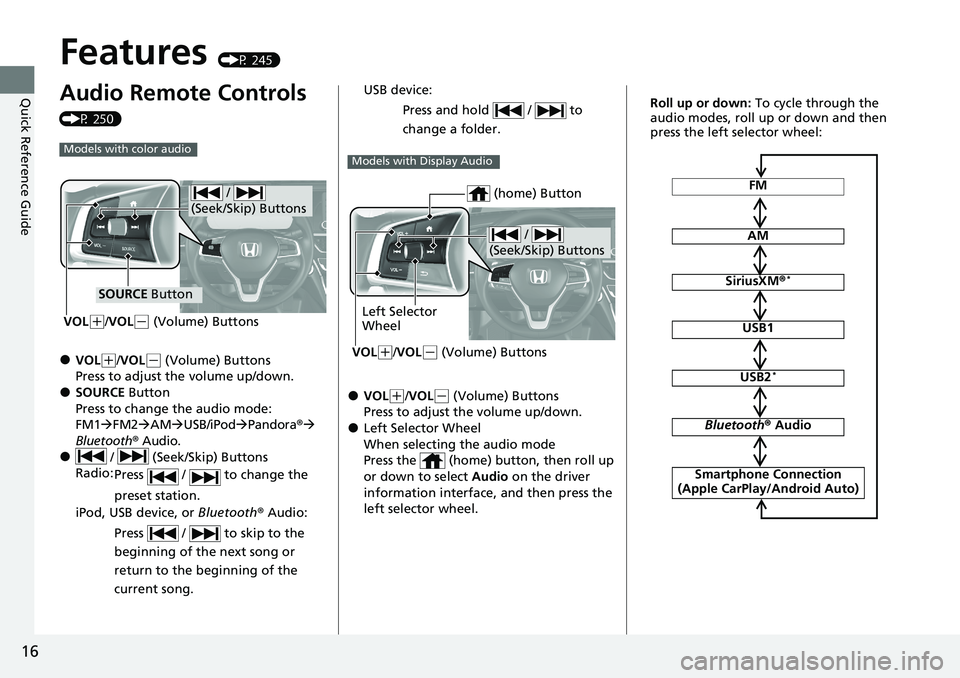
Audio Remote Controls
(P 250)
●VOL(+/VOL(- (Volume) Buttons
Press to adjust the volume up/down.
●SOURCE Button
Press to change the audio mode:
FM1 FM2 AM USB/iPod Pandora®
Bluetooth® Audio.
● / (Seek/Skip) Buttons
Radio: Press / to change the
preset station.
iPod, USB device, or Bluetooth ® Audio:
Press / to skip to the
beginning of the next song or
return to the beginning of the
current song.
Models with color audio
/
(Seek/Skip) Buttons
SOURCE Button
VOL
( +/VOL(- (Volume) Buttons
●VOL(+/VOL(- (Volume) Buttons
Press to adjust the volume up/down.
●Left Selector Wheel
When selecting the audio mode
Press the (home) button, then roll up
or down to select Audio on the driver
information interface, and then press the
left selector wheel. USB device:
Press and hold / to
change a folder.
Models with Display Audio
/
(Seek/Skip) Buttons
Left Selector
Wheel
VOL
( +/VOL(- (Volume) Buttons
(home) ButtonFM
AM
SiriusXM ®*
USB1
USB2*
Bluetooth® Audio
Smartphone Connection
(Apple CarPlay/Android Auto)
Roll up or down: To cycle through the
audio modes, roll up or down and then
press the left selector wheel:
Page 19 of 728
17
Quick Reference Guide
● / (Seek/Skip) Buttons
Radio: Press / to change the
preset station.
iPod, USB device, Bluetooth® Audio or
Smartphone Connection:
Press / to skip to the
beginning of the next song or
return to the beginning of the
current song.
USB device:
Press and hold / to
change a folder.
* Not available on all models
Page 20 of 728
18
Quick Reference Guide
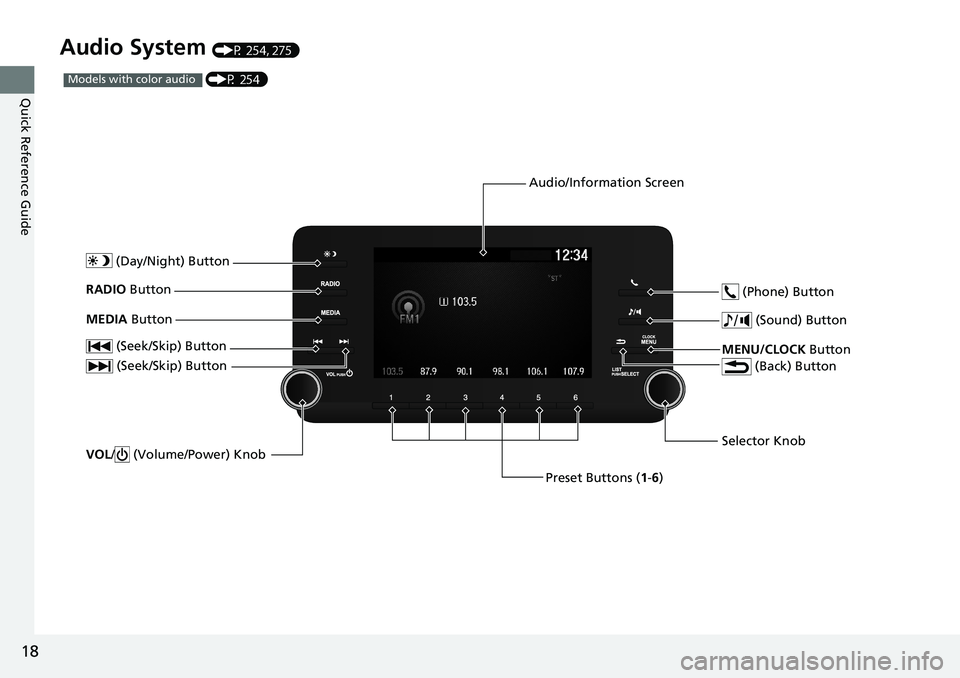
Audio System (P 254, 275)
(P 254)Models with color audio
(Seek/Skip) Button
Selector Knob
(Day/Night) ButtonVOL
/ (Volume/Power) Knob
RADIO Button
(Sound) Button
Preset Buttons (1-6)
(Seek/Skip) Button
MEDIA
Button
MENU/CLOCK Button
(Phone) Button
(Back) Button
Audio/Information Screen
Page 71 of 728
Continued69
uuChild Safety uSafety of Infants and Small Children
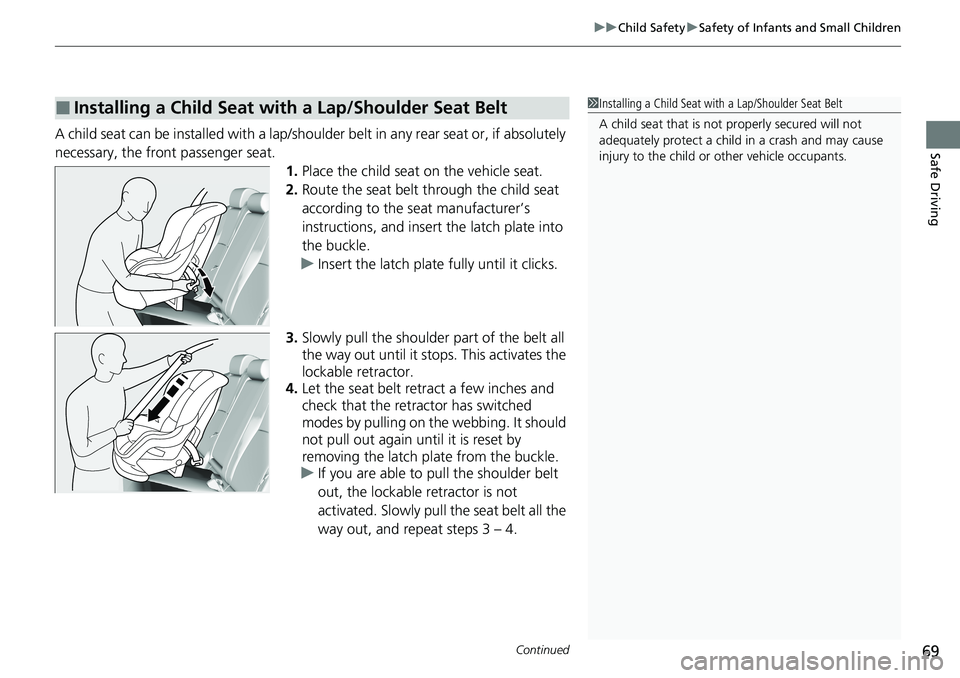
Safe DrivingA child seat can be installed with a lap/should er belt in any rear seat or, if absolutely
necessary, the front passenger seat. 1.Place the child seat on the vehicle seat.
2. Route the seat belt through the child seat
according to the seat manufacturer’s
instructions, and insert the latch plate into
the buckle.
u Insert the latch plate fully until it clicks.
3. Slowly pull the shoulder part of the belt all
the way out until it stops. This activates the
lockable retractor.
4. Let the seat belt retract a few inches and
check that the retractor has switched
modes by pulling on the webbing. It should
not pull out again until it is reset by
removing the latch pl ate from the buckle.
u If you are able to pull the shoulder belt
out, the lockable retractor is not
activated. Slowly pull the seat belt all the
way out, and repeat steps 3 – 4.
■Installing a Child Seat with a Lap/Shoulder Seat Belt1Installing a Child Seat with a Lap/Shoulder Seat Belt
A child seat that is not properly secured will not
adequately protect a child in a crash and may cause
injury to the child or other vehicle occupants.
Page 125 of 728
123
uuIndicators uDriver Information Interface Wa rning and Information Messages
Continued
Instrument Panel
MessageConditionExplanation
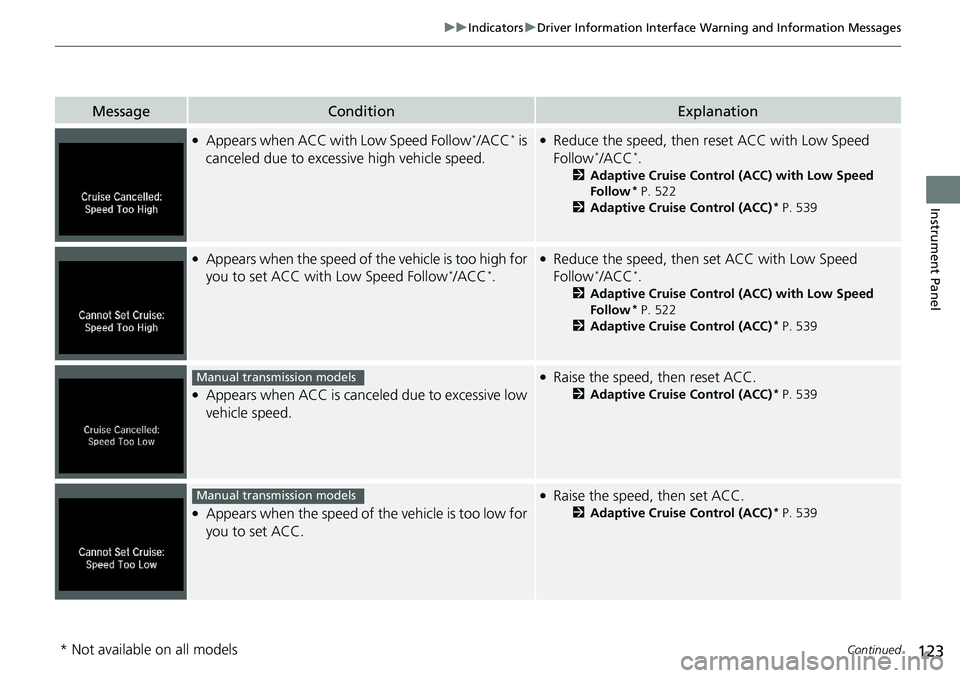
●Appears when ACC with Low Speed Follow*/ACC* is
canceled due to excess ive high vehicle speed.●Reduce the speed, then reset ACC with Low Speed
Follow*/ACC*.
2Adaptive Cruise Control (ACC) with Low Speed
Follow* P. 522
2 Adaptive Cruise Control (ACC)* P. 539
●Appears when the speed of the vehicle is too high for
you to set ACC with Low Speed Follow*/ACC*.
●Reduce the speed, then set ACC with Low Speed
Follow*/ACC*.
2Adaptive Cruise Control (ACC) with Low Speed
Follow* P. 522
2 Adaptive Cruise Control (ACC)* P. 539
●Appears when ACC is cancel ed due to excessive low
vehicle speed.
●Raise the speed, then reset ACC.
2 Adaptive Cruise Control (ACC)* P. 539
●Appears when the speed of the vehicle is too low for
you to set ACC.
●Raise the speed, then set ACC.
2 Adaptive Cruise Control (ACC)* P. 539
Manual transmission models
Manual transmission models
* Not available on all models
Page 143 of 728
Continued141
uuGauges and Displays uDriver Information Interface
Instrument Panel
Shows the total number of miles or kilomete rs driven since the last reset. Meters A
and B can be used to measure two separate trips.
■Resetting a trip meter
To reset a trip meter, display it, then press and hold the TRIP Button. The trip meter
is reset to 0.0.
Shows the outside temperature in Fahr enheit (U.S.) or Celsius (Canada).
■Adjusting the outside temperature display
Adjust the temperature reading by up to ±5°F or ±3°C if the temperature reading
seems incorrect.
Use the customized features in the au dio/information screen to correct the
temperature.
2 Customized Features P. 372, 383
■Trip Meter
■Outside Temperature
1Trip Meter
Switch between trip meter A and trip meter B by
pressing the TRIP Button.
1Outside Temperature
The temperature sensor is in the front bumper.
Road heat and exhaust from another vehicle can
affect the temperature reading when your vehicle
speed is less than 19 mph (30 km/h).
It may take several minutes for the display to be
updated after the temperature reading has stabilized.
Page 145 of 728
Continued143
uuGauges and Displays uDriver Information Interface
Instrument Panel
■Trip meter
Shows the total number of miles or kilomete rs driven since the last reset. Meters A
and B can be used to measure two separate trips.
Resetting a trip meter
To reset the trip meter, display it, press the left selector wheel and then select Reset.
u The trip meter is reset to 0.0 .
■Average fuel economy (Avg. Fuel)
Shows the estimated average fuel economy of each trip meter in mpg or l/100 km.
The display is updated at set intervals. Wh en a trip meter is reset, the average fuel
economy is also reset.
■Instant fuel economy
Shows the instant fuel economy as a bar graph in mpg or l/100 km.
■Range
Shows the estimated distance you can trave l on the remaining fuel. This estimated
distance is based on the vehicle’s current fuel economy.
1 Trip meter
Switch between trip meter A and trip meter B by
rolling the left selector wheel.
Resetting the trip meter in the Range & Fuel, the trip
meter in the sub display resets at the same time.
1 Average fuel economy (Avg. Fuel)
You can change when the average fuel economy is
reset.
2 Customized Features P. 372, 383
Page 147 of 728
Continued145
uuGauges and Displays uDriver Information Interface
Instrument Panel
■Trip meter
2 Trip meter P. 143
■Elapsed Time
Shows the time elapsed since the last time Trip A or Trip B was reset.
■Average Speed (Avg. Speed)
Shows the average speed in mph or km/h si nce the last time Trip A or Trip B was
reset.
1 Elapsed Time
You can change when to reset the elapsed time.
2 Customized Features P. 372, 383
1Average Speed (Avg. Speed)
You can change when to reset the average speed.
2 Customized Features P. 372, 383
Page 156 of 728
uuGauges and Displays uDriver Information Interface
154
Instrument Panel
■The Driver Attention Monitor resets when:
• The engine is turned off.
• The driver unfastens the seat belt and op ens the door while the vehicle is stopped.
■For the Driver Attention Monitor to function:
• The vehicle must be traveling above 25 mph (40 km/h).
• The electric power steering (EPS) system indicator must be off.
■Depending on driving conditions or other factors, the Driver Attention
Monitor may not function in the following circumstances:
• The steering assist function of the Lane Keeping Assist System (LKAS) is active.
2Lane Keeping Assist System (LKAS) P. 554
•The condition of the road is poor, e.g. the surface is unpaved or bumpy.
• It is windy.
• The driver is frequently op erating the vehicle in an assertive manner such as
changing lanes or accelerating.
■Customizing
You can change the Driver A ttention Monitor settings. Select Tactile and Audible
Alert
*1/ Tactile And Audible Alert*2, Tactile Alert , or Off*1/OFF*2.
2 Customized Features P. 372, 383
*1 : Models with color audio
*2 : Models with Display Audio
1For the Driver Attention Monitor to function:
The bars on the driver information interface remain
grayed out unless the Driv er Attention Monitor is
functioning.
Page 208 of 728
206
uuOperating the Switches Around the Steering Wheel uDriving Position Memory System*
Controls
Driving Position Memory System*
You can store two driver’s seat positions (except for power lumbar) with the driving
position memory system.
When you unlock and open the driver's doo r with a remote transmitter, or smart
entry system to one of the two preset pos itions and the seat adjusts to retracted
positions of one of the two pr eset positions automatically.
The seat will move to th e stored position when you set the power mode to
ACCESSORY.
When you enter the vehicle, the driver in formation interface briefly shows you which
remote transmitter you used to unlock the vehicle.
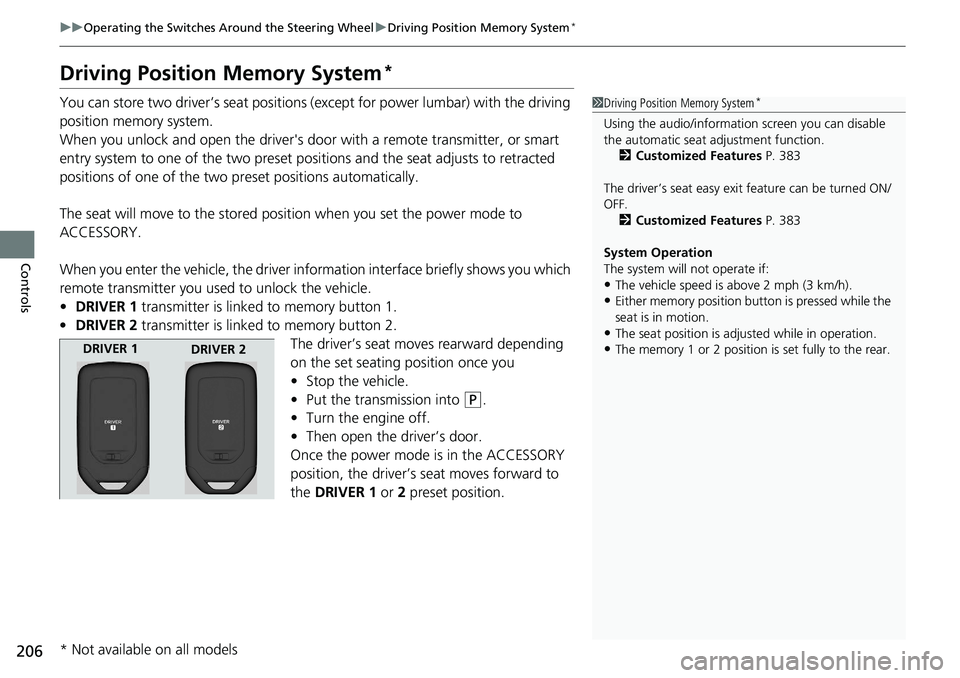
• DRIVER 1 transmitter is linked to memory button 1.
• DRIVER 2 transmitter is linked to memory button 2.
The driver’s seat moves rearward depending
on the set seating position once you
•Stop the vehicle.
• Put the transmission into
(P.
• Turn the engine off.
• Then open the driver’s door.
Once the power mode is in the ACCESSORY
position, the driver’s seat moves forward to
the DRIVER 1 or 2 preset position.
1 Driving Position Memory System*
Using the audio/informati on screen you can disable
the automatic seat adjustment function. 2 Customized Features P. 383
The driver’s seat easy exit feature can be turned ON/
OFF. 2 Customized Features P. 383
System Operation
The system will not operate if:
•The vehicle speed is above 2 mph (3 km/h).
•Either memory position button is pressed while the
seat is in motion.
•The seat position is adju sted while in operation.
•The memory 1 or 2 position is set fully to the rear.DRIVER 1
DRIVER 2
* Not available on all models