fuel pressure HONDA ACCORD SEDAN 2021 Owner's Manual (in English)
[x] Cancel search | Manufacturer: HONDA, Model Year: 2021, Model line: ACCORD SEDAN, Model: HONDA ACCORD SEDAN 2021Pages: 659, PDF Size: 28.71 MB
Page 27 of 659
25
Quick Reference Guide
VSA® On and Off (P 444)
●The Vehicle Stability AssistTM (VSA ®)
system helps stabilize the vehicle during
cornering, and helps maintain traction
while accelerating on loose or slippery
road surfaces.
●VSA ® comes on automatically every time
you start the engine.
●To partially disable or fully restore VSA ®
function, press and ho ld the button until
you hear a beep.
CMBSTM On and Off
(P 461)
●When a possible frontal collision is likely
unavoidable, the CMBSTM can help you to
reduce the vehicle speed and the severity
of the collision.
●The CMBSTM is turned on every time you
start the engine.
●To turn the CMBSTM on or off, use the
safety support switch.
Tire Pressure Monitoring
System (TPMS)
(P 446)
●Detects a change in tire conditions and
overall dimensions due to decrease in tire
pressures.
●The TPMS is turned on automatically
every time you start the engine.
●A calibration procedure must be
performed when certain conditions arise.
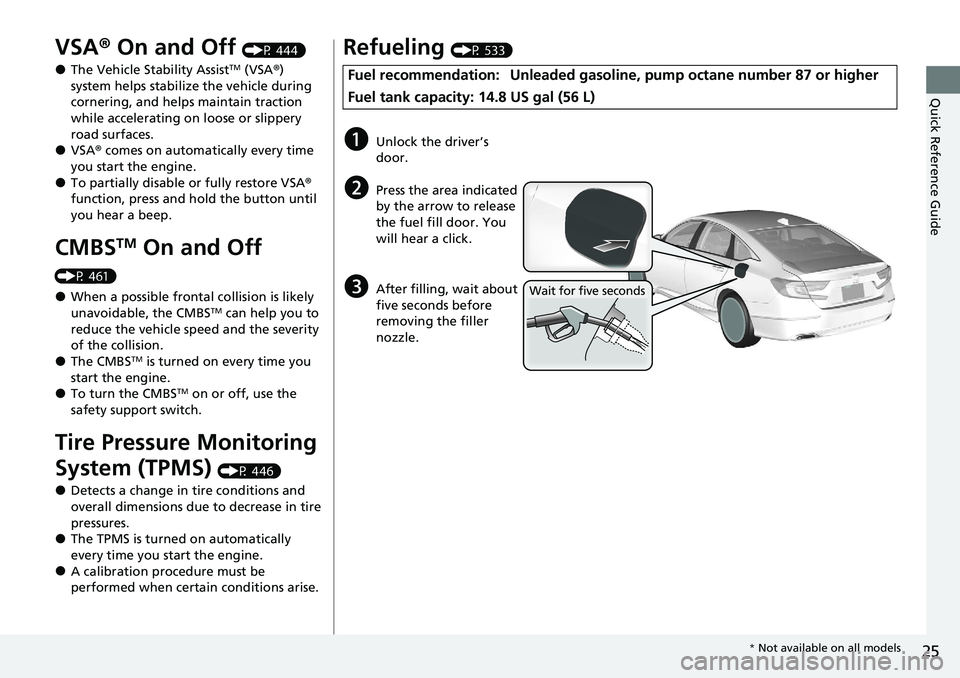
Refueling (P 533)
Fuel recommendation: Unlead ed gasoline, pump octane number 87 or higher
Fuel tank capacity: 14.8 US gal (56 L)
aUnlock the driver’s
door.
bPress the area indicated
by the arrow to release
the fuel fill door. You
will hear a click.
cAfter filling, wait about
five seconds before
removing the filler
nozzle.Wait for five seconds
* Not available on all models
Page 84 of 659
82
Instrument Panel
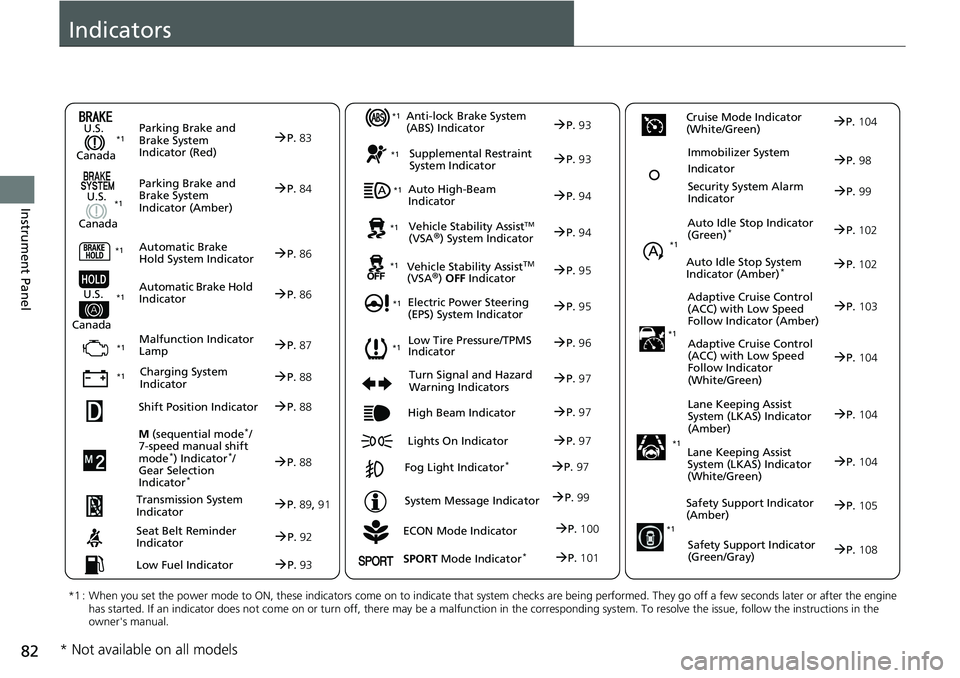
Indicators
ECON Mode Indicator
M
(sequential mode
*/
7-speed manual shift
mode
*) Indicator*/
Gear Selection
Indicator
*
P. 88
Parking Brake and
Brake System
Indicator (Red)
Parking Brake and
Brake System
Indicator (Amber)
U.S.
Canada
U.S.
Canada Automatic Brake
Hold System Indicator
Automatic Brake Hold
IndicatorU.S.
Canada
*1 : When you set the power mode to ON, these indicators come on to indicate that system checks are being performed. They go off a few seconds later or after the engine
has started. If an indicator does not come on or turn off, ther e may be a malfunction in the corresponding system. To resolve the issue, follow the instructions in the
owner's manual.
P. 83*1
Malfunction Indicator
Lamp
Charging System
Indicator
Anti-lock Brake System
(ABS) Indicator
Seat Belt Reminder
Indicator
Low Fuel Indicator
Vehicle Stability AssistTM (VSA®) System Indicator
Vehicle Stability Assist
TM (VSA®) OFF Indicator
Supplemental Restraint
System Indicator
Auto High-Beam
Indicator
Low Tire Pressure/TPMS
Indicator
Electric Power Steering
(EPS) System Indicator
Turn Signal and Hazard
Warning Indicators
Lights On Indicator High Beam Indicator
Fog Light Indicator*
System Message Indicator Auto Idle Stop Indicator
(Green)
*
Lane Keeping Assist
System (LKAS) Indicator
(Amber)
Safety Support Indicator
(Amber)
Safety Support Indicator
(Green/Gray)
P. 84
P.86
P.86
P.87
P.88
*1
*1 *1 *1
P.
96*1
*1
Shift Position IndicatorP. 88
Transmission System
Indi
catorP.89, 91
P.92
P.93
P.93
P.93
P.94
P.94
*1
*1
*1
*1
P. 95
*1P.95
P.97
P.102
*1
P.97
P.97
P.97 Security System Alarm
Indi
cator P.99
P.99
P. 104
P.105
P.108
*1
Auto Idle Stop System
Indicator (Amber)*P.102
*1Lane Keeping Assist
System (LKAS) Indicator
(White/Green)P.104
*1
Immobilizer System
IndicatorP.98
SPORT Mode Indicator*P.101
P.100
Cruise Mode Indicator
(White/Green)P. 104
Adaptive Cruise Control
(
ACC) with Low Speed
Follow Indicator (Amber)P. 103
*1Adaptive Cruise Control
(ACC) with Low Speed
Follow Indicator
(White/Green)P.104
* Not available on all models
Page 405 of 659
403
Driving
This chapter discusses driving and refueling.
Before Driving................................... 404
Towing a Trailer ................................ 409
When Driving Starting the Engine .......................... 414
Precautions While Driving................. 420
Transmission .................................... 421
Shifting ............................ 422, 429, 431
SPORT Mode
*.................................. 435
ECON Mode .................................... 436
Auto Idle Stop
*................................ 437
Adaptive Damper System*............... 442Vehicle Stability AssistTM (VSA ®), aka Electronic
Stability Control (ESC), System ..............443
Agile Handling Assist ..............................445
Tire Pressure Monitoring System (TPMS) .... 446Tire Pressure Monitoring System (TPMS) - Required Federal Explanation ......... 450
Blind spot information System
*........... 452
Honda Sensing ®................................ 455
Collision Mitigati on Braking System
TM
(CMBSTM) ....................................... 458
Low Speed Braking Control*............ 467
Adaptive Cruise Control (ACC) with Low
Speed Follow ................................. 472
Lane Keeping Assist System (LKAS).... 488
Road Departure Mitigation (RDM) System ....................................... 496
Traffic Sign Recognition System ....... 500 Front Sensor Camera ....................... 506
Radar Sensor ................................... 508
Sonar Sensors
*................................ 509
Braking
Brake System ................................... 510
Anti-lock Brake System (ABS) ........... 518
Brake Assist System ......................... 519
Parking Your Vehicle ........................ 520
Multi-View Rear Camera .................. 531
Refueling ........................................... 533
Fuel Economy and CO
2 Emissions .... 536
Turbo Engine Vehicle ....................... 537
* Not available on all models
Page 425 of 659
Continued423
uuWhen Driving uShifting
Driving
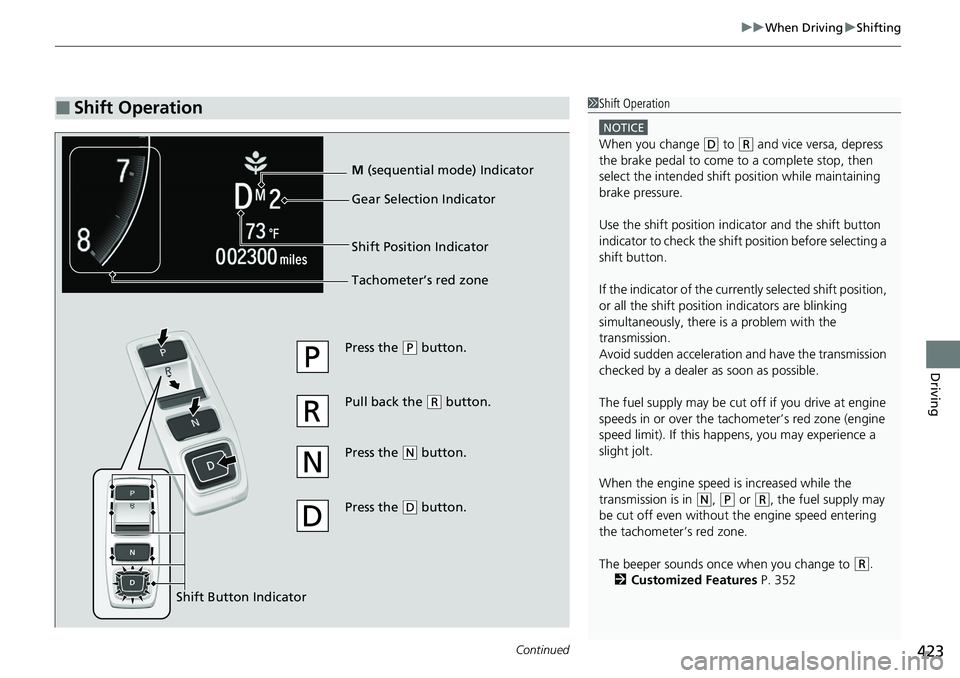
■Shift Operation1Shift Operation
NOTICE
When you change (D to (R and vice versa, depress
the brake pedal to come to a complete stop, then
select the intended shift position while maintaining
brake pressure.
Use the shift position indi cator and the shift button
indicator to check the shift position before selecting a
shift button.
If the indicator of the currently selected shift position,
or all the shift position indicators are blinking
simultaneously, there is a problem with the
transmission.
Avoid sudden acceleration and have the transmission
checked by a dealer as soon as possible.
The fuel supply may be cut of f if you drive at engine
speeds in or over the tac hometer’s red zone (engine
speed limit). If this happe ns, you may experience a
slight jolt.
When the engine speed is increased while the
transmission is in
( N, (P or (R, the fuel supply may
be cut off even without the engine speed entering
the tachometer’s red zone.
The beeper sounds once when you change to
( R.
2 Customized Features P. 352
Press the (P button.
Pull back the
( R button.
Press the
( N button.
Press the
( D button.
Shift Button Indicator M
(sequential mode) Indicator
Tachometer’s red zone Gear Selection Indicator
Shift Position Indicator
Page 452 of 659
450
uuWhen Driving uTire Pressure Monitoring System (TPMS) - Required Federal Explanation
Driving
Tire Pressure Monitoring System (TPMS) - Required
Federal Explanation
Each tire, including the spare (i f provided), should be checked
monthly when cold and inflated to the inflation pressure
recommended by the vehicle manufacturer on the vehicle placard
or tire inflation pressure label.
(If your vehicle has tires of a different size than the size indicated
on the vehicle placard or tire infl ation pressure label, you should
determine the proper tire inflat ion pressure for those tires.)
As an added safety feature, your vehicle has been equipped with
a tire pressure monitoring system (TPMS) that illuminates a low
tire pressure telltale
when one or more of your tire s is significantly under-inflated.
Accordingly, when the low tire pr essure telltale illuminates, you
should stop and check your tires as soon as possible, and inflate
them to the proper pressure.
Driving on a significantly under-in flated tire causes the tire to
overheat and can lead to tire failure. Under-inflat ion also reduces
fuel efficiency and tire tread li fe, and may affect the vehicle's
handling and stopping ability.
U.S. models
Page 538 of 659
536
Driving
Fuel Economy and CO2 Emissions
Improving Fuel Economy and Reducing CO2 Emissions
Achieving fuel economy and reducing CO2 emissions is dependent on several
factors, including driving conditions, load weight, idling time, driving habits, and
vehicle condition. Depending on these and other factors, you may not achieve the
rated fuel economy of this vehicle.
You can optimize your fuel economy with proper maintenance of your vehicle.
Always maintain your vehicle in accord ance with the messages displayed on the
driver information interface.
• Use engine oil with the viscosity recommended.
2 Recommended Engine Oil P. 553
•Maintain the specified tire pressure.
• Do not load the vehicl e with excess cargo.
• Keep your vehicle clean. A buildup of snow or mud on your vehicle’s underside
adds weight and increases wind resistance.
■Maintenance and Fuel Economy
1Improving Fuel Economy and Reducing CO2 Emissions
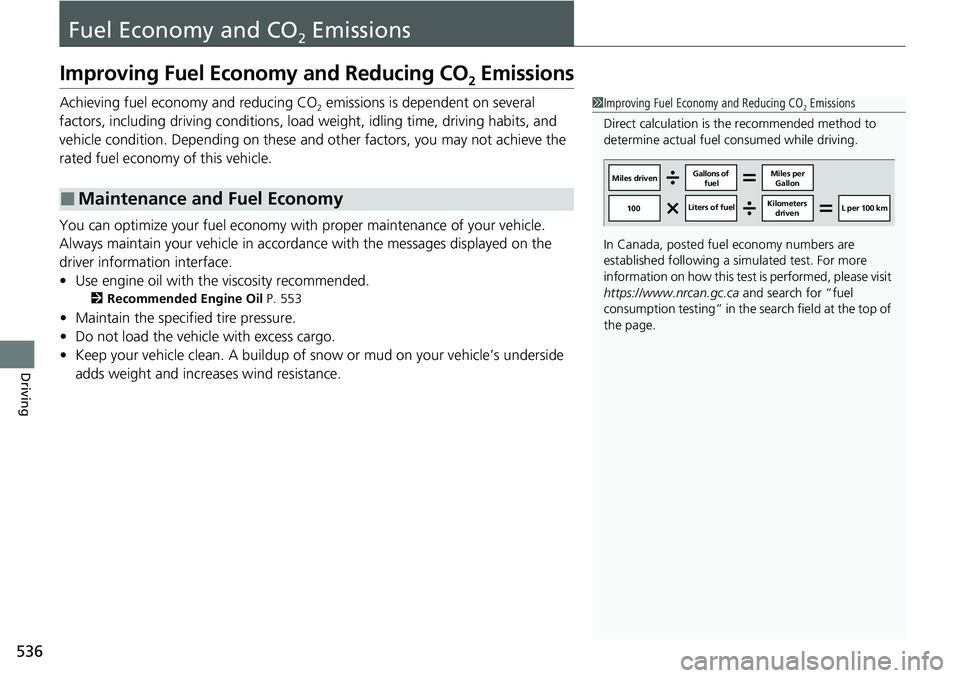
Direct calculation is the recommended method to
determine actual fuel consumed while driving.
In Canada, posted fuel economy numbers are
established following a simulated test. For more
information on how this test is performed, please visit
https://www.nrcan.gc.ca and search for “fuel
consumption testing” in the se arch field at the top of
the page.
Miles driven Gallons of
fuel Miles per
Gallon
100 Liters of fuel Kilometers
driven L per 100 km
Page 542 of 659
540
Maintenance
Before Performing Maintenance
Inspection and Maintenance
For your safety, perform all listed inspections and maintenance to keep your vehicle
in good condition. If you become aware of an y abnormality (noise, smell, insufficient
brake fluid, oil residue on the ground, etc.), have your vehicle inspected by a dealer.
(Note, however, that service at a dealer is not mandatory to keep your warranties in
effect.)
■Daily inspections
Perform inspections before long distance tri ps, when washing the vehicle, or when
refueling.
2 Maintenance P. 28
■Periodic inspections
• Check the brake fluid level monthly.
2 Brake Fluid P. 564
•Check the tire pressure monthly. Examin e the tread for wear and foreign objects.
2Checking and Maintaining Tires P. 577
•Check the operation of the exterior lights monthly.
2 Replacing Light Bulbs P. 566
•Check the condition of the wiper bl ades at least every six months.
2Checking and Maintaining Wiper Blades P. 574
■Types of Inspection and Maintenance
1Inspection and Maintenance
Maintenance, replacement, or repair of
emissions control devices and systems may be
done by any automotive repair establishment or
individuals using parts that are “certified” to
EPA standards.
According to state and fede ral regulations, failure to
perform maintenance on the maintenance main
items marked with # will not void your emissions
warranties. However, all ma intenance services should
be performed in accordan ce with the intervals
indicated by the driver information interface.
2 Maintenance Service Items P. 547
If you want to perform complex maintenance tasks
that require more skills a nd tools, you can purchase a
subscription to the Service Express website at
www.techinfo.honda.com .
2 Authorized Manuals P. 646
If you want to perform ma intenance yourself, make
sure that you have the necessary tools and skills first.
After performing maintenanc e, update the records in
the separate maintenance booklet.
U.S. models
Page 579 of 659
577
Maintenance
Checking and Maintaining Tires
Checking Tires
To safely operate your vehicle, your tires must be of the proper type and size, in
good condition with adequate tread, and properly inflated.
■Inflation guidelines
Properly inflated tires provid e the best combination of hand ling, tread life, and comfort.
Refer to the driver’s doorjamb label or spec ifications page for the specified pressure.
Under inflated tires wear unevenly, advers ely affect handling and fuel economy, and
are more likely to fail from overheating.
Overinflated tires make your vehicle ride ha rshly, are more prone to road hazards,
and wear unevenly.
Every day before you drive, look at each of the tires. If one looks lower than the
others, check the pressure with a tire gauge.
At least once a month or before long trips, use a gauge to measure the pressure in all
tires, including the spare. Even tires in good condition can lose 1–2 psi (10–20 kPa,
0.1–0.2 kgf/cm
2) per month.
■Inspection guidelines
Every time you check inflation, also examine the tires and valve stems.
Look for:
• Bumps or bulges on the side or in the tread. Replace the tire if you find any cuts,
splits, or cracks in the side of the tire . Replace it if you see fabric or cord.
• Remove any foreign objects and inspect for air leaks.
• Uneven tread wear. Have a deal er check the wheel alignment.
• Excessive tread wear.
2 Wear Indicators P. 582
•Cracks or other damage around valve stem.
1Checking Tires
Measure the air pressure when tires are cold. This
means the vehicle has been parked for at least three
hours, or driven less than 1 mile (1.6 km). If
necessary, add or releas e air until the specified
pressure is reached.
If checked when hot, tire pressure can be as much as
4–6 psi (30–40 kPa, 0.3–0.4 kgf/cm
2) higher than if
checked when cold.
Whenever tire pressure is adjusted, you must
calibrate the TPMS. 2 TPMS Calibration P. 448
Have a dealer check the tires if you feel a consistent
vibration while driving. Ne w tires and any that have
been removed and reinst alled should be properly
balanced.
Check the spare tire pressu re once a month or before
long trips.
3WARNING
Using tires that are excessively worn or
improperly inflated can cause a crash in
which you can be seriously hurt or killed.
Follow all instruction s in this owner’s
manual regarding ti re inflation and
maintenance.
Page 594 of 659
592
uuCleaning uExterior Care
Maintenance
Exterior Care
Dust off the vehicle body after you drive.
Regularly inspect your vehi cle for scratches on painted surfaces. A scratch on a
painted surface can result in body rust. If you find a scratch, promptly repair it.
Wash the vehicle regularly. Wash more frequently when driving in the following
conditions:
• If driving on roads with road salt.
• If driving in coastal areas.
• If tar, soot, bird droppings, insects, or tree sap are stuck to painted surfaces.
• Make sure to follow the instructions indicated on the automated car wash.
• Fold in the door mirrors.
• For models equipped with automatic inte rmittent wipers, turn the wipers off.
• Keep sufficient distance between the cleaning nozzl e and the vehicle body.
• Take particular care around the windows. St anding too close may cause water to
enter the vehicle interior.
• Do not spray high pressure water directly into the engine compartment. Instead,
use low pressure water and a mild detergent.
■Washing the Vehicle
■Using an Automated Car Wash
■Using High Pressure Cleaners
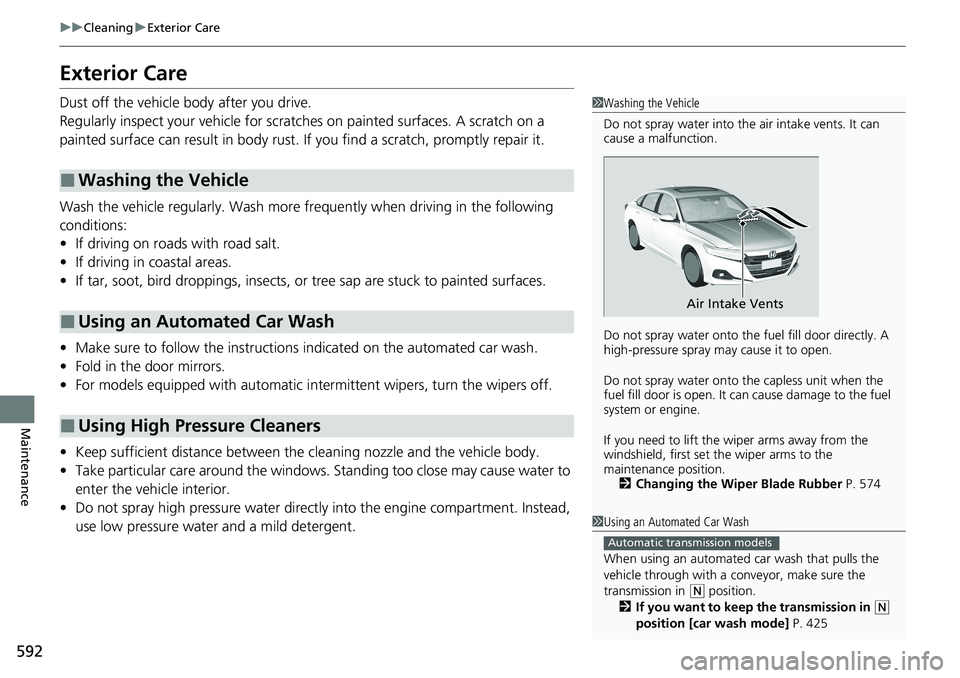
1 Washing the Vehicle
Do not spray water into the air intake vents. It can
cause a malfunction.
Do not spray water onto the fuel fill door directly. A
high-pressure spray ma y cause it to open.
Do not spray water onto the capless unit when the
fuel fill door is open. It ca n cause damage to the fuel
system or engine.
If you need to lift the wiper arms away from the
windshield, first set the wiper arms to the
maintenance position. 2 Changing the Wiper Blade Rubber P. 574
Air Intake Vents
1Using an Automated Car Wash
When using an automated car wash that pulls the
vehicle through with a c onveyor, make sure the
transmission in
( N position.
2 If you want to keep the transmission in (N
position [car wash mode] P. 425
Automatic transmission models
Page 599 of 659
597
Handling the Unexpected
This chapter explains how to handle unexpected troubles.
ToolsTypes of Tools .................................. 598
If a Tire Goes Flat
Changing a Flat Tire ......................... 599
Engine Does Not Start Checking the Engine ........................ 605
If the Remote Battery is Weak .......... 606
Emergency Engine Stop ................... 607
If the Battery Is Dead ....................... 608
Shift Lever Does Not Move .............. 611
Overheating How to Handle Overheating ............. 613 Indicator, Coming On/Blinking
If the Low Oil Pressure Warning Appears ... 615If the Charging System Indicator Comes
On ................................................. 615
If the Malfunction Indicator Lamp Comes On or Blinks ................................... 616
If the Brake System Indicator (Red) Comes
On or Blinks ................................... 617
If the Brake System Indicator (Red) Comes On
or Blinks at the Same Time When the Brake
System Indicator (Amber) Comes On.... 618
If the Electric Power Steering (EPS) System Indicator Comes On ....................... 619 If the Low Tire Pressure/TPMS Indicator
Comes On or Blinks ....................... 620
If the Transmission System Indicator Blinks along with the Warning Message... 621
Fuses Fuse Locations ................................. 622
Inspecting and Changing Fuses ........ 627
Emergency Towing ........................... 628
If You Cannot Unlock the Fuel Fill Door....629
If You Cannot Open the Trunk ........... 630
Refueling ........................................... 632