battery HONDA CIVIC 2003 7.G Workshop Manual
[x] Cancel search | Manufacturer: HONDA, Model Year: 2003, Model line: CIVIC, Model: HONDA CIVIC 2003 7.GPages: 1139, PDF Size: 28.19 MB
Page 720 of 1139
Dashboard
Dashboard Removal/lnstallation
SRS components are located in this area. Review the
SRS component locations (see page 23-13) and the
precautions and procedures (see page 23-14) in the SRS
section before performing repairs or service.
NOTE:. When prying with a flat-tip screwdriver, wrap it with
protective tape, and apply protective tape around the
related parts to prevent damage.. Have an assistant help you when removing and
installing the dashboa rd.. Take care not to scratch the dashboard, body, and
other related parts.
. Put on gloves to protect your hands.
1. Make sure you have the anti-theft code for the radio,
then write down the frequencies for the preset
buttons.
Disconnect the negative cable from the battery, and
wait at least three minutes before beginning work.
Remove these items:
. Driver's dashboard lower cover (see page 20-59). Driver's dashboard under cover (see page 20-60). Passenger's dashboard lower cover (see page
20-63). Glove box (see page 20-63). Consoles, front and rear (see page 20-57). Shift lever trim {see page 20-61). Center panel (see page 20-62). Kick panels, both sides (see page 20-50). A-pillar trim. both sides (see page 20-50). Steering column (see page 17-9)
20-66
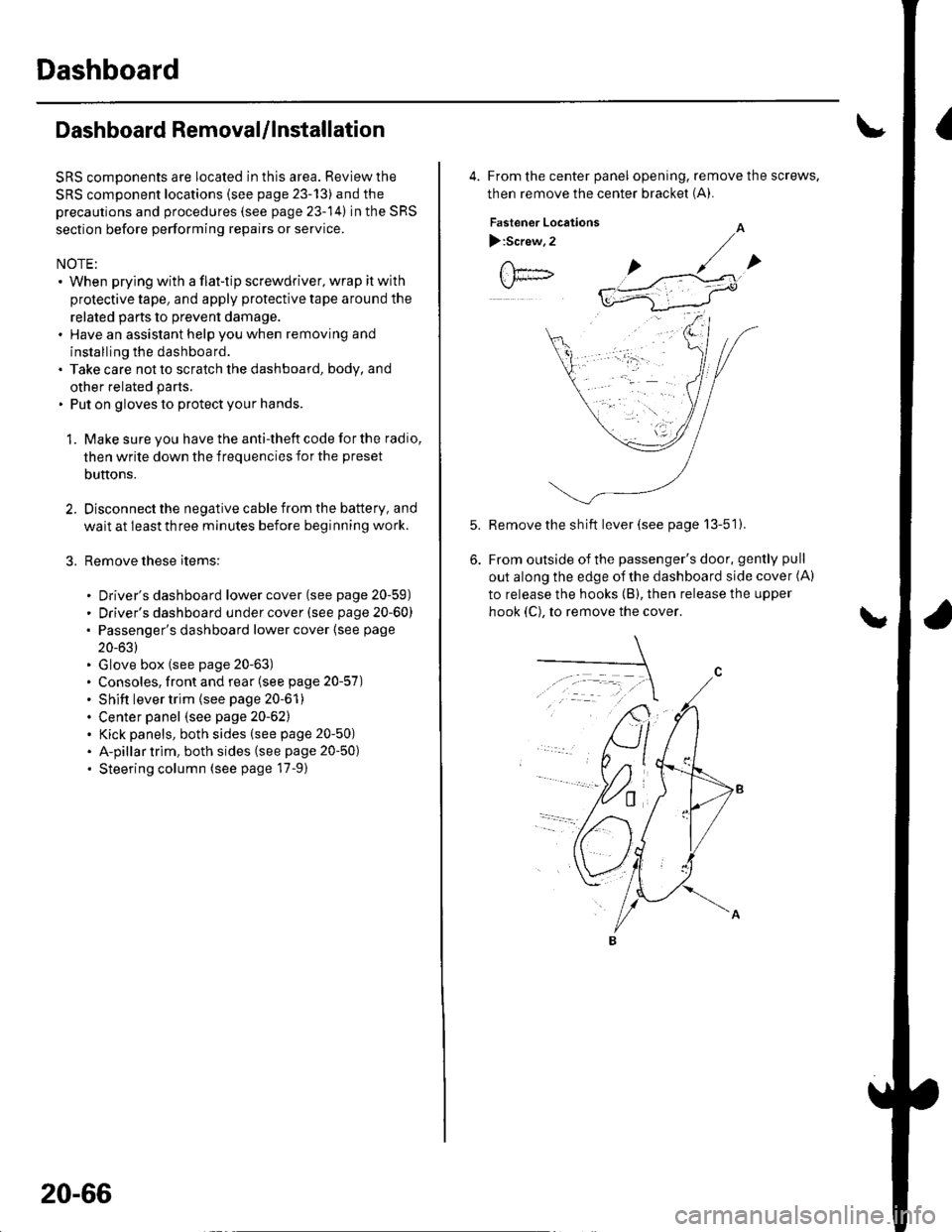
4. From the center panel opening, remove the screws,
then remove the center bracket (A).
Fastener Locations
):Screw,2
Remove the sh ift lever (see page 13-51).
From outside of the passenger's door, gently pull
out along the edge of the dashboard side cover (A)
to release the hooks (B), then release the upper
hook (C), to remove the cover.
Page 722 of 1139
Dashboard
Dashboard Removal/lnstallation
(cont'd)
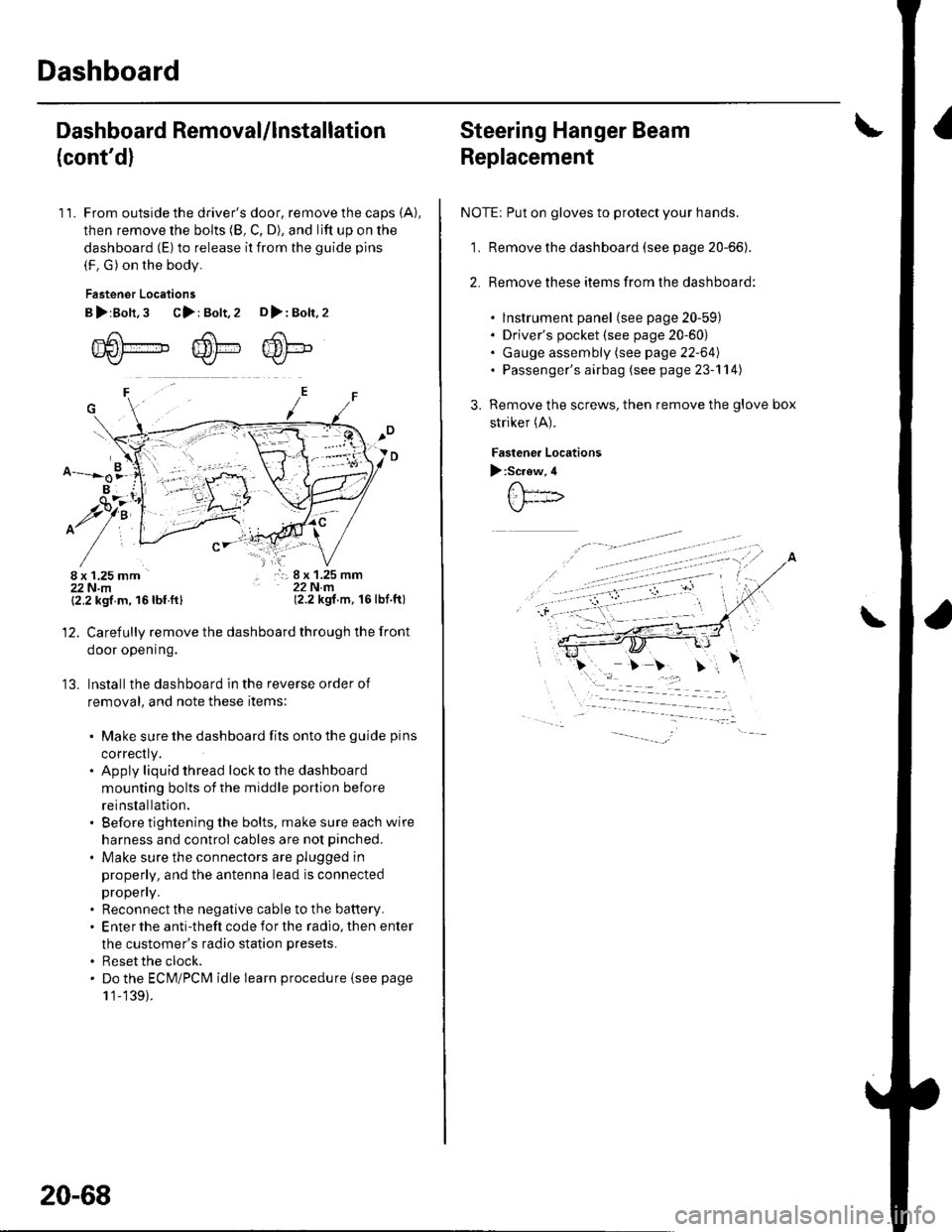
11. From outside the driver's door, remove the caps (A),
then remove the bolts (8, C, D), and lift up on the
dashboard (E) to release it from the guide pins
(F. G) on the body.
Fastener Locations
B>rBolt.3 C>: Bolt,2 D>: Bolt,2
m6[-,,,,",",,-,F6't---'' ffi'!--v{/- Kr* w-
B
$7:
^/761:
/,-,. r:; 8 x 1.25 mm22Nm(2.2 kgf.m, 16lbf.ft)
13.
{2.2 kgf m, 16lbf.ftl
Carefully remove the dashboard through the front
door opening.
lnstall the dashboard in the reverse order of
removal, and note these items:
. Make sure the dashboard fits onto the guide pins
correctly.. Apply liquid thread lock to the dashboard
mounting bolts of the middle portion before
reinstallation.. Before tightening the bolts, make sure each wire
harness and control cables are not pinched.
. Make sure the connectors are plugged in
properly, and the antenna lead is connected
propeny.. Reconnect the negative cable to the battery.. Enter the anti-theft code for the radio, then enter
the customer's radio station presets.
. Reset the clock.. Do the ECM/PCM idle learn procedure isee page
1 '1-139).
20-68
Steering Hanger Beam
Replacement
NOTE: Put on gloves to protect your hands.
1, Remove the dashboard (see page 20-66).
2. Remove these items from the dashboard:
. lnstrument panel (see page 20-59). Driver's pocket (see page 20-60). Gauge assembly (see page 22-64). Passenger's airbag (see page 23-'l 14)
Remove the screws, then remove the glove box
striker (A).
Fastenea Locations
):Screw,4
\
Page 725 of 1139
Front Seat Removal/lnstallation
For some models: SRS components are located in this
area. Review the SRS component locations (see page
23-'13) and the precautions and procedures (see page
23-14) in the SRS section before performing repairs or
service.
NOTE. When prying with a flat-tip screwdriver, wrap it with
protective tape to prevent damage.. Take care not to scratch the body or tear the seat
covers.. Put on gloves to protect your hands.
1, Make sure you have the anti-theft code for the radio,
then write down the frequencies for the preset
butlons.
Disconnect the negative cable from the battery, and
wait at least 3 minutes before beginning work.
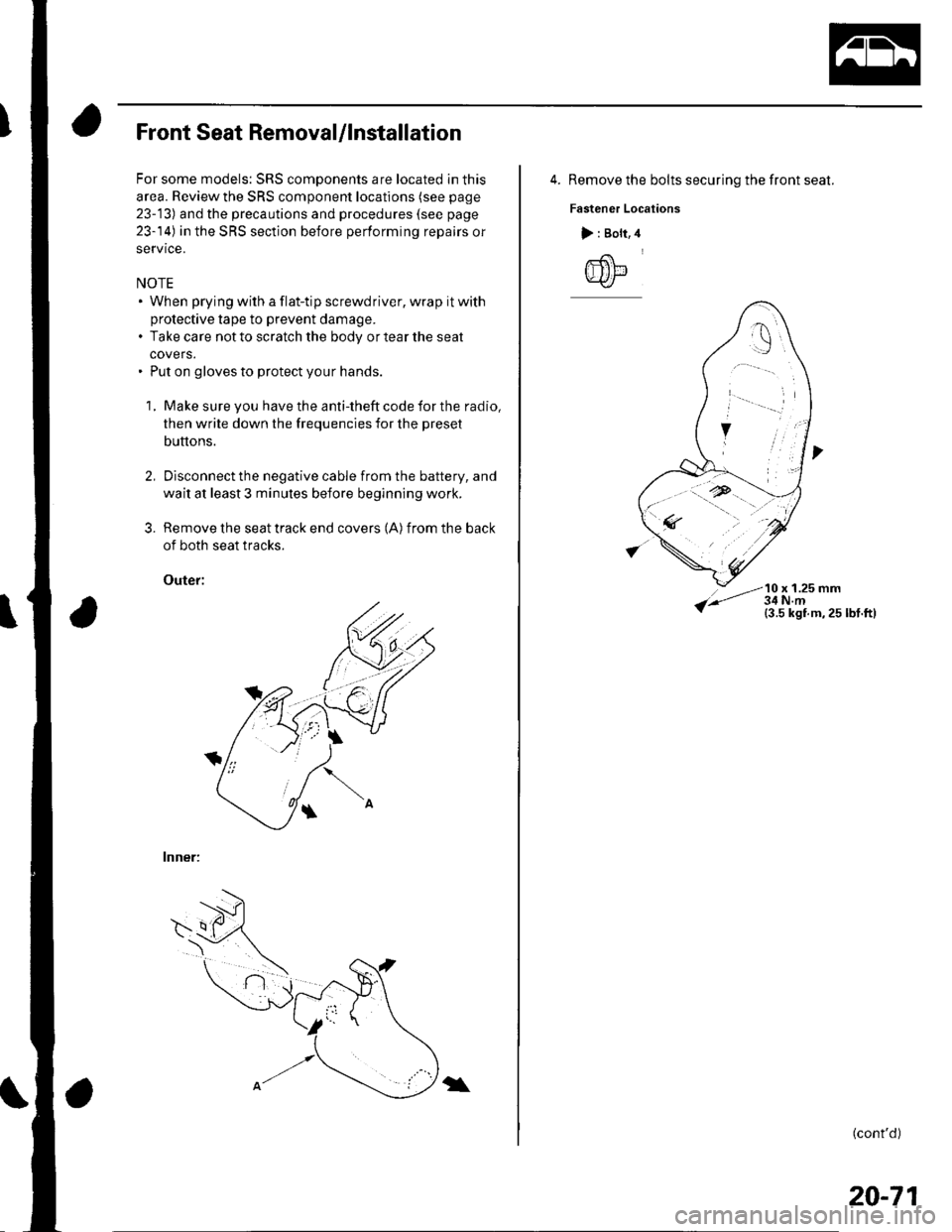
Remove the seat track end covers (A) from the back
of both seat tracks.
Outef:
lnner:
3.
\
4. Remove the bolts securing the front seat.
Fastener Locations
10 x 1.25 mm
> : Bolt,
@
(cont'd)
20-71
Page 726 of 1139
Seats
Front Seat Removal/lnstallation (cont'dl
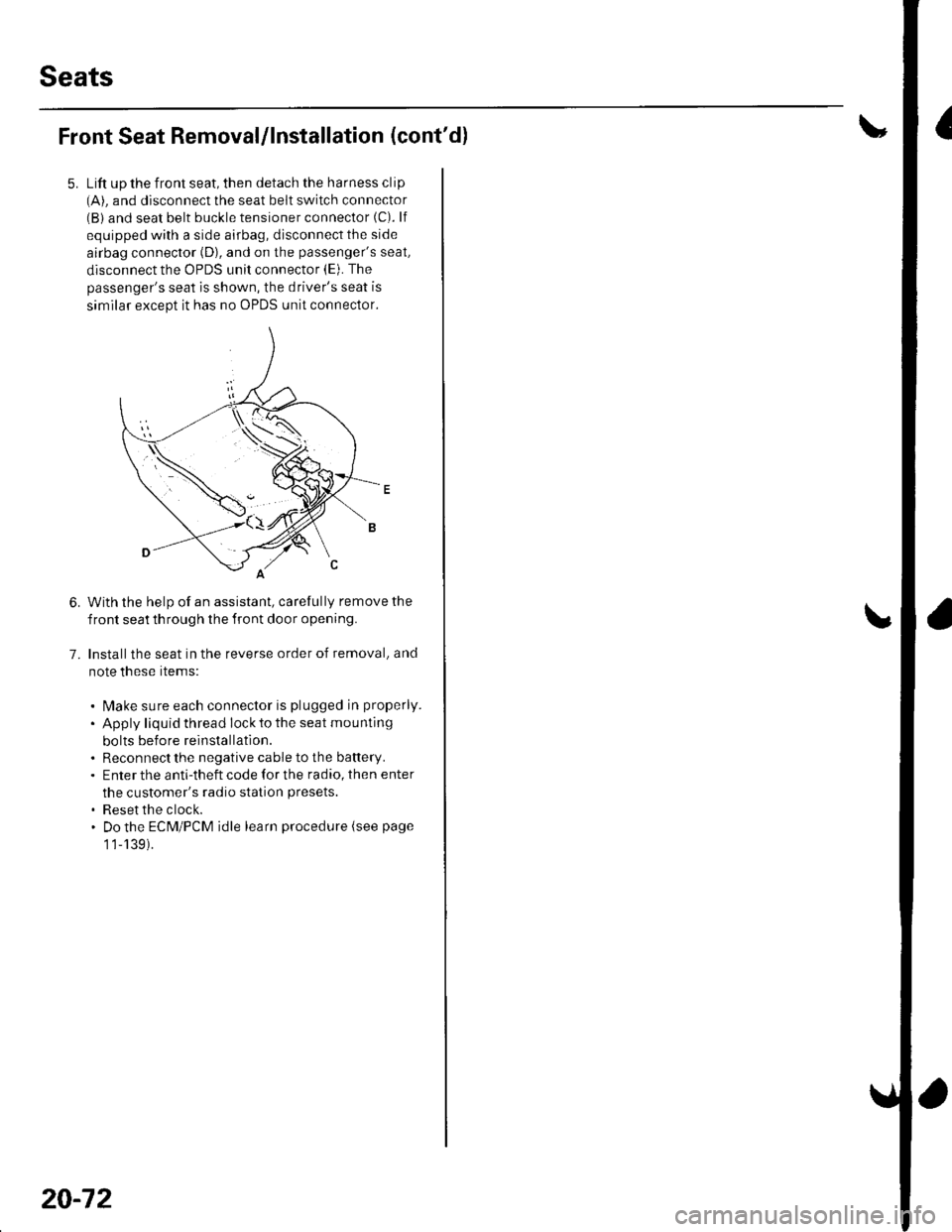
Lift up the front seat, then detach the harness clip(A). and disconnect the seat belt switch connector(B) and seat belt buckle tensioner connector (C). lf
equipped with a side airbag, disconnect the side
airbag connector (D), and on the passenger's seat,
disconnect the OPDS unit connector (E). The
passenger's seat is shown, the driver's seat is
similar except it has no OPDS unit connector.
With the help of an assistant, carefully remove the
front seat th rough the front door opening.
Installthe seat in the reverse order of removal, and
note these rtems:
. l\4ake sure each connector is plugged in properly.
. Apply liquid thread lock to the seat mounting
bolts before reinstallatlon.. Reconnect the negative cable to the battery.. Enter the anti-theft code for the radio, then enter
the customer's radio station presets.
. Reset the clock.. Do the ECM/PCM idle learn procedure (see page
1 1-139).
6.
7.
20-72
Page 778 of 1139
Heating and Air Conditioning
A/C Service Tips and Precautions
Compressed air mixed with R- 134a forms a
combustible vapor.
The vapor can burn or explode causing serious
injury.
Never use compressed air to pressure test
R-134a service equipment or vehicle air
conditioning systems.
Air conditioning refrigerant or lubricant vapor
can irritate your eyes, nose, or throat.
Be careful when connecting service equipment.
Do not breathe refrigerant or vapor.
The air conditioning system uses HFC-134a (R-134a)
ref rigerant and polyalkyleneglycol (PAG) ref rigerant oil,
which are not compatible with CFC'12 (R-12) refrigerant
and mineral oil. Do not use R-'12 refrigerant or mineral
oil in this system, and do not aftempt to use R 12
servicing equipment; damage to the air conditioning
system or your servicing equipment will result.
Use only service equipment that is U.L.-listed and is
certified to meet the requirements of SAE J2210 to
remove R-134a from the air conditioning system.
lf accidental system discharge occurs, ventilate the
work area before resuming service.
R-134a service equipment or vehicle air conditioning
systems should not be pressure tested or leak tested
with compressed air.
Additional health and safety information may be
obtained from the refrigerant and lubricant
manufacturers.
. Always disconnect the negative cable from the
battery whenever replacing air conditioning parts.
. Keep moisture and dirt out of the system. When
disconnecting any lines, plug or cap the fittings
immediately; don't remove the caps or plugs until
iust be{ore you reconnect each line.' Before connecting any hose or line, apply a few drops
of relrigerant oil to the O-ring.. When tightening or loosening a fitting, use a second
wrench to support the matching fitting.. When discharging the system, use a R-'134a
ref rigerant recovery/recycling/charging station; don't
release refrigerant into the atmosphere.
21-6
A: 130 m0 {4 l/3 tl.oz,4.6 lmp.oz)
],^
A/C Refrigerant Oll Replacement
Recommended PAG oil: KEIHIN SP 10:
. P/N 38897-P l3-A01AH: '120 m0 i4 fl oz). P/N 38899-P13'A01: 40 m0 i1 1/3 fl oz)
Add the recommended refrigerant oil in the amount
listed if you replace any of the following parts.
. To avoid contamination. do not return the oilto the
container once dispensed, and never mix it with other
refrigerant oils.. lmmediately af'ter using the oil, reinstallthe cap on
the container, and seal it to avoid moisture
aosorpron.. Donotspill the refrigerant oil on the vehicle; it may
damage the paint. lf it gets on the paint, wash it off
immediately.
Condenser ...........25 mA \516 tl.oz, 0.9 lmp.oz)
Evaporator ........... 45 m0 (1 113Il.oz, '1.4 lmp.oz)
Line or hose ......... '10 m0 {1/3 fl.oz,0.4 lmp.oz)
Receiver/Dryer .... '10 m0 ('113 fl.oz,0.4 lmp.oz)
Leakage repai r .... 25 m0, 1516 Il oz, 0.9 lmp.oz)
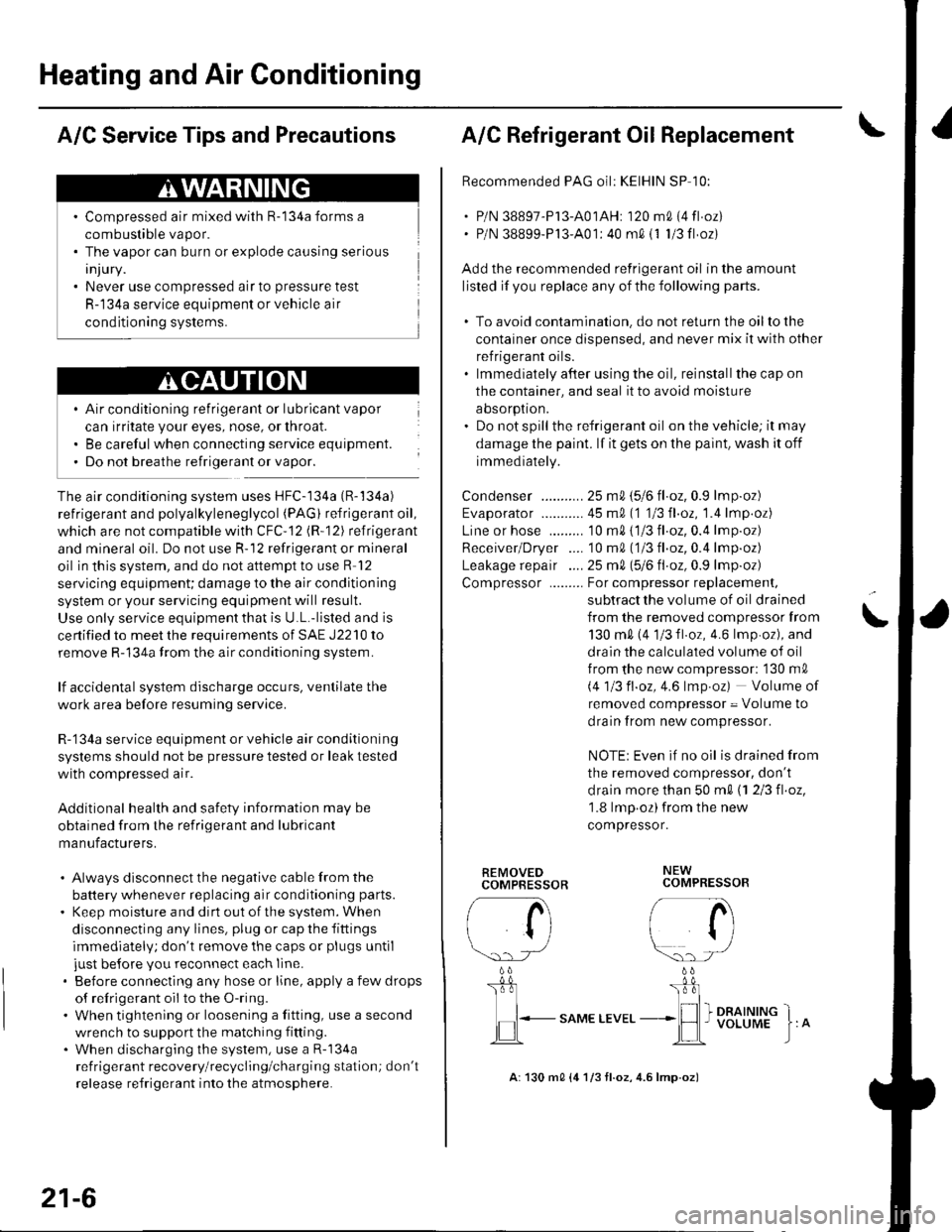
Compressor ......... For compressor replacemenl,
subtract the volume of oil drained
from the removed compressor from
130 m0 (4 1/3fl.oz, 4.6lmp.oz), and
drain the calculated volume of oil
f rom the new compressor: '130 m0
i.4113 fl.oz,4.6 lmp.oz) Volume of
removed compressor = Volume to
drain from new compressor.
NOTE: Even if no oil is drained from
the removed compressor, don't
d rain more than 50 m0 \1 2/3 fl.oz,'1.8 lmp oz)from the new
compressor.
\
REMOVEDCOMPBESSOR
rA
li
\.. rJ
b
I
,lEL.-
"o*t ttu"
NEWCOMPRESSOR
/- a\i tl
r/
\:)-) -/
_ 0L'r:l_
I I I DRAINING_*lH I voLUME
Page 792 of 1139
1a
13.
Disconnect heater control panel connector A (14P).
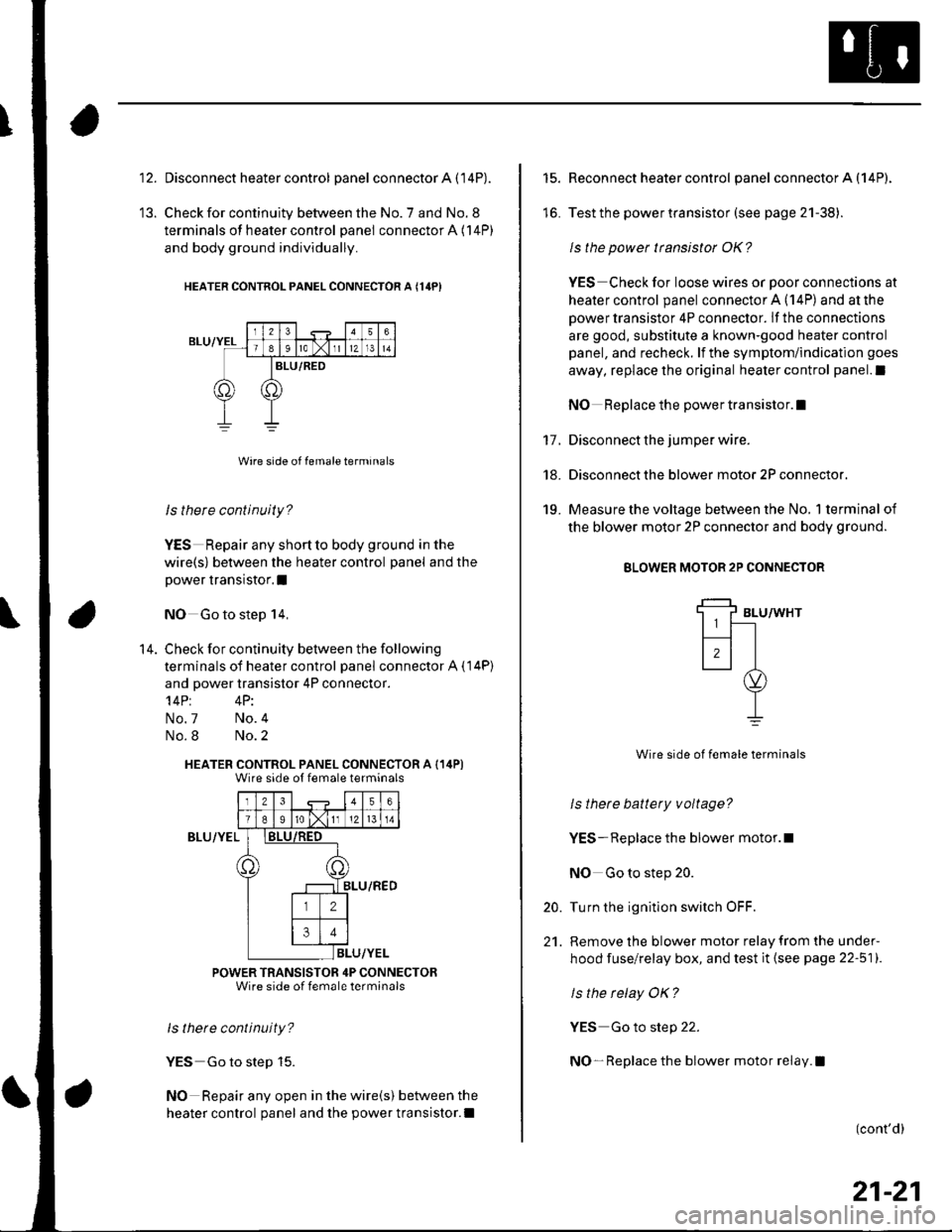
Check for continuity between the No. 7 and No. 8
terminals of heater control panel connector A (14P)
and body ground individually.
HEATER CONTNOL PANEL CONNECTOR A {14PI
ls there continuity?
YES Repair any shortto body ground in the
wire(s) between the heater control panel and the
power transistor.I
NO Go to step 14,
Check for continuity between the following
terminals of heater control panel connector A ( 14P)
and power transistor 4P connector.'l4Pt 4P:
No.7 No.4
No.8 No.2
HEATER CONTROL PANEL CONNECTOR A (14P)Wire side ot female terminals
Iz341516
T89ro lxlI12l 13 l 14
)8LU/RED
ILU/YEL
POWER TRANSISTOR 4P CONNECTORWire side of female terminals
ls thete continuity?
YES Go to step 15.
NO Repair any open in the wire(s) between the
heater control panel and the power transistor.l
14.
BLU/YEL
15.
lo.
17.
18.
19.
Reconnect heater control panel connector A (14P).
Test the power transistor (see page 21-38).
ls the power transistor OK?
YES Check for loose wires or poor connections at
heater control panel connector A (14P) and at the
power transistor 4P connector. lf the connections
are good, substitute a known-good heater control
panel, and recheck. lf the symptom/indication goes
away, replace the original heater control panel.l
NO Replace the power transistor.I
Disconnect the jumper wire.
Disconnect the blower motor 2P connector.
Measure the voltage between the No, 1 terminal of
the blower motor 2P connector and body ground.
BLOWER MOTOR 2P CONNECTOR
BLU/WHT
Wire side of female terminals
ls thete battery voltage?
YES- Replace the blower motor.l
NO Go to step 20.
Turn the ignition switch OFF.
Remove the blower motor relay from the under-
hood fuse/relay box, and test it (see page 22-511.
ls the relay OK?
YES Go to step 22.
NO- Replace the blower motor relay.l
20.
21.
(cont'd)
21-21
Page 793 of 1139
Heating and Air Conditioning
DTC Troubleshooting lcont'd)
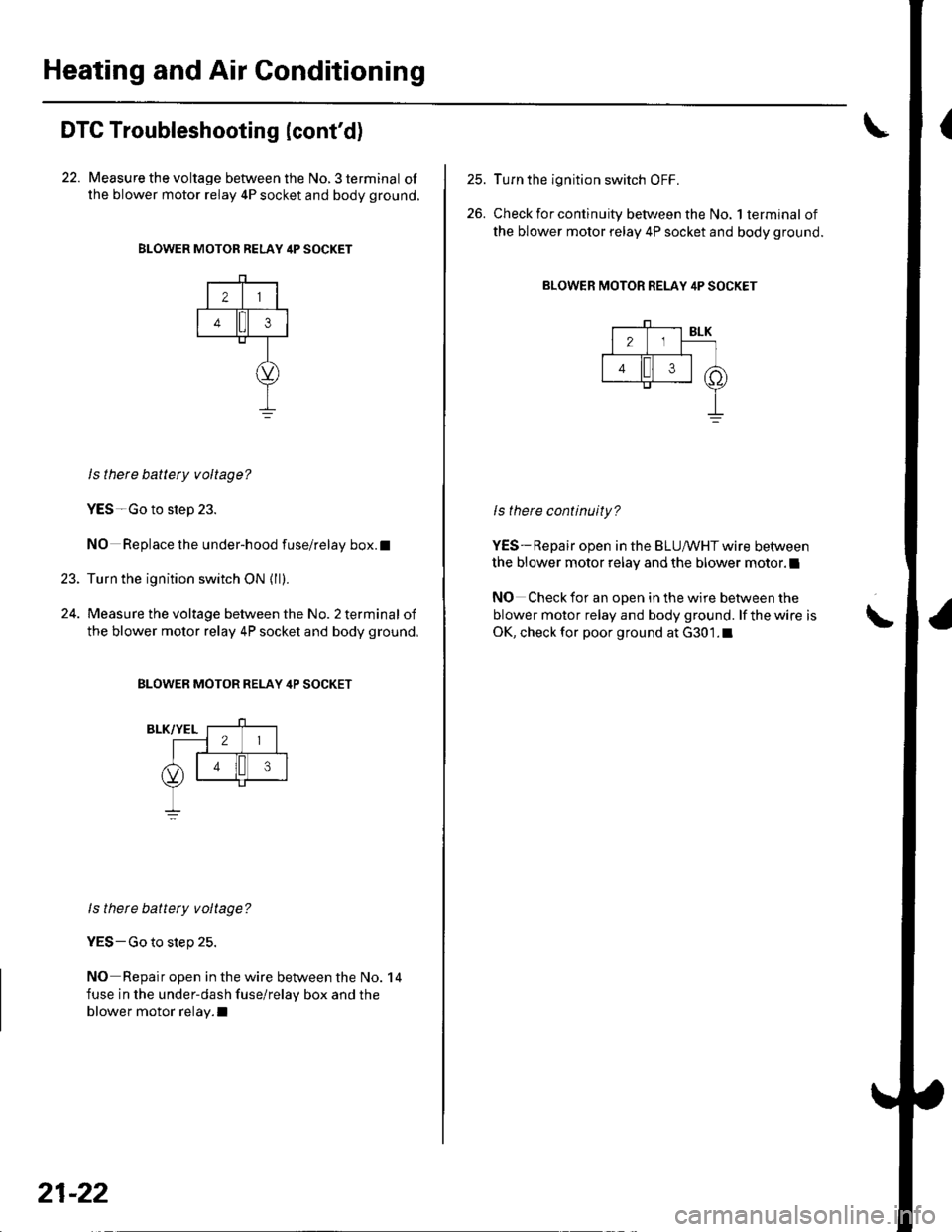
22. Measure the voltage between the No. 3 terminal of
the blower motor relay 4P socket and body ground.
BLOWER MOTOR RELAY 4P SOCKET
21
43
23.
ls there battety voltage?
YES-Go to step 23.
NO Replace the under-hood fuse/relay box.t
Turn the ignition switch ON {ll).
Measure the voltage between the No. 2 terminal of
the blower motor relay 4P socket and body ground,
BLOWER MOTOR RELAY 4P SOCKET
ls there battery voltage?
YES-Go to step 25.
NO Repair open in the wire between the No. 14
fuse in the under-dash fuse/relay box and the
blower motor relay.I
21-22
25.
26.
Turn the ignition switch OFF,
Check for continuity between the No. 1 terminal of
the blower motor relay 4P socket and body ground.
BLOWER MOTOR RELAY 4P SOCKET
ls there continuity?
YES-Repair open in the BLUIr'/HT wire between
the blower motor relay and the blower motor.l
NO Check for an open in the wire between the
blower motor relay and body ground. lf the wire is
OK, check for poor ground at G301.1\
Page 796 of 1139
3.
Recirculation Control Motor Circuit Troubleshooting
1. Check the No. 14('10A)fuse inthe under-dashfuse/
relay box.
ls the f use OK?
YES Go to step 2.
NO- Replace the fuse, and recheck.l
2. Disconnect the recirculation control motor 5P
conneclor.
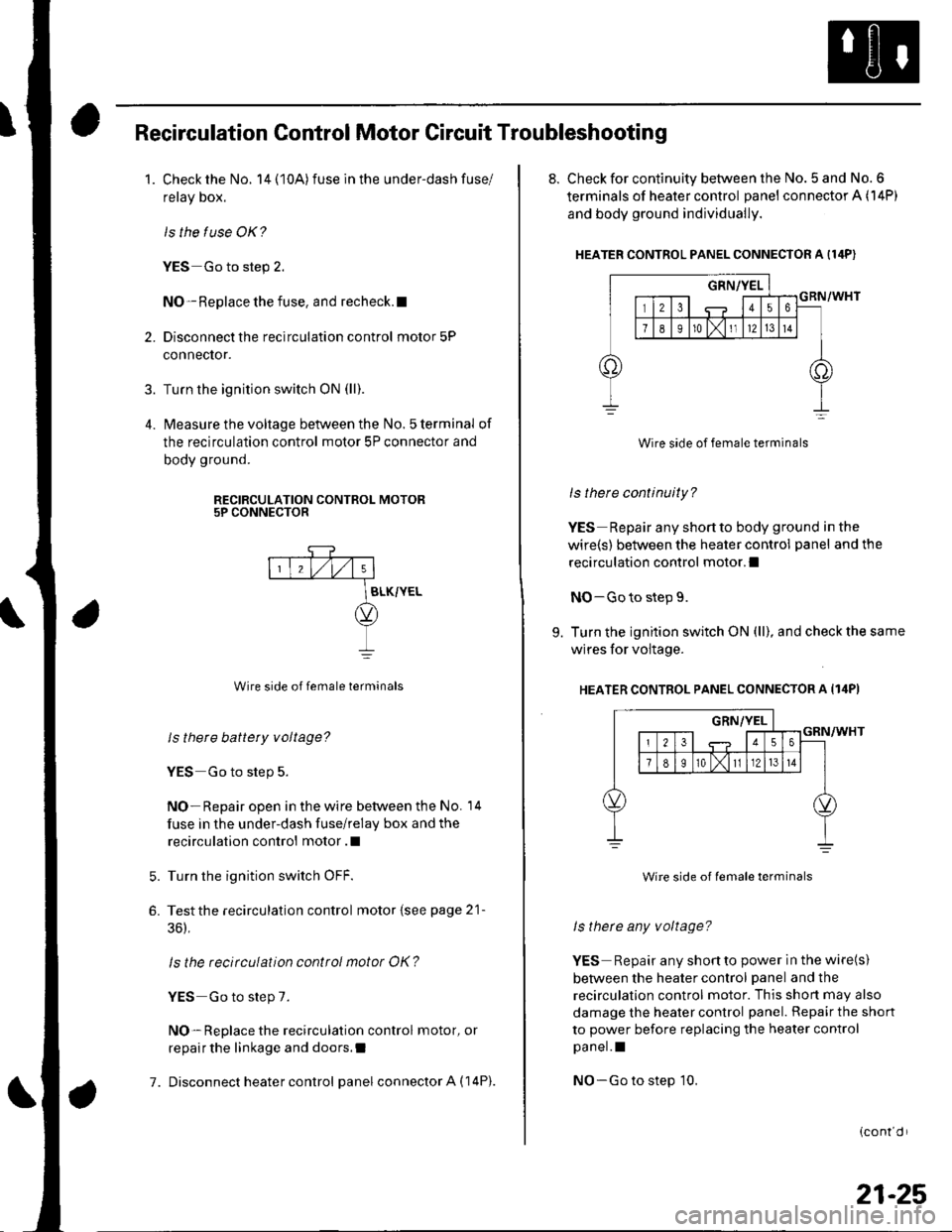
Turn the ignition switch ON (ll).
lvleasure the voltage between the No. 5 terminal of
the recirculation control motor 5P connector and
body ground.
RECIRCULATION CONTROL MOTOR5P CONNECTOR
7.
Wire side of female terminals
ls there battery voltage?
YES Go to step 5.
NO- Repair open in the wire between the No. 14
fuse in the under-dash fuse/relay box and the
recirculation control motor .l
Turn the ignition switch OFF.
Testthe recirculation control motor {see page 21-
36),
ls the recirculation control motor OK?
YES Go to step 7.
NO- Replace the recirculation control motor, or
repair the linkage and doors.I
Disconnect heater control panel connector A (14P).
5.
6.
8. Check for continuity between the No. 5 and No. 6
terminals of heater control panel connector A (14P)
and body ground individually.
HEATER CONTROL PANEL CONNECTOR A I14P)
Wire side of female terminals
ls there continuity?
YES Repair any shortto body ground in the
wire(s) between the heater control panel and the
recirculation control motor.l
NO-Go to step 9.
9. Turn the ignition switch ON (ll), and check the same
wires for voltage.
HEATER CONTROL PANEL CONNECTOR A Il4PI
Wire side of lemale terminals
ls therc any voltage?
YES Repair any shonto power in the wire(s)
between the heater control panel and the
recirculation control motor. This shon may also
damage the heater control panel. Repair the shon
to power before replacing the heater control
pa nel. I
NO-Go to step 10.
{cont d r
21-25
Page 798 of 1139
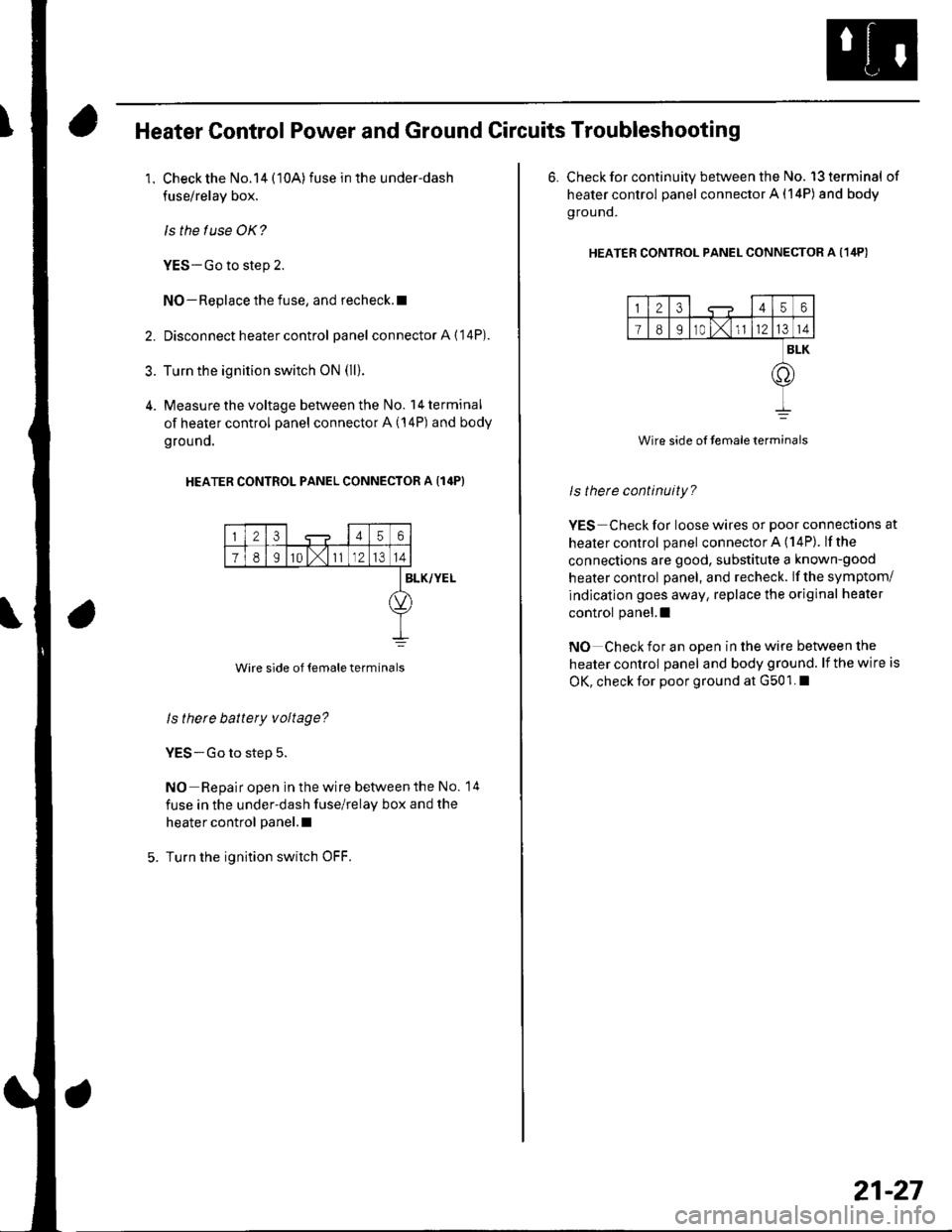
Heater Control Power and Ground Circuits Troubleshooting
1. Check the No.14 (10A)fuse in the under-dash
fuse/relay box.
ls the f use OK?
YES-Go to step 2.
NO-Replace the fuse, and recheck.l
2. Disconnect heater control panel connectorA{'14P).
3. Turn the ignition switch oN (ll).
4. Measure the voltage between the No. l4terminal
of heater control panel connector A (14P) and body
grouno.
HEATER CONTROL PANEL CONNECTOR A {14P}
23456
78I10 l,111214
Wire side of temale terminals
BLK/YEL
ls there battery voltage?
YES-Go to step 5.
NO Repair open in the wire betvveen the No. 14
fuse in the under-dash fuse/relay box and the
heater control panel.l
Turn the ignition switch OFF.
6. Check for continuity between the No. l3terminal of
heater control panel connector A (14P) and body
g rou nd.
HEATER CONTRoL PANEL CONNEcToR A (1ilP)
123456
I89r0 t,1l1214
BLK
.o
Wire side of temaleterminals
ls therc continuity?
YES Check for loose wires or poor connections at
healer control panel connector A (14P). lfthe
connections are good, substitute a known-good
heater control panel, and recheck. lf the symptom/
indication goes away, replace the original heater
control panel.l
NO Check for an open in the wire between the
heater control panel and body ground. lf the wire is
OK, check for poor ground at G501. I
21-27
Page 799 of 1139
Heating and Air Conditioning
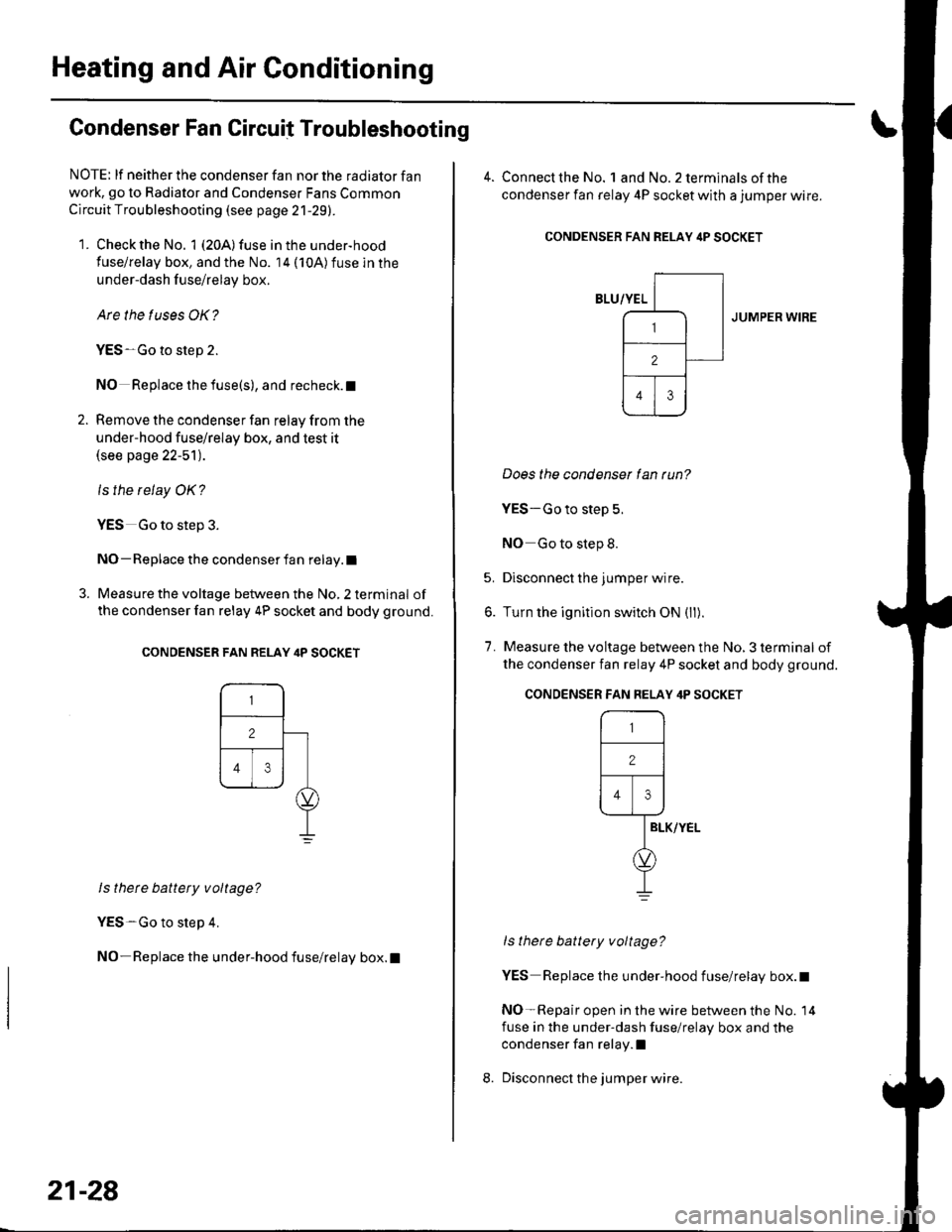
Condenser Fan Circuit Troubleshooting
NOTE: lf neither the condenser fan nor the radiator fan
work, go to Radiator and Condenser Fans Common
Circuit Troubleshooting (see page 21-29).
1. Check the No. 1 (20A) fuse in the under-hood
fuse/relay box, and the No. 14 (10A)fuse in the
under-dash f use/relay box.
Are the tuses OK?
YES-Go to step 2.
NO Replace the fuse(s), and recheck. t
2. Remove the condenser fan relay from the
under-hood fuse/relay box, and test it(see page 22-51).
ls the relay OK?
YES Go to step 3.
NO- Replace the condenser fan relay.l
3. Measure the voltage between the No, 2 terminal of
the condenser fan relay 4P socket and body ground.
CONDENSER FAN RELAY ilP SOCKET
ls thete battery voltage?
YES-Go to step 4.
NO-Replace the under-hood fuse/relay box.l
21-28
4. Connect the No. landNo.2terminalsof the
condenser fan relay 4P socket with a jumper wire.
CONDENSER FAN RELAY itP SOCKET
JUMPER WIRE
Does the condenser lan tun?
YES-Go to step 5.
NO Go to step 8.
5. Disconnect the jumper wire.
6. Turn the ignition switch ON (ll).
7. Measure the voltage between the No, 3 terminal of
the condenser fan relay 4P socket and body ground.
ls there battery voltage?
YES Replace the under-hood fuse/relay box.t
NO-Repair open in the wire between the No. 14
fuse in the under-dash fuse/relay box and the
condenser fan relay.l
Disconnect the jumper wire.
CONDENSER FAN FELAY 4P SOCKET
r-,_-l
12 |
Flr\----1--rl
IELK/YEL
d,
I