Locks HONDA CIVIC 2003 7.G User Guide
[x] Cancel search | Manufacturer: HONDA, Model Year: 2003, Model line: CIVIC, Model: HONDA CIVIC 2003 7.GPages: 1139, PDF Size: 28.19 MB
Page 442 of 1139
Manual Transmission
Countershaft Assembly Clearance
Inspection (cont'd)
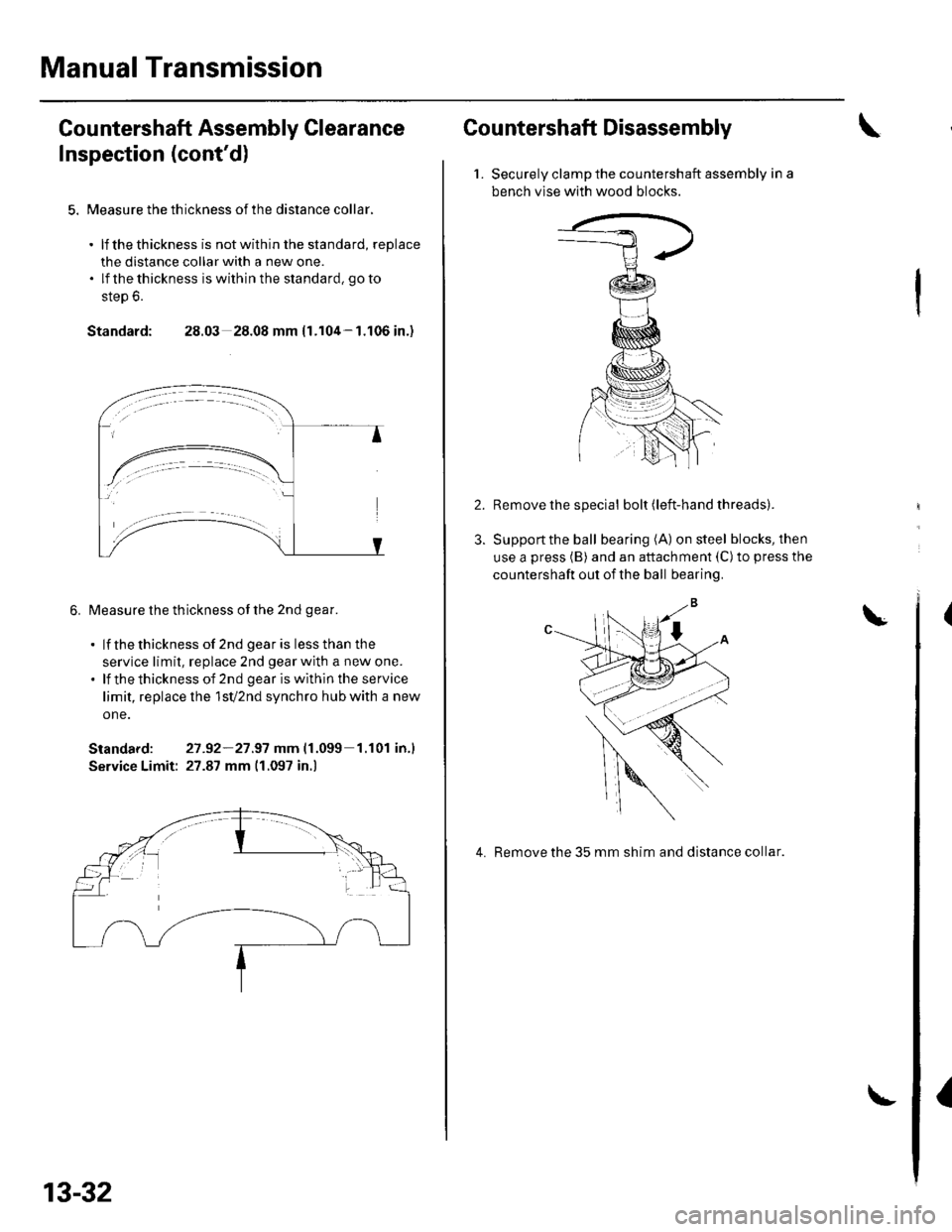
5. Measure the th ickness of the distance collar.
. lf thethickness is notwithin the standard, replace
the distance collar with a new one.. lf thethickness iswithinthe standard, goto
step 6.
Standard: 28.03 28.08 mm {1.104-1.106 in.)
6. Measure the thickness of the 2nd qear.
. lf thethickness of 2nd gearis lessthan the
service limit, replace 2nd gear with a new one.. lf thethicknessof 2nd geariswithintheservice
limit, replace lhe 1sV2nd synchro hub with a new
one.
Standard: 27 -92-21.97 mm|.1.099 1.r01 in.l
Service Limit: 27.87 mm 11.097 in.)
13-32
Countershaft Disassembly
1.Securely clamp the countershaft assembly in a
bench vlse with wood blocks.
Remove the special bolt (left-hand threads).
Support the ball bearing (A) on steel blocks, then
use a press (B) and an attachment (C)to press the
countershaft out of the ball bearing.
4. Remove the 35 mm shim and distance collar.
I
Page 443 of 1139
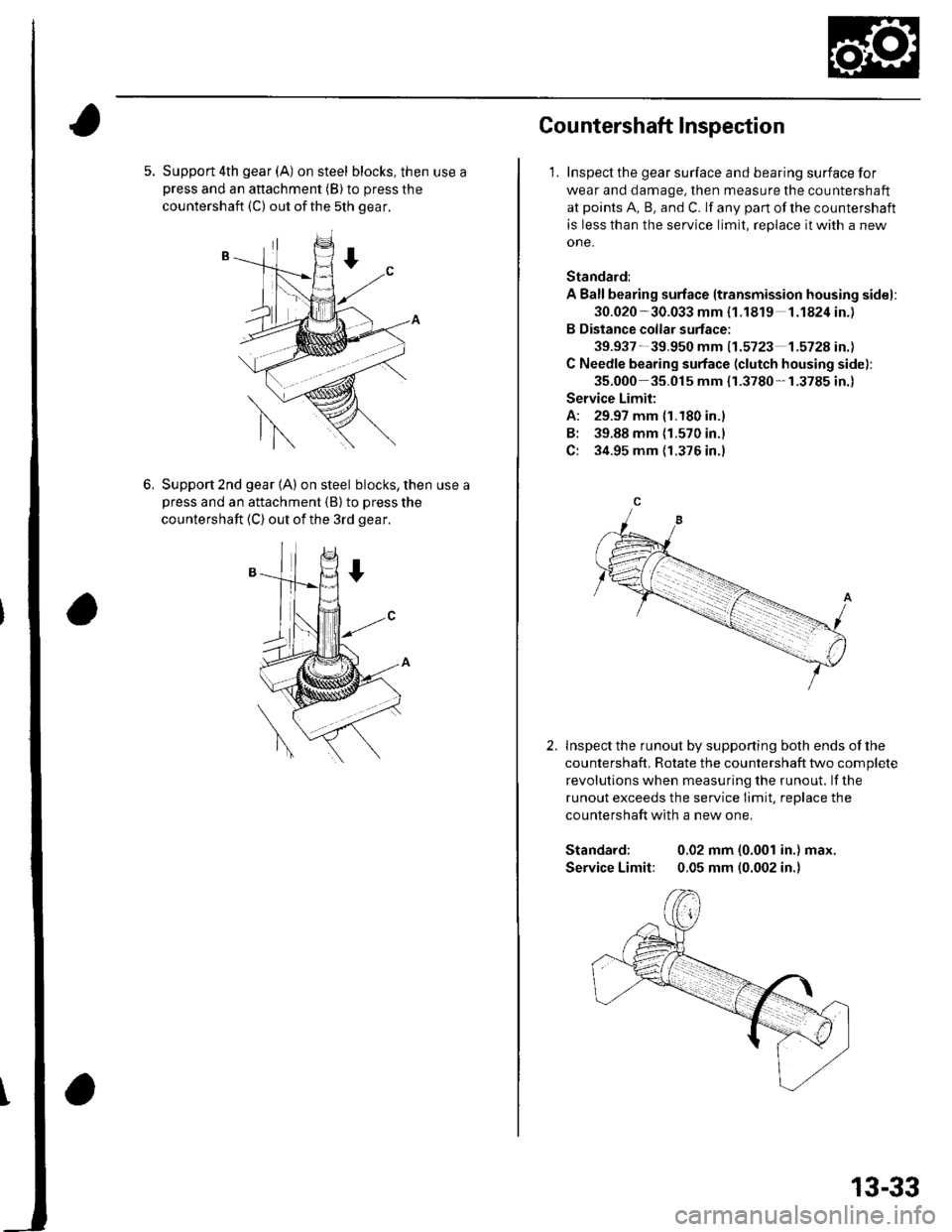
5. Support 4th gear (A) on steel blocks, then use apress and an attachment (B) to press the
countershaft (C) out ofthe 5th gear.
6.Support 2nd gear (A) on steel blocks, then use a
Dress and an attachment {B} to press the
countershaft (C) out of the 3rd gear.
Cou ntershaft lnspection
1. Inspect the gear surface and bearing surface for
wear and damage, then measure the countershaft
at points A, B, and C. lf any part of the countershaft
is less than the service limit, replace it with a new
one.
Standard:
A Ballbearing surface ltransmission housing sidel:
30.020 -30.033 mm {1.1819 1.1824in.)
B Distance collar surface;
39.937- 39.950 mm 11.5723 1.572A in.l
C Needle bearing surface (clutch housing side):
35.000 35.015 mm {r.3780-1.3785 in.)
Service Limit:
A: 29.97 mm {1.180 in.)
B: 39.88 mm {1.570 in.l
C: 34.95 mm {1.376 in.)
lnspect the runout by supporting both ends of lhe
countershaft. Rotate the countershaft two complete
revolutions when measuring the runout. lf the
runout exceeds the service Iimit, replace the
countershaft with a new one.
Standard: 0.02 mm (0.001 in.) max.
Service Limit: 0.05 mm (0.002 in.)
2.
13-33
Page 446 of 1139
Manual Transmission
10.
Countershaft Reassembly (cont'dl
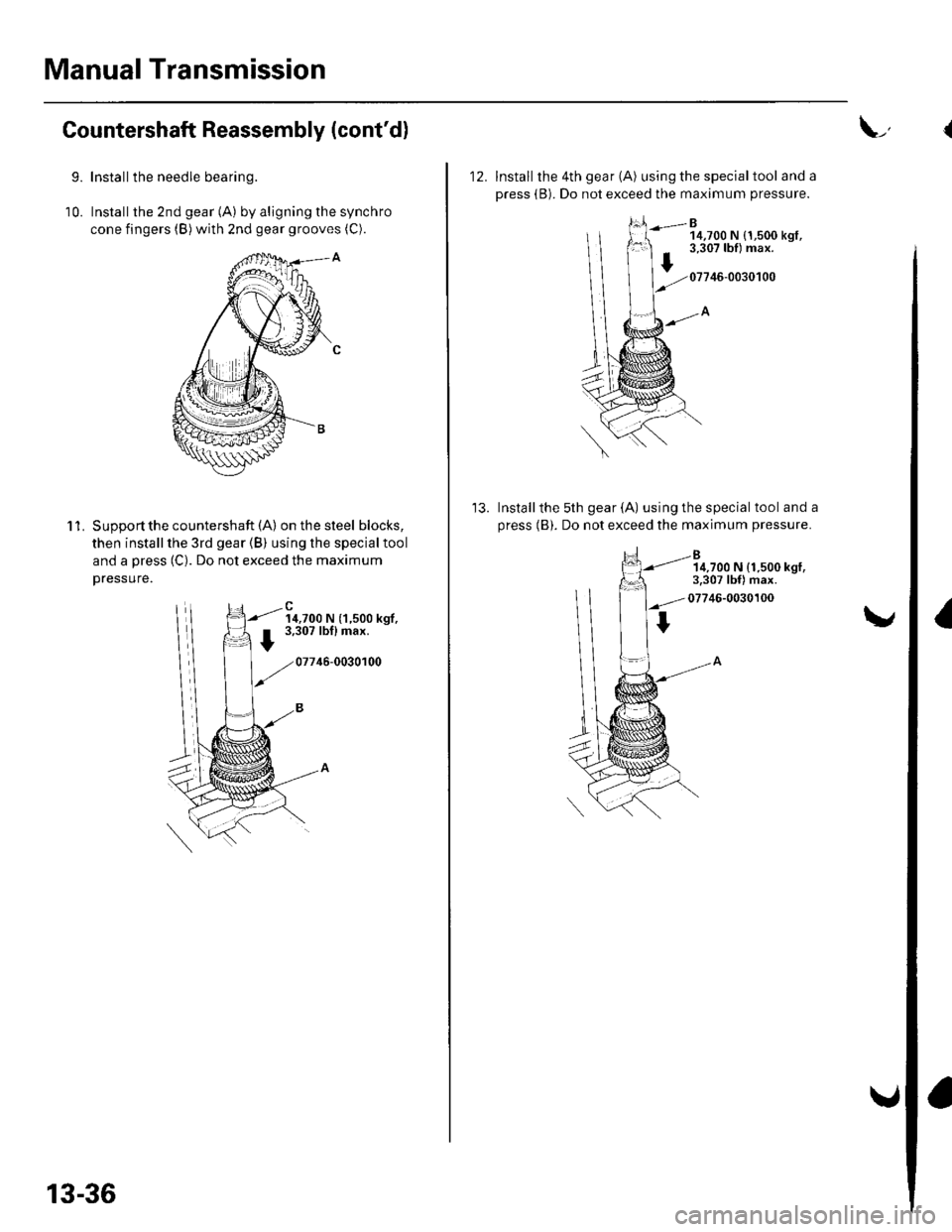
9.Install the needle bearing.
Installthe 2nd gear (A) by aligning the synchro
cone fingers (B) with znd gear grooves (C).
'l 1.Supoort the countershaft (A) on the steel blocks,
then install the 3rd gear (B) using the special tool
and a press (C). Do not exceed the maximum
Dressure.
14,700 N (1,500 kgf,3,307 lbflmax.
07746-0030100
13-36
L,
12. Install the 4th gear (A) using the specialtool and a
press (B). Do not exceed the maximum pressure.
B14,700 N {1,500 kgt,3,307 lbf) max.
07746-0030100
Installthe 5th gear (A) using the special tool and a
press (B). Do not exceed the maximum pressure.
14,700 N (1.500 kgl,3.307 lbf) max.
07746-0030100
I
Page 448 of 1139
Manual Transmission
Countershaft Reassembly (cont'd)
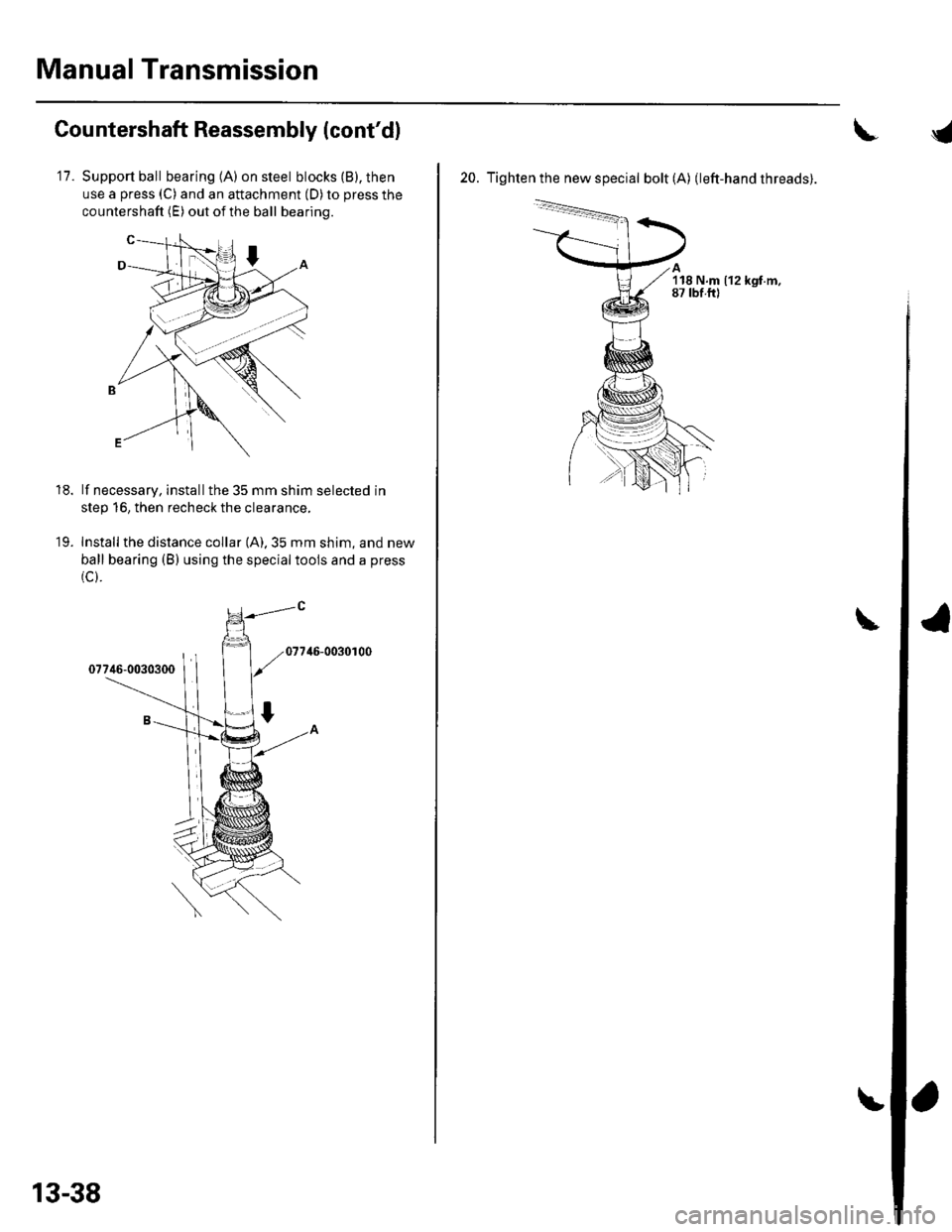
11.Support ball bearing (A) on steel blocks (B), then
use a press (C) and an attachment (D) to press the
countershaft (E) out of the ball bearing.
lf necessary, installthe 35 mm shim selected in
step 16, then recheck the clearance,
Install the distance collar (A).35 mm shim, and new
ball bearing (B) using the specialtools and a press
(c).
46-0030r00
18.
19.
13-38
20. Tighten the new special bolt (A) (left-hand threads).
'l18 N.m (12 kgf.m,87 tbf.ftl
Page 463 of 1139
, and
install both axles.
Measure the backlash of both pinion gears (B) with
a dial indicator (C). lf the backlash is not within")
\
Backlash lnspection
1.Place the differential assembly on V-blocks (A), and
install both axles.
Measure the backlash of both pinion gears (B) with
a dial indicator (C). lf the backlash is not within the
standard, replace the differential carrier.
Standard (New): 0.05 0.15 mm (0.002 0.006 in.)
Final Driven Gear/Carrier
Replacement
1. Remove the bolts (left-hand threads) in a crisscross
pattern in several steps, then remove the final
driven gear (A)from the differential carrier {B).
t x t.o mm {to)121 Nm(12.3 kgf m,89 rbt.ft)
Install the final driven gear with the chamfer on the
inside diameter facing the carrier. Align the marks
on the final driven gear and the carrier. Tighten the
bolts in a crisscross pattern in several steps.
13-53
Page 485 of 1139
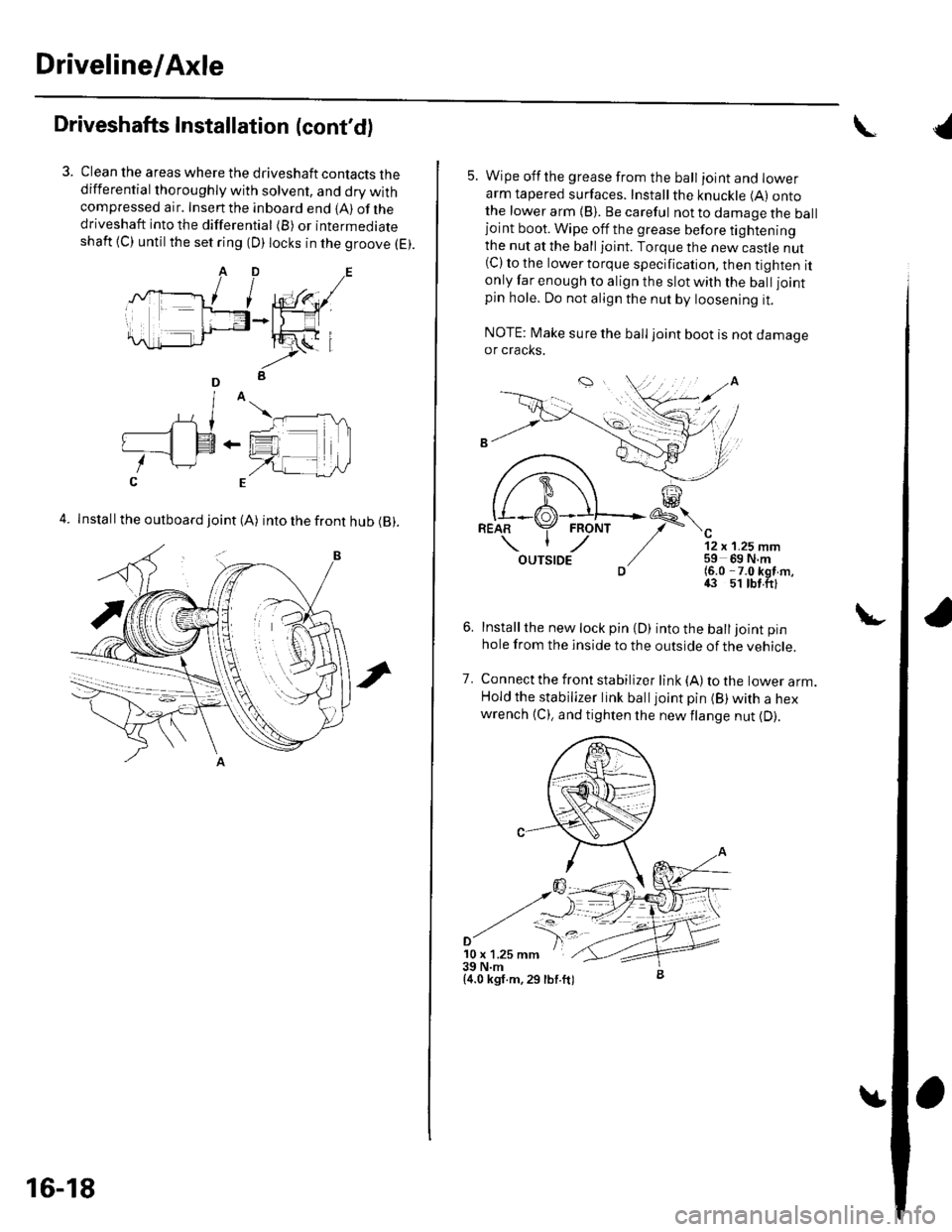
Driveline/Axle
Driveshafts Installation (cont'd)
Clean the areas where the driveshaft contacts thedifferential thoroughly with solvent, and dry withcompressed air. Insenthe inboard end {A) ofthedriveshaft into the differential (B) or intermediateshaft {C) until the set ring (D) locks in the groove (E).
4. Install the outboard joint (A) into the front hub (B).
16-18
5. Wipe offthe grease from the ball ioint and lowerarm tapered surfaces. Installthe knuckle (A) ontothe lower arm {B). Be careful not to damage the balljoint boot. Wipe off the grease before tighteningthe nut at the ball joint. Torque the new castle nut(C) to the lower torque specification, then tighten itonly far enough to align the slot with the ball joint
pin hole. Do not align the nut by loosening it.
NOTE: Make sure the ball joint boot is not damageor cracks.
"-'t-
12 x 1.25 mm59 69 N.m(6.0 -7.0 kgf m,43 51 tbt.ftl
Installthe new lock pin {D) into the balljoint pin
hole from the inside to the outside of the vehicle.
Connect the front stabilizer link {A) to the lower arm.Hold the stabilizer link balljoint pin (B) with a hexwrench {C), and tighten the newflange nut {D).
7.
'10 x 1.25 mm39 N.m{4.0 kgf.m,29 lbf.ft)
{
Page 504 of 1139
Steering
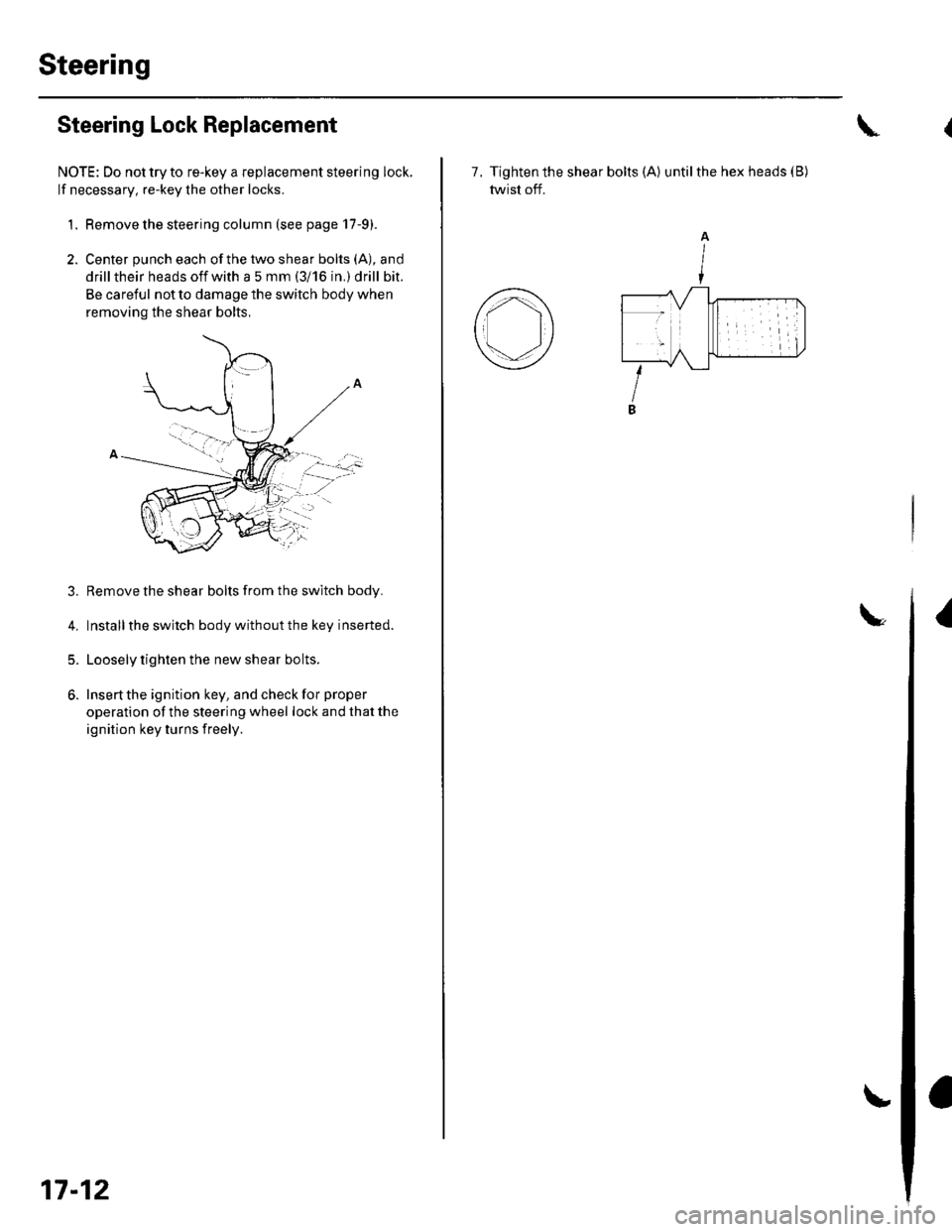
Steering Lock Replacement
NOTE: Do not try to re-key a replacement steering lock.
lf necessary, re-key the other locks.
1. Remove the steering column (see page 17-9).
2. Center punch each ofthe two shear bolts (A), and
drill their heads off with a 5 mm (3i 16 in.) drill bit.
Be careful not to damage the switch body when
removing the shear bolts,
3. Remove the shear bolts from the switch body.
4. Installthe switch body without the key inserted.
5. Loosely tighten the new shear bolts.
6. Insert the ignition key, and check for proper
operation of the steering wheel lock and that the
ignition key turns freely.
:..'-":'
17-12
7. Tighten the shear bolts (A) untilthe hex heads (B)
twist off.
I
A
I
Page 661 of 1139
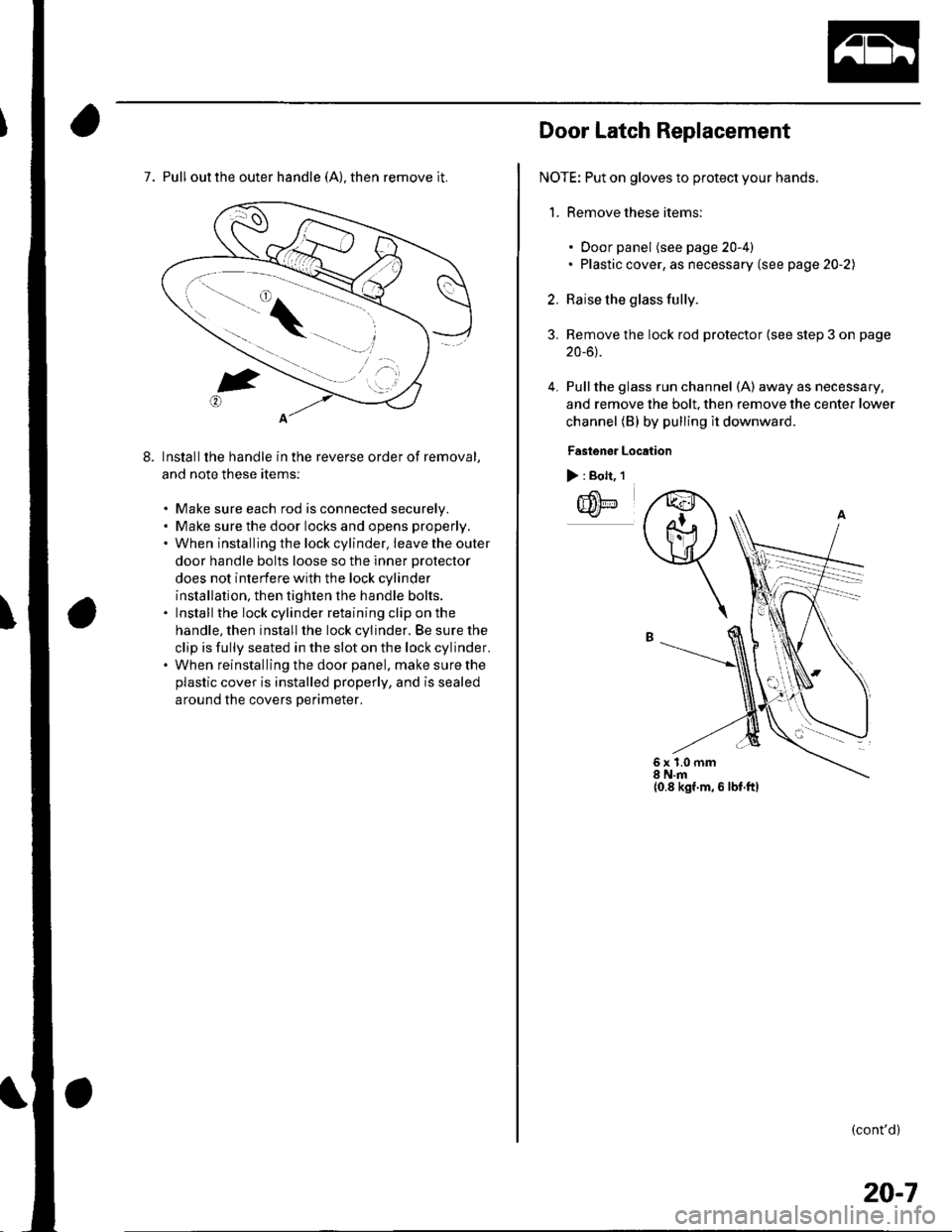
7. Pull out the outer handle (A), then remove it.
Installthe handle in the reverse order of removal,
and note these items:
. Make sure each rod is connected securelv.. Make sure the door locks and opens properly.. When installing the lock cylinder. leavetheouter
door handle bolts loose so the inner protector
does not interfere with the lock cylinder
installation, then tighten the handle bolts.. Install the lock cylinder retaining clip on the
handle, then install the lock cylinder. Be sure the
clip is fully seated in the slot on the lock cylinder.. When reinstalling the door panel, make sure the
plastic cover is installed properly, and is sealed
around the covers Derimeter.
Door Latch Replacement
NOTE: Put on gloves to protect your hands.
1. Remove these items:
3.
4.
. Door panel (see page 20-4). Plastic cover, as necessary (see page 20-2)
Raise the glass fully.
Remove the lock rod protector (see step 3 on page
20-6).
Pullthe glass run channel (A) away as necessary,
and remove the bolt, then remove the center lower
channel (B) by pulling il downward
Fastenor Location
> : Bolt, 1
IIilE
q
6x1.0mm8 N.m{0.8 kgf.m, 6 lbf.ftl
(cont'd)
20-7
Page 662 of 1139
Doors
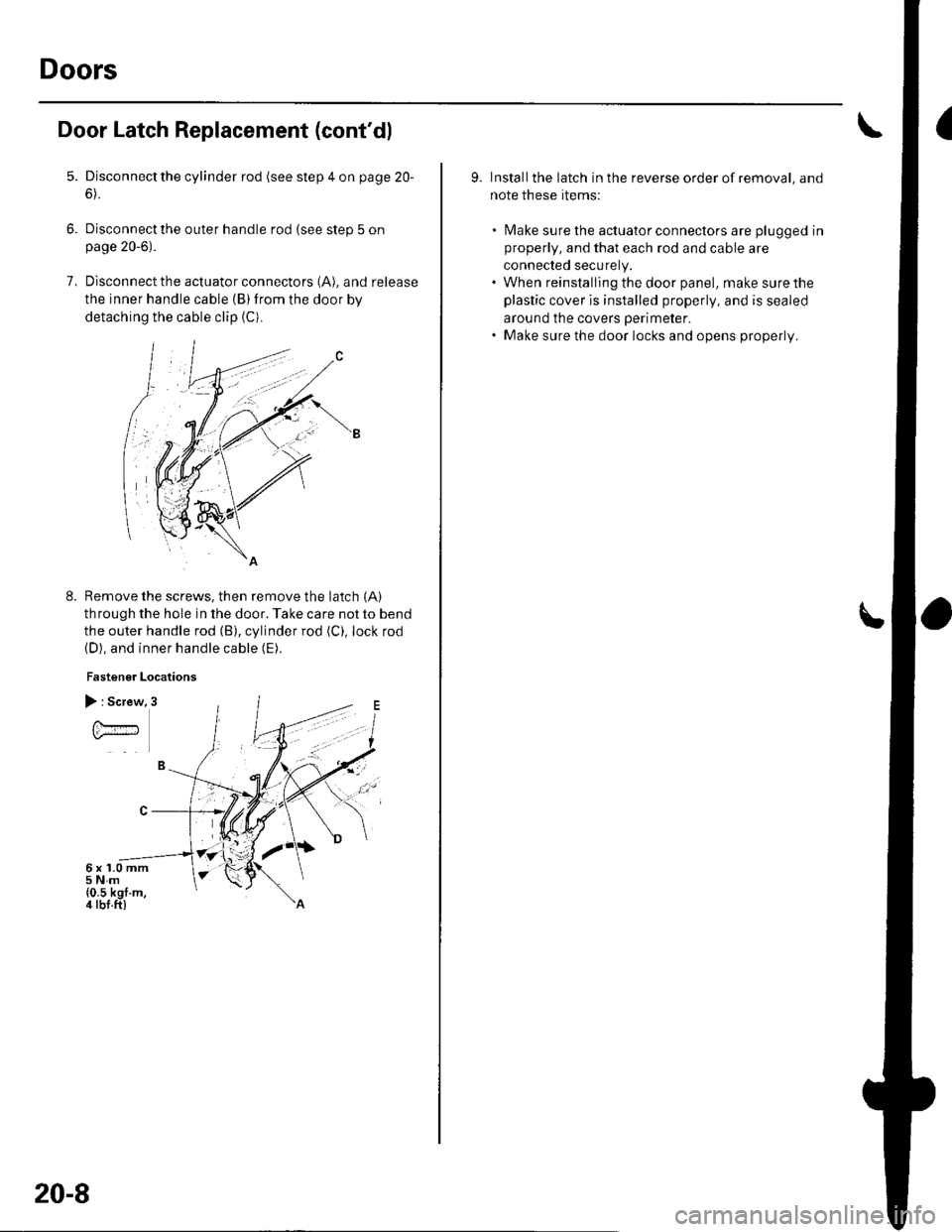
Door Latch Replacement (cont'dl
5.
6.
7.
Disconnect the cylinder rod (see step 4 on page 20-
6).
Disconnect the outer handle rod (see step 5 onpage 20-6).
Disconnect the actuator connectors (A), and release
the inner handle cable (B)from the door by
detaching the cable clip (Ci.
Remove the screws, then remove the latch {A)
through the hole in the door. Take care not to bend
the outer handle rod (B), cylinder rod (C), lock rod(D), and inner handle cable (E).
Fastener Locations
8.
) : Screw
U.#
6x1.0mm5Nm{0.5 kgf.m,4 tbf.ft)
20-8
9. Installthe latch in the reverse order of removal, and
note these rtems:
. [Vlake sure the actuator conneclors are plugged in
properly, and that each rod and cable are
connected securely.. When reinstalling the door panel, make sure the
plastic cover is installed properly, and is sealed
around the covers perimeter.. Make sure the door locks and opens properly.
Page 669 of 1139
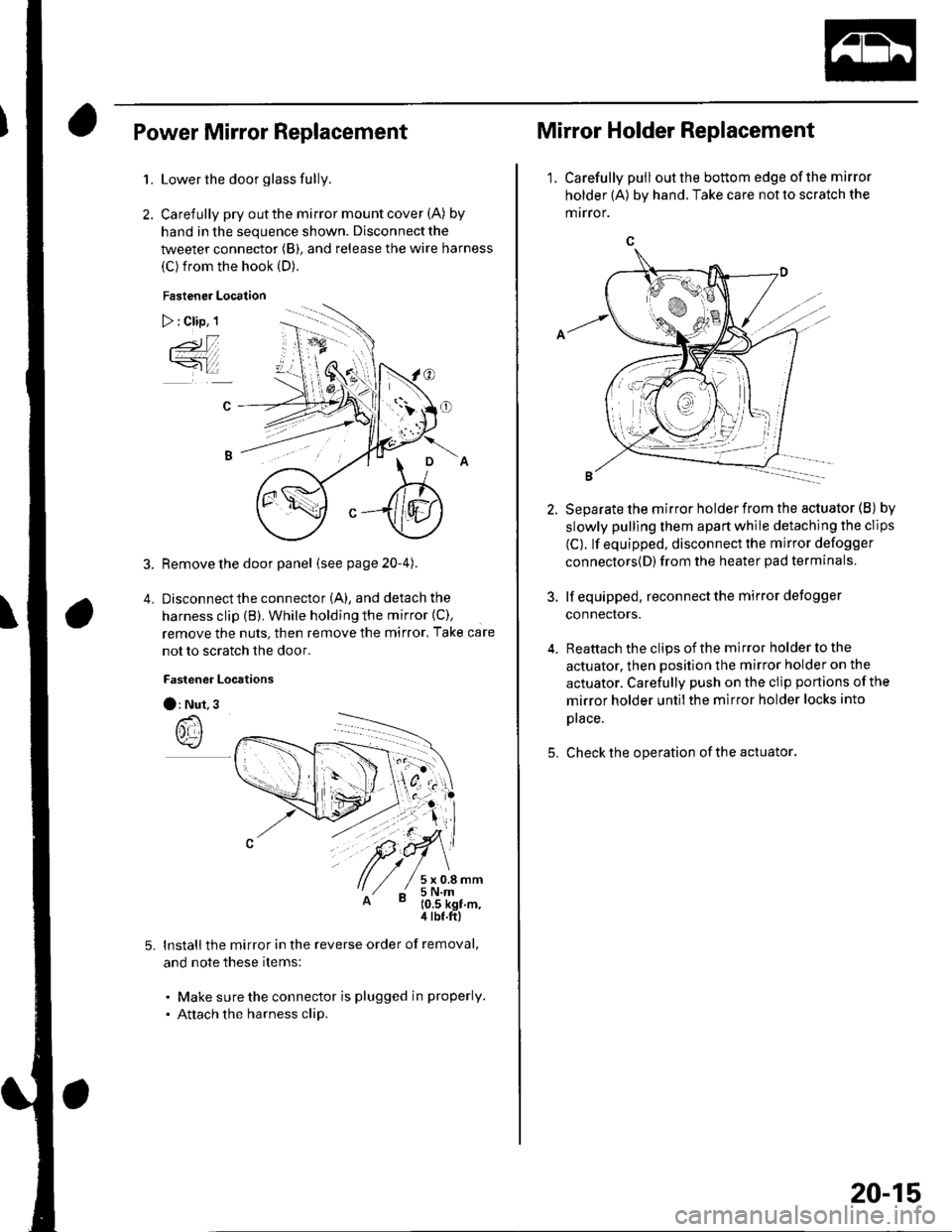
Power Mirror Replacement
1.
2.
5.
Lower the door glass fully.
Carefully pry out the mirror mount cover (A) by
hand in the sequence shown. Disconnect the
tweeter connector (B), and release the wire harness
(C) from the hook (D).
Fastener Location
) : Clip, 1
3. Remove the door panel (seepage20-4).
4. Disconnectthe connector (A), and detach the
harness clip (B). While holding the mirror {C),
remove the nuts, then remove the mirror. Take care
not to scratch the door.
Fastener Locrtions
O: Nut.3
lnstall the mirror in the reverse order of removal,
and note these items:
. Make sure the connector is plugged in properly.
. Attach the harness clip.
Mirror Holder Replacement
1. Carefully pulloutthe bottom edge ofthe mirror
holder (A) by hand. Take care not to scratch the
mrrror.
5.
Separate the mirror holder from the actuator (B) by
slowly pulling them apart while detaching the clips
(C). lf equipped, disconnect the mirror defogger
connectors{D) from the heater pad terminals.
lf equipped, reconnect the mirror defogger
connectors.
Reattach the clips of the mirror holder to the
actuator, then position the mirror holder on the
actuator. Carefully push on the clip portions of the
mirror holder untilthe mirror holder locks into
prace.
Check the operation of the actuator
20-15