Power door HONDA CIVIC 2003 7.G Owner's Manual
[x] Cancel search | Manufacturer: HONDA, Model Year: 2003, Model line: CIVIC, Model: HONDA CIVIC 2003 7.GPages: 1139, PDF Size: 28.19 MB
Page 922 of 1139
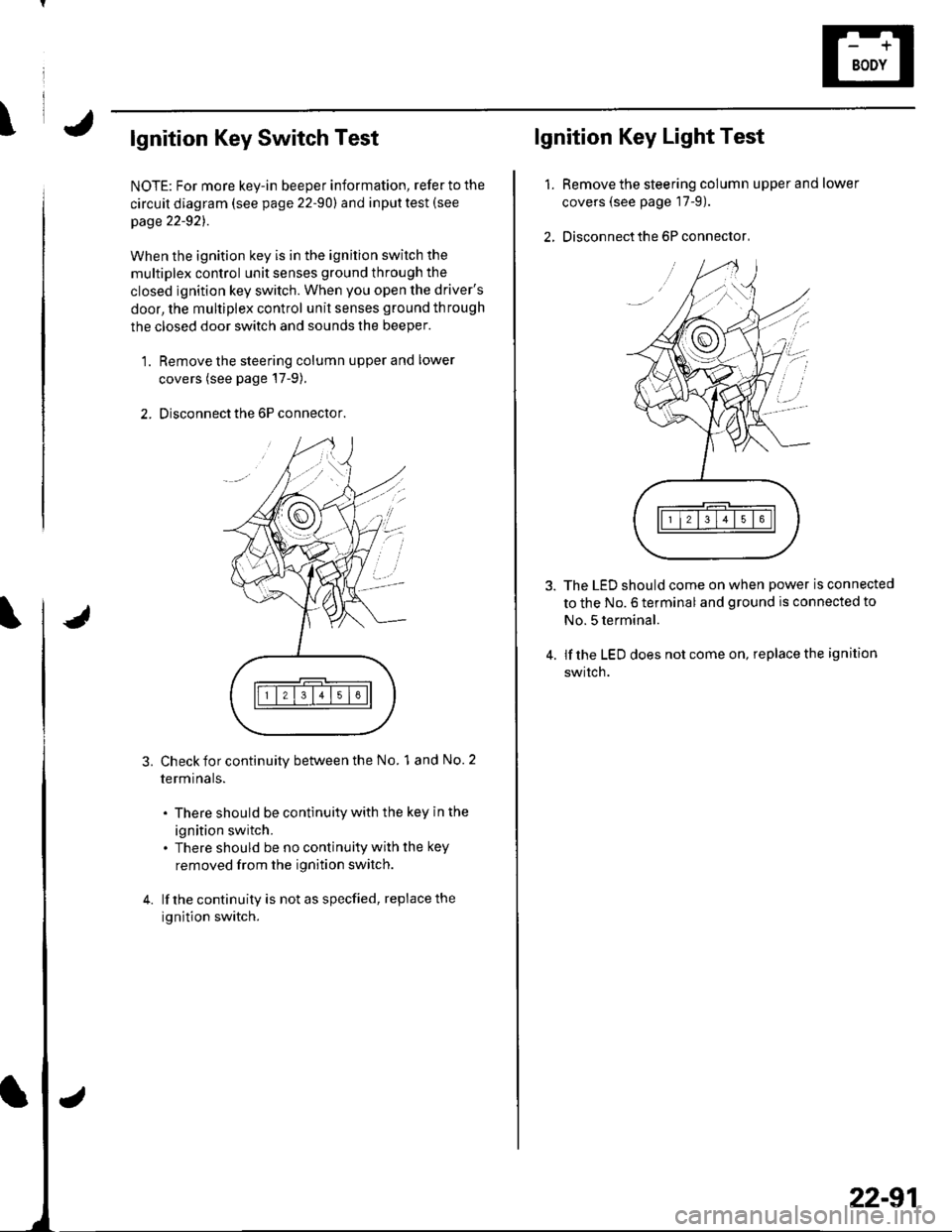
\lgnition Key Switch Test
NOTE: For more key-in beeper information, refer to the
circuit diagram (see page 22-90) and input test (see
page 22-921.
When the ignition key is in the ignition switch the
multiplex control unit senses ground through the
closed ignition key switch. When you open the driver's
door, the multiplex control unit senses ground through
the closed door switch and sounds the beeper.
1. Remove the steering column upper and lower
covers (see page'17-9).
2. Disconnect the 6P connector.
3.Check for continuity between the No. 1 and No. 2
termrnars.
. There should be continuity with the key in the
ignition switch.. There should be no continuity with the key
removed from the ignition switch.
lf the continuity is not as specfied, replace the
ignition switch.
lgnition Key Light Test
1.Remove the steering column upper and lower
covers (see page 17-9).
Disconnect the 6P connector,
The LED should come on when power is connected
to the No. 6 terminal and ground is connected to
No. 5 terminal.
lf the LED does not come on, replace the ignition
swrtch.
i'
/.'
22-91
Page 932 of 1139
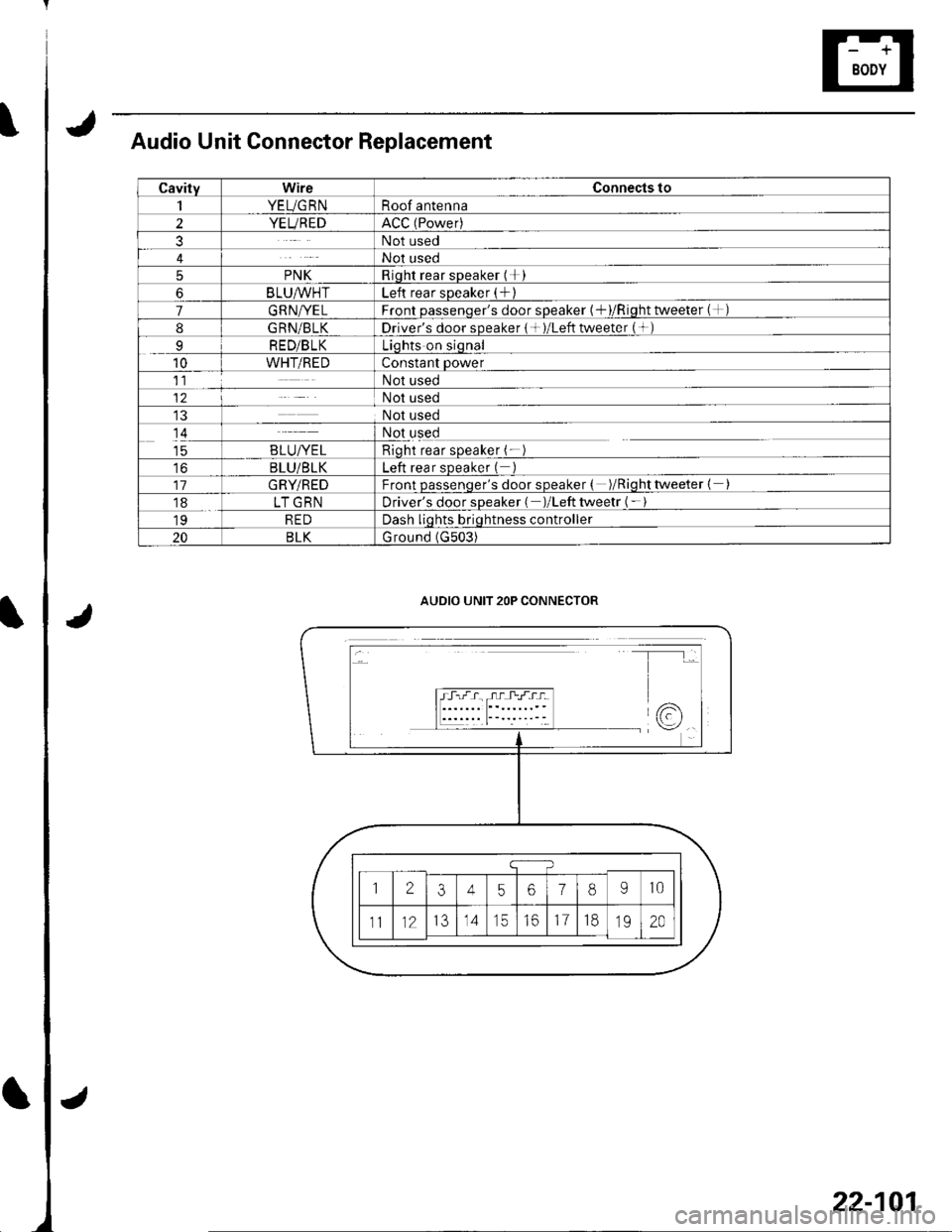
Audio Unit Connector Replacement
CavityWireConnects to
1YEUG RNRoof antenna
2YEUREDACC (Power)
3Not used
4Not used
5PNKRioht rear sDeaker (+I
6BLU^/vHTLeft rear sDeaker (+)
7GRN/YELFront oassenqer's door sDeaker {+)/Riqht tweeter (+)
8G RN/BLKDriver's door speaker { + )/Left tweeter (+ )
9RED/BLKLiqhts on siqnal
10WHT/REDConstant power
11Not used
12Not used
Not used
14Not used
taB LU/YE LRioht rear soeaker (-
toBLU/BLKLeft rear sDeaker (
11GRY/REDFront passenqer's door speaker ( )/Riqhttweeter {
18LT GRNDriver's door sDeaker ( )/Left tweetr ( -
19REDDash liqhts briqhtness controller
20BLKG round (G503)
AUDIO UNIT 2OP CONNECTOR
22-101
Page 948 of 1139
1.
2.
3.
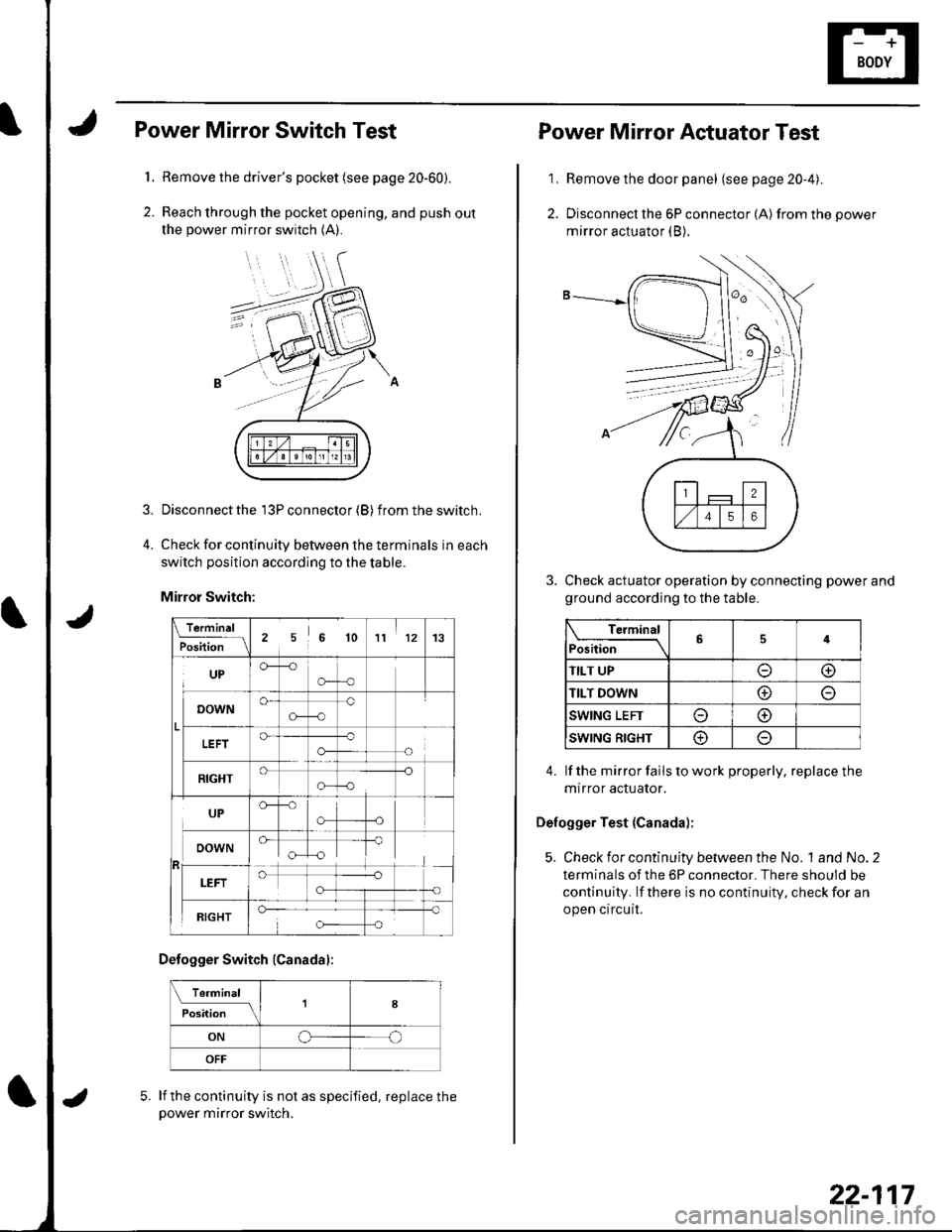
Power Mirror Switch Test
Remove the driver's pocket (see page 20-60).
Reach through the pocket opening, and push out
the power mirror switch (A).
Disconnect the 13P connector (B) f rom the switch.
Check for continuity between the terminals in each
switch position according to the table.
Mirror Switch:
\.f9.-'"1L
Position256 1011 1213
UPCF--o
o-o
o-
G-c)o
o-o-
-o
!
RIGHT-o
o-o
UP
"[T
RIGHT
Defogger Switch (Canadal:
Te.minal
il;;; tlfI8
ONoo
OFF
lf the continuity is not as specified, replace thepower mirror switch.
5.
22-117
1,
2.
Power Mirror Actuator Test
Remove the door panel (see page 20-4).
Disconnect the 6P connector (A) from the power
mirror actuator (B).
Check actuator operation by connecting power and
ground according to the table.
Terminal
Position64
TILT UPoo
TILT DOWNo
SWING LEFTo@
SWING RIGHT@
4. lf the mirror fails to work properly, replace the
mtrror actuator.
Defogger Test {Canada);
5. Check for continuity between the No. 1and No.2
terminals of the 6P connector. There should be
continuity. lf there is no continuity, check for an
open circuit.
Page 950 of 1139
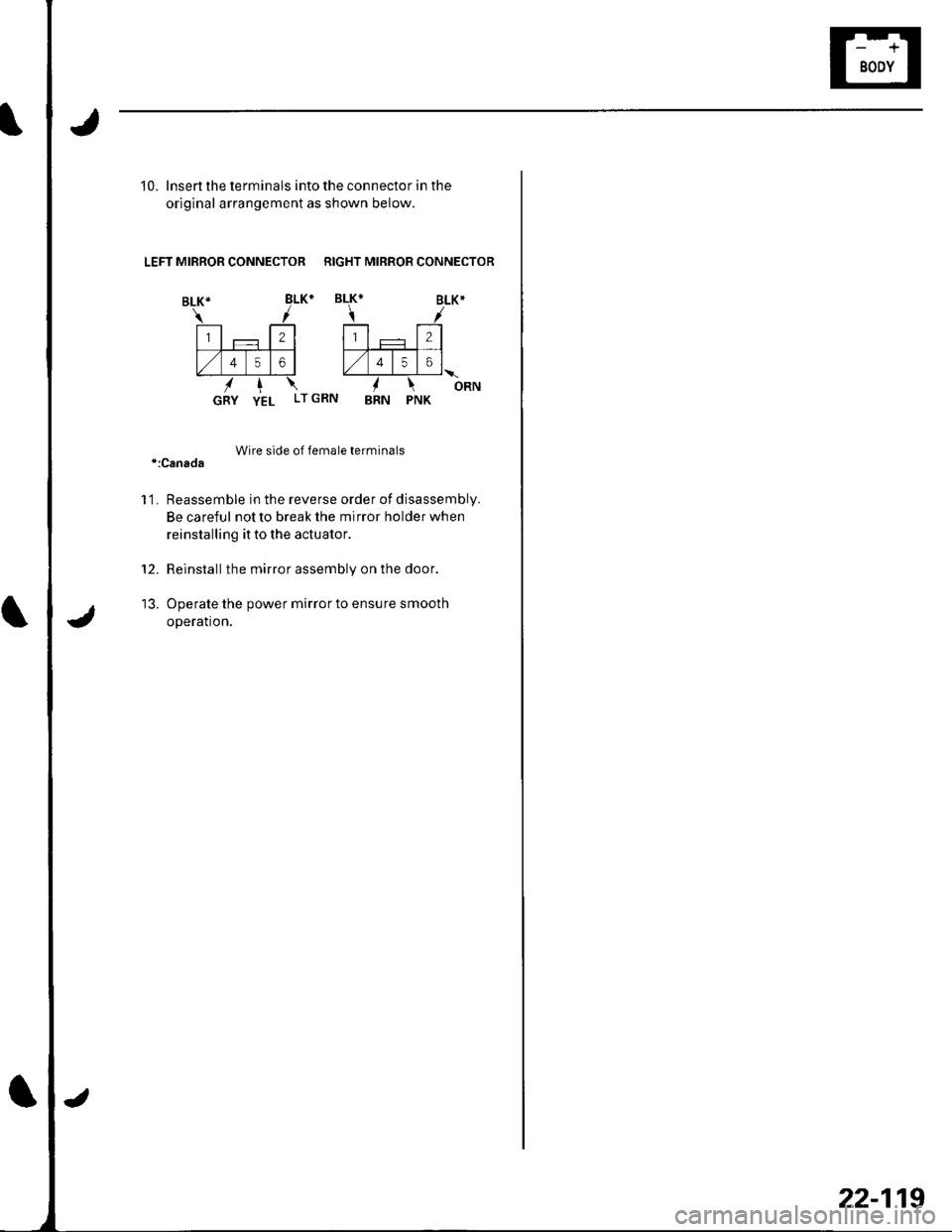
10. lnsert the terminals into the connector in the
original arrangement as shown below.
LEFT MIRROR CONNECTOR RIGHT MIRROR CONNECTOR
Wire side of female terminals*:Canada
'l'1. Reassemble in the reverse order of disassembly.
Be careful not to break the mirror holder when
reinstalling it to the actuator.
Reinstallthe mirror assembly on the door.
Operate the power mirror to ensure smooth
operation.
12.
tJ.
22-119
Page 960 of 1139
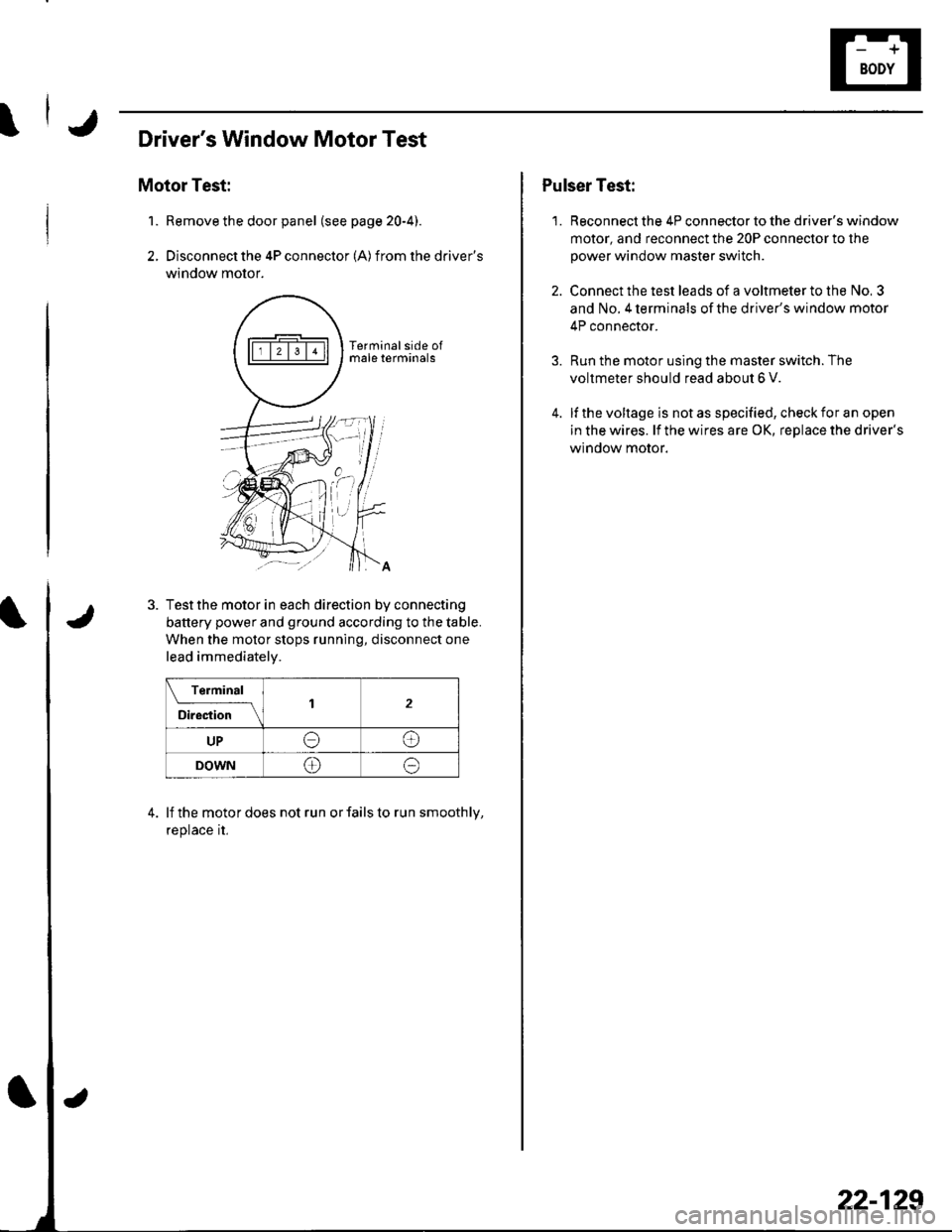
Driver's Window Motor Test
Motor Test:
Remove the door panel (see page 20-4).
Disconnect the 4P connector (A) from the driver's
window motor.
1.
4.
Test the motor in each direction by connecting
battery power and ground according to the table.
When the motor stops running, disconnect one
lead immediatelv.
Terminal
il;;'-\2
UPeo
DOWN@e
lf the motor does not run or fails to run smoothly,
replace rL
1.
Pulser Test:
Reconnect the 4P connector to the driver's window
motor, and reconnect the 20P connector to the
power window master switch.
Connect the test leads of a voltmeter to the No, 3
and No. 4 terminals of the driver's window motor
4P connector.
Run the motor using the master switch. The
voltmeter should read about 6 V.
lf the voltage is not as specified, check for an open
in the wires. lf the wires are OK, replace the driver's
window motor.
22-129
Page 963 of 1139
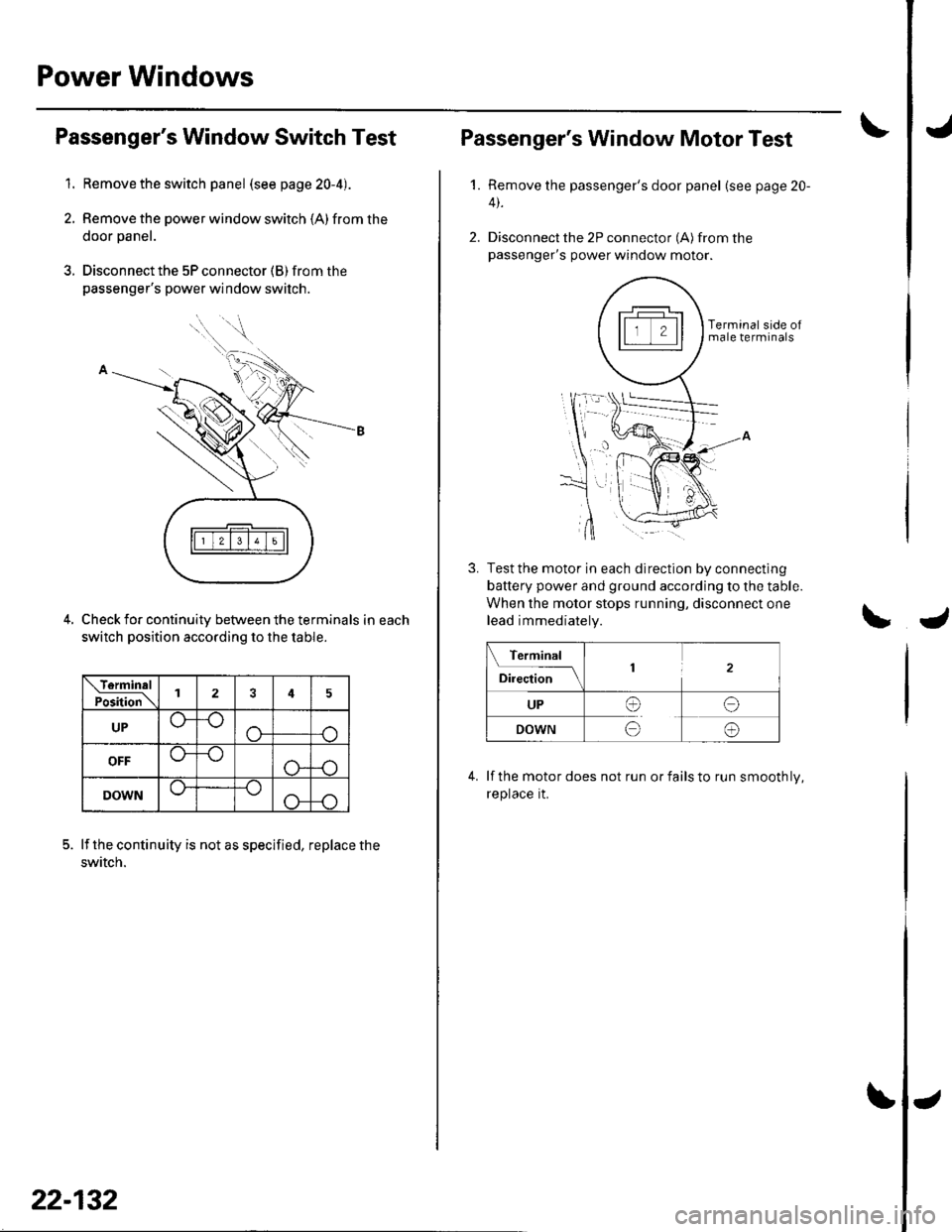
Power Windows
1.
Passenger's Window Switch Test
Remove the switch panel (see page 20-4).
Remove the power window switch (A) from the
door panel.
Disconnect the 5P connector (B) from the
passenger's power window switch.
Check for continuity between the terminals in each
switch position according to the table.
lf the continuity is not as specified, replace the
swtlcn.
tfiTtTtT;Etll' '-r--r-,Jl
\TorminalPoiition\124
UP
OFF
DOWN
22-132
Passenger's Window Motor Test
1.Remove the passenger's door panel (see page 20-
4).
Disconnect the 2P connector (A) from thepassenger's power window motor.
Terminal side ofmale terminals
Test the motor in each direction by connecting
battery power and ground according to the table.
When the motor stops running, disconnect one
lead immediately.
Terminal
Dl*;;;__\1
UPI
o
o
DOWNo
lf the motor does not run or fails to run smooth ly,
reptace rt.
Page 964 of 1139
'1.
2.
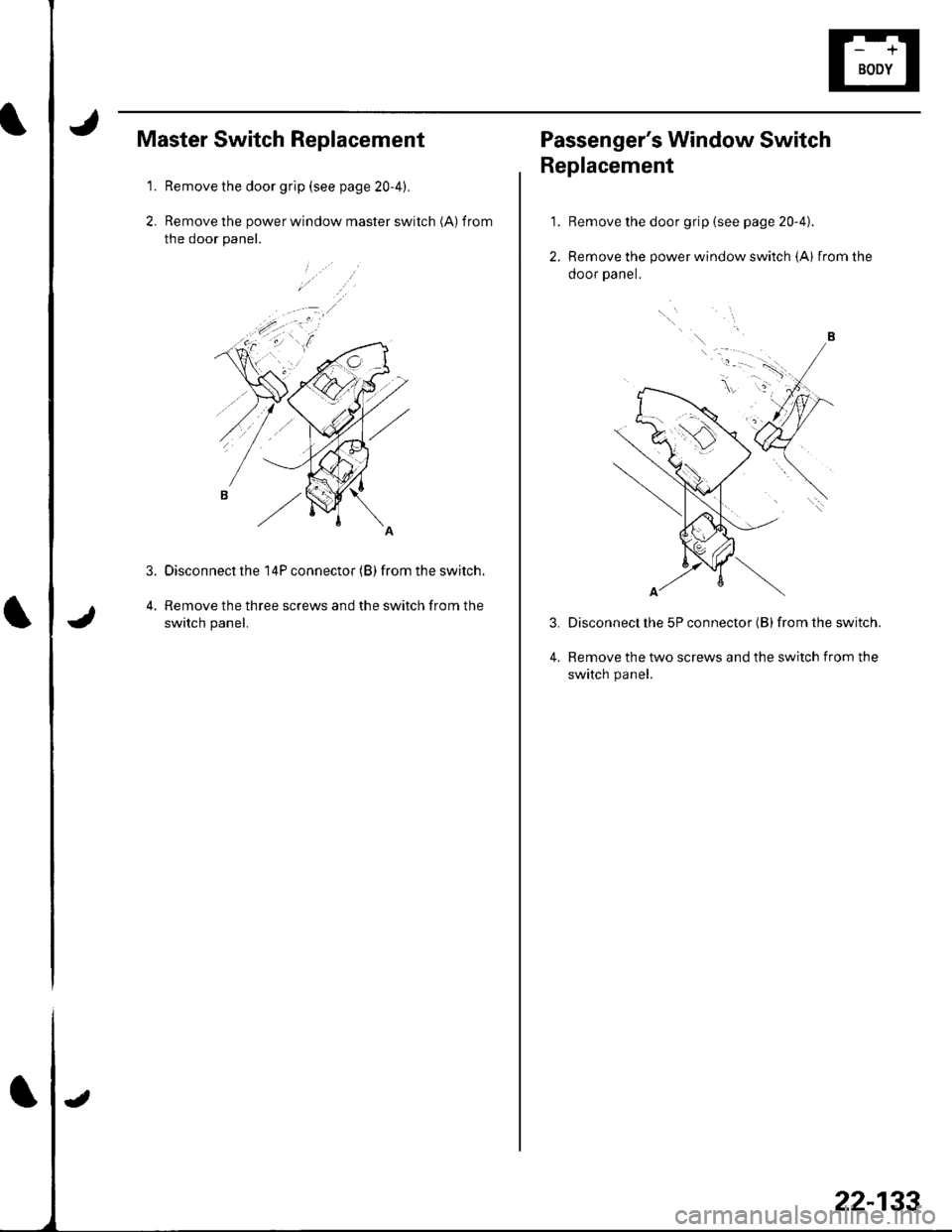
Master Switch Replacement
Remove the door grip (see page 20-4).
Remove the power window master switch (A) f rom
the door panel.
Disconnect the 14P connector (B) from the switch.
Remove the three screws and the switch from the
switch panel.
3.
22-133
Passenger's Window Switch
Replacement
Remove the door grip {see page 20-4).
Remove the power window switch (A) from the
ooor paner.
Disconnect lhe 5P connector (B) from the switch.
Remove the two screws and the switch from the
switch panel.
1.
2.
3.
4.
Page 981 of 1139
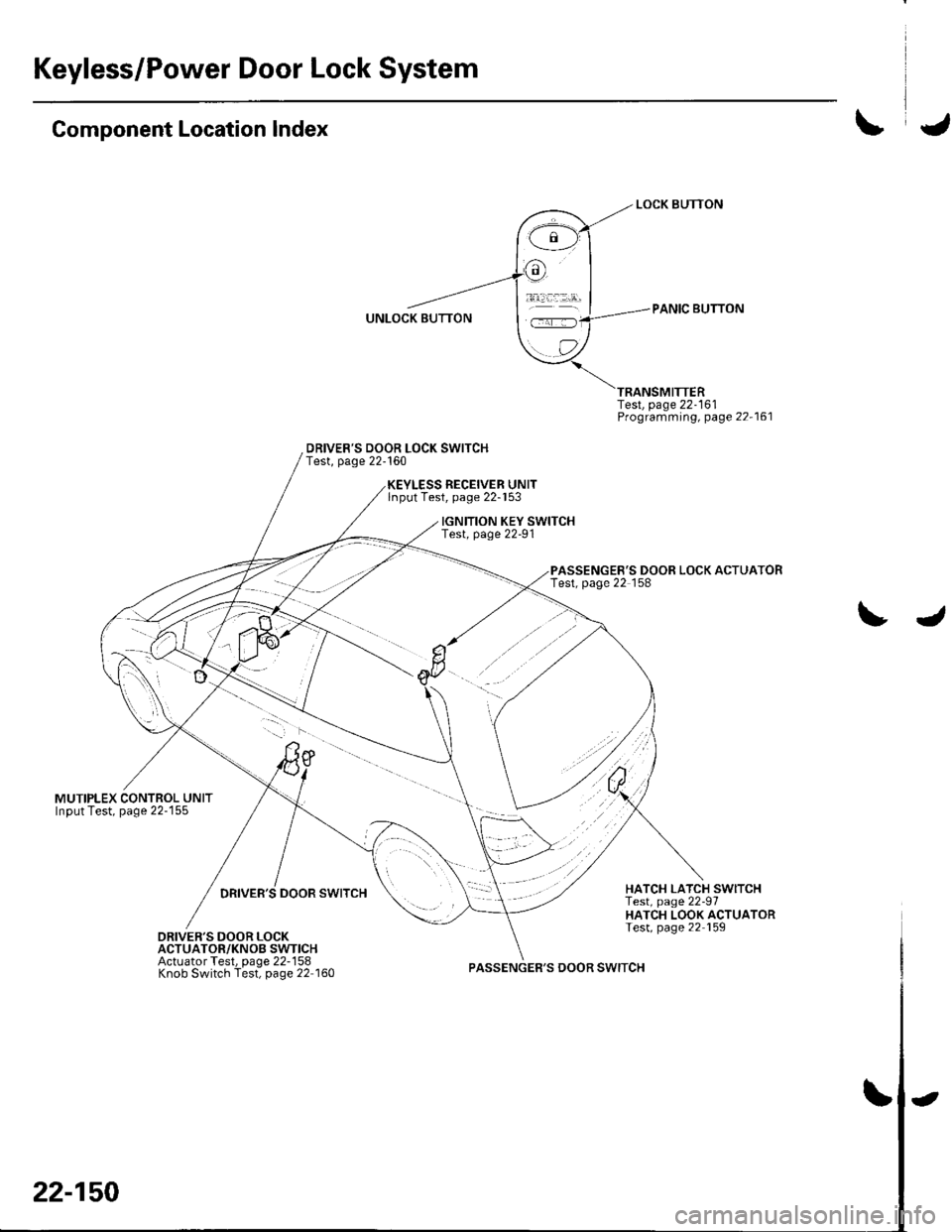
Keyless/Power Door Lock System
Component Location Index
MUTIPLEX CONTROL UNITInput Test, page 22-155
DRIVER'S DOOR LOCK SWITCHTest, page 22-160
Test, page 22-161Programming, page 22-161
PASSENGER'S DOOR LOCK ACTUATORTest, page 22 158
RECEIVER UNITlnput Test, page 22-153
IGNITION KEY SWITCHTest, page 22-91
DRIVER'S DOOR SWITCHHATCH LATCH SWITCHTest, page 22-97HATCH LOOK ACTUATORTest, page 22 159DRIVER'S DOOR LOCKACTUATOR/KNOB SWTICHActuator Test, page 22-158Knob Switch Test, page 22 160PASSENGER'S DOOR SWITCH
22-150
-
Page 983 of 1139
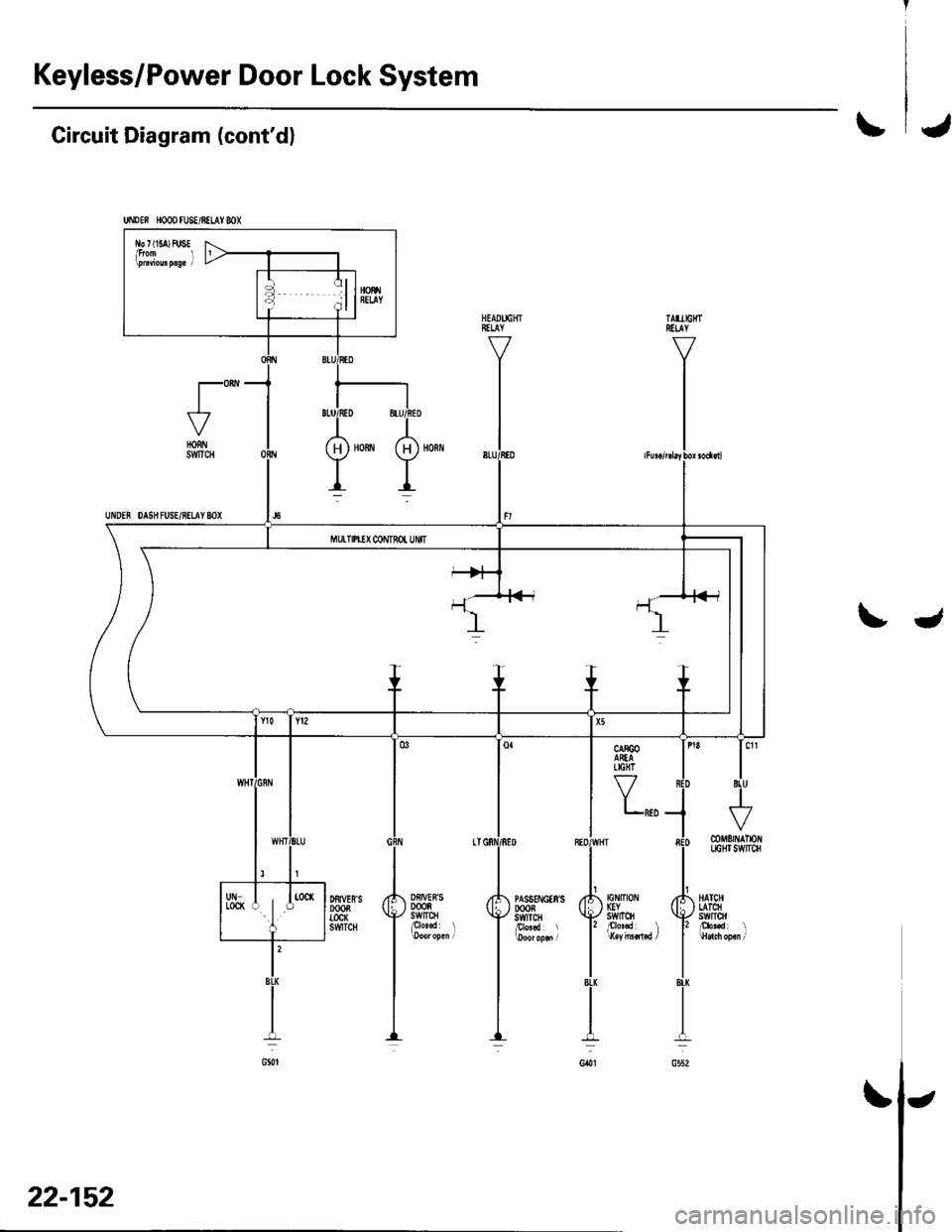
Keyless/Power Door Lock System
UNDEN HOOD FU8E/BELAY MX
l\b r t15a) FUSE
Circuit Diagram (cont'dl\J
t"-HORNSWTCH
UNDEN DAS}I FUSE/8ELAY 8OX
tJ
Y,,,
Df,IVEB'S0008swtrcHplo'.d l
DFIVES'SDOOBTOCK6WTCH
tG tltot IGYstvrTcH
mMErNAlloflLIGHI SWITCH
HATCHLATCHswlrol
22-152
\
Page 985 of 1139
Keyless/Power Door Lock System
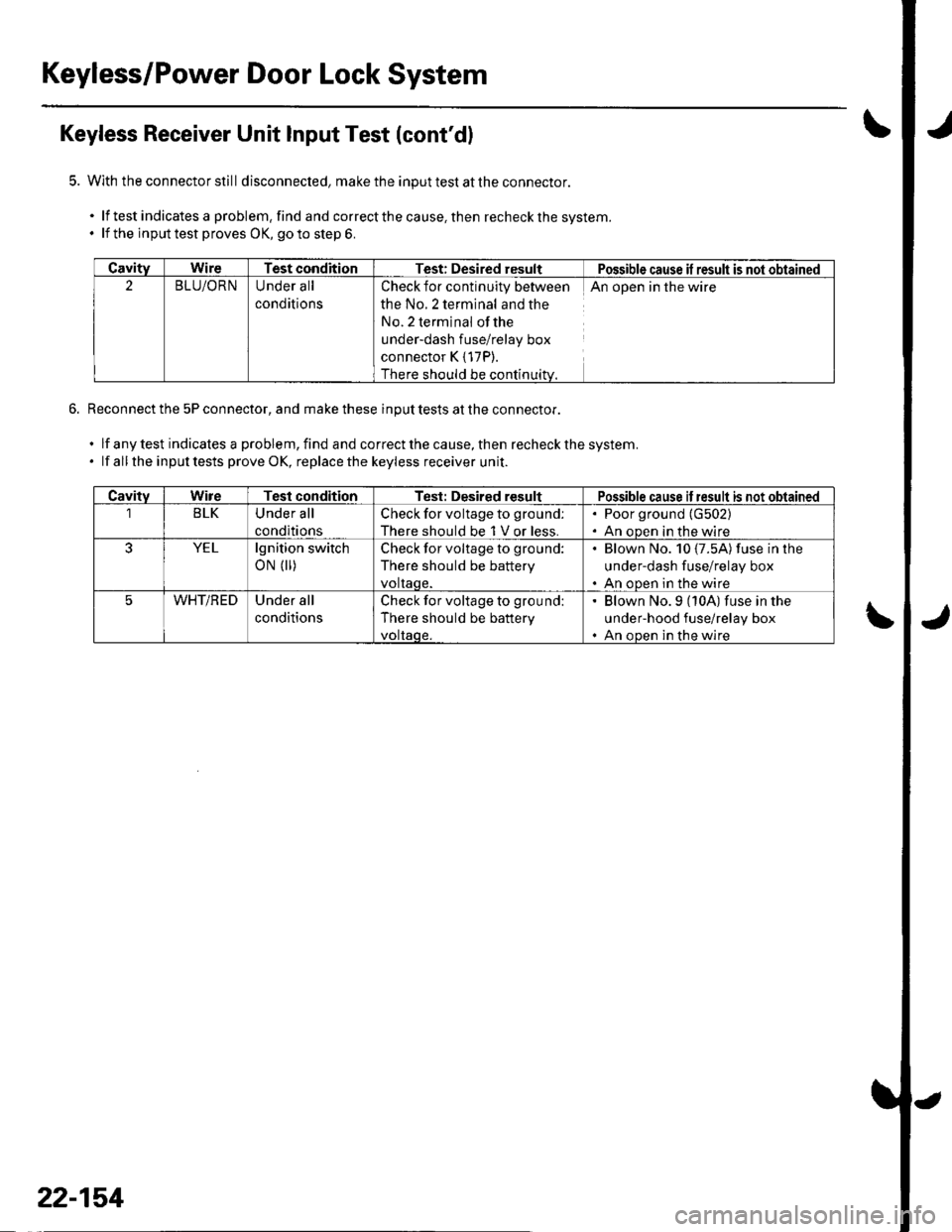
Keyless Receiver Unit Input Test (cont'dl
With the connector still disconnecled, make the input test at the connector.
.lftestindicatesaproblem,findandcorrectthecause,thenrecheckthesystem.
. lf the inputtest proves OK, goto step 6.
Reconnect the 5P connector, and make these input tests at the connector.
.lfanytestindicalesaproblem,findandcorrectthecause,thenrecheckthesystem.
. lf all the inputtests prove OK, replacethe keyless receiver unit.
CavityWireTest conditionTest: Desired resultPossible cause il result is not obtained
2BLU/ORNUnder all
conditions
Check for continuity between
the No.2 terminal and the
No. 2 terminal ofthe
under-dash fuse/relay box
connector K { 17P).
There should be continuitv.
An open in the wire
CavitvWireTest conditionTest: Desired resultPossible cause if result is not obtained
1BLKUnder all
conditions
Check for voltage to ground:
There should be 1 V or less.
. Poor ground (G502)
. An oDen in the wire
YELlgnition switch
oN (||)Check for voltage to ground:
There should be battery
voltaqe.
Blown No. 10 {7.5A) fuse in lhe
under-dash fuse/relay box
An ooen in the wire
WHT/REDUnder all
conditions
Check for voltage to ground:
There should be battery
voltaqe.
' Blown No.9 (10A) fuse in the
under-hood fuse/relay box. An ooen in the wire
22-154