heating HONDA CIVIC 2003 7.G Owner's Manual
[x] Cancel search | Manufacturer: HONDA, Model Year: 2003, Model line: CIVIC, Model: HONDA CIVIC 2003 7.GPages: 1139, PDF Size: 28.19 MB
Page 807 of 1139
Heating and Air Conditioning
Recirculation Control Motor Test
1. Disconnect the 5P connector from the recirculation
control motor.
Incorrectly applying power and ground to
the recirculation control motor will damge it.
Follow the instructions carefullv.
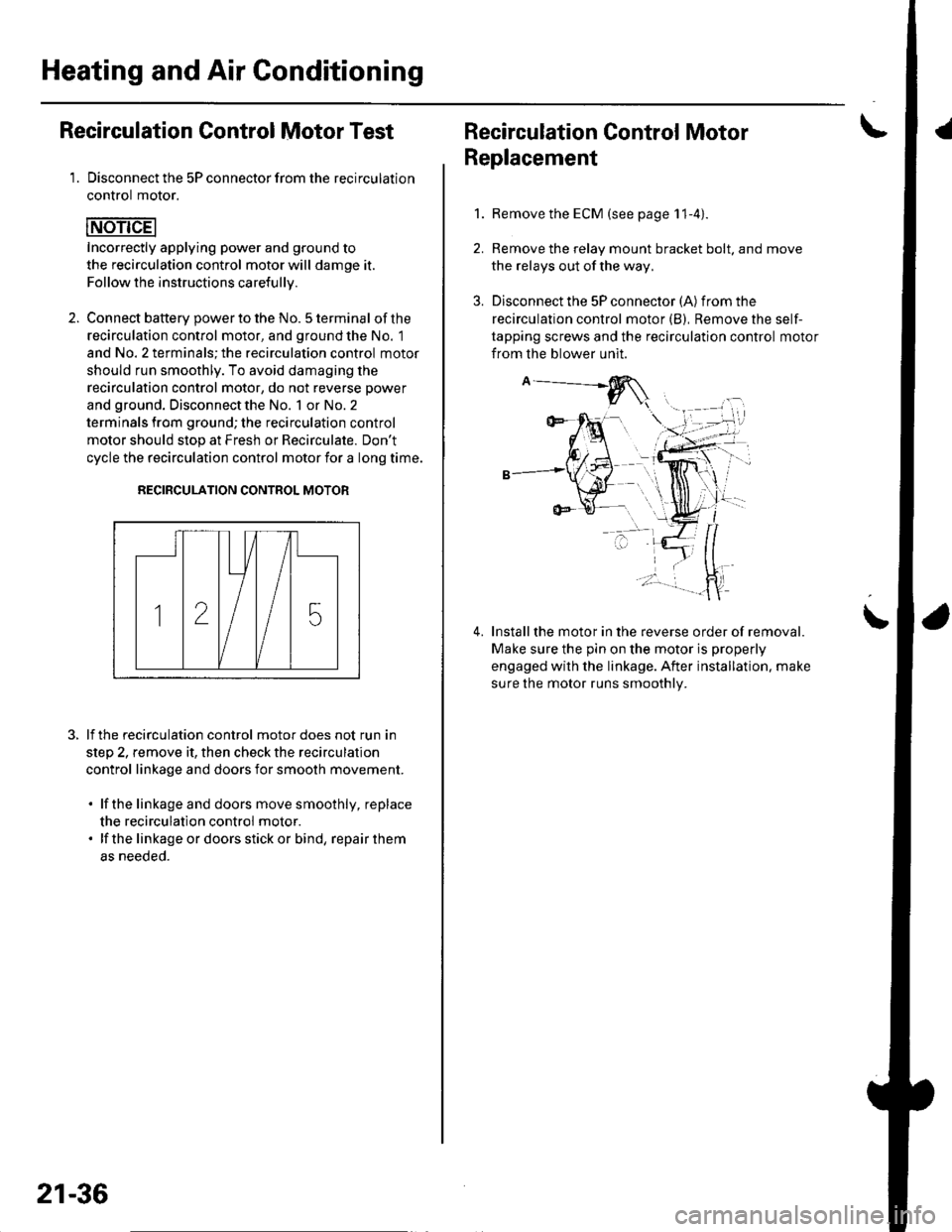
2. Connect batterv oower to the No. 5 terminal ofthe
recirculation control motor, and ground the No. 1
and No. 2 terminals; the recirculation control motor
should run smoothly. To avoid damaging the
recirculation control motor, do not reverse power
and ground. Disconnect the No. 1 or No. 2
terminals from ground; the recirculation control
motor should stop at Fresh or Recirculate. Don't
cycle the recirculation control motor {or a long time.
RECIRCULATION CONTROL MOTOR
lf the recirculation control motor does not run in
step 2, remove it, then check the recirculation
control linkage and doors for smooth movement.
. lfthe linkage and doors move smoothly, replace
the recirculation control motor.. lf the linkageordoorsstickor bind, repairthem
as neeoeo.
21-36
Recirculation Control MotorI
Replacement
1.Remove the ECM (see page 11-4).
Remove the relay mount bracket bolt. and move
the relays out of the way,
Disconnect the 5P connector (A) from the
recirculation control motor (B), Remove the self-
tapping screws and the recirculation control motor
from the blower unit.
Installthe motor in the reverse order of removal.
Make sure the pin on the motor is properly
engaged with the linkage. After installation. make
sure the motor runs smoothly.
\
Page 809 of 1139

Heating and Air Gonditioning
a
\
Power Transistor Test
1. Disconnect the 4P connector from the power
Iranslslor.
2, Measure the resistance between the No. 1 and
No. 2 terminals of the power transistor. lt should be
about '1.4 1.5 kQ.
. lf the resistance iswithln the specifications, go to
step 3.. lf the resistance is notwithin the specifications,
replace the power transistor.
POWER TRANSISTOB
Carefully release the lock tab on the No. 4 terminal(BLUI/EL) (A) in the 4P connector, then remove the
terminal and insulate it from body ground.
(To 12 V power source on vehicle)
Reconnect the 4P connector to the power transistor.
Supply 12 volts to the No. 4 cavity with a jumper
wire.
Turn the ignition switch ON (ll), and check that the
blower motor runs.
. lf the blower motor does not run, replace the
power rranstsror.. lf the blower motor runs,the powertransistoris
oK.
12 V power source on vehicle)
21-38
1.
Heater Control Panel and Push
Switch Assembly Removal and
Installation
Remove the center panel (see page 20-62).
Remove the dials (A), then remove the self-tapping
screws and the heater control panel (B)from the
center panel (Cl. Remove the self-tapping screws
and the push switch assembly (D)from the center
panel.
lnstall the control panel and push switch assembly
in the reverse order of removal. After installation,
operate the control panel controls to see whether it
worKs propeny.
Run the self-diagnosis function to confirm that
there are no problems in the system (see page 21-
8).
3.
4.
Page 811 of 1139
Heating and Air Gonditioning
Blower Unit Removal and Installation {cont'd}
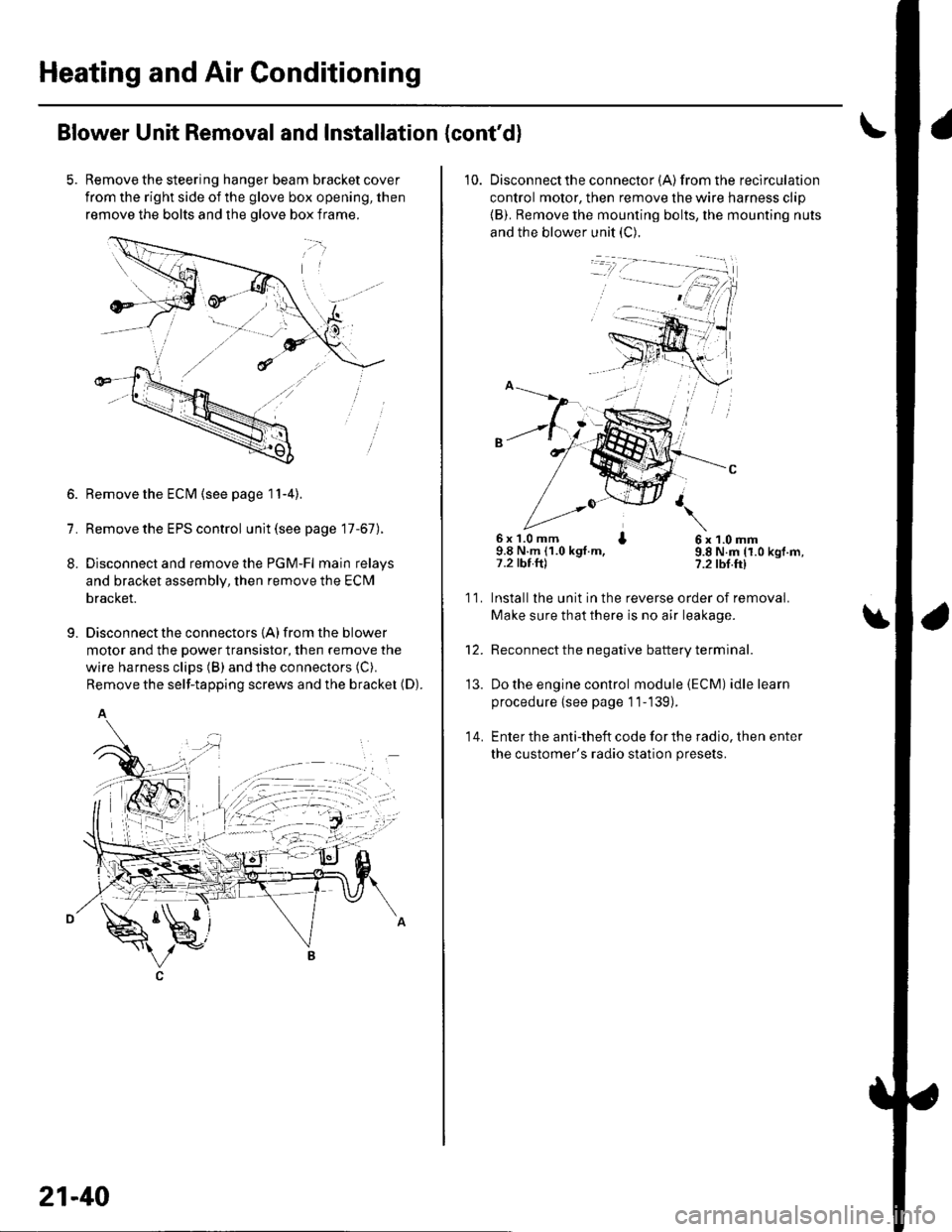
Remove the steering hanger beam bracket cover
from the right side of the glove box opening, then
remove the bolts and the olove box frame.
1.
8.
9.
Remove the ECM (see page 11-4).
Remove the EPS control unit (see page 17-67).
Disconnect and remove the PGM-Fl main relays
and bracket assembly, then remove the ECM
bracket.
Disconnect the connectors {A) from the blower
motor and the power transistor, then remove the
wire harness clips (B) and the connectors (C).
Remove the self-tapping screws and the bracket (D).
A
21-40
10. Disconnectthe connector {A) from the recirculation
control motor, then remove the wire harness clip
{B). Remove the mounting bolts, the mounting nuts
and the blower unit (C).
6x 1.0 mm I9.8 N.m (1.0 kgt.m,7.2 tbt.ftl
6x1.0mm9.8 N.m (1.0 kgf.m,?.2 tbf.ft)
11.
14.
Installlhe unit in the reverse order of removal.
Make sure that there is no air leakage.
Reconnect the negative battery terminal.
Do the engine control module (ECM) idle learn
procedure {see page 11-139).
Enter the anti-theft code for the radio, then enter
the customer's radio station presets.
\
'13.
Page 813 of 1139
Heating and Air Gonditioning
a
1.
Evaporator Core Replacement
Recover the refrigerant with a recovery/recycling/
charging station (see page 21-53).
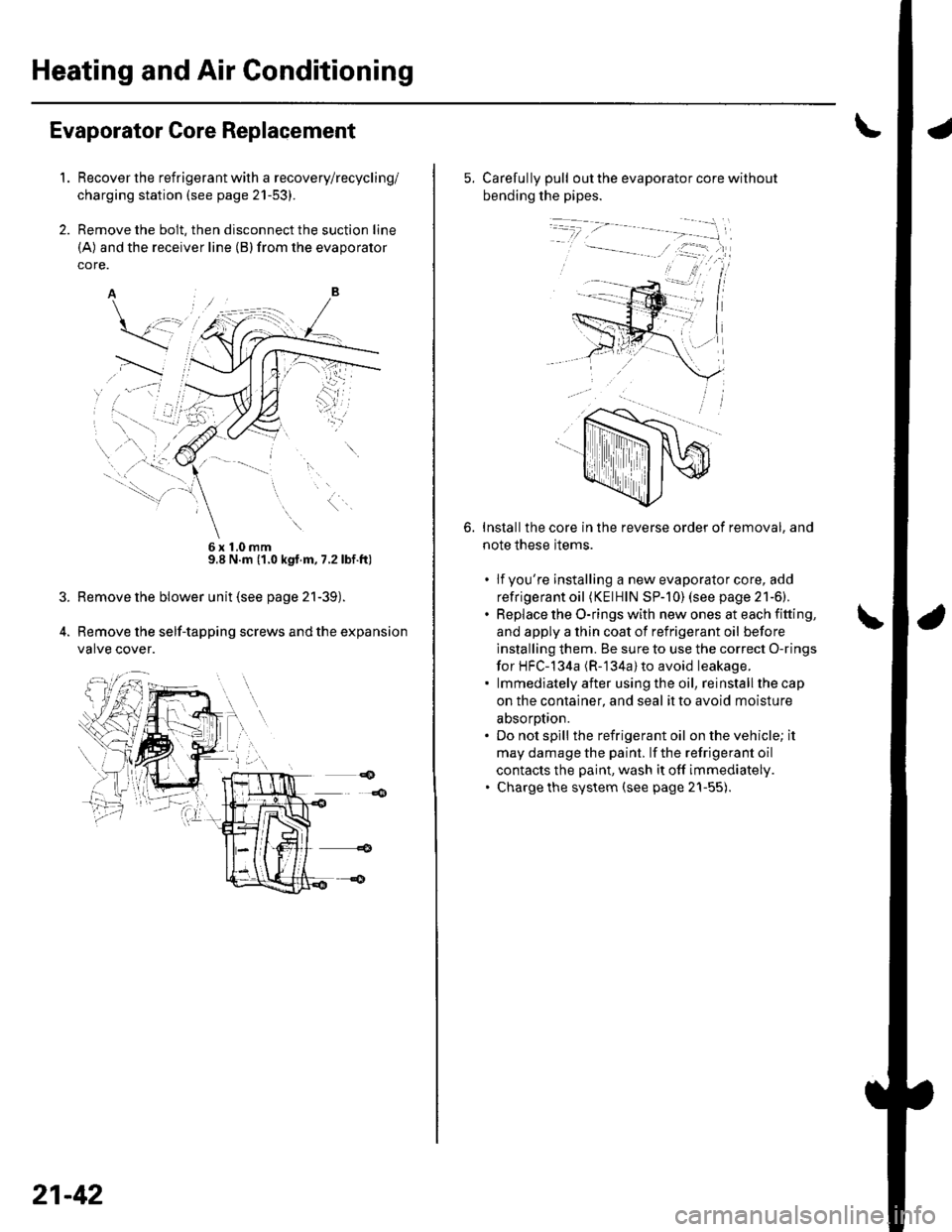
Remove the bolt, then disconnect the suction line
(A) and the receiver line (B)from the evaporator
core.
6x10mm9.8 N.m (1.0 kgt.m, 7.2lbf.ft)
Remove the blower unit (see page 21-39).
Remove the self-tapping screws and the expansion
valve cover.
21-42
5. Carefully pull out the evaporator core without
bending the pipes.
Installthe core in the reverse order of removal, and
note these items.
. lfyou're installing a new evaporator core, add
refrigerant oil (KElHlN SP-]0) (see page 21-6).. Replace the O-rings with new ones at each fitting,
and apply a thin coat of refrigerant oil before
installing them. Be sure to use the correct O-rings
for HFC-134a (R-'134a) to avoid leakage.. lmmediatelyafter usingthe oil, reinstallthecap
on the container, and seal it to avoid moisture
absorotion.. Do not spill the refrigerant oil on the vehicle; it
may damage the paint. lf the refrigerant oil
contacts the paint, wash it off immediately.. Charge the system (see page 21-55).
6.
Page 815 of 1139
Heating and Air Conditioning
Heater Unit/Core Replacement (cont'd)
8. Remove the dashboard {see page 20-66).
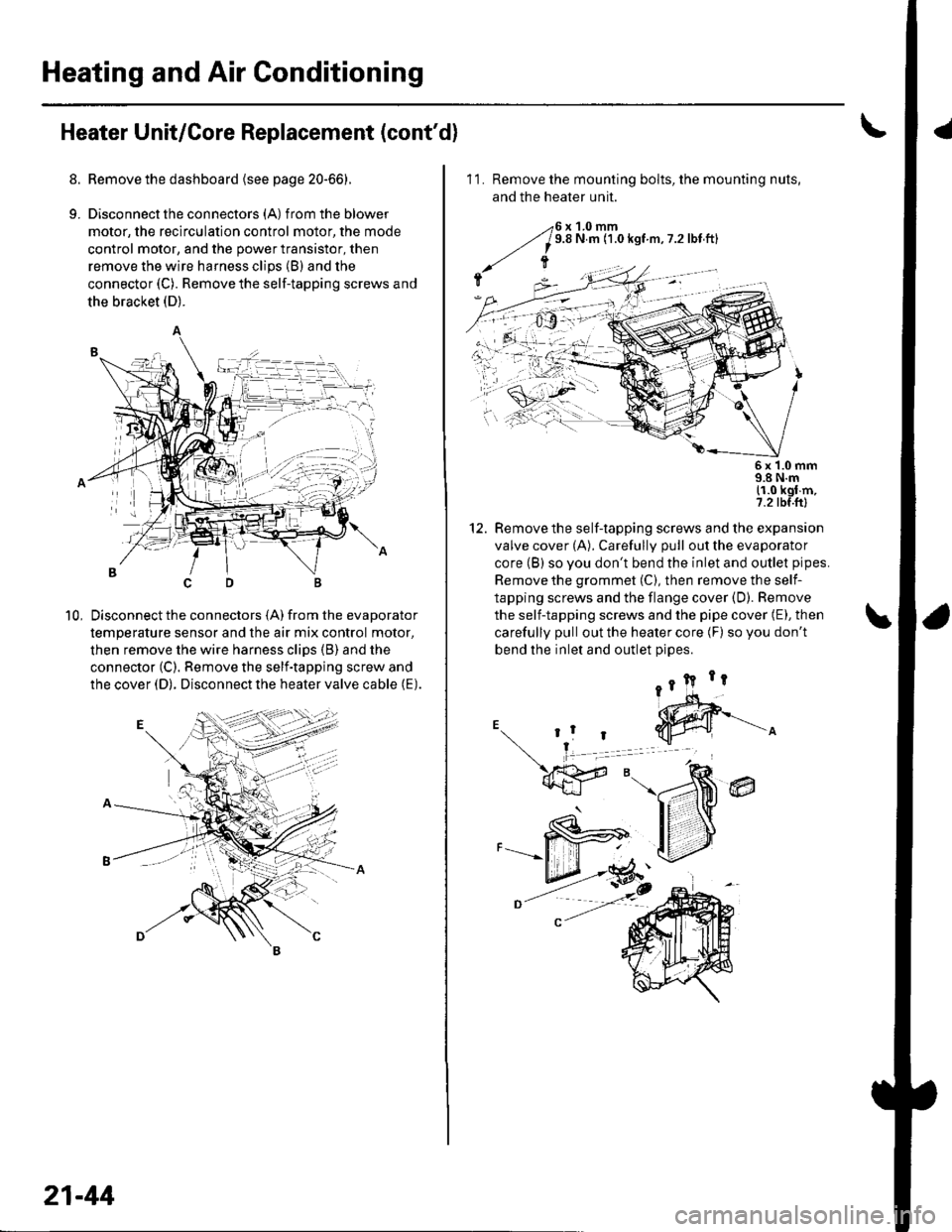
9. Disconnectthe connectors (A) from the blower
motor, the recirculation control motor, the mode
control motor, and the power transistor, then
remove the wire harness clips (B) and the
connector (C). Remove the self-tapping screws and
the bracket (D).
Disconnect the connectors (A) from the evaporator
temperature sensor and the air mix control motor,
then remove the wire harness clips (B) and the
connector (C). Remove the self-tapping screw and
the cover (D). Disconnect the heater valve cable (E).
10,
7t,
21-44
11. Remove the mounting bolts, the mounting nuts,
and the heater unit.
Remove the self-tapping screws and the expansion
valve cover (A). Carefully pull out the evaporator
core (B) so you don't bend the inlet and outlet pipes.
Remove the grommet (C), then remove the self-
tapping screws and the flange cover (D). Bemove
the self-tapping screws and the pipe cover (E), then
carefully pull out the heater core (F) so you don't
bend the inlet and outlet oioes.
@
5x 1.0 mm9.8 N.m11.0 kgl m,7.2 tbf.ftl
12.
Page 817 of 1139
Heating and Air Conditioning
Heater Valve Cable Adjustment
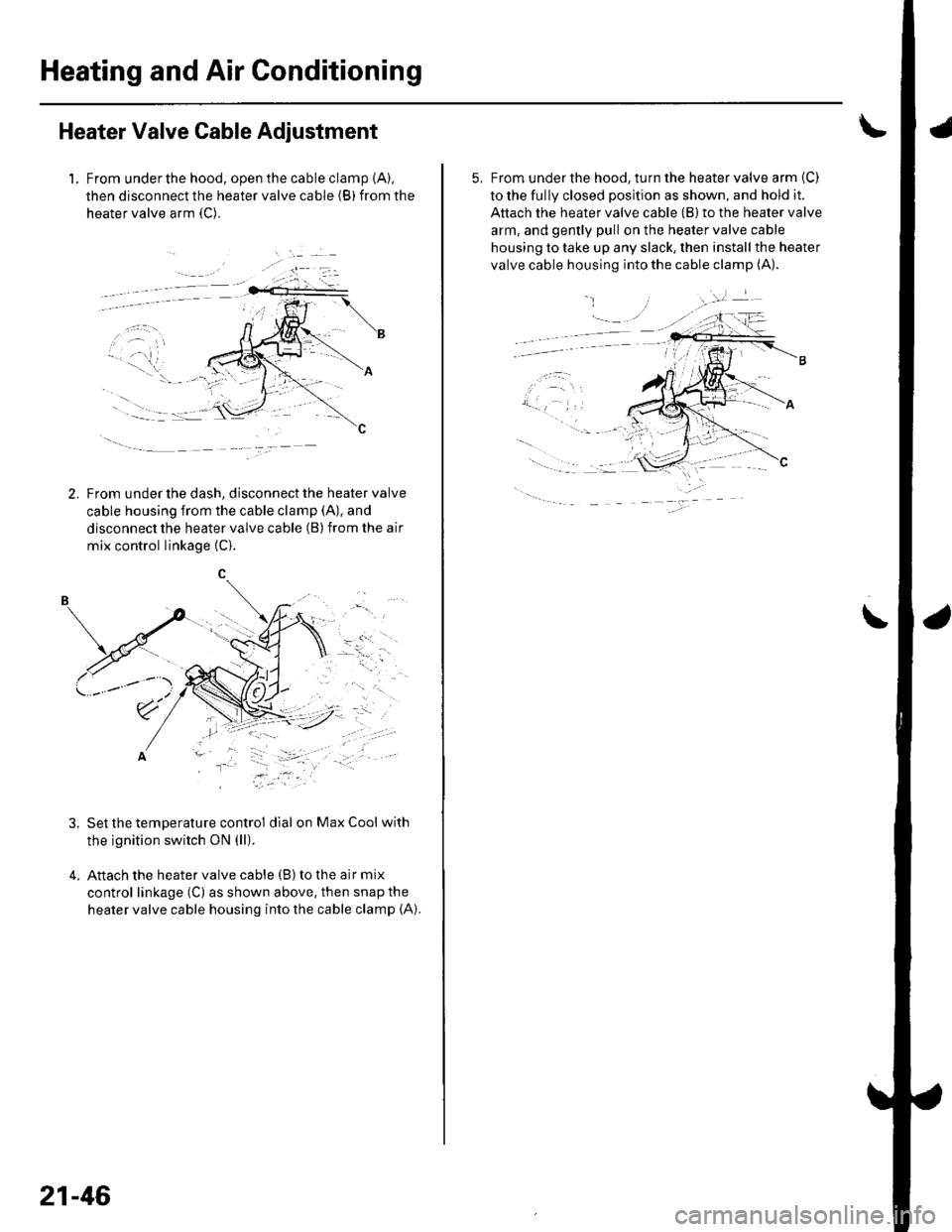
1. From underthe hood, open the cable clamp {A),
then disconnect the heater valve cable (B) from the
heater valve arm {C).
tFrom under the dash, disconnect the heater valve
cable housing from the cable clamp (A), and
disconnect the heater valve cable (B) from the air
mix control linkage {C).
, t.- l
\'r2t' ''' '
' ::"'
Set the temperature control dial on Max Cool with
the ignition switch ON (ll).
Attach the heater valve cable (B) to the air mix
control linkage (C) as shown above, then snap the
heater valve cable housing into the cable clamp (A).
.'.-:',,
-"ll
.....-
21-46
5, From under the hood, turn the heater valve arm {C)
to the fully closed position as shown, and hold it.
Attach the heater valve cable (B) to the heater valve
arm, and gently pull on the heater valve cable
housing to take up any slack, then install the heater
valve cable housing into the cable clamp (A).
.
\
Page 819 of 1139
Heating and Air Gonditioning
1.
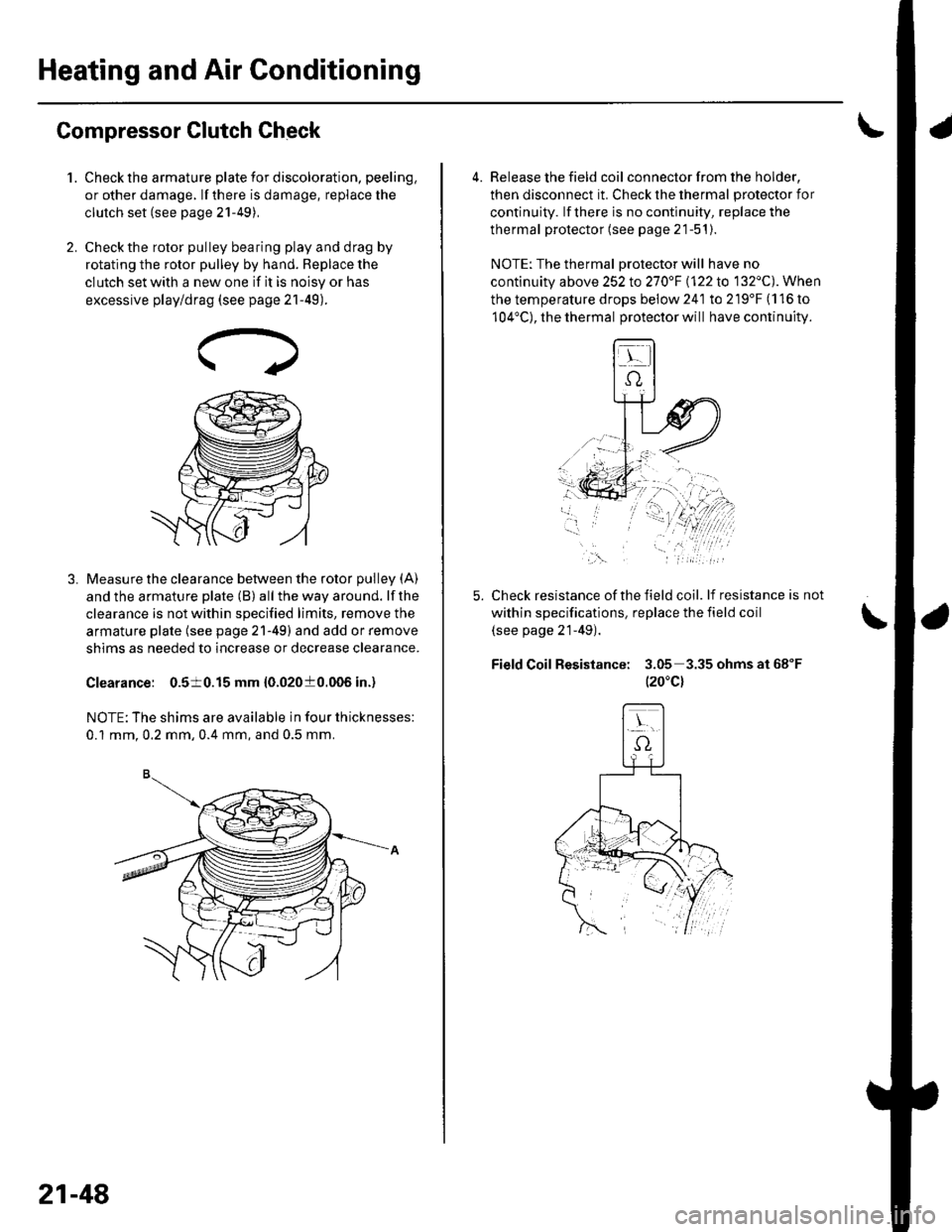
Compressor Clutch Check
Check the armature plate for discoloration, peeling,
or other damage. lf there is damage, replace the
clutch set (see page 21-49),
Check the rotor pulley bearing play and drag by
rotating the rotor pulley by hand. Beplace the
clutch set with a new one if it is noisy or has
excessive play/drag (see page 21-49).
Measure the clearance between the rotor pulley (A)
and the armature plate (B) all the way around. lf the
clearance is not within specified limits, remove the
armature plate (see page 21-49) and add or remove
shims as needed to increase or decrease clearance.
Clearance: 0.510.15 mm {0.02010.006 in.)
NOTE: The shims are available in four thicknesses:
0.1 mm.0.2 mm,0.4 mm, and 0.5 mm.
21-48
a
4. Release the field coil con nector f rom the holder,
then disconnect it. Check the thermal protector for
continuity. lf there is no continuity, replace the
thermal protector (see page 21-51).
NOTE: The thermal Drotector will have no
continuity above 252to270"F \122lo 132'C). When
the temperature drops below 241 to 219'F (116 to
104'C), the thermal protector will have continuity.
Check resistance of the field coil. lf resistance is not
within specifications, replace the field coil
(see page 21-49).
Field Coil Resistance: 3.05 3.35ohmsat68"F
t20"c)
,\.
Page 821 of 1139
Heating and Air Gonditioning
Compressor Clutch Overhaul (cont'd)
5. Reassemble the clutch in the reverse order of
disassembly, and note these items:
. Installthe field coil with the wire side facing
down, and align the boss on the field coil with the
hole in the compressor.. Clean the rotor pulley and compressor sliding
surfaces with contact cleaner or other
non-petroleum solvent..Install new snap rings, note the installation
direction, and make sure they are fully seated in
the groove.
. Make sure that the rotor pulley turns smoothly
after it's reassembled,. Route and clamp the wires properly or they can
be damaged by the rotor pulley.
21-50
Page 823 of 1139
Heating and Air Conditioning
Gondenser Replacement
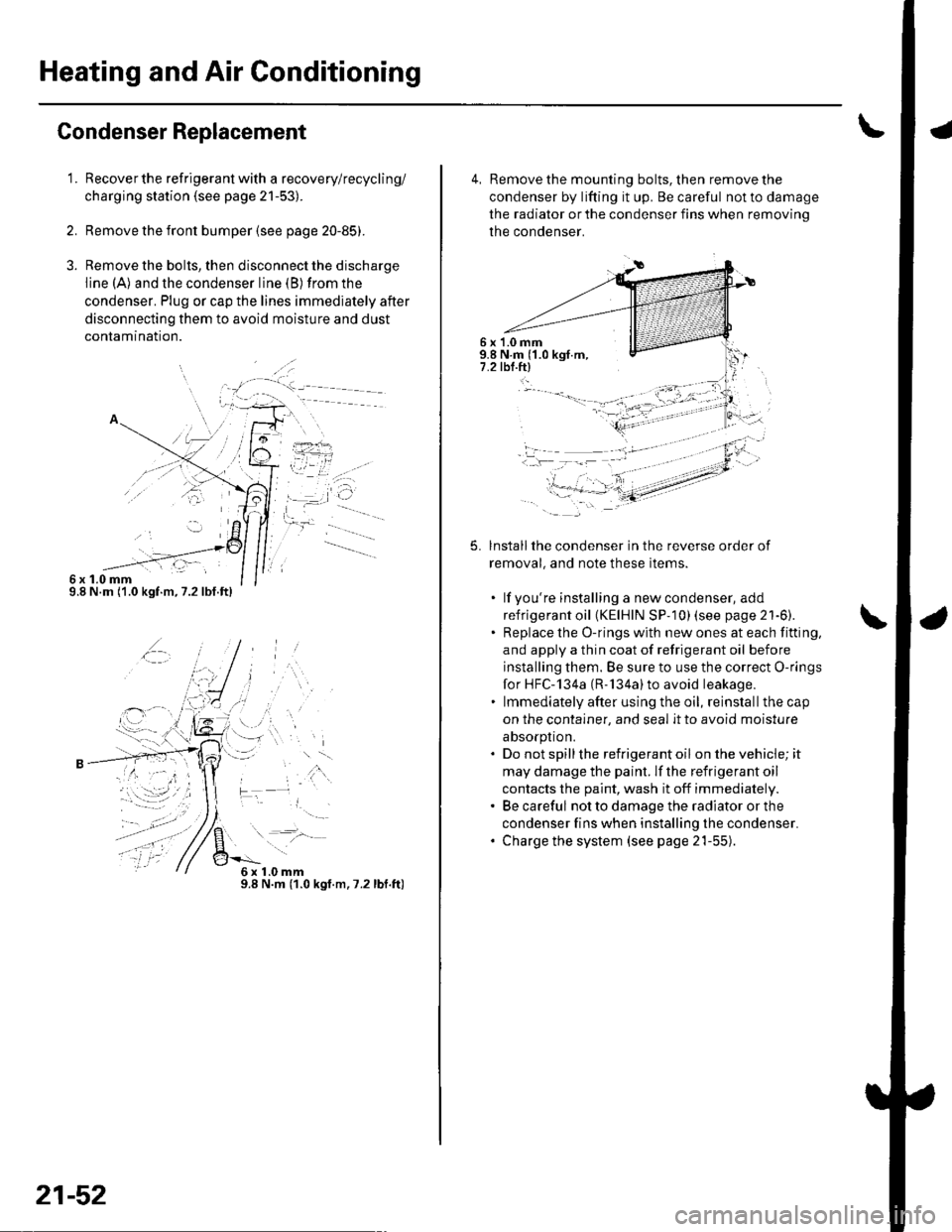
1.
6x1.0mm9.8 N.m ('1.0 kgf.m,7.2lbf.ft)
Recover the refrigerant with a recovery/recycling/
charging station (see page 21-53).
Remove the front bumper {see page 20-85).
Remove the bolts, then disconnect the discharge
line (A) and the condenser line (B) from the
condenser. Plug or cap the lines immediately after
disconnecting them to avoid moisture and dust
conlamtnaflon.
,t\
6x1.0mm9.8 N.m (1.0 kgt.m.7.2lbf.ft)
21-52
4, Remove the mounting bolts, then remove the
condenser by lifting it up. Be careful not to damage
the radiator or the condenser fins when removino
the condenser.
6 x '1.0 mm9.8 N.m ('1.0 kgf.m,7.2 tbl.ftl
5.lnstallthe condenser in the reverse order of
removal, and note these items.
. lf you're installing a newcondenser, add
refrigerant oil (KElHlN SP- 10) lsee page 21'6).. Replace the O-rings with new ones at each fitting,
and apply a thin coat of refrigerant oil before
installing them. Be sure to use the correct O-rings
for HFC-134a (R-'134a)to avoid leakage.. lmmediately after using the oil, reinstallthe cap
on the container, and seal it to avoid moisture
absorption.. Do not spillthe refrigerant oil onthevehicle;it
may damage the paint. lf the refrigerant oil
contacts the paint, wash it off immediately.. Be careful not to damage the radiator or the
condenser fins when installing the condenser.. Charge the system (see page 21-55).
t -"'.
f,
t-
-li .:)-:.-- ---- - -'
Page 825 of 1139
Heating and Air Conditioning
System Evacuation
Use only service equipment that is U.L.-listed and is
certified to meet the requirements of SAE J2210 to
remove HFC-134a (R-134a)from the air conditioninq
system.
lf accidental system discharge occurs, ventilate the
work area before resuming service.
Additional health and safety information may be
obtained from the refrigerant and lubricant
manufacturers.
1. When an Ay'C system has been opened to the
atmosphere, such as during installation or repair, it
must be evacuated using a R-134a refrigerant
recovery/recycling/charging station (lf the system
has been open for several days, the receiver/dryer
should be replaced, and the system should be
evacuated for several hours.)
. Air conditioning refrigerant or lubricant vapor
can irritate your eyes, nose, or throat.. Be carefulwhen connecting service equipment.. Do not breathe refrigerant or vapor.
21-54
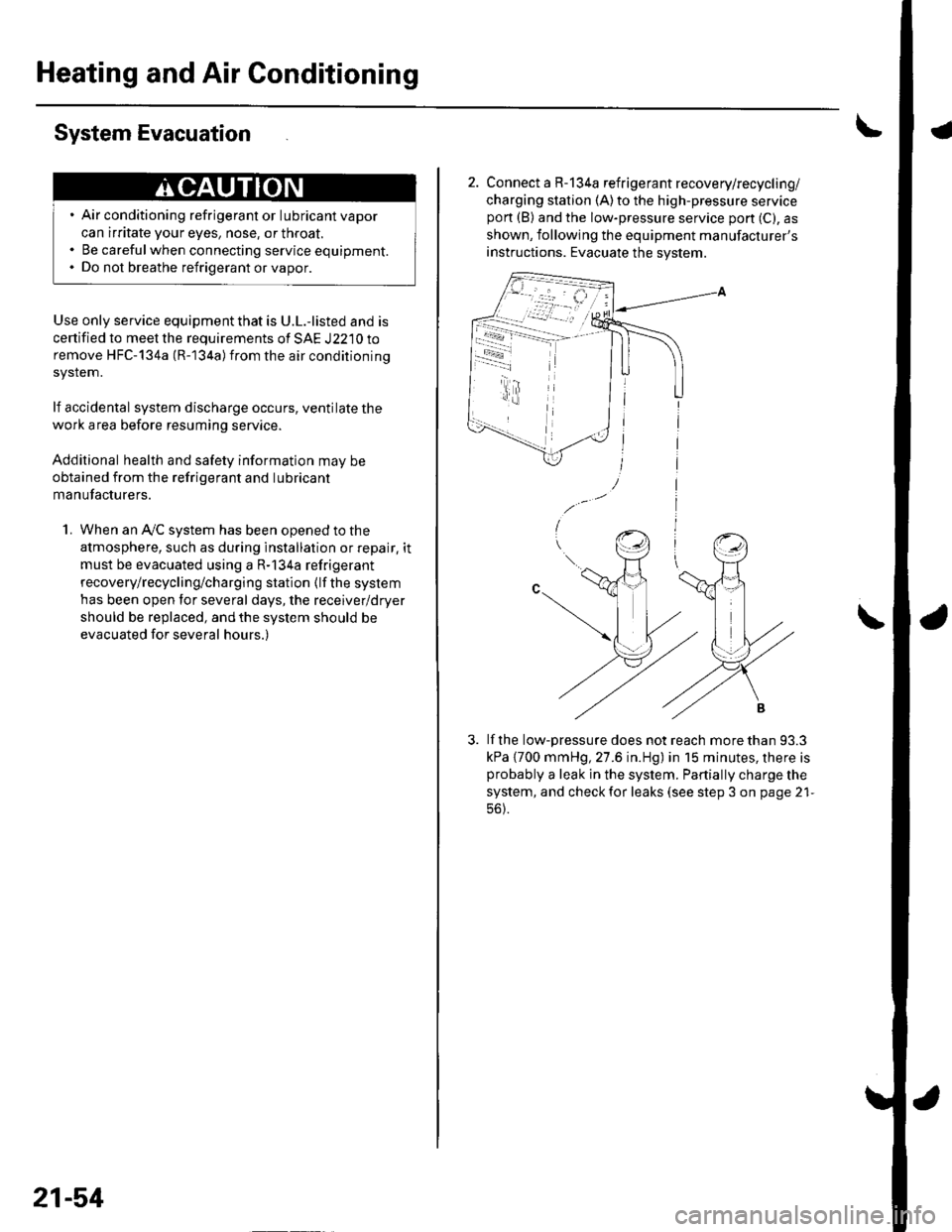
2. Connect a R-134a refrigerant recovery/recycling/
charging station (A)to the high-pressure servicepon (B) and the low-pressure service port (C), as
shown, following the equipment manufacturer's
instructions. Evacuate the system.
lf the low-pressure does not reach more than 93.3
kPa {700 mmHg, 27.6 in.Hg) in 15 minutes, there isprobably a leak in the system. Partially charge the
system, and check for leaks (see step 3 on page 21-
56).
-i - r4.t