wheel HONDA CIVIC 2003 7.G Owner's Manual
[x] Cancel search | Manufacturer: HONDA, Model Year: 2003, Model line: CIVIC, Model: HONDA CIVIC 2003 7.GPages: 1139, PDF Size: 28.19 MB
Page 408 of 1139
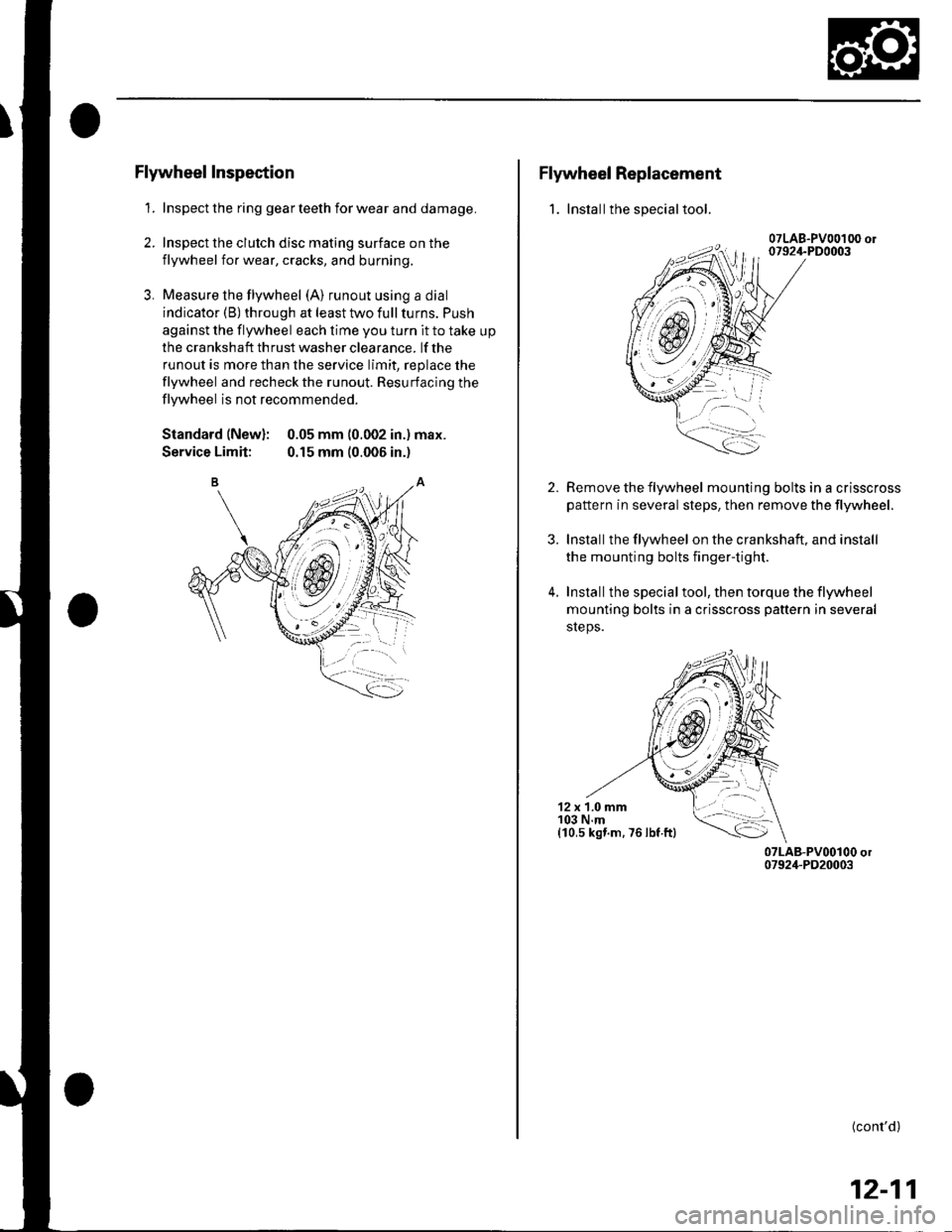
Flywheel Inspection
1. Inspect the ring gear teeth for wear and damage.
2. Inspect the clutch disc mating surface on the
flywheel for wear, cracks, and burning.
3. Measure the flywheel (A) runout using a dial
indicator (B) through at least two full turns. Push
against the flywheel each time you turn it to take up
the cra nksh aft th rust washer clea rance. lf the
runout is more than the service limit, replace the
flywheel and recheck the runout. Resurfacing the
flywheel is not recommended.
Standard (New): 0.05 mm (0.002 in.) max.
Service Limit: 0.15 mm (0.006 in.)
Flywheel Replacement
1. Installthe special tool.
2.
3.
4.
Remove the flywheel mounting bolts in a crisscross
pattern in several steps, then remove the tlywheel.
Installthe flywheel on the crankshaft, and install
the mounting bolts fingertight.
Installthe specialtool, then torque the flywheel
mounting bolts in a crisscross pattern in several
sreps.
12 x 1.0 mm103 N.m(10,s kst.m. 76 lbf ftl
(cont'd)
12-11
Page 423 of 1139
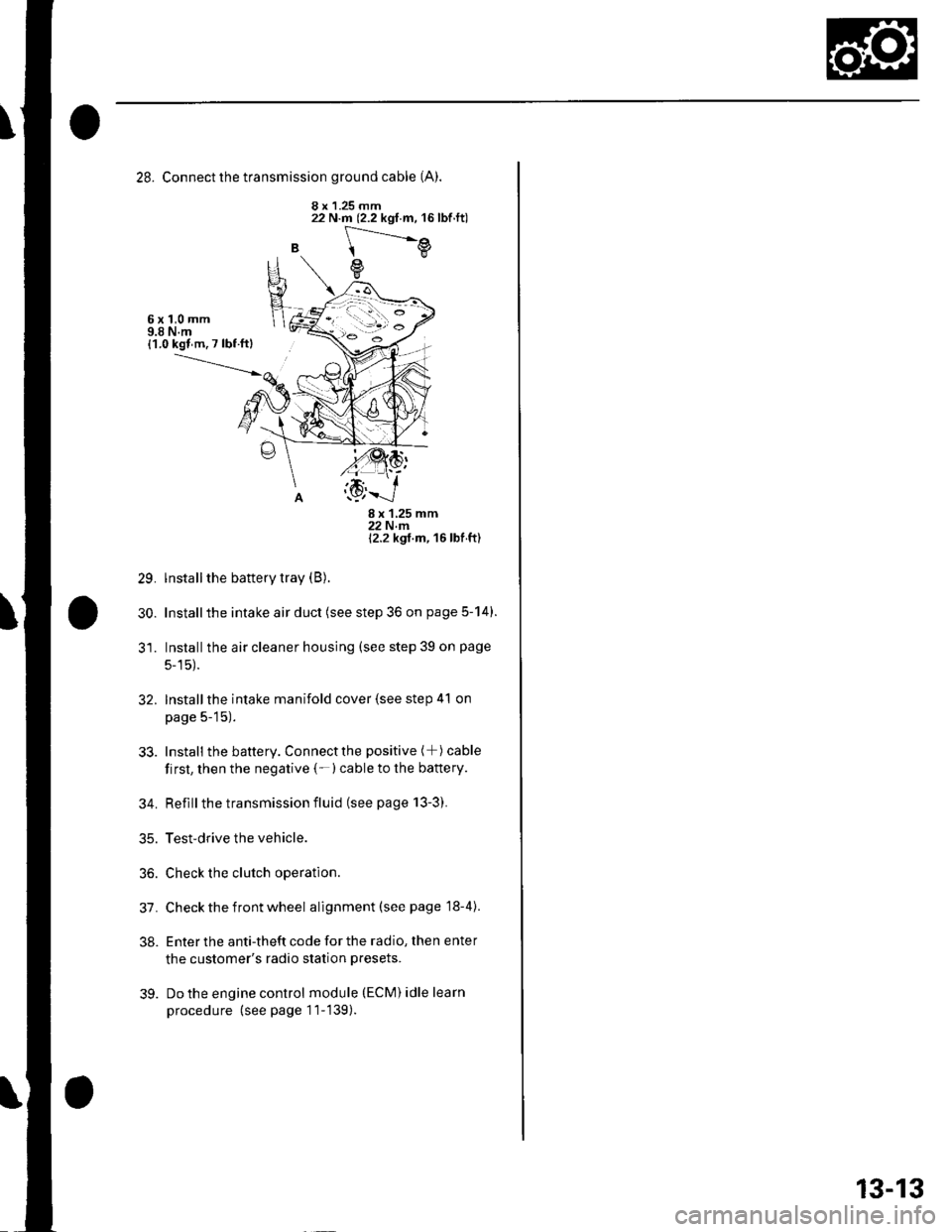
28. Connect the transmission ground cable (A).
8 x 1.25 mm
B
22 N.m (2.2 kgf.m, 16lbf.ft)
[---.-.---e
e
6x1,0mm9.8 N.m{1.0 kgl m. 7 lbf ftl
29.
30.
8x125mm22Nm12.2 kgt m, 16 lbf ft)
lnstall the battery tray (B).
Installthe intake air duct (see step 36 on page 5-14).
Installthe air cleaner housing (see step 39 on page
5-15).
Installthe intake manifold cover (see step 41 on
page 5-15).
Install the battery. Connectthe positive (+) cable
first, then the negative (-)cable to the battery.
Reflllthe transmission fluid (see page 13-3).
Test-drive the vehicle.
Check the clutch operation.
Check the front wheel alignment (see page 18-4).
Enter the anti-theft code for the radio, then enter
the customer's radio station presets.
Do the engine control module (ECM) idle learn
procedure (see page 11-139).
32.
33.
34.
35.
36.
31.
38.
39.
13-13
Page 470 of 1139
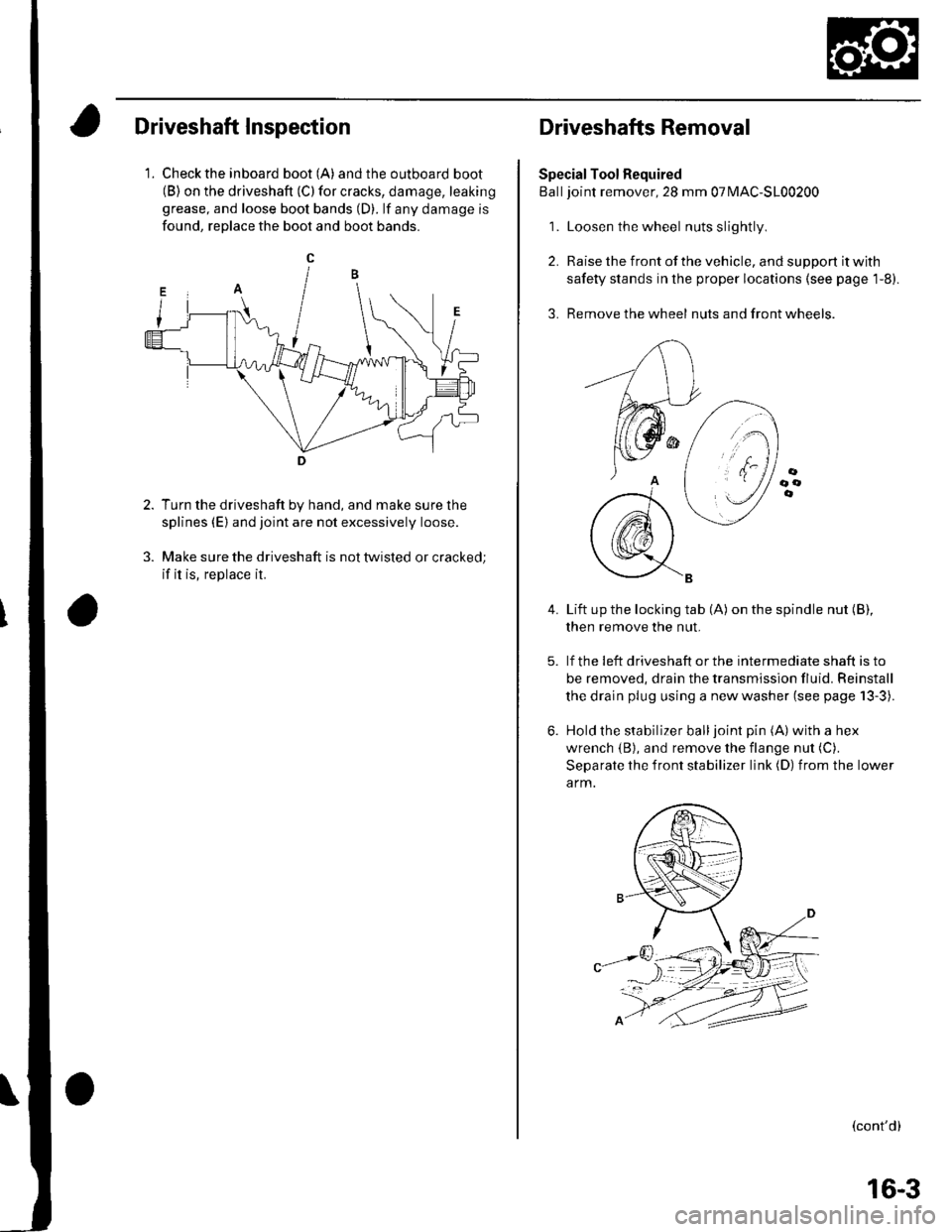
Driveshaft Inspection
1. Check the inboard boot (A) andthe outboard boot(B) on the driveshaft (C) for cracks, damage, leaking
grease, and loose boot bands (D). lf any damage is
found, reDlace the boot and boot bands.
Turn the driveshaft by hand, and make sure the
splines (E) and joint are not excessively loose.
Make sure the driveshaft is not twisted or cracked;
if it is, replace it.
Driveshafts Removal
Special Tool Required
Balljoint remover, 28 mm 07MAC-S100200
1. Loosen the wheel nuts slightly
2. Raise the front of the vehicle, and support it with
safety stands in the proper locations (see page 1-8).
3. Remove the wheel nuts and front wheels.
4.Lift up the locking tab (A) on the spindle nut (B),
then remove the nut.
lf the !eft driveshaft or the intermediate shaft is to
be removed, drain the transmission fluid. Reinstall
the drain plug using a new washer (see page 13-3).
Hold the stabilizer balljoint pin (A) with a hex
wrench {B), and remove the flange nut (C).
Separate the front stabilizer link (D) from the lower
a rm.
(cont'd)
16-3
Page 471 of 1139
Driveline/Axle
Driveshafts Removal (cont'd)
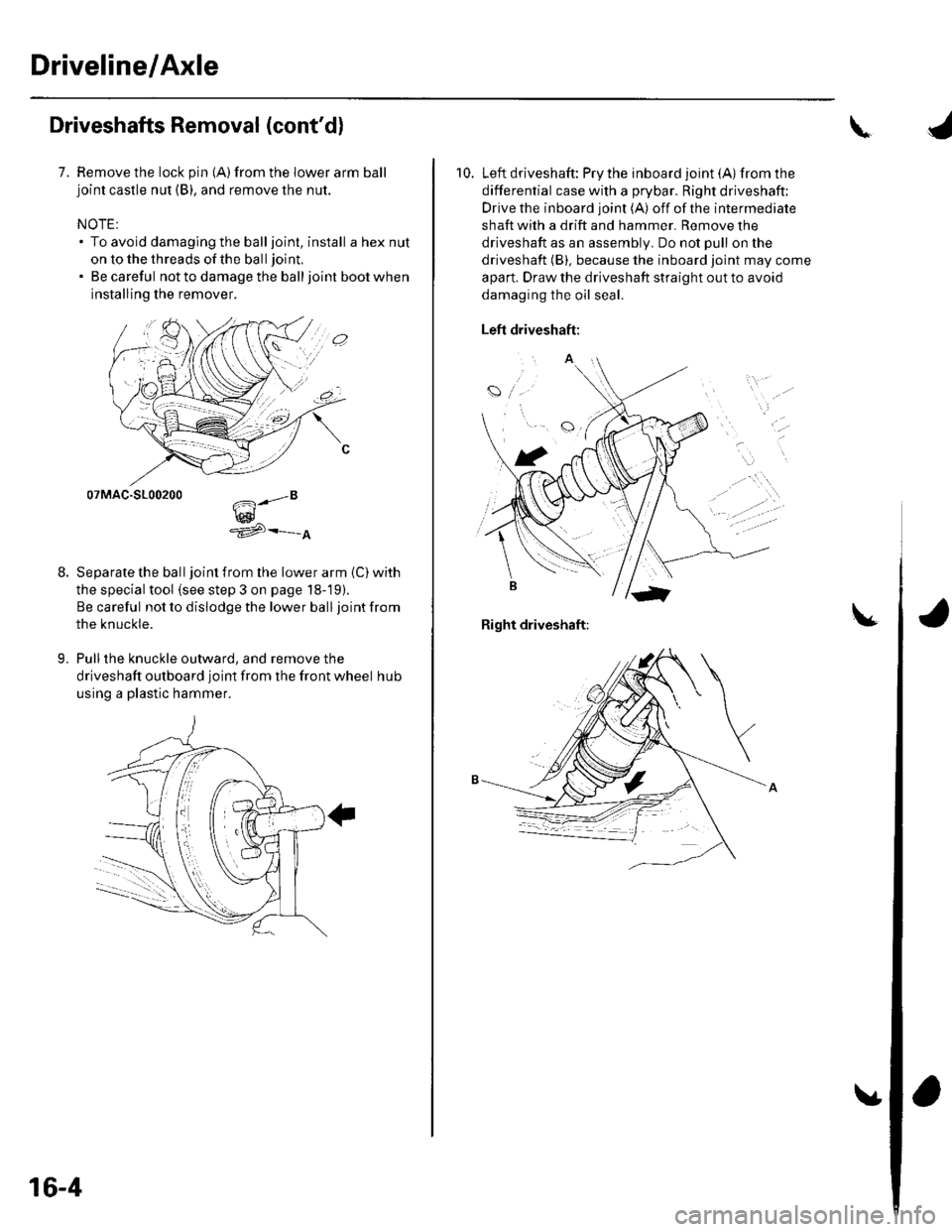
7. Remove the lock pin {A)from the lower arm balljoint castle nut (B), and remove the nut.
NOTE:. To avoid damaging the balljoint, install a hex nut
on to the threads of the ball joint,
. Be careful not to damage the balljoint boot when
installing the remover.
07MAC-S100200
w^'e
Separate the ball joint from the lower arm (C) with
the special tool (see step 3 on page 18-19).
Be careful not to dislodge the lower ball joint from
the knuckle.
Pull the knuckle outward, and remove the
driveshaft outboard joint from the front wheel hub
using a plastic hammer.
9.
.."8
16-4
\
10. Left driveshaft: Pry the inboard joint (A)from the
differential case with a prybar. Right driveshaft:
Drive the inboard joint (A) off of the intermediate
shaft with a drift and hammer. Remove the
driveshaft as an assembly. Do not pull on the
driveshaft (B), because the inboard joint may come
apart. Draw the driveshaft straight out to avoid
damaging the oil seal.
Left driveshaft:
a
t
Right driveshaft:
Page 486 of 1139
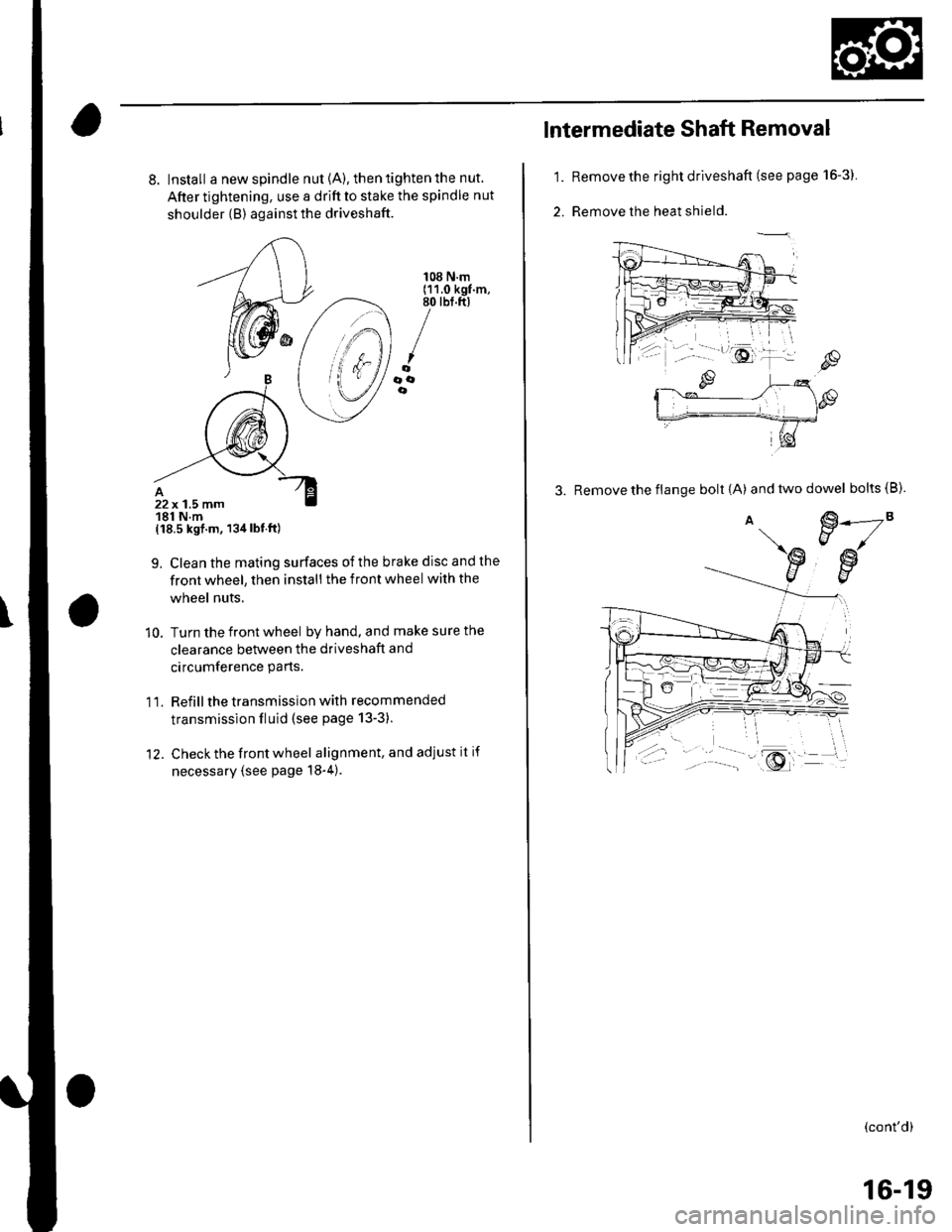
8. Install a new spindle nut {A), then tighten the nut.
After tightening, use a drift to stake the spindle nut
shoulder {B) against the driveshaft.
{18.5 kgf.m, 134lbt.ft)
9. Clean the mating surfaces ofthe brake disc and the
front wheel, then install the front wheel with the
wheel nuts.
10. Turn the front wheel by hand, and make sure the
clearance between the driveshaft and
circumference parts.
1 l. Refill the transmission with recommended
transmission fluid (see page 13-3).
12. Check the front wheel alignment, and adjust it if
necessary (see page 18-4).
108 N.m(11.0 kgf.m,80 tbt.ft)
/oooe
22x 1.5 mm181 N.m
1.
2.
lntermediate Shaft Removal
Remove the right driveshaft (see page 16-3).
Remove the heat shield.
3. Remove the flange bolt {A) andtwodowel bolts(B).
€.---2"EJ/
€w
(cont'd)
16-19
Page 493 of 1139
Steering
Steering
Special Tools ............. 17-2
Comoonent Location Index ......................................... 17-3
Steering Wheel Rotational Play Check .....................". 17-4
Power Assist Check .................. .......... 17-4
Steering Linkage and Gearbox Inspection ................. 17-5
Steering Wheel Removal .........................,................... 17-6
Steering Wheel Disassembly/Reassembly ................ 17-7
Steering Wheel Installation ............... 17-8
Steering Column Removal and Installation ...........'... 17-9
Steering Column Inspection .............. 17-11
Steering Lock Replacement .......................................'. 17-'12
Rack Guide Adiustment ....."........'..'.. 17-13
Electrical Power Steering (EPS)17-15
Page 495 of 1139
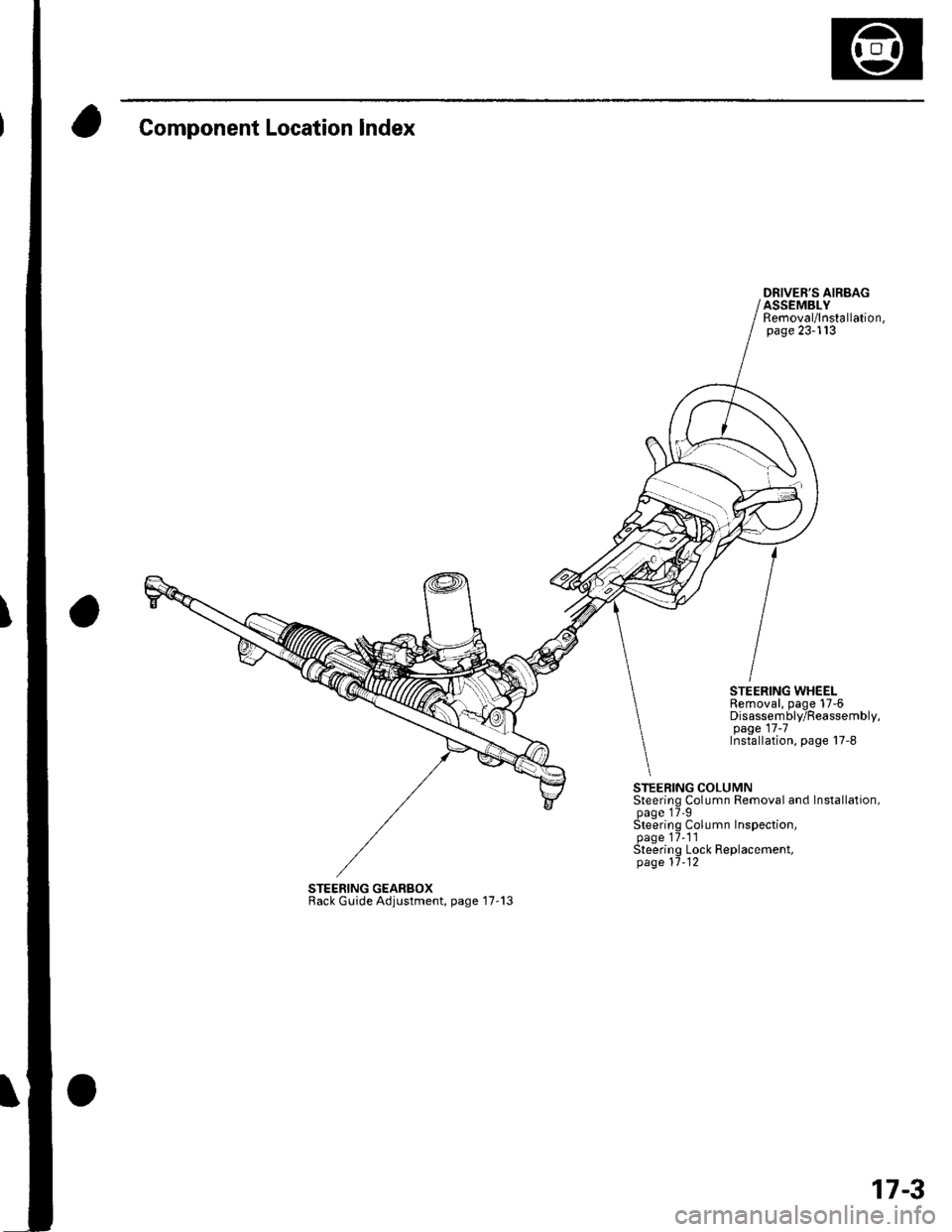
Component Location Index
DRIVER'S AIRBAGASSEMBLYRemoval/lnstallation,page 23-113
STEERING WHEELRemoval, page 17-6Disassembly/Reassembly,page 17 -7Installation, page 17-8
STEERING COLUMNSteering Column Removal and Installation,page 17'9Steering Column Inspection,page 17-1'lSteering Lock Replacement,page 11-12
STEERING GEARBOXRack Guide Adjustment, page '17-13
17-3
Page 496 of 1139
Steering
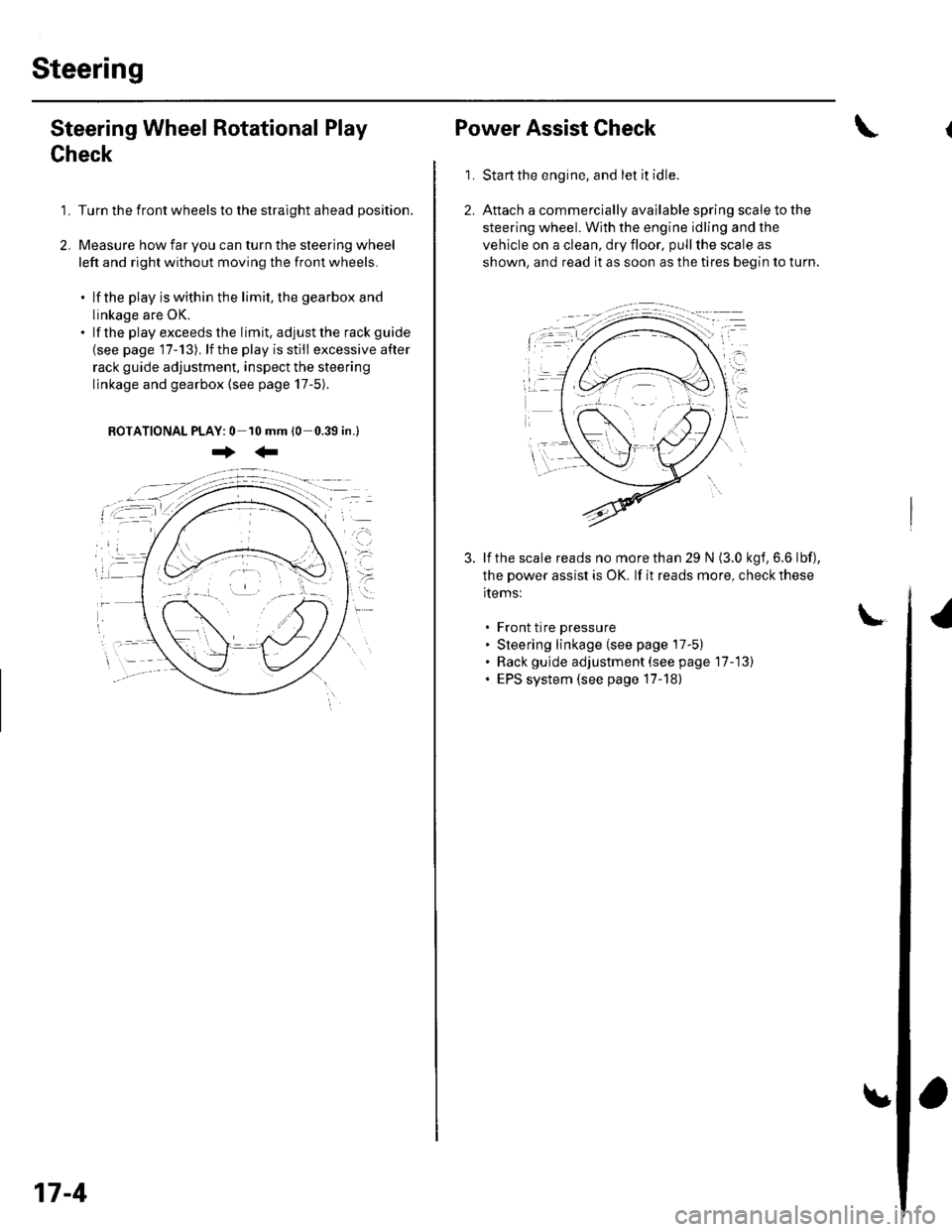
Steering Wheel Rotational Play
Check
1. Turn the front wheels to the straight ahead position.
2. Measure how far you can turn the steering wheel
left and right without moving the front wheels.
. lf the play is within the limit, the gearbox and
linkage are OK.. lf the playexceedsthe limit, adjustthe rack guide
{see page '17-13). lf the play is still excessive after
rack guide adjustment, inspect the steering
linkage and gearbox {see page 17-5).
BOTATIONAL PLAY: 0 10 mm (0-0.39 in.l
+:
17-4
Power Assist Check
Start the engine, and let it idle.
Attach a commercially available spring scale to the
steering wheel. With the engine idling and the
vehicle on a clean, dry floor, pull the scale as
shown, and read it as soon as the tires begin to turn.
\
1.
3. lf the scale reads no morethan 29 N (3.0 kgf,6.6 lbf),
the power assist is OK. lf it reads more, check these
items:
. Front tire pressure. Steering linkage (see page 17-5). Rack gulde adjustment (see page 17-13). EPS system (see page 17-18)
Page 498 of 1139
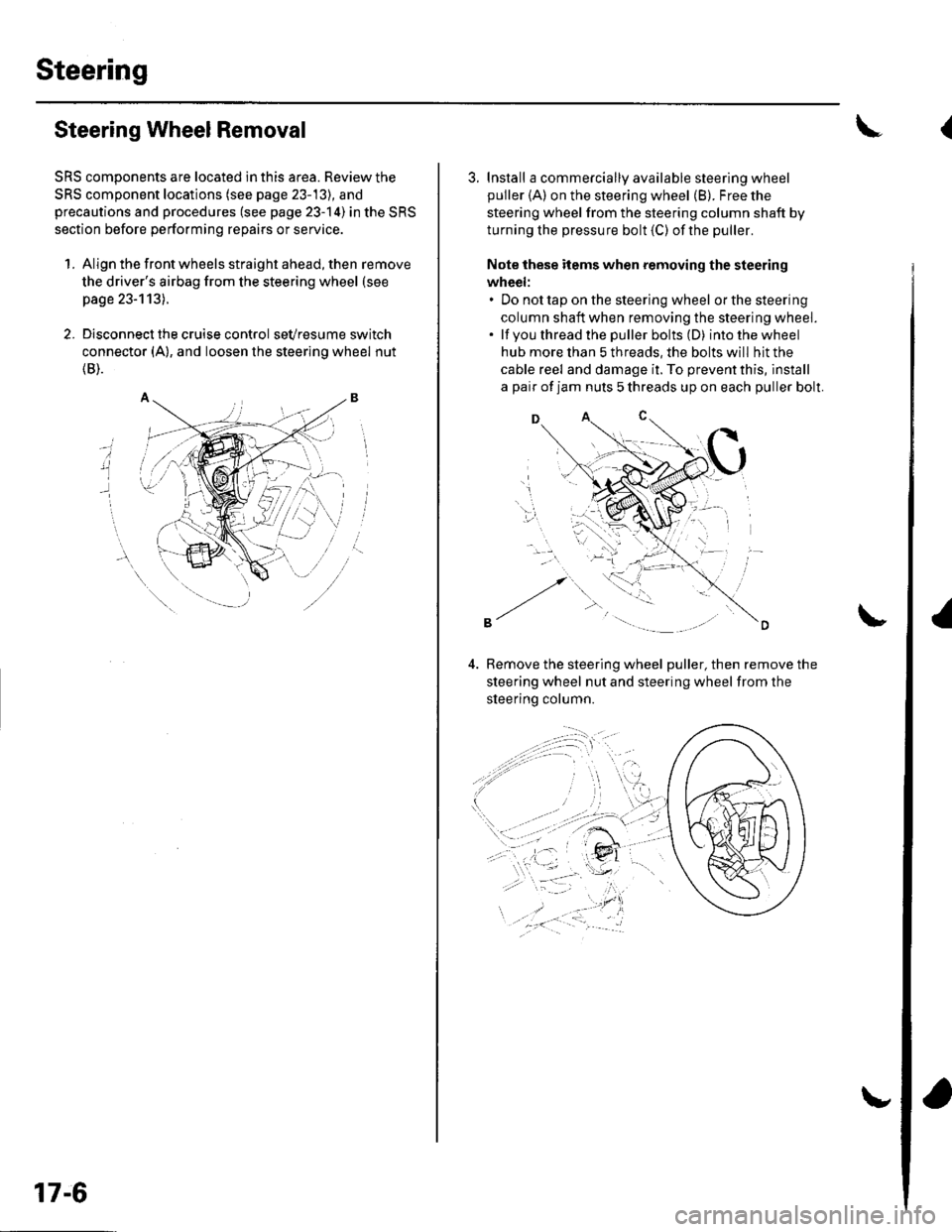
Steering
Steering Wheel Removal
SRS components are located in this area. Review the
SRS component locations (see page 23-13), and
precautions and procedures (see page 23-14) in the SRS
section before performing repairs or service.
1. Align the front wheels straight ahead, then remove
the driver's airbag from the steering wheel (see
page 23-113).
2. Disconnect the cruise control sevresume switch
connector (A), and loosen the steering wheel nut
{B).
i
17-6
3. Install a commercially available steering wheel
puller {A) on the steering wheel (B). Free the
steering wheel from the steering column shaft by
turning the pressure bolt (C) ofthe puller.
Note these items when removing the steering
wheel:. Do not tap on the steering wheel orthesteering
column shaft when removing the steering wheel.. lf you thread the puller bolts (D) intothewheel
hub more than 5 threads, the bolts will hit the
cable reel and damage it. To prevent this, install
a pair of jam nuts 5 threads up on each puller bolt.
D
Bemove the steering wheel puller, then remove the
steering wheel nut and steering wheel from the
sleerino column.
{
Page 499 of 1139
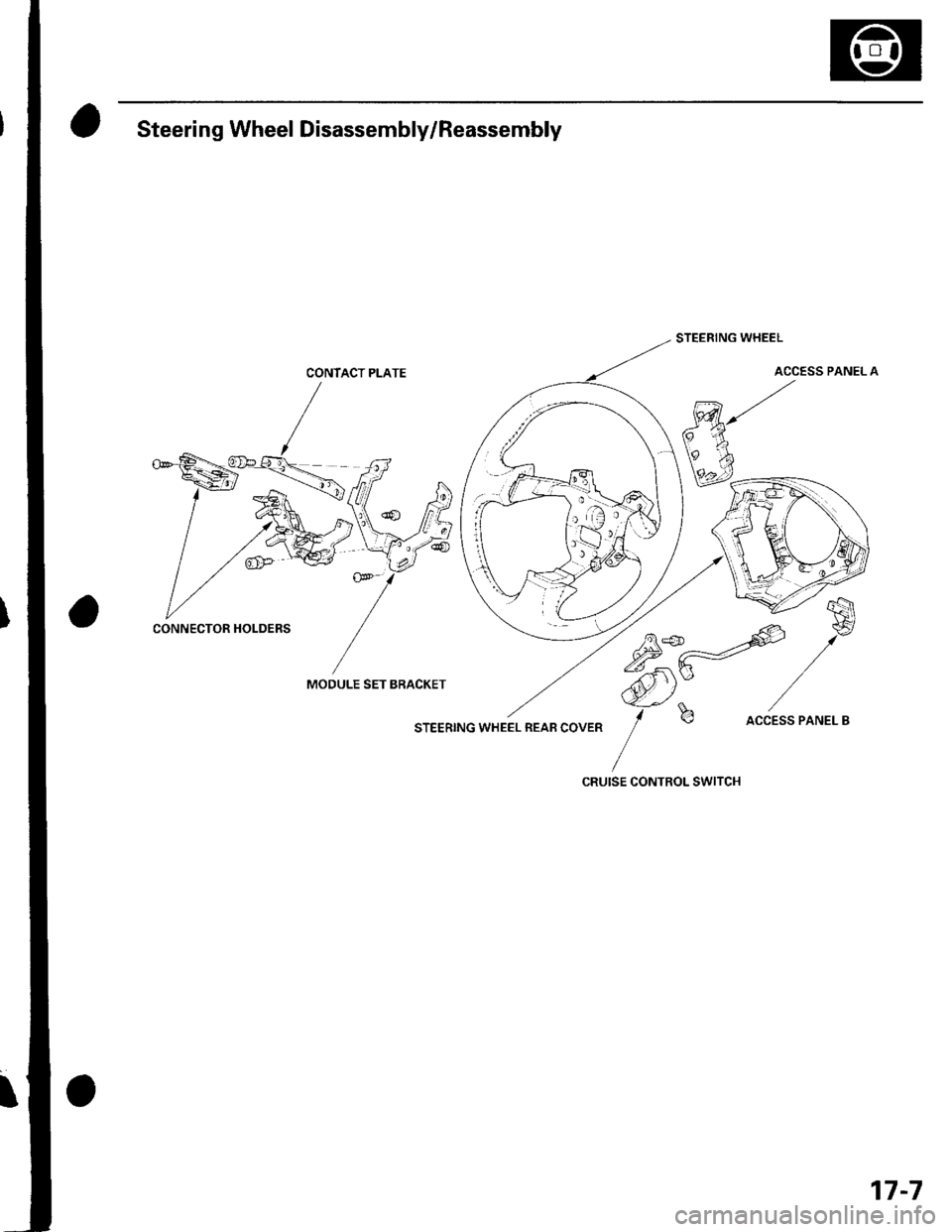
Steering Wheel Disassembly/Reassembly
CONTACT PLATE
MOOULE SET BRACKET
STEERING WHEEL REAB COVER
STEERING WHEEL
ACCESS PANEL A
75*-=offi
,/*
ffi)Y /-f
b accEss PANEL B
CRUISE CONTROL SWITCH
CONNECTOR HOLDERS
17-7