Harness HONDA CIVIC 2003 7.G Owner's Guide
[x] Cancel search | Manufacturer: HONDA, Model Year: 2003, Model line: CIVIC, Model: HONDA CIVIC 2003 7.GPages: 1139, PDF Size: 28.19 MB
Page 554 of 1139
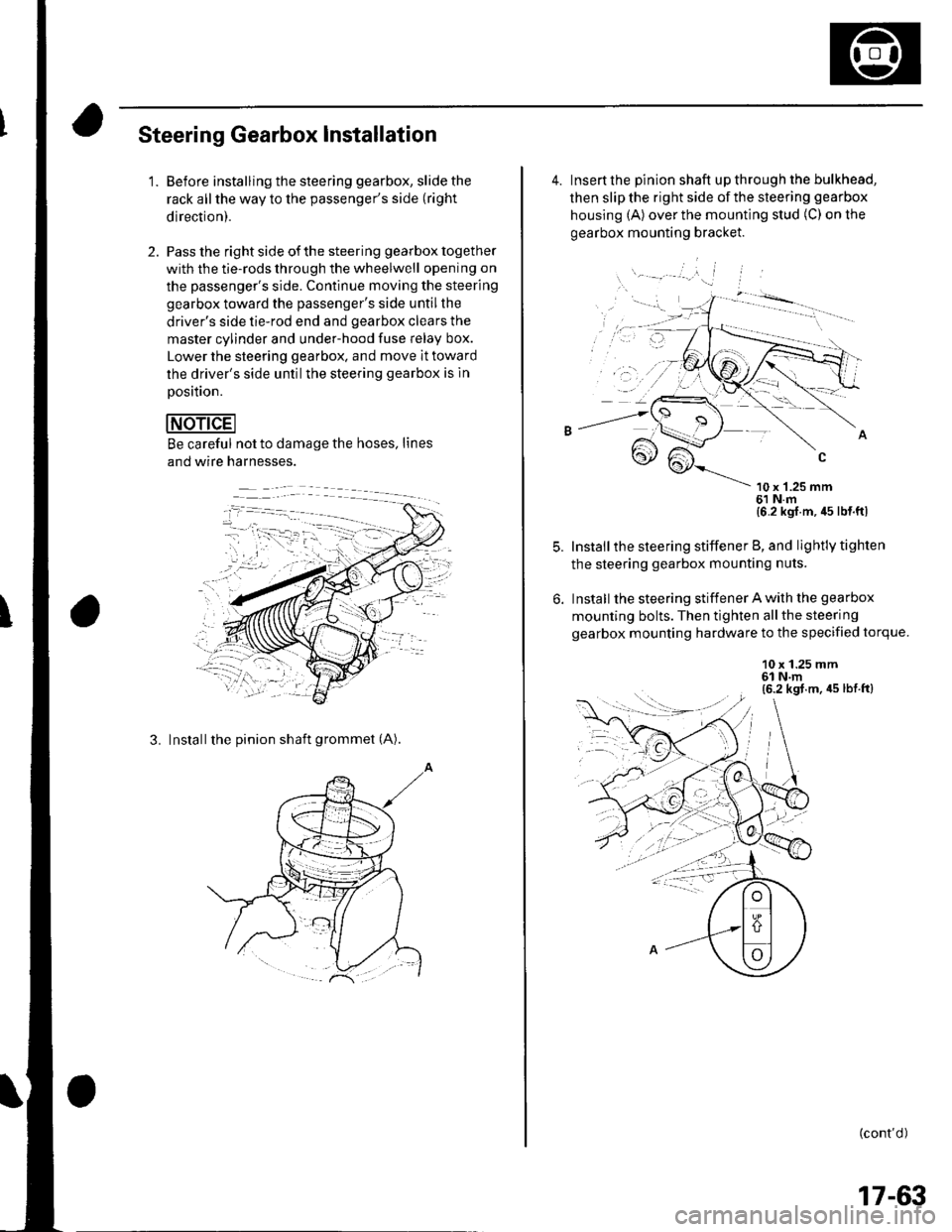
Steering Gearbox Installation
2.
'1.Before installing the steering gearbox, slide the
rack all the way to the passenger's side (right
direction).
Pass the right side of the steering gearbox together
with the tie-rods through the wheelwell opening on
the passenger's side. Continue moving the steering
gearbox toward the passenger's side untilthe
driver's side tie-rod end and gearbox clears the
master cylinder and under-hood fuse Ielay box.
Lower the steering gearbox. and move it toward
the driver's side untilthe steering gearbox is ln
Dosition.
Be careful not to damage the hoses, lines
and wire harnesses.
3. Installthe pinion shaft grommet (A).
4. Insert the pinion shaft up through the bulkhead,
then slip the right side of the steering gearbox
housing (A) over the mounting stud (C) on the
gearbox mounting bracket.
\- --' '.'', i
10 x '1.25 mm61 N.m{6 2 kgl m, 45 lb{ ftl
Install the steering stiffener B, and lightly tighten
the steering gearbox mounting nuts.
Install the steering stiffener A with the gearbox
mounting bolts. Then tighten allthe steering
gearbox mounting hardware to the specified torque.
10 x 1.25 mm6l N.m(6.2 kgt.m, 45 lbt.ft)
: --.-{..
(cont'd )
:-1....
17-63
Page 555 of 1139
EPS Components
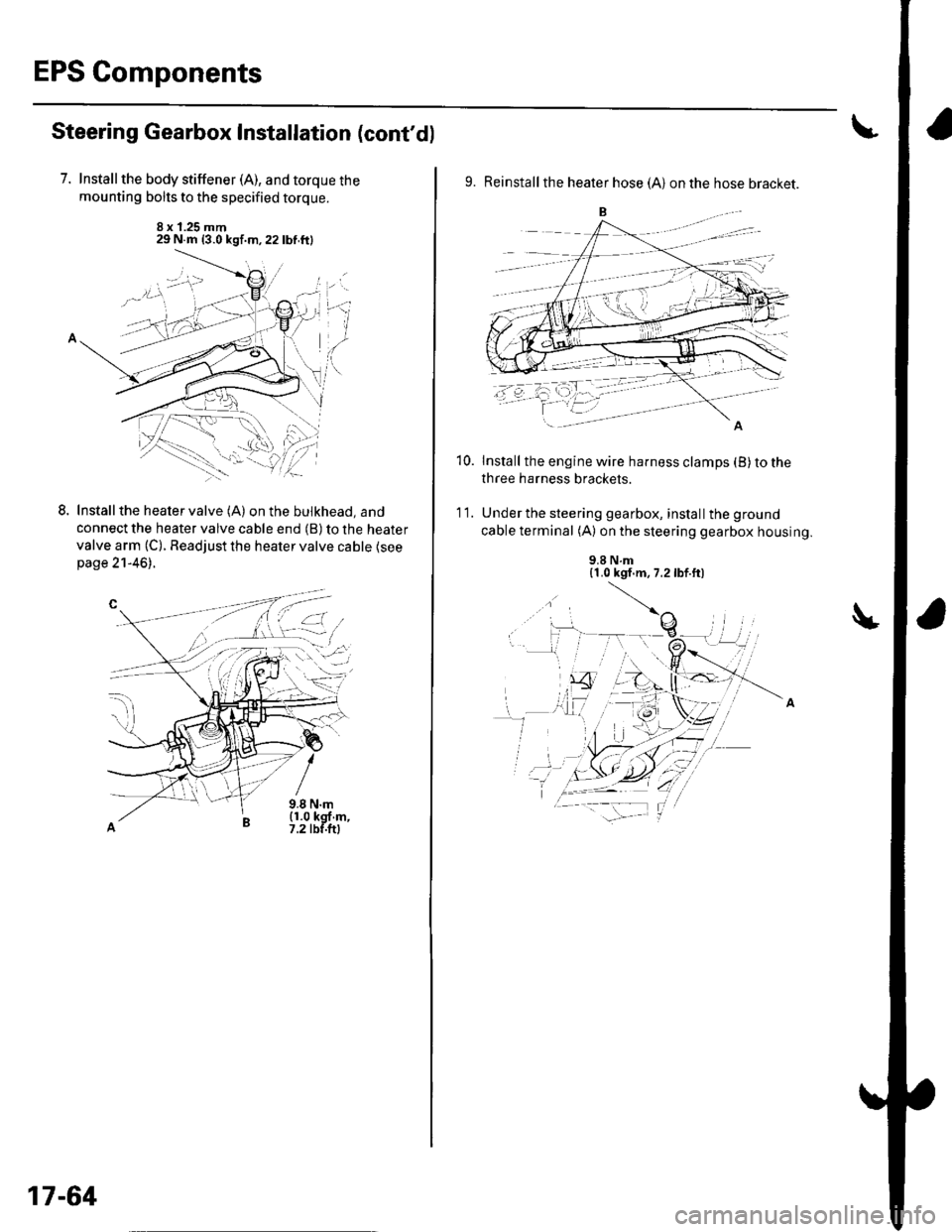
Steering Gearbox Installation (cont'd)
7. Installthe body stiffener (A), and torque the
mounting bolts to the specified torque.
8 x 1.25 mm29 N.m {3.0 kgf.m,22lbf.ftl
LInstall the heater valve (A) on the bulkhead, and
connect the heater valve cable end (B) to the heater
valve arm (C). Readjust the heater valve cable {seepage 21-46).
9.8 N.m(1.0 kgf m,7.2 tbf.ftl
L-t ,:.i.t'
17-64
9. Reinstall the heater hose (A) on the hose bracket.
Install the engine wire harness clamps (B) to the
three harness brackets.
Under the steering gearbox, install the ground
cable terminal (A) on the steering gearbox housing.
10.
'I t.
9.8 N.m{1.0 kgf.m, 7.2lbf.ft)
Page 556 of 1139
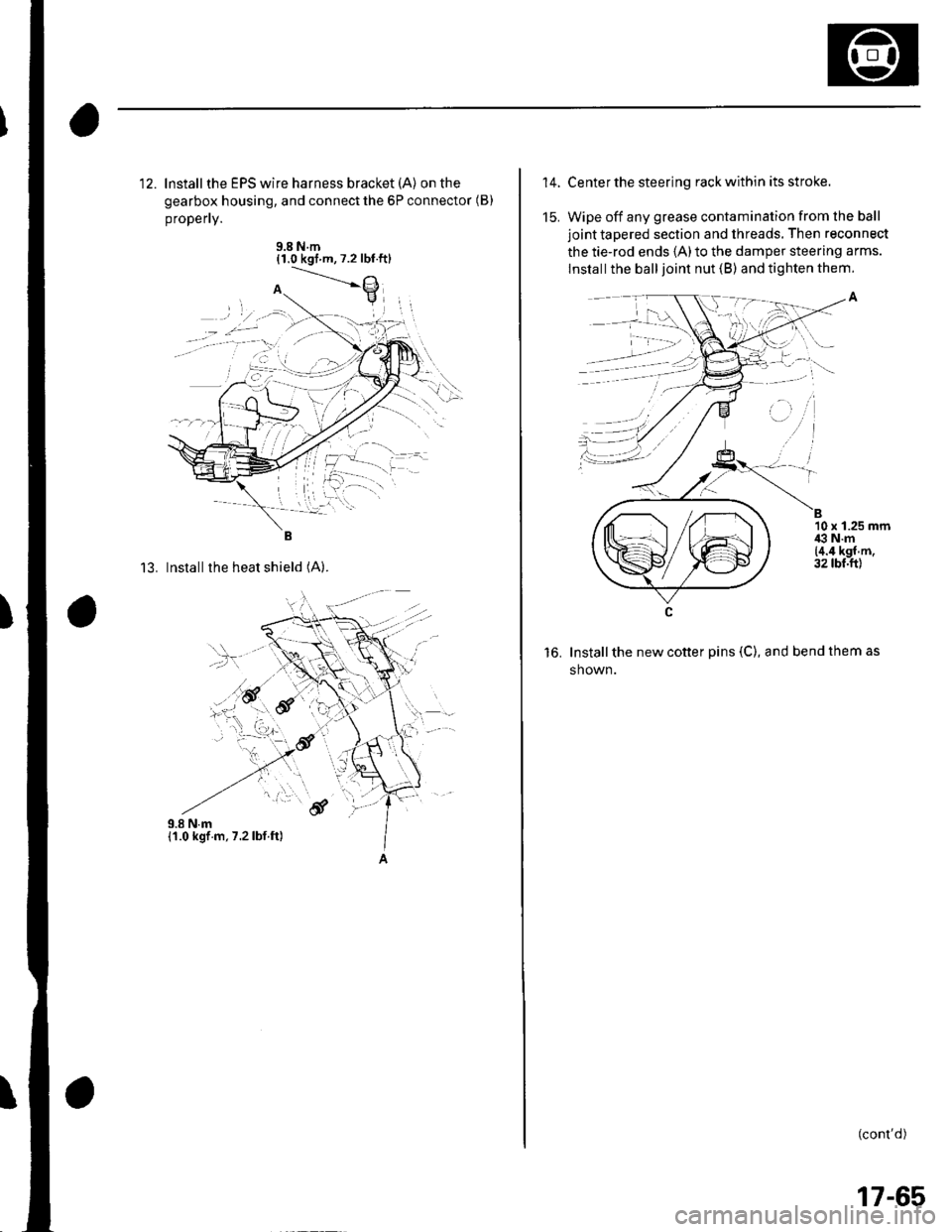
12. lnstallthe EPS wire harness bracket (A) on the
gearbox housing, and connect the 6P connector (B)
propefly.
9.8 N.m{1.0 kgt m,7.2 lbt.ftl
13. Installthe heat shield (A).
,.!,..''6f
14.
15.
Center the steering rack within its stroke.
Wipe off any grease contamination from lhe ball
joint tapered section and threads. Then reconnect
the tie-rod ends 1A)to the damper steering arms.
lnstall the ball joint nut (B) and tighten them.
Install the new cotter pins (C), and bend them as
shown.
(cont'd)
B10 x 1.25 mmi€ N.m{4.4 kgf.m.32 tbt.ftl
to.
, -', ''l
:1)
17-65
Page 579 of 1139
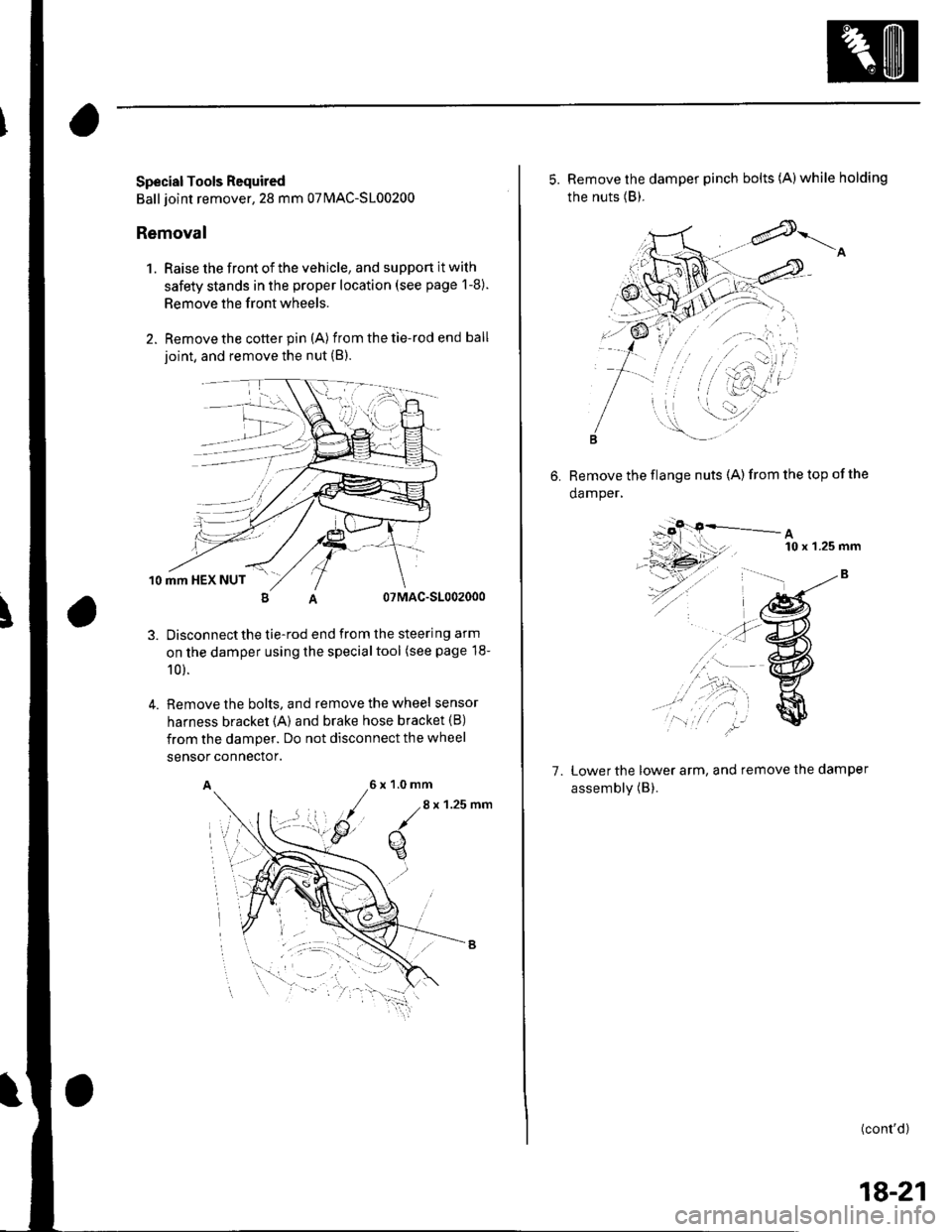
Special Tools Required
Ball joint remover,28 mm 07MAC-S100200
Removal
1. Raise the front of the vehicle, and support it with
safety stands in the proper location (see page 1-8).
Remove the front wheels.
Remove the cotter pin (A) from the tie-rod end ball
ioint, and remove the nut (B).
10 mm HEX NUT
07MAC-S1002000
Disconnectthe tie-rod end from the steering arm
on the damper using the specialtool (see page 18-
10 ).
Remove the bolts, and remove the wheel sensor
harness bracket {A) and brake hose bracket (B)
from the damper. Do not disconnect the wheel
4.
sensor connector.
A6x1.0mm
/.8
x 1.25 nm
q
5. Remove the damper pinch bolts (A)while holding
the nuts (B).
6. Remove the flange nuts (A)from the top ofthe
damper,
A10 x 'l.25 mm
7. Lower the lower arm, and remove the damper
assembly (B).
(cont'd)
18-21
Page 583 of 1139
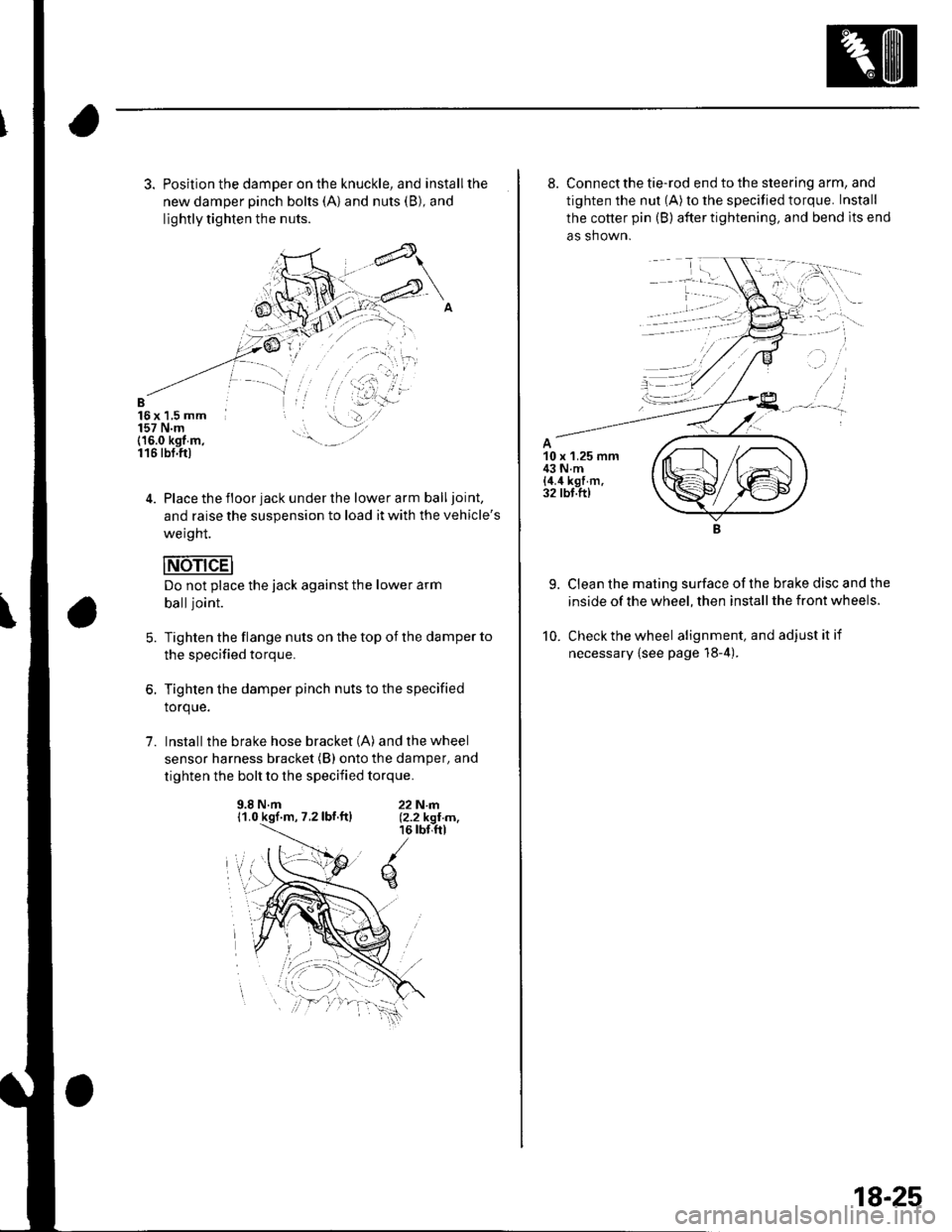
3. Position the damper on the knuckle, and installthe
new damper pinch bolts (A) and nuts (B), and
lightly tighten the nuts.
B16x 1,5 mm157 N.m(16.0 kgt m,116 tbt.ftl
4. Place the floor jack under the lower arm balljoint,
and raise the suspension to load it with the vehicle's
weight.
Do not place the jack against the lower arm
balljoint.
Tighten the flange nuts on the top of the damper to
the specified torque.
Tighten the damper pinch nuts to the specified
torque.
Install the brake hose bracket (A) and the wheel
sensor harness bracket (B) onto the damper, and
tighten the bolt to the specified torque.
5.
1.
9.8 N.m11.0 kgf.m, 7.2lbf.ftl22N|rl.12.2 kgI m,16 rbr,ftl
q
8. Connect the tie-rod end to the steering arm, and
tighten the nut (A) to the specified torque. Install
the cotter pin (B) after tightening, and bend lts end
as shown.
9. Clean the mating surface ofthe brake disc and the
inside of the wheel, then install the front wheels.
10. Check the wheel alignment, and adjustitif
necessary {see page 18-4).
18-25
Page 590 of 1139
Rear Suspension
Upper Arm Removal/lnstallation
1.Raise the rear of the vehicle, and support lt with
safety stands in the proper location (see page 1-8).
Remove the rear wheels.
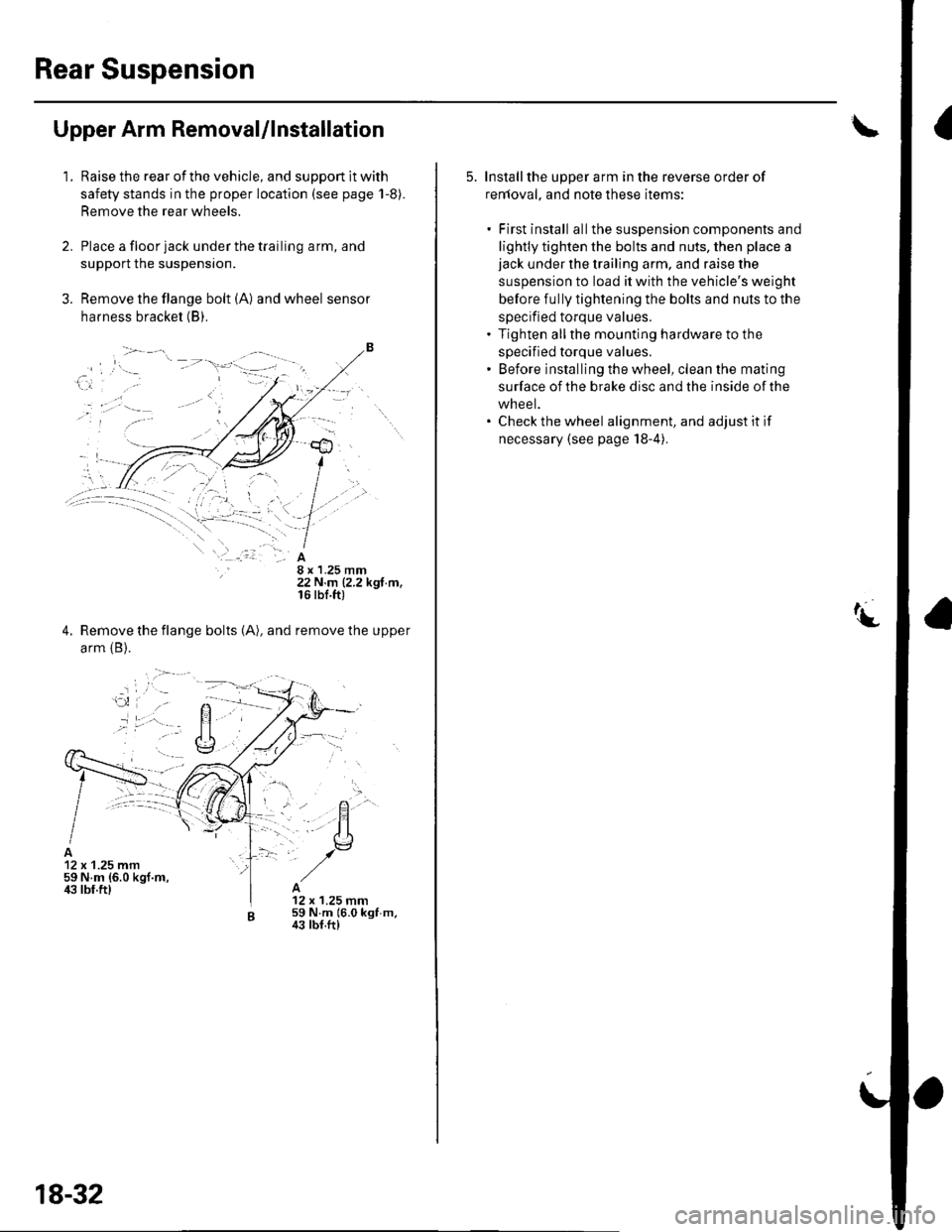
Place a floor jack under the trailing arm, and
support the suspensron.
Remove the flange bolt (A) and wheel sensor
harness bracket (B).
8 x 1.25 mm22 N.m (2.2 kgf.m,16 rbf.ft)
Remove the flange bolts (A), and remove the upper
arm {B).
12 x 1.25 mm59 N.m {6.0 kgf.m,ir3 lbf.ft)12 x 1.25 mm59 N.m 16.0 kgf m,43 tbf.ft)
18-32
5. Installthe upper arm in the reverse order of
renloval, and note these items:
. First install allthe suspension components and
lightly tighten the bolts and nuts, then place ajack under the trailing arm, and raise the
suspension to load it with the vehicle's weight
before fully tightening the bolts and nuts to the
specified torque values.. Tighten allthe mounting hardware to the
specified torque values.' Before installing the wheel, clean the mating
surface of the brake disc and the inside of the
wheel.. Check the wheel alignment, and adjust it if
necessary (see page 18-4).
Page 610 of 1139
Master Cylinder Replacement
NOTE: Do not spill brake fluid on the vehicle; it may
damage the paint; if brake fluid does contact the paint,
wash it off immediately with water,
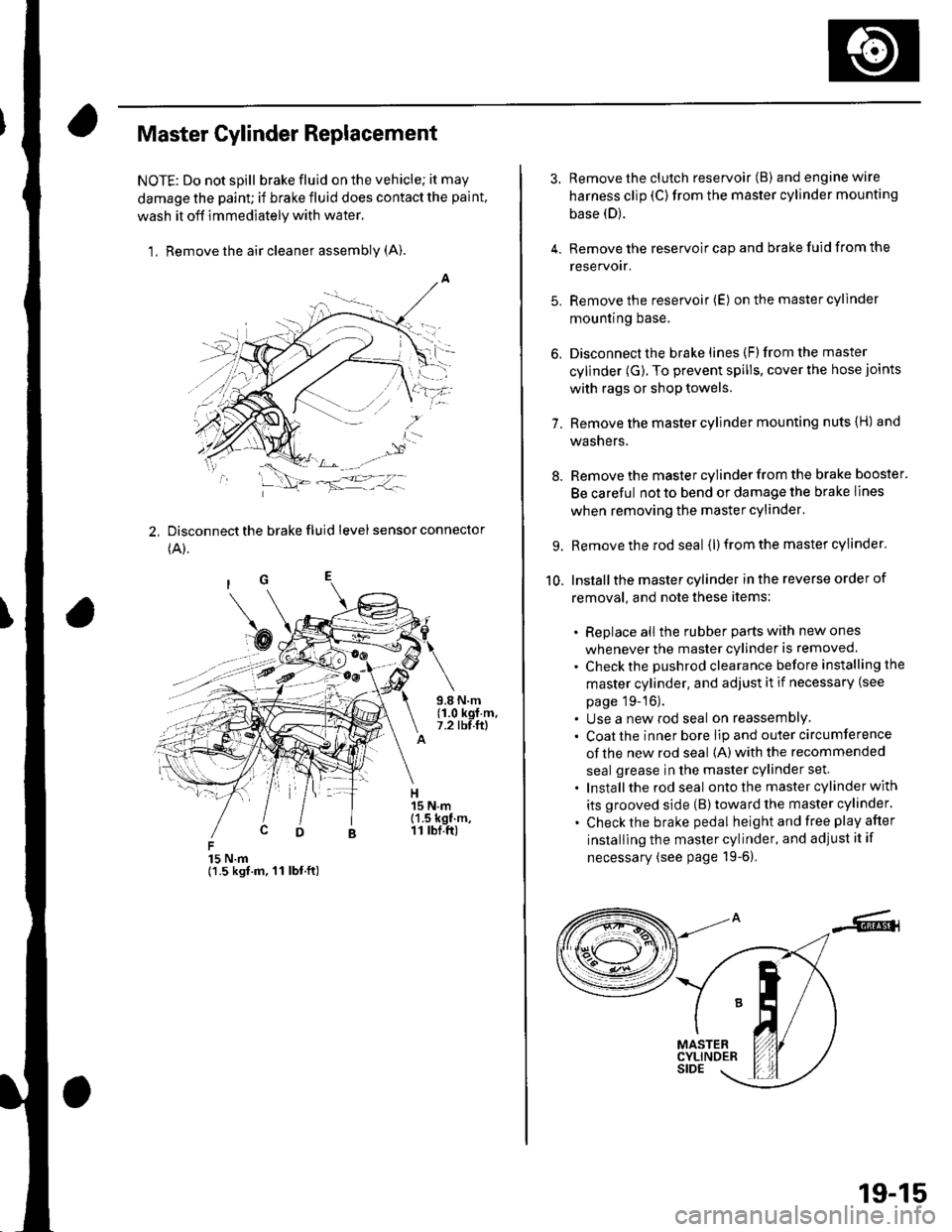
1, Remove the air cleaner assembly (A).
2, Disconnect the brake fluid level sensor connector
(A).
15 N.m{1.5 kgt.m, 11 lbt.ft)
3. Remove the clutch reservoir (B) andenginewire
harness clip (C)from the master cylinder mounting
base (D).
4. Remove the reservoir cap and brake fuid from the
reservoir.
5. Remove the reservoir (E) on the master cylinder
mountrng Dase.
6, Disconnect the brake lines (F)from the master
cylinder (G). To prevent spills, cover the hose joints
with rags or shop towels.
7. Remove the master cylinder mounting nuts {H) and
washers.
8. Remove the master cylinder from the brake booster.
Be careful not to bend or damage the brake lines
when removing the master cylinder.
9. Remove the rod seal (l) from the master cylinder.
10. Installthe master cylinder in the reverse order of
removal, and note these items:
. Replace all the rubber parts with new ones
whenever the master cylinder is removed.
. Check the pushrod clearance before installing the
master cylinder. and adjust it if necessary (see
page 19-16).. Use a new rod seal on reassemblY. Coat the inner bore lip and outer circumference
of the new rod seal {A) with the recommended
seal grease in the master cylinder set.
. Installthe rod seal ontothe master cylinder with
its grooved side (B)toward the master cylinder.
. Check the brake pedal height and free play after
installing the master cylinder, and adjust it if
necessary (see page 19-6).
19-15
Page 639 of 1139

1. Disconnect the ABS control unit 31P connector.
2. Sta rt the engine.
3. Measure the voltage between")
\
DTC Troubleshooting
DTC 11, 13, 15, 17: Wheel Sensor
(Open/Short to Body Ground/Short to Power)
1. Disconnect the ABS control unit 31P connector.
2. Sta rt the engine.
3. Measure the voltage between the appropriate
wheel sensor (*)circuitterminal of theABS
control unit 31P connector and body ground (see
table).
DTCADpropriate Terminal
11 (Rioht-front)No.5: FRS (t)
13 (Left-front)No, 7: FLS (*)
15 {Riqht-rear}No. 2: RRS (*)
17 (Left-rear)No.9 RtS (f )
ABS CONTROL UNIT 31P CONNECTOR
FRS {+IIGNR/BLK} FLS I+I (BLU
RRS {+)(GNR/YEL)
Wire side of female terminals
ls thete battery voltage?
YES Repair short to power in the (+) circuit wire
between the ABS modulator-control unit and the
appropriate wheel sensor. I
NO Go to step 4.
4. Turn the ignition switch OFF.
5. Check for continuity between the appropriate
wheel sensor (+ ) circuit terminal and body ground
{see table).
DTCAppropriate Terminal
11 (Riqht-front)No. 5: FRS (+)
13 (Left-front)No. 7: FLS (*)
15 (Rioht-rear)No.2: RRS (*)
17 (Left-rear)No.9 RLS (+l
ABS CONTROL UNIT 31P CONNECTOR
Wire side
ls there continuity?
YES Go to step 6.
NO-Go to step 7.
Disconnect the harness 2P connector from the
appropriate wheel sensor, then check for continuity
between the 1+)and ( )terminals ofthe harness
and body ground.
ls there continuity?
YES-Repair shortto body ground in the (+)or { )
circuit wire between the ABS modulator-control
unit and the wheel sensor.l
NO Repiace the wheel sensor.l
(cont'd)
Wire side of female terminals
19-45
Page 640 of 1139
ABS Components
DTC Troubleshooting (cont'dl
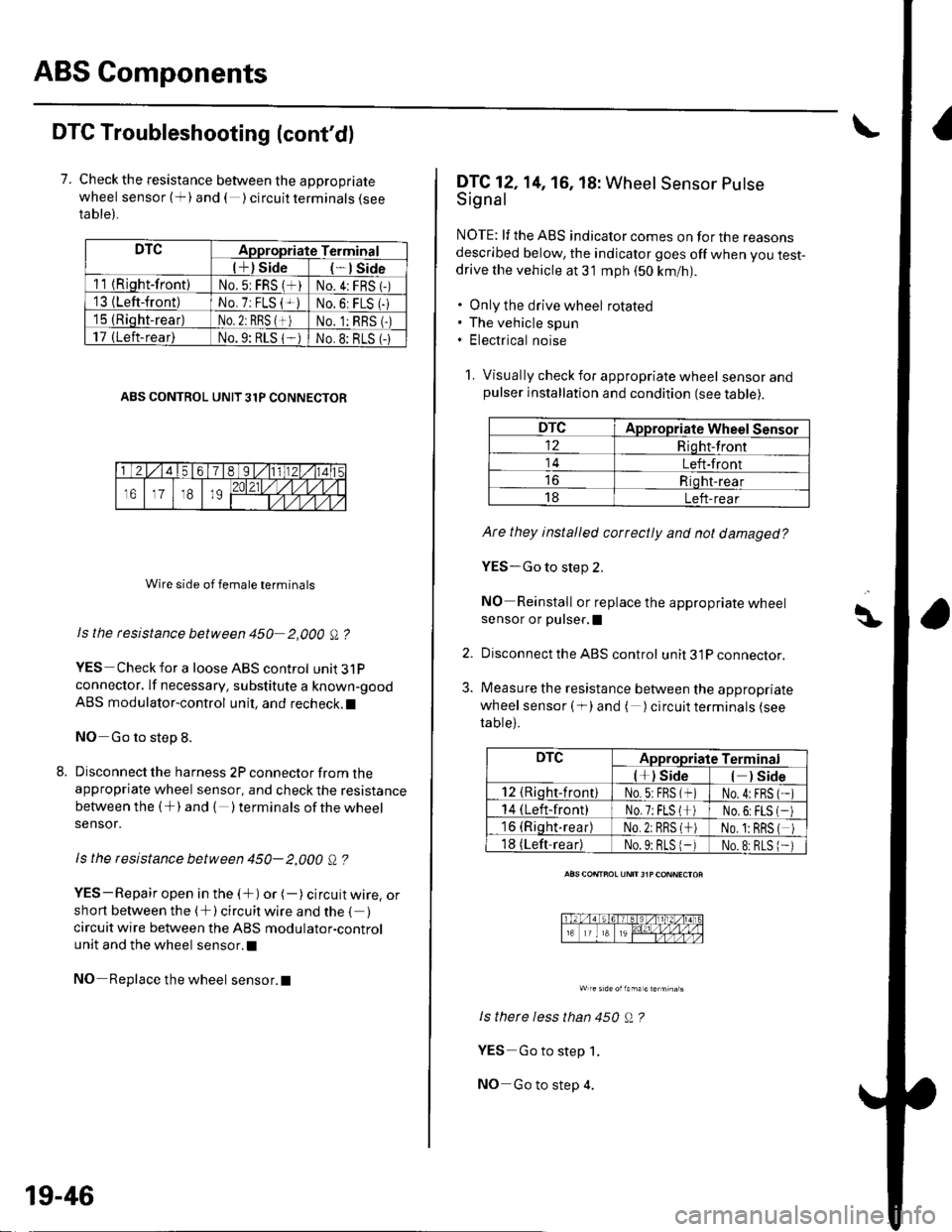
7. Check the resistance between the appropriate
wheel sensor (+) and ( ) circuit terminals {seeta ble).
DTCAppropriate Terminal
l+) Side*lSide
11 {Riqht-front)No.5: FRS (*)No.4:FRS 1-)'13 {Left-front)No. 7: FLS {+iNo.6: FLS (-
15 (Rioht-rear)No. 2: RBS {+)No. 1:RBS (-)
17 (Left-rear)No.9: RLS 1-No.8: BLS (-
ABS CONTROL UNIT 31P CONNECTOR
Wire side of female terminals
Is the rcsistance between 450 2,000 A ?
YES Check for a loose ABS control unit3lP
connector. lf necessary. substitute a known-good
ABS modulator-control unit, and recheck.l
NO Go to step 8.
Disconnect the harness 2P connector from theappropriate wheel sensor, and check the resistance
between the (+) and { )terminalsof thewheel
sensor.
ls the resistance between 450- 2,000 Q ?
YES-Repair open in the (+) or (-) circuit wire, orshort between the (+) circuit wire and the { )circuit wire between the ABS modulator-control
unit and the wheel sensor.l
NO Replace the wheel sensor.l
19-46
DTC12,14, 16, 18: Wheel Sensor Putse
Signal
NOTE: lf the ABS indicator comes on for the reasonsdescribed below, the indicator goes off when you test-drive the vehicle at 31 mph (50 km/nl.
. Only the drive wheel rotated. The vehicle spun. Electrical noise
1. Visually check for appropriate wheel sensorandpulser installation and condition (see table).
DTCAppropriate Wheel Sensor
12Riqht-front
14Left-front
Riqht-rear
18Left-rear
Ate they installed correctly and not damaged?
YES-Go to step 2,
NO Reinstall or replace the appropriate wheelsensor or pulser,I
Disconnect the ABS control unit 31P connector.
Measure the resistance between the appropriate
wheel sensor ( f) and ( ) circuit terminals (see
table).
ls therc less than 450 Q ?
YES Go to step 1.
NO-Go to step 4.
\\|D
2.
3.
DTCAppropriate Terminal
l*) Side) Side
12 {Rioht-front)No.5:FBS (*No.4:FBS
14 (Left-front)No.7;FLS l*No,6:FLS
16 (Riqht.rear)No.2: RRS (*No. 1:BRS
18 (Left-readNo.9: BLS 1-No.8:RLS
Page 641 of 1139
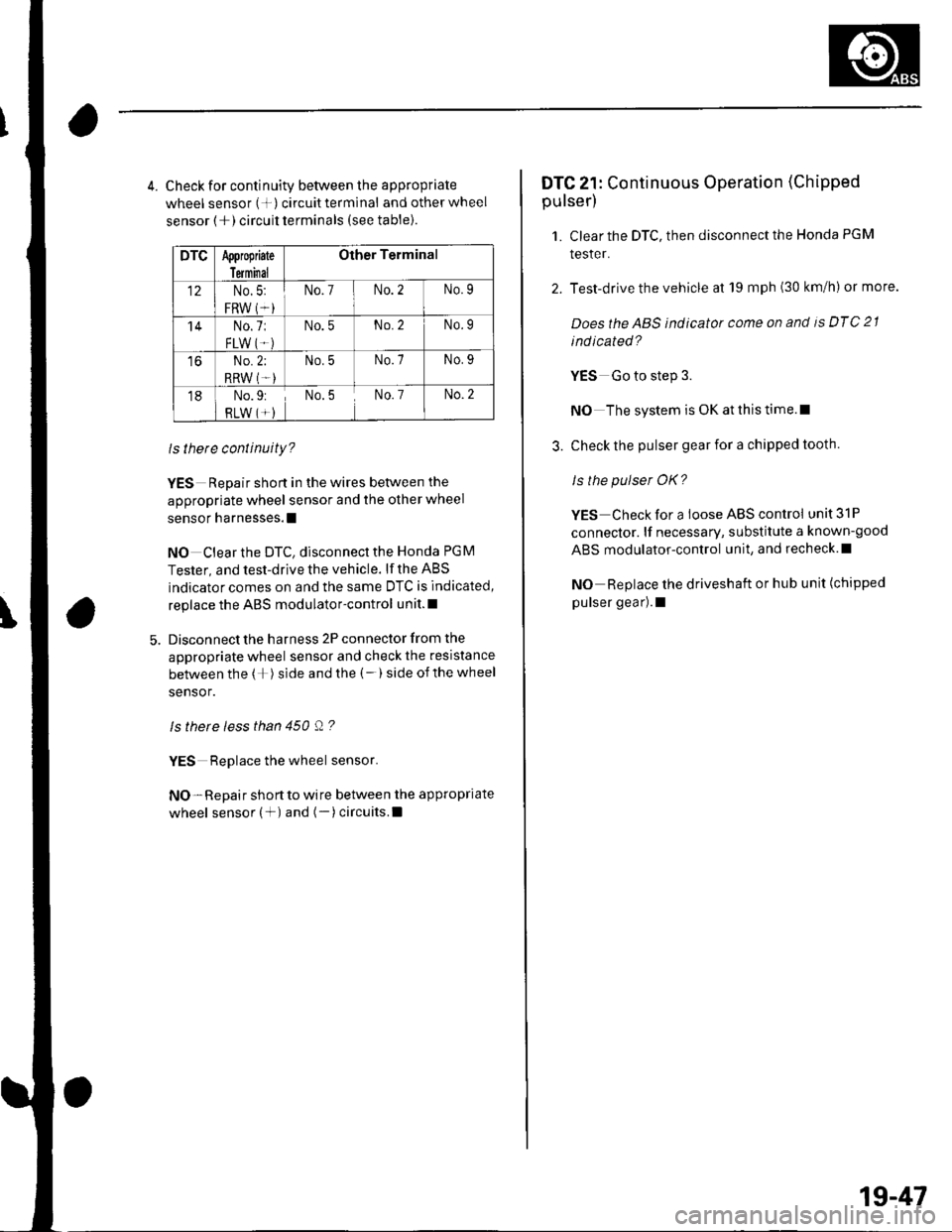
4. Check for continuity between the appropriate
wheel sensor (+) circuittermlnal and otherwheel
sensor (+) circuit terminals (see table).
DTCAppropiate
Terminal
Other Terminal
12No.5:
FRW (*i
No.7No.2No.9
'14No.7:
FLW IT.)
No.5No.2No.9
toNo.2;
RRW (T-)
No.5No.7No.9
18No.9:
RLW (*)No.5No. 7No.2
ls there continuity?
YES Repair short in the wires between the
appropriate wheel sensor and the other wheel
sensor harnesses.l
NO Clear the DTC, disconnect the Honda PGM
Tester, and test-drive the vehicle. lf the ABS
indicator comes on and the same DTC is indicated,
replace the ABS modulator-control unit.l
Disconnect the harness 2P connector from the
appropriate wheel sensor and check the resistance
between the (+) side and the (-) side ofthe wheel
sensor.
ls there less than 450 Q ?
YES Replace the wheel sensor.
NO- Repair short to wire between the appropriate
wheel sensor (+) and (-)circuits.l
DTC 21: Continuous Operation (Chipped
pulser)
1. Clear the DTC, then disconnect the Honda PGM
tesler.
2. Test-drive the vehicle at 19 mph (30 km/h) or more.
Doesthe ABS indicator come on and is DTC 21
ind icated?
YES Go to step 3.
NO The system is OK at this time.l
3. Check the pulser gear for a chipped tooth.
ls the pulser OK?
YES Check for a loose ABS control unit 31P
connector. lf necessary, substitute a known-good
ABS modulator-control unit, and recheck.l
NO Replace the driveshaft or hub unit (chipped
pulser gear).1
1g-47