Harness HONDA CIVIC 2003 7.G Service Manual
[x] Cancel search | Manufacturer: HONDA, Model Year: 2003, Model line: CIVIC, Model: HONDA CIVIC 2003 7.GPages: 1139, PDF Size: 28.19 MB
Page 659 of 1139
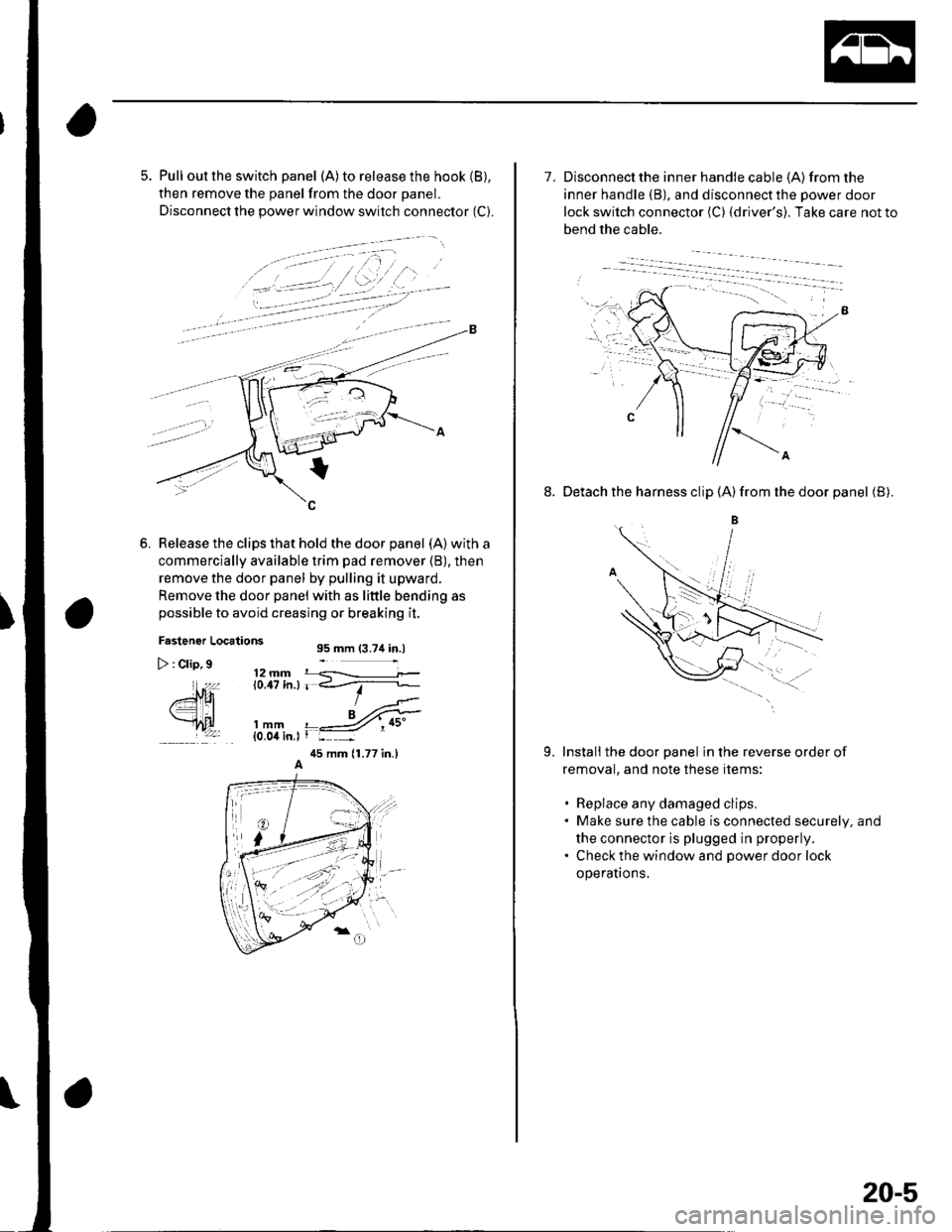
5. Pull out the switch panel (A)to release the hook (B),
then remove the panel from the door panel.
Disconnect the power window switch connector (C).
Release the clips that hold the door panel (A) with a
commercially available trim pad remover (B), then
remove the door panel by pulling it upward.
Remove the door panel with as little bending as
possible to avoid creasing or breaking it,
Fastener Locations95 mm (3.74 in.l
12 mm r q----------i.0.17 in.l r <_--'r-
> : Clip,9
ffi
EtAlmm{0.04 in.l
45 mm {1.77 in.l
7. Disconnect the inner handle cable {A) from the
inner handle (B), and disconnectthe power door
lock switch connector (C) {driver's). Take care not to
bend the cable.
8. Detach the harness clip (A)from the door panel (B).
B
Install the door panel in the reverse order of
removal, and note these items:
. Replace any damaged clips.. Make sure the cable is connected securely, and
the connector is plugged in properly.. Check the window and power door lock
operatrons,
9.
20-5
Page 663 of 1139
Door Glass and Regulator Replacement
NOTE: Put on gloves to protect your hands.
1. Remove these items:
. Door panel (see page 20-4). Plastic cover. as necessary (see page 20-2)
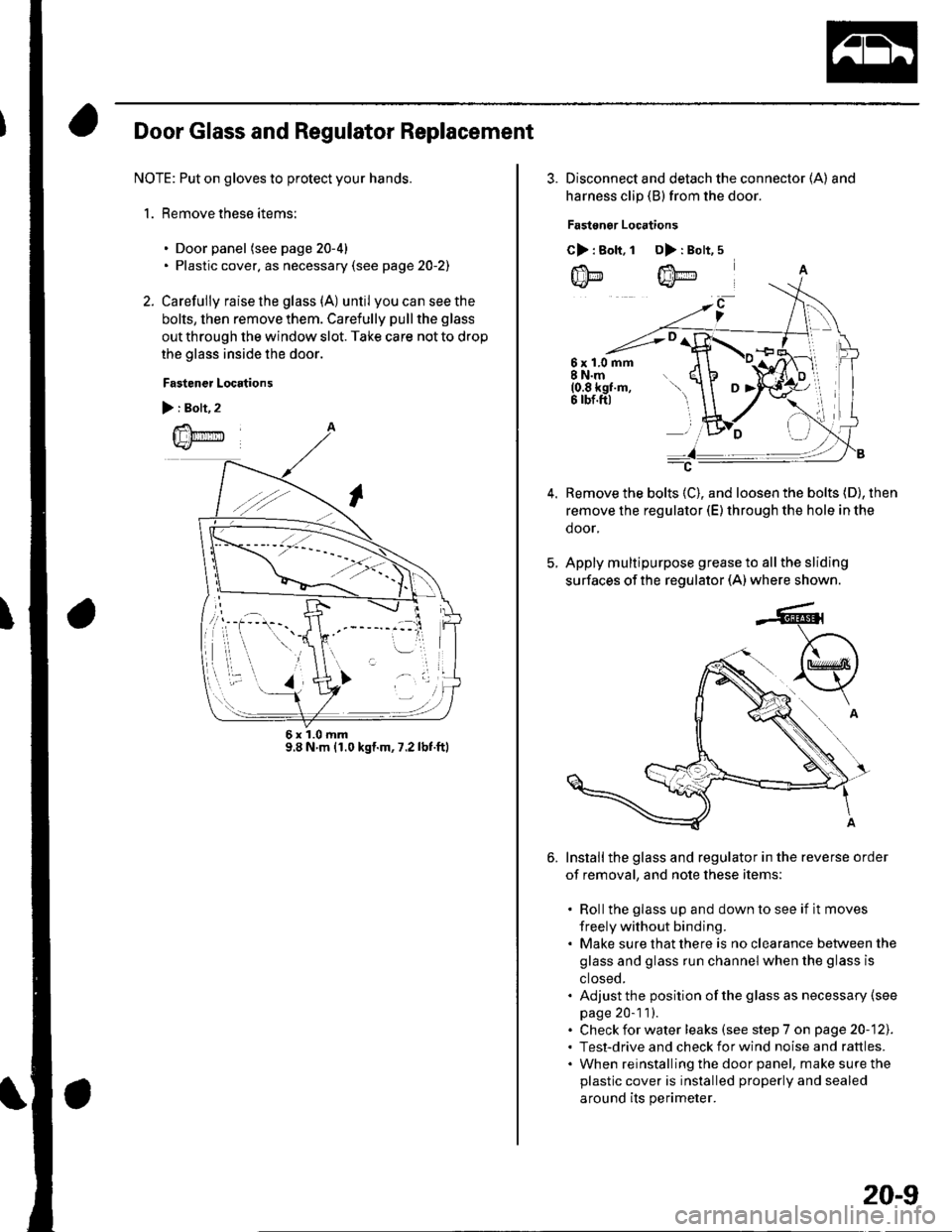
2. Carefully raise the glass (A) until youcanseethe
bolts, then remove them. Carefully pull the glass
out through the window slot. Take care not to drop
the glass inside the door.
Fastener Locations
):Boh,2
@
6x1.0mm9.8 N m {1.0 kgl.m, 7.2 lbf.ftl
3. Disconnect and detach the connector (A) and
harness clip (B) from the door.
Fastonor Locations
C>: Bolt.1 D>: Bolt,5
6x1.0mm8 N.m(0.8 kgf.m,6 rbf.ftl
Remove the bolts (C), and loosen the bolts (D), then
remove the regulator (E) through the hole in the
door,
Apply multipurpose grease to all the sliding
surfaces of the regulator (A) where shown.
Installthe glass and regulator in the reverse order
of removal, and note these items:
. Rollthe glass up and down to see if it moves
freely without binding.. Make sure that there is no clearance between the
glass and glass run channel when the glass is
ctoseo.. Adjust the position of the glass as necessary (see
page 20-1 1).. Check for water leaks (see step 7 on page 20-121.. Test-drive and check for wind noise and rattles.. When reinstalling the door panel, make sure the
plastic cover is installed properly and sealed
around its perimeter.
20-9
Page 669 of 1139
Power Mirror Replacement
1.
2.
5.
Lower the door glass fully.
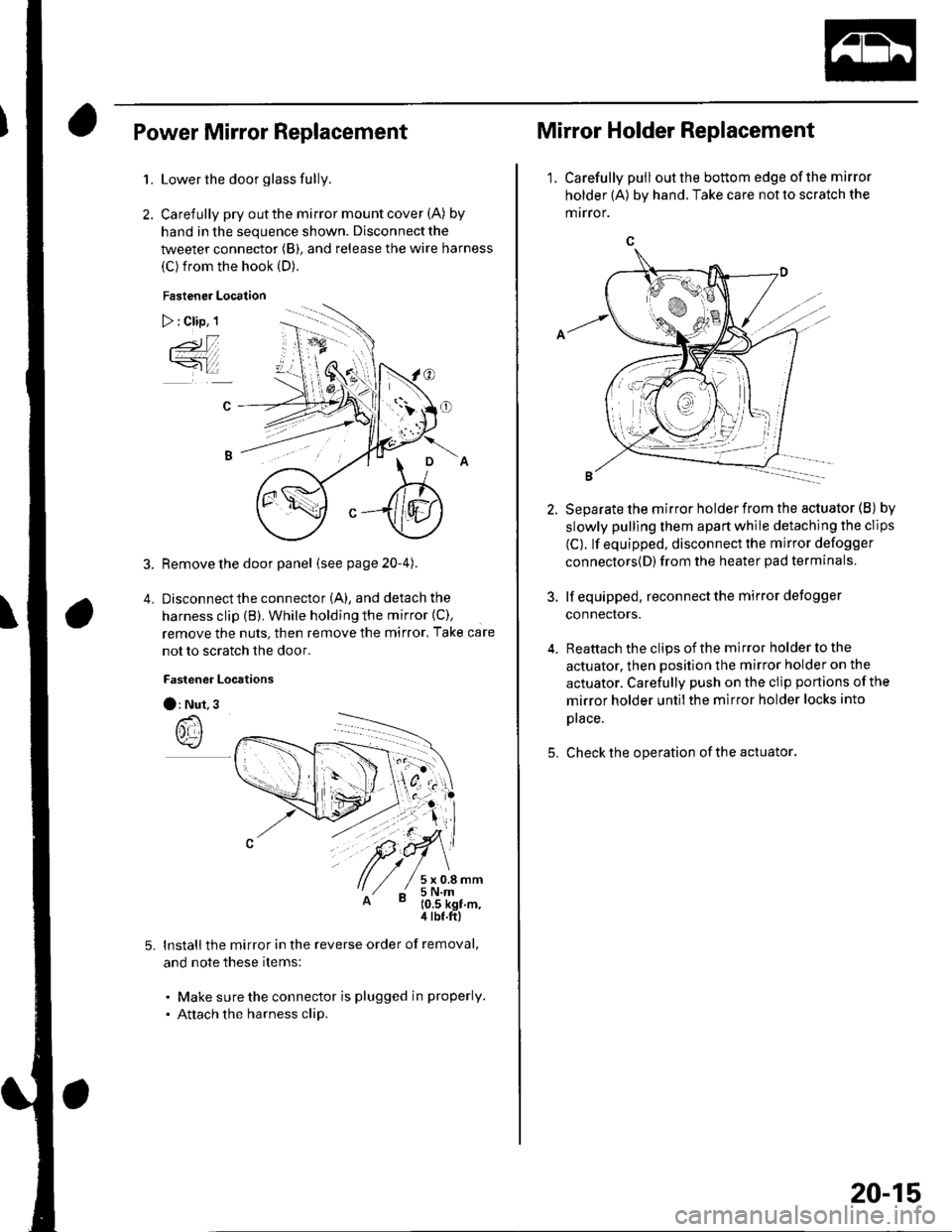
Carefully pry out the mirror mount cover (A) by
hand in the sequence shown. Disconnect the
tweeter connector (B), and release the wire harness
(C) from the hook (D).
Fastener Location
) : Clip, 1
3. Remove the door panel (seepage20-4).
4. Disconnectthe connector (A), and detach the
harness clip (B). While holding the mirror {C),
remove the nuts, then remove the mirror. Take care
not to scratch the door.
Fastener Locrtions
O: Nut.3
lnstall the mirror in the reverse order of removal,
and note these items:
. Make sure the connector is plugged in properly.
. Attach the harness clip.
Mirror Holder Replacement
1. Carefully pulloutthe bottom edge ofthe mirror
holder (A) by hand. Take care not to scratch the
mrrror.
5.
Separate the mirror holder from the actuator (B) by
slowly pulling them apart while detaching the clips
(C). lf equipped, disconnect the mirror defogger
connectors{D) from the heater pad terminals.
lf equipped, reconnect the mirror defogger
connectors.
Reattach the clips of the mirror holder to the
actuator, then position the mirror holder on the
actuator. Carefully push on the clip portions of the
mirror holder untilthe mirror holder locks into
prace.
Check the operation of the actuator
20-15
Page 696 of 1139
Moonroof
1.
Frame and Drain Tube Replacement
Remove these items:
. Headliner (see page 20-54). Moonroof glass (see page 20-37)
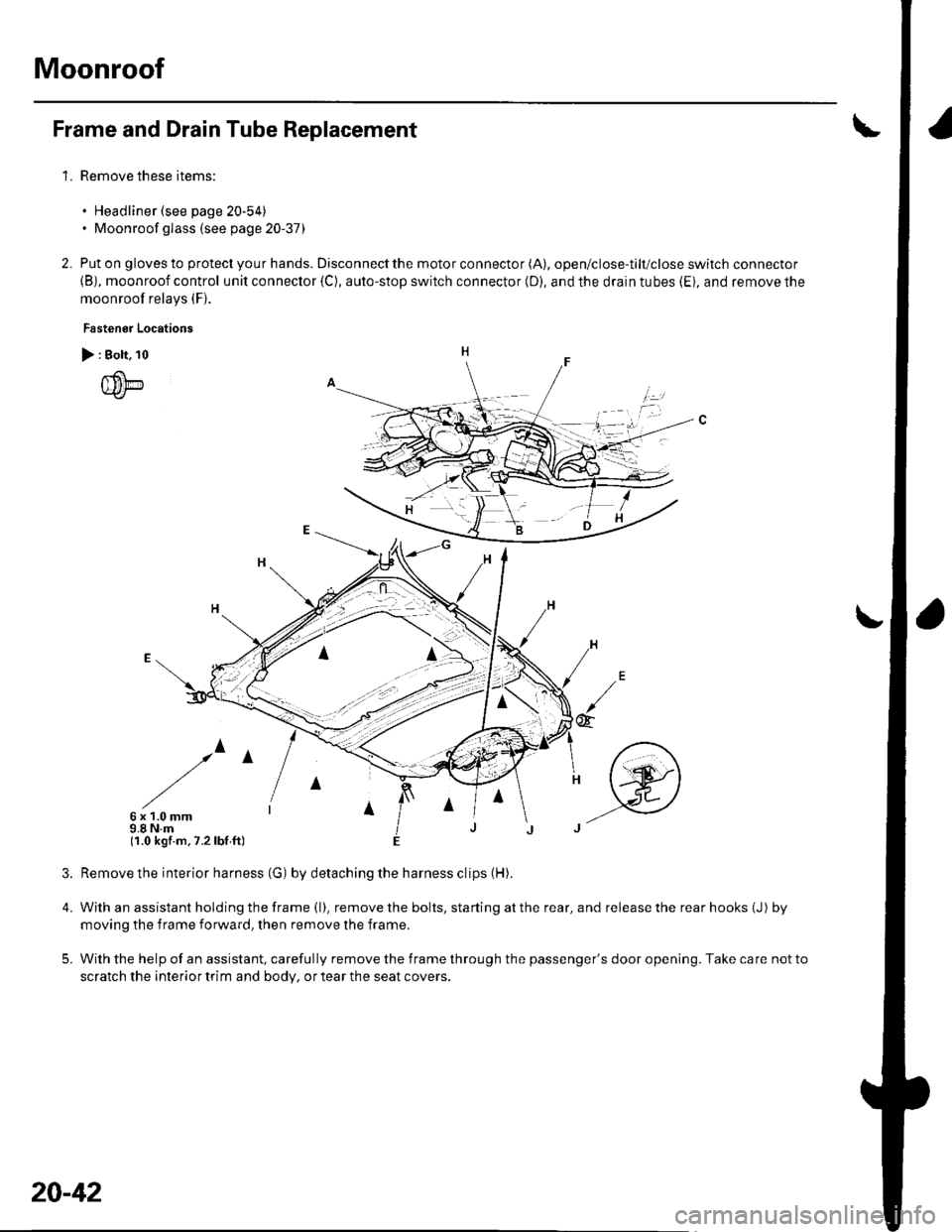
Put on gloves to protect you r hands. Disconnect the motor connector (A), open/close-tilt/close switch connector
{B), moonroof control unit connector {C), auto-stop switch connector (D), and the drain tubes (Ei, and remove the
moonroof relays (F).
Fastenor Locations
> : Bolt, 10
{um
/^
6x1.0mm9.8 N.m(1.0 kgf.m,7.2lbf ft)
4.
5.
2.
irl
@
Remove the interior harness (G) by detaching the harness clips (H).
With an assistant holding the frame (l). remove the bolts, starting at the rear, and release the rear hooks (J) by
moving the f rame forward, then remove the frame.
With the help of an assistant, carefully remove the frame through the passenger's door opening. Take care not to
scratch the interior trim and body, or tear the seat covers.
20-42
Page 710 of 1139
Interior Trim
Carpet Replacement (cont'dl
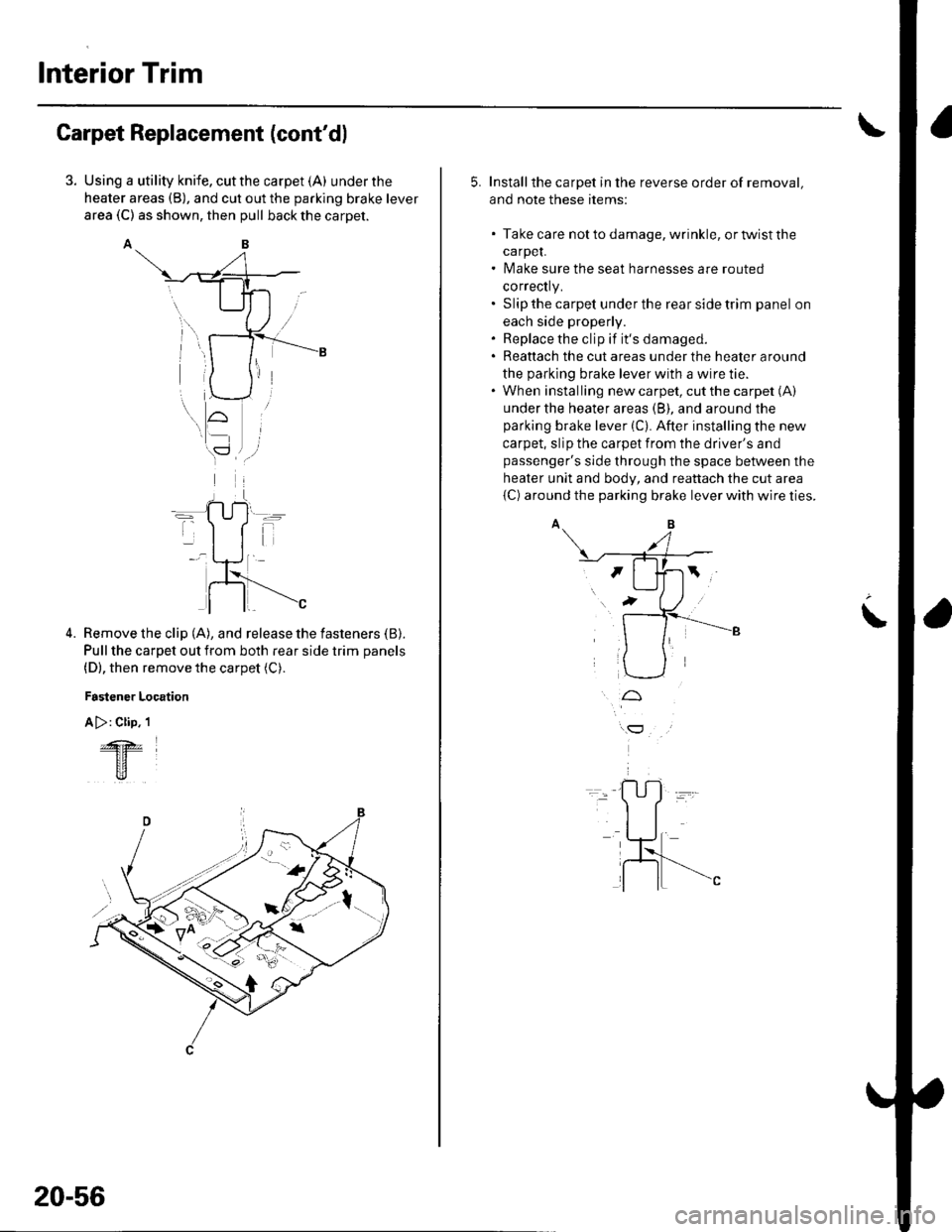
Using a utility knife, cut the carpet (A) under the
heater areas (B), and cut out the parking brake lever
area (C) as shown, then pull back the carpet.
AB
Remove the clip (A), and release the fasteners (B).
Pull the carpet out from both rear side trim panels
(D), then remove the carpet (C).
Fastener Location
A >: Clip. 1
4.
&z
tr
20-56
5. Installthe carpet in the reverse order of removal,
and note these items:
. Take care notto damage, wrinkle, ortwistthe
carpeL. Make sure the seat harnesses are routed
correctly.. Slip the carpet under the rear side trim panel on
each side properly.. Replace the clip if it's damaged.. Reattach the cut areas under the heater around
the parking brake lever with a wire tie.. When installing new carpet, cut the carpet (A)
under the heater areas (B), and around the
parking brake lever (C). After installing the new
carpet, slip the carpet from the driver's and
passenger's side through the space between the
heater unit and body, and reattach the cut area
{C) around the parking brake lever with wire ties.
t
Page 716 of 1139
Dashboard
Dashboard Center Panel Removal/lnstallation
NOTE:. Put on gloves to protect your hands.. When prying with a flat-tip screwdriver, wrap it with
protective tape, and apply protective tape around the
related parts, to prevent damage.. Take care not to scratch the dashboard and related
parts.
1. Make sure you have the anti-theft code for the radio,
the write down the frequencies for the preset
buttons.
Remove these items:
. Driver's dashboard lower cover (see page 20-59)
. Passenger's dashboard lower cover (see page
20-63).. Glove box (see page 20-63).. Shift lever trim {see page 20-61).
From the glove box and driver's dashboard Iower
cover openings, loosen the bolts (A) securing the
center panel (B).
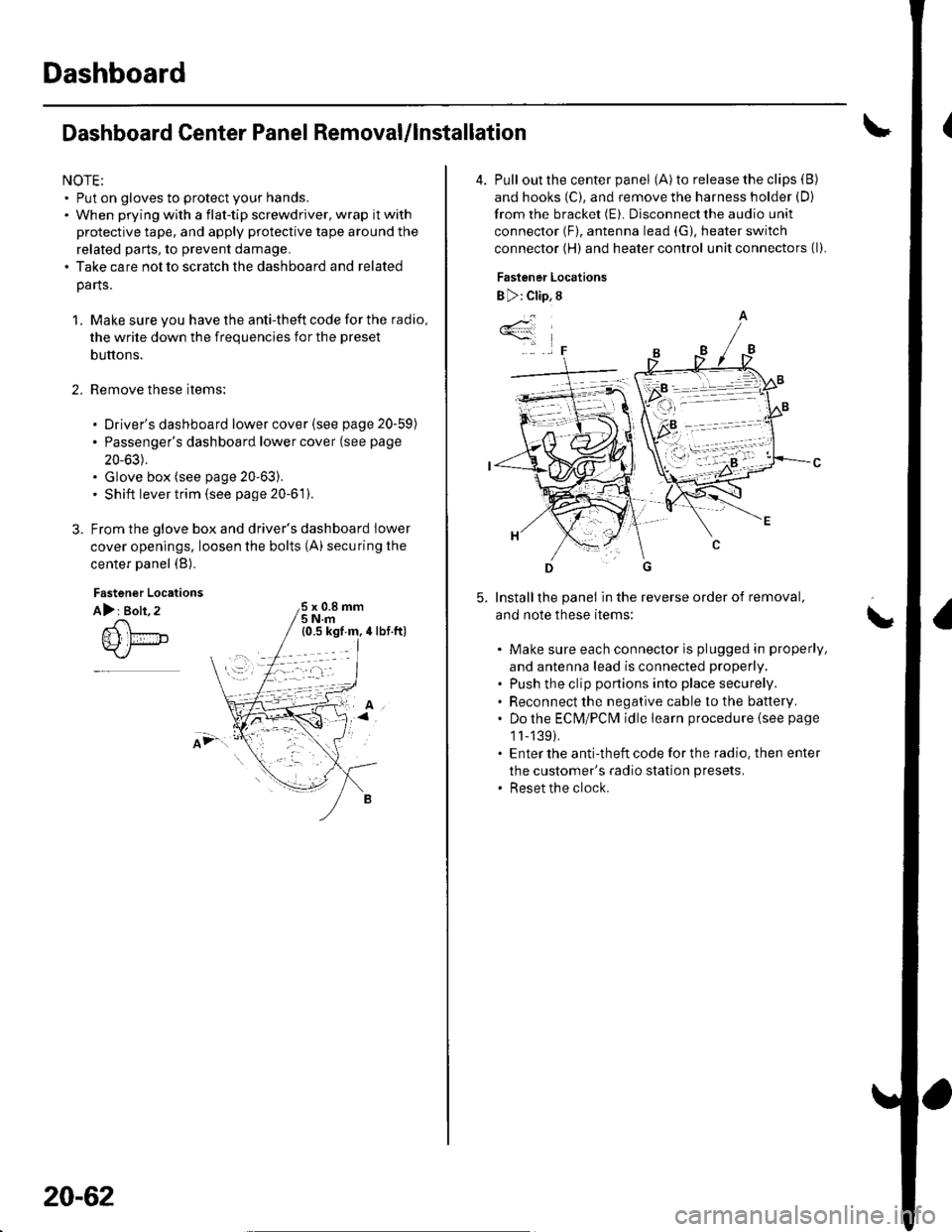
2.
Fastener Locations
A): Bolt, 2x 0.8 mm5Nm
;.'
20-62
4. Pull out the center panel (A) to release the clips (B)
and hooks (C), and remove the harness holder (D)
from the bracket (E). Disconnect the audio unit
connector (F), antenna lead (G), heater switch
connector (H) and heater control unit connectors (l).
Fastener Locations
B ): Clip, 8
Installthe panel in the reverse order of removal,
and note these items:
Make sure each connector is plugged in properly,
and antenna lead is connected properly.
Push the clip portions into place securely.
Reconnect the negative cable to the battery.
Do the ECN4/PCt\4 idle learn procedure {see page
1l-139).
Enter the anti-theft code for the radio. then enter
the customer's radio station presets.
Reset the clock.
*4
,F
\
Page 721 of 1139
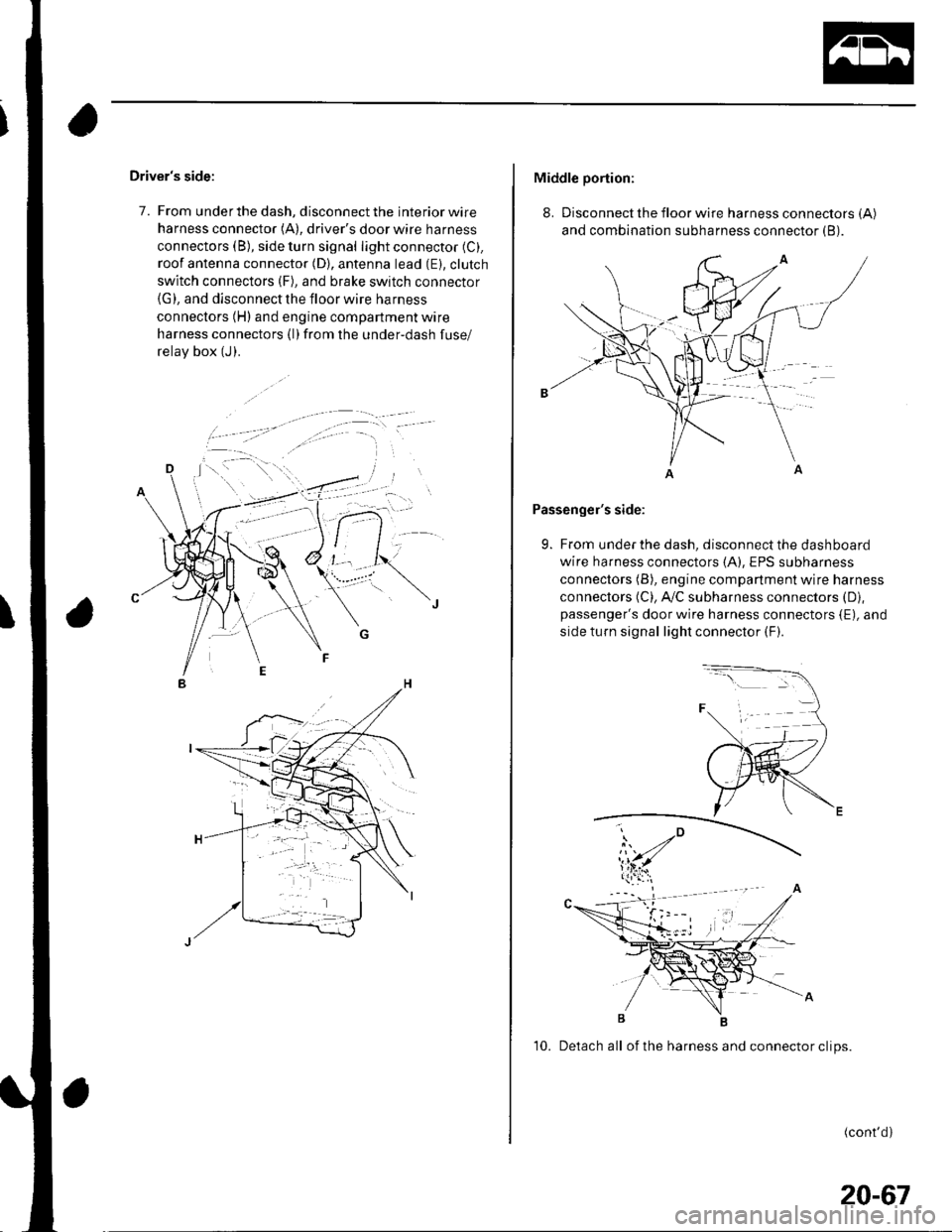
Driver's side:
7. From under the dash, disconnect the interior wire
harness connector (A), driver's door wire harness
connectors (B), side turn signal light connector (C).
roof antenna connector (D), antenna lead (E). clutch
switch connectors (F), and brake switch connector(G), and disconnect the floor wire harness
connectors (H) and engine compartment wire
harness connectors (l)from the under-dash fuse/
relav box (J).
Middle portion:
8. Disconnect the floor wire harness connectors (A)
and combination subharness connector (B).
Passenger's side:
9. From under the dash, disconnect the dashboard
wire harness connectors (A), EPS subharness
connectors (B), engine compartment wire harness
connectors (C), A,/C subharness connectors (D),
passenger's door wire harness connectors {E), and
side turn signal light connector (F).
10. Detach all of the harness and connector clips.
(cont'd)
20-67
Page 722 of 1139
Dashboard
Dashboard Removal/lnstallation
(cont'd)
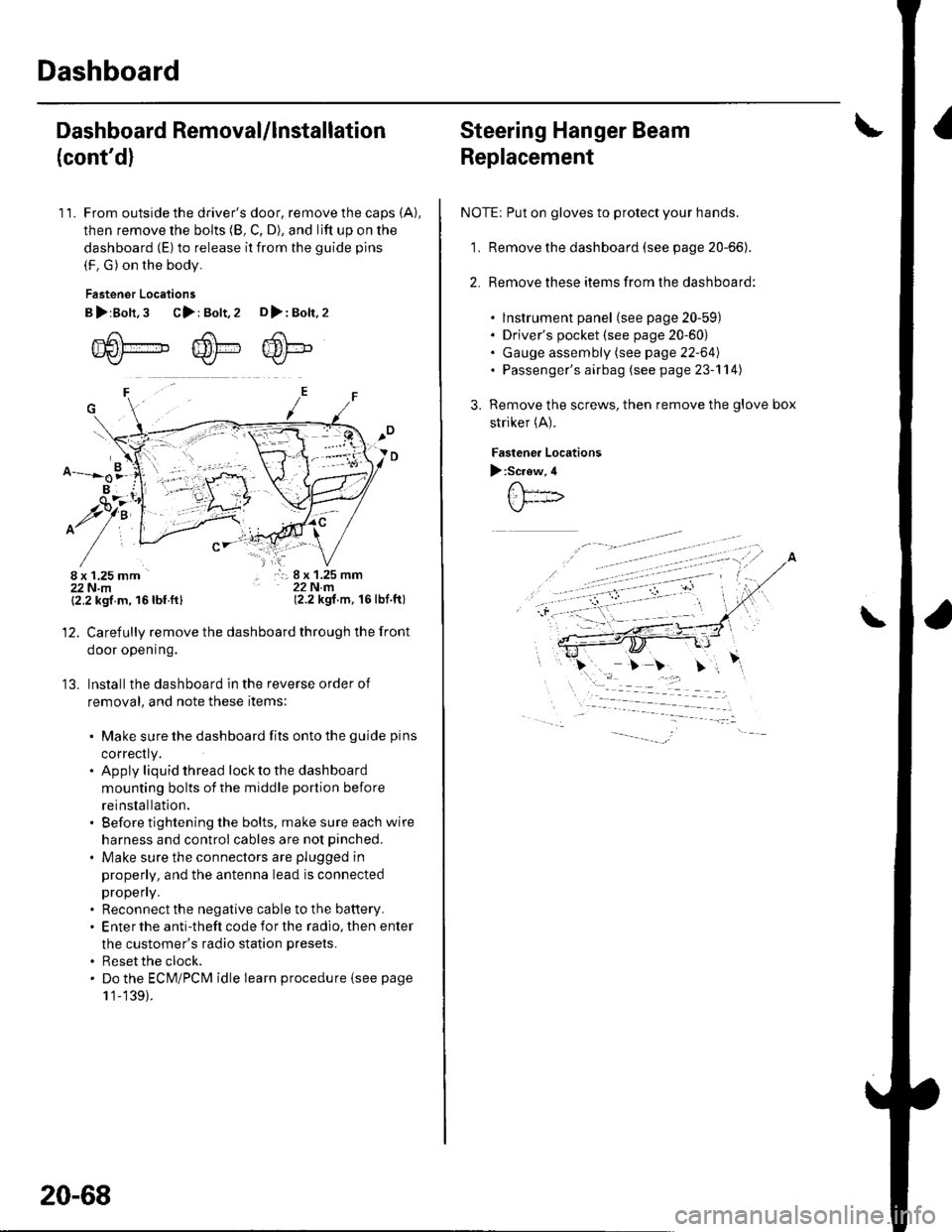
11. From outside the driver's door, remove the caps (A),
then remove the bolts (8, C, D), and lift up on the
dashboard (E) to release it from the guide pins
(F. G) on the body.
Fastener Locations
B>rBolt.3 C>: Bolt,2 D>: Bolt,2
m6[-,,,,",",,-,F6't---'' ffi'!--v{/- Kr* w-
B
$7:
^/761:
/,-,. r:; 8 x 1.25 mm22Nm(2.2 kgf.m, 16lbf.ft)
13.
{2.2 kgf m, 16lbf.ftl
Carefully remove the dashboard through the front
door opening.
lnstall the dashboard in the reverse order of
removal, and note these items:
. Make sure the dashboard fits onto the guide pins
correctly.. Apply liquid thread lock to the dashboard
mounting bolts of the middle portion before
reinstallation.. Before tightening the bolts, make sure each wire
harness and control cables are not pinched.
. Make sure the connectors are plugged in
properly, and the antenna lead is connected
propeny.. Reconnect the negative cable to the battery.. Enter the anti-theft code for the radio, then enter
the customer's radio station presets.
. Reset the clock.. Do the ECM/PCM idle learn procedure isee page
1 '1-139).
20-68
Steering Hanger Beam
Replacement
NOTE: Put on gloves to protect your hands.
1, Remove the dashboard (see page 20-66).
2. Remove these items from the dashboard:
. lnstrument panel (see page 20-59). Driver's pocket (see page 20-60). Gauge assembly (see page 22-64). Passenger's airbag (see page 23-'l 14)
Remove the screws, then remove the glove box
striker (A).
Fastenea Locations
):Screw,4
\
Page 723 of 1139
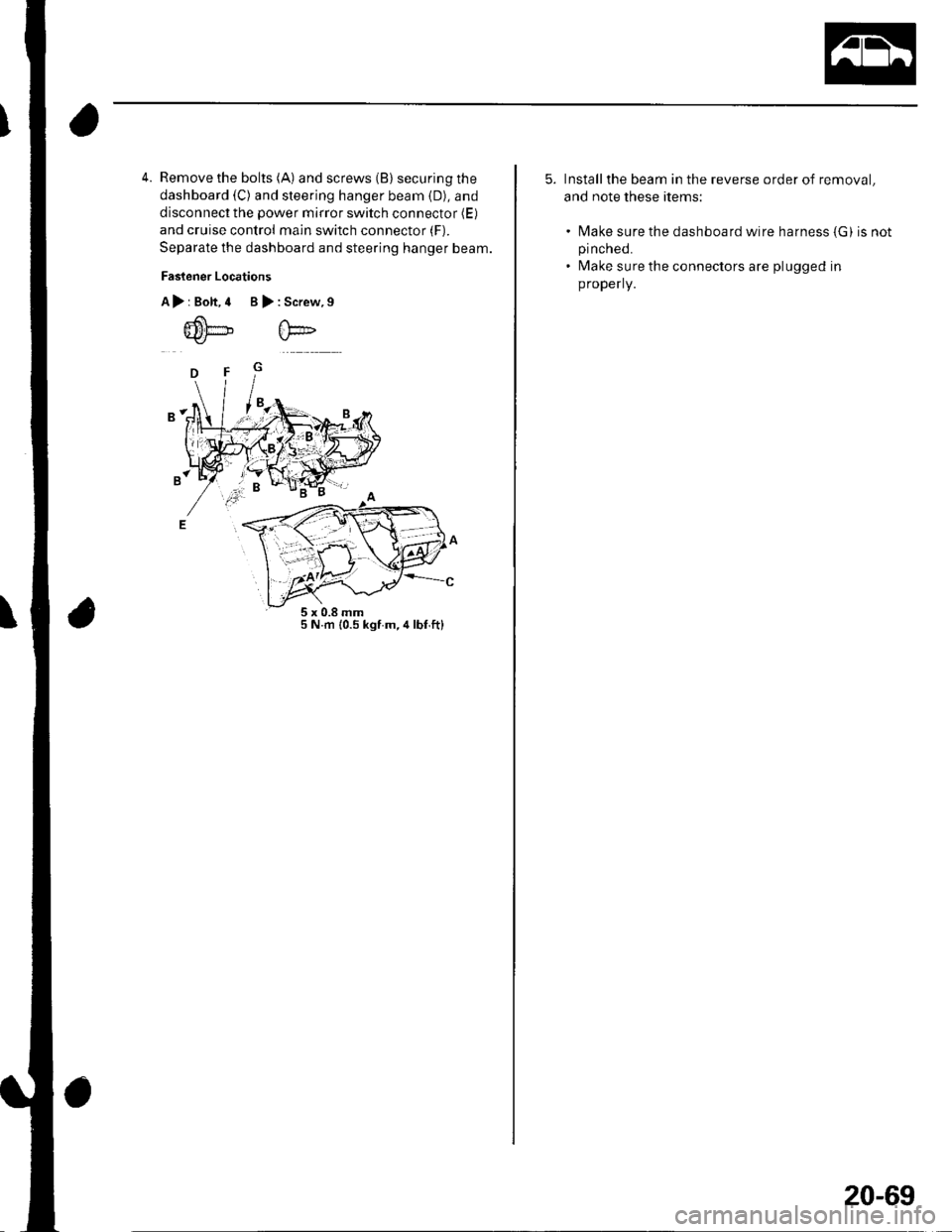
4. Remove the bolts (A) and screws (B) securing the
dashboard (C) and steering hanger beam (D), and
disconnect the power mirror switch connector (E)
and cruise control main switch connector (F).
Separate the dashboard and steering hanger beam.
Faslener Locations
A>rBolt,4 B>:Screw,9
5 N.m {0.5 kgf m,4lbf,ftl
5. Installthe beam in the reverse order of removal,
and note these items:
. N4ake sure the dashboard wire harness (G) is notpinched.
. Make sure the connectors are plugged in
properly.
20-69
Page 726 of 1139
Seats
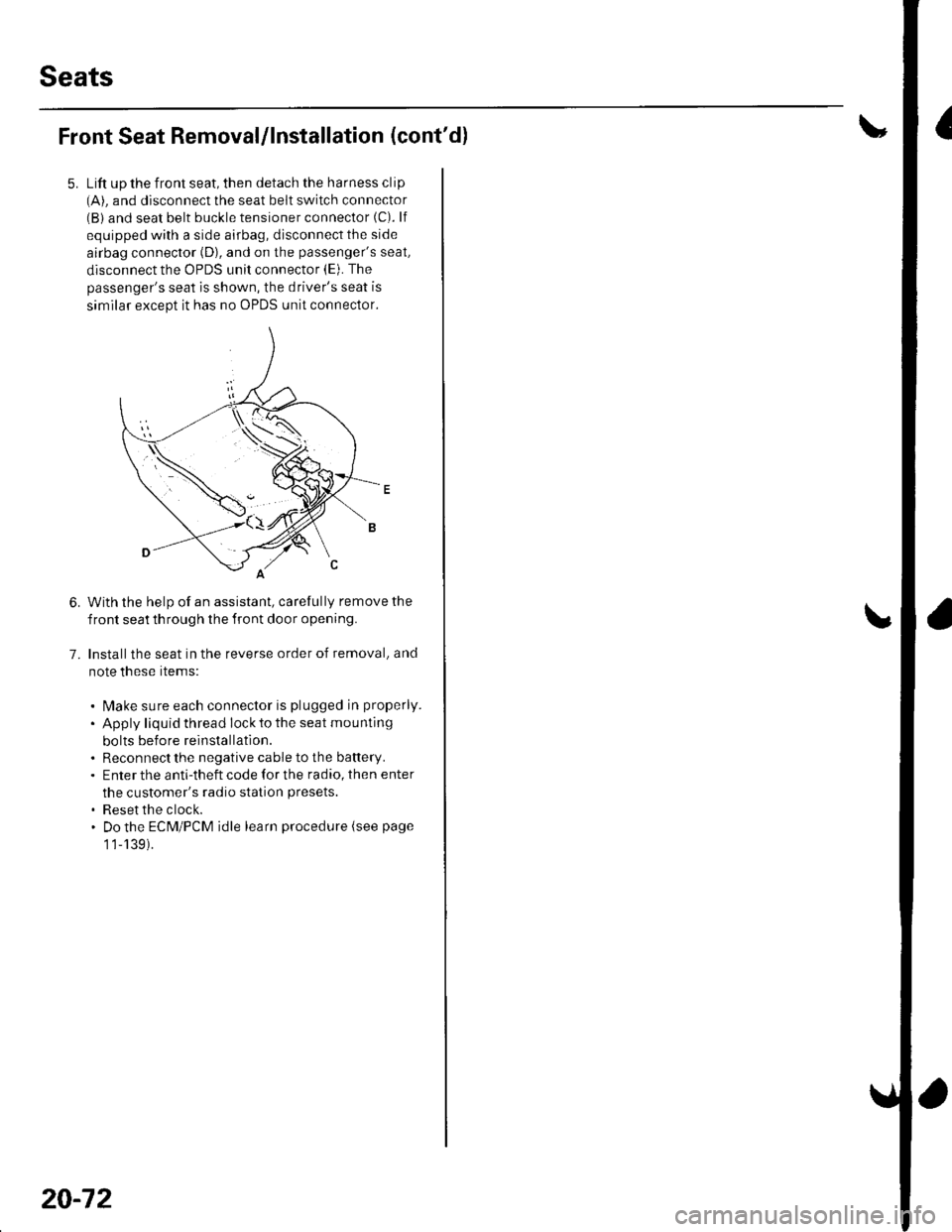
Front Seat Removal/lnstallation (cont'dl
Lift up the front seat, then detach the harness clip(A). and disconnect the seat belt switch connector(B) and seat belt buckle tensioner connector (C). lf
equipped with a side airbag, disconnect the side
airbag connector (D), and on the passenger's seat,
disconnect the OPDS unit connector (E). The
passenger's seat is shown, the driver's seat is
similar except it has no OPDS unit connector.
With the help of an assistant, carefully remove the
front seat th rough the front door opening.
Installthe seat in the reverse order of removal, and
note these rtems:
. l\4ake sure each connector is plugged in properly.
. Apply liquid thread lock to the seat mounting
bolts before reinstallatlon.. Reconnect the negative cable to the battery.. Enter the anti-theft code for the radio, then enter
the customer's radio station presets.
. Reset the clock.. Do the ECM/PCM idle learn procedure (see page
1 1-139).
6.
7.
20-72