Door HONDA CIVIC 2003 7.G Repair Manual
[x] Cancel search | Manufacturer: HONDA, Model Year: 2003, Model line: CIVIC, Model: HONDA CIVIC 2003 7.GPages: 1139, PDF Size: 28.19 MB
Page 887 of 1139
Gauges
Self-diagnostic Procedure
The gauge assembly has a self-diagnosis function.. The Beeper Drive Circuit Check. The Indicator Drive Circuit ChecL. The LCD Segments Check. The Gauges Drive Circuit Check (Speedometer, Tachometer, Fuel gauge, Coolant temperature gauge). The Communication Line Check (the coolanttemperature signal line between the gauge and ECM)
NOTE: Indicators are also controlled via the communication line.
Entering the self-diagnosis f unction:
Before doing the self-diagnosis function, check the No. 9 (10A) fuse in the under-hood fuse/relay box and No. 10 {7.5A)fuse in the under'dash fuse/relay box.
1. Push and hold the trip/reset button.
2. Turn the lighting switch ON.
3. Turn the ignition switch ON (ll).
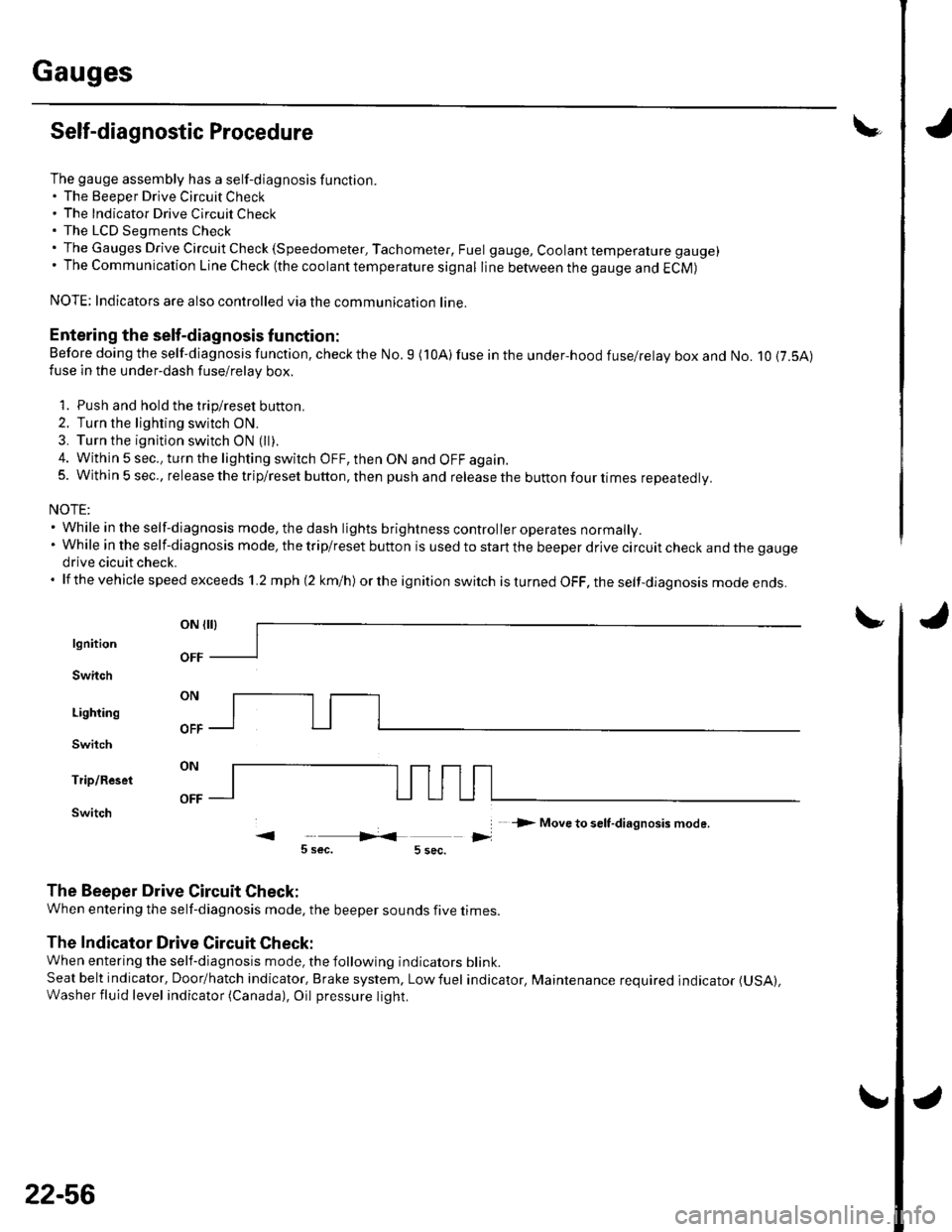
4. Within 5 sec., turn the lighting switch OFF, then ON and OFF again.5. Within 5 sec., release the trip/reset button, then push and release the button four times reDeatedlv.
NOTE:. While in the self-diagnosis mode, the dash lights brightness controller operates normally.'Whileintheself-diagnosismode,thetrip/resetbuttonisusedtostartthebeeperdrivecircuitcheckandthegauge
drive cicuit check.. lf the vehicle speed exceeds 1.2 mph 12 km/h) orthe ignition switch is tu rned OFF, the self,diag nosis mode ends.
oN flrl
lgnition
Switch
Lighting
Switch
Trip/Reset
Switch-> Move to selt-diagnosis mode.
5 sec.5 sec.
The Beeper Drive Circuit Check:
When entering the self-diagnosis mode, the beeper sounds five times
The Indicator Drive Circuit Check:
When entering the self-diagnosis mode, the following indicators blink.
Seat belt indicator, Door/hatch indicator, Brake system, Lowfuel indicator, Maintenance required indicator (USA),
Washer fluid level indicator (Canada), Oil pressure light.
v
OFF
22-56
Page 920 of 1139
Entry Light Control System
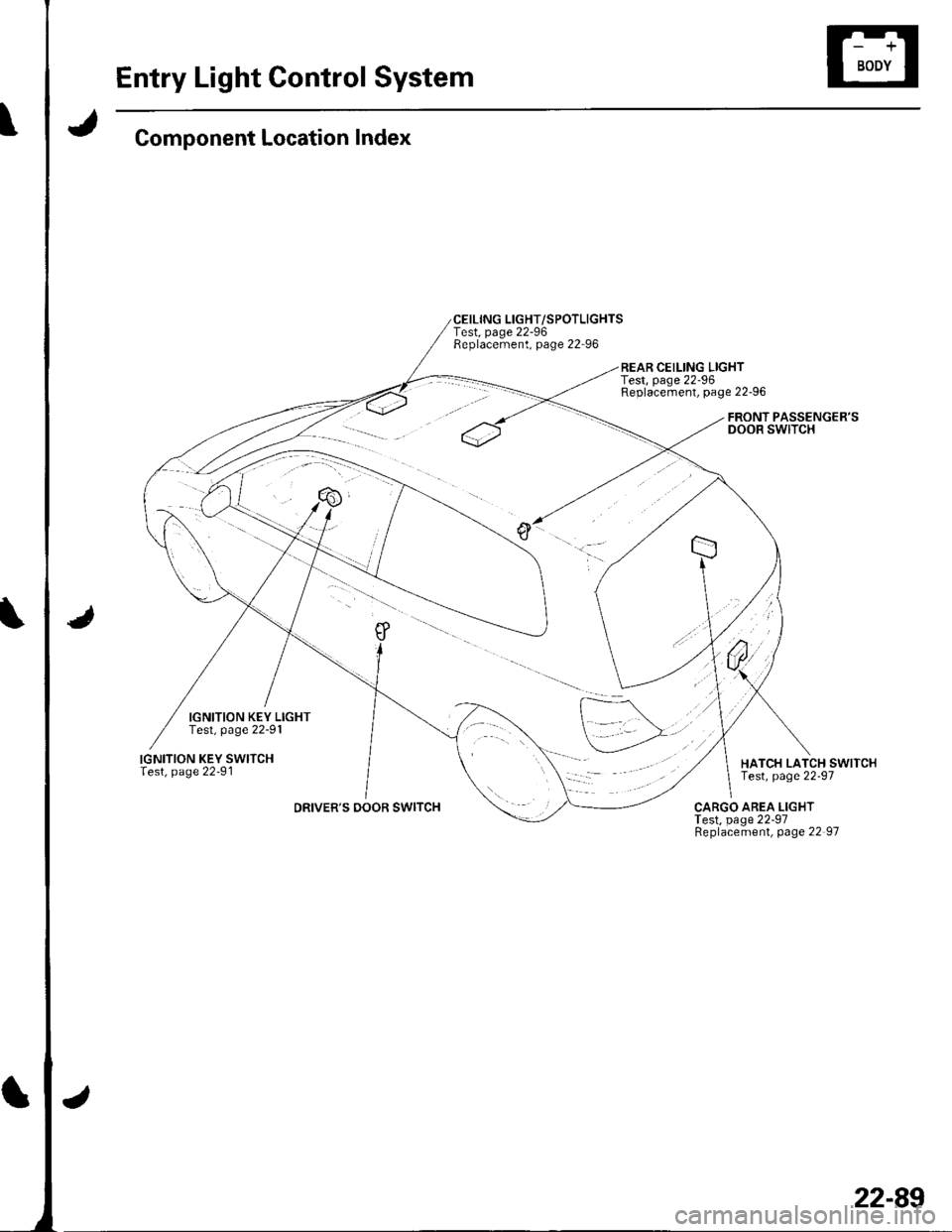
Component Location Index
IGNITION KEY LIGHTTest, page 22-91
IGNITION KEY SWITCHlest, page 22-91
DRIVER'S DOOR SWITCH
CEILING LIGHT/SPOTLIGHTSTest, page 22-96Replacement, page 22-96
REAR CEILING LIGHTTest, page 22-96Replacement, page 22-96
FRONT PASSENGER'SDOOR SWITCH
HATCH LATCH SWITCHTest, page 22-97
CARGO AREA LIGHTTest, page 22-97Replacement, page 22 97
22-89
Page 921 of 1139
 USA
Circuit Diagram
CEILINGUGHT
Y
I
I
J\
jIGNIlx)NKEYSWtTCH
PASSTNGERSDOOBSWITCHi9r\"..d l
ORIVEBSDOORSWITCH
DtrVTNSDOORLocx(NOBs!t/tTc8
lBU
I
G()t
lGl HoTin")
Entry Light Control System
Jt
'No.20({0A) USA
Circuit Diagram
CEILINGUGHT
Y
I
I
J\
jIGNIlx)NKEYSWtTCH
PASSTNGERSDOOBSWITCHi9r"..d l
ORIVEBSDOORSWITCH
DtrVTN'SDOORLocx(NOBs!t/tTc8
l'BU
I
G()t
lGl HoTin 0N illlnd STAnT 0D
EiIIpNSMTqI
UiIOTf, HOOD fUSE/8ELAY BOX
J
22-90
Page 922 of 1139
\lgnition Key Switch Test
NOTE: For more key-in beeper information, refer to the
circuit diagram (see page 22-90) and input test (see
page 22-921.
When the ignition key is in the ignition switch the
multiplex control unit senses ground through the
closed ignition key switch. When you open the driver's
door, the multiplex control unit senses ground through
the closed door switch and sounds the beeper.
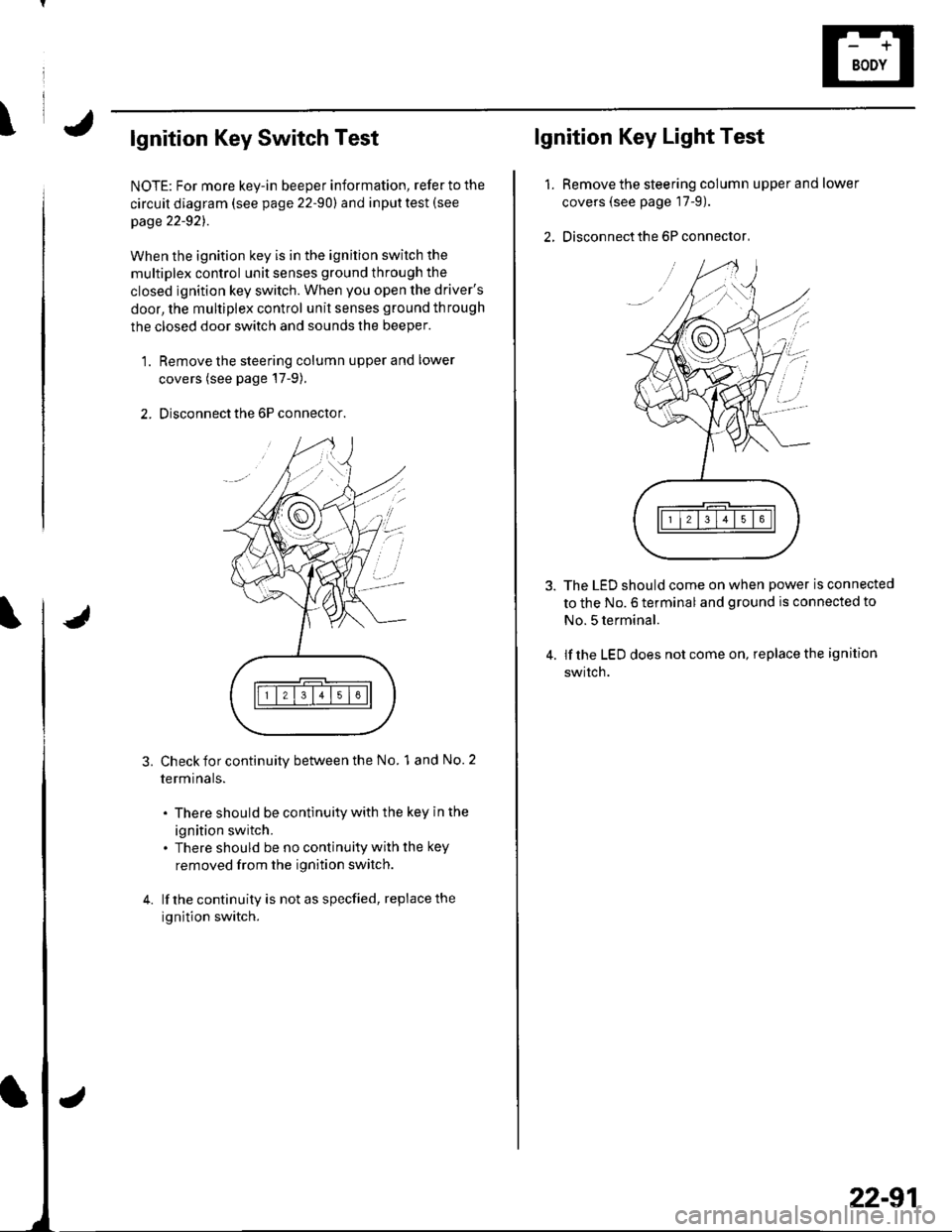
1. Remove the steering column upper and lower
covers (see page'17-9).
2. Disconnect the 6P connector.
3.Check for continuity between the No. 1 and No. 2
termrnars.
. There should be continuity with the key in the
ignition switch.. There should be no continuity with the key
removed from the ignition switch.
lf the continuity is not as specfied, replace the
ignition switch.
lgnition Key Light Test
1.Remove the steering column upper and lower
covers (see page 17-9).
Disconnect the 6P connector,
The LED should come on when power is connected
to the No. 6 terminal and ground is connected to
No. 5 terminal.
lf the LED does not come on, replace the ignition
swrtch.
i'
/.'
22-91
Page 924 of 1139
I
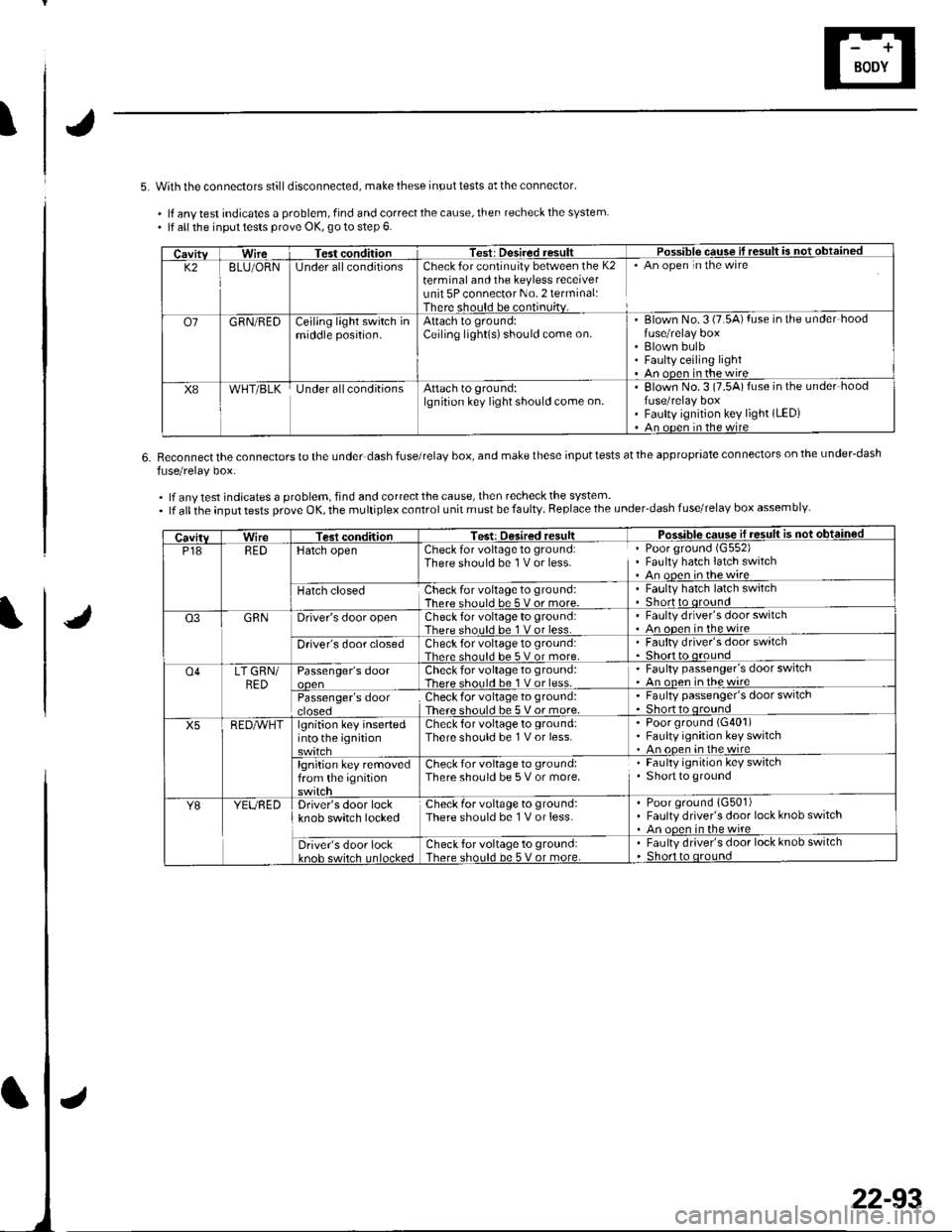
5. With the connectors stilldisconnected, make these input tests at the connector'
. lf anv test indicates a problem, find and correct the cause, then recheck the system. lf all the inpul tests prove OK, go to step 6.
6.Reconnect the connectors to the under dash fuse/relaV box, and make these input tests at the appropriate connectors on the under-dash
fuse/relay box.
.lfanytestindicatesaproblem,findandcorrectthecause,thenrecheckthesystem..lfalltheinputtestsproveOK,themultiplexcontrolunitmustbefaulty.Replacetheunder'dashfuse/relaYboxassemblY
CavitvWireTest conditionTest: Desired resultPossible cquse il result is not obtained
K28LU/ORNlJnder allconditionsCheck for continuity between the K2terminal and the keyless receiverunit 5P connector No. 2 terminal:There should be continuitv.
An open in the wire
o7GRN/REDCejling light switch inmiddle position.Attach to ground:Ceiling light(s)should come on.Blown No. 3 (7.5A) fuse in the under hood
Blown bulbFaulty ceiling lightAn ooen in the wire
X8WHT/BLKUnder allconditionsAttach to ground:lgnition key light should come on.Elown No.3 (7.5A)fuse in the under hoodfuse/relay boxFaulty ignition key light (LED)
An ooen in the wire
CavitvWireTest conditionTest: Desired resultPosq!!!c sq!!ej1!.9!!!!j €d
P18REDHatch openCheck for voltage to ground:There should be 1 V or less.Poor ground (G552)
Fauhy hatch latch switchAn open inthewire
Hatch closedCheck for voltage to ground:There should be 5 v or more.Faulty hatch latch switchShortto oround
Q3GRNDriver's door openCheck for voltage to ground:There should be 1 V or less.Faulty drlver's door switchAn oDen in the wire
Driver's door closedCheck for voltage to ground:Thar. shoul.l he 5 V or more.Faulty driver's door switch
o4LT GRN/BED
RED^vHT
Passenger's doorCheck for voltage to ground:There should be 1 V or less.
' Faulty passenger's door switch' An onen inthewire
Passenger's doorcroseoCheckfor voltage to ground:There should be 5 Vor more.
. Faulty passenger's door switch. Shor o oround
X5lgnition key insertedinto the ignitionCheck for voltage to ground:There should be 1 V or less.Poor ground (G401)
Faulty ignition key switchAn ooen in the wire
lgnition key removedfrom the ignitionCheck for voltage to ground:There should be 5 V or more.Faulty ignition key switchShort to ground
Y8YEUREDDriver's door lockknob switch lockedCheck for voltage to ground:There should be 1 V or less.Poor ground {G501)Faulty driver's door lock knob switchAn ooen in the wire
Driver's door lockkn6h cwirch Inl6cke.lCheck for voltage to ground:There should be 5 V or more.Faulty driver's door lock knob switchShort to oround
22-93
Page 929 of 1139

Audio System
Component Location Index
AUOIO UNITRemoval/f nstallation, Daoe 22-100Connector Terminals, pa-ge 22-101
RIGHT DOOB TWEETERReplacement, page 22-102
ANTENNA SUB LEAD
DRIVER'S DOOR SPEAKERReplacement, page 22 102
ROOF ANTENNAReplacement, page 22-'1 03
RIGHT REAR SPEAKERReplacement, page 22-102
LEFT REAR SPEAKERReplacement, page 22-102
ANTENNA LEAD
22-98
Page 930 of 1139
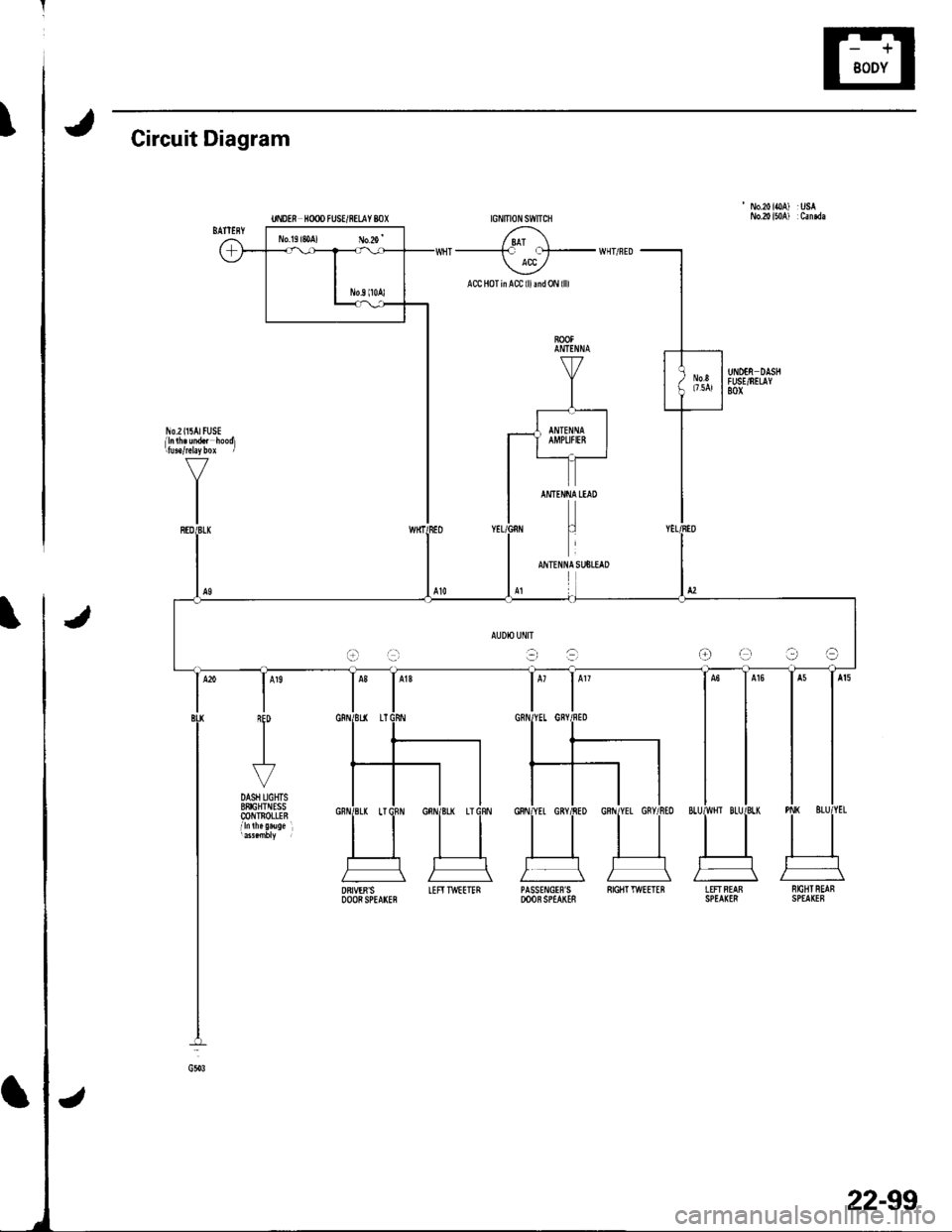
tCircuit Diagram
' No.20ioA) :USA
/ 8AT \--------F f!t- WHT/FED ACC /
ACC HoTinACC lllmd0N llll
AUDIO UflIT
t-ra-r:-raOe?a
DRIVER'SDOORSPEArcFIEFITWEETERPASSE!{GIF'S SIGIITTWEETEBDOOB SPEAKESLEFTFEAB NrcBTREAFSPEA(I8 SPEAKEF
22-99
Page 932 of 1139
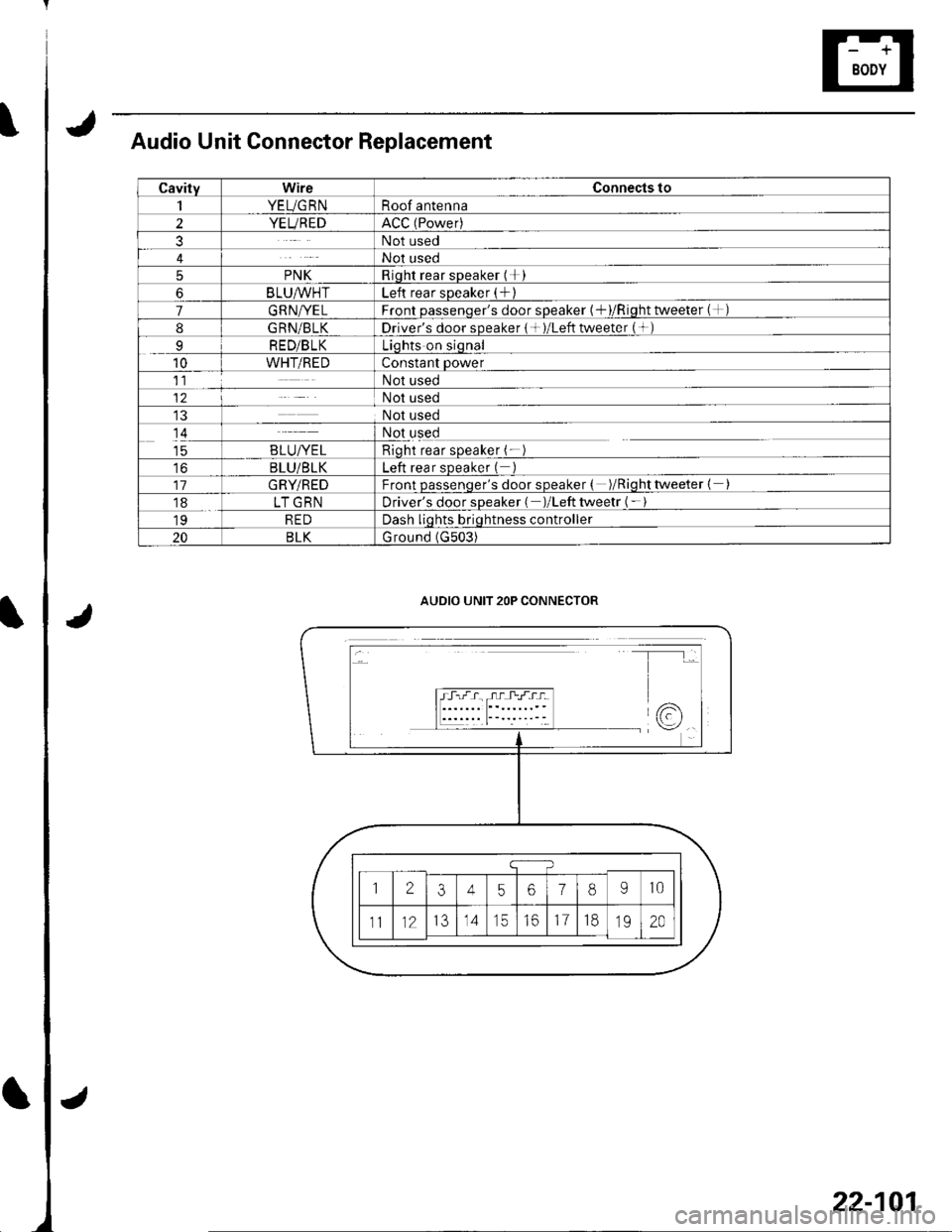
Audio Unit Connector Replacement
CavityWireConnects to
1YEUG RNRoof antenna
2YEUREDACC (Power)
3Not used
4Not used
5PNKRioht rear sDeaker (+I
6BLU^/vHTLeft rear sDeaker (+)
7GRN/YELFront oassenqer's door sDeaker {+)/Riqht tweeter (+)
8G RN/BLKDriver's door speaker { + )/Left tweeter (+ )
9RED/BLKLiqhts on siqnal
10WHT/REDConstant power
11Not used
12Not used
Not used
14Not used
taB LU/YE LRioht rear soeaker (-
toBLU/BLKLeft rear sDeaker (
11GRY/REDFront passenqer's door speaker ( )/Riqhttweeter {
18LT GRNDriver's door sDeaker ( )/Left tweetr ( -
19REDDash liqhts briqhtness controller
20BLKG round (G503)
AUDIO UNIT 2OP CONNECTOR
22-101
Page 933 of 1139
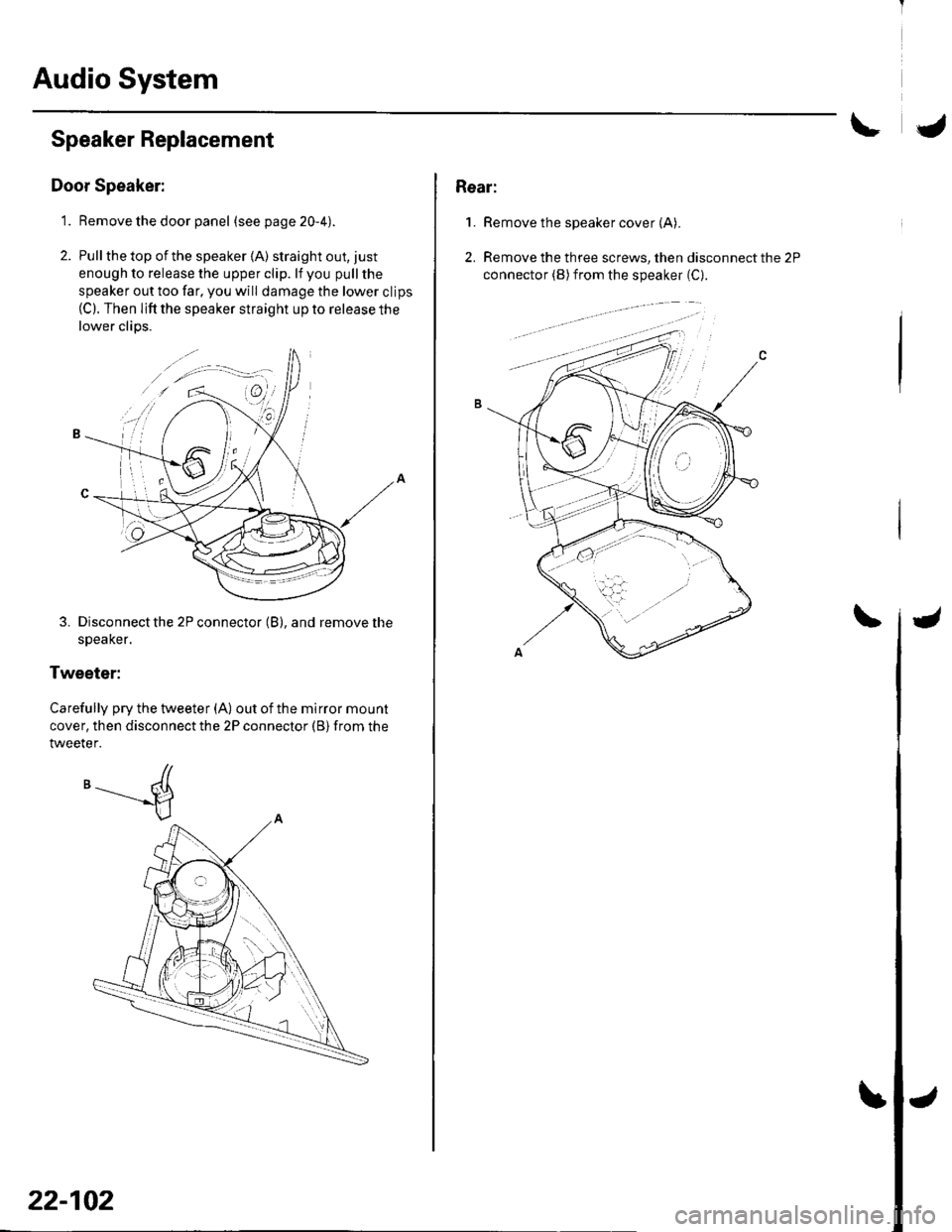
Audio System
Speaker Replacement
Door Speaker:
1. Remove the door panel (seepage20-4).
2. Pull the top of the speaker {A) straight out, just
enough to release the upper clip. lf you pull the
speaker out too far, you will damage the lower clips(C). Then lifi the speaker straight up to release the
lower clips.
3. Disconnect the 2P connector (B), and remove the
speaKer.
Tweeter:
Carefully pry the tweeter (A) out of the mirror mount
cover, then disconnect the 2P connector (B) from the
tweeter.
'-----d
22-102
Rear:
1.Remove the speaker cover (A).
Remove the three screws, then disconnect the 2P
connector (B) from the speaker (C).
2.
Page 948 of 1139
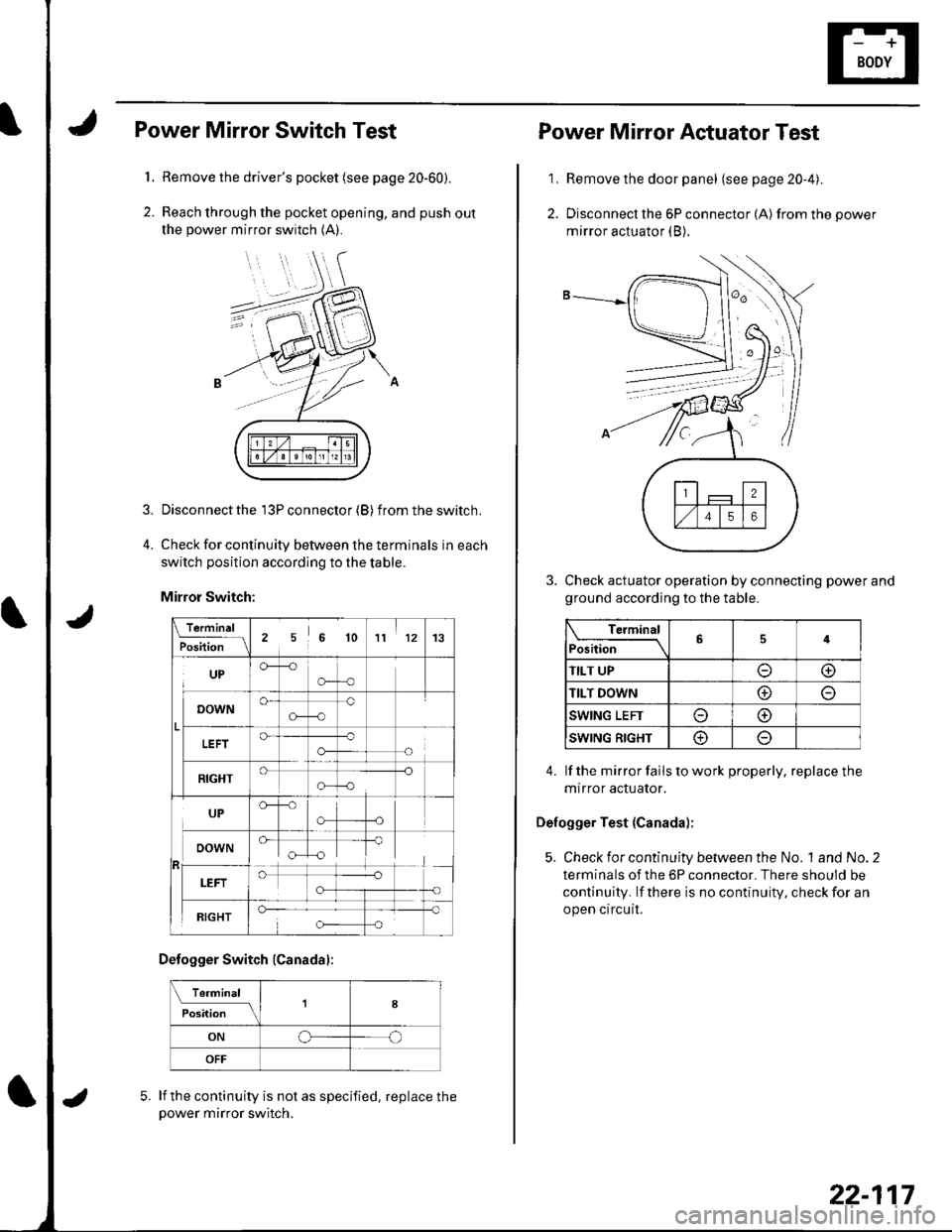
1.
2.
3.
Power Mirror Switch Test
Remove the driver's pocket (see page 20-60).
Reach through the pocket opening, and push out
the power mirror switch (A).
Disconnect the 13P connector (B) f rom the switch.
Check for continuity between the terminals in each
switch position according to the table.
Mirror Switch:
\.f9.-'"1L
Position256 1011 1213
UPCF--o
o-o
o-
G-c)o
o-o-
-o
!
RIGHT-o
o-o
UP
"[T
RIGHT
Defogger Switch (Canadal:
Te.minal
il;;; tlfI8
ONoo
OFF
lf the continuity is not as specified, replace thepower mirror switch.
5.
22-117
1,
2.
Power Mirror Actuator Test
Remove the door panel (see page 20-4).
Disconnect the 6P connector (A) from the power
mirror actuator (B).
Check actuator operation by connecting power and
ground according to the table.
Terminal
Position64
TILT UPoo
TILT DOWNo
SWING LEFTo@
SWING RIGHT@
4. lf the mirror fails to work properly, replace the
mtrror actuator.
Defogger Test {Canada);
5. Check for continuity between the No. 1and No.2
terminals of the 6P connector. There should be
continuity. lf there is no continuity, check for an
open circuit.