Start HONDA CIVIC 2012 9.G User Guide
[x] Cancel search | Manufacturer: HONDA, Model Year: 2012, Model line: CIVIC, Model: HONDA CIVIC 2012 9.GPages: 345, PDF Size: 9.02 MB
Page 75 of 345
74
uuIndicatorsu
Instrument Panel
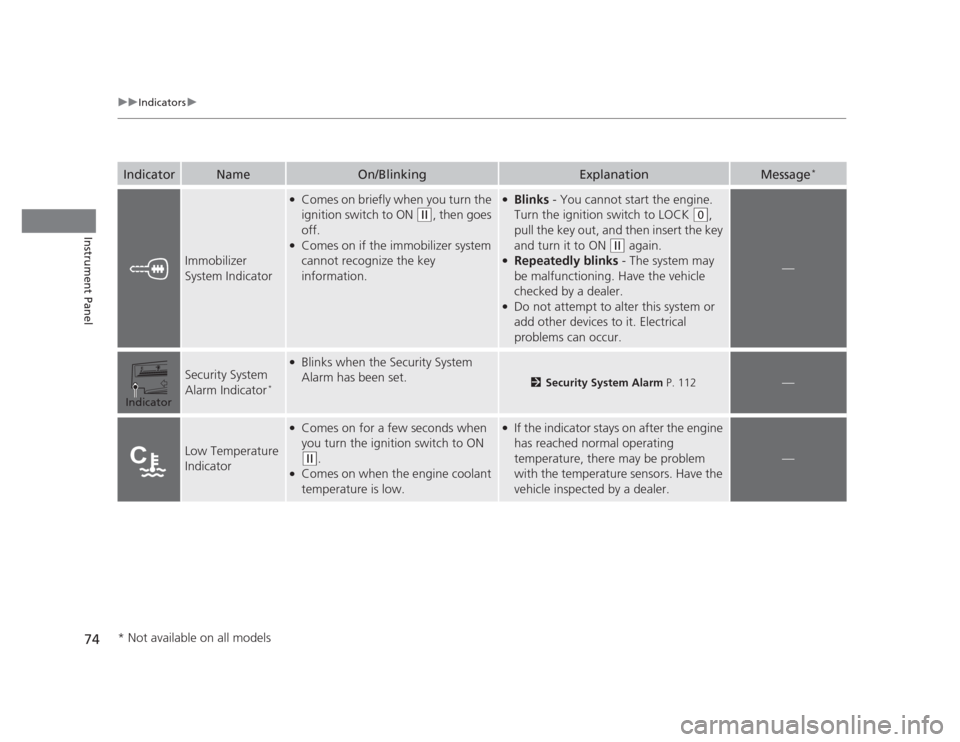
IndicatorNameOn/BlinkingExplanationMessage*
Immobilizer
System Indicator
●
Comes on briefly when you turn the
ignition switch to ON
(w , then goes
off.
● Comes on if the immobilizer system
cannot recognize the key
information.
●Blinks - You cannot start the engine.
Turn the ignition switch to LOCK
(0 ,
pull the key out, and then insert the key
and turn it to ON
(w again.
● Repeatedly blinks - The system may
be malfunctioning. Have the vehicle
checked by a dealer.
● Do not attempt to alter this system or
add other devices to it. Electrical
problems can occur.
—
Security System
Alarm Indicator *
●
Blinks when the Security System
Alarm has been set.
2 Security System Alarm P. 112—
Low Temperature
Indicator
●
Comes on for a few seconds when
you turn the ignition switch to ON
(w .
● Comes on when the engine coolant
temperature is low.
●If the indicator stays on after the engine
has reached normal operating
temperature, there may be problem
with the temperature sensors. Have the
vehicle inspected by a dealer.
—
Indicator
* Not available on all models
Page 76 of 345
75
uuIndicatorsu
Instrument Panel
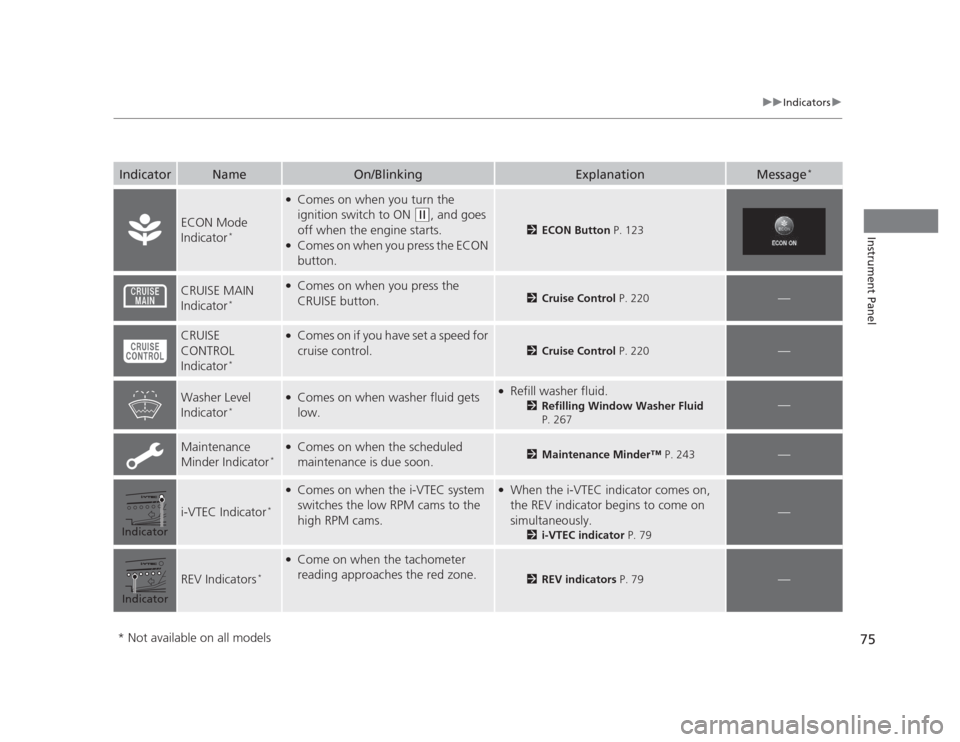
IndicatorNameOn/BlinkingExplanationMessage*
ECON Mode
Indicator
*
●
Comes on when you turn the
ignition switch to ON
(w , and goes
off when the engine starts.
● Comes on when you press the ECON
button.
2 ECON Button P. 123
CRUISE MAIN
Indicator*●
Comes on when you press the
CRUISE button.
2 Cruise Control P. 220—
CRUISE CONTROL
Indicator*●
Comes on if you have set a speed for
cruise control.
2 Cruise Control P. 220—
Washer Level
Indicator*●
Comes on when washer fluid gets
low.● Refill washer fluid.
2Refilling Window Washer Fluid
P. 267
—
Maintenance
Minder Indicator *●
Comes on when the scheduled
maintenance is due soon.2 Maintenance Minder™ P. 243—
i-VTEC Indicator*
●
Comes on when the i-VTEC system
switches the low RPM cams to the
high RPM cams.● When the i-VTEC indicator comes on,
the REV indicator begins to come on
simultaneously.
2i-VTEC indicator P. 79
—
REV Indicators*
●
Come on when the tachometer
reading approaches the red zone.
2 REV indicators P. 79—
Indicator
Indicator
* Not available on all models
Page 100 of 345
99
Continued
Controls
Locking and Unlocking the Doors
Key Types and Functions
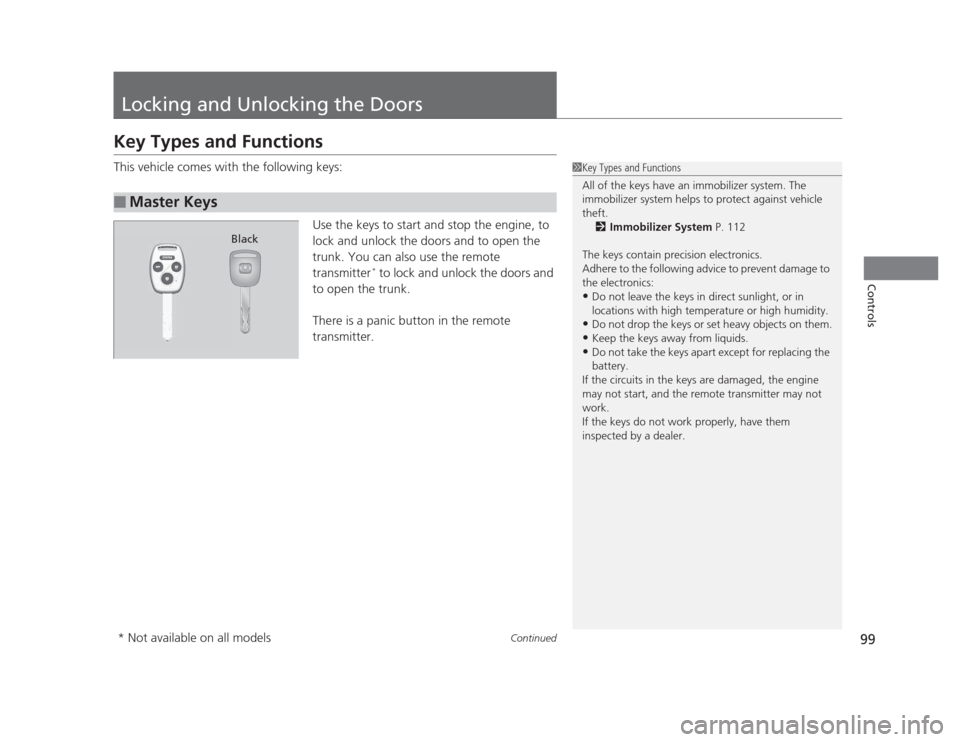
This vehicle comes with the following keys:
Use the keys to start and stop the engine, to
lock and unlock the doors and to open the
trunk. You can also use the remote
transmitter*
to lock and unlock the doors and
to open the trunk.
There is a panic button in the remote
transmitter.
■Master Keys
1Key Types and Functions
All of the keys have an immobilizer system. The
immobilizer system helps to protect against vehicle theft. 2 Immobilizer System P. 112
The keys contain precision electronics.
Adhere to the following advice to prevent damage to the electronics: • Do not leave the keys in direct sunlight, or in
locations with high temperature or high humidity.
• Do not drop the keys or set heavy objects on them.
• Keep the keys away from liquids.
• Do not take the keys apart except for replacing the
battery.
If the circuits in the keys are damaged, the engine
may not start, and the remote transmitter may not work.
If the keys do not work properly, have them
inspected by a dealer.
Black
* Not available on all models
Page 101 of 345
uuLocking and Unlocking the DoorsuKey Types and Functions
100
Controls
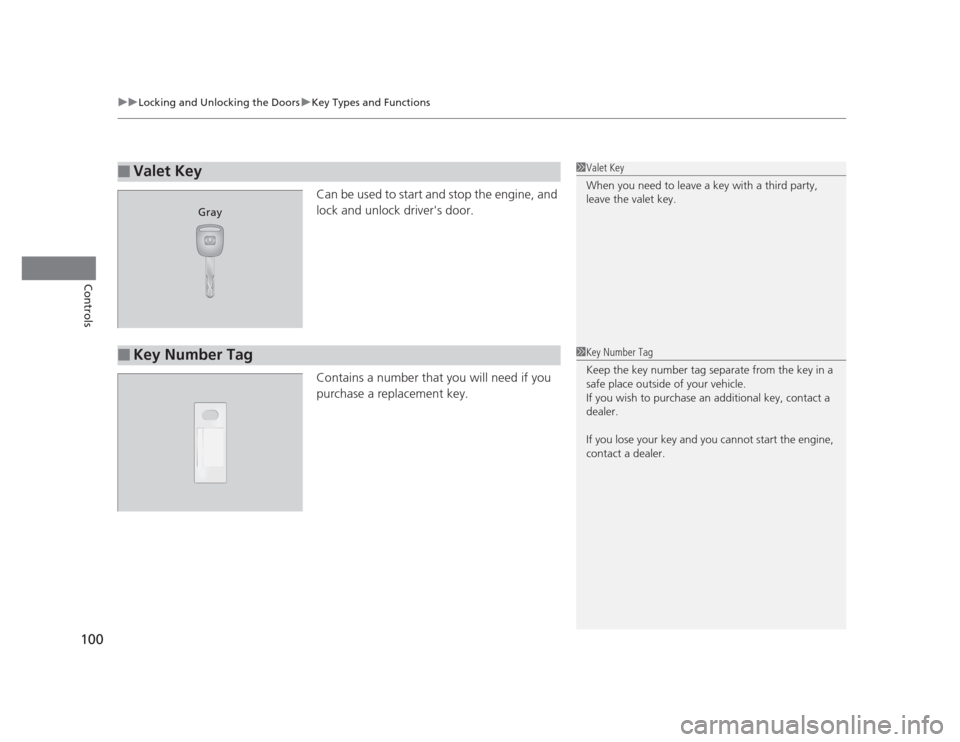
Can be used to start and stop the engine, and
lock and unlock driver's door.
Contains a number that you will need if you
purchase a replacement key.
■Valet Key1Valet Key
When you need to leave a key with a third party,
leave the valet key.
Gray
■Key Number Tag1Key Number Tag
Keep the key number tag separate from the key in a
safe place outside of your vehicle.
If you wish to purchase an additional key, contact a dealer.
If you lose your key and you cannot start the engine, contact a dealer.
Page 113 of 345
112
Controls
Security System
Immobilizer System
The immobilizer system prevents a key that has not been pre-registered from
starting the engine. Each key contains electronic transmitters that use electronic
signals to verify the key.
Pay attention to the following when inserting the key into the ignition switch: •Do not allow objects that emit strong radio waves near the ignition switch.
• Make sure the key is not covered by or touching a metal object.
• Do not bring a key from another vehicle's immobilizer system near the ignition
switch.
Security System Alarm *
The security system alarm activates when the doors, trunk, or hood are opened
without the key, or remote transmitter. ■ When the security system alarm activates
The horn sounds intermittently and all of the exterior lights flash.■ To deactivate the security system alarm
Unlock the vehicle using the key, or remote transmitter. The system, along with the
horn and flashing lights, is deactivated.
1Immobilizer System
NOTICE
Leaving the ignition key in the vehicle can result in
theft or accidental movement of the vehicle.
Always take the ignition key with you whenever you
leave the vehicle unattended.
Do not alter the system or add other devices to it.
Doing so may damage the system and make your
vehicle inoperable.
1Security System Alarm
The security alarm continues for a maximum of two
minutes until the security system deactivates.
* Not available on all models
Page 118 of 345
117
Controls
Operating the Switches Around the Steering Wheel
Ignition Switch
1Ignition Switch
You cannot take the key out unless the shift lever is in
(P.
If you open the driver's door when the key is in LOCK
(0 or ACCESSORY (q, a warning buzzer will sound
to remind you to take the key out.
When this happens, the following messages appear
on the multi-information display *
:
• In LOCK
(0 : "REMOVE KEY."
• In ACCESSORY
(q : "RETURN IGNITION SWITCH
TO LOCK (0) POSITION" The buzzer will stop when
you take the key out.
If the key won't turn from LOCK
(0 to ACCESSORY
(q , turn the key while moving the steering wheel left
and right. The steering wheel will unlock, allowing
the key to turn.
3WARNING
Removing the key from the ignition switch
while driving locks the steering. This can
cause you to lose control of the vehicle.
Remove the key from the ignition switch
only when parked.
Manual transmission models
Automatic transmission models
All models
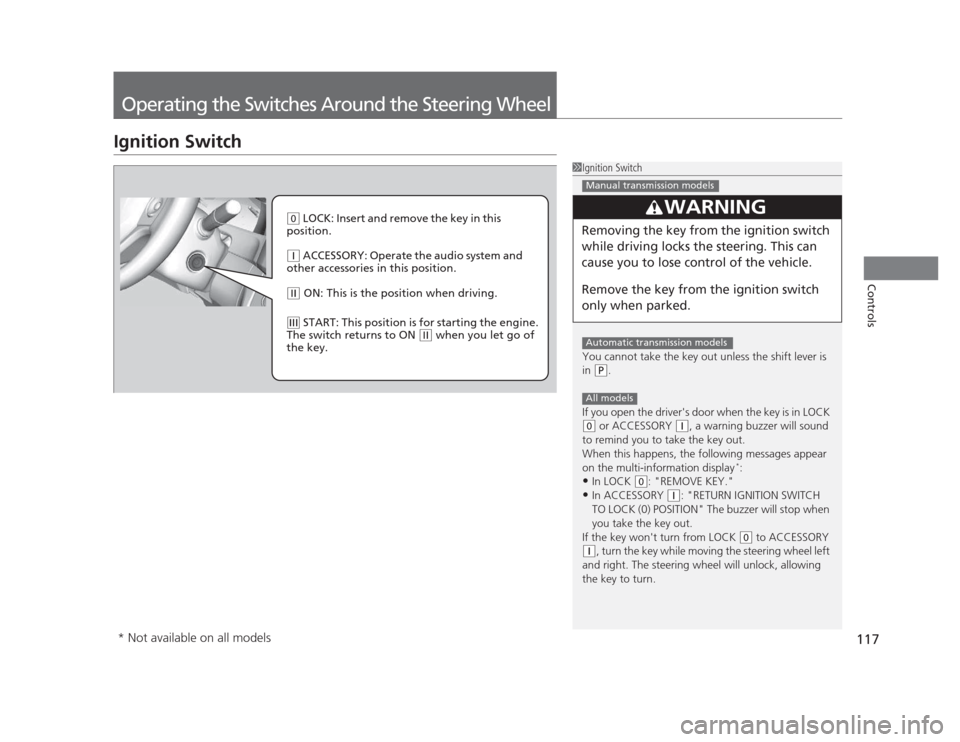
(0 LOCK: Insert and remove the key in this
position.
(q ACCESSORY: Operate the audio system and
other accessories in this position.
(w ON: This is the position when driving.
(e START: This position is for starting the engine.
The switch returns to ON
(w when you let go of
the key.
* Not available on all models
Page 122 of 345
121
uuOperating the Switches Around the Steering WheeluWipers and Washers
Controls
Wipers and WashersThe windshield wipers and washers can be
used when the ignition switch is in ON
(w.
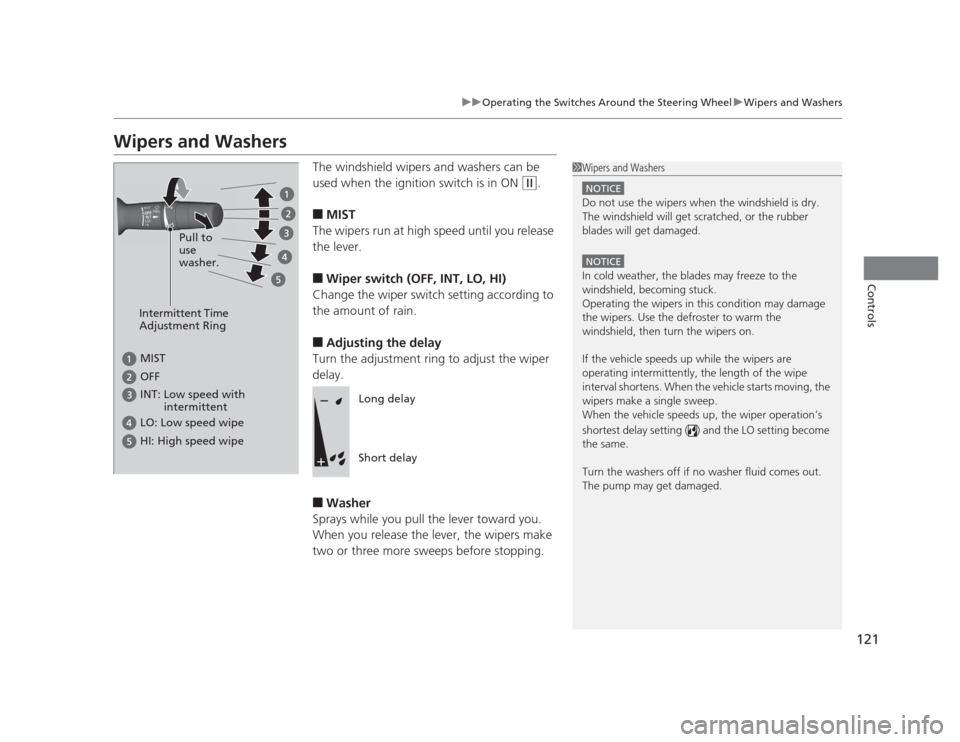
■ MIST
The wipers run at high speed until you release
the lever. ■ Wiper switch (OFF, INT, LO, HI)
Change the wiper switch setting according to
the amount of rain. ■ Adjusting the delay
Turn the adjustment ring to adjust the wiper
delay. ■ Washer
Sprays while you pull the lever toward you.
When you release the lever, the wipers make
two or three more sweeps before stopping.
1Wipers and Washers
NOTICE
Do not use the wipers when the windshield is dry.
The windshield will get scratched, or the rubber
blades will get damaged.
NOTICE
In cold weather, the blades may freeze to the
windshield, becoming stuck.
Operating the wipers in this condition may damage
the wipers. Use the defroster to warm the
windshield, then turn the wipers on.
If the vehicle speeds up while the wipers are
operating intermittently, the length of the wipe
interval shortens. When the vehicle starts moving, the
wipers make a single sweep.
When the vehicle speeds up, the wiper operation’s
shortest delay setting ( ) and the LO setting become the same.
Turn the washers off if no washer fluid comes out.
The pump may get damaged.
Intermittent Time
Adjustment Ring
MIST
INT: Low speed with
intermittent
OFF
LO: Low speed wipe
HI: High speed wipe
Pull to use
washer.
Long delay
Short delay
Page 124 of 345
123
uuOperating the Switches Around the Steering WheeluRear Defogger/Heated Door Mirror*
Button
Controls
Rear Defogger/Heated Door Mirror *
Button
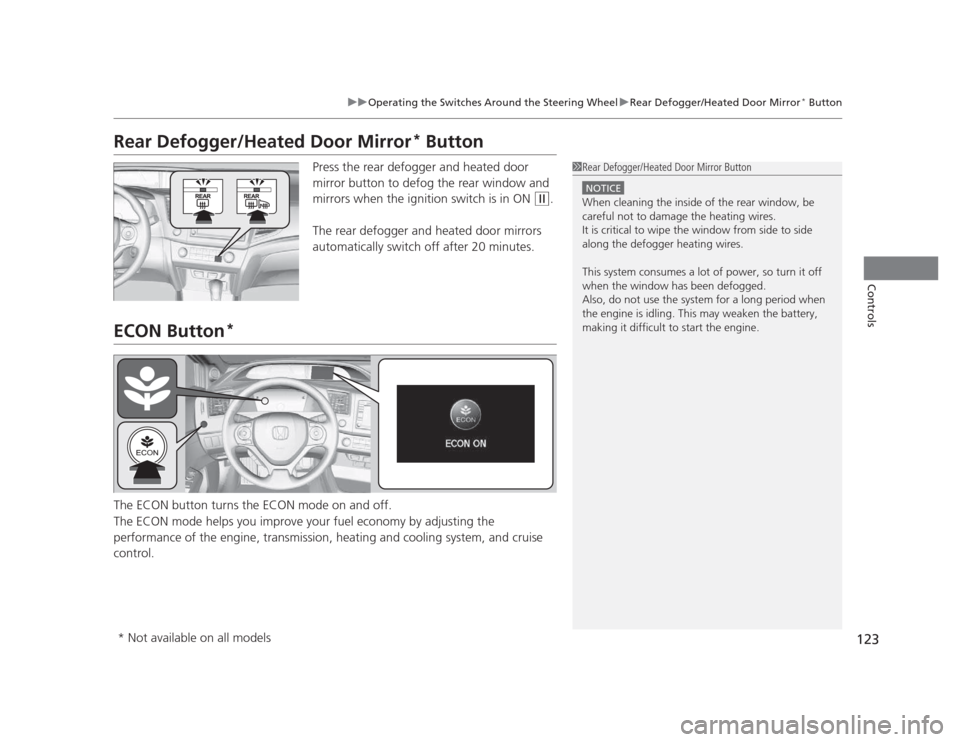
Press the rear defogger and heated door
mirror button to defog the rear window and
mirrors when the ignition switch is in ON
(w .
The rear defogger and heated door mirrors
automatically switch off after 20 minutes.
ECON Button *
The ECON button turns the ECON mode on and off.
The ECON mode helps you improve your fuel economy by adjusting the
performance of the engine, transmission, heating and cooling system, and cruise control.
1Rear Defogger/Heated Door Mirror Button
NOTICE
When cleaning the inside of the rear window, be careful not to damage the heating wires.
It is critical to wipe the window from side to side
along the defogger heating wires.
This system consumes a lot of power, so turn it off
when the window has been defogged.
Also, do not use the system for a long period when
the engine is idling. This may weaken the battery,
making it difficult to start the engine.
* Not available on all models
Page 125 of 345
124
uuOperating the Switches Around the Steering WheeluAdjusting the Steering Wheel
Controls
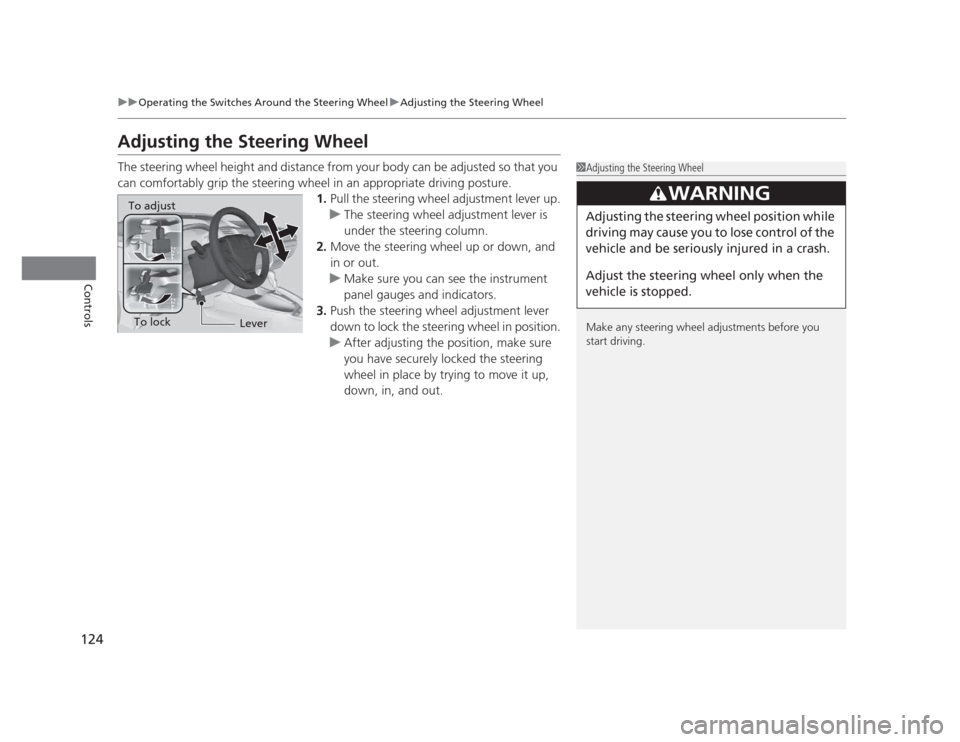
Adjusting the Steering Wheel
The steering wheel height and distance from your body can be adjusted so that you
can comfortably grip the steering wheel in an appropriate driving posture.1.Pull the steering wheel adjustment lever up.
uThe steering wheel adjustment lever is
under the steering column.
2. Move the steering wheel up or down, and
in or out.
uMake sure you can see the instrument
panel gauges and indicators.
3. Push the steering wheel adjustment lever
down to lock the steering wheel in position.
uAfter adjusting the position, make sure
you have securely locked the steering
wheel in place by trying to move it up,
down, in, and out.
1Adjusting the Steering Wheel
Make any steering wheel adjustments before you
start driving.
3WARNING
Adjusting the steering wheel position while
driving may cause you to lose control of the
vehicle and be seriously injured in a crash.
Adjust the steering wheel only when the
vehicle is stopped.To adjust
To lockLever
Page 126 of 345
125
Controls
Adjusting the Mirrors
Interior Rearview Mirror
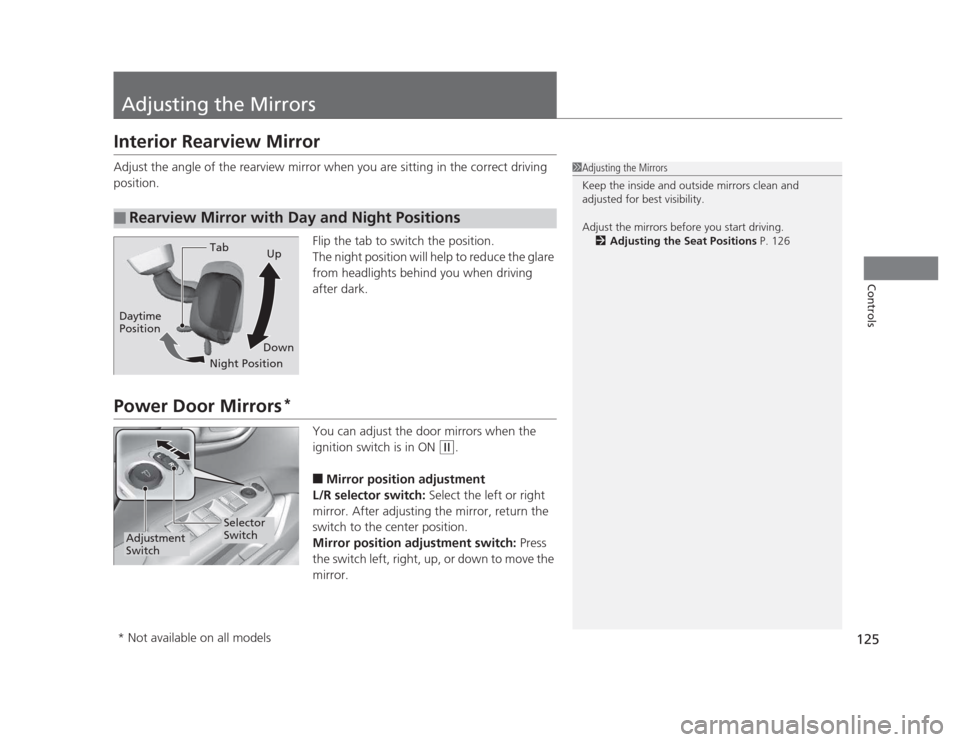
Adjust the angle of the rearview mirror when you are sitting in the correct driving
position.Flip the tab to switch the position.
The night position will help to reduce the glare
from headlights behind you when driving after dark.
Power Door Mirrors*
You can adjust the door mirrors when the
ignition switch is in ON
(w.
■ Mirror position adjustment
L/R selector switch: Select the left or right
mirror. After adjusting the mirror, return the
switch to the center position.
Mirror position adjustment switch: Press
the switch left, right, up, or down to move the
mirror.
■Rearview Mirror with Day and Night Positions
1Adjusting the Mirrors
Keep the inside and outside mirrors clean and
adjusted for best visibility.
Adjust the mirrors before you start driving. 2 Adjusting the Seat Positions P. 126
Tab
Daytime Position
Night PositionUp
Down
Selector
Switch
Adjustment
Switch
* Not available on all models