Back up HONDA CIVIC 2012 9.G Owner's Manual
[x] Cancel search | Manufacturer: HONDA, Model Year: 2012, Model line: CIVIC, Model: HONDA CIVIC 2012 9.GPages: 345, PDF Size: 9.02 MB
Page 61 of 345
60
uuChild SafetyuSafety of Larger Children
Safe Driving
Safety of Larger Children
The following pages give instructions on how to check proper seat belt fit, what kind
of booster seat to use if one is needed, and important precautions for a child who must sit in front.
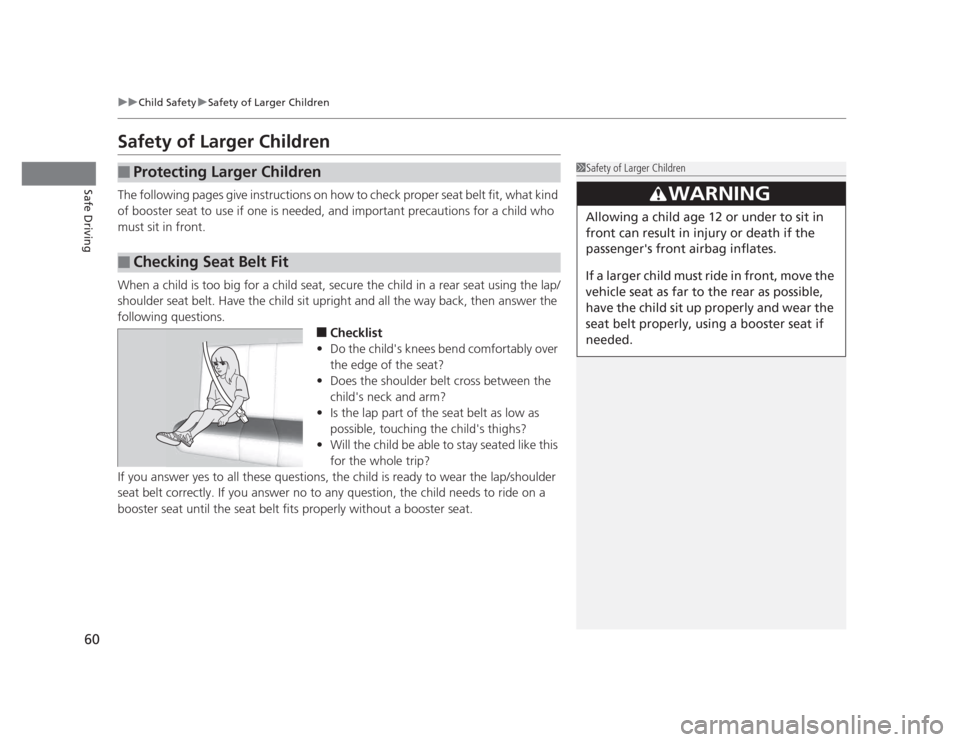
When a child is too big for a child seat, secure the child in a rear seat using the lap/
shoulder seat belt. Have the child sit upright and all the way back, then answer the
following questions.■Checklist
• Do the child's knees bend comfortably over
the edge of the seat?
• Does the shoulder belt cross between the
child's neck and arm?
• Is the lap part of the seat belt as low as
possible, touching the child's thighs?
• Will the child be able to stay seated like this
for the whole trip?
If you answer yes to all these questions, the child is ready to wear the lap/shoulder
seat belt correctly. If you answer no to any question, the child needs to ride on a
booster seat until the seat belt fits properly without a booster seat.
■Protecting Larger Children
■Checking Seat Belt Fit
1Safety of Larger Children
3WARNING
Allowing a child age 12 or under to sit in
front can result in injury or death if the
passenger's front airbag inflates.
If a larger child must ride in front, move the
vehicle seat as far to the rear as possible,
have the child sit up properly and wear the
seat belt properly, using a booster seat if
needed.
Page 62 of 345
61
uuChild SafetyuSafety of Larger Children
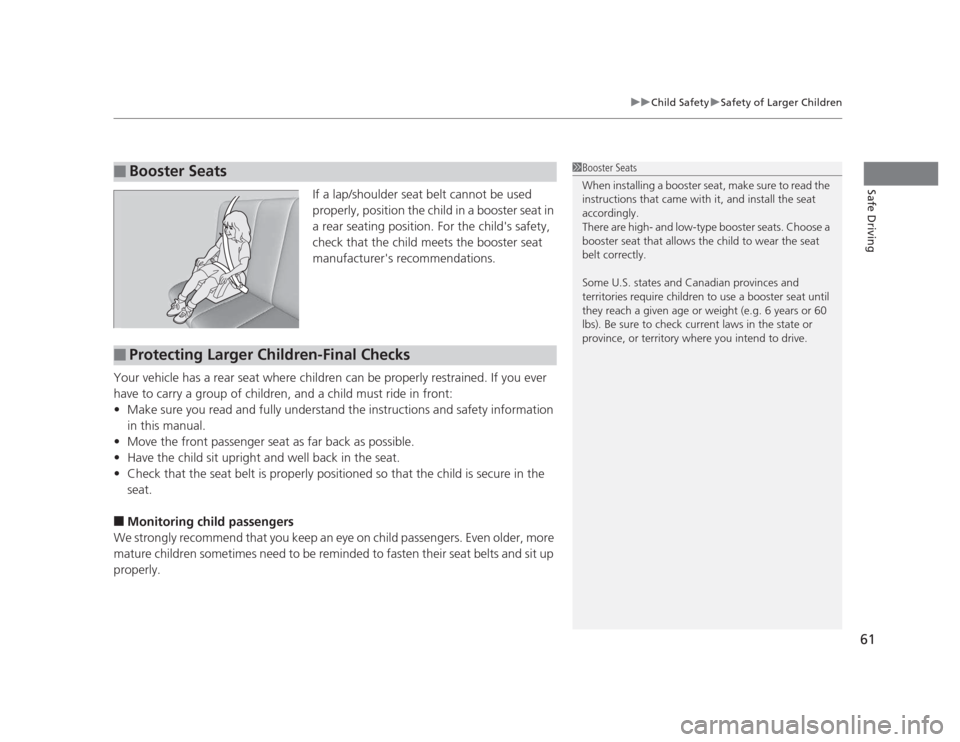
Safe DrivingIf a lap/shoulder seat belt cannot be used
properly, position the child in a booster seat in
a rear seating position. For the child's safety,
check that the child meets the booster seat
manufacturer's recommendations.
Your vehicle has a rear seat where children can be properly restrained. If you ever
have to carry a group of children, and a child must ride in front: • Make sure you read and fully understand the instructions and safety information
in this manual.
• Move the front passenger seat as far back as possible.
• Have the child sit upright and well back in the seat.
• Check that the seat belt is properly positioned so that the child is secure in the seat.
■ Monitoring child passengers
We strongly recommend that you keep an eye on child passengers. Even older, more
mature children sometimes need to be reminded to fasten their seat belts and sit up
properly.
■Booster Seats1Booster Seats
When installing a booster seat, make sure to read the
instructions that came with it, and install the seat
accordingly.
There are high- and low-type booster seats. Choose a
booster seat that allows the child to wear the seat
belt correctly.
Some U.S. states and Canadian provinces and
territories require children to use a booster seat until
they reach a given age or weight (e.g. 6 years or 60
lbs). Be sure to check current laws in the state or
province, or territory where you intend to drive.
■Protecting Larger Children-Final Checks
Page 72 of 345
71
uuIndicatorsu
Continued
Instrument Panel
IndicatorNameOn/BlinkingExplanationMessage*
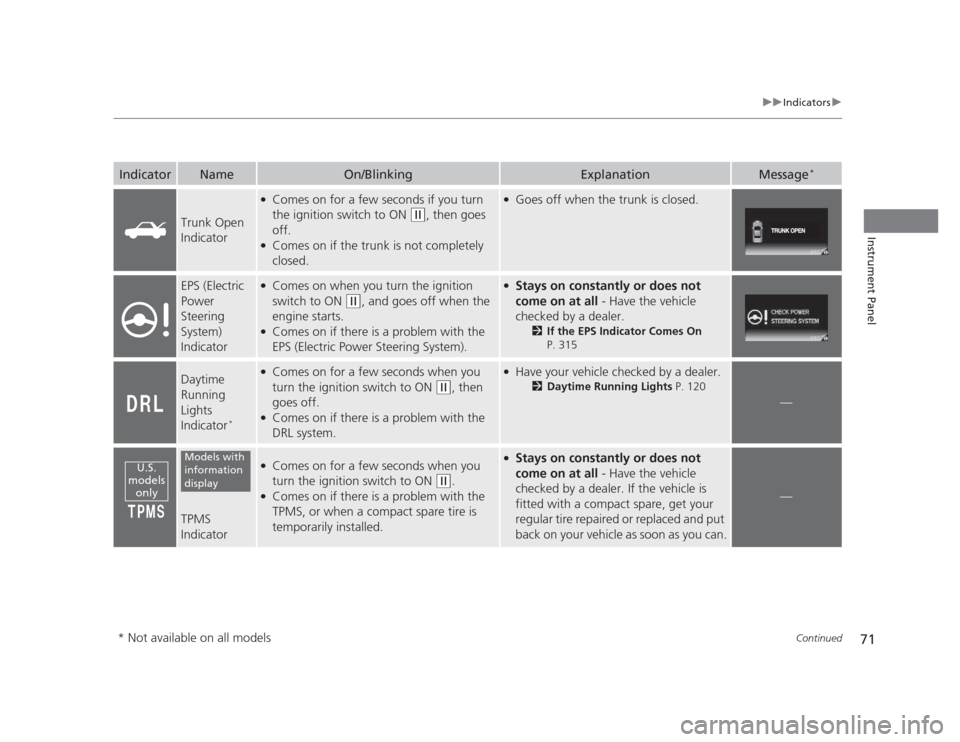
Trunk Open
Indicator
●
Comes on for a few seconds if you turn
the ignition switch to ON
(w , then goes
off.
● Comes on if the trunk is not completely
closed.
●Goes off when the trunk is closed.
EPS (Electric
Power
Steering
System)
Indicator● Comes on when you turn the ignition
switch to ON
(w , and goes off when the
engine starts.
● Comes on if there is a problem with the
EPS (Electric Power Steering System).
●
Stays on constantly or does not
come on at all - Have the vehicle
checked by a dealer. 2If the EPS Indicator Comes On
P. 315
Daytime
Running
Lights
Indicator *●
Comes on for a few seconds when you
turn the ignition switch to ON
(w , then
goes off.
● Comes on if there is a problem with the
DRL system.
●
Have your vehicle checked by a dealer.
2Daytime Running Lights P. 120
—
TPMS
Indicator
●
Comes on for a few seconds when you
turn the ignition switch to ON
(w .
● Comes on if there is a problem with the
TPMS, or when a compact spare tire is
temporarily installed.
●Stays on constantly or does not
come on at all - Have the vehicle
checked by a dealer. If the vehicle is
fitted with a compact spare, get your
regular tire repaired or replaced and put
back on your vehicle as soon as you can.
—
U.S.
models onlyModels with
information
display
* Not available on all models
Page 73 of 345
72
uuIndicatorsu
Instrument Panel
IndicatorNameOn/BlinkingExplanationMessage*
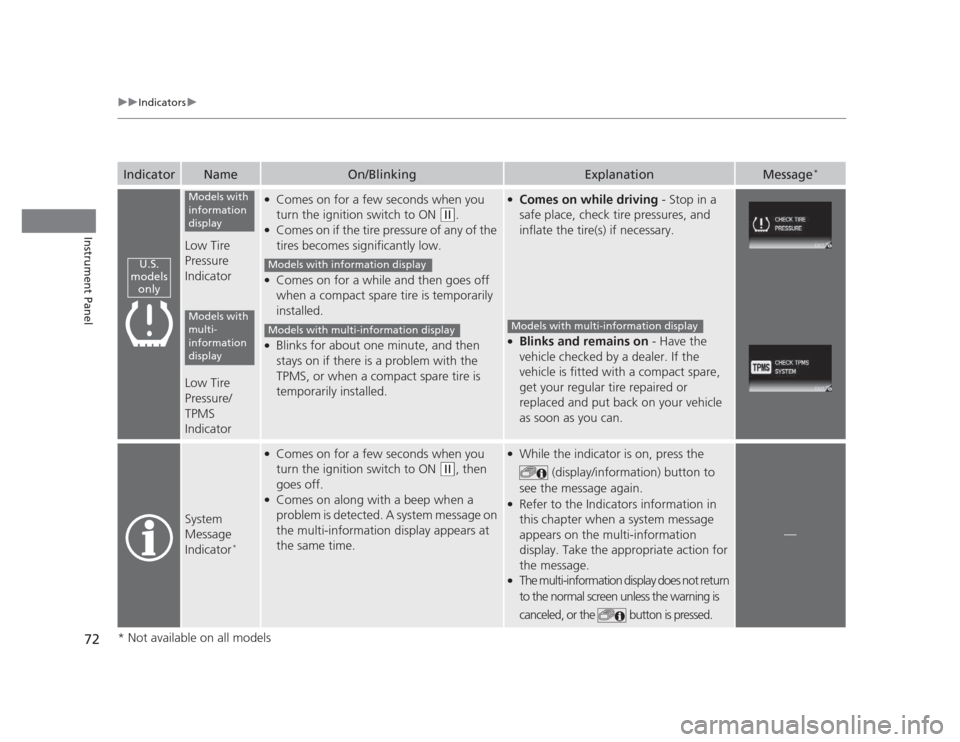
Low Tire Pressure
Indicator
Low Tire Pressure/ TPMS
Indicator
●
Comes on for a few seconds when you
turn the ignition switch to ON
(w .
● Comes on if the tire pressure of any of the
tires becomes significantly low.
● Comes on for a while and then goes off
when a compact spare tire is temporarily
installed.
● Blinks for about one minute, and then
stays on if there is a problem with the
TPMS, or when a compact spare tire is
temporarily installed.
●
Comes on while driving - Stop in a
safe place, check tire pressures, and
inflate the tire(s) if necessary.
● Blinks and remains on - Have the
vehicle checked by a dealer. If the
vehicle is fitted with a compact spare,
get your regular tire repaired or
replaced and put back on your vehicle
as soon as you can.
System
Message
Indicator *
●
Comes on for a few seconds when you
turn the ignition switch to ON
(w , then
goes off.
● Comes on along with a beep when a
problem is detected. A system message on
the multi-information display appears at
the same time.
● While the indicator is on, press the
(display/information) button to
see the message again.
● Refer to the Indicators information in
this chapter when a system message
appears on the multi-information
display. Take the appropriate action for the message.
● The multi-information display does not return
to the normal screen unless the warning is
canceled, or the button is pressed.
—
U.S.
models only
Models with
information
display
Models with
multi-
information
display
Models with information display
Models with multi-information displayModels with multi-information display
* Not available on all models
Page 87 of 345
uuGauges and DisplaysuMulti-Information Display*
86
Instrument Panel
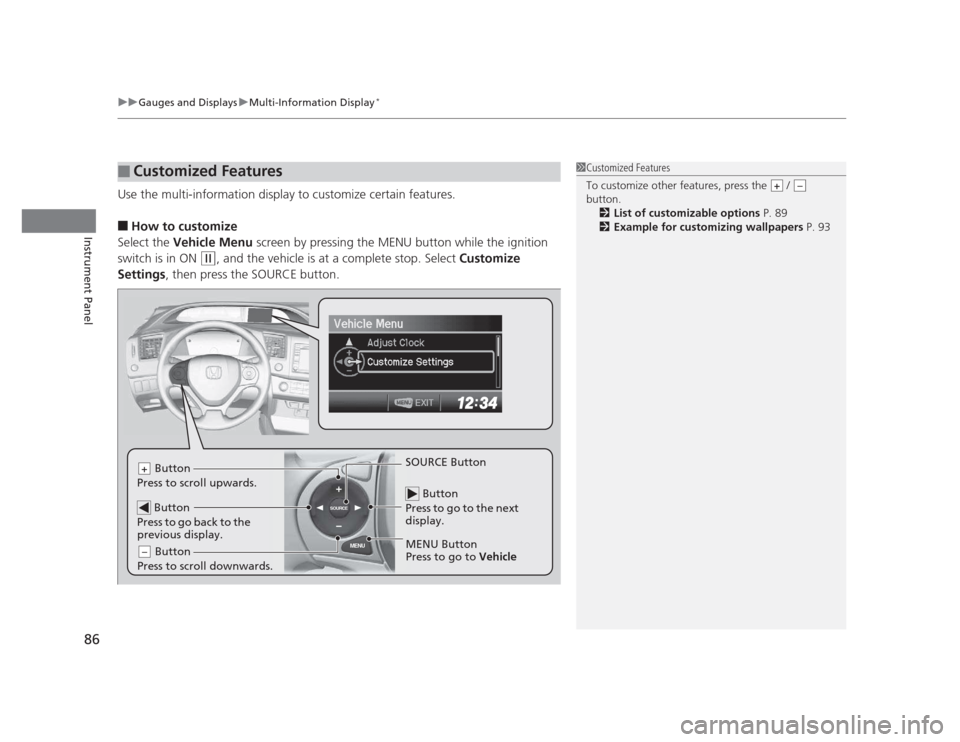
Use the multi-information display to customize certain features. ■ How to customize
Select the Vehicle Menu screen by pressing the MENU button while the ignition
switch is in ON
(w , and the vehicle is at a complete stop. Select Customize
Settings , then press the SOURCE button.
■Customized Features1Customized Features
To customize other features, press the /
button.
2 List of customizable options P. 89
2 Example for customizing wallpapers P. 93
+–
MENU
SOURCE
Button
Press to go to the next
display.
SOURCE Button
MENU Button
Press to go to Vehicle
Button
Press to scroll upwards.+
Button
Press to go back to the
previous display.
Button
Press to scroll downwards.–
Page 89 of 345
88
uuGauges and DisplaysuMulti-Information Display*
Instrument Panel
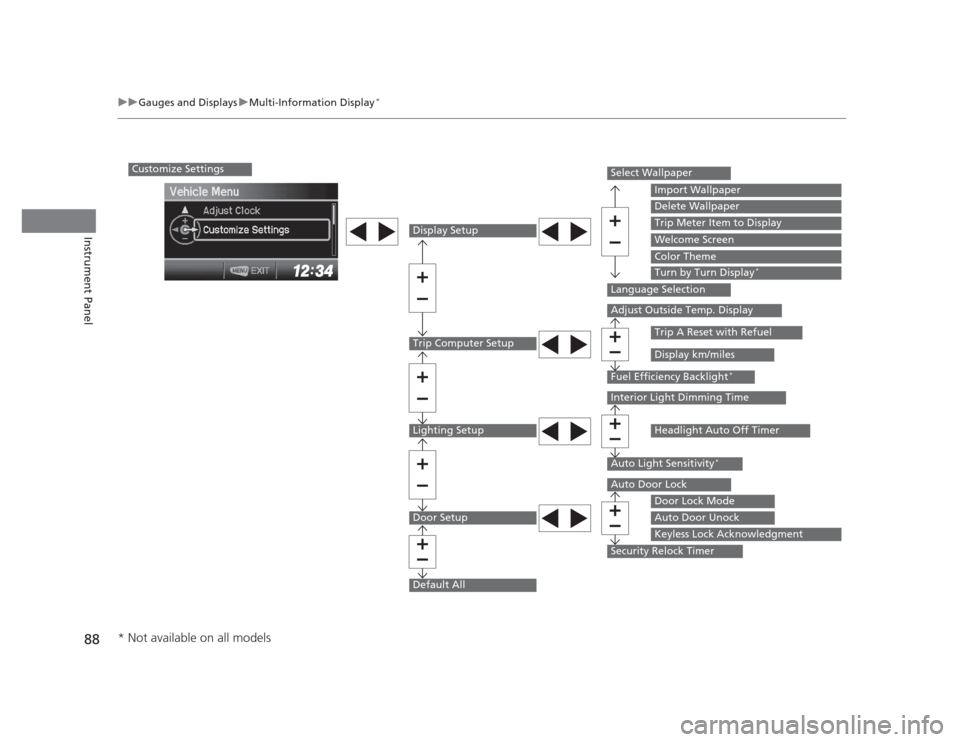
Customize Settings
Display Setup
Trip Computer Setup
Lighting Setup
Door Setup
Default All
Select Wallpaper
Language Selection
Adjust Outside Temp. Display
Fuel Efficiency Backlight*
Interior Light Dimming Time
Auto Light Sensitivity
*
Auto Door Lock
Security Relock Timer
Import Wallpaper
Delete Wallpaper
Trip Meter Item to Display
Welcome Screen
Color Theme
Turn by Turn Display*
Trip A Reset with Refuel
Display km/miles
Headlight Auto Off Timer
Door Lock Mode
Auto Door Unock
Keyless Lock Acknowledgment
* Not available on all models
Page 92 of 345
91
uuGauges and DisplaysuMulti-Information Display*
Continued
Instrument Panel
*1: Not available on all models
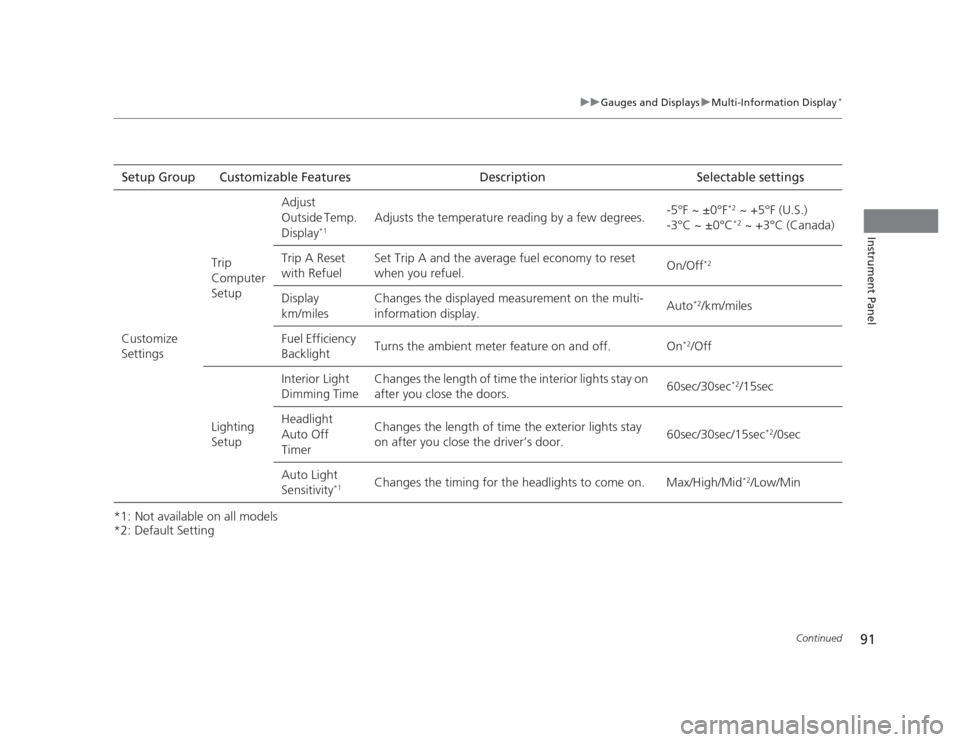
*2: Default SettingSetup Group Customizable Features Description Selectable settings
Customize
Settings Trip Computer SetupAdjust
Outside Temp.
Display
*1 Adjusts the temperature reading by a few degrees.
-5°F ~ ±0°F
*2
~ +5°F (U.S.)
-3°C ~ ±0°C *2
~ +3°C (Canada)
Trip A Reset
with Refuel Set Trip A and the average fuel economy to reset
when you refuel.
On/Off
*2
Display km/miles Changes the displayed measurement on the multi-information display.
Auto
*2
/km/miles
Fuel Efficiency
Backlight Turns the ambient meter feature on and off. On
*2
/Off
Lighting Setup Interior Light
Dimming Time
Changes the length of time the interior lights stay on
after you close the doors.
60sec/30sec
*2
/15sec
Headlight Auto Off
Timer Changes the length of time the exterior lights stay
on after you close the driver’s door.
60sec/30sec/15sec
*2
/0sec
Auto Light Sensitivity *1Changes the timing for the headlights to come on. Max/High/Mid
*2
/Low/Min
Page 117 of 345
116
Controls
Opening and Closing the Moonroof*
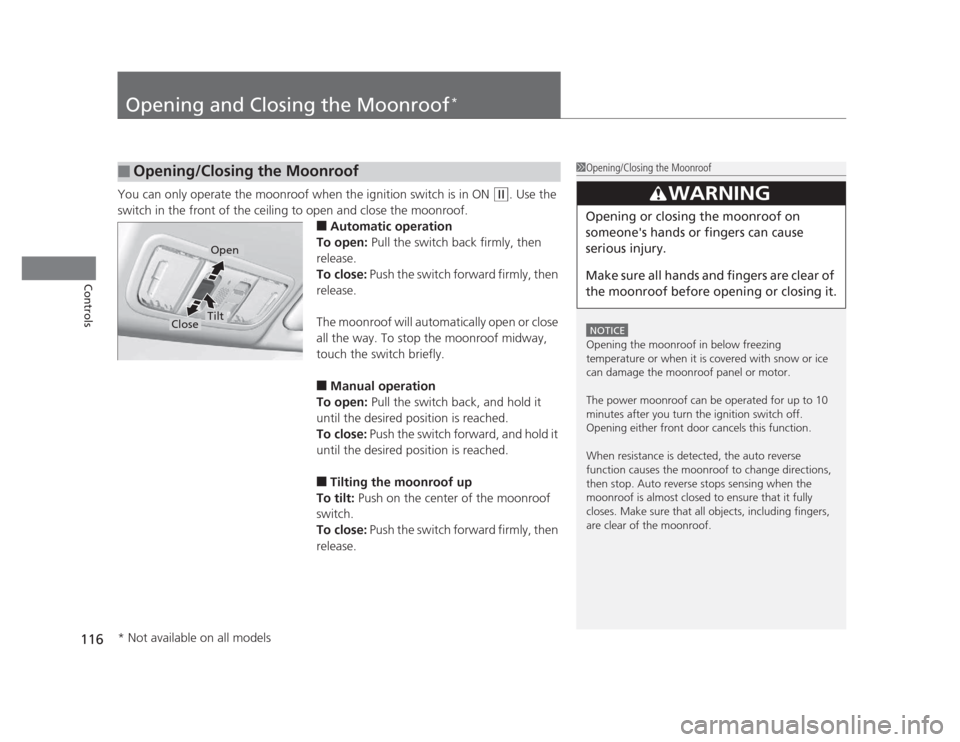
You can only operate the moonroof when the ignition switch is in ON (w
. Use the
switch in the front of the ceiling to open and close the moonroof. ■Automatic operation
To open: Pull the switch back firmly, then
release.
To close: Push the switch forward firmly, then
release.
The moonroof will automatically open or close
all the way. To stop the moonroof midway,
touch the switch briefly. ■ Manual operation
To open: Pull the switch back, and hold it
until the desired position is reached.
To close: Push the switch forward, and hold it
until the desired position is reached. ■ Tilting the moonroof up
To tilt: Push on the center of the moonroof
switch.
To close: Push the switch forward firmly, then
release.
■Opening/Closing the Moonroof1Opening/Closing the Moonroof
NOTICE
Opening the moonroof in below freezing
temperature or when it is covered with snow or ice
can damage the moonroof panel or motor.
The power moonroof can be operated for up to 10
minutes after you turn the ignition switch off.
Opening either front door cancels this function.
When resistance is detected, the auto reverse
function causes the moonroof to change directions,
then stop. Auto reverse stops sensing when the
moonroof is almost closed to ensure that it fully
closes. Make sure that all objects, including fingers,
are clear of the moonroof.
3WARNING
Opening or closing the moonroof on
someone's hands or fingers can cause
serious injury.
Make sure all hands and fingers are clear of
the moonroof before opening or closing it.
Open
CloseTilt
* Not available on all models
Page 119 of 345
118
uuOperating the Switches Around the Steering WheeluTurn Signals
Controls
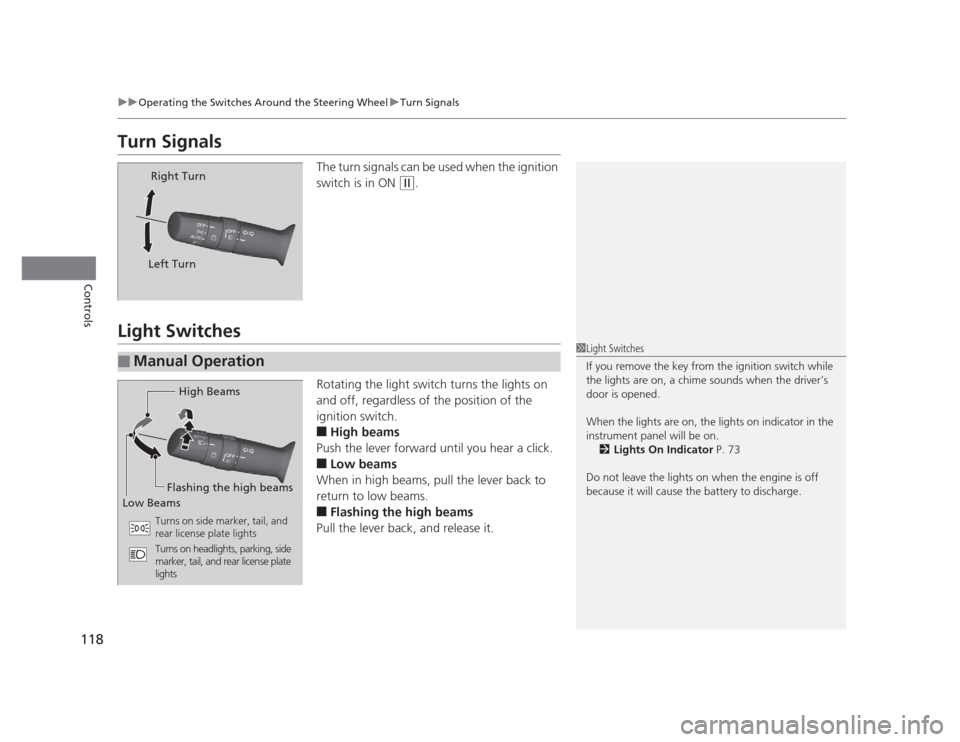
Turn SignalsThe turn signals can be used when the ignition
switch is in ON
(w.
Light Switches
Rotating the light switch turns the lights on
and off, regardless of the position of the
ignition switch. ■High beams
Push the lever forward until you hear a click. ■ Low beams
When in high beams, pull the lever back to
return to low beams.■ Flashing the high beams
Pull the lever back, and release it.
Right Turn
Left Turn
■Manual Operation
1Light Switches
If you remove the key from the ignition switch while
the lights are on, a chime sounds when the driver’s
door is opened.
When the lights are on, the lights on indicator in the
instrument panel will be on. 2 Lights On Indicator P. 73
Do not leave the lights on when the engine is off
because it will cause the battery to discharge.
High Beams
Flashing the high beams
Low Beams
Turns on side marker, tail, and
rear license plate lights
Turns on headlights, parking, side
marker, tail, and rear license plate lights
Page 127 of 345
126
Controls
Adjusting the Seats
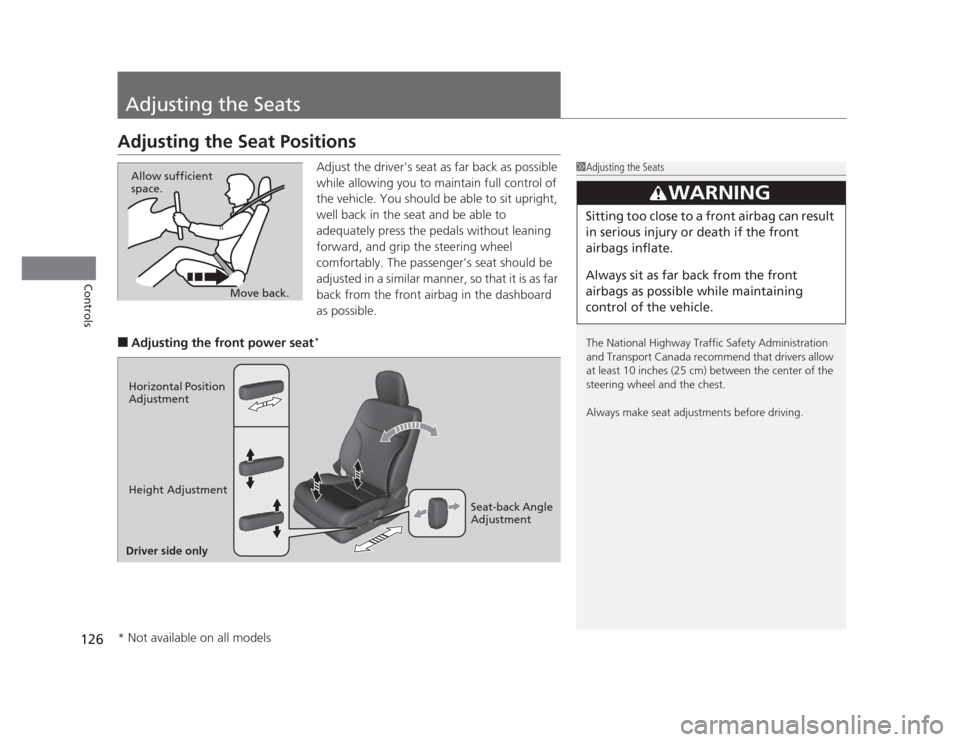
Adjusting the Seat PositionsAdjust the driver's seat as far back as possible
while allowing you to maintain full control of
the vehicle. You should be able to sit upright,
well back in the seat and be able to
adequately press the pedals without leaning
forward, and grip the steering wheel
comfortably. The passenger's seat should be
adjusted in a similar manner, so that it is as far
back from the front airbag in the dashboard as possible.
■ Adjusting the front power seat *
1Adjusting the Seats
The National Highway Traffic Safety Administration
and Transport Canada recommend that drivers allow
at least 10 inches (25 cm) between the center of the
steering wheel and the chest.
Always make seat adjustments before driving.
3WARNING
Sitting too close to a front airbag can result
in serious injury or death if the front
airbags inflate.
Always sit as far back from the front
airbags as possible while maintaining
control of the vehicle.
Move back.
Allow sufficient space.
Horizontal Position
Adjustment
Height Adjustment
Seat-back Angle
Adjustment
Driver side only
* Not available on all models