drive HONDA CIVIC 2012 9.G Owner's Manual
[x] Cancel search | Manufacturer: HONDA, Model Year: 2012, Model line: CIVIC, Model: HONDA CIVIC 2012 9.GPages: 345, PDF Size: 9.02 MB
Page 63 of 345
62
Safe Driving
Exhaust Gas Hazard
Carbon Monoxide Gas
The engine exhaust from this vehicle contains carbon monoxide, a colorless,
odorless, and highly toxic gas. As long as you properly maintain your vehicle, carbon
monoxide gas will not get into the interior. ■Have the exhaust system inspected for leaks whenever
• The exhaust system is making an unusual noise.
• The exhaust system may have been damaged.
• The vehicle is raised for an oil change.
When you operate a vehicle with the trunk open, airflow can pull exhaust gas into
the interior and create a hazardous condition. If you must drive with the trunk open,
open all the windows and set the heating and cooling *
system as shown below.
1. Select the fresh air mode.
2. Select the mode.
3. Set the fan speed to high.
4. Set the temperature control to a comfortable setting.
Adjust the heating and cooling *
system in the same manner if you sit in your parked
vehicle with the engine running.
1Carbon Monoxide Gas
An enclosed area such as a garage can quickly fill up with carbon monoxide gas.
Do not run the engine with the garage door closed.
Even when the garage door is open, drive out of the
garage immediately after starting the engine.
3WARNING
Carbon monoxide gas is toxic.
Breathing it can cause unconsciousness and
even kill you.
Avoid any enclosed areas or activities that
expose you to carbon monoxide.
* Not available on all models
Page 67 of 345
66
Instrument Panel
Indicators
IndicatorNameOn/BlinkingExplanationMessage*
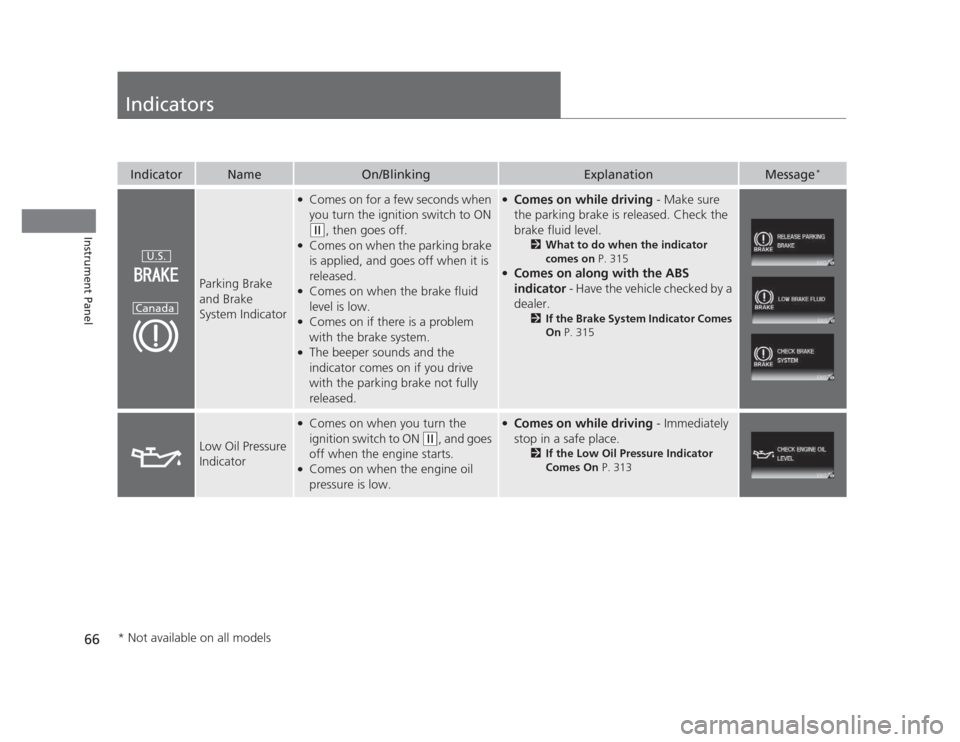
Parking Brake and Brake
System Indicator
●
Comes on for a few seconds when
you turn the ignition switch to ON
(w , then goes off.
● Comes on when the parking brake
is applied, and goes off when it is released.
● Comes on when the brake fluid
level is low.
● Comes on if there is a problem
with the brake system.
● The beeper sounds and the
indicator comes on if you drive
with the parking brake not fully released.
●
Comes on while driving - Make sure
the parking brake is released. Check the
brake fluid level. 2What to do when the indicator
comes on P. 315
● Comes on along with the ABS
indicator - Have the vehicle checked by a
dealer. 2If the Brake System Indicator Comes On P. 315
Low Oil Pressure
Indicator
●
Comes on when you turn the
ignition switch to ON
(w , and goes
off when the engine starts.
● Comes on when the engine oil
pressure is low.
● Comes on while driving - Immediately
stop in a safe place. 2If the Low Oil Pressure Indicator
Comes On P. 313
U.S.
Canada
* Not available on all models
Page 70 of 345
69
uuIndicatorsu
Continued
Instrument Panel
IndicatorNameOn/BlinkingExplanationMessage*
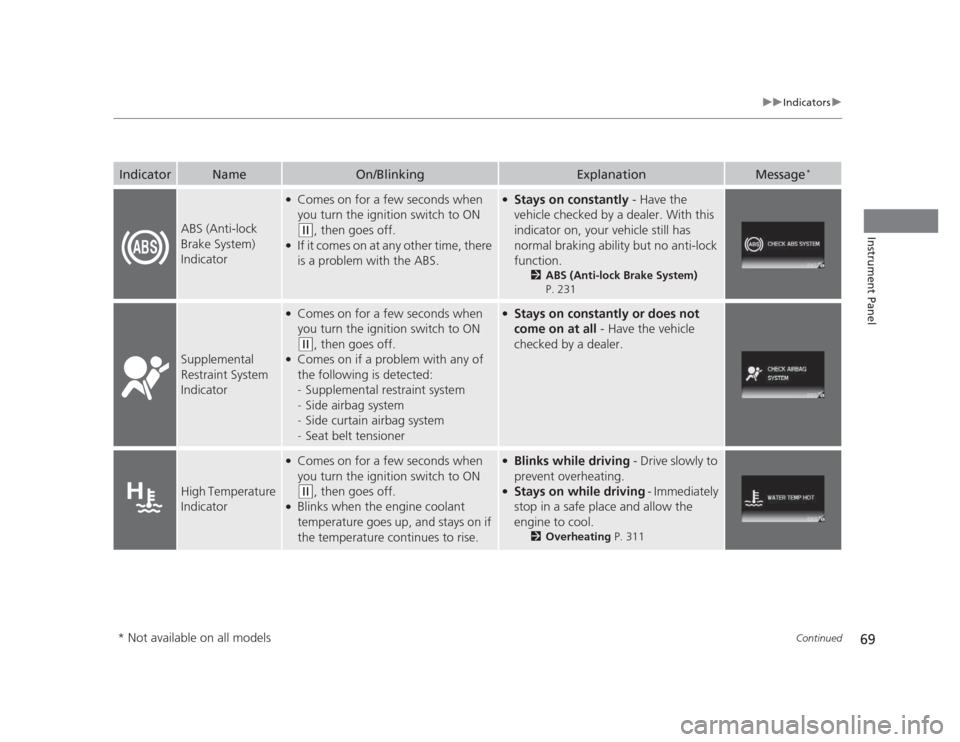
ABS (Anti-lock
Brake System)
Indicator
●
Comes on for a few seconds when
you turn the ignition switch to ON
(w , then goes off.
● If it comes on at any other time, there
is a problem with the ABS.
● Stays on constantly - Have the
vehicle checked by a dealer. With this
indicator on, your vehicle still has
normal braking ability but no anti-lock
function. 2ABS (Anti-lock Brake System)
P. 231
Supplemental
Restraint System
Indicator
● Comes on for a few seconds when
you turn the ignition switch to ON
(w , then goes off.
● Comes on if a problem with any of
the following is detected:-Supplemental restraint system
- Side airbag system
- Side curtain airbag system
- Seat belt tensioner
●
Stays on constantly or does not
come on at all - Have the vehicle
checked by a dealer.
High Temperature
Indicator
● Comes on for a few seconds when
you turn the ignition switch to ON
(w , then goes off.
● Blinks when the engine coolant
temperature goes up, and stays on if
the temperature continues to rise.
● Blinks while driving - Drive slowly to
prevent overheating.
● Stays on while driving - Immediately
stop in a safe place and allow the
engine to cool. 2Overheating P. 311
* Not available on all models
Page 74 of 345
73
uuIndicatorsu
Continued
Instrument Panel
IndicatorNameOn/BlinkingExplanationMessage*
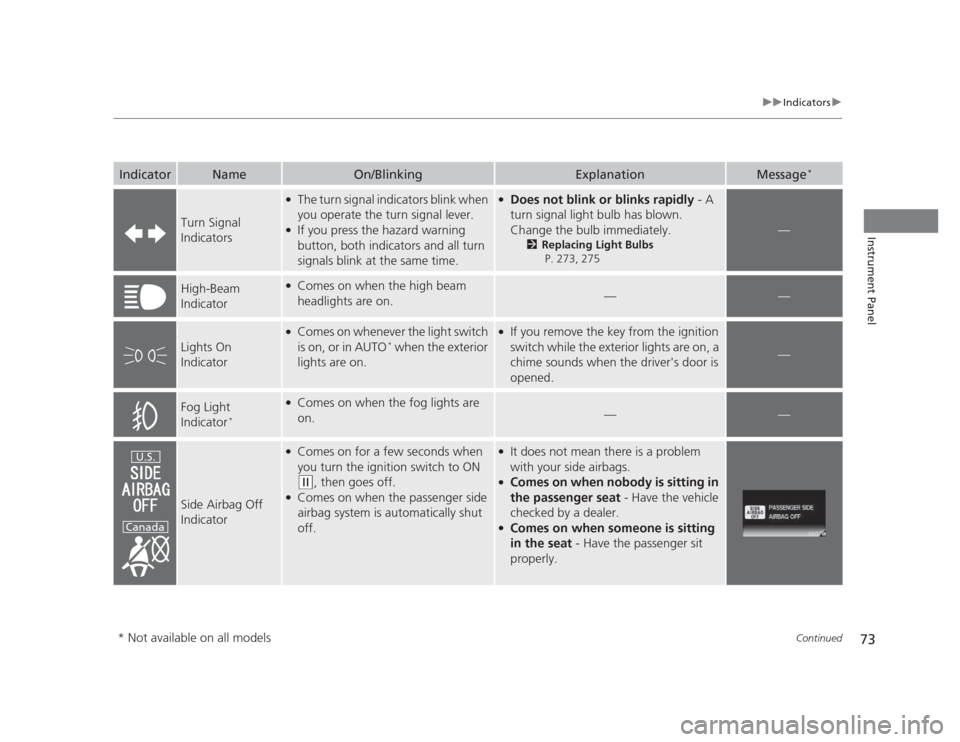
Turn Signal
Indicators
●
The turn signal indicators blink when
you operate the turn signal lever.
● If you press the hazard warning
button, both indicators and all turn
signals blink at the same time.● Does not blink or blinks rapidly - A
turn signal light bulb has blown.
Change the bulb immediately. 2Replacing Light Bulbs
P. 273, 275
—
High-Beam
Indicator●
Comes on when the high beam
headlights are on.
——
Lights On
Indicator
●Comes on whenever the light switch
is on, or in AUTO *
when the exterior
lights are on.● If you remove the key from the ignition
switch while the exterior lights are on, a
chime sounds when the driver's door is
opened.
—
Fog Light
Indicator *●
Comes on when the fog lights are
on.
——
Side Airbag Off
Indicator
●
Comes on for a few seconds when
you turn the ignition switch to ON
(w , then goes off.
● Comes on when the passenger side
airbag system is automatically shut
off.
● It does not mean there is a problem
with your side airbags.
● Comes on when nobody is sitting in
the passenger seat - Have the vehicle
checked by a dealer.
● Comes on when someone is sitting
in the seat - Have the passenger sit
properly.U.S.
Canada
* Not available on all models
Page 78 of 345
77
uuIndicatorsuMulti-Information Display Warning and Information Messages*
Instrument Panel
MessageConditionExplanation
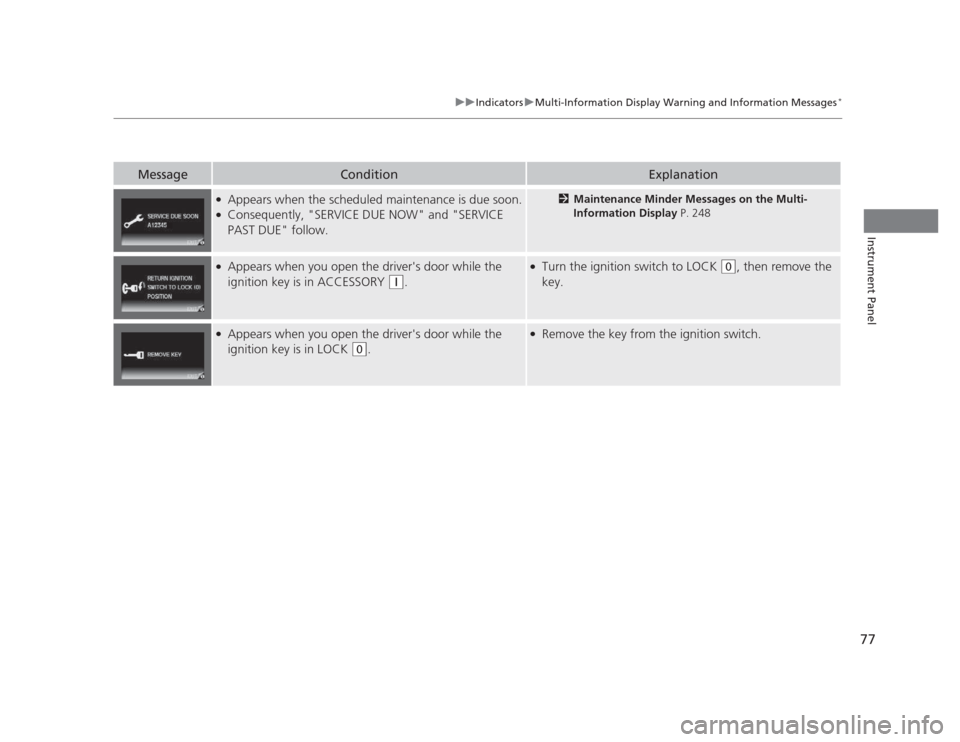
●
Appears when the scheduled maintenance is due soon.
● Consequently, "SERVICE DUE NOW" and "SERVICE PAST DUE" follow.2 Maintenance Minder Messages on the Multi-
Information Display P. 248
●
Appears when you open the driver's door while the ignition key is in ACCESSORY
(q .
●
Turn the ignition switch to LOCK (0 , then remove the
key.
● Appears when you open the driver's door while the
ignition key is in LOCK
(0 .
●
Remove the key from the ignition switch.
Page 81 of 345
80
uuGauges and DisplaysuInformation Display*
Instrument Panel
Information Display *
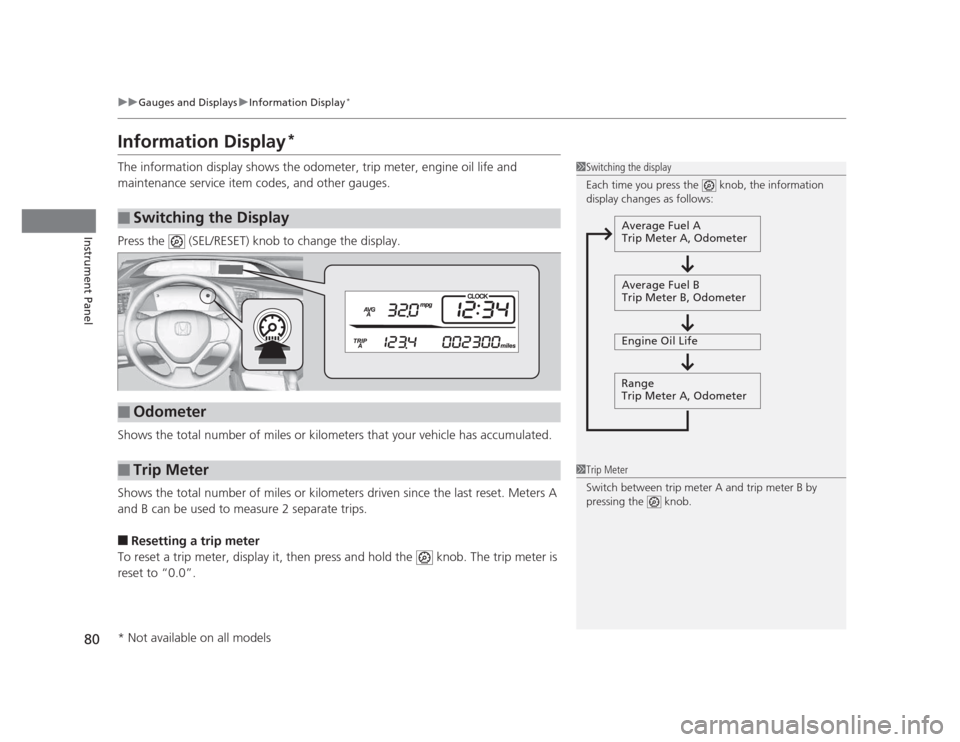
The information display shows the odometer, trip meter, engine oil life and
maintenance service item codes, and other gauges.
Press the (SEL/RESET) knob to change the display.
Shows the total number of miles or kilometers that your vehicle has accumulated.
Shows the total number of miles or kilometers driven since the last reset. Meters A
and B can be used to measure 2 separate trips. ■ Resetting a trip meter
To reset a trip meter, display it, then press and hold the knob. The trip meter is reset to “0.0”.
■Switching the Display
1Switching the display
Each time you press the knob, the information
display changes as follows:
Average Fuel A
Trip Meter A, Odometer
Average Fuel B
Trip Meter B, Odometer
Engine Oil Life
Range
Trip Meter A, Odometer
■Odometer
■Trip Meter1Trip Meter
Switch between trip meter A and trip meter B by
pressing the knob.
* Not available on all models
Page 84 of 345
Continued83
uuGauges and DisplaysuMulti-Information Display*
Instrument Panel
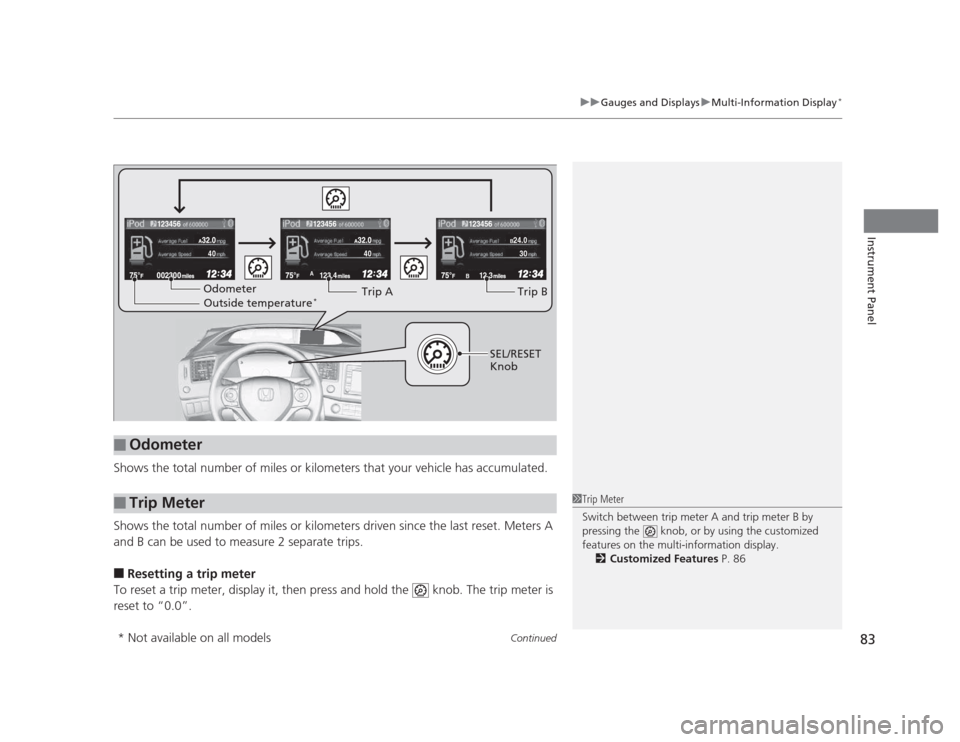
Shows the total number of miles or kilometers that your vehicle has accumulated.
Shows the total number of miles or kilometers driven since the last reset. Meters A
and B can be used to measure 2 separate trips. ■ Resetting a trip meter
To reset a trip meter, display it, then press and hold the knob. The trip meter is
reset to “0.0”.
■Odometer
■Trip Meter
123.4A12.3B
123456123456123456
B24.0
304040
Odometer Outside temperature *Trip ATrip B
SEL/RESET
Knob
1Trip Meter
Switch between trip meter A and trip meter B by
pressing the knob, or by using the customized
features on the multi-information display.
2 Customized Features P. 86
* Not available on all models
Page 92 of 345
91
uuGauges and DisplaysuMulti-Information Display*
Continued
Instrument Panel
*1: Not available on all models
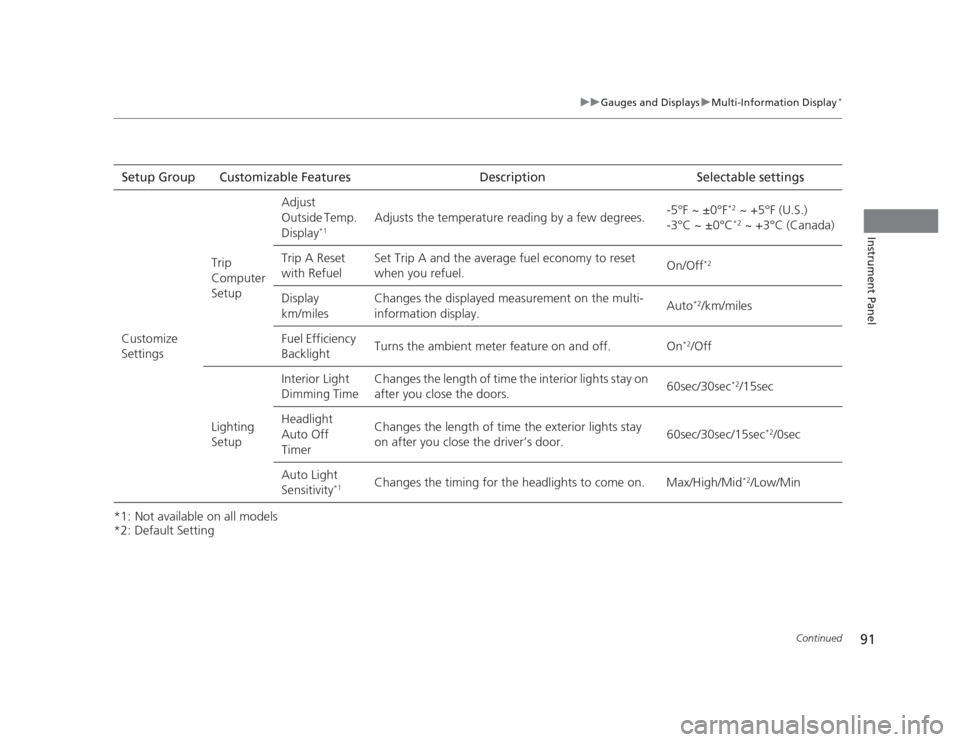
*2: Default SettingSetup Group Customizable Features Description Selectable settings
Customize
Settings Trip Computer SetupAdjust
Outside Temp.
Display
*1 Adjusts the temperature reading by a few degrees.
-5°F ~ ±0°F
*2
~ +5°F (U.S.)
-3°C ~ ±0°C *2
~ +3°C (Canada)
Trip A Reset
with Refuel Set Trip A and the average fuel economy to reset
when you refuel.
On/Off
*2
Display km/miles Changes the displayed measurement on the multi-information display.
Auto
*2
/km/miles
Fuel Efficiency
Backlight Turns the ambient meter feature on and off. On
*2
/Off
Lighting Setup Interior Light
Dimming Time
Changes the length of time the interior lights stay on
after you close the doors.
60sec/30sec
*2
/15sec
Headlight Auto Off
Timer Changes the length of time the exterior lights stay
on after you close the driver’s door.
60sec/30sec/15sec
*2
/0sec
Auto Light Sensitivity *1Changes the timing for the headlights to come on. Max/High/Mid
*2
/Low/Min
Page 93 of 345
92
uuGauges and DisplaysuMulti-Information Display*
Instrument Panel
*1:Default Setting
*2:Default Setting for automatic transmission
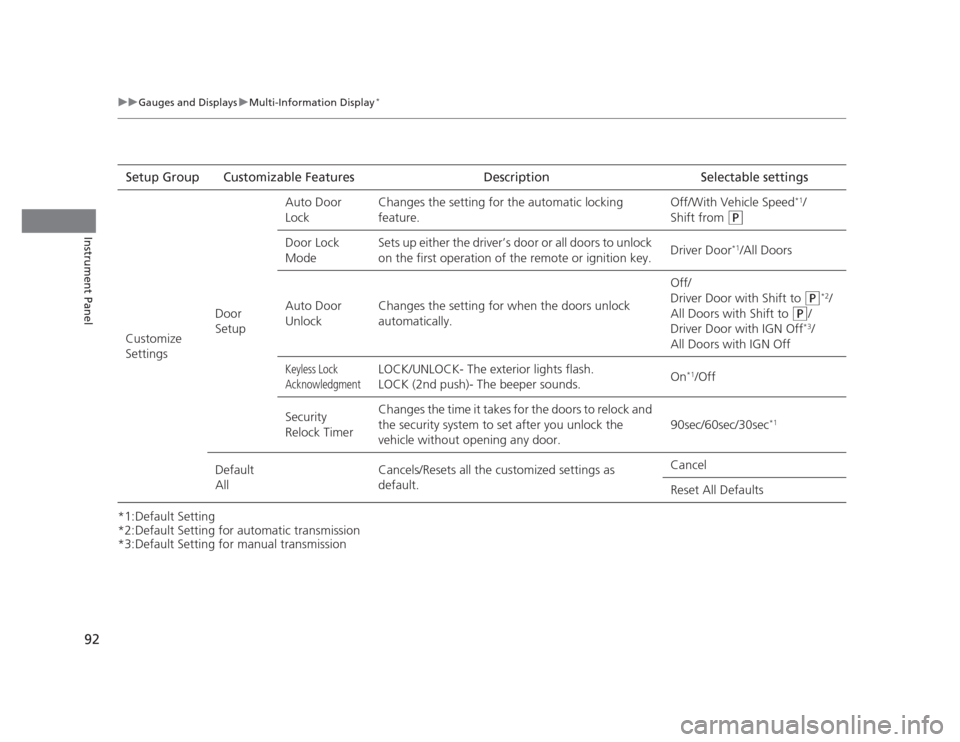
*3:Default Setting for manual transmissionSetup Group Customizable Features Description Selectable settings
Customize Settings Door SetupAuto Door
Lock
Changes the setting for the automatic locking feature. Off/With Vehicle Speed
*1
/
Shift from
(P
Door Lock
Mode Sets up either the driver’s door or all doors to unlock
on the first operation of the remote or ignition key.
Driver Door
*1
/All Doors
Auto Door
Unlock Changes the setting for when the doors unlock
automatically. Off/
Driver Door with Shift to
(P
*2
/
All Doors with Shift to
(P /
Driver Door with IGN Off *3
/
All Doors with IGN Off
Keyless Lock
AcknowledgmentLOCK/UNLOCK- The exterior lights flash.
LOCK (2nd push)- The beeper sounds. On
*1
/Off
Security
Relock Timer Changes the time it takes for the doors to relock and
the security system to set after you unlock the
vehicle without opening any door.
90sec/60sec/30sec
*1
Default All Cancels/Resets all the customized settings as default. Cancel Reset All Defaults
Page 94 of 345
Continued93
uuGauges and DisplaysuMulti-Information Display*
Instrument Panel
■
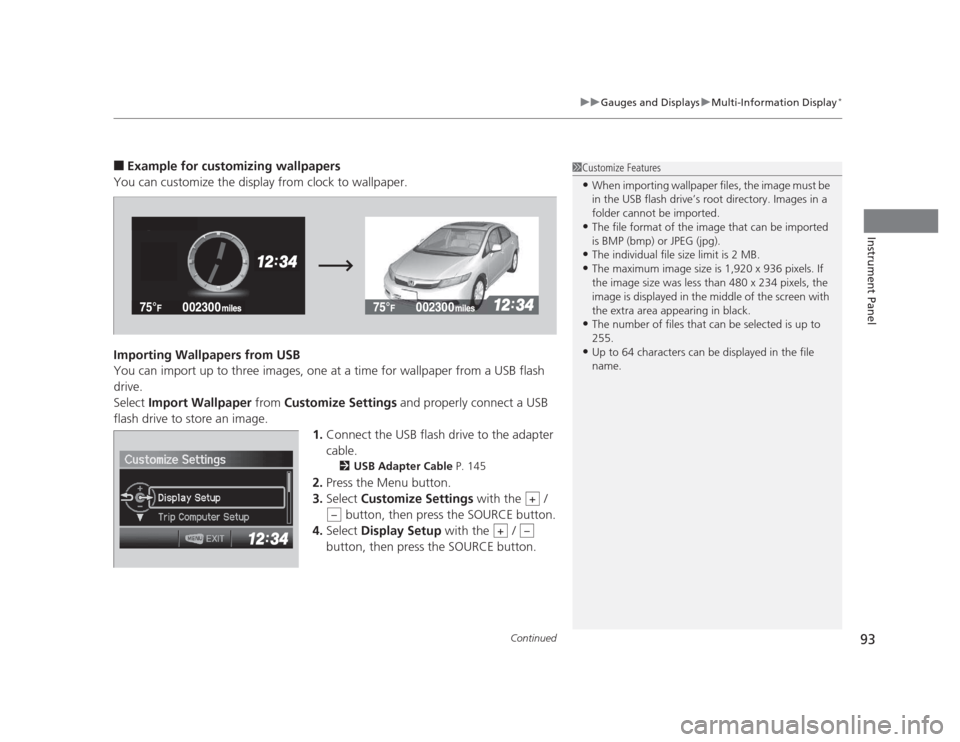
Example for customizing wallpapers
You can customize the display from clock to wallpaper.
Importing Wallpapers from USB
You can import up to three images, one at a time for wallpaper from a USB flash drive.Select Import Wallpaper from Customize Settings and properly connect a USB
flash drive to store an image.
1.Connect the USB flash drive to the adapter
cable.
2 USB Adapter Cable P. 145
2. Press the Menu button.
3. Select Customize Settings with the /
button, then press the SOURCE button.
4. Select Display Setup with the /
button, then press the SOURCE button.1Customize Features • When importing wallpaper files, the image must be
in the USB flash drive’s root directory. Images in a
folder cannot be imported.
• The file format of the image that can be imported
is BMP (bmp) or JPEG (jpg).
• The individual file size limit is 2 MB.
• The maximum image size is 1,920 x 936 pixels. If
the image size was less than 480 x 234 pixels, the
image is displayed in the middle of the screen with
the extra area appearing in black.
• The number of files that can be selected is up to 255.
• Up to 64 characters can be displayed in the file name.
+
–
+–