battery HONDA CIVIC 2013 9.G User Guide
[x] Cancel search | Manufacturer: HONDA, Model Year: 2013, Model line: CIVIC, Model: HONDA CIVIC 2013 9.GPages: 367, PDF Size: 8.43 MB
Page 142 of 367
141
uuInterior Lights/Interior Convenience Items uInterior Convenience Items
Controls
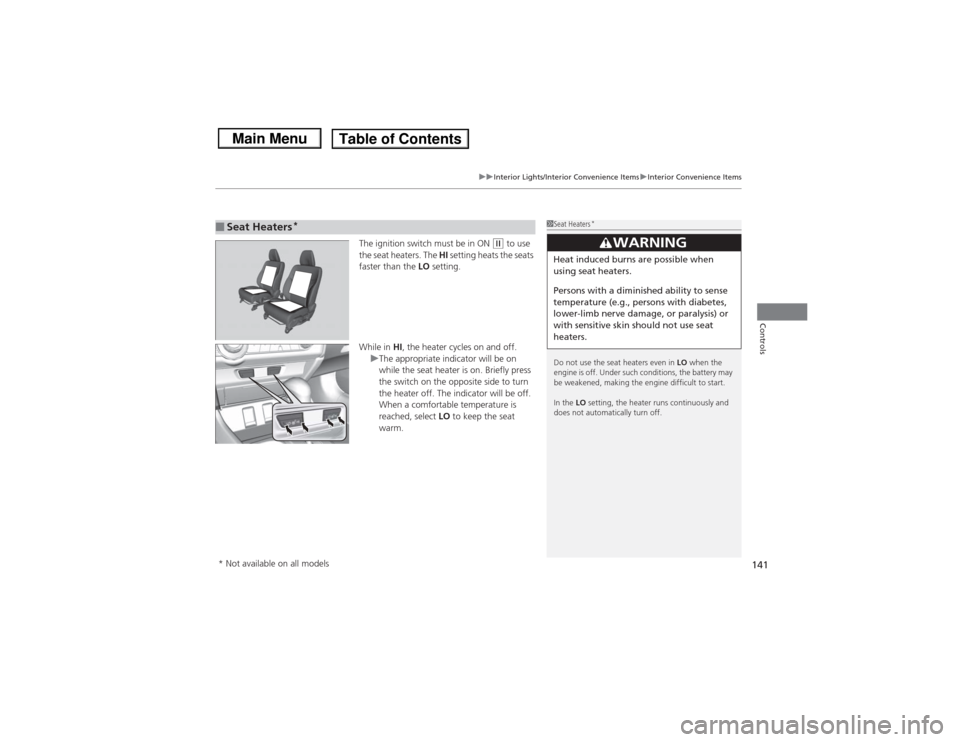
The ignition switch must be in ON
(w to use
the seat heaters. The HI setting heats the seats
faster than the LO setting.
While in HI, the heater cycles on and off.
u The appropriate indicator will be on
while the seat heater is on. Briefly press
the switch on the opposite side to turn
the heater off. The indicator will be off.
When a comfortable temperature is
reached, select LO to keep the seat
warm.
■Seat Heaters
*
1 Seat Heaters
*
Do not use the seat heaters even in LO when the
engine is off. Under such conditions, the battery may
be weakened, making the engine difficult to start.
In the LO setting, the heater runs continuously and
does not automatically turn off.
3
WARNING
Heat induced burns are possible when
using seat heaters.
Persons with a diminish ed ability to sense
temperature (e.g., persons with diabetes,
lower-limb nerve damage, or paralysis) or
with sensitive skin should not use seat
heaters.
* Not available on all models
Page 153 of 367
152
uuAudio System uAudio System Theft Protection
*
Features
Audio System Theft Protection
*
The audio system is disabled when it is disconnected from the power source, such as
when the battery is disconnected or goes dead.■Reactivating the audio system
1. Turn the ignition switch to ON
(w, and turn on the audio system.
u If you turn the ignition switch to ACCESSORY
(q, you will be requested to
enter the audio security code. See step 3.
2. Press and hold the power button again for more than two seconds.
u The audio system is reactivated when the system’s control unit recognizes that
the system is in your vehicle.
If the control unit fails to recognize, ENTER CODE appears on the i-MID.
3. Enter the audio security code using the preset buttons. If you enter an incorrect
digit, continue to the last digit, then try again. If you do not enter code correctly
after 10 tries, leave the system for one hour before trying again, or visit a dealer
to have the system reset.
■Entering the audio security code
ENTER CODE appears on the display when the power is reconnected.
1. Turn on the audio system.
2. Enter the audio security code using the preset buttons. If you enter an incorrect
digit, continue to the last digit, then try again. If you do not enter the code
correctly after 10 tries, leave the system for one hour before trying again, or visit
a dealer to have the system reset.
1Audio System Theft Protection
*
Find the audio system's security code and serial
number label in your owner’s manual kit.
We recommend that you write down the serial
number in this owner’s manual.
Do not store the label in your vehicle. If you lose the
label, you must first retrieve the serial number, and
then obtain the code.
You can find out about your serial number and
security code from a dealer.
You can register the security code at Owner Link
(owners.honda.com. ), and find information on how
to retrieve the serial number and obtain the code at
radio-navicode.honda.com .U.S. models
Models with i-MIDModels with information display* Not available on all models
Page 183 of 367
uuBluetooth® HandsFreeLink ®
*uUsing HFL
182Features
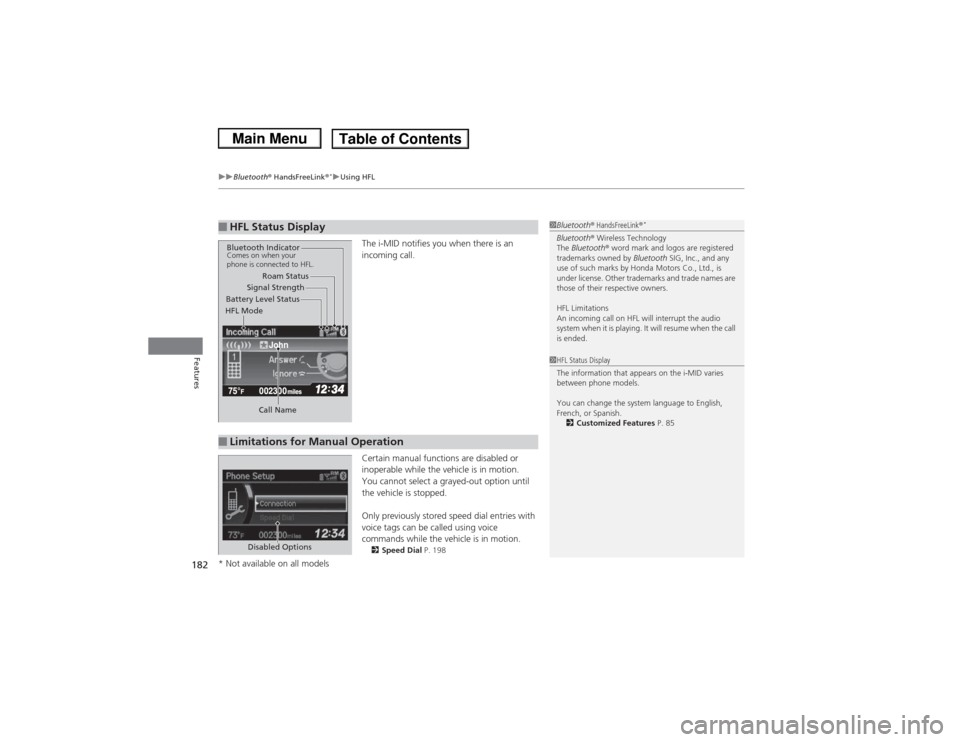
The i-MID notifies you when there is an
incoming call.
Certain manual functions are disabled or
inoperable while the vehicle is in motion.
You cannot select a grayed-out option until
the vehicle is stopped.
Only previously stored speed dial entries with
voice tags can be called using voice
commands while the vehicle is in motion.2 Speed Dial P. 198
■HFL Status Display
1Bluetooth ® HandsFreeLink ®
*
Bluetooth® Wireless Technology
The Bluetooth ® word mark and logos are registered
trademarks owned by Bluetooth SIG, Inc., and any
use of such marks by Honda Motors Co., Ltd., is
under license. Other trademarks and trade names are
those of their respective owners.
HFL Limitations
An incoming call on HFL will interrupt the audio
system when it is playing. It will resume when the call
is ended.
John
Signal Strength
HFL Mode Battery Level Status Roam Status
Call Name
Bluetooth IndicatorComes on when your
phone is connected to HFL.■Limitations for Manual Operation
1 HFL Status Display
The information that appears on the i-MID varies
between phone models.
You can change the system language to English,
French, or Spanish.
2 Customized Features P. 85
Disabled Options
* Not available on all models
Page 189 of 367
uuBluetooth® HandsFreeLink ®
*uHFL Menus
188Features
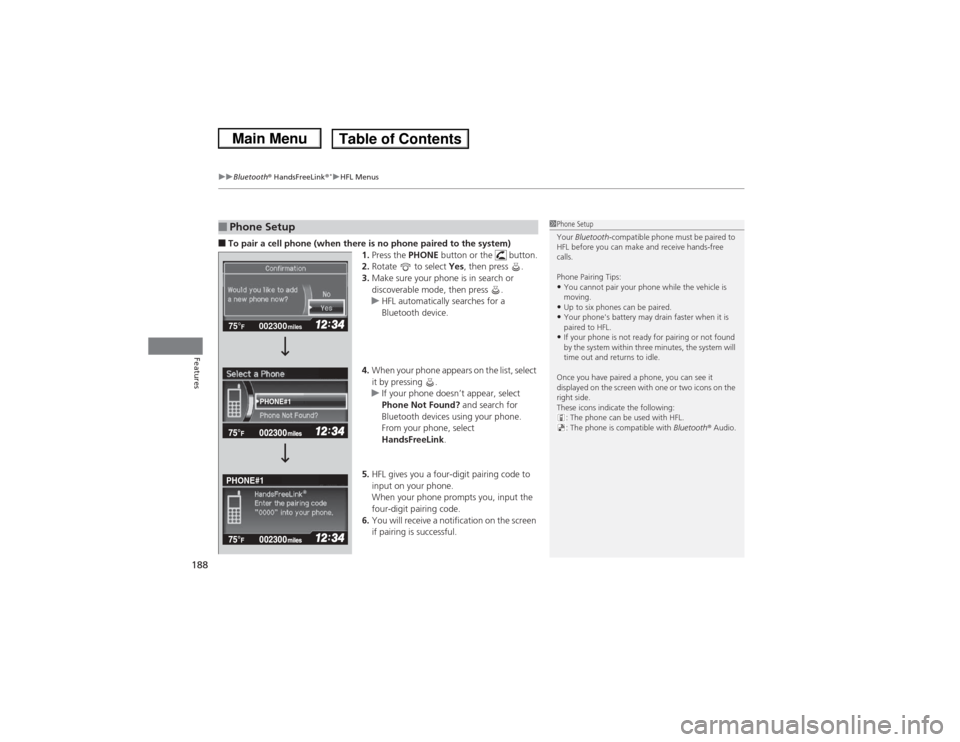
■To pair a cell phone (when there is no phone paired to the system)
1.Press the PHONE button or the button.
2. Rotate to select Yes, then press .
3. Make sure your phone is in search or
discoverable mode, then press .
u HFL automatically searches for a
Bluetooth device.
4. When your phone appears on the list, select
it by pressing .
u If your phone doesn’t appear, select
Phone Not Found? and search for
Bluetooth devices using your phone.
From your phone, select
HandsFreeLink .
5. HFL gives you a four-digit pairing code to
input on your phone.
When your phone prompts you, input the
four-digit pairing code.
6. You will receive a notification on the screen
if pairing is successful.■Phone Setup
1Phone Setup
Your Bluetooth -compatible phone must be paired to
HFL before you can make and receive hands-free
calls.
Phone Pairing Tips:•You cannot pair your phone while the vehicle is
moving.•Up to six phones can be paired.•Your phone's battery may drain faster when it is
paired to HFL.•If your phone is not ready for pairing or not found
by the system within three minutes, the system will
time out and returns to idle.
Once you have paired a phone, you can see it
displayed on the screen with one or two icons on the
right side.
These icons indicate the following: : The phone can be used with HFL.
: The phone is compatible with Bluetooth® Audio.
002300
75°
F miles
PHONE#1
PHONE#1
Page 224 of 367
223
Continued
Driving
When DrivingStarting the Engine
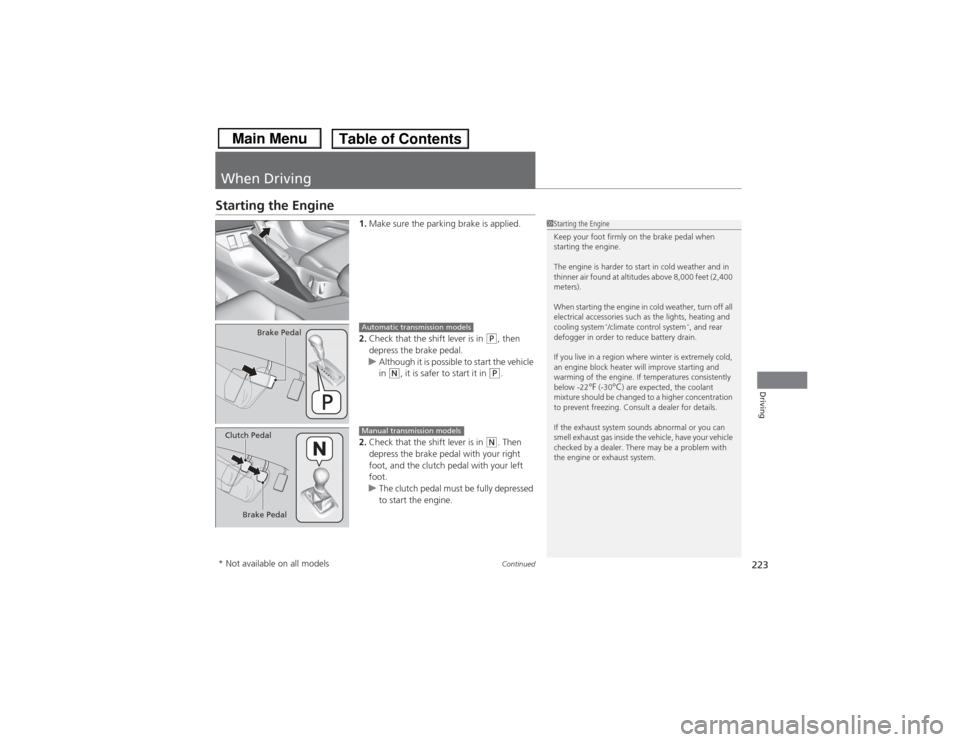
1.Make sure the parking brake is applied.
2. Check that the shift lever is in
(P, then
depress the brake pedal.
u Although it is possible to start the vehicle
in
(N, it is safer to start it in
(P.
2. Check that the shift lever is in
(N. Then
depress the brake pedal with your right
foot, and the clutch pedal with your left
foot.
u The clutch pedal must be fully depressed
to start the engine.
1Starting the Engine
Keep your foot firmly on the brake pedal when
starting the engine.
The engine is harder to start in cold weather and in
thinner air found at altitudes above 8,000 feet (2,400
meters).
When starting the engine in cold weather, turn off all
electrical accessories such as the lights, heating and
cooling system
*/climate control system
*, and rear
defogger in order to reduce battery drain.
If you live in a region where winter is extremely cold,
an engine block heater will improve starting and
warming of the engine. If temperatures consistently
below -22
°F (-30
°C) are expected, the coolant
mixture should be changed to a higher concentration
to prevent freezing. Consult a dealer for details.
If the exhaust system sounds abnormal or you can
smell exhaust gas inside the vehicle, have your vehicle
checked by a dealer. There may be a problem with
the engine or exhaust system.
Brake Pedal
Automatic transmission models
Brake Pedal
Clutch Pedal
Manual transmission models
* Not available on all models
Page 254 of 367
253
Maintenance
This chapter discusses basic maintenance.
Before Performing MaintenanceInspection and Maintenance ............ 254Safety When Performing Maintenance..... 255Parts and Fluids Used in Maintenance Service ........................................... 256
Maintenance Minder
TM..................... 257
Maintenance Under the Hood
Maintenance Items Under the Hood ..... 265Opening the Hood ........................... 267
Recommended Engine Oil ................ 268
Oil Check ......................................... 269
Adding Engine Oil ............................ 271Changing the Engine Oil and Oil Filter ..... 272
Engine Coolant ................................ 275
Transmission Fluid ............................ 277
Brake/Clutch Fluid ............................ 280
Refilling Window Washer Fluid......... 281
Replacing Light Bulbs ....................... 282Checking and Maintaining Wiper
Blades .......................................... 295Checking and Maintaining Tires
Checking Tires ................................. 297Tire and Loading Information Label ...... 298Tire Labeling .................................... 298DOT Tire Quality Grading (U.S. Vehicles)....... 300Wear Indicators................................ 302 Tire Service Life ................................ 302
Tire and Wheel Replacement ........... 303
Tire Rotation .................................... 304
Winter Tires ..................................... 305
Battery ............................................... 306
Remote Transmitter Care
*
Replacing the Button Battery ........... 307
Heating and Cooling System
*/Climate
Control System
* Maintenance ....... 308
Cleaning
Interior Care .................................... 309
Exterior Care.................................... 311
* Not available on all models
Page 256 of 367
255
uuBefore Performing Maintenance uSafety When Performing Maintenance
Maintenance
Safety When Performing MaintenanceSome of the most important safety precautions are given here.
However, we cannot warn you of every conceivable hazard that can arise in
performing maintenance. Only you can decide whether or not you should perform
a given task.
• To reduce the possibility of fire or explosion, keep cigarettes, sparks, and flames
away from the battery and all fuel related parts.
• Never leave rags, towels, or other flammable objects under the hood.
u Heat from the engine and exhaust can ignite them causing a fire.
• To clean parts, use a commercially available degreaser or parts cleaner, not
gasoline.
• Wear eye protection and protective clothing when working with the battery or
compressed air.
• Engine exhaust contains carbon monoxide, which is poisonous and can kill you.
u Only operate the engine if there is sufficient ventilation.
• The vehicle must be in a stationary condition.
u Make sure your vehicle is parked on level ground, the parking brake is set, and
the engine is off.
• Be aware that hot parts can burn you.
u Make sure to let the engine and exhaust system cool thoroughly before
touching vehicle parts.
• Be aware that moving parts can injure you.
u Do not start the engine unless instructed, and keep your hands and limbs away
from moving parts.■Maintenance Safety■Vehicle Safety
1Safety When Performing Maintenance
3
WARNING
Improperly maintaining this vehicle or
failing to correct a problem before driving
can cause a crash in which you can be
seriously hurt or killed.
Always follow the inspection and
maintenance recommendations according
to the schedules in this owner's manual.
3
WARNING
Failure to properly follow maintenance
instructions and precautions can cause you
to be seriously hurt or killed.
Always follow the procedures and
precautions in this owner's manual.
Page 266 of 367
265
Continued
Maintenance
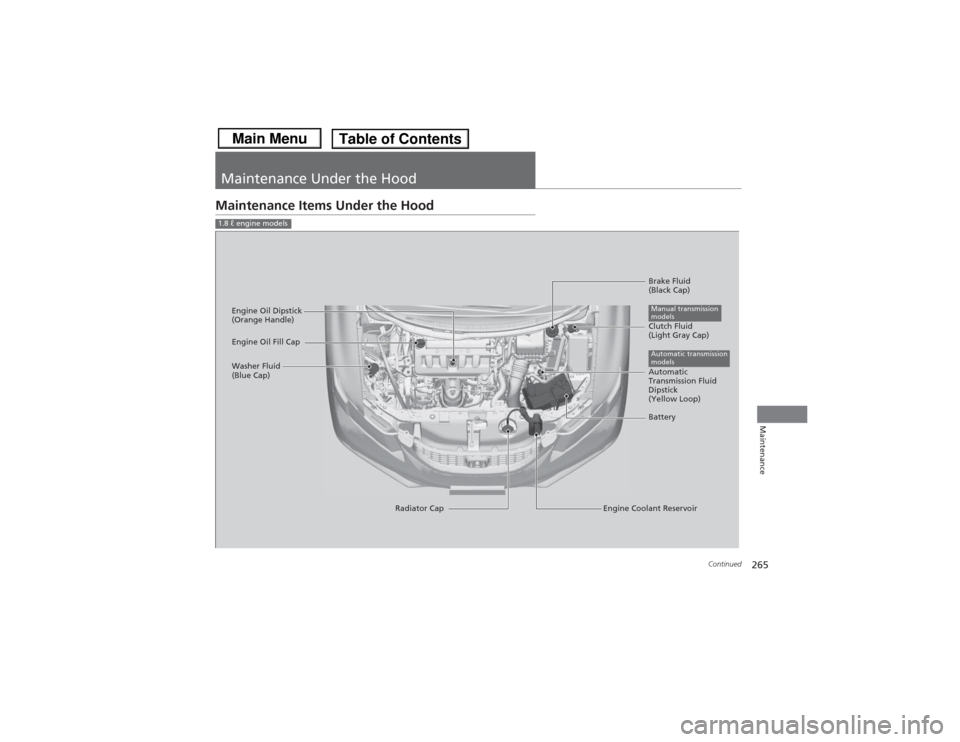
Maintenance Under the HoodMaintenance Items Under the Hood1.8 ℓ engine models
Brake Fluid
(Black Cap)
Engine Coolant Reservoir
Radiator Cap
Washer Fluid
(Blue Cap)
Engine Oil Dipstick
(Orange Handle)
Clutch Fluid
(Light Gray Cap)
Engine Oil Fill CapAutomatic transmission
modelsBatteryManual transmission
modelsAutomatic
Transmission Fluid
Dipstick
(Yellow Loop)
Page 267 of 367
266
uuMaintenance Under the Hood uMaintenance Items Under the Hood
Maintenance
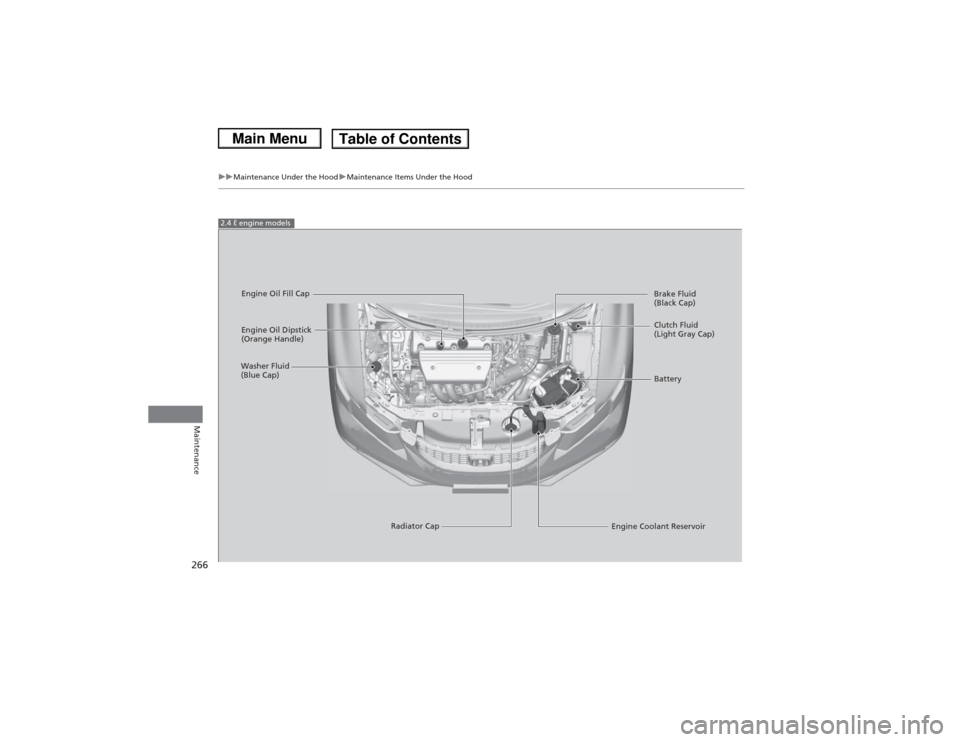
2.4 ℓ engine models
Engine Oil Dipstick
(Orange Handle)
Washer Fluid
(Blue Cap)
Engine Coolant Reservoir
Radiator Cap Brake Fluid
(Black Cap)
Engine Oil Fill Cap
Clutch Fluid
(Light Gray Cap)
Battery
Page 307 of 367
306Maintenance
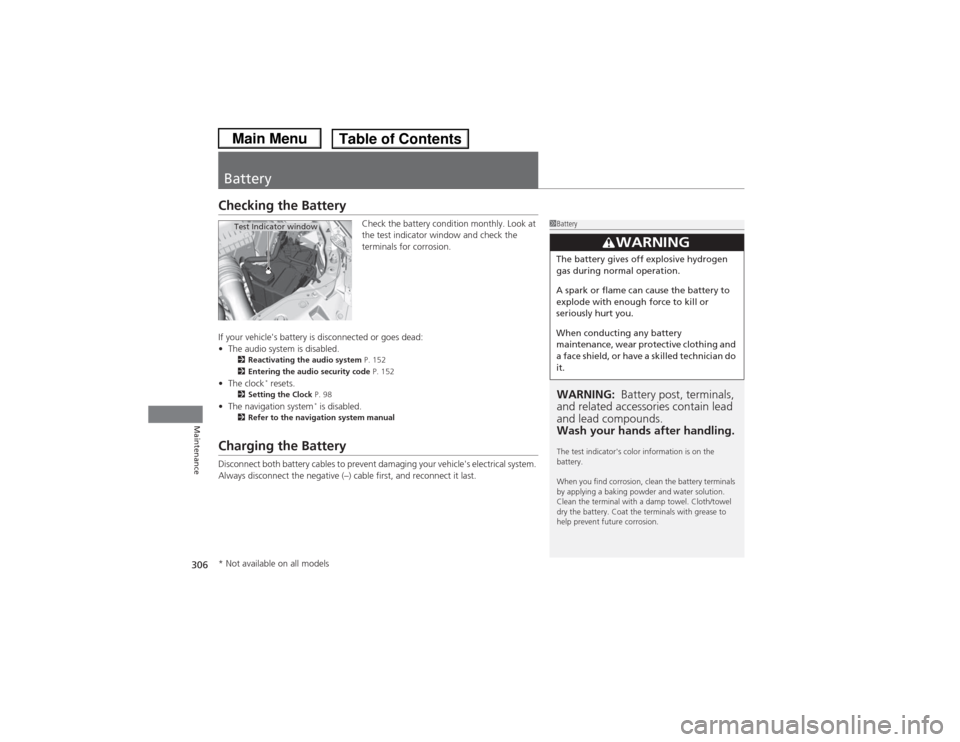
BatteryChecking the Battery
Check the battery condition monthly. Look at
the test indicator window and check the
terminals for corrosion.
If your vehicle's battery is disconnected or goes dead:
• The audio system is disabled.
2 Reactivating the audio system P. 152
2 Entering the audio security code P. 152
•The clock
* resets.
2 Setting the Clock P. 98
•The navigation system
* is disabled.
2 Refer to the navigation system manual
Charging the BatteryDisconnect both battery cables to prevent damaging your vehicle's electrical system.
Always disconnect the negative (–) cable first, and reconnect it last.
1BatteryWARNING: Battery post, terminals,
and related accessories contain lead
and lead compounds.
Wash your hands after handling.The test indicator's color information is on the
battery.
When you find corrosion, clean the battery terminals
by applying a baking powder and water solution.
Clean the terminal with a damp towel. Cloth/towel
dry the battery. Coat the terminals with grease to
help prevent future corrosion.
3
WARNING
The battery gives off explosive hydrogen
gas during normal operation.
A spark or flame can cause the battery to
explode with enough force to kill or
seriously hurt you.
When conducting any battery
maintenance, wear protective clothing and
a face shield, or have a skilled technician do
it.
Test Indicator window
* Not available on all models