display HONDA CIVIC 2013 9.G User Guide
[x] Cancel search | Manufacturer: HONDA, Model Year: 2013, Model line: CIVIC, Model: HONDA CIVIC 2013 9.GPages: 367, PDF Size: 8.43 MB
Page 77 of 367
76
uuIndicators uintelligent Multi-Information Display (i-MID) Warning and Information Messages
*
Instrument Panel
Message
Condition
Explanation
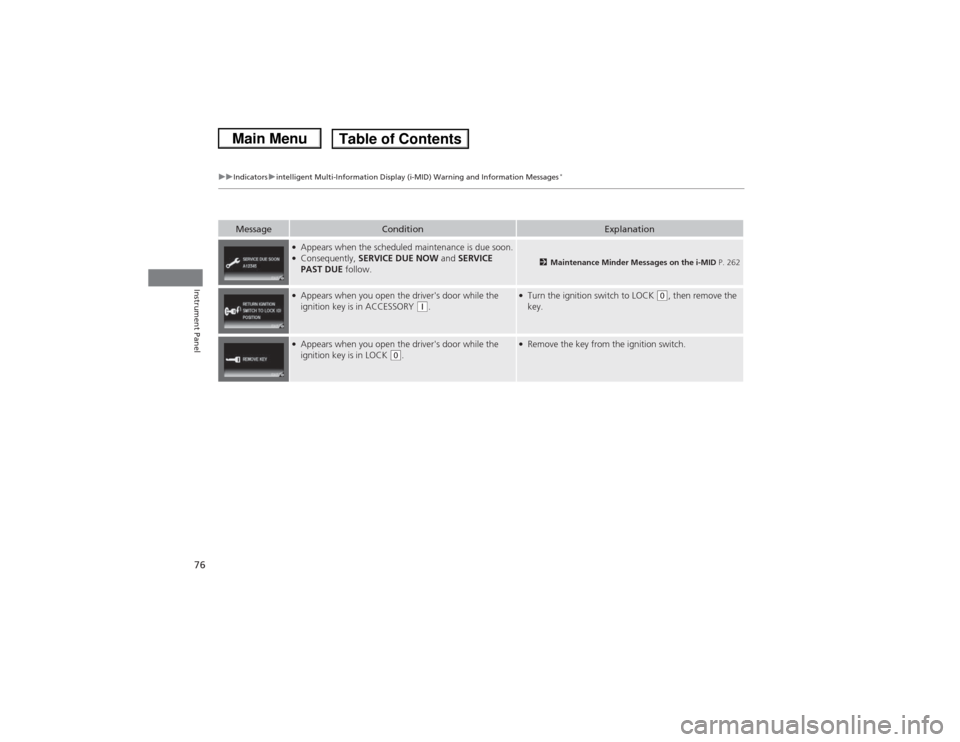
●Appears when the scheduled maintenance is due soon.●Consequently, SERVICE DUE NOW and SERVICE
PAST DUE follow.
2Maintenance Minder Messages on the i-MID P. 262
●Appears when you open the driver's door while the
ignition key is in ACCESSORY
(q.
●Turn the ignition switch to LOCK
(0, then remove the
key.
●Appears when you open the driver's door while the
ignition key is in LOCK
(0.
●Remove the key from the ignition switch.
Page 78 of 367
77
Continued
Instrument Panel
Gauges and DisplaysGaugesGauges include the speedometer, tachometer, fuel gauge, and related indicators.
They are displayed when the ignition switch is in ON
(w.
Displays your driving speed in mph or km/h.
Shows the number of engine revolutions per minute.
Displays the amount of fuel left in the fuel tank.
Shows the instant fuel economy as a bar graph in mpg or l/100km.
■Speedometer■Tachometer■Fuel Gauge■Instant Fuel Economy Gauge
*
1 Gauges
Press and hold the km/mile change knob until you
hear a beep. The speedometer reading and the
displayed measurements switch between mph and
km/h.1Fuel GaugeNOTICEYou should refuel when the reading approaches .
Running out of fuel can cause the engine to misfire,
damaging the catalytic converter.
The actual amount of remaining fuel may differ from
the fuel gauge reading.
E
1Instant Fuel Economy Gauge
*
Press and hold the km/mile change knob to switch
the measurement.
* Not available on all models
Page 79 of 367
uuGauges and Displays uGauges
78Instrument Panel
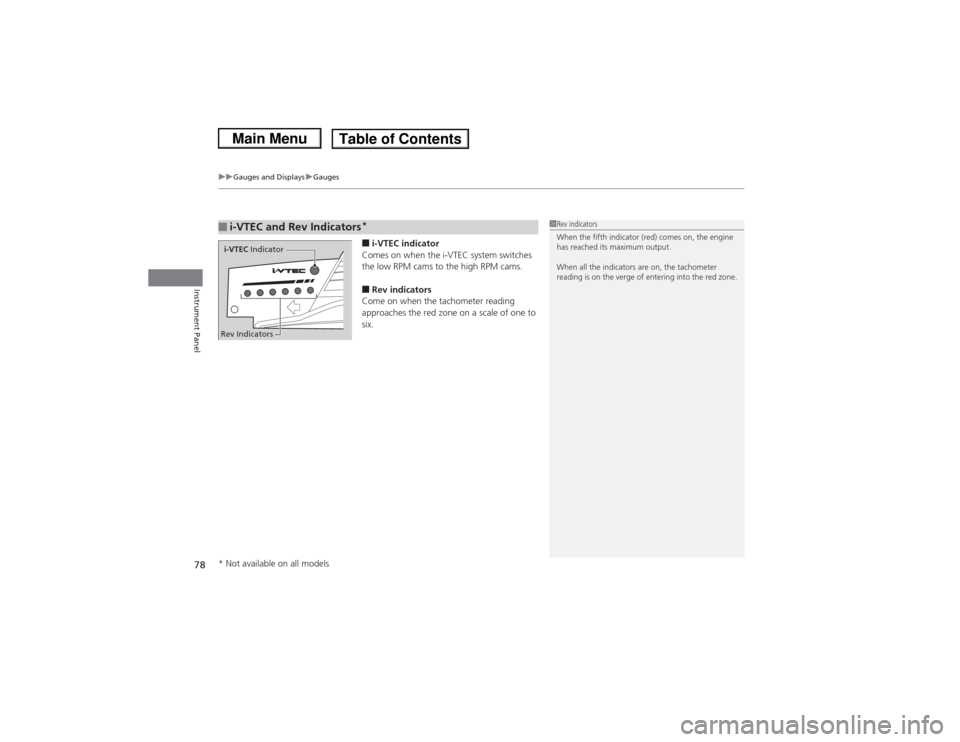
■i-VTEC indicator
Comes on when the i-VTEC system switches
the low RPM cams to the high RPM cams.■Rev indicators
Come on when the tachometer reading
approaches the red zone on a scale of one to
six.
■i-VTEC and Rev Indicators
*
1 Rev indicators
When the fifth indicator (red) comes on, the engine
has reached its maximum output.
When all the indicators are on, the tachometer
reading is on the verge of entering into the red zone.
i-VTEC Indicator
Rev Indicators* Not available on all models
Page 80 of 367
79
uuGauges and Displays uInformation Display
*
Continued
Instrument Panel
Information Display
*
The information display shows the odometer, trip meter, engine oil life and
maintenance service item codes, and other gauges.
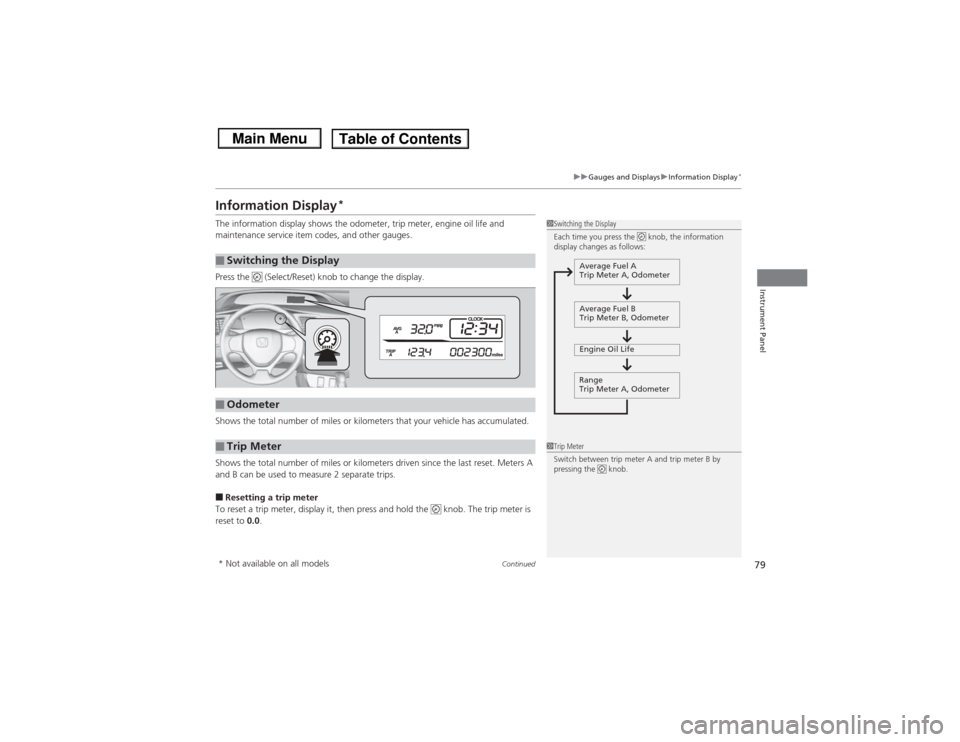
Press the (Select/Reset) knob to change the display.
Shows the total number of miles or kilometers that your vehicle has accumulated.
Shows the total number of miles or kilometers driven since the last reset. Meters A
and B can be used to measure 2 separate trips.■Resetting a trip meter
To reset a trip meter, display it, then press and hold the knob. The trip meter is
reset to 0.0.■Switching the Display
1Switching the Display
Each time you press the knob, the information
display changes as follows:
Average Fuel A
Trip Meter A, Odometer
Average Fuel B
Trip Meter B, Odometer
Engine Oil Life
Range
Trip Meter A, Odometer
■Odometer■Trip Meter
1 Trip Meter
Switch between trip meter A and trip meter B by
pressing the knob.
* Not available on all models
Page 81 of 367
80
uuGauges and Displays uInformation Display
*
Instrument Panel
Shows the estimated average fuel economy of each trip meter in mpg or l/100 km.
The display is updated at set intervals. When a trip meter is reset, the average fuel
economy is also reset.
Shows the remaining oil life and Maintenance Minder
TM.
2 Maintenance Minder
TM P. 257
Shows the estimated distance you can travel on the remaining fuel. This distance is
estimated from the fuel economy of your trips in the past.
Appears when the fuel fill cap is loose or is not installed.2Check/Tighten Fuel Cap Message P. 338■Average Fuel Economy■Engine Oil Life■Range■Check Fuel Cap
Page 82 of 367
81
uuGauges and Displays uintelligent Multi-Info rmation Display (i-MID)
*
Continued
Instrument Panel
intelligent Multi-Information Display (i-MID)
*
The i-MID shows the odometer, trip meter, outside temperature indicator, and other
gauges.
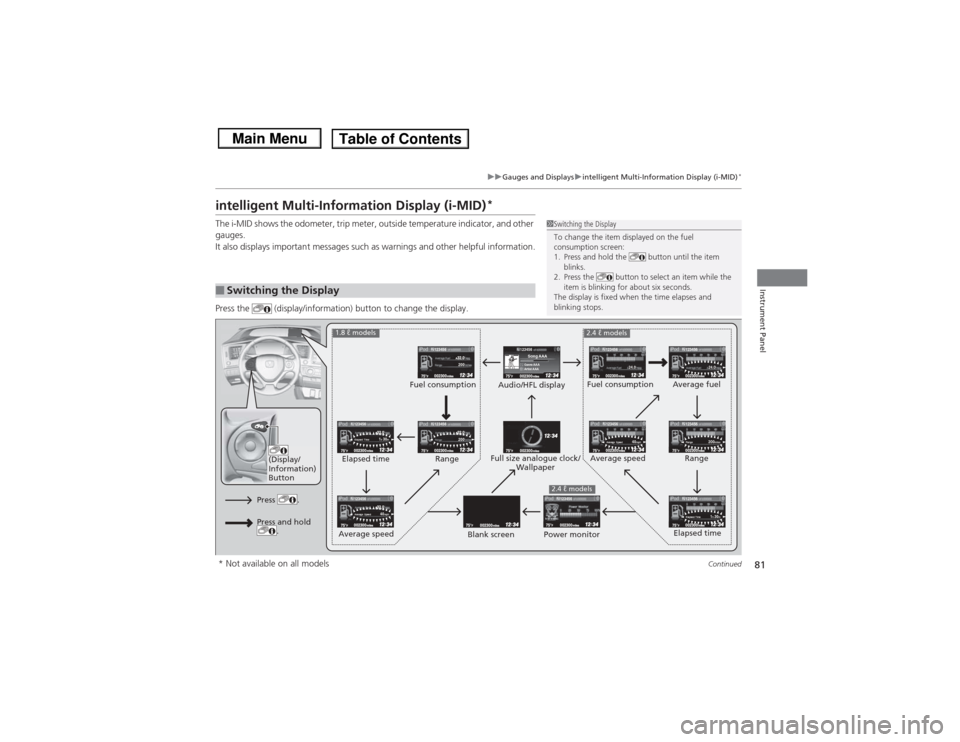
It also displays important messages such as warnings and other helpful information.
Press the (display/information) button to change the display.■Switching the Display
1Switching the Display
To change the item displayed on the fuel
consumption screen:
1. Press and hold the button until the item
blinks.
2. Press the button to select an item while the
item is blinking for about six seconds.
The display is fixed when the time elapses and
blinking stops.
123456Genre AAASong AAAArtist AAA
200200
1h 30m
Elapsed Time
1h 30m
Elapsed Time
24.0
24.0
40mph
Average Speed
40mph
Average Speed
200miles
Range
123456
123456123456
123456123456
123456
123456
123456
123456123456
(Display/
Information)
Button
Audio/HFL display Fuel consumption
Blank screen Full size analogue clock/
Wallpaper
2.4 ℓ models
Power monitor
1.8 ℓ models
2.4 ℓ models
Fuel consumption
Range
Elapsed time
Average speed Elapsed time
Average speed
Average fuel
Range
Press .Press and hold .
* Not available on all models
Page 83 of 367
uuGauges and Displays uintelligent Multi-Information Display (i-MID)
*
82Instrument Panel
■Trip computer
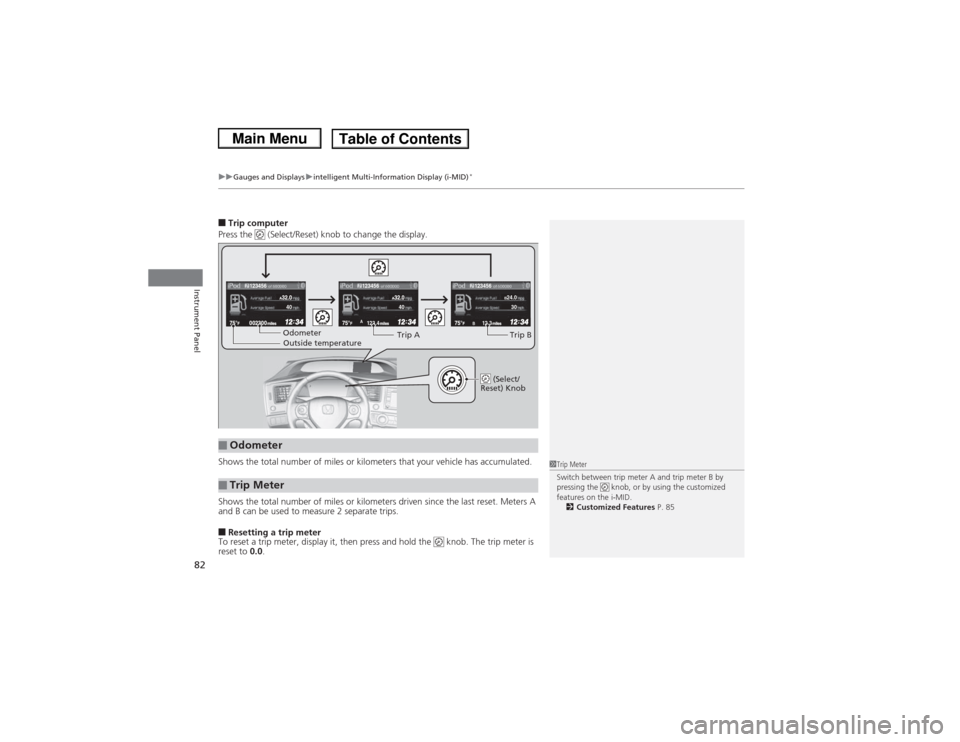
Press the (Select/Reset) knob to change the display.
Shows the total number of miles or kilometers that your vehicle has accumulated.
Shows the total number of miles or kilometers driven since the last reset. Meters A
and B can be used to measure 2 separate trips.■Resetting a trip meter
To reset a trip meter, display it, then press and hold the knob. The trip meter is
reset to 0.0.■Odometer■Trip Meter
123.4A
12.3B123456
123456
123456
B24.030
40
40Odometer
Outside temperature Trip A
Trip B
(Select/
Reset) Knob
1 Trip Meter
Switch between trip meter A and trip meter B by
pressing the knob, or by using the customized
features on the i-MID.
2 Customized Features P. 85
Page 84 of 367
Continued
83
uuGauges and Displays uintelligent Multi-Info rmation Display (i-MID)
*
Instrument Panel
Shows the estimated average fuel economy of each trip meter in mpg or l/100 km.
The display is updated at set intervals. When a trip meter is reset, the average fuel
economy is also reset.
Shows the estimated distance you can travel on the remaining fuel. This distance is
estimated from the fuel economy of your trips in the past.
Shows the time elapsed since the last time Trip A or Trip B was reset.
Shows the average speed in mph or km/h since the last time Trip A or Trip B was
reset.
Shows the remaining oil life and Maintenance Minder
TM.
2Maintenance Minder
TM P. 257
■Average Fuel Economy■Range■Elapsed Time■Average Speed■Engine Oil Life
1Average Fuel Economy
You can change when to reset the average fuel
economy.
2 Customized Features P. 85
You can choose an item to be displayed in the fuel
consumption screen. Average fuel economy, range,
elapsed time, or average speed can be selected. 2 Customized Features P. 85
2 Switching the Display P. 812.4 ℓ engine models1Range
You can choose an item to be displayed in the fuel
consumption screen. Range, elapsed time, or average
speed can be selected.
2 Customized Features P. 85
2 Switching the Display P. 811.8 ℓ engine models
Page 85 of 367
uuGauges and Displays uintelligent Multi-Information Display (i-MID)
*
84Instrument Panel
Shows the outside temperature in Fahrenheit (U.S.) or Celsius (Canada).■Adjusting the outside temperature display
Adjust the temperature reading up to ±5°F or ±3°C if the temperature reading
seems incorrect.
Use the i-MID’s customized features to correct the temperature.2 Customized Features P. 85Shows the instant fuel economy as a bar graph in mpg or l/100 km.
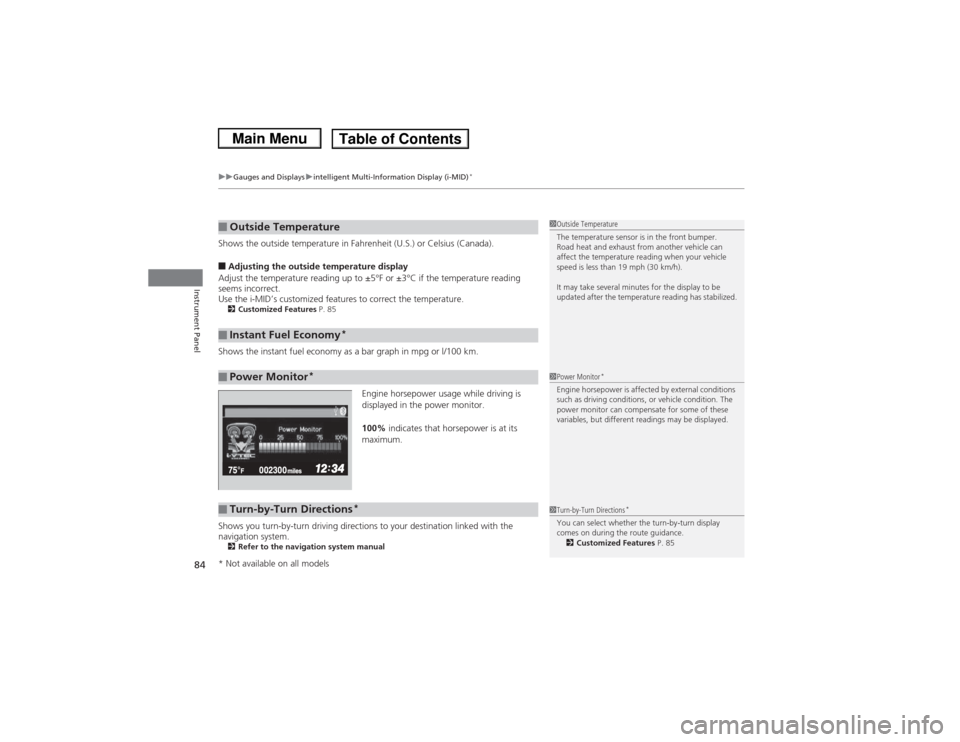
Engine horsepower usage while driving is
displayed in the power monitor.
100% indicates that horsepower is at its
maximum.
Shows you turn-by-turn driving directions to your destination linked with the
navigation system.2 Refer to the navigation system manual■Outside Temperature■Instant Fuel Economy
*
■Power Monitor
*
1Outside Temperature
The temperature sensor is in the front bumper.
Road heat and exhaust from another vehicle can
affect the temperature reading when your vehicle
speed is less than 19 mph (30 km/h).
It may take several minutes for the display to be
updated after the temperature reading has stabilized.1Power Monitor
*
Engine horsepower is affected by external conditions
such as driving conditions, or vehicle condition. The
power monitor can compensate for some of these
variables, but different readings may be displayed.
■Turn-by-Turn Directions
*
1Turn-by-Turn Directions
*
You can select whether the turn-by-turn display
comes on during the route guidance.
2 Customized Features P. 85
* Not available on all models
Page 86 of 367
Continued
85
uuGauges and Displays uintelligent Multi-Info rmation Display (i-MID)
*
Instrument Panel
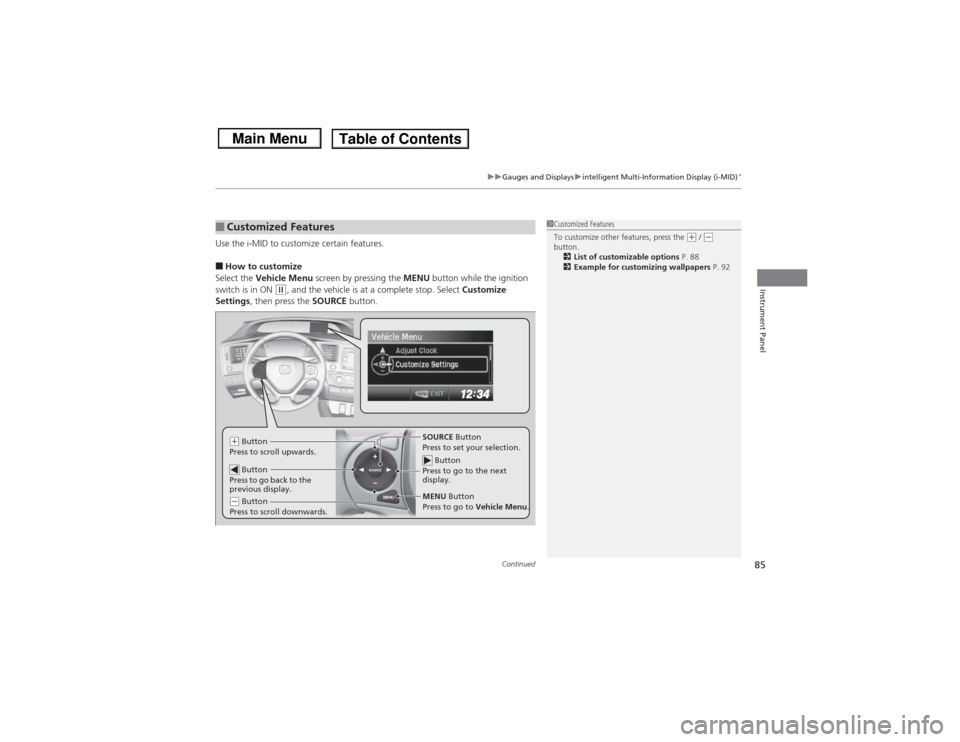
Use the i-MID to customize certain features.■How to customize
Select the Vehicle Menu screen by pressing the MENU button while the ignition
switch is in ON
(w, and the vehicle is at a complete stop. Select Customize
Settings , then press the SOURCE button.
■Customized Features
1Customized Features
To customize other features, press the
(+ / (-
button.
2 List of customizable options P. 88
2 Example for customizing wallpapers P. 92
MENU
SOURCE
Button
Press to go to the next
display.SOURCE Button
Press to set your selection.
MENU Button
Press to go to Vehicle Menu.
(+ Button
Press to scroll upwards.
Button
Press to go back to the
previous display.(- Button
Press to scroll downwards.