lights HONDA CIVIC 2013 9.G User Guide
[x] Cancel search | Manufacturer: HONDA, Model Year: 2013, Model line: CIVIC, Model: HONDA CIVIC 2013 9.GPages: 367, PDF Size: 8.43 MB
Page 76 of 367
 Warning and Information Messages
*
Continued
Instrument Panel
intelligent Multi-Information Display (i-MID) Warning and Information \
Mes")
75
uuIndicators uintelligent Multi-Information Display (i-MID) Warning and Information Messages
*
Continued
Instrument Panel
intelligent Multi-Information Display (i-MID) Warning and Information \
Messages
*
The following messages appear only on the i-MID. Press the (display/information) button to see the message again with the syst em
message indicator on.
Message
Condition
Explanation
●Appears when the fuel fill cap is loose or is not
installed.
2 Check/Tighten Fuel Cap Message P. 338
●Appears if there is a problem with the DRL system.
●Have your vehicle checked by a dealer.
2Daytime Running Lights P. 121
●Appears when the washer fluid is low.
●Refill the washer fluid.
2Refilling Window Washer Fluid P. 281
Canadian models* Not available on all models
Page 91 of 367
90
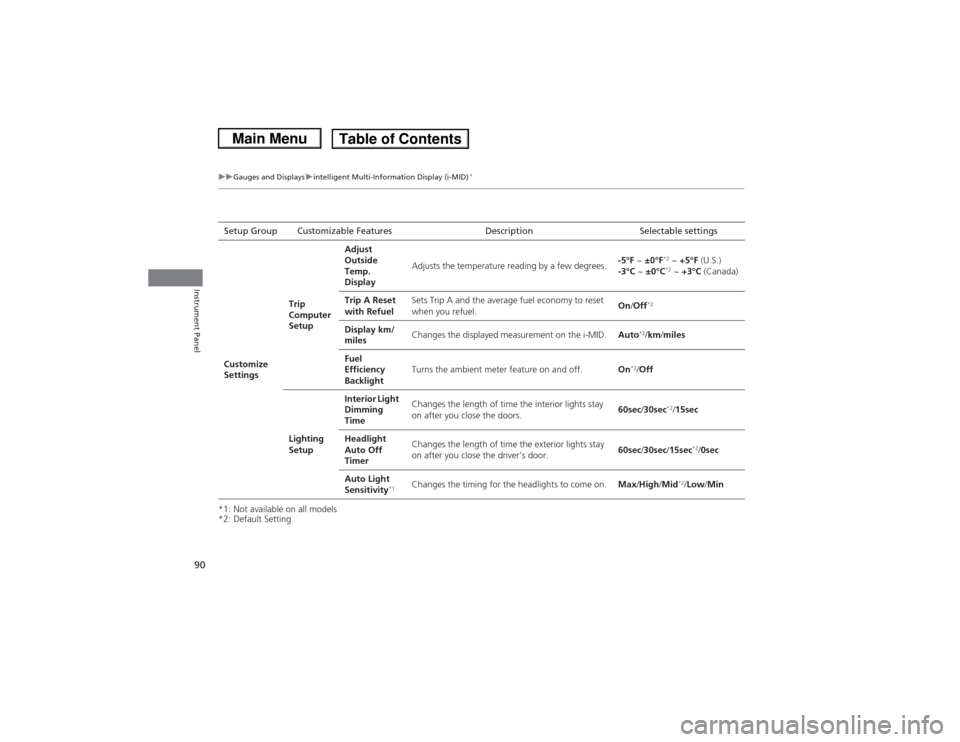
uuGauges and Displays uintelligent Multi-Information Display (i-MID)
*
Instrument Panel
*1: Not available on all models
*2: Default SettingSetup Group Customizable Features Description Selectable settings
Customize
Settings Trip
Computer
SetupAdjust
Outside
Temp.
Display
Adjusts the temperature reading by a few degrees.
-5°F
~ ±0°F
*2 ~ +5°F (U.S.)
-3°C ~ ±0°C*2 ~ +3°C (Canada)
Trip A Reset
with Refuel Sets Trip A and the average fuel economy to reset
when you refuel.
On
/Off
*2
Display km/
miles Changes the displayed measurement on the i-MID.
Auto
*2/km/ miles
Fuel
Efficiency
Backlight Turns the ambient meter feature on and off.
On
*2/Off
Lighting
Setup Interior Light
Dimming
Time
Changes the length of time the interior lights stay
on after you close the doors.
60sec
/30sec
*2/ 15sec
Headlight
Auto Off
Timer Changes the length of time the exterior lights stay
on after you close the driver’s door.
60sec
/30sec /15sec
*2/0sec
Auto Light
Sensitivity
*1
Changes the timing for the headlights to come on. Max/High/ Mid
*2/Low /Min
Page 92 of 367
91
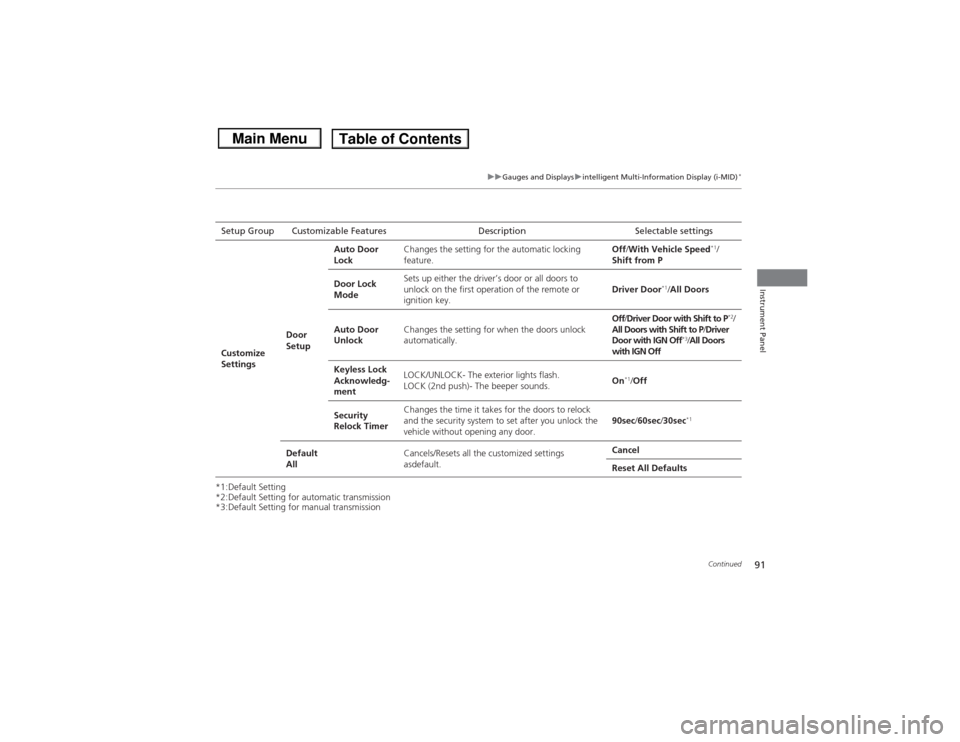
uuGauges and Displays uintelligent Multi-Info rmation Display (i-MID)
*
Continued
Instrument Panel
*1:Default Setting
*2:Default Setting for automatic transmission
*3:Default Setting for manual transmissionSetup Group Customizable Features D
escription Selectable settings
Customize
Settings Door
SetupAuto Door
Lock
Changes the setting for the automatic locking
feature. Off
/With Vehicle Speed
*1/
Shift from P
Door Lock
Mode Sets up either the driver’s door or all doors to
unlock on the first operation of the remote or
ignition key.
Driver Door
*1/
All Doors
Auto Door
Unlock Changes the setting for when the doors unlock
automatically. Off
/Driver Door with Shift to P
*2/
All Doors with Shift to P /Driver
Door with IGN Off
*3/ All Doors
with IGN Off
Keyless Lock
Acknowledg-
ment LOCK/UNLOCK- The exterior lights flash.
LOCK (2nd push)- The beeper sounds.
On
*1/
Off
Security
Relock Timer Changes the time it takes for the doors to relock
and the security system to set after you unlock the
vehicle without opening any door.
90sec
/60sec /30sec
*1
Default
All Cancels/Resets all the customized settings
asdefault. Cancel
Reset All Defaults
Page 98 of 367
97
Controls
This chapter explains how to operate the various controls necessary for driving.
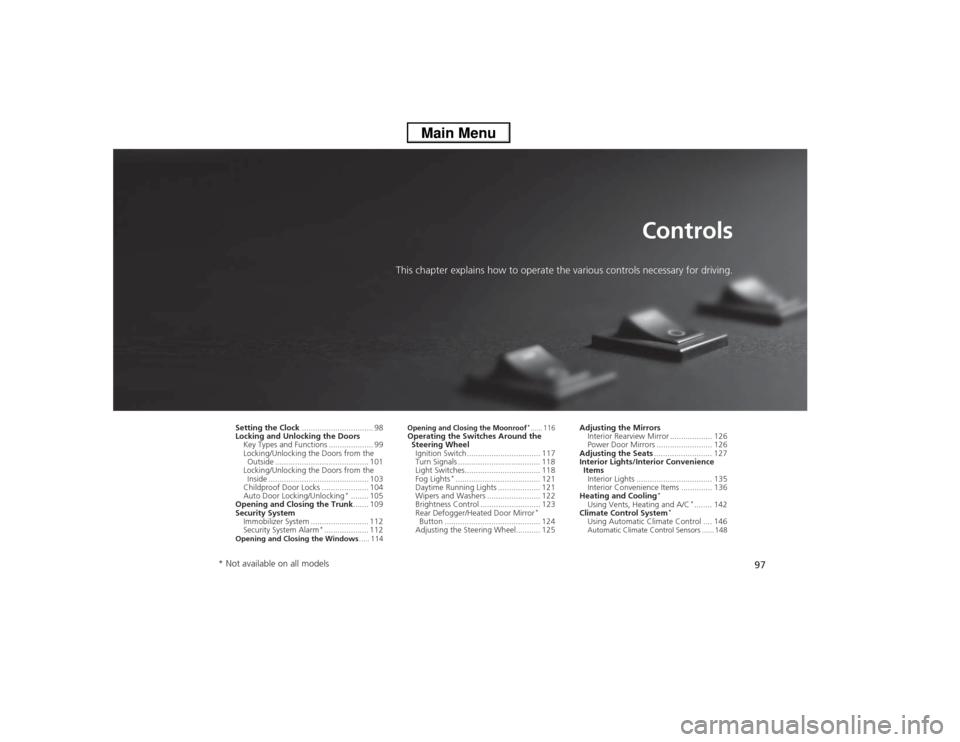
Setting the Clock................................ 98
Locking and Unlocking the Doors
Key Types and Functions .................... 99
Locking/Unlocking the Doors from the Outside .......................................... 101
Locking/Unlocking the Doors from the Inside ............................................. 103
Childproof Door Locks . .................... 104
Auto Door Locking/Unlocking
*........ 105
Opening and Closing the Trunk ....... 109
Security System
Immobilizer System .......................... 112
Security System Alarm
*.................... 112
Opening and Closing the Windows ..... 114
Opening and Closing the Moonroof
*...... 116
Operating the Switches Around the
Steering WheelIgnition Switch ................................. 117
Turn Signals ..................................... 118
Light Switches.................................. 118
Fog Lights
*...................................... 121
Daytime Running Lights ................... 121
Wipers and Washers ........................ 122
Brightness Control ........................... 123
Rear Defogger/Heated Door Mirror
*
Button ........................................... 124
Adjusting the Steering Wheel........... 125 Adjusting the Mirrors
Interior Rearview Mirror ................... 126
Power Door Mirrors ......................... 126
Adjusting the Seats .......................... 127
Interior Lights/Interior Convenience
Items Interior Lights .................................. 135
Interior Convenience Items .............. 136
Heating and Cooling
*
Using Vents, Heating and A/C
*........ 142
Climate Control System
*
Using Automatic Climate Control .... 146Automatic Climate Control Sensors ...... 148
* Not available on all models
Page 102 of 367
101
uuLocking and Unlocking the Doors uLocking/Unlocking the Doors from the Outside
Continued
Controls
Locking/Unlocking the Doors from the Outside
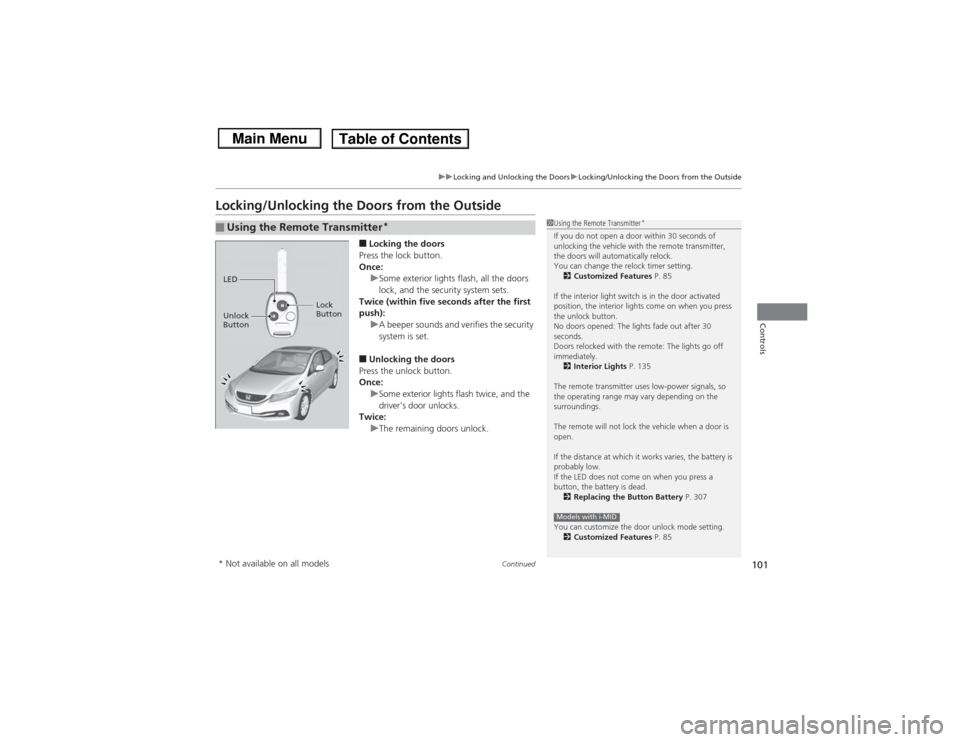
■Locking the doors
Press the lock button.
Once: uSome exterior lights flash, all the doors
lock, and the security system sets.
Twice (within five seconds after the first
push):
uA beeper sounds and verifies the security
system is set.■Unlocking the doors
Press the unlock button.
Once:
uSome exterior lights flash twice, and the
driver's door unlocks.
Twice: uThe remaining doors unlock.
■Using the Remote Transmitter
*
1Using the Remote Transmitter
*
If you do not open a door within 30 seconds of
unlocking the vehicle with the remote transmitter,
the doors will automatically relock.
You can change the relock timer setting.
2 Customized Features P. 85
If the interior light switch is in the door activated
position, the interior lights come on when you press
the unlock button.
No doors opened: The lights fade out after 30
seconds.
Doors relocked with the remote: The lights go off
immediately. 2 Interior Lights P. 135
The remote transmitter uses low-power signals, so
the operating range may vary depending on the
surroundings.
The remote will not lock the vehicle when a door is
open.
If the distance at which it works varies, the battery is
probably low.
If the LED does not come on when you press a
button, the battery is dead. 2 Replacing the Button Battery P. 307
You can customize the door unlock mode setting. 2 Customized Features P. 85Models with i-MID
LED
Unlock
Button Lock
Button* Not available on all models
Page 113 of 367
112Controls
Security SystemImmobilizer SystemThe immobilizer system prevents a key that has not been pre-registered from
starting the engine. Each key contains electronic transmitters that use electronic
signals to verify the key.
Pay attention to the following when inserting the key into the ignition switch:
•Do not allow objects that emit strong radio waves near the ignition switch.
• Make sure the key is not covered by or touching a metal object.
• Do not bring a key from another vehicle's immobilizer system near the ignition
switch.Security System Alarm
*
The security system alarm activates when the doors, trunk, or hood are opened
without the key, or remote transmitter.■When the security system alarm activates
The horn sounds intermittently and all of the exterior lights flash.■To deactivate the security system alarm
Unlock the vehicle using the key, or remote transmitter. The system, along with the
horn and flashing lights, is deactivated.
1 Immobilizer SystemNOTICELeaving the ignition key in the vehicle can result in
theft or accidental movement of the vehicle.
Always take the ignition key with you whenever you
leave the vehicle unattended.
Do not alter the system or add other devices to it.
Doing so may damage the system and make your
vehicle inoperable.1Security System Alarm
*
The security alarm continues for a maximum of two
minutes until the security system deactivates.
* Not available on all models
Page 114 of 367
113
uuSecurity System uSecurity System Alarm
*
Controls
■Setting the security system alarm
The security system alarm automatically sets wh en the following conditions have
been met:
• The ignition switch is in LOCK
(0, and the key has been removed from the
ignition switch.
• The hood and trunk are closed.
• All doors are locked with the key or the remote transmitter.
■When the security system alarm sets
The security system indicator in the instrument panel blinks. When the blinking
interval changes after about 15 seconds, the security system is set.■To cancel the security system alarm
The security system is canceled when the vehicle is unlocked using the key or remote
transmitter, or the ignition switch is turned to ON
(w. The security system indicator
goes off at the same time.
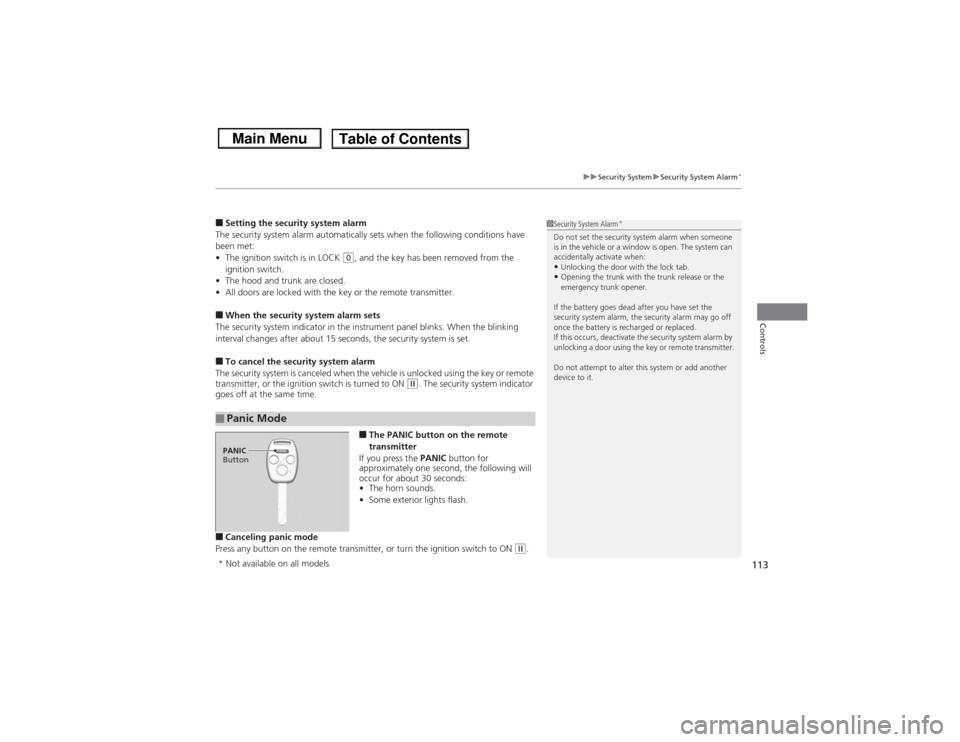
■The PANIC button on the remote
transmitter
If you press the PANIC button for
approximately one second, the following will
occur for about 30 seconds:
• The horn sounds.
• Some exterior lights flash.
■Canceling panic mode
Press any button on the remote transmitter, or turn the ignition switch to ON
(w.
■Panic Mode
1 Security System Alarm
*
Do not set the security system alarm when someone
is in the vehicle or a window is open. The system can
accidentally activate when:•Unlocking the door with the lock tab.•Opening the trunk with the trunk release or the
emergency trunk opener.
If the battery goes dead after you have set the
security system alarm, the security alarm may go off
once the battery is recharged or replaced.
If this occurs, deactivate the security system alarm by
unlocking a door using the key or remote transmitter.
Do not attempt to alter this system or add another
device to it.
PANIC
Button* Not available on all models
Page 119 of 367
118
uuOperating the Switches Around the Steering Wheel uTurn Signals
Controls
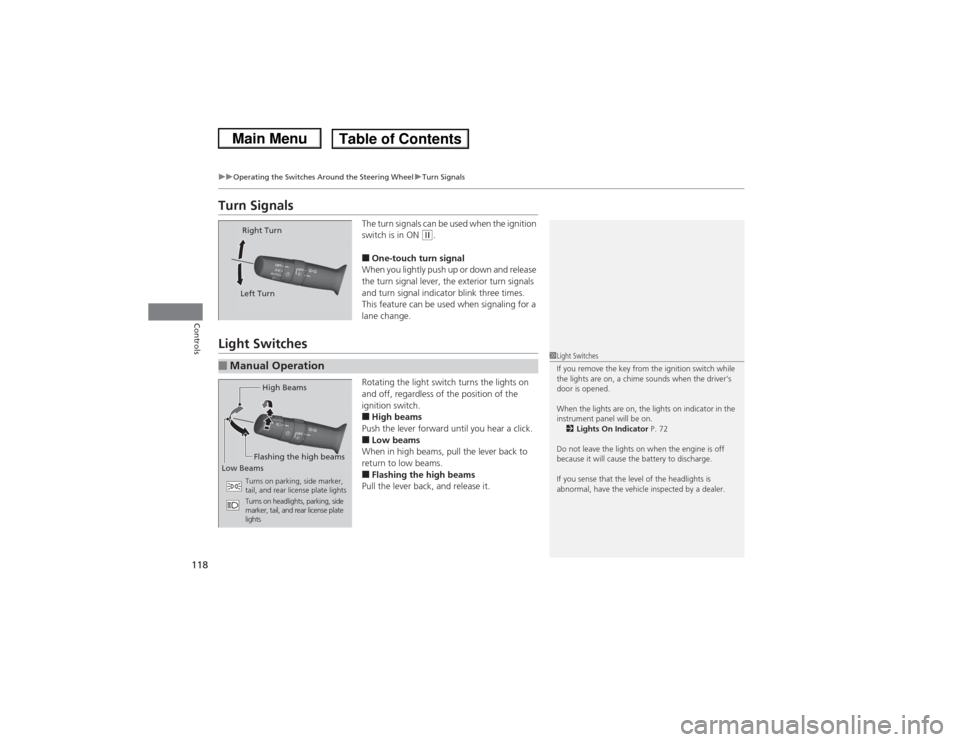
Turn Signals
The turn signals can be used when the ignition
switch is in ON
(w.
■One-touch turn signal
When you lightly push up or down and release
the turn signal lever, the exterior turn signals
and turn signal indicator blink three times.
This feature can be used when signaling for a
lane change.
Light Switches
Rotating the light switch turns the lights on
and off, regardless of the position of the
ignition switch.■High beams
Push the lever forward until you hear a click.■Low beams
When in high beams, pull the lever back to
return to low beams.■Flashing the high beams
Pull the lever back, and release it.
Right Turn
Left Turn
■Manual Operation
1 Light Switches
If you remove the key from the ignition switch while
the lights are on, a chime sounds when the driver’s
door is opened.
When the lights are on, the lights on indicator in the
instrument panel will be on.
2 Lights On Indicator P. 72
Do not leave the lights on when the engine is off
because it will cause the battery to discharge.
If you sense that the level of the headlights is
abnormal, have the vehicle inspected by a dealer.
High Beams
Flashing the high beams
Low Beams
Turns on parking, side marker,
tail, and rear license plate lights
Turns on headlights, parking, side
marker, tail, and rear license plate
lights
Page 120 of 367
Continued
119
uuOperating the Switches Around the Steering Wheel uLight Switches
Controls
Automatic lighting control can be used when
the ignition switch is in ON
(w.
When you turn the light switch to AUTO, the
headlights and other exterior lights will switch
on and off automatically depending on the
ambient brightness. uYou can change the auto light sensitivity
setting.
2 Customized Features P. 85
■Automatic Lighting Control
*
1Automatic Lighting Control
*
We recommend that you turn on the lights manually
when driving at night, in a dense fog, or in dark areas
such as long tunnels or parking facilities.
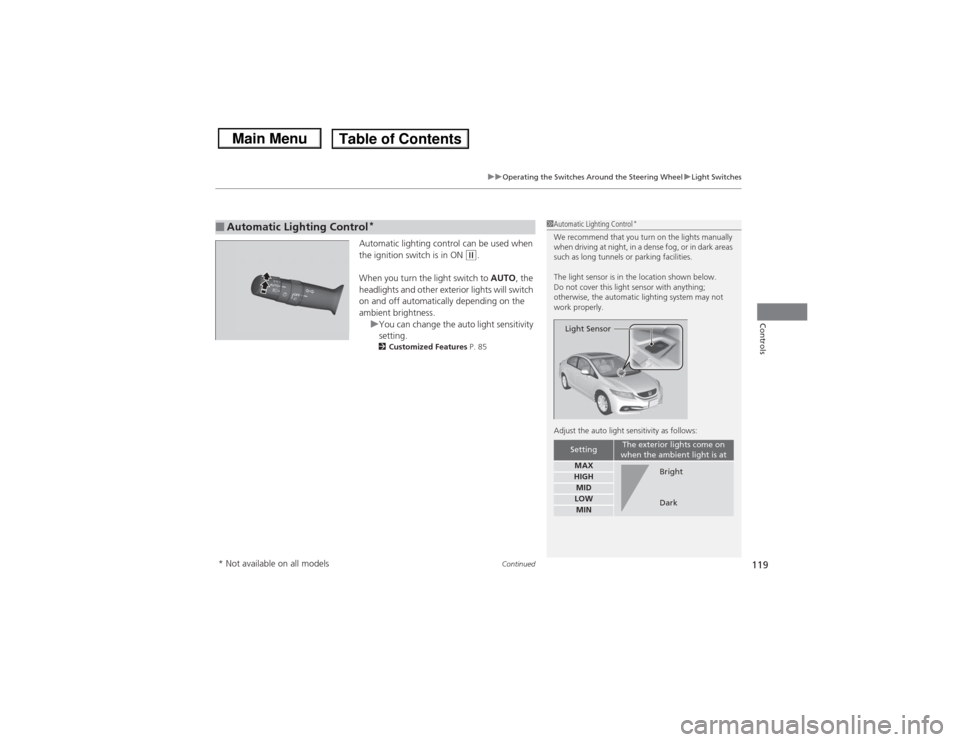
The light sensor is in the location shown below.
Do not cover this light sensor with anything;
otherwise, the automatic lighting system may not
work properly.
Adjust the auto light sensitivity as follows:
Setting
The exterior lights come on
when the ambient light is at
MAXHIGHMIDLOWMINLight Sensor
Bright
Dark
* Not available on all models
Page 121 of 367
uuOperating the Switches Around the Steering Wheel uLight Switches
120Controls
The headlights automatically come on when the wipers are used several times within
a certain number of intervals with the headlight switch in AUTO.
The headlights automatically go off a few minutes later if the wipers are stopped.
The headlights, all other exterior lights, and the instrument panel lights turn off
within 15 seconds after you remove the key and close the driver's door.
uYou can change the headlight auto off timer setting.
2 Customized Features P. 85
If you turn the ignition switch to LOCK
(0 with the headlight switch on, but do not
open the door, the lights turn off after 10 minutes (three minutes, if the switch is in
the AUTO position).
The lights turn on again when you unlock or open the driver's door. If you unlock
the door, but do not open it within 15 seconds, the lights go off. If you open the
driver's door, you will hear a lights on reminder chime.
■Headlight Integration with Wiper
*
■Automatic Lighting Off Feature
1 Headlight Integration with Wiper
*
This feature activates while the headlights are off in
AUTO .
The instrument panel brightness does not change
when the headlights come on.
At dark ambient light levels, the automatic lighting
control feature turns on the headlights, regardless of
the number of wiper sweeps.
* Not available on all models