change HONDA CIVIC 2013 9.G Owner's Guide
[x] Cancel search | Manufacturer: HONDA, Model Year: 2013, Model line: CIVIC, Model: HONDA CIVIC 2013 9.GPages: 367, PDF Size: 8.43 MB
Page 163 of 367
162
uuAudio System Basic Operation uPlaying a CD
Features
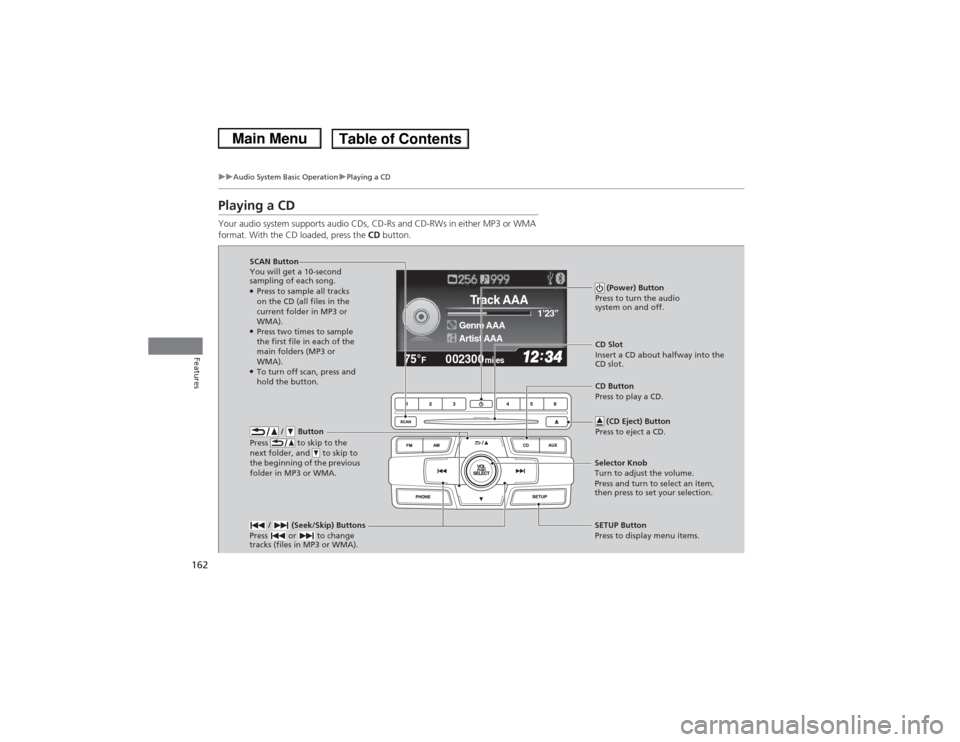
Playing a CDYour audio system supports audio CDs, CD-Rs and CD-RWs in either MP3 or WMA
format. With the CD loaded, press the CD button.
002300
75°
F miles
Genre AAA 1’23’’Track AAAArtist AAA
/ Button
Press to skip to the
next folder, and to skip to
the beginning of the previous
folder in MP3 or WMA.
SCAN Button
You will get a 10-second
sampling of each song.●Press to sample all tracks
on the CD (all files in the
current folder in MP3 or
WMA).●Press two times to sample
the first file in each of the
main folders (MP3 or
WMA).●To turn off scan, press and
hold the button. (Power) Button
Press to turn the audio
system on and off.
CD Slot
Insert a CD about halfway into the
CD slot.
/ (Seek/Skip) Buttons
Press or to change
tracks (files in MP3 or WMA).SETUP Button
Press to display menu items.
Selector Knob
Turn to adjust the volume.
Press and turn to select an item,
then press to set your selection. CD Button
Press to play a CD.
(CD Eject) Button
Press to eject a CD.
Page 164 of 367
Continued
163
uuAudio System Basic Operation uPlaying a CD
Features
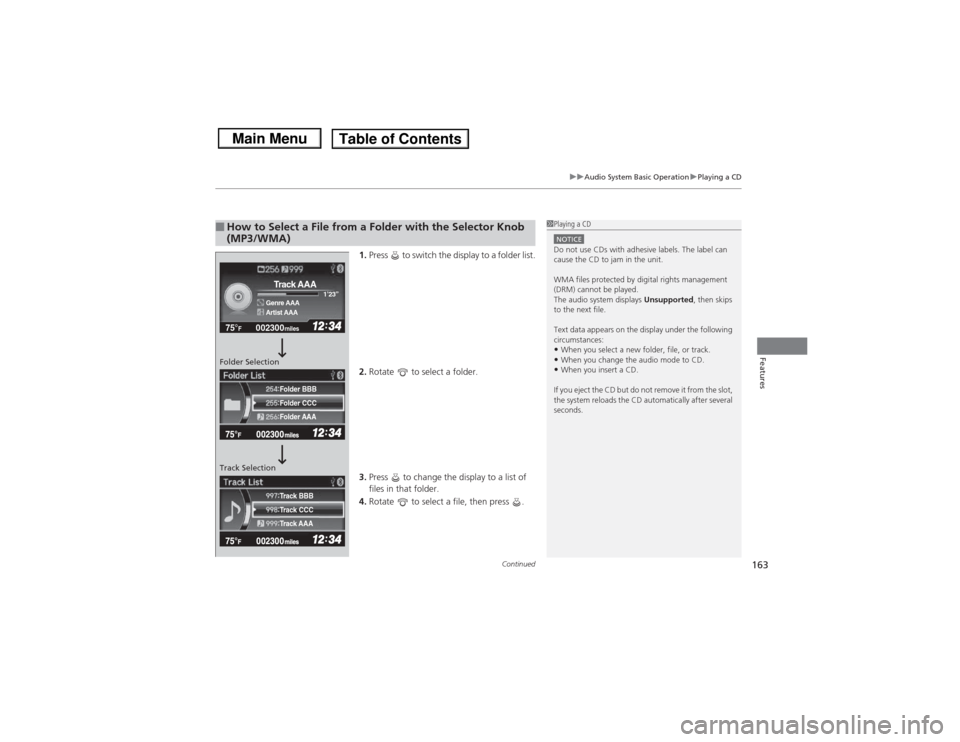
1. Press to switch the display to a folder list.
2. Rotate to select a folder.
3. Press to change the display to a list of
files in that folder.
4. Rotate to select a file, then press .
■How to Select a File from a Folder with the Selector Knob
(MP3/WMA)
1Playing a CDNOTICEDo not use CDs with adhesive labels. The label can
cause the CD to jam in the unit.
WMA files protected by digital rights management
(DRM) cannot be played.
The audio system displays Unsupported, then skips
to the next file.
Text data appears on the display under the following
circumstances:•When you select a new folder, file, or track.•When you change the audio mode to CD.•When you insert a CD.
If you eject the CD but do not remove it from the slot,
the system reloads the CD automatically after several
seconds.
002300
75°
F miles
Genre AAA 1’23’’Track AAAArtist AAA
Folder CCC
Folder AAA Folder BBB
Track CCC
Track AAA Track BBB
Folder Selection
Track Selection
Page 166 of 367
165
uuAudio System Basic Operation uPlaying an iPod ®
Continued
Features
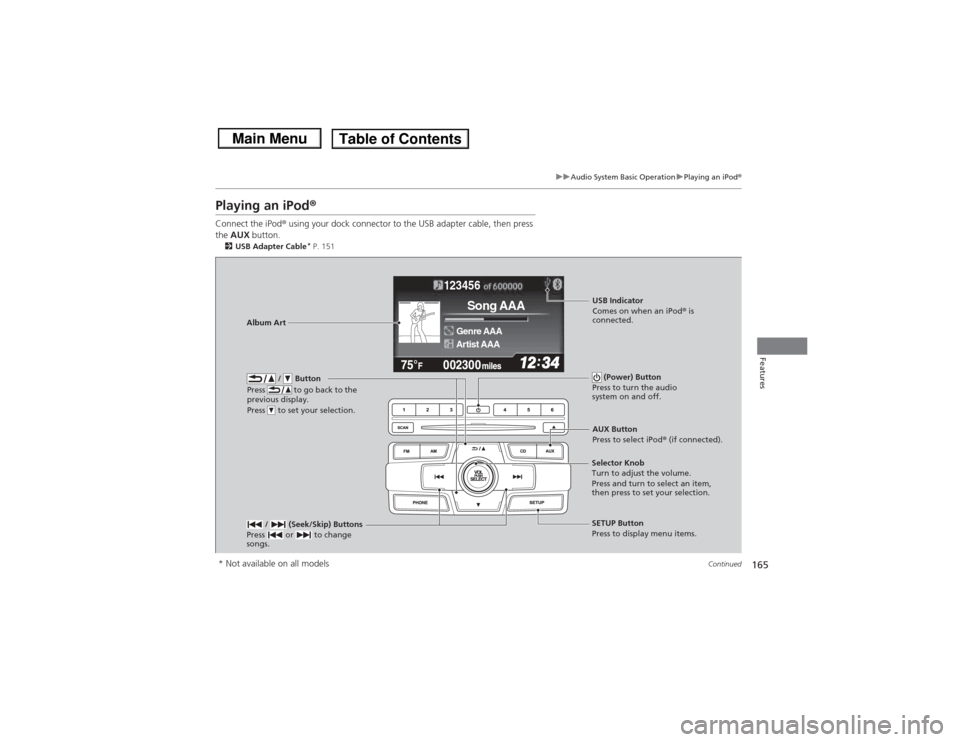
Playing an iPod ®Connect the iPod ® using your dock connector to the USB adapter cable, then press
the AUX button.2USB Adapter Cable
* P. 151
123456
Genre AAASong AAAArtist AAA
/ Button
Press to go back to the
previous display.
Press to set your selection.
(Power) Button
Press to turn the audio
system on and off.
/ (Seek/Skip) Buttons
Press or to change
songs.
SETUP Button
Press to display menu items.
Selector Knob
Turn to adjust the volume.
Press and turn to select an item,
then press to set your selection.AUX Button
Press to select iPod®
(if connected).
Album Art
USB Indicator
Comes on when an iPod ® is
connected.
* Not available on all models
Page 171 of 367
170
uuAudio System Basic Operation uPlaying a USB Flash Drive
Features
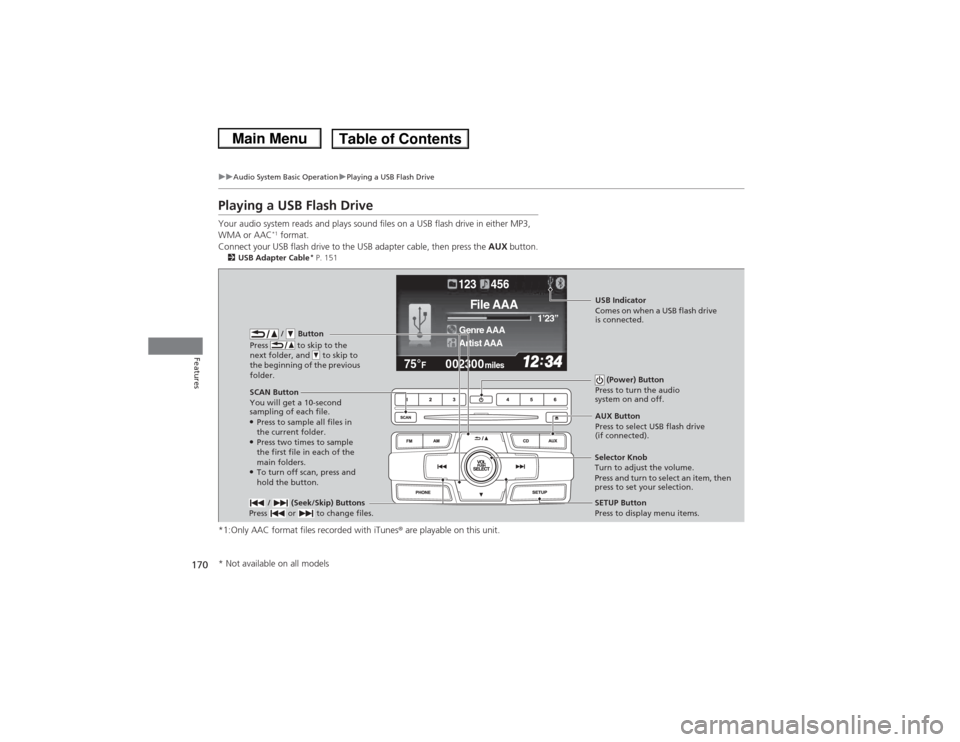
Playing a USB Flash DriveYour audio system reads and plays sound files on a USB flash drive in either MP3,
WMA or AAC
*1 format.
Connect your USB flash drive to the USB adapter cable, then press the AUX button.
2USB Adapter Cable
* P. 151
*1:Only AAC format files recorded with iTunes ® are playable on this unit.
002300
75°
F miles
Genre AAA 1’23’’File AAAArtist AAA123 456
/ Button
Press to skip to the
next folder, and to skip to
the beginning of the previous
folder.
SCAN Button
You will get a 10-second
sampling of each file.●Press to sample all files in
the current folder.●Press two times to sample
the first file in each of the
main folders.●To turn off scan, press and
hold the button. (Power) Button
Press to turn the audio
system on and off. / (Seek/Skip) Buttons
Press or to change files.
SETUP Button
Press to display menu items.
Selector Knob
Turn to adjust the volume.
Press and turn to select an item, then
press to set your selection. AUX Button
Press to select USB flash drive
(if connected).USB Indicator
Comes on when a USB flash drive
is connected.
* Not available on all models
Page 172 of 367
Continued
171
uuAudio System Basic Operation uPlaying a USB Flash Drive
Features
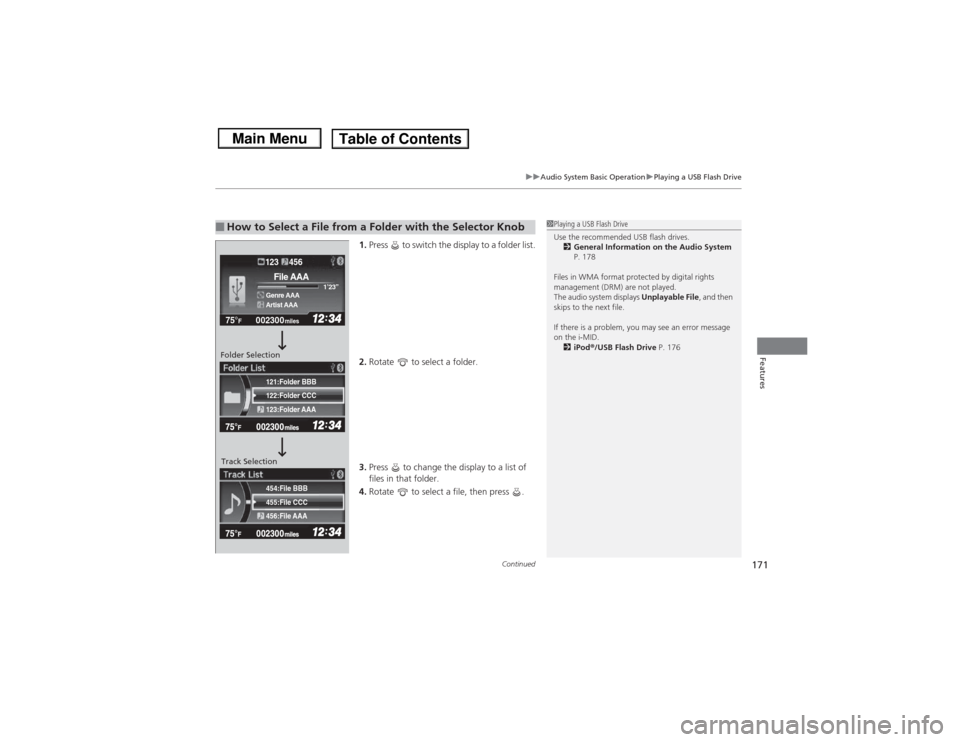
1. Press to switch the display to a folder list.
2. Rotate to select a folder.
3. Press to change the display to a list of
files in that folder.
4. Rotate to select a file, then press .
■How to Select a File from a Folder with the Selector Knob
1Playing a USB Flash Drive
Use the recommended USB flash drives.
2 General Information on the Audio System
P. 178
Files in WMA format protected by digital rights
management (DRM) are not played.
The audio system displays Unplayable File, and then
skips to the next file.
If there is a problem, you may see an error message
on the i-MID.
2 iPod ®/USB Flash Drive P. 176
455:File CCC
456:File AAA 454:File BBB122:Folder CCC
123:Folder AAA 121:Folder BBB002300
75°
F miles
Genre AAA 1’23’’File AAAArtist AAA123 456
Folder Selection
Track Selection
Page 174 of 367
173
uuAudio System Basic Operation uPlaying Bluetooth® Audio
Continued
Features
Playing Bluetooth ® AudioYour audio system allows you to listen to music from your Bluetooth®-compatible
phone.
This function is available when the phone is paired and connected to the vehicle's
Bluetooth ® HandsFreeLink ® (HFL) system.2 Phone Setup P. 188
1Playing Bluetooth ® Audio
Not all Bluetooth -enabled phones with streaming
audio capabilities are compatible with the system.
For a list of compatible phones:•U.S.: Visit www.handsfreelink.honda.com , or call
1-888-528-7876.•Canada: Visit www.handsfreelink.ca , or call 1-888-
528-7876.
In some states, it may be illegal to perform some data
device functions while driving.
If more than one phone is paired to the HFL system,
there will be a delay before the system begins to play.
123456Genre AAAFile AAAArtist AAA
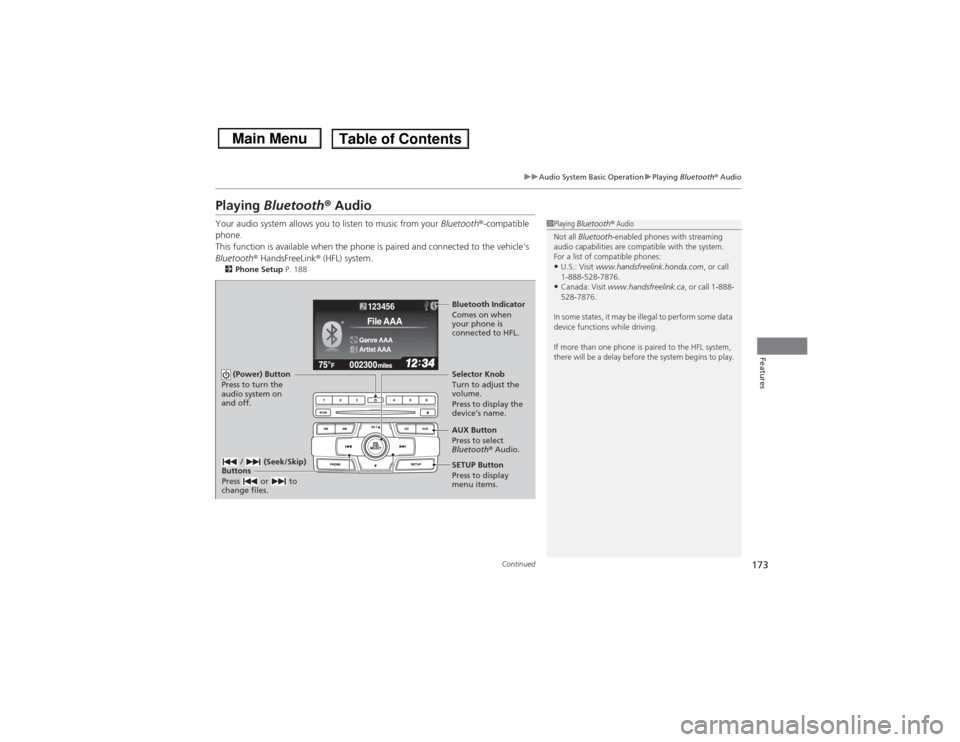
(Power) Button
Press to turn the
audio system on
and off.
SETUP Button
Press to display
menu items. Selector Knob
Turn to adjust the
volume.
Press to display the
device’s name.
AUX Button
Press to select
Bluetooth® Audio.
/ (Seek/Skip)
Buttons
Press or to
change files.Bluetooth Indicator
Comes on when
your phone is
connected to HFL.
Page 182 of 367
181
Continued
Features
Bluetooth® HandsFreeLink®
*
For models with the navigation system, see Navigation System Manual for how to
operate the Bluetooth® HandsFreeLink ®.
Bluetooth ® HandsFreeLink ® (HFL) allows you to place and receive phone calls using
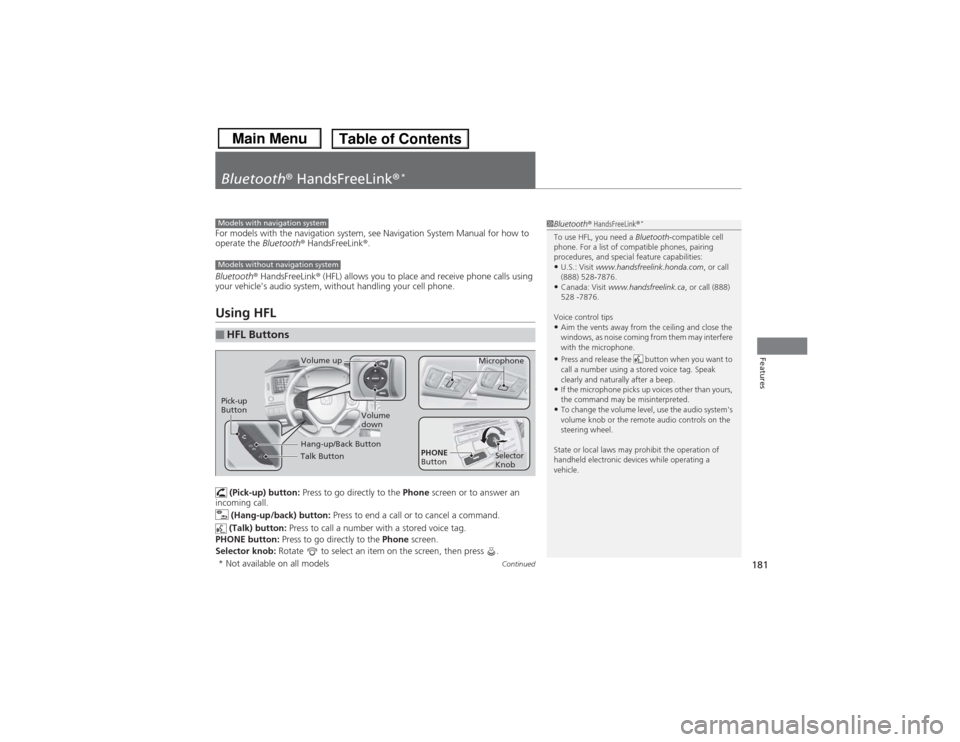
your vehicle's audio system, without handling your cell phone.Using HFL (Pick-up) button: Press to go directly to the Phone screen or to answer an
incoming call.
(Hang-up/back) button: Press to end a call or to cancel a command.
(Talk) button: Press to call a number with a stored voice tag.
PHONE button: Press to go directly to the Phone screen.
Selector knob: Rotate to select an item on the screen, then press .■HFL Buttons
1Bluetooth ® HandsFreeLink ®
*
To use HFL, you need a Bluetooth-compatible cell
phone. For a list of compatible phones, pairing
procedures, and special feature capabilities:•U.S.: Visit www.handsfreelink.honda.com , or call
(888) 528-7876.•Canada: Visit www.handsfreelink.ca , or call (888)
528 -7876.
Voice control tips•Aim the vents away from the ceiling and close the
windows, as noise coming from them may interfere
with the microphone.•Press and release the button when you want to
call a number using a stored voice tag. Speak
clearly and naturally after a beep.•If the microphone picks up voices other than yours,
the command may be misinterpreted.•To change the volume level, use the audio system's
volume knob or the remote audio controls on the
steering wheel.
State or local laws may prohibit the operation of
handheld electronic devices while operating a
vehicle.
Models with navigation systemModels without navigation system
Talk ButtonVolume up Microphone
Hang-up/Back Button
Pick-up
Button
Volume
down
Selector
Knob
PHONE
Button
* Not available on all models
Page 183 of 367
uuBluetooth® HandsFreeLink ®
*uUsing HFL
182Features
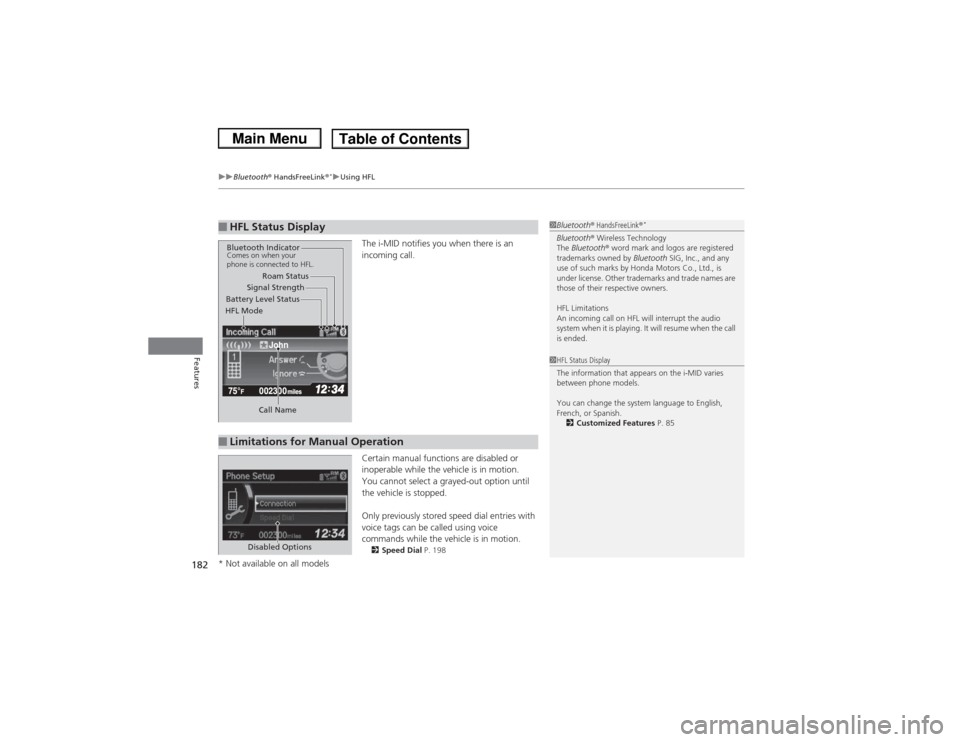
The i-MID notifies you when there is an
incoming call.
Certain manual functions are disabled or
inoperable while the vehicle is in motion.
You cannot select a grayed-out option until
the vehicle is stopped.
Only previously stored speed dial entries with
voice tags can be called using voice
commands while the vehicle is in motion.2 Speed Dial P. 198
■HFL Status Display
1Bluetooth ® HandsFreeLink ®
*
Bluetooth® Wireless Technology
The Bluetooth ® word mark and logos are registered
trademarks owned by Bluetooth SIG, Inc., and any
use of such marks by Honda Motors Co., Ltd., is
under license. Other trademarks and trade names are
those of their respective owners.
HFL Limitations
An incoming call on HFL will interrupt the audio
system when it is playing. It will resume when the call
is ended.
John
Signal Strength
HFL Mode Battery Level Status Roam Status
Call Name
Bluetooth IndicatorComes on when your
phone is connected to HFL.■Limitations for Manual Operation
1 HFL Status Display
The information that appears on the i-MID varies
between phone models.
You can change the system language to English,
French, or Spanish.
2 Customized Features P. 85
Disabled Options
* Not available on all models
Page 187 of 367
186
uuBluetooth® HandsFreeLink ®
*uHFL Menus
Features
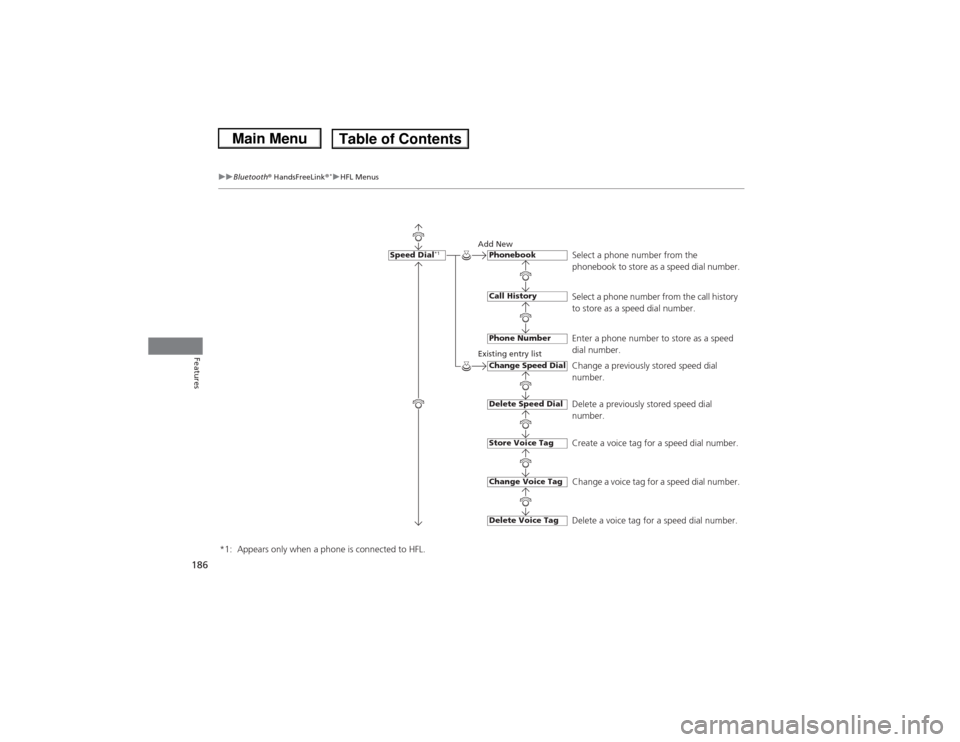
Select a phone number from the
phonebook to store as a speed dial number.
Add New
Existing entry list
Select a phone number from the call history
to store as a speed dial number.
Enter a phone number to store as a speed
dial number.
Change a previously stored speed dial
number.
Delete a previously stored speed dial
number.
Create a voice tag for a speed dial number.
Change a voice tag for a speed dial number.
Delete a voice tag for a speed dial number.
Speed Dial
*1
PhonebookCall HistoryPhone NumberChange Speed DialDelete Speed DialStore Voice TagDelete Voice TagChange Voice Tag
*1: Appears only when a phone is connected to HFL.
Page 190 of 367
189
uuBluetooth® HandsFreeLink ®
*uHFL Menus
Continued
Features
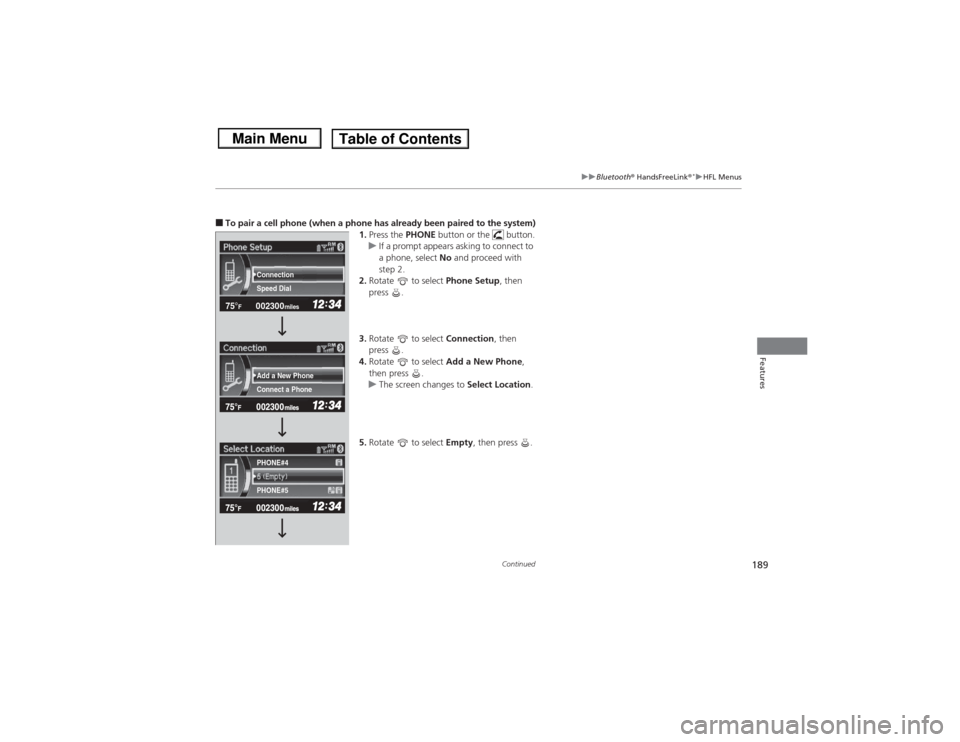
■To pair a cell phone (when a phone has already been paired to the system)
1.Press the PHONE button or the button.
u If a prompt appears asking to connect to
a phone, select No and proceed with
step 2.
2. Rotate to select Phone Setup, then
press .
3. Rotate to select Connection, then
press .
4. Rotate to select Add a New Phone,
then press .
u The screen changes to Select Location.
5. Rotate to select Empty, then press .
002300
75°
F miles
Connect a Phone Add a New Phone Speed Dial Connection
PHONE#4
PHONE#5