Indicators HONDA CIVIC 2013 9.G Owners Manual
[x] Cancel search | Manufacturer: HONDA, Model Year: 2013, Model line: CIVIC, Model: HONDA CIVIC 2013 9.GPages: 367, PDF Size: 8.43 MB
Page 1 of 367
ContentsThis owner’s manual should be considered a permanent part of the
vehicle and should remain with the vehicle when it is sold.
This owner’s manual covers all models of your vehicle. You may find
descriptions of equipment and features that are not on your
particular model.
Images throughout this owner’s manual (including the front cover)
represent features and equipment that are available on some, but
not all, models. Your particular model may not have some of these
features.
This owner’s manual is for vehicles sold in the United States and
Canada.
The information and specifications included in this publication were
in effect at the time of approval for printing. Honda Motor Co., Ltd.
reserves the right, however, to discontinue or change specifications
or design at any time without notice and without incurring any
obligation.
2Safe Driving P. 25For Safe Driving P. 26 Seat Belts P. 30 Airbags P. 372Instrument Panel P. 65Indicators P. 66 Gauges and Displays P. 772Controls P. 97Setting the Clock P. 98 Locking and Unlocking the Doors P. 99
Opening and Closing the Moonroof
* P. 116
Adjusting the Seats P. 127
Climate Control System
* P. 146
2 Features P. 149Audio System P. 150 Audio System Basic Operation P. 153, 156
Bluetooth ® HandsFreeLink ®
* P. 181
2Driving P. 213Before Driving P. 214 Towing a Trailer P. 219
Rearview Camera
* P. 246 Refueling P. 247 Fuel Economy P. 250
2Maintenance P. 253Before Performing Maintenance P. 254 Maintenance Minder
TM P. 257
Checking and Maintaining Wiper Blades P. 295
Heating and Cooling System
*/Climate Control System
* Maintenance P. 308
2 Handling the Unexpected P. 313Tools P. 314 If a Tire Goes Flat P. 315
Overheating P. 335 Indicator, Coming On/Blinking P. 3372Information P. 345Specifications P. 346 Identification Numbers P. 350
Emissions Testing P. 353 Warranty Coverages P. 355
Page 3 of 367
2Quick Reference Guide
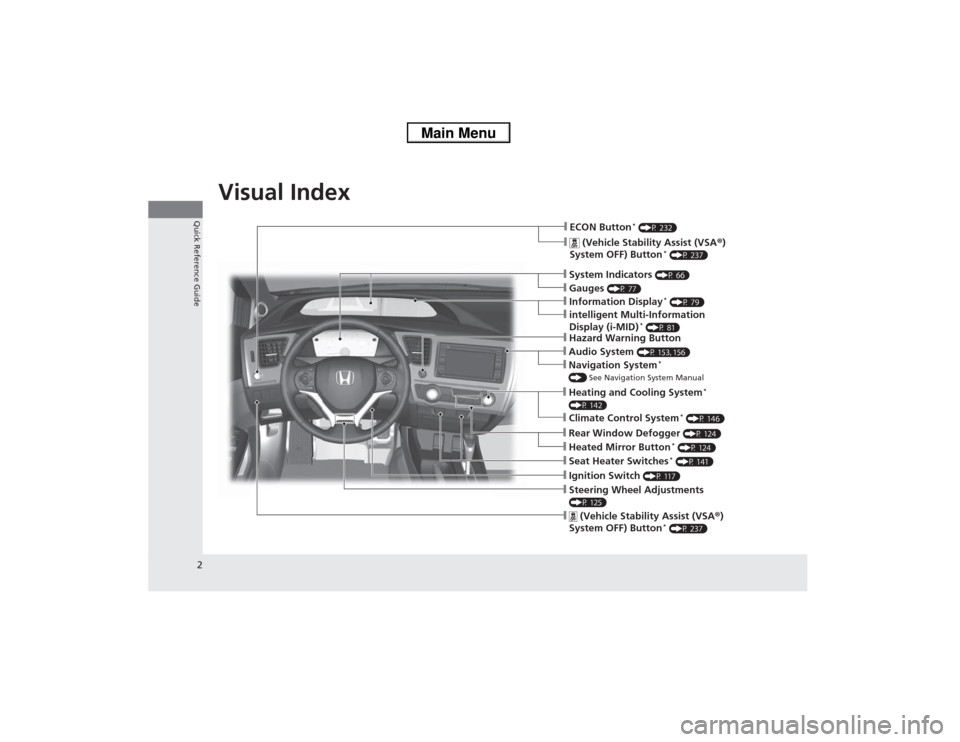
Quick Reference GuideVisual Index
❙Navigation System
*
() See Navigation System Manual❙Audio System
(P 153, 156)
❙Hazard Warning Button❙Seat Heater Switches
* (P 141)
❙Ignition Switch
(P 117)
❙Steering Wheel Adjustments (P 125)❙
(Vehicle Stability Assist (VSA ®)
System OFF) Button
* (P 237)
❙ECON Button
* (P 232)
❙
(Vehicle Stability Assist (VSA ®)
System OFF) Button
* (P 237)
❙Heating and Cooling System
*
(P 142)❙Climate Control System
* (P 146)
❙System Indicators
(P 66)
❙Gauges
(P 77)
❙Information Display
* (P 79)
❙intelligent Multi-Information
Display (i-MID)
* (P 81)
❙Rear Window Defogger
(P 124)
❙Heated Mirror Button
* (P 124)
Page 10 of 367
9Quick Reference Guide
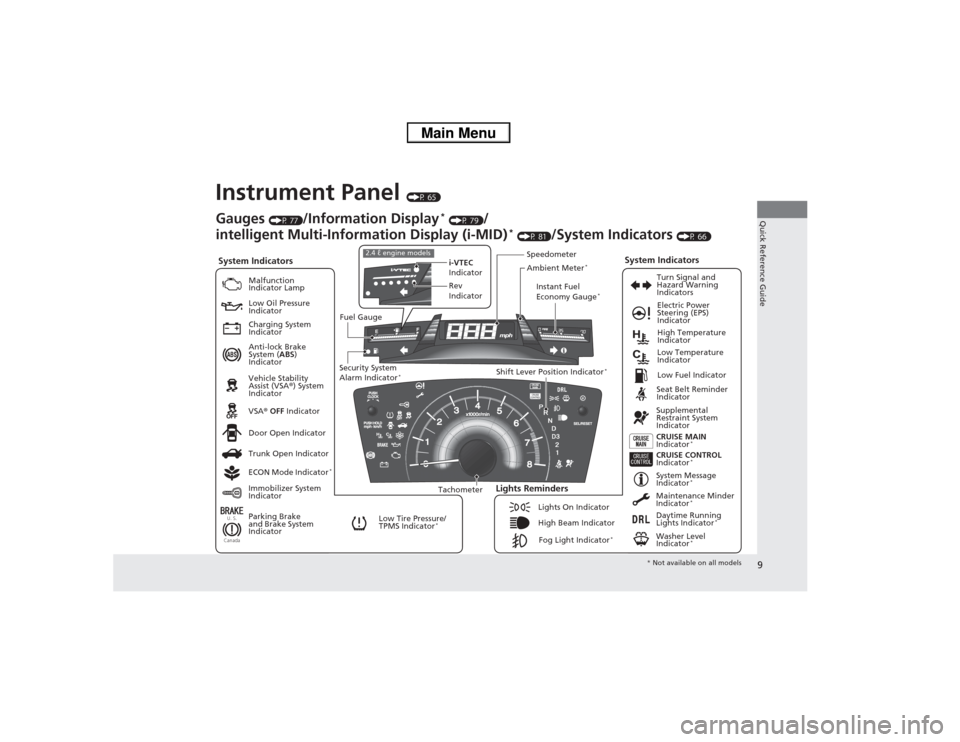
Instrument Panel
(P 65)
U. S.CanadaSystem Indicators
Malfunction
Indicator Lamp
Low Oil Pressure
Indicator
Charging System
Indicator
Anti-lock Brake
System (ABS)
Indicator
Vehicle Stability
Assist (VSA ®) System
Indicator
VSA ® OFF Indicator
Low Tire Pressure/
TPMS Indicator
*
Electric Power
Steering (EPS)
Indicator
Lights Reminders
Lights On Indicator
High Beam IndicatorFog Light Indicator
*
Immobilizer System
Indicator Seat Belt Reminder
Indicator
System Indicators
CRUISE CONTROL
Indicator
*
System Message
Indicator
*
Parking Brake
and Brake System
IndicatorSupplemental
Restraint System
Indicator
Door Open Indicator CRUISE MAIN
Indicator
*
Tachometer Instant Fuel
Economy Gauge
*
Speedometer
Fuel Gauge
Security System
Alarm Indicator
*
Shift Lever Position Indicator
*
Low Fuel Indicator
Gauges
(P 77)
/Information Display
* (P 79)
/
intelligent Multi-Information Display (i-MID)
* (P 81)
/System Indicators
(P 66)
Trunk Open Indicator
ECON Mode Indicator
*
Turn Signal and
Hazard Warning
Indicators
High Temperature
Indicator
Low Temperature
Indicator
Maintenance Minder
Indicator
*
Daytime Running
Lights Indicator
*
Washer Level
Indicator
*
i-VTEC
Indicator
Rev
Indicator
2.4 ℓ engine models
Ambient Meter
*
* Not available on all models
Page 20 of 367
Quick Reference Guide19
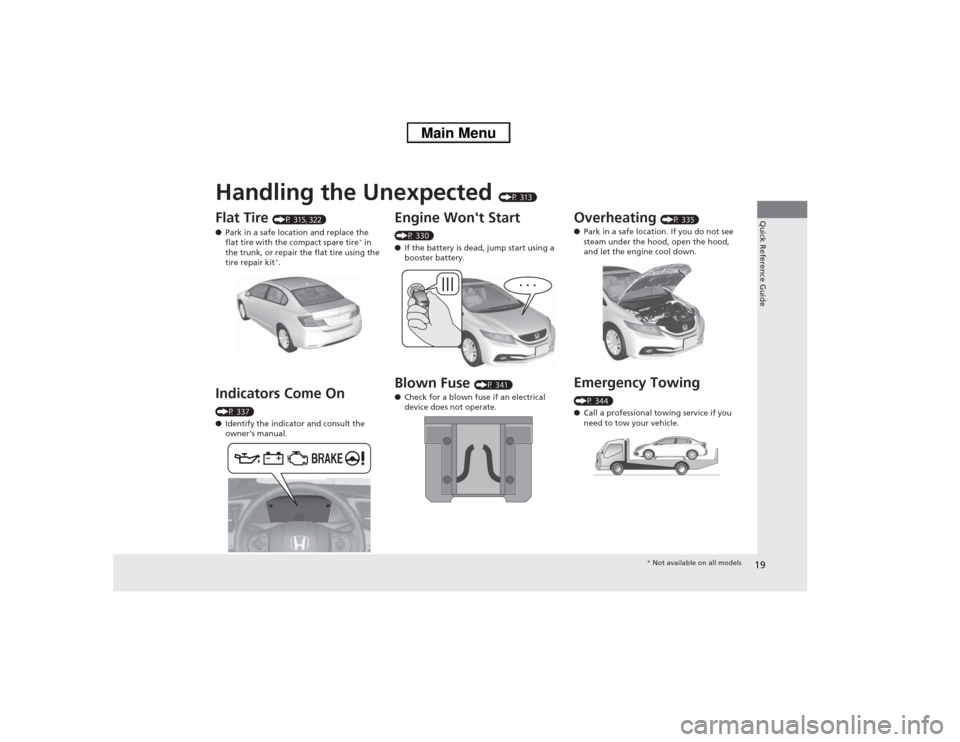
Handling the Unexpected
(P 313)
Flat Tire
(P 315, 322)
● Park in a safe location and replace the
flat tire with the compact spare tire
* in
the trunk, or repair the flat tire using the
tire repair kit
*.
Indicators Come On (P 337)
● Identify the indicator and consult the
owner's manual.
Engine Won't Start (P 330)
● If the battery is dead, jump start using a
booster battery.Blown Fuse
(P 341)
● Check for a blown fuse if an electrical
device does not operate.
Overheating
(P 335)
● Park in a safe location. If you do not see
steam under the hood, open the hood,
and let the engine cool down.
Emergency Towing (P 344)
●Call a professional towing service if you
need to tow your vehicle.
* Not available on all models
Page 26 of 367
25
Safe Driving
You can find many safety recommendations throughout this chapter, and throughout this manual.
For Safe Driving
Important Safety Precautions ............. 26
Your Vehicle's Safety Features............ 28
Seat Belts
About Your Seat Belts ........................ 30
Fastening a Seat Belt .......................... 33
Seat Belt Inspection............................ 36
Airbags Airbag System Components ............... 37
Types of Airbags ................................ 40
Front Airbags (SRS) ............................ 40
Side Airbags....................................... 44 Side Curtain Airbags .......................... 46
Airbag System Indicators.................... 47
Airbag Care ....................................... 49
Child Safety
Protecting Child Passengers ............... 50
Safety of Infants and Small Children ....... 52Safety of Larger Children ................... 60
Exhaust Gas Hazard Carbon Monoxide Gas ....................... 62
Safety Labels
Label Locations .................................. 63
Page 48 of 367
Continued
47
uuAirbags uAirbag System Indicators
Safe Driving
■When side curtain airbags deploy in a frontal collision
One or both side curtain airbags may inflate in a moderate-to-severe angled frontal
collision.
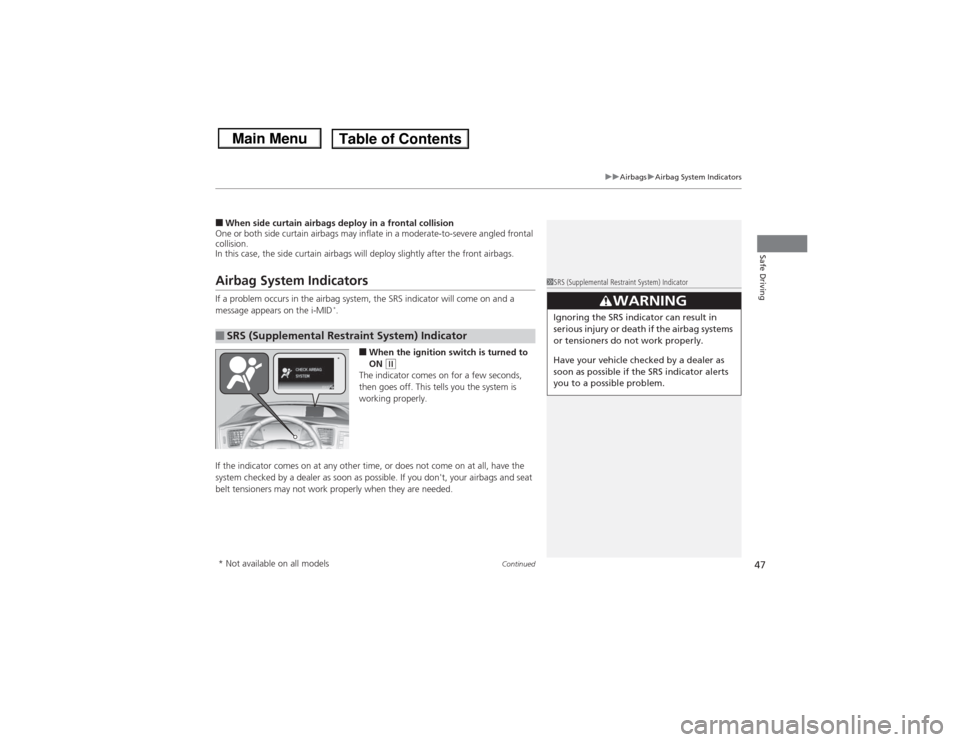
In this case, the side curtain airbags will deploy slightly after the front airbags.Airbag System IndicatorsIf a problem occurs in the airbag system, the SRS indicator will come on and a
message appears on the i-MID
*.
■When the ignition switc h is turned to
ON
(w
The indicator comes on for a few seconds,
then goes off. This tells you the system is
working properly.
If the indicator comes on at any other time, or does not come on at all, have the
system checked by a dealer as soon as po ssible. If you don't, your airbags and seat
belt tensioners may not work properly when they are needed.
■SRS (Supplemental Re straint System) Indicator
1SRS (Supplemental Restraint System) Indicator
3
WARNING
Ignoring the SRS indicator can result in
serious injury or death if the airbag systems
or tensioners do not work properly.
Have your vehicle checked by a dealer as
soon as possible if the SRS indicator alerts
you to a possible problem.
*
* Not available on all models
Page 49 of 367
uuAirbags uAirbag System Indicators
48Safe Driving
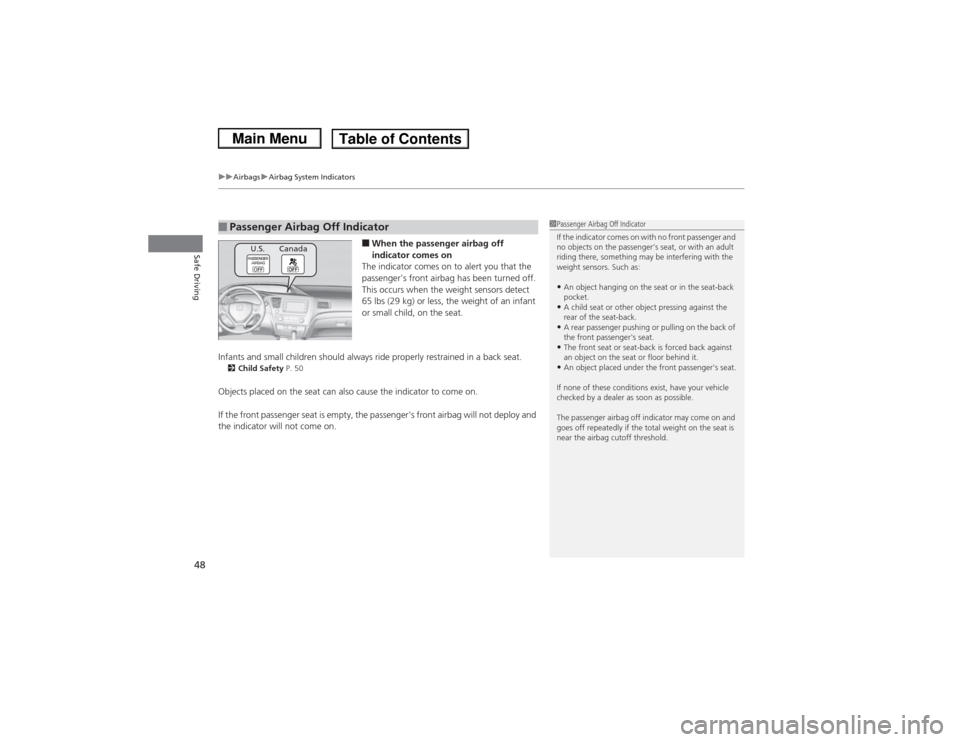
■When the passenger airbag off
indicator comes on
The indicator comes on to alert you that the
passenger's front airbag has been turned off.
This occurs when the weight sensors detect
65 lbs (29 kg ) or less, the weight of an infant
or small child, on the seat.
Infants and small children should always ride properly restrained in a back seat.
2 Child Safety P. 50Objects placed on the seat can also cause the indicator to come on.
If the front passenger seat is empty, the passenger's front airbag will not deploy and
the indicator will not come on.■Passenger Airbag Off Indicator
1Passenger Airbag Off Indicator
If the indicator comes on with no front passenger and
no objects on the passenger’s seat, or with an adult
riding there, something may be interfering with the
weight sensors. Such as:•An object hanging on the seat or in the seat-back
pocket.•A child seat or other object pressing against the
rear of the seat-back.•A rear passenger pushing or pulling on the back of
the front passenger's seat.•The front seat or seat-back is forced back against
an object on the seat or floor behind it.•An object placed under the front passenger's seat.
If none of these conditions exist, have your vehicle
checked by a dealer as soon as possible.
The passenger airbag off indicator may come on and
goes off repeatedly if the total weight on the seat is
near the airbag cutoff threshold.
U.S. Canada
Page 66 of 367
65
Instrument Panel
This chapter describes the buttons, indicators, and gauges that are used while driving.
Indicators............................................ 66
intelligent Multi-Information Display (i-
MID) Warning and Information
Messages
*....................................... 75
Gauges and Displays Gauges .............................................. 77
Information Display
*.......................... 79
intelligent Multi-Information Display (i- MID)
*.............................................. 81
* Not available on all models
Page 67 of 367
66Instrument Panel
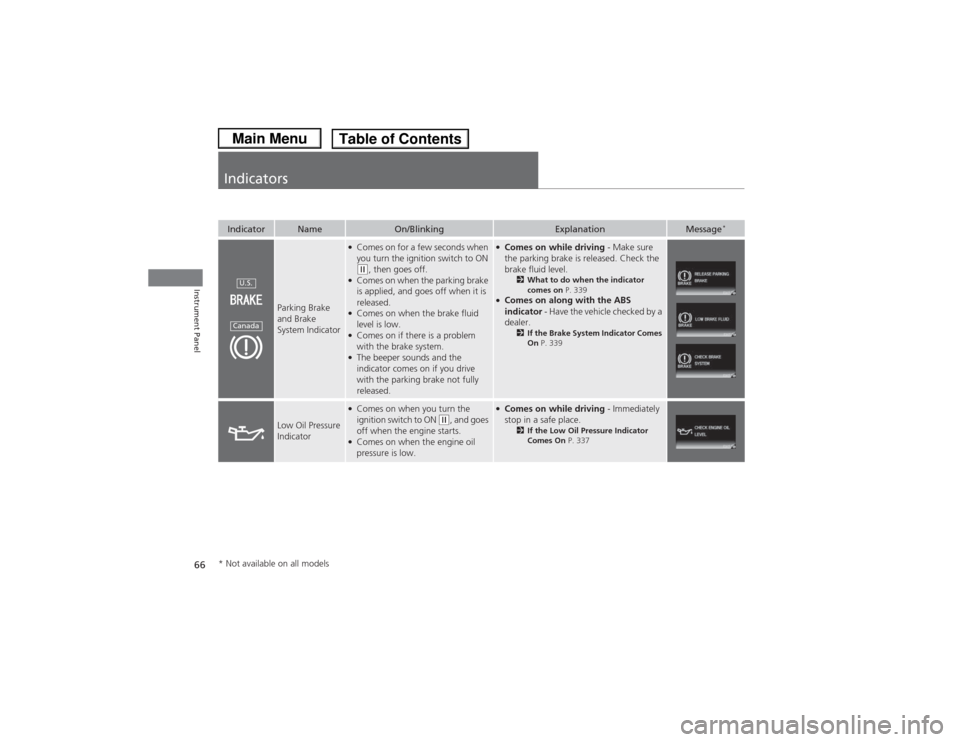
IndicatorsIndicator
Name
On/Blinking
Explanation
Message
*
Parking Brake
and Brake
System Indicator
●Comes on for a few seconds when
you turn the ignition switch to ON (w, then goes off.
●Comes on when the parking brake
is applied, and goes off when it is
released.●Comes on when the brake fluid
level is low.●Comes on if there is a problem
with the brake system.●The beeper sounds and the
indicator comes on if you drive
with the parking brake not fully
released.
●Comes on while driving - Make sure
the parking brake is released. Check the
brake fluid level.
2 What to do when the indicator
comes on P. 339
●Comes on along with the ABS
indicator - Have the vehicle checked by a
dealer.
2 If the Brake System Indicator Comes
On P. 339
Low Oil Pressure
Indicator
●Comes on when you turn the
ignition switch to ON
(w, and goes
off when the engine starts.
●Comes on when the engine oil
pressure is low.
●Comes on while driving - Immediately
stop in a safe place.
2 If the Low Oil Pressure Indicator
Comes On P. 337
U.S.Canada
* Not available on all models
Page 68 of 367
67
uuIndicators u
Continued
Instrument Panel
Indicator
Name
On/Blinking
Explanation
Message
*
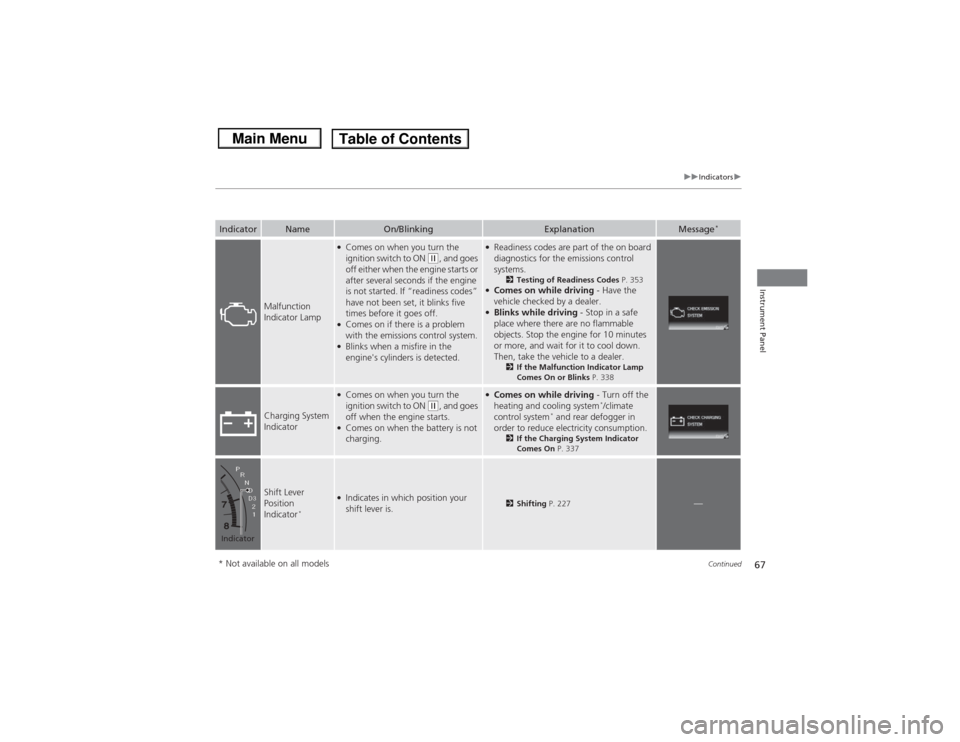
Malfunction
Indicator Lamp
●Comes on when you turn the
ignition switch to ON
(w, and goes
off either when the engine starts or
after several seconds if the engine
is not started. If “readiness codes”
have not been set, it blinks five
times before it goes off.
●Comes on if there is a problem
with the emissions control system.●Blinks when a misfire in the
engine's cylinders is detected.
●Readiness codes are part of the on board
diagnostics for the emissions control
systems.
2 Testing of Readiness Codes P. 353
●Comes on while driving - Have the
vehicle checked by a dealer.●Blinks while driving - Stop in a safe
place where there are no flammable
objects. Stop the engine for 10 minutes
or more, and wait for it to cool down.
Then, take the vehicle to a dealer.
2 If the Malfunction Indicator Lamp
Comes On or Blinks P. 338
Charging System
Indicator
●Comes on when you turn the
ignition switch to ON
(w, and goes
off when the engine starts.
●Comes on when the battery is not
charging.
●Comes on while driving - Turn off the
heating and cooling system
*/climate
control system
* and rear defogger in
order to reduce electricity consumption.
2 If the Charging System Indicator
Comes On P. 337
Shift Lever
Position
Indicator
*
●Indicates in which position your
shift lever is.
2Shifting P. 227
—
Indicator* Not available on all models