warning light HONDA CIVIC 2013 9.G Owners Manual
[x] Cancel search | Manufacturer: HONDA, Model Year: 2013, Model line: CIVIC, Model: HONDA CIVIC 2013 9.GPages: 367, PDF Size: 8.43 MB
Page 10 of 367
9Quick Reference Guide
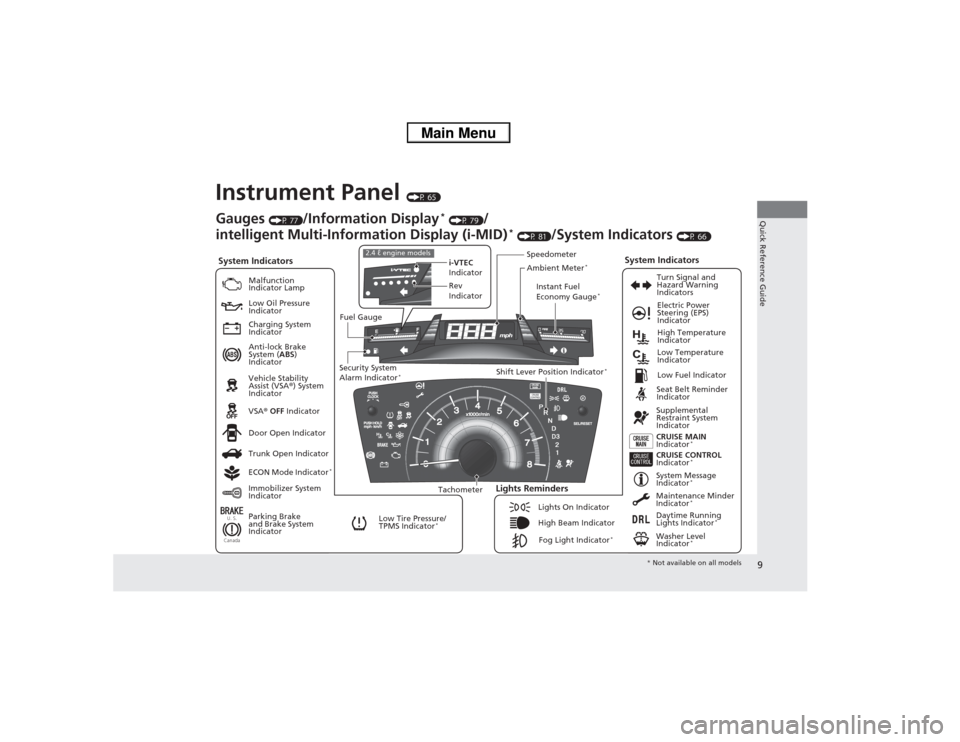
Instrument Panel
(P 65)
U. S.CanadaSystem Indicators
Malfunction
Indicator Lamp
Low Oil Pressure
Indicator
Charging System
Indicator
Anti-lock Brake
System (ABS)
Indicator
Vehicle Stability
Assist (VSA ®) System
Indicator
VSA ® OFF Indicator
Low Tire Pressure/
TPMS Indicator
*
Electric Power
Steering (EPS)
Indicator
Lights Reminders
Lights On Indicator
High Beam IndicatorFog Light Indicator
*
Immobilizer System
Indicator Seat Belt Reminder
Indicator
System Indicators
CRUISE CONTROL
Indicator
*
System Message
Indicator
*
Parking Brake
and Brake System
IndicatorSupplemental
Restraint System
Indicator
Door Open Indicator CRUISE MAIN
Indicator
*
Tachometer Instant Fuel
Economy Gauge
*
Speedometer
Fuel Gauge
Security System
Alarm Indicator
*
Shift Lever Position Indicator
*
Low Fuel Indicator
Gauges
(P 77)
/Information Display
* (P 79)
/
intelligent Multi-Information Display (i-MID)
* (P 81)
/System Indicators
(P 66)
Trunk Open Indicator
ECON Mode Indicator
*
Turn Signal and
Hazard Warning
Indicators
High Temperature
Indicator
Low Temperature
Indicator
Maintenance Minder
Indicator
*
Daytime Running
Lights Indicator
*
Washer Level
Indicator
*
i-VTEC
Indicator
Rev
Indicator
2.4 ℓ engine models
Ambient Meter
*
* Not available on all models
Page 48 of 367
Continued
47
uuAirbags uAirbag System Indicators
Safe Driving
■When side curtain airbags deploy in a frontal collision
One or both side curtain airbags may inflate in a moderate-to-severe angled frontal
collision.
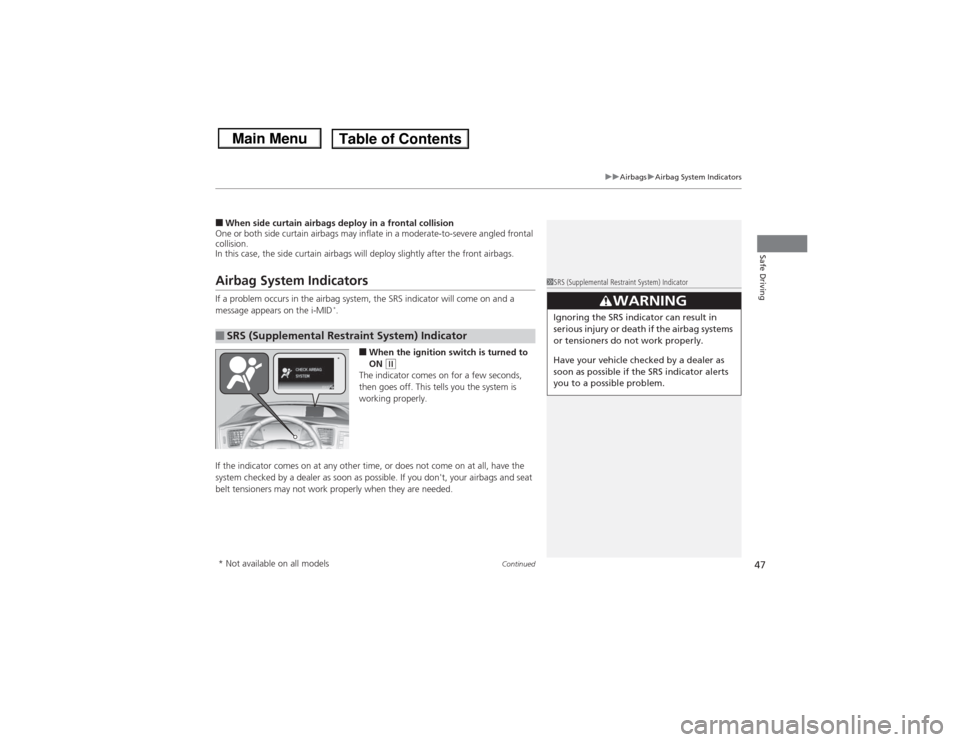
In this case, the side curtain airbags will deploy slightly after the front airbags.Airbag System IndicatorsIf a problem occurs in the airbag system, the SRS indicator will come on and a
message appears on the i-MID
*.
■When the ignition switc h is turned to
ON
(w
The indicator comes on for a few seconds,
then goes off. This tells you the system is
working properly.
If the indicator comes on at any other time, or does not come on at all, have the
system checked by a dealer as soon as po ssible. If you don't, your airbags and seat
belt tensioners may not work properly when they are needed.
■SRS (Supplemental Re straint System) Indicator
1SRS (Supplemental Restraint System) Indicator
3
WARNING
Ignoring the SRS indicator can result in
serious injury or death if the airbag systems
or tensioners do not work properly.
Have your vehicle checked by a dealer as
soon as possible if the SRS indicator alerts
you to a possible problem.
*
* Not available on all models
Page 73 of 367
72
uuIndicators u
Instrument Panel
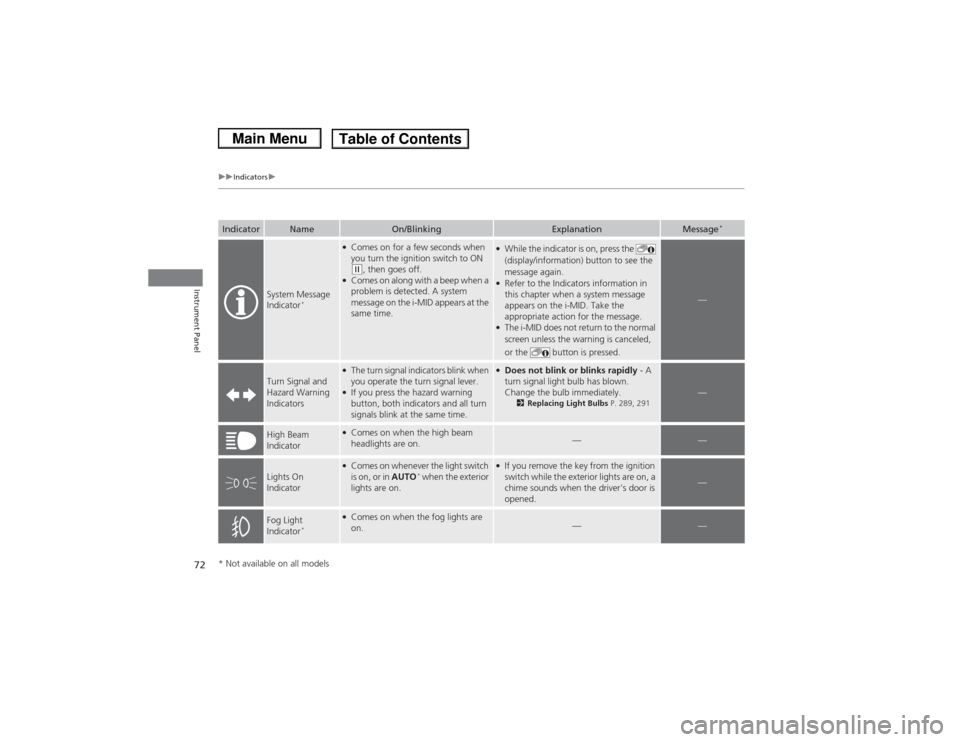
Indicator
Name
On/Blinking
Explanation
Message
*
System Message
Indicator
*
●Comes on for a few seconds when
you turn the ignition switch to ON (w, then goes off.
●Comes on along with a beep when a
problem is detected. A system
message on the i-MID appears at the
same time.
●While the indicator is on, press the
(display/information) button to see the
message again.●Refer to the Indicators information in
this chapter when a system message
appears on the i-MID. Take the
appropriate action for the message.●The i-MID does not return to the normal
screen unless the warning is canceled,
or the button is pressed.
—
Turn Signal and
Hazard Warning
Indicators
●The turn signal indicators blink when
you operate the turn signal lever.●If you press the hazard warning
button, both indicators and all turn
signals blink at the same time.
●Does not blink or blinks rapidly - A
turn signal light bulb has blown.
Change the bulb immediately.
2 Replacing Light Bulbs P. 289, 291
—
High Beam
Indicator
●Comes on when the high beam
headlights are on.
—
—
Lights On
Indicator
●Comes on whenever the light switch
is on, or in AUTO
* when the exterior
lights are on.
●If you remove the key from the ignition
switch while the exterior lights are on, a
chime sounds when the driver's door is
opened.
—
Fog Light
Indicator
*
●Comes on when the fog lights are
on.
—
—
* Not available on all models
Page 76 of 367
 Warning and Information Messages
*
Continued
Instrument Panel
intelligent Multi-Information Display (i-MID) Warning and Information \
Mes")
75
uuIndicators uintelligent Multi-Information Display (i-MID) Warning and Information Messages
*
Continued
Instrument Panel
intelligent Multi-Information Display (i-MID) Warning and Information \
Messages
*
The following messages appear only on the i-MID. Press the (display/information) button to see the message again with the syst em
message indicator on.
Message
Condition
Explanation
●Appears when the fuel fill cap is loose or is not
installed.
2 Check/Tighten Fuel Cap Message P. 338
●Appears if there is a problem with the DRL system.
●Have your vehicle checked by a dealer.
2Daytime Running Lights P. 121
●Appears when the washer fluid is low.
●Refill the washer fluid.
2Refilling Window Washer Fluid P. 281
Canadian models* Not available on all models
Page 115 of 367
114Controls
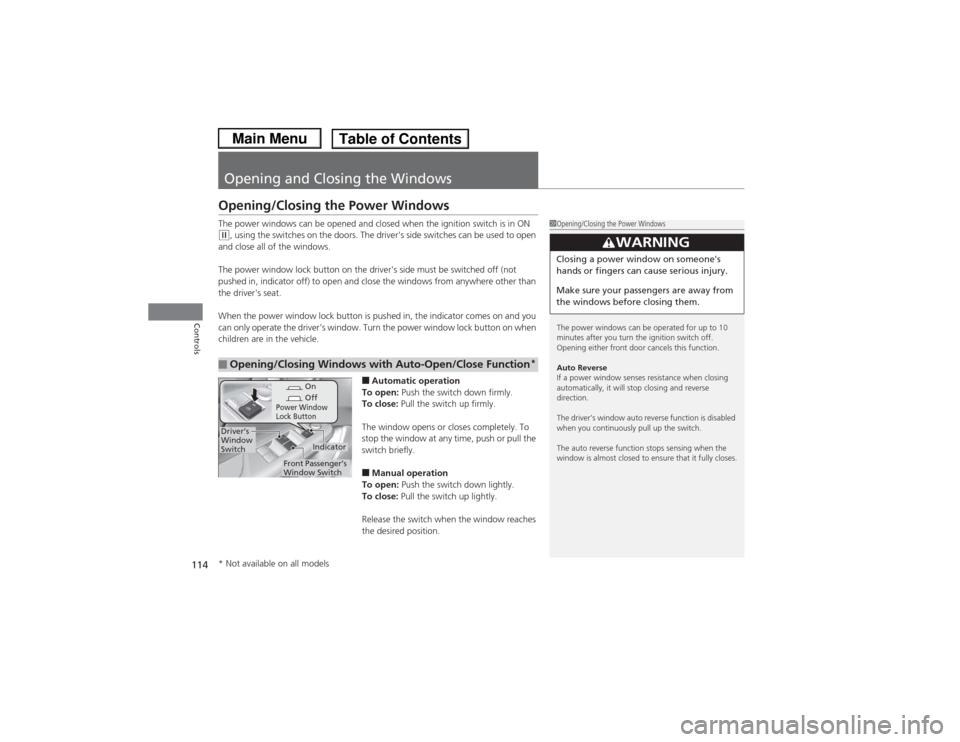
Opening and Closing the WindowsOpening/Closing the Power WindowsThe power windows can be opened and closed when the ignition switch is in ON (w, using the switches on the doors. The driver's side switches can be used to open
and close all of the windows.
The power window lock button on the driver's side must be switched off (not
pushed in, indicator off) to open and close the windows from anywhere other than
the driver's seat.
When the power window lock button is pushed in, the indicator comes on and you
can only operate the driver's window. Turn the power window lock button on when
children are in the vehicle.
■Automatic operation
To open: Push the switch down firmly.
To close: Pull the switch up firmly.
The window opens or closes completely. To
stop the window at any time, push or pull the
switch briefly.■Manual operation
To open: Push the switch down lightly.
To close: Pull the switch up lightly.
Release the switch when the window reaches
the desired position.
■Opening/Closing Windows with Auto-Open/Close Function
*
1 Opening/Closing the Power Windows
The power windows can be operated for up to 10
minutes after you turn the ignition switch off.
Opening either front door cancels this function.
Auto Reverse
If a power window senses resistance when closing
automatically, it will stop closing and reverse
direction.
The driver’s window auto reverse function is disabled
when you continuously pull up the switch.
The auto reverse function stops sensing when the
window is almost closed to ensure that it fully closes.
3
WARNING
Closing a power window on someone's
hands or fingers can cause serious injury.
Make sure your passengers are away from
the windows before closing them.
On
Off
Power Window
Lock Button
Indicator
Driver’s
Window
Switch
Front Passenger’s
Window Switch
* Not available on all models
Page 137 of 367
136
uuInterior Lights/Interior Convenience Items uInterior Convenience Items
Controls
Interior Convenience Items
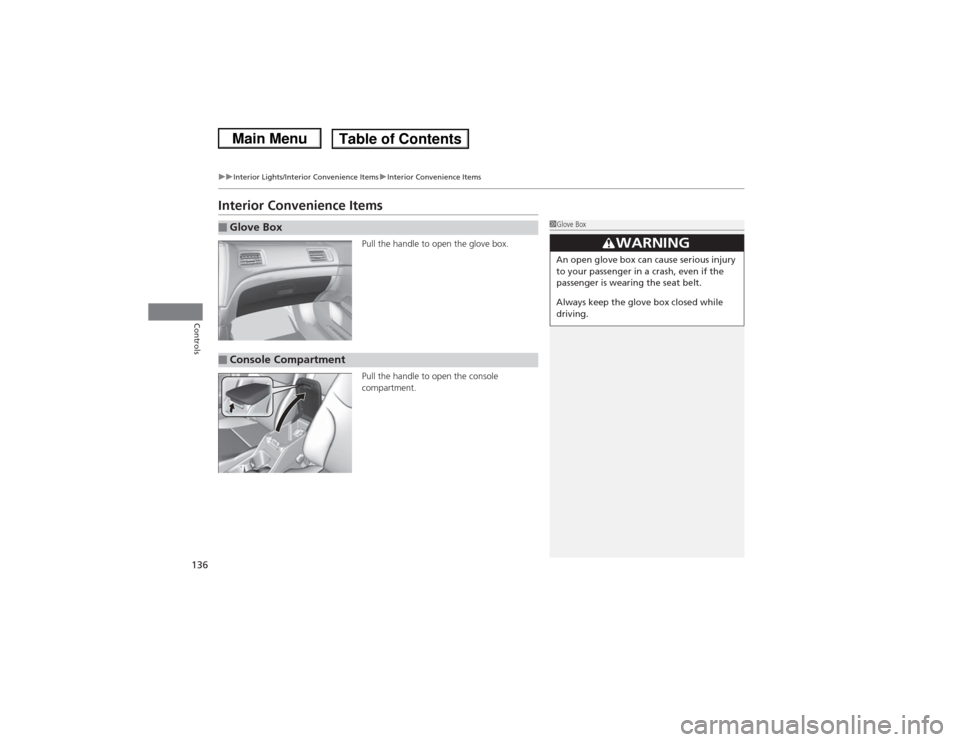
Pull the handle to open the glove box.
Pull the handle to open the console
compartment.
■Glove Box
1Glove Box
3
WARNING
An open glove box can cause serious injury
to your passenger in a crash, even if the
passenger is wearing the seat belt.
Always keep the glove box closed while
driving.
■Console Compartment
Page 142 of 367
141
uuInterior Lights/Interior Convenience Items uInterior Convenience Items
Controls
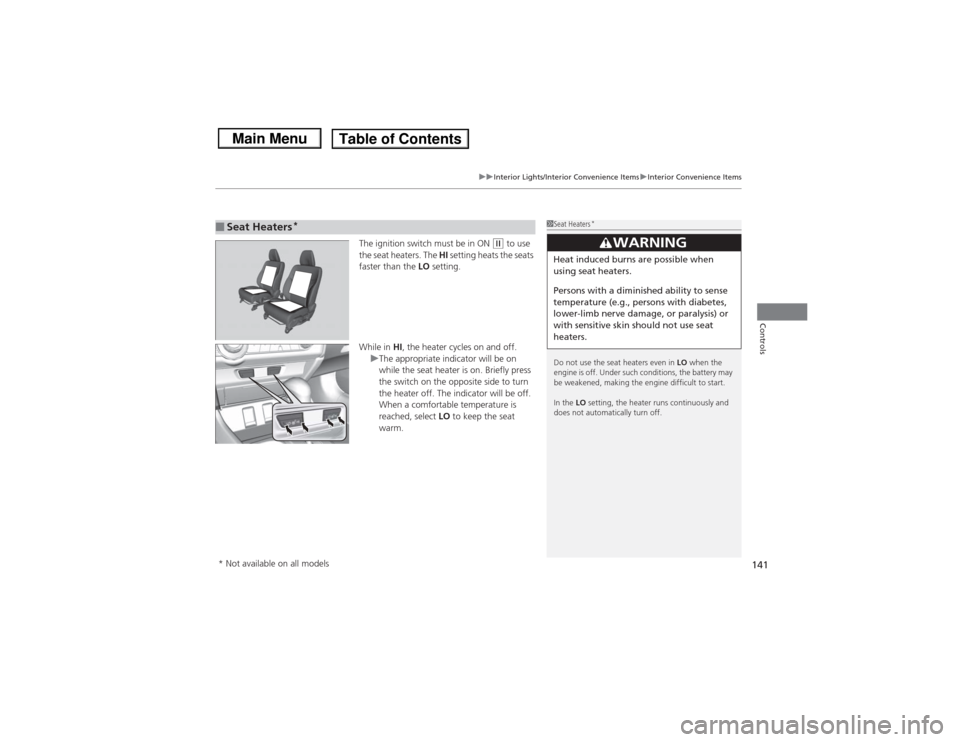
The ignition switch must be in ON
(w to use
the seat heaters. The HI setting heats the seats
faster than the LO setting.
While in HI, the heater cycles on and off.
u The appropriate indicator will be on
while the seat heater is on. Briefly press
the switch on the opposite side to turn
the heater off. The indicator will be off.
When a comfortable temperature is
reached, select LO to keep the seat
warm.
■Seat Heaters
*
1 Seat Heaters
*
Do not use the seat heaters even in LO when the
engine is off. Under such conditions, the battery may
be weakened, making the engine difficult to start.
In the LO setting, the heater runs continuously and
does not automatically turn off.
3
WARNING
Heat induced burns are possible when
using seat heaters.
Persons with a diminish ed ability to sense
temperature (e.g., persons with diabetes,
lower-limb nerve damage, or paralysis) or
with sensitive skin should not use seat
heaters.
* Not available on all models
Page 242 of 367
241
Continued
Driving
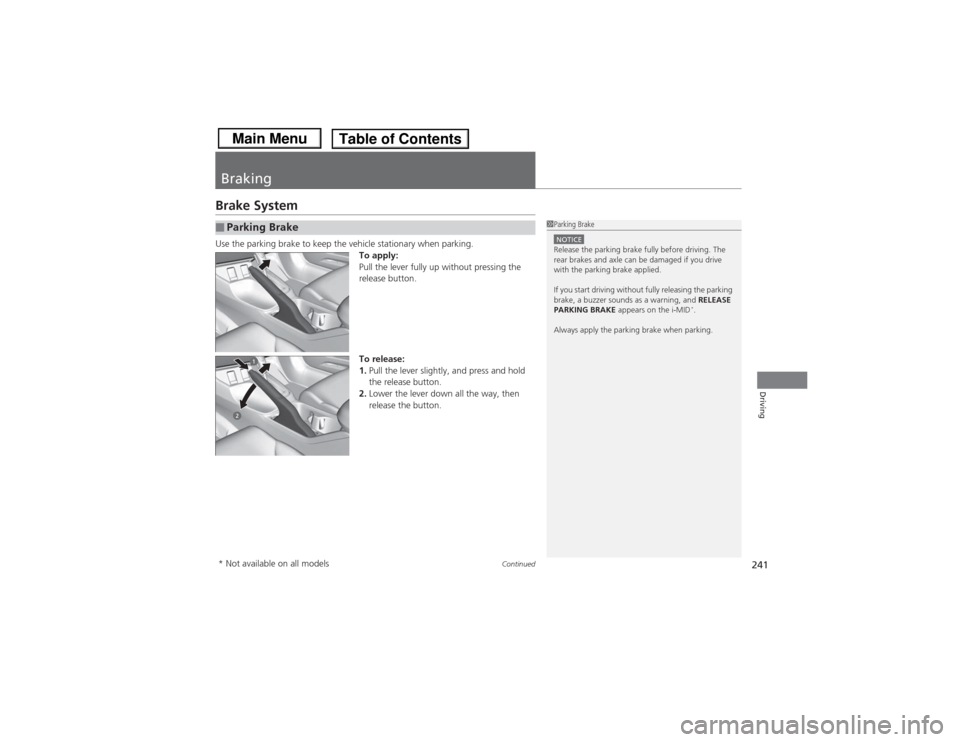
BrakingBrake SystemUse the parking brake to keep the vehicle stationary when parking.To apply:
Pull the lever fully up without pressing the
release button.
To release:
1.Pull the lever slightly, and press and hold
the release button.
2. Lower the lever down all the way, then
release the button.■Parking Brake
1Parking BrakeNOTICERelease the parking brake fully before driving. The
rear brakes and axle can be damaged if you drive
with the parking brake applied.
If you start driving without fully releasing the parking
brake, a buzzer sounds as a warning, and RELEASE
PARKING BRAKE appears on the i-MID
*.
Always apply the parking brake when parking.
* Not available on all models
Page 316 of 367
315
Continued
Handling the Unexpected
If a Tire Goes FlatChanging a Flat TireIf a tire goes flat while driving, grasp the steering wheel firmly, and brake gradually
to reduce speed. Then, stop in a safe place. Replace the flat tire with a compact
spare tire. Go to a dealer as soon as possible to have the full-size tire repaired or
replaced.
1.Park the vehicle on firm, level, and non-slippery surface and apply the parking
brake.
2. Put the shift lever in
(P.
2. Put the shift lever in (R.
3. Turn on the hazard warning lights and turn the ignition switch to LOCK
(0.
Models with compact spare tire
1Changing a Flat Tire
Periodically check the tire pressure of the compact
spare. It should be set to the specified pressure.
Specified Pressure: 60 psi (420 kPa, 4.2 kgf/cm
2)
When driving with the compact spare tire, keep the
vehicle speed under 50 mph (80 km/h). Replace with
a full-size tire as soon as possible.
The compact spare tire and wheel in your vehicle are
specifically for this model.
Do not use them with another vehicle.
Do not use another type of compact spare tire or
wheel with your vehicle.
Do not mount tire chains on a compact spare tire.
If a chain-mounted front tire goes flat, remove one of
the full-size rear tires and replace it with the compact
spare tire. Remove the flat front tire and replace it
with the full-size tire that was removed from the rear.
Mount the tire chains on the front tire.
Do not use a puncture-repairing agent on a flat tire,
as it can damage the tire pressure sensor.
U.S. models
Automatic transmission modelsManual transmission modelsAll models
Page 323 of 367
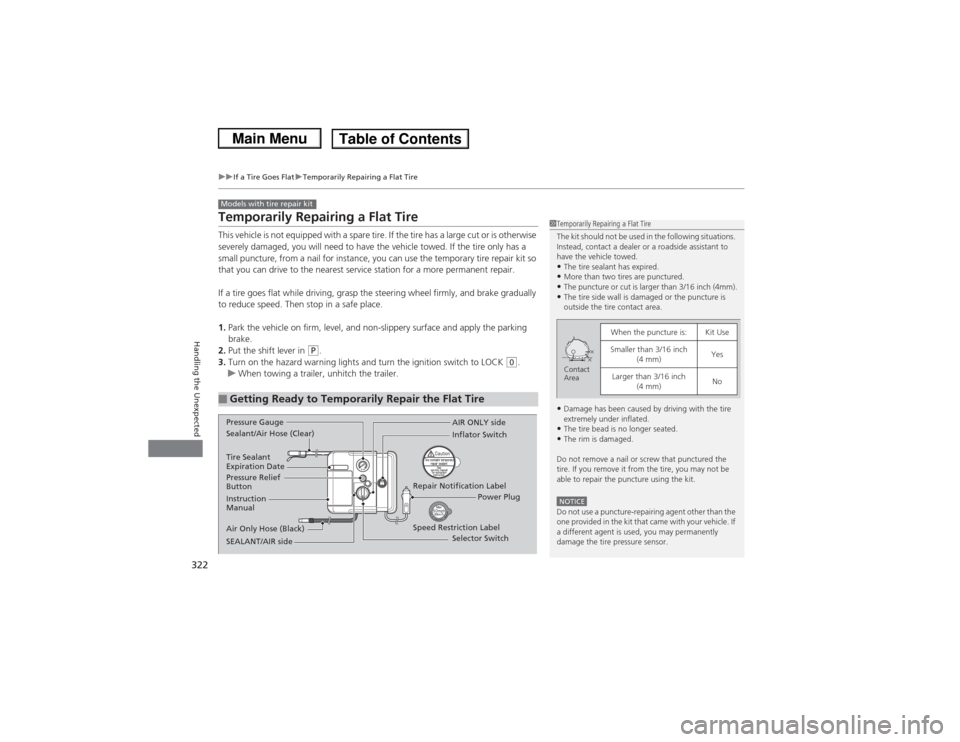
322
uuIf a Tire Goes Flat uTemporarily Repairing a Flat Tire
Handling the Unexpected
Temporarily Repairing a Flat TireThis vehicle is not equipped with a spare tire. If the tire has a large cut or is otherwise
severely damaged, you will need to have the vehicle towed. If the tire only has a
small puncture, from a nail for instance, you can use the temporary tire repair kit so
that you can drive to the nearest service station for a more permanent repair.
If a tire goes flat while driving, grasp the steering wheel firmly, and brake gradually
to reduce speed. Then stop in a safe place.
1. Park the vehicle on firm, level, and non-slippery surface and apply the parking
brake.
2. Put the shift lever in
(P.
3. Turn on the hazard warning lights and turn the ignition switch to LOCK
(0.
u When towing a trailer, unhitch the trailer.
■Getting Ready to Temporarily Repair the Flat TireModels with tire repair kit
1Temporarily Repairing a Flat Tire
The kit should not be used in the following situations.
Instead, contact a dealer or a roadside assistant to
have the vehicle towed.•The tire sealant has expired.•More than two tires are punctured.•The puncture or cut is larger than 3/16 inch (4mm).•The tire side wall is damaged or the puncture is
outside the tire contact area.•Damage has been caused by driving with the tire
extremely under inflated.•The tire bead is no longer seated.•The rim is damaged.
Do not remove a nail or screw that punctured the
tire. If you remove it from the tire, you may not be
able to repair the puncture using the kit.NOTICEDo not use a puncture-repairing agent other than the
one provided in the kit that came with your vehicle. If
a different agent is used, you may permanently
damage the tire pressure sensor.
When the puncture is:
Kit Use
Smaller than 3/16 inch (4 mm)
Yes
Larger than 3/16 inch (4 mm)
No
Contact
Area
Instruction
Manual
Air Only Hose (Black) Speed Restriction Label Repair Notification Label
Pressure Relief
Button Inflator Switch
Selector Switch
SEALANT/AIR side Sealant/Air Hose (Clear) AIR ONLY side
Power Plug
Pressure Gauge
Tire Sealant
Expiration Date