battery HONDA CIVIC 2014 9.G Owner's Manual
[x] Cancel search | Manufacturer: HONDA, Model Year: 2014, Model line: CIVIC, Model: HONDA CIVIC 2014 9.GPages: 469, PDF Size: 17.32 MB
Page 284 of 469
Continued
283
uuBluetooth ® HandsFreeLink ®
*uHFL Menus
Features
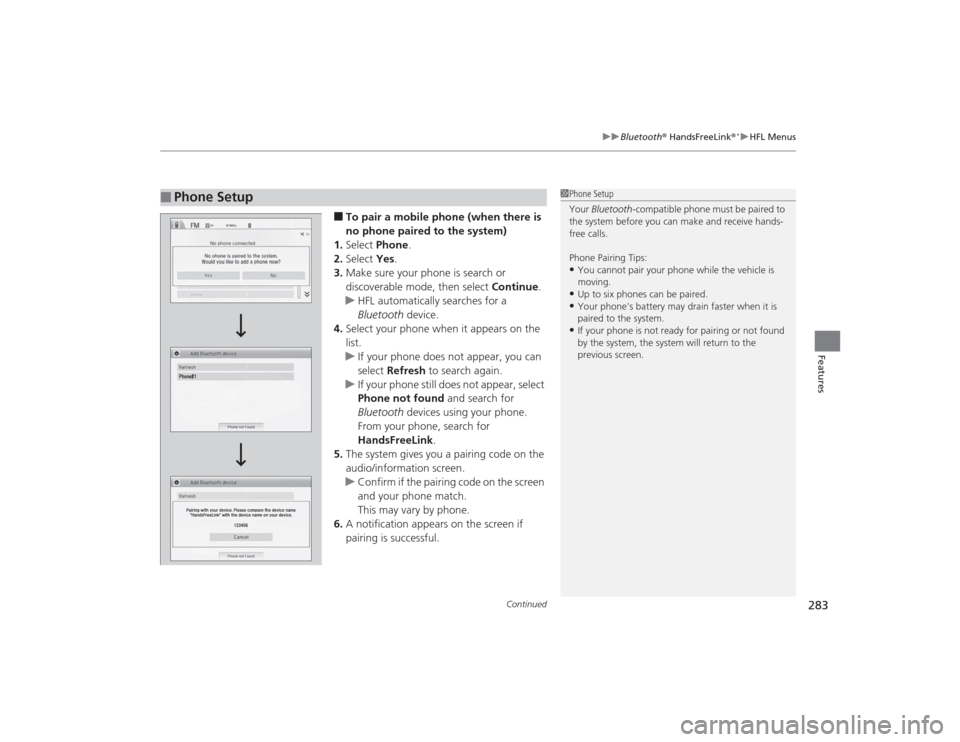
■To pair a mobile phone (when there is
no phone paired to the system)
1. Select Phone .
2. Select Yes.
3. Make sure your phone is search or
discoverable mode, then select Continue.
u HFL automatically searches for a
Bluetooth device.
4. Select your phone when it appears on the
list.
u If your phone does not appear, you can
select Refresh to search again.
u If your phone still does not appear, select
Phone not found and search for
Bluetooth devices using your phone.
From your phone, search for
HandsFreeLink .
5. The system gives you a pairing code on the
audio/information screen.
u Confirm if the pairing code on the screen
and your phone match.
This may vary by phone.
6. A notification appears on the screen if
pairing is successful.
■
Phone Setup
1Phone Setup
Your Bluetooth -compatible phone must be paired to
the system before you can make and receive hands-
free calls.
Phone Pairing Tips:•You cannot pair your phone while the vehicle is
moving.•Up to six phones can be paired.•Your phone's battery may drain faster when it is
paired to the system.•If your phone is not ready for pairing or not found
by the system, the system will return to the
previous screen.
Page 303 of 469
uuBluetooth ® HandsFreeLink ®
*uHFL Menus
302Features
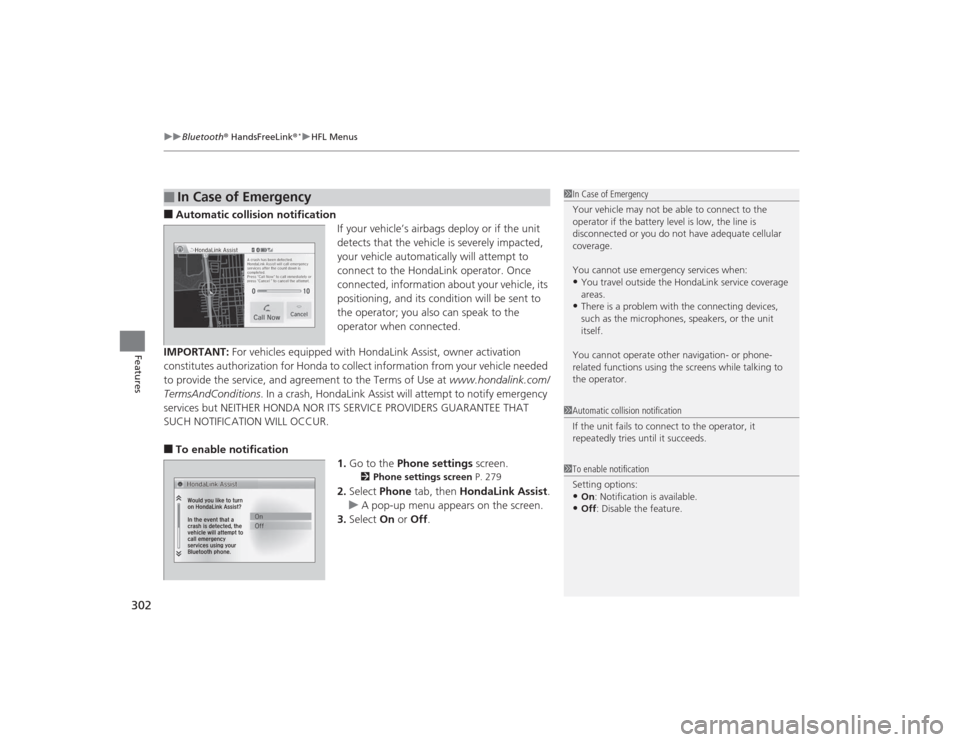
■Automatic collision notification
If your vehicle’s airbags deploy or if the unit
detects that the vehicle is severely impacted,
your vehicle automatically will attempt to
connect to the HondaLink operator. Once
connected, information about your vehicle, its
positioning, and its condition will be sent to
the operator; you also can speak to the
operator when connected.
IMPORTANT: For vehicles equipped with HondaLink Assist, owner activation
constitutes authorization for Honda to collect information from your vehicle needed
to provide the service, and agreement to the Terms of Use at www.hondalink.com/
TermsAndConditions . In a crash, HondaLink Assist will attempt to notify emergency
services but NEITHER HONDA NOR ITS SERVICE PROVIDERS GUARANTEE THAT
SUCH NOTIFICATION WILL OCCUR.■To enable notification 1.Go to the Phone settings screen.
2Phone settings screen P. 279
2.Select Phone tab, then HondaLink Assist .
u A pop-up menu appears on the screen.
3. Select On or Off .
■
In Case of Emergency
1In Case of Emergency
Your vehicle may not be able to connect to the
operator if the battery level is low, the line is
disconnected or you do not have adequate cellular
coverage.
You cannot use emergency services when:•You travel outside the HondaLink service coverage
areas.•There is a problem with the connecting devices,
such as the microphones, speakers, or the unit
itself.
You cannot operate other navigation- or phone-
related functions using the screens while talking to
the operator.
1 Automatic collision notification
If the unit fails to connect to the operator, it
repeatedly tries until it succeeds.1To enable notification
Setting options:•On : Notification is available.•Off : Disable the feature.
Page 314 of 469
313
Continued
Driving
When DrivingStarting the Engine
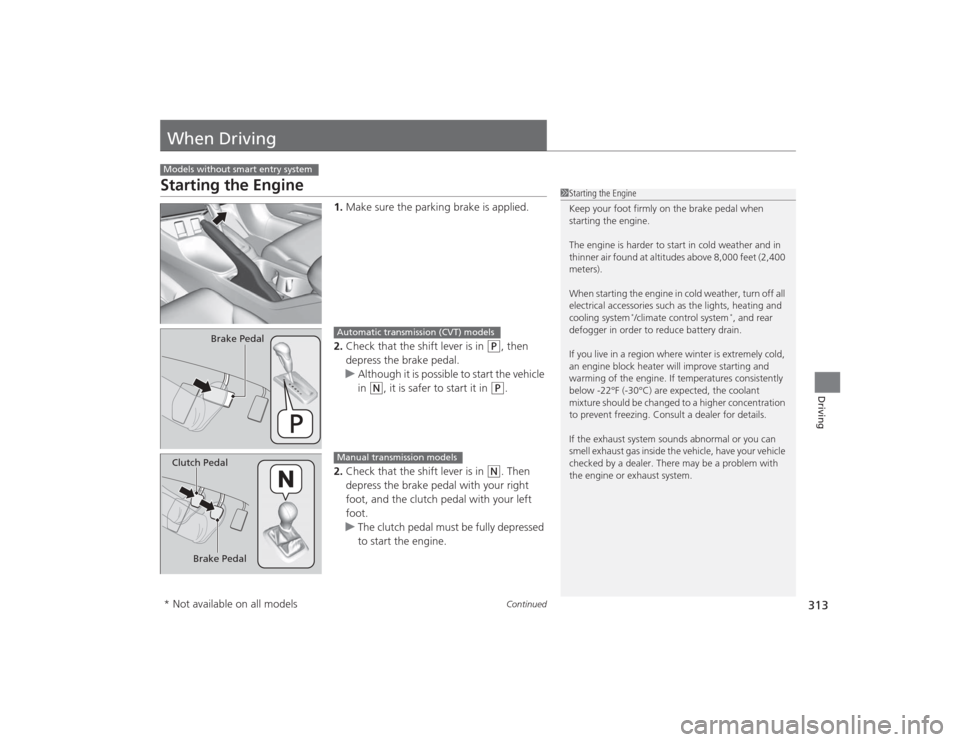
1.Make sure the parking brake is applied.
2. Check that the shift lever is in
(P
, then
depress the brake pedal.
u Although it is possible to start the vehicle
in
(N
, it is safer to start it in
(P
.
2. Check that the shift lever is in
(N
. Then
depress the brake pedal with your right
foot, and the clutch pedal with your left
foot.
u The clutch pedal must be fully depressed
to start the engine.
Models without smart entry system
1Starting the Engine
Keep your foot firmly on the brake pedal when
starting the engine.
The engine is harder to start in cold weather and in
thinner air found at altitudes above 8,000 feet (2,400
meters).
When starting the engine in cold weather, turn off all
electrical accessories such as the lights, heating and
cooling system
*/climate control system
*, and rear
defogger in order to reduce battery drain.
If you live in a region where winter is extremely cold,
an engine block heater will improve starting and
warming of the engine. If temperatures consistently
below -22°F (-30°C) are expected, the coolant
mixture should be changed to a higher concentration
to prevent freezing. Consult a dealer for details.
If the exhaust system sounds abnormal or you can
smell exhaust gas inside the vehicle, have your vehicle
checked by a dealer. There may be a problem with
the engine or exhaust system.
Brake Pedal
Automatic transmission (CVT) models
Brake Pedal
Clutch Pedal
Manual transmission models
* Not available on all models
Page 316 of 469
315
uuWhen Driving uStarting the Engine
Continued
Driving
Starting the Engine
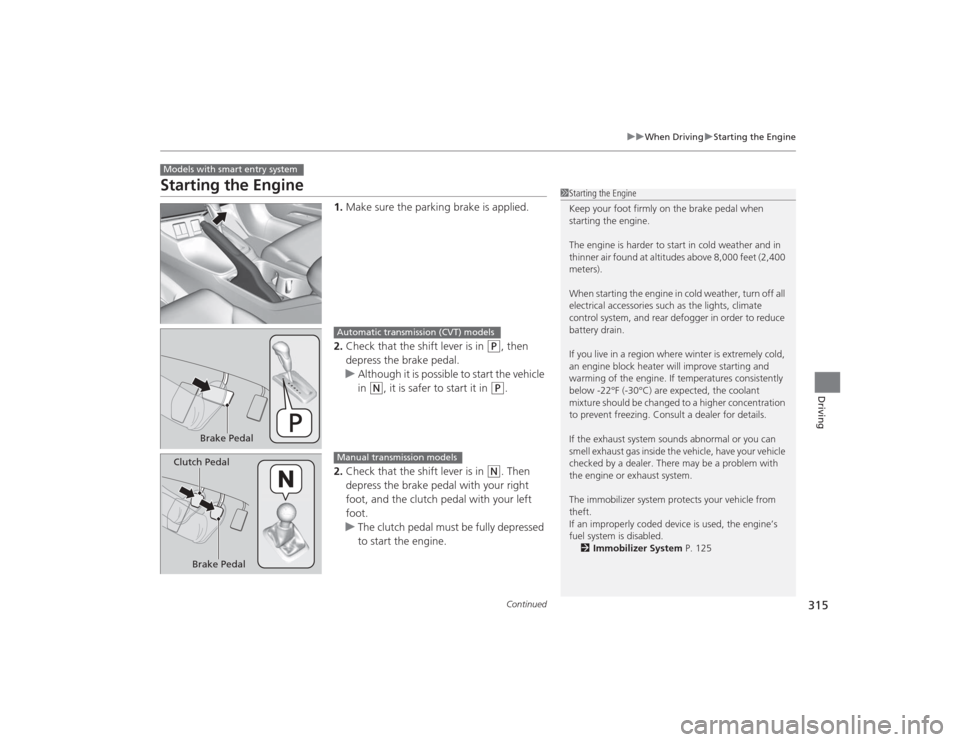
1. Make sure the parking brake is applied.
2. Check that the shift lever is in
(P
, then
depress the brake pedal.
u Although it is possible to start the vehicle
in
(N
, it is safer to start it in
(P
.
2. Check that the shift lever is in
(N
. Then
depress the brake pedal with your right
foot, and the clutch pedal with your left
foot.
u The clutch pedal must be fully depressed
to start the engine.
Models with smart entry system
1Starting the Engine
Keep your foot firmly on the brake pedal when
starting the engine.
The engine is harder to start in cold weather and in
thinner air found at altitudes above 8,000 feet (2,400
meters).
When starting the engine in cold weather, turn off all
electrical accessories such as the lights, climate
control system, and rear defogger in order to reduce
battery drain.
If you live in a region where winter is extremely cold,
an engine block heater will improve starting and
warming of the engine. If temperatures consistently
below -22°F (-30°C) are expected, the coolant
mixture should be changed to a higher concentration
to prevent freezing. Consult a dealer for details.
If the exhaust system sounds abnormal or you can
smell exhaust gas inside the vehicle, have your vehicle
checked by a dealer. There may be a problem with
the engine or exhaust system.
The immobilizer system protects your vehicle from
theft.
If an improperly coded device is used, the engine’s
fuel system is disabled.
2 Immobilizer System P. 125
Brake Pedal
Automatic transmission (CVT) models
Brake Pedal
Clutch Pedal
Manual transmission models
Page 317 of 469
uuWhen Driving uStarting the Engine
316Driving
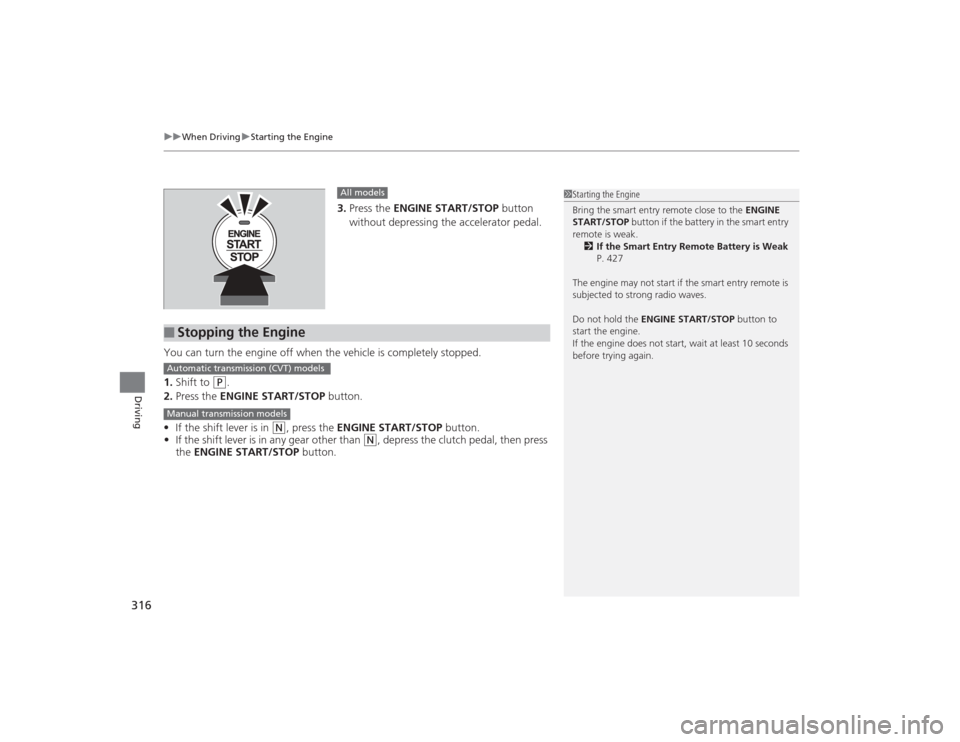
3. Press the ENGINE START/STOP button
without depressing the accelerator pedal.
You can turn the engine off when the vehicle is completely stopped.
1. Shift to
(P
.
2. Press the ENGINE START/STOP button.
• If the shift lever is in
(N
, press the ENGINE START/STOP button.
• If the shift lever is in any gear other than
(N
, depress the clutch pedal, then press
the ENGINE START/STOP button.
All models
■
Stopping the Engine
1Starting the Engine
Bring the smart entry remote close to the ENGINE
START/STOP button if the battery in the smart entry
remote is weak. 2 If the Smart Entry Remote Battery is Weak
P. 427
The engine may not start if the smart entry remote is
subjected to strong radio waves.
Do not hold the ENGINE START/STOP button to
start the engine.
If the engine does not start, wait at least 10 seconds
before trying again.
Automatic transmission (CVT) modelsManual transmission models
Page 350 of 469
349
Maintenance
This chapter discusses basic maintenance.
Before Performing MaintenanceInspection and Maintenance ............ 350Safety When Performing Maintenance..... 351Parts and Fluids Used in Maintenance Service ........................................... 352
Maintenance Minder
TM..................... 353
Maintenance Under the Hood
Maintenance Items Under the Hood ..... 361Opening the Hood ........................... 363
Recommended Engine Oil ................ 364
Oil Check ......................................... 365
Adding Engine Oil ............................ 367Changing the Engine Oil and Oil Filter ..... 368
Engine Coolant ................................ 371
Transmission Fluid ............................ 373
Brake/Clutch Fluid ............................ 374
Refilling Window Washer Fluid......... 375
Replacing Light Bulbs ....................... 376Checking and Maintaining Wiper
Blades .......................................... 389Checking and Maintaining Tires
Checking Tires ................................. 391Tire and Loading Information Label ...... 392Tire Labeling .................................... 392DOT Tire Quality Grading (U.S. Vehicles)....... 394Wear Indicators................................ 396 Tire Service Life ................................ 396
Tire and Wheel Replacement ........... 397
Tire Rotation .................................... 398
Winter Tires ..................................... 399
Battery ............................................... 400
Remote Transmitter Care
*
Replacing the Button Battery ........... 401
Heating and Cooling System
*/Climate
Control System
* Maintenance ....... 403
Cleaning
Interior Care .................................... 404
Exterior Care.................................... 406
* Not available on all models
Page 352 of 469
351
uuBefore Performing Maintenance uSafety When Performing Maintenance
Maintenance
Safety When Performing MaintenanceSome of the most important safety precautions are given here.
However, we cannot warn you of every conc eivable hazard that can arise in
performing maintenance. Only you can decide whether or not you should perform
a given task.
• To reduce the possibility of fire or explosion, keep cigarettes, sparks, and flames
away from the battery and all fuel related parts.
• Never leave rags, towels, or other flammable objects under the hood.
u Heat from the engine and exhaust can ignite them causing a fire.
• To clean parts, use a commercially available degreaser or parts cleaner, not
gasoline.
• Wear eye protection and protective clothing when working with the battery or
compressed air.
• Engine exhaust contains carbon monoxide, which is poisonous and can kill you.
u Operate the engine only when there is sufficient ventilation.
• The vehicle must be in a stationary condition.
u Make sure your vehicle is parked on level ground, the parking brake is set, and
the engine is off.
• Be aware that hot parts can burn you.
u Make sure to let the engine and exhaust system cool thoroughly before
touching vehicle parts.
• Be aware that moving parts can injure you.
u Do not start the engine unless instructed, and keep your hands and limbs away
from moving parts.■
Maintenance Safety
■
Vehicle Safety
1Safety When Performing Maintenance
3
WARNING
Improperly maintaining this vehicle or
failing to correct a problem before driving
can cause a crash in which you can be
seriously hurt or killed.
Always follow the inspection and
maintenance recommendations according
to the schedules in this owner's manual.
3
WARNING
Failure to properly fol low maintenance
instructions and precautions can cause you
to be seriously hurt or killed.
Always follow the procedures and
precautions in this owner's manual.
Page 362 of 469
361
Continued
Maintenance
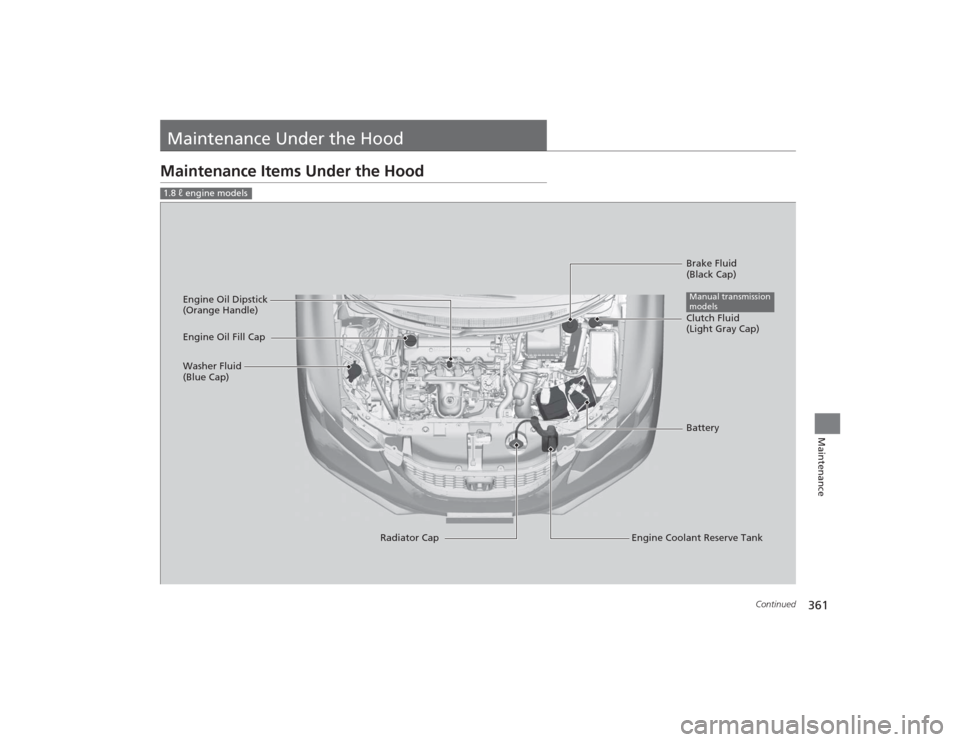
Maintenance Under the HoodMaintenance Items Under the Hood1.8 ℓ engine models
Brake Fluid
(Black Cap)
Engine Coolant Reserve Tank
Radiator Cap
Washer Fluid
(Blue Cap)
Engine Oil Dipstick
(Orange Handle)
Clutch Fluid
(Light Gray Cap)
Engine Oil Fill Cap
BatteryManual transmission
models
Page 363 of 469
362
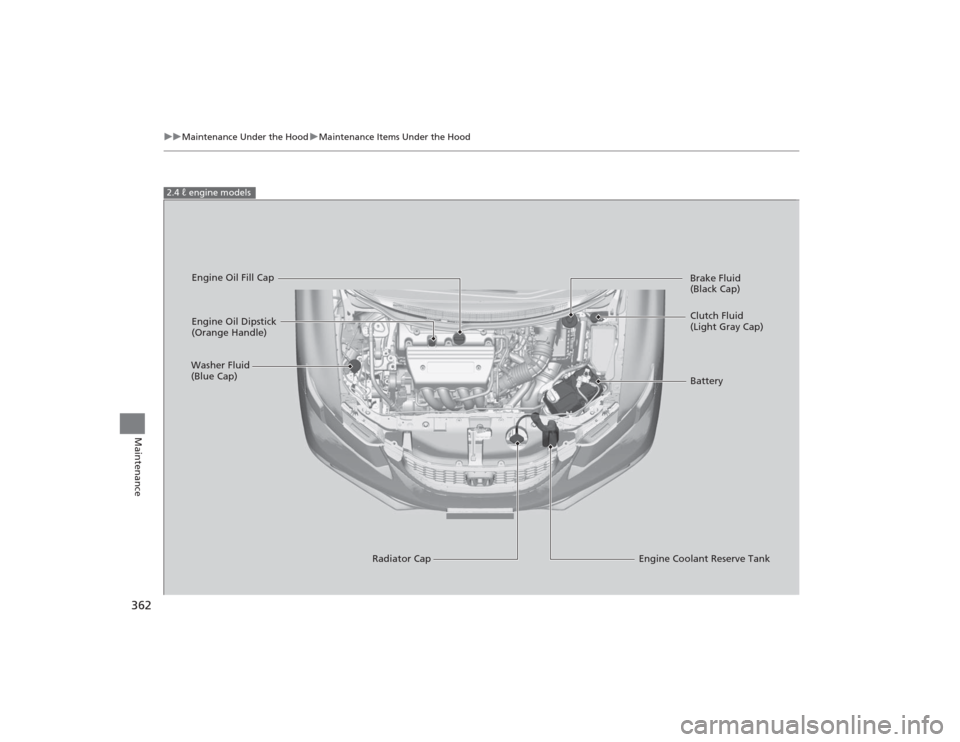
uuMaintenance Under the Hood uMaintenance Items Under the Hood
Maintenance
2.4 ℓ engine models
Engine Oil Dipstick
(Orange Handle)
Washer Fluid
(Blue Cap)
Engine Coolant Reserve Tank
Radiator Cap Brake Fluid
(Black Cap)
Engine Oil Fill Cap
Clutch Fluid
(Light Gray Cap)
Battery
Page 401 of 469
400Maintenance
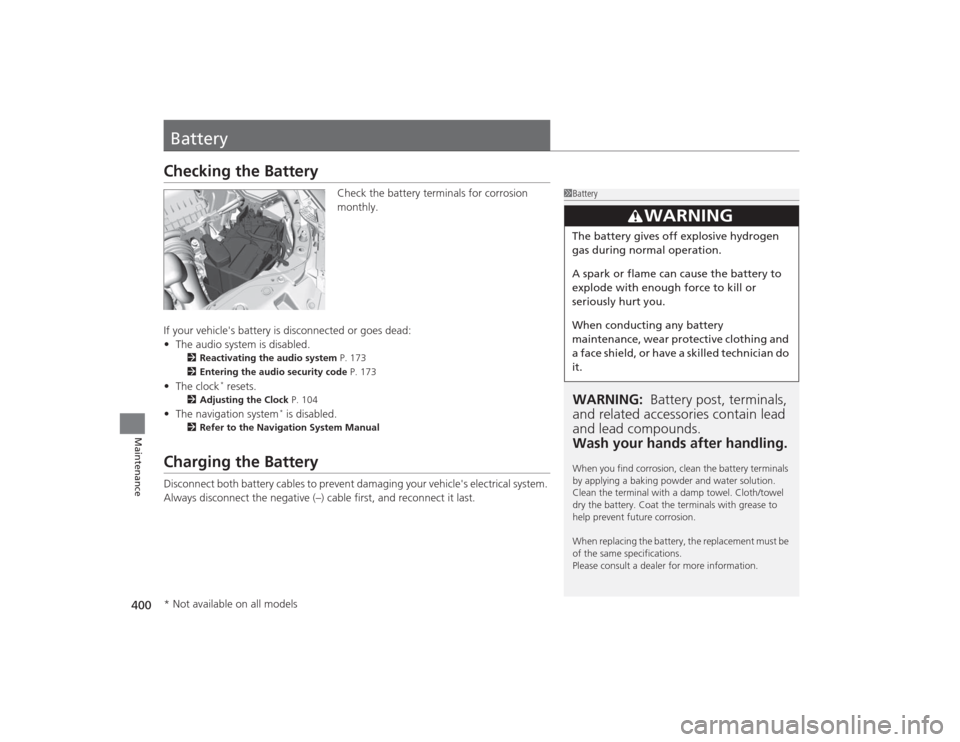
BatteryChecking the Battery
Check the battery terminals for corrosion
monthly.
If your vehicle's battery is disconnected or goes dead:
• The audio system is disabled.
2 Reactivating the audio system P. 173
2 Entering the audio security code P. 173
•The clock
* resets.
2 Adjusting the Clock P. 104
•The navigation system
* is disabled.
2 Refer to the Navigation System Manual
Charging the BatteryDisconnect both battery cables to prevent damaging your vehicle's electrical system.
Always disconnect the negative (–) cable first, and reconnect it last.
1BatteryWARNING: Battery post, terminals,
and related accessori es contain lead
and lead compounds.
Wash your hands after handling.When you find corrosion, clean the battery terminals
by applying a baking powder and water solution.
Clean the terminal with a damp towel. Cloth/towel
dry the battery. Coat the terminals with grease to
help prevent future corrosion.
When replacing the battery, the replacement must be
of the same specifications.
Please consult a dealer for more information.
3
WARNING
The battery gives off explosive hydrogen
gas during normal operation.
A spark or flame can cause the battery to
explode with enough force to kill or
seriously hurt you.
When conducting any battery
maintenance, wear protective clothing and
a face shield, or have a skilled technician do
it.
* Not available on all models