reset HONDA CIVIC 2014 9.G Owner's Manual
[x] Cancel search | Manufacturer: HONDA, Model Year: 2014, Model line: CIVIC, Model: HONDA CIVIC 2014 9.GPages: 469, PDF Size: 17.32 MB
Page 206 of 469
Continued
205
uuAudio System Basic Operation uPlaying AM/FM Radio
Features
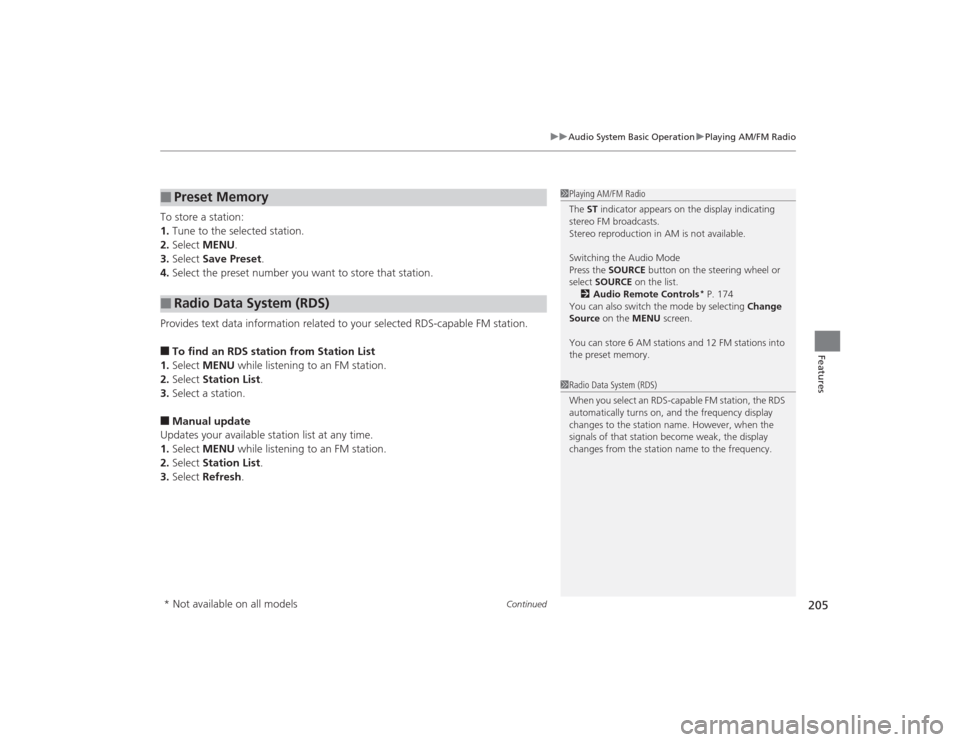
To store a station:
1. Tune to the selected station.
2. Select MENU .
3. Select Save Preset .
4. Select the preset number you want to store that station.
Provides text data information related to your selected RDS-capable FM station.■To find an RDS station from Station List
1. Select MENU while listening to an FM station.
2. Select Station List .
3. Select a station.■Manual update
Updates your available station list at any time.
1. Select MENU while listening to an FM station.
2. Select Station List .
3. Select Refresh .■
Preset Memory
■
Radio Data System (RDS)
1Playing AM/FM Radio
The ST indicator appears on the display indicating
stereo FM broadcasts.
Stereo reproduction in AM is not available.
Switching the Audio Mode
Press the SOURCE button on the steering wheel or
select SOURCE on the list.
2 Audio Remote Controls
* P. 174
You can also switch the mode by selecting Change
Source on the MENU screen.
You can store 6 AM stations and 12 FM stations into
the preset memory.
1 Radio Data System (RDS)
When you select an RDS-capable FM station, the RDS
automatically turns on, and the frequency display
changes to the station name. However, when the
signals of that station become weak, the display
changes from the station name to the frequency.
* Not available on all models
Page 235 of 469
234
uuCustomized Features
*u
Features
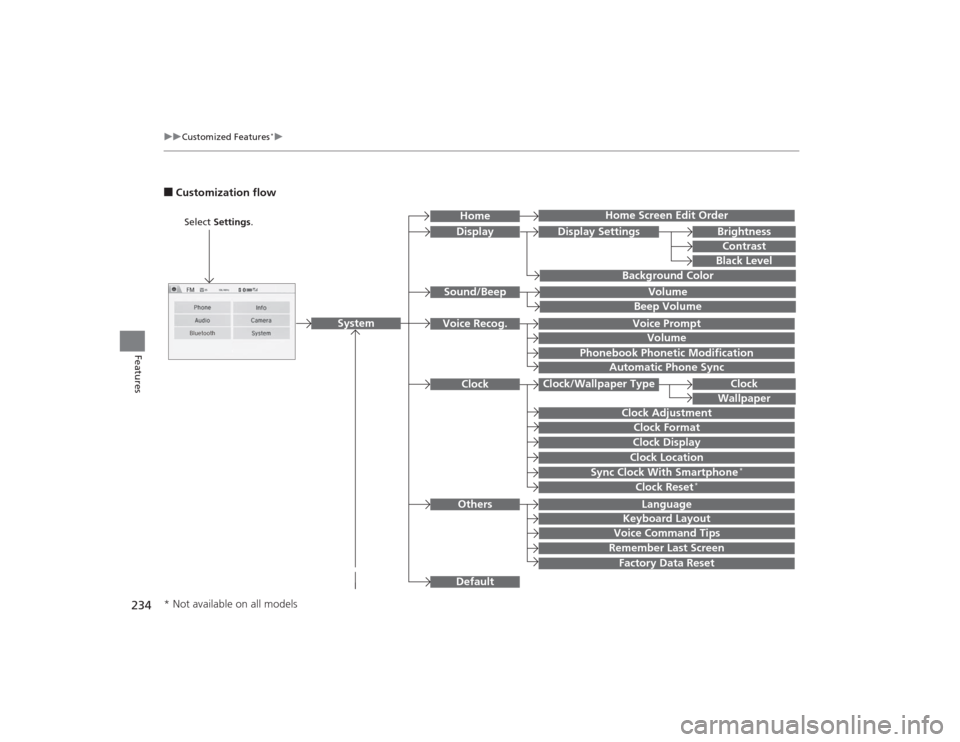
■Customization flow
Clock Format
Remember Last ScreenFactory Data ResetClock Adjustment
Select Settings .
Language
Default
BrightnessContrastBlack Level
Clock
Wallpaper
Display
Home Screen Edit Order
Background Color
Volume
Sync Clock With Smartphone
*
Clock LocationClock DisplayBeep VolumeKeyboard Layout
Home
Sound/Beep
Display Settings
Clock
Clock/Wallpaper Type
System
Clock Reset
*
Others
Phonebook Phonetic Modification
Automatic Phone Sync
Voice Prompt
Volume
Voice Recog.
Voice Command Tips
* Not available on all models
Page 236 of 469
![HONDA CIVIC 2014 9.G Owners Manual 235
uuCustomized Features
*u
Continued
Features
Color
Audio
Sound
Audio Source Pop-up
[Your selected media] Cover Art
*1
Display Adjustment
*1
Aspect Ratio Adjustment
*1
Change Bluetooth Audio Device](/img/13/5834/w960_5834-235.png "HONDA CIVIC 2014 9.G Owners Manual 235
uuCustomized Features
*u
Continued
Features
Color
Audio
Sound
Audio Source Pop-up
[Your selected media] Cover Art
*1
Display Adjustment
*1
Aspect Ratio Adjustment
*1
Change Bluetooth Audio Device")
235
uuCustomized Features
*u
Continued
Features
Color
Audio
Sound
Audio Source Pop-up
[Your selected media] Cover Art
*1
Display Adjustment
*1
Aspect Ratio Adjustment
*1
Change Bluetooth Audio Device
*1
Bluetooth Device List
*1
Default
Display
BrightnessContrastBlack Level
ColorTint
Clock FormatClock Adjustment
Clock/Wallpaper Type
Clock
Wallpaper
Sync Clock With Smartphone
*
Clock LocationClock Display
Info Screen Preference
Default
Info
Clock Reset
*
OtherClock
*1: May change depending on your currently
selected source.* Not available on all models
Page 239 of 469
238
uuCustomized Features
*u
Features
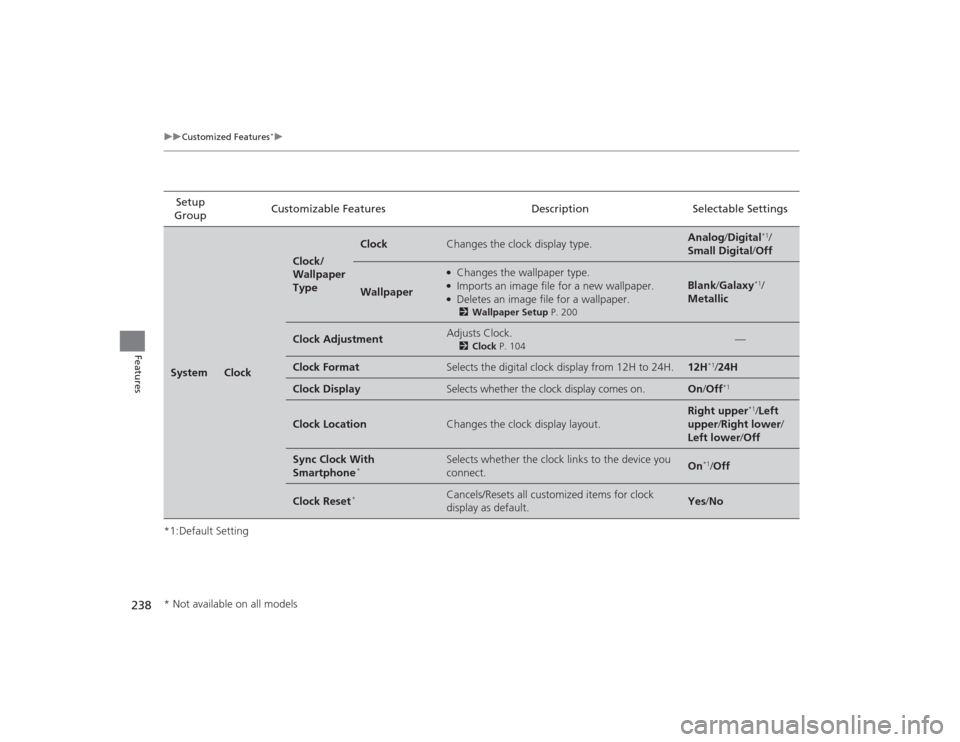
*1:Default SettingSetup
Group Customizable Features Description Selectable SettingsSystem
Clock
Clock/
Wallpaper
Type
Clock
Changes the clock display type.
Analog
/Digital
*1/
Small Digital /Off
Wallpaper
●Changes the wallpaper type.●Imports an image file for a new wallpaper.●Deletes an image file for a wallpaper.2 Wallpaper Setup P. 200
Blank /Galaxy
*1/
Metallic
Clock Adjustment
Adjusts Clock.
2 Clock P. 104
—
Clock Format
Selects the digital clock display from 12H to 24H.
12H
*1/24H
Clock Display
Selects whether the clock display comes on.
On /Off
*1
Clock Location
Changes the clock display layout.
Right upper
*1/Left
upper /Right lower/
Left lower/ Off
Sync Clock With
Smartphone
*
Selects whether the clock links to the device you
connect.
On
*1/Off
Clock Reset
*
Cancels/Resets all customized items for clock
display as default.
Yes /No
* Not available on all models
Page 240 of 469
239
uuCustomized Features
*u
Continued
Features
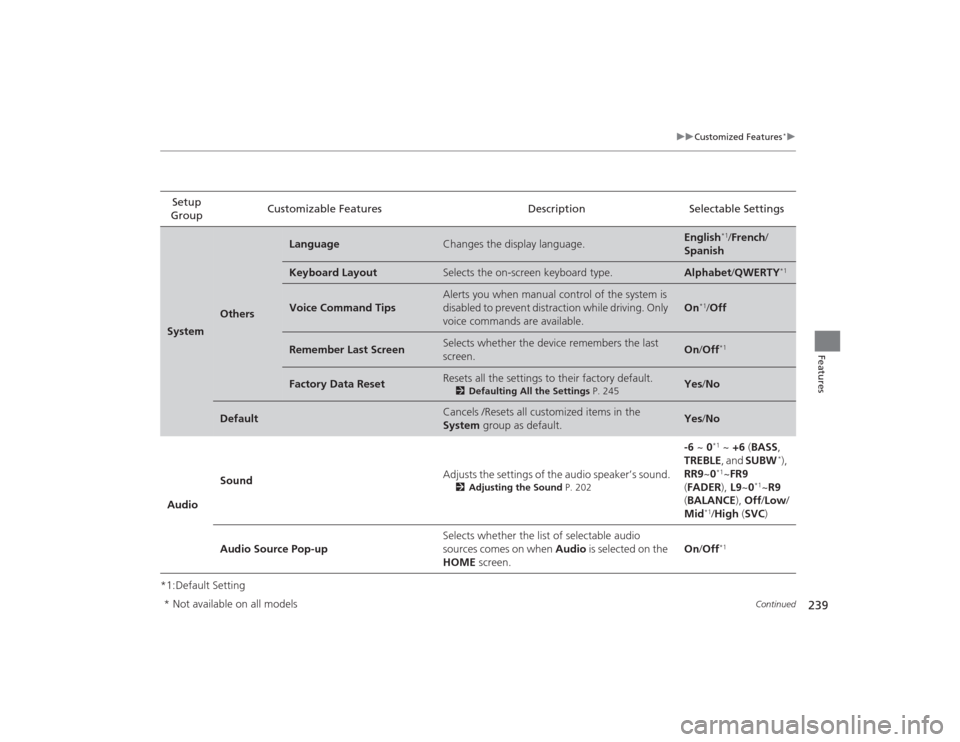
*1:Default SettingSetup
Group Customizable Features Description Selectable SettingsSystem
Others
Language
Changes the display language.
English
*1/
French /
Spanish
Keyboard Layout
Selects the on-screen keyboard type.
Alphabet /QWERTY
*1
Voice Command Tips
Alerts you when manual control of the system is
disabled to prevent distraction while driving. Only
voice commands are available.
On
*1/Off
Remember Last Screen
Selects whether the device remembers the last
screen.
On /Off
*1
Factory Data Reset
Resets all the settings to their factory default.
2 Defaulting All the Settings P. 245
Yes/No
Default
Cancels /Resets all customized items in the
System group as default.
Yes/No
Audio Sound
Adjusts the settings of the audio speaker’s sound.
2
Adjusting the Sound P. 202
-6 ~ 0
*1 ~ +6 (BASS,
TREBLE , and SUBW
*),
RR9 ~0
*1~FR9
( FADER ), L9~0
*1~R9
( BALANCE ), Off /Low /
Mid
*1/ High (SVC )
Audio Source Pop-up Selects whether the list of selectable audio
sources comes on when
Audio is selected on the
HOME screen. On
/Off*1
* Not available on all models
Page 241 of 469
![HONDA CIVIC 2014 9.G Owners Manual 240
uuCustomized Features
*u
Features
*1:Default SettingSetup
Group Customizable Features Description Selectable Settings
Audio [Your selected media]
Cover Art Turns on and off the cover art display](/img/13/5834/w960_5834-240.png "HONDA CIVIC 2014 9.G Owners Manual 240
uuCustomized Features
*u
Features
*1:Default SettingSetup
Group Customizable Features Description Selectable Settings
Audio [Your selected media]
Cover Art Turns on and off the cover art display")
240
uuCustomized Features
*u
Features
*1:Default SettingSetup
Group Customizable Features Description Selectable Settings
Audio [Your selected media]
Cover Art Turns on and off the cover art display.
On
*1/Off
Display
Adjustment Display
Brightness
See System on P. 237
Contrast
Black Level
Color Color
Changes the color of the audio/information
screen. —
Tint Changes the tint of the audio/information screen. —
Aspect Ratio Adjustment Changes the aspect ratio and zoom settings of
the audio/information screen.
Normal
/Full
*1/Zoom
Change Bluetooth Audio Device Connects, disconnects or pairs a
Bluetooth®
Audio device to HFL. —
Bluetooth Device List Pairs a new phone to HFL, edits or deletes a
paired phone.
2
Phone Setup P. 283
—
Default Cancels/Resets all customized items in the
Audio
group as default. Yes
/No
iPod or USB modeHDMI ® modeHDMI ® modeBluetooth ® Audio modeBluetooth ® Audio mode
Page 242 of 469
241
uuCustomized Features
*u
Continued
Features
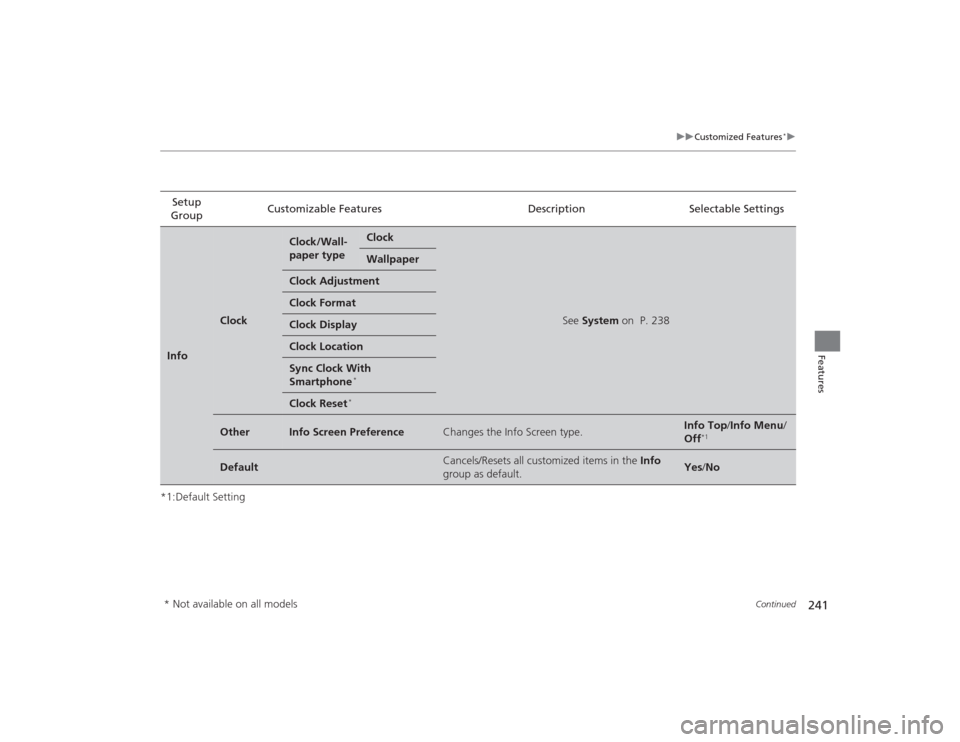
*1:Default SettingSetup
Group Customizable Features Description Selectable SettingsInfo
Clock
Clock/Wall-
paper type
Clock
See
System on P. 238
Wallpaper
Clock AdjustmentClock FormatClock DisplayClock LocationSync Clock With
Smartphone
*
Clock Reset
*
Other
Info Screen Preference
Changes the Info Screen type.
Info Top /Info Menu/
Off
*1
Default
Cancels/Resets all customized items in the Info
group as default.
Yes /No
* Not available on all models
Page 243 of 469
242
uuCustomized Features
*u
Features
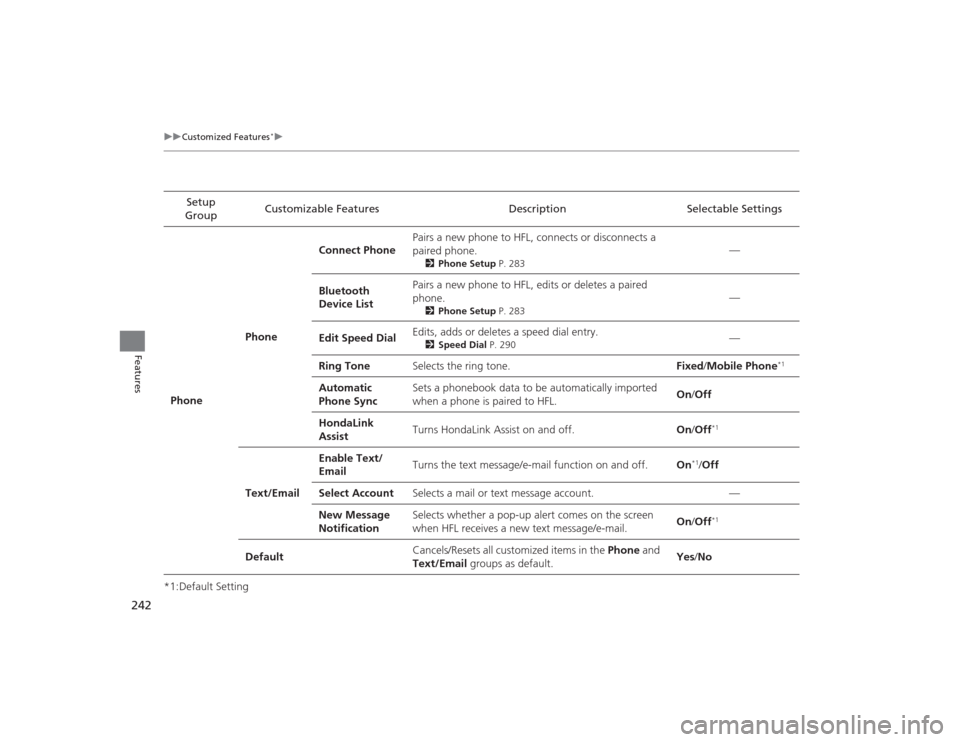
*1:Default Setting Setup
Group Customizable Features Description Selectable Settings
Phone PhoneConnect Phone
Pairs a new phone to HFL, connects or disconnects a
paired phone.
2
Phone Setup P. 283
—
Bluetooth
Device List Pairs a new phone to HFL, edits or deletes a paired
phone.
2
Phone Setup P. 283
—
Edit Speed Dial Edits, adds or deletes a speed dial entry.
2
Speed Dial P. 290
—
Ring Tone Selects the ring tone. Fixed/Mobile Phone
*1
Automatic
Phone Sync Sets a phonebook data to be automatically imported
when a phone is paired to HFL.
On
/Off
HondaLink
Assist Turns HondaLink Assist on and off.
On/Off
*1
Text/Email Enable Text/
Email
Turns the text message/e-mail function on and off.
On
*1/Off
Select Account Selects a mail or text message account. —
New Message
Notification Selects whether a pop-up alert comes on the screen
when HFL receives a new text message/e-mail.
On
/Off
*1
Default Cancels/Resets all customized items in the
Phone and
Text/Email groups as default. Yes
/No
Page 244 of 469
243
uuCustomized Features
*u
Continued
Features
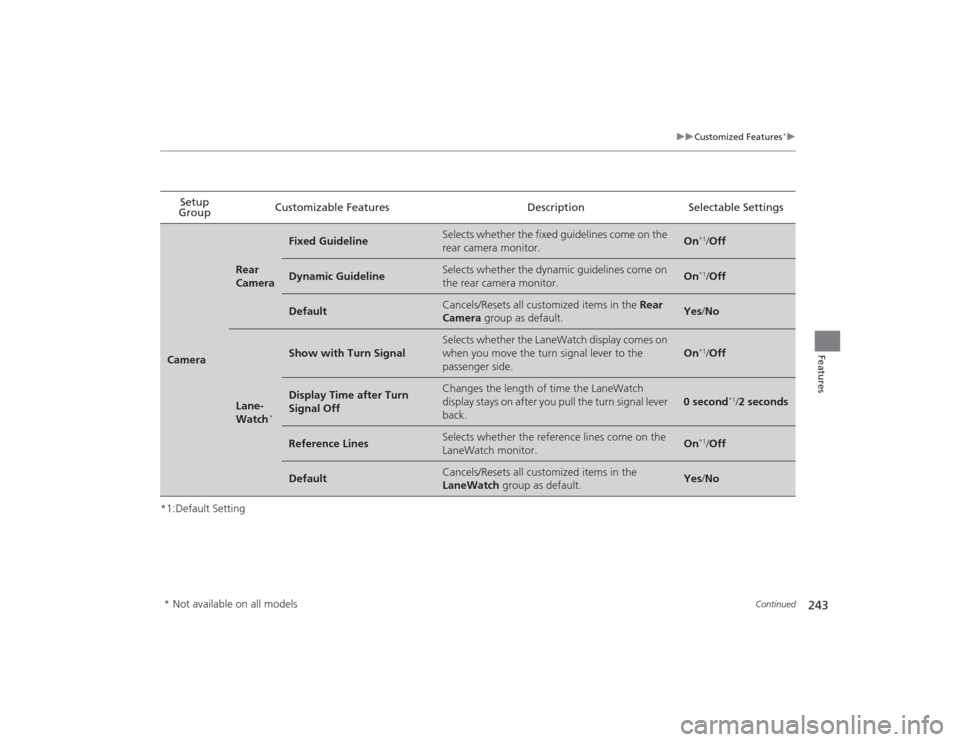
*1:Default SettingSetup
Group Customizable Features Description Selectable SettingsCamera
Rear
Camera
Fixed Guideline
Selects whether the fixed guidelines come on the
rear camera monitor.
On
*1/
Off
Dynamic Guideline
Selects whether the dynamic guidelines come on
the rear camera monitor.
On
*1/Off
Default
Cancels/Resets all customized items in the Rear
Camera group as default.
Yes /No
Lane-
Watch
*
Show with Turn Signal
Selects whether the LaneWatch display comes on
when you move the turn signal lever to the
passenger side.
On
*1/Off
Display Time after Turn
Signal Off
Changes the length of time the LaneWatch
display stays on after you pull the turn signal lever
back.
0 second
*1/2 seconds
Reference Lines
Selects whether the reference lines come on the
LaneWatch monitor.
On
*1/Off
Default
Cancels/Resets all customized items in the
LaneWatch group as default.
Yes/No
* Not available on all models
Page 245 of 469
244
uuCustomized Features
*u
Features
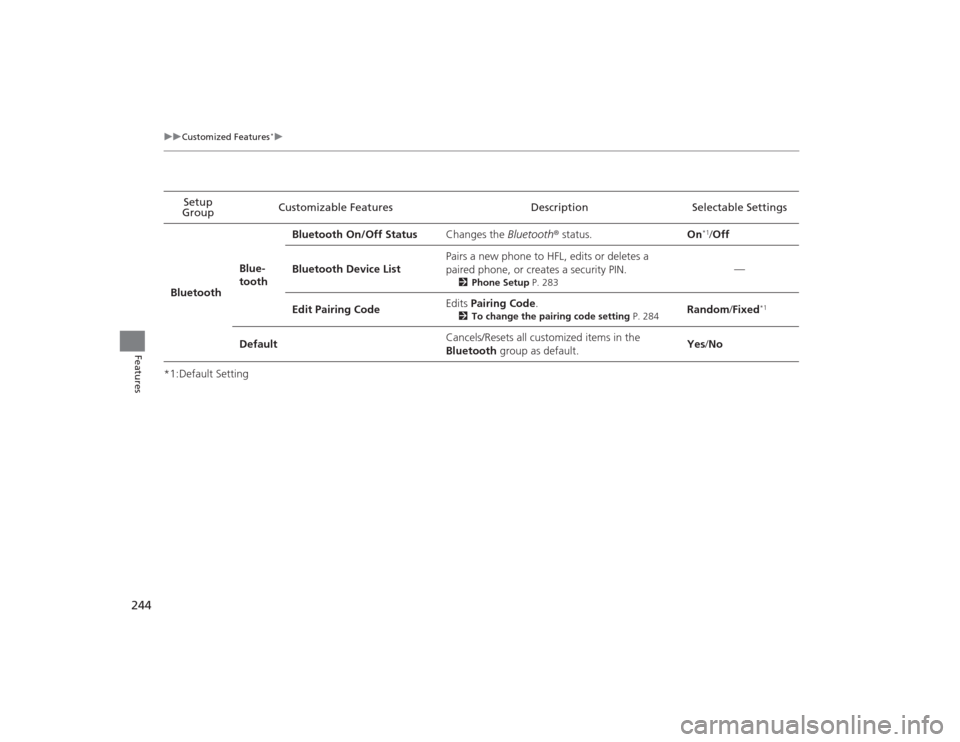
*1:Default SettingSetup
Group Customizable Features Description Selectable Settings
Bluetooth Blue-
toothBluetooth On/Off Status
Changes the Bluetooth® status. On
*1/Off
Bluetooth Device List Pairs a new phone to HFL, edits or deletes a
paired phone, or creates a security PIN.
2
Phone Setup P. 283
—
Edit Pairing Code Edits
Pairing Code .
2To change the pairing code setting P. 284
Random/Fixed
*1
Default Cancels/Resets all customized items in the
Bluetooth
group as default. Yes
/No