reset HONDA CIVIC 2014 9.G Owner's Guide
[x] Cancel search | Manufacturer: HONDA, Model Year: 2014, Model line: CIVIC, Model: HONDA CIVIC 2014 9.GPages: 469, PDF Size: 17.32 MB
Page 246 of 469
245
uuCustomized Features
*uDefaulting All the Settings
Features
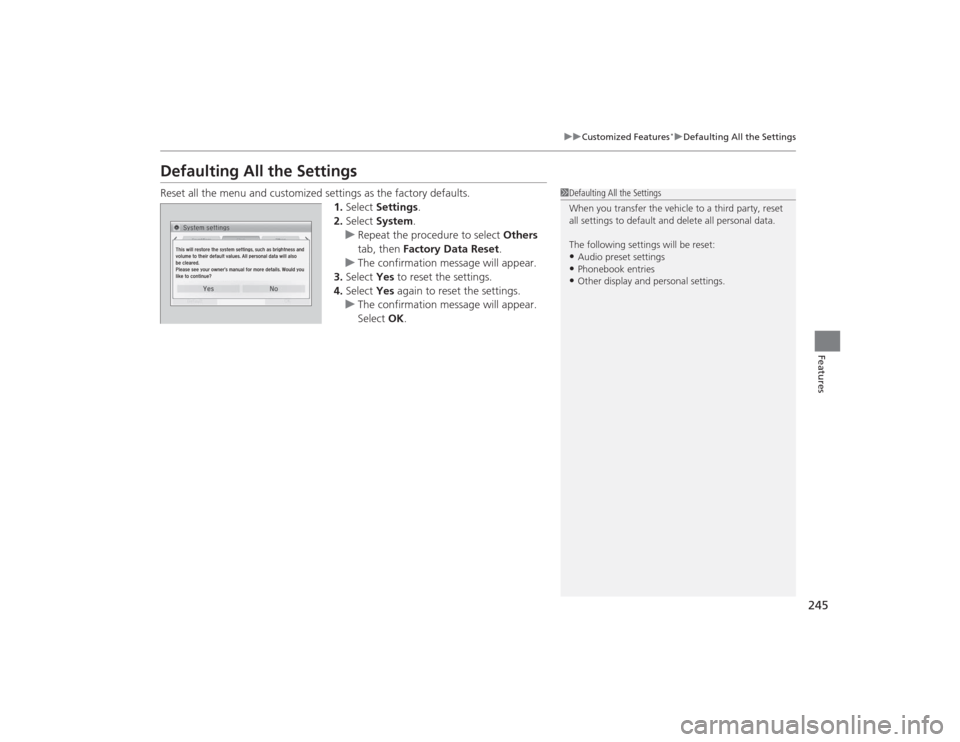
Defaulting All the SettingsReset all the menu and customized settings as the factory defaults.
1.Select Settings .
2. Select System.
u Repeat the procedure to select Others
tab, then Factory Data Reset .
u The confirmation message will appear.
3. Select Yes to reset the settings.
4. Select Yes again to reset the settings.
u The confirmation message will appear.
Select OK.
1Defaulting All the Settings
When you transfer the vehicle to a third party, reset
all settings to default and delete all personal data.
The following settings will be reset:•Audio preset settings•Phonebook entries•Other display and personal settings.
Page 264 of 469
Continued
263
uuBluetooth ® HandsFreeLink ®
*uHFL Menus
Features
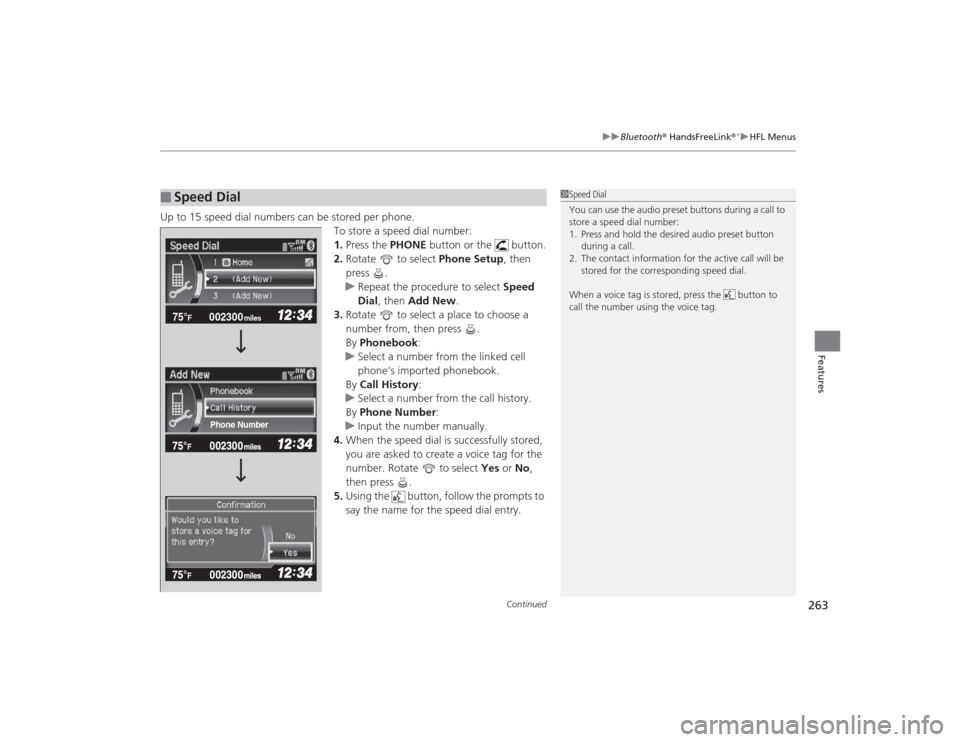
Up to 15 speed dial numbers can be stored per phone.
To store a speed dial number:
1.Press the PHONE button or the button.
2. Rotate to select Phone Setup, then
press .
u Repeat the procedure to select Speed
Dial , then Add New .
3. Rotate to select a place to choose a
number from, then press .
By Phonebook :
u Select a number from the linked cell
phone’s imported phonebook.
By Call History :
u Select a number from the call history.
By Phone Number :
u Input the number manually.
4. When the speed dial is successfully stored,
you are asked to create a voice tag for the
number. Rotate to select Yes or No,
then press .
5. Using the button, follow the prompts to
say the name for the speed dial entry.■
Speed Dial
1Speed Dial
You can use the audio preset buttons during a call to
store a speed dial number:
1. Press and hold the desired audio preset button
during a call.
2. The contact information for the active call will be stored for the corresponding speed dial.
When a voice tag is stored, press the button to
call the number using the voice tag.
002300
75°
F miles
Phone Number
Page 270 of 469
Continued
269
uuBluetooth ® HandsFreeLink ®
*uHFL Menus
Features
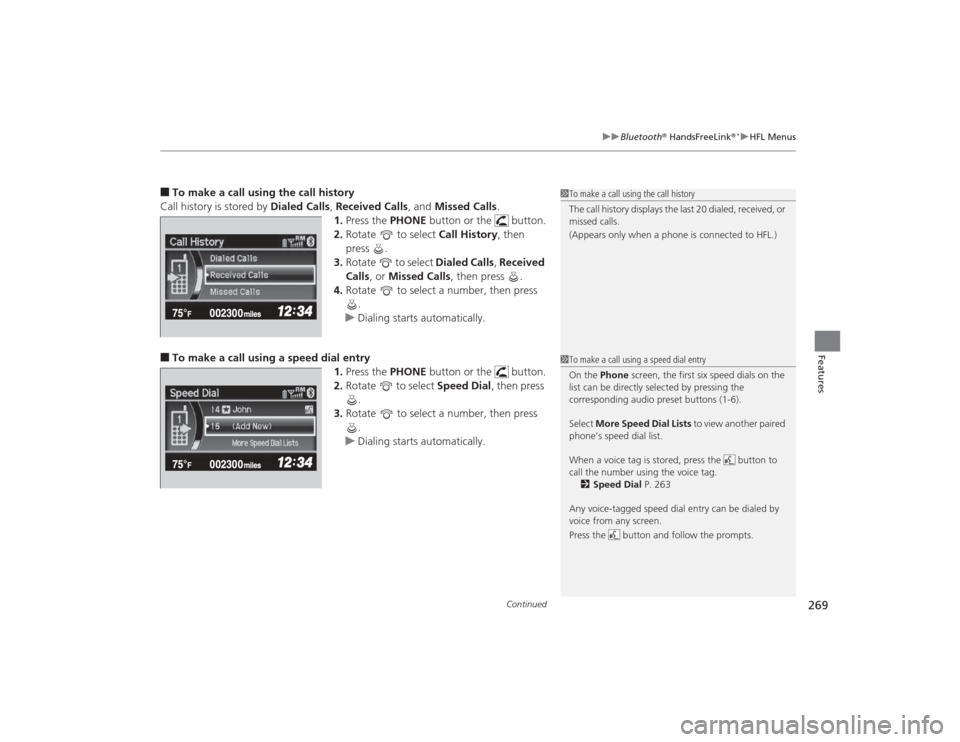
■To make a call using the call history
Call history is stored by Dialed Calls, Received Calls , and Missed Calls .
1. Press the PHONE button or the button.
2. Rotate to select Call History, then
press .
3. Rotate to select Dialed Calls, Received
Calls , or Missed Calls , then press .
4. Rotate to select a number, then press
.
u Dialing starts automatically.■To make a call using a speed dial entry
1.Press the PHONE button or the button.
2. Rotate to select Speed Dial, then press
.
3. Rotate to select a number, then press
.
u Dialing starts automatically.
1To make a call using the call history
The call history displays the last 20 dialed, received, or
missed calls.
(Appears only when a phone is connected to HFL.)1To make a call using a speed dial entry
On the Phone screen, the first six speed dials on the
list can be directly selected by pressing the
corresponding audio preset buttons (1-6).
Select More Speed Dial Lists to view another paired
phone’s speed dial list.
When a voice tag is stored, press the button to
call the number using the voice tag. 2 Speed Dial P. 263
Any voice-tagged speed dial entry can be dialed by
voice from any screen.
Press the button and follow the prompts.
Page 281 of 469
280
uuBluetooth ® HandsFreeLink ®
*uHFL Menus
Features
*1: Appears only when a phone is connected to the system.
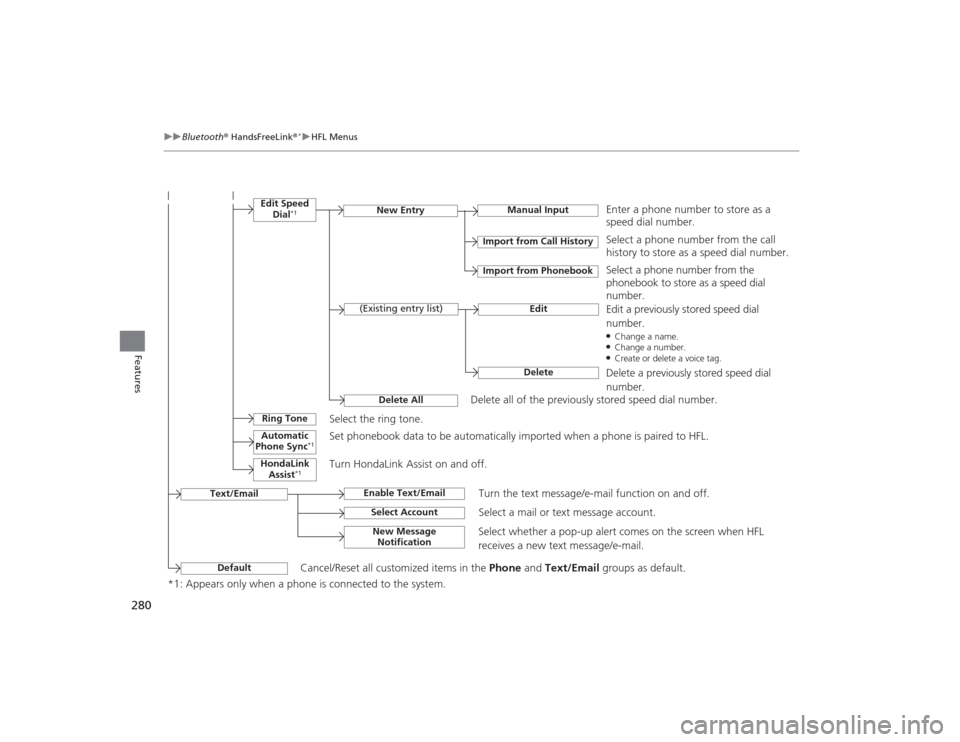
Manual Input
New Entry
Import from Call HistoryImport from Phonebook
EditDelete
(Existing entry list)
Edit Speed
Dial
*1
Delete All
Enter a phone number to store as a
speed dial number.Select a phone number from the call
history to store as a speed dial number.
Delete all of the previously stored speed dial number. Select a phone number from the
phonebook to store as a speed dial
number.
Edit a previously stored speed dial
number.●Change a name.●Change a number.●Create or delete a voice tag.Delete a previously stored speed dial
number.
Ring Tone
Select the ring tone.
Automatic
Phone Sync
*1
Set phonebook data to be automatically imported when a phone is paired to HFL.
HondaLink Assist
*1
Turn HondaLink Assist on and off.
Text/Email
Enable Text/Email
Turn the text message/e-mail function on and off.
Select Account
Select a mail or text message account.
New Message Notification
Select whether a pop-up alert comes on the screen when HFL
receives a new text message/e-mail.
Default
Cancel/Reset all customized items in the Phone and Text/Email groups as default.
Page 354 of 469
353
Continued
Maintenance
Maintenance Minder
TM
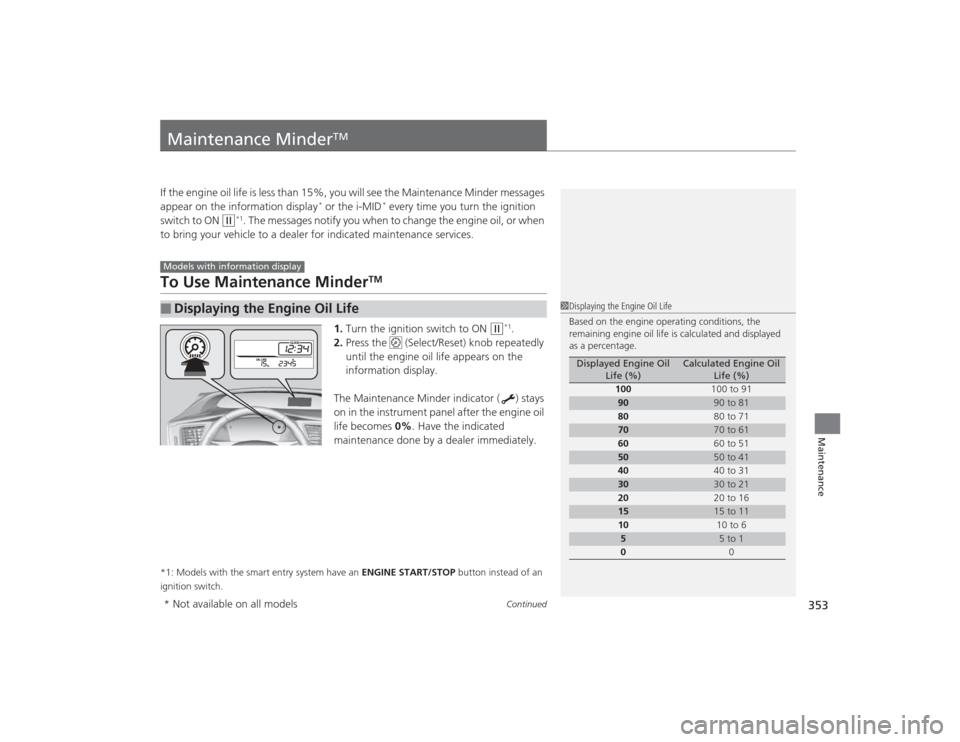
If the engine oil life is less than 15%, you will see the Maintenance Minder messages
appear on the information display
* or the i-MID
* every time you turn the ignition
switch to ON
(w
*1. The messages notify you when to change the engine oil, or when
to bring your vehicle to a dealer for indicated maintenance services.
To Use Maintenance Minder
TM
1. Turn the ignition switch to ON
(w
*1.
2. Press the (Select/Reset) knob repeatedly
until the engine oil life appears on the
information display.
The Maintenance Minder indicator ( ) stays
on in the instrument panel after the engine oil
life becomes 0% . Have the indicated
maintenance done by a dealer immediately.
*1: Models with the smart entry system have an ENGINE START/STOP button instead of an
ignition switch.■
Displaying the Engine Oil LifeModels with information display
1 Displaying the Engine Oil Life
Based on the engine operating conditions, the
remaining engine oil life is calculated and displayed
as a percentage.
Displayed Engine Oil
Life (%)
Calculated Engine Oil Life (%)
100 100 to 91
90
90 to 81
80 80 to 71
70
70 to 61
60 60 to 51
50
50 to 41
40 40 to 31
30
30 to 21
20 20 to 16
15
15 to 11
10 10 to 6
5
5 to 1
0 0
* Not available on all models
Page 355 of 469
354
uuMaintenance Minder
TMuTo Use Maintenance Minder
TM
Maintenance
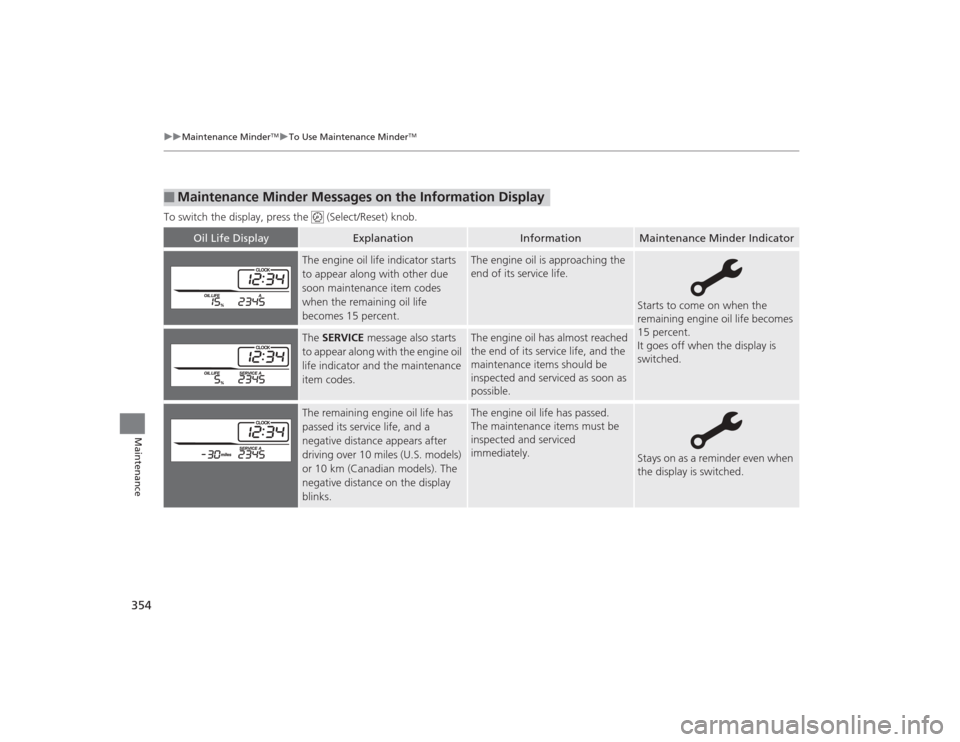
To switch the display, press the (Select/Reset) knob.■
Maintenance Minder Messages on the Information Display
Oil Life Display
Explanation
Information
Maintenance Minder Indicator
The engine oil life indicator starts
to appear along with other due
soon maintenance item codes
when the remaining oil life
becomes 15 percent.
The engine oil is approaching the
end of its service life.
Starts to come on when the
remaining engine oil life becomes
15 percent.
It goes off when the display is
switched.
The SERVICE message also starts
to appear along with the engine oil
life indicator and the maintenance
item codes.
The engine oil has almost reached
the end of its service life, and the
maintenance items should be
inspected and serviced as soon as
possible.
The remaining engine oil life has
passed its service life, and a
negative distance appears after
driving over 10 miles (U.S. models)
or 10 km (Canadian models). The
negative distance on the display
blinks.
The engine oil life has passed.
The maintenance items must be
inspected and serviced
immediately.
Stays on as a reminder even when
the display is switched.
Page 356 of 469
355
uuMaintenance Minder
TMuTo Use Maintenance Minder
TM
Continued
Maintenance
■
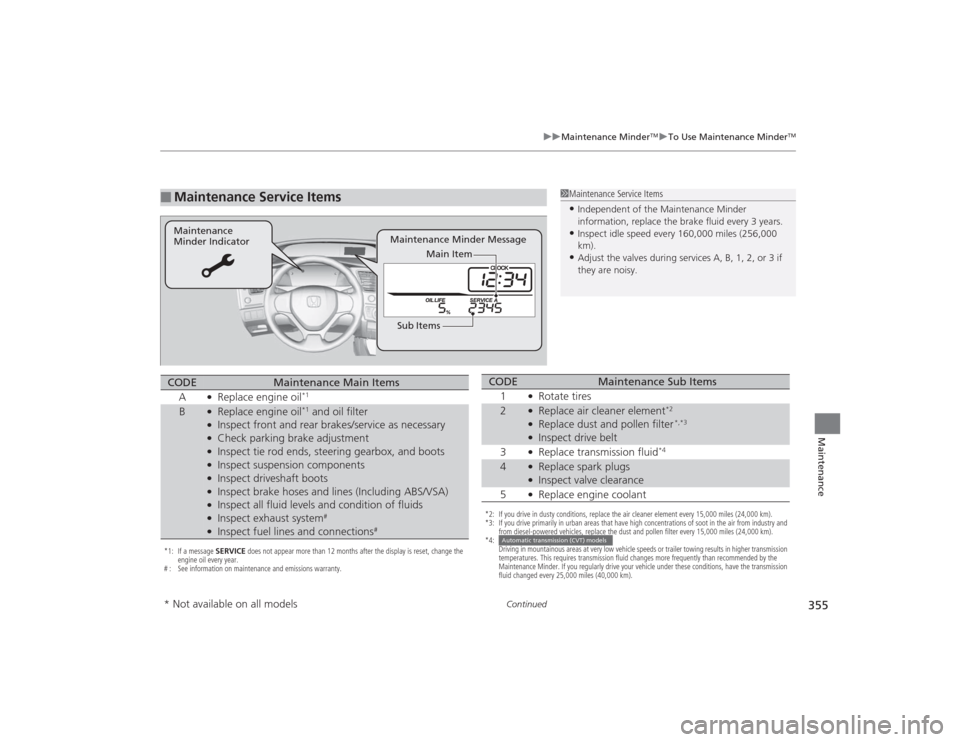
Maintenance Service Items
1Maintenance Service Items•Independent of the Maintenance Minder
information, replace the brake fluid every 3 years.•Inspect idle speed every 160,000 miles (256,000
km).•Adjust the valves during services A, B, 1, 2, or 3 if
they are noisy.
Maintenance Minder Message
Maintenance
Minder Indicator
Sub ItemsMain Item
*1: If a message
SERVICE does not appear more than 12 months after the display is reset, change the
engine oil every year.
# : See information on maintenance and emissions warranty.CODE
Maintenance Main Items
A
●Replace engine oil
*1
B
●Replace engine oil
*1 and oil filter
●Inspect front and rear brakes/service as necessary●Check parking brake adjustment●Inspect tie rod ends, steering gearbox, and boots●Inspect suspension components●Inspect driveshaft boots●Inspect brake hoses and lines (Including ABS/VSA)●Inspect all fluid levels and condition of fluids●Inspect exhaust system
#
●Inspect fuel lines and connections
#
*2: If you drive in dusty conditions, replace the air cleaner element every 15,000 miles (24,000 km).
*3: If you drive primarily in urban areas that have high concentrations of soot in the air from industry and from diesel-powered vehicles, replace the dust and pollen filter every 15,000 miles (24,000 km).
*4: Driving in mountainous areas at very low vehicle speeds or trailer towing results in higher transmission
temperatures. This requires transmission fluid changes more frequently than recommended by the
Maintenance Minder. If you regularly drive your vehicle under these conditions, have the transmission
fluid changed every 25,000 miles (40,000 km).CODE
Maintenance Sub Items
1
●Rotate tires
2
●Replace air cleaner element
*2
●Replace dust and pollen filter
*,*3
●Inspect drive belt
3●Replace transmission fluid
*4
4
●Replace spark plugs●Inspect valve clearance
5●Replace engine coolant
Automatic transmission (CVT) models
* Not available on all models
Page 357 of 469
uuMaintenance Minder
TMuTo Use Maintenance Minder
TM
356Maintenance
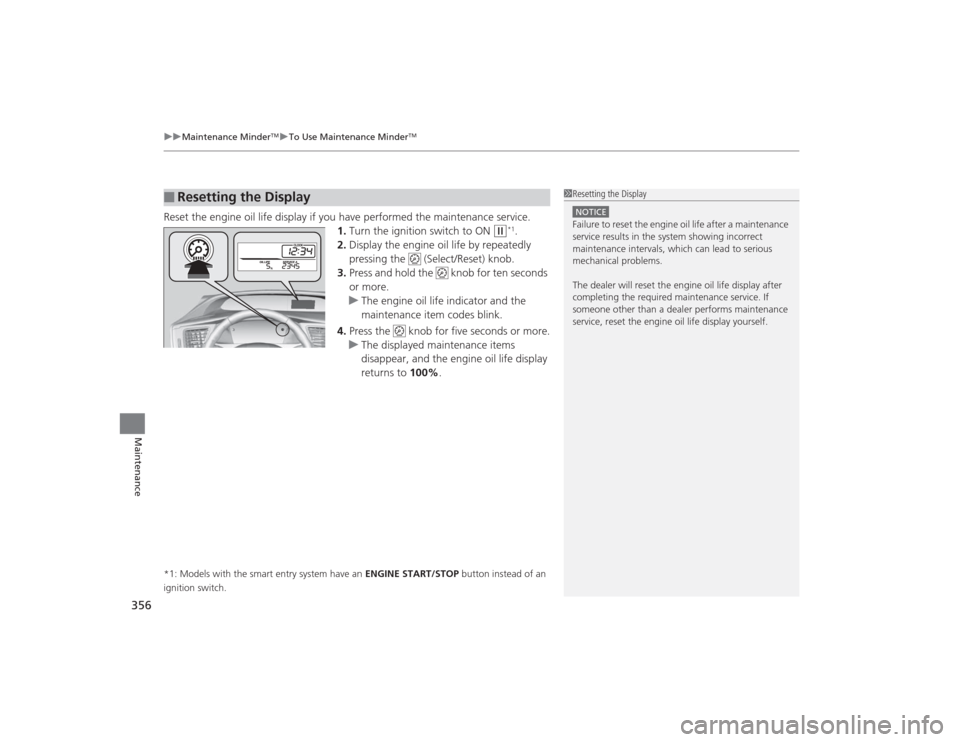
Reset the engine oil life display if you have performed the maintenance service.
1.Turn the ignition switch to ON
(w
*1.
2. Display the engine oil life by repeatedly
pressing the (Select/Reset) knob.
3. Press and hold the knob for ten seconds
or more.
u The engine oil life indicator and the
maintenance item codes blink.
4. Press the knob for five seconds or more.
u The displayed maintenance items
disappear, and the engine oil life display
returns to 100%.
*1: Models with the smart entry system have an ENGINE START/STOP button instead of an
ignition switch.■
Resetting the Display
1 Resetting the DisplayNOTICEFailure to reset the engine oil life after a maintenance
service results in the system showing incorrect
maintenance intervals, which can lead to serious
mechanical problems.
The dealer will reset th e engine oil life display after
completing the required maintenance service. If
someone other than a dealer performs maintenance
service, reset the engine oil life display yourself.
Page 360 of 469
359
uuMaintenance Minder
TMuTo Use Maintenance Minder
TM
Continued
Maintenance
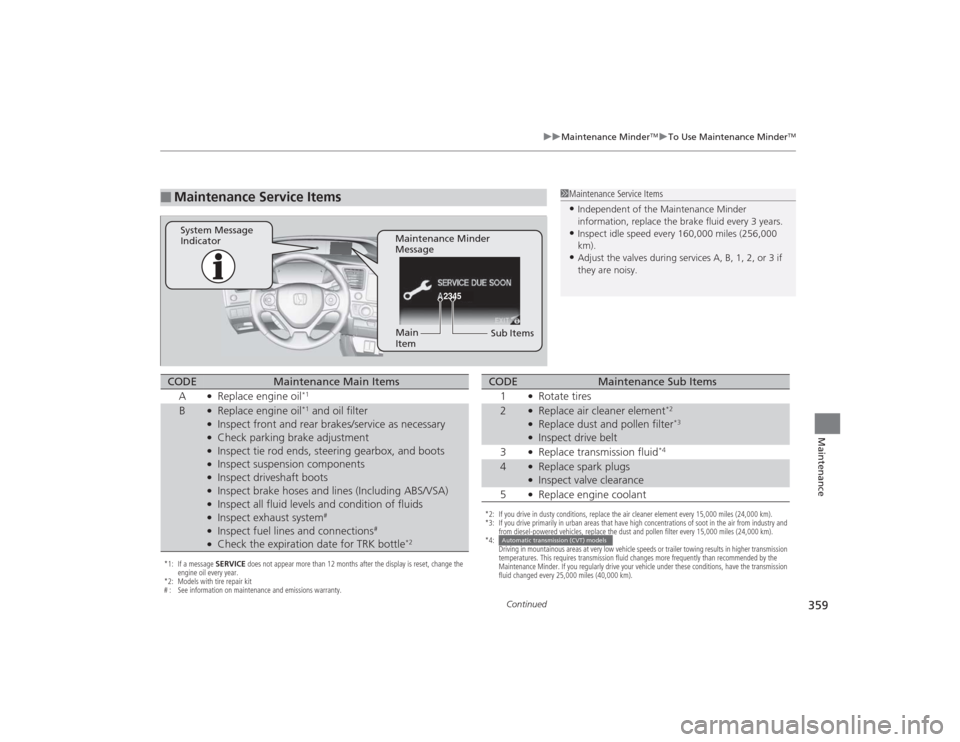
■
Maintenance Service Items
1Maintenance Service Items•Independent of the Maintenance Minder
information, replace the brake fluid every 3 years.•Inspect idle speed every 160,000 miles (256,000
km).•Adjust the valves during services A, B, 1, 2, or 3 if
they are noisy.
2345
Maintenance Minder
Message
System Message
Indicator
Sub Items
Main
Item
*1: If a message
SERVICE does not appear more than 12 months after the display is reset, change the
engine oil every year.
*2: Models with tire repair kit
# : See information on maintenance and emissions warranty.CODE
Maintenance Main Items
A
●Replace engine oil
*1
B
●Replace engine oil
*1 and oil filter
●Inspect front and rear brakes/service as necessary●Check parking brake adjustment●Inspect tie rod ends, steering gearbox, and boots●Inspect suspension components●Inspect driveshaft boots●Inspect brake hoses and lines (Including ABS/VSA)●Inspect all fluid levels and condition of fluids●Inspect exhaust system
#
●Inspect fuel lines and connections
#
●Check the expiration date for TRK bottle
*2
*2: If you drive in dusty conditions, replace the air cleaner element every 15,000 miles (24,000 km).
*3: If you drive primarily in urban areas that have high concentrations of soot in the air from industry and from diesel-powered vehicles, replace the dust and pollen filter every 15,000 miles (24,000 km).
*4: Driving in mountainous areas at very low vehicle speeds or trailer towing results in higher transmission
temperatures. This requires transmission fluid changes more frequently than recommended by the
Maintenance Minder. If you regularly drive your vehicle under these conditions, have the transmission
fluid changed every 25,000 miles (40,000 km).CODE
Maintenance Sub Items
1
●Rotate tires
2
●Replace air cleaner element
*2
●Replace dust and pollen filter
*3
●Inspect drive belt
3●Replace transmission fluid
*4
4
●Replace spark plugs●Inspect valve clearance
5●Replace engine coolant
Automatic transmission (CVT) models
Page 361 of 469
uuMaintenance Minder
TMuTo Use Maintenance Minder
TM
360Maintenance
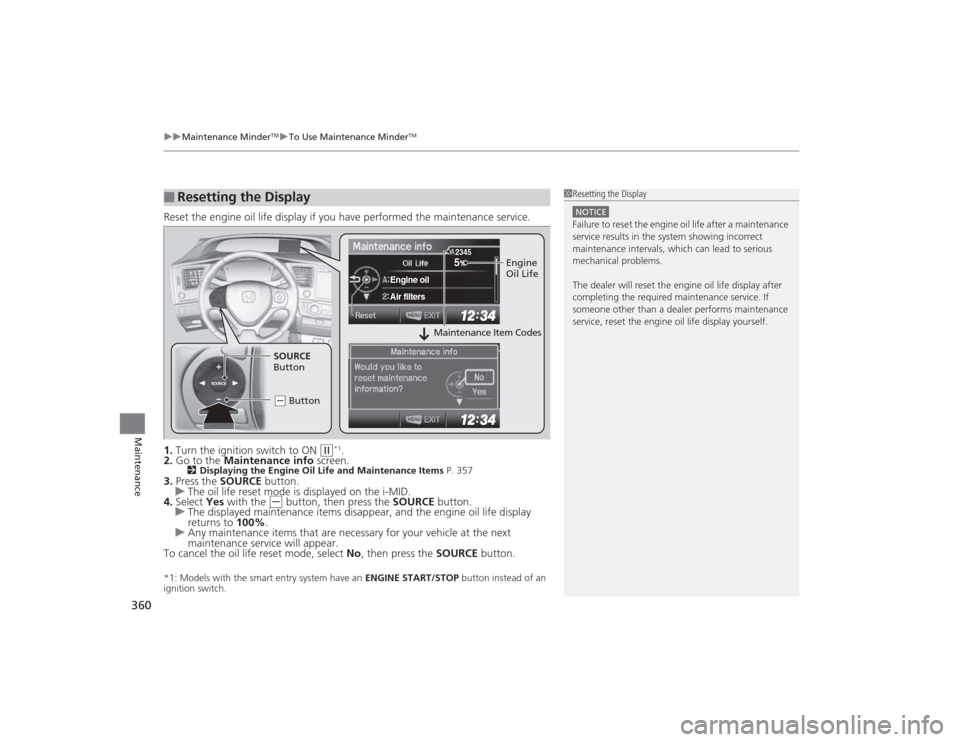
Reset the engine oil life display if you have performed the maintenance service.
1. Turn the ignition switch to ON
(w
*1.
2. Go to the Maintenance info screen.
2Displaying the Engine Oil Life and Maintenance Items P. 357
3.Press the SOURCE button.
u The oil life reset mode is displayed on the i-MID.
4. Select Yes with the
(-
button, then press the SOURCE button.
u The displayed maintenance items disappear, and the engine oil life display
returns to 100%.
u Any maintenance items that are necessary for your vehicle at the next
maintenance service will appear.
To cancel the oil life reset mode, select No, then press the SOURCE button.
*1: Models with the smart entry system have an ENGINE START/STOP button instead of an
ignition switch.■
Resetting the Display
1 Resetting the DisplayNOTICEFailure to reset the engine oil life after a maintenance
service results in the system showing incorrect
maintenance intervals, which can lead to serious
mechanical problems.
The dealer will reset th e engine oil life display after
completing the required maintenance service. If
someone other than a dealer performs maintenance
service, reset the engine oil life display yourself.
SOURCE
5
Engine oilAir filters
2345
Engine
Oil Life
SOURCE
Button
( - Button
Maintenance Item Codes