ignition HONDA CIVIC 2014 9.G Repair Manual
[x] Cancel search | Manufacturer: HONDA, Model Year: 2014, Model line: CIVIC, Model: HONDA CIVIC 2014 9.GPages: 469, PDF Size: 17.32 MB
Page 412 of 469
411
Continued
Handling the Unexpected
If a Tire Goes FlatChanging a Flat TireIf a tire goes flat while driving, grasp the steering wheel firmly, and brake gradually
to reduce speed. Then, stop in a safe place. Replace the flat tire with a compact
spare tire. Go to a dealer as soon as possible to have the full-size tire repaired or
replaced.
1.Park the vehicle on firm, level, and non-slippery surface, and apply the parking
brake.
2. Put the shift lever in
(P
.
2. Put the shift lever in
(R
.
3. Turn on the hazard warning lights and turn the ignition switch to LOCK
(0
*1.
*1: Models with the smart entry system have an ENGINE START/STOP button instead of an
ignition switch.Models with compact spare tire
1 Changing a Flat Tire
Periodically check the tire pressure of the compact
spare. It should be set to the specified pressure.
Specified Pressure: 60 psi (420 kPa, 4.2 kgf/cm
2)
When driving with the compact spare tire, keep the
vehicle speed under 50 mph (80 km/h). Replace with
a full-size tire as soon as possible.
The compact spare tire and wheel in your vehicle are
specifically for this model. Do not use them with
another vehicle. Do not use another type of compact
spare tire or wheel with your vehicle.
Do not mount tire chains on a compact spare tire.
If a chain-mounted front tire goes flat, remove one of
the full-size rear tires and replace it with the compact
spare tire. Remove the flat front tire and replace it
with the full-size tire that was removed from the rear.
Mount the tire chains on the front tire.
Automatic transmission (CVT) modelsManual transmission modelsAll models
Page 419 of 469
418
uuIf a Tire Goes Flat uTemporarily Repairing a Flat Tire
Handling the Unexpected
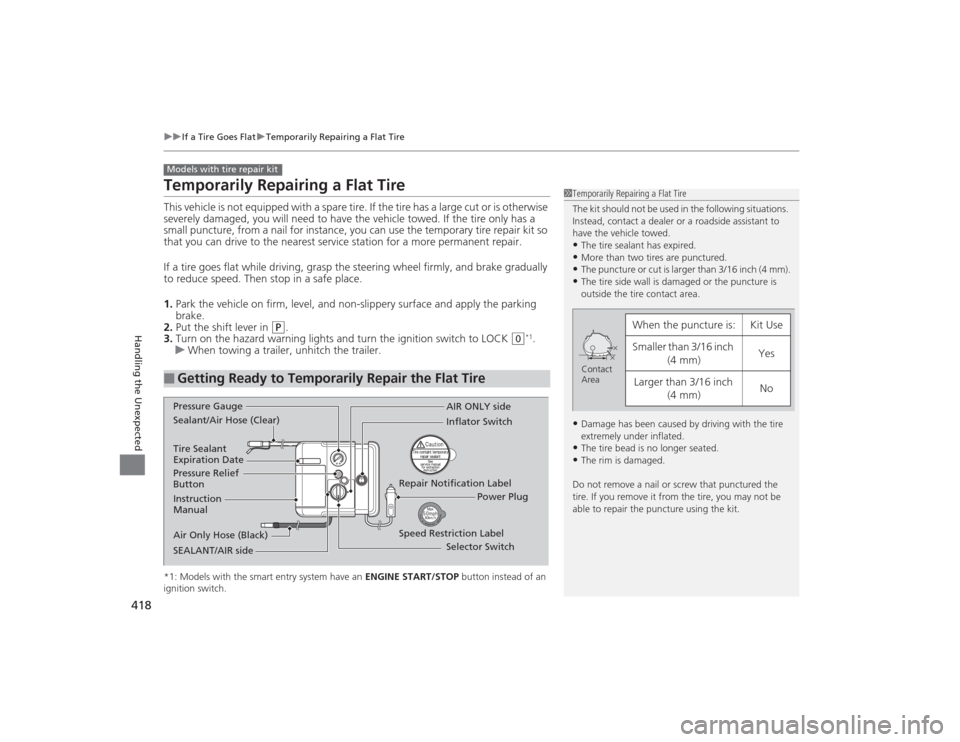
Temporarily Repairing a Flat TireThis vehicle is not equipped with a spare tire. If the tire has a large cut or is otherwise
severely damaged, you will need to have the vehicle towed. If the tire only has a
small puncture, from a nail for instance, you can use the temporary tire repair kit so
that you can drive to the nearest service station for a more permanent repair.
If a tire goes flat while driving, grasp the steering wheel firmly, and brake gradually
to reduce speed. Then stop in a safe place.
1. Park the vehicle on firm, level, and non-slippery surface and apply the parking
brake.
2. Put the shift lever in
(P
.
3. Turn on the hazard warning lights and turn the ignition switch to LOCK
(0
*1.
u When towing a trailer, unhitch the trailer.
*1: Models with the smart entry system have an ENGINE START/STOP button instead of an
ignition switch.■
Getting Ready to Temporarily Repair the Flat TireModels with tire repair kit
1 Temporarily Repairing a Flat Tire
The kit should not be used in the following situations.
Instead, contact a dealer or a roadside assistant to
have the vehicle towed.•The tire sealant has expired.•More than two tires are punctured.•The puncture or cut is larger than 3/16 inch (4 mm).•The tire side wall is damaged or the puncture is
outside the tire contact area.•Damage has been caused by driving with the tire
extremely under inflated.•The tire bead is no longer seated.•The rim is damaged.
Do not remove a nail or screw that punctured the
tire. If you remove it from the tire, you may not be
able to repair the puncture using the kit.
When the puncture is:
Kit Use
Smaller than 3/16 inch (4 mm)
Yes
Larger than 3/16 inch (4 mm)
No
Contact
Area
Instruction
Manual
Air Only Hose (Black) Speed Restriction Label Repair Notification Label
Pressure Relief
Button Inflator Switch
Selector Switch
SEALANT/AIR side Sealant/Air Hose (Clear) AIR ONLY side
Power Plug
Pressure Gauge
Tire Sealant
Expiration Date
Page 433 of 469
432Handling the Unexpected
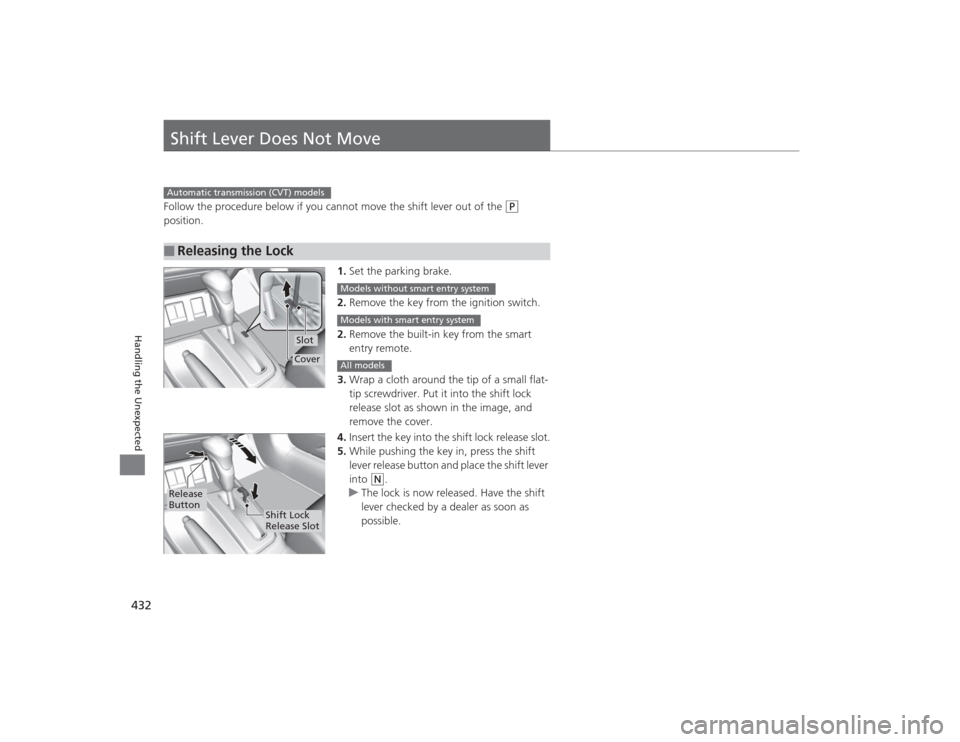
Shift Lever Does Not MoveFollow the procedure below if you cannot move the shift lever out of the
(P
position.
1.Set the parking brake.
2. Remove the key from the ignition switch.
2. Remove the built-in key from the smart
entry remote.
3. Wrap a cloth around the tip of a small flat-
tip screwdriver. Put it into the shift lock
release slot as shown in the image, and
remove the cover.
4. Insert the key into the shift lock release slot.
5. While pushing the key in, press the shift
lever release button and place the shift lever
into
(N
.
u The lock is now released. Have the shift
lever checked by a dealer as soon as
possible.
■
Releasing the LockAutomatic transmission (CVT) models
SlotCover
Models without smart entry systemModels with smart entry systemAll models
Release
Button
Shift Lock
Release Slot
Page 440 of 469
439
Continued
Handling the Unexpected
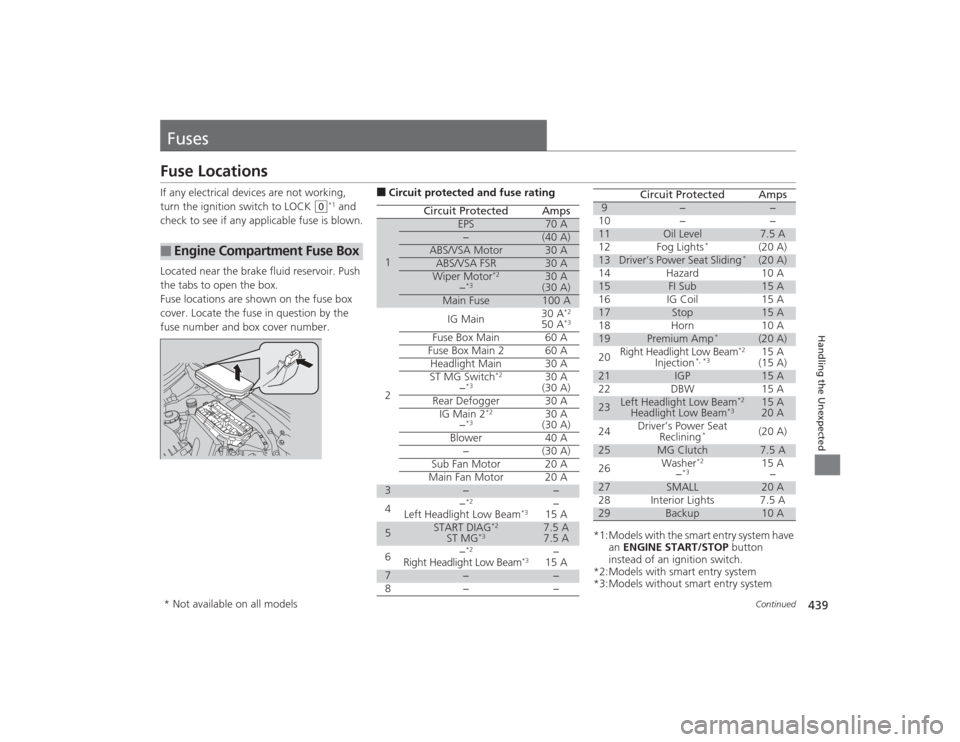
FusesFuse LocationsIf any electrical devices are not working,
turn the ignition switch to LOCK
(0
*1 and
check to see if any applicable fuse is blown.
Located near the brake fluid reservoir. Push
the tabs to open the box.
Fuse locations are shown on the fuse box
cover. Locate the fuse in question by the
fuse number and box cover number.
■
Engine Compartment Fuse Box
■Circuit protected and fuse rating
Circuit Protected
Amps
1
EPS
70 A
−
(40 A)
ABS/VSA Motor
30 A
ABS/VSA FSR
30 A
Wiper Motor
*2
−*3
30 A
(30 A)
Main Fuse
100 A
2
IG Main
30 A
*2
50 A
*3
Fuse Box Main 60 AFuse Box Main 2
60 A
Headlight Main 30 A
ST MG Switch
*2
−*3
30 A
(30 A)
Rear Defogger 30 A IG Main 2
*2
−*3
30 A
(30 A)
Blower 40 A −(30 A)
Sub Fan Motor 20 A
Main Fan Motor 20 A
3
−
−
4 −
*2
Left Headlight Low Beam
*3
−
15 A
5
START DIAG
*2
ST MG
*3
7.5 A
7.5 A
6 −
*2
Right Headlight Low Beam
*3
−
15 A
7
−
−
8− −
*1:Models with the smart entry system have an ENGINE START/STOP button
instead of an ignition switch.
*2:Models with smart entry system
*3:Models without smart entry system9
−
−
10 − −
11
Oil Level
7.5 A
12 Fog Lights
*
(20 A)
13
Driver’s Power Seat Sliding
*
(20 A)
14 Hazard 10 A
15
FI Sub
15 A
16 IG Coil 15 A
17
Stop
15 A
18 Horn 10 A
19
Premium Amp
*
(20 A)
20 Right Headlight Low Beam
*2
Injection
*, *3
15 A
(15 A)
21
IGP
15 A
22 DBW 15 A
23
Left Headlight Low Beam
*2
Headlight Low Beam
*3
15 A
20 A
24 Driver’s Power Seat
Reclining
*
(20 A)
25
MG Clutch
7.5 A
26 Washer
*2
−*3
15 A
−
27
SMALL
20 A
28 Interior Lights 7.5 A
29
Backup
10 A
Circuit Protected
Amps
* Not available on all models
Page 442 of 469
441
uuFuses uInspecting and Changing Fuses
Handling the Unexpected
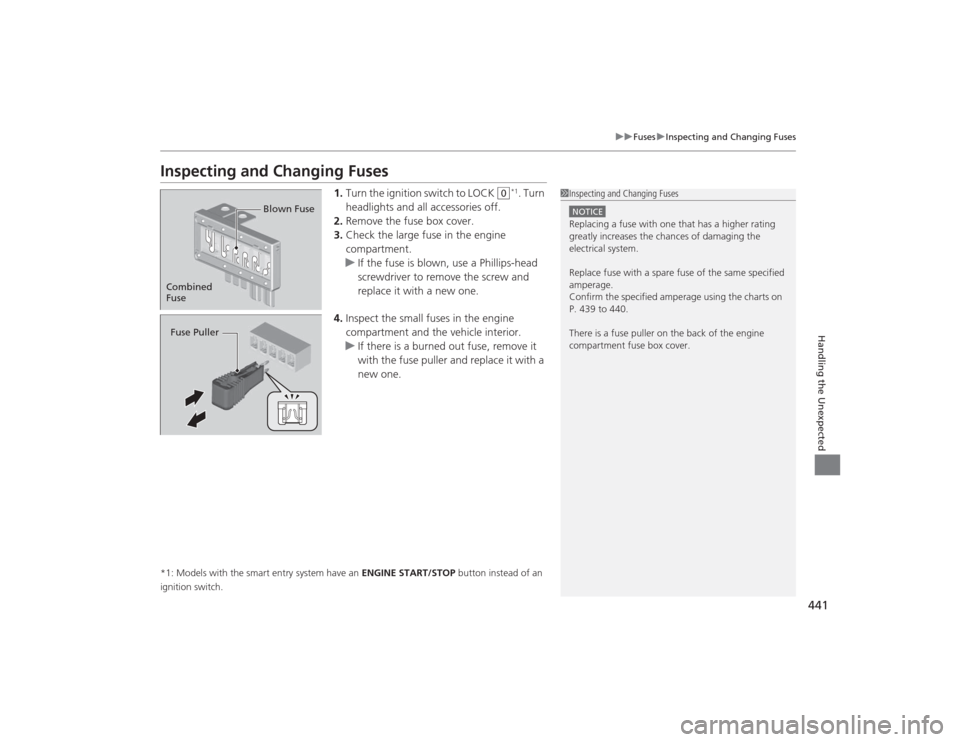
Inspecting and Changing Fuses
1. Turn the ignition switch to LOCK
(0
*1. Turn
headlights and all accessories off.
2. Remove the fuse box cover.
3. Check the large fuse in the engine
compartment.
u If the fuse is blown, use a Phillips-head
screwdriver to remove the screw and
replace it with a new one.
4. Inspect the small fuses in the engine
compartment and the vehicle interior.
u If there is a burned out fuse, remove it
with the fuse puller and replace it with a
new one.
*1: Models with the smart entry system have an ENGINE START/STOP button instead of an
ignition switch.
1 Inspecting and Changing FusesNOTICEReplacing a fuse with one that has a higher rating
greatly increases the chances of damaging the
electrical system.
Replace fuse with a spare fuse of the same specified
amperage.
Confirm the specified amperage using the charts on
P. 439 to 440.
There is a fuse puller on the back of the engine
compartment fuse box cover.
Combined
Fuse Blown FuseFuse Puller
Page 452 of 469
451
Continued
Information
Emissions TestingTesting of Readiness CodesYour vehicle has “Readiness Codes,” as part of the onboard self diagnostic system.
Some States use these codes as a test to see if your vehicle's emissions components
are working properly.
The codes may not be read properly if testing is performed just after the battery has
gone dead or been disconnected.
To check if they are set, turn the ignition switch to ON
(w
*1, without starting the
engine. The malfunction indicator lamp will come on for several seconds. If it then
goes off, the readiness codes are set. If it blinks five times, the readiness codes are
not set.
If you are required to have your vehicle tested before the readiness codes are ready,
prepare the vehicle for retesting by doing the following:
1. Fill the gas tank to approximately 3/4 full.
2. Park the vehicle and leave the engine off for six hours or more.
3. Make sure the ambient temperature is between 40°F and 95°F (4°C and 35°C).
4. Start the engine without touching the accelerator pedal, and let it idle for 20
seconds.
5. Keep the vehicle in
(P
(CVT) or
(N
(manual transmission). Increase the engine
speed to 2,000 rpm, and hold it there for about three minutes.
6. Let the engine idle with your foot off the accelerator for 20 seconds.
*1: Models with the smart entry system have an ENGINE START/STOP button instead of an
ignition switch.
1 Testing of Readiness Codes
The readiness codes are erased when the battery is
disconnected, and set again only after several days of
driving under a variety of conditions.
If a testing facility determines that the readiness
codes are not set, you may be requested to return at
a later date to complete the test.
If the testing faci lity determines the readiness codes
are still not set, see a dealer.
Page 461 of 469
460Index
Fuel Fill Door....................................... 18, 344
Fuses .......................................................... 439
Inspecting and Changing ......................... 441
Locations ......................................... 439, 440GGasoline (Fuel) Economy ................................................. 346
Gauge ....................................................... 82
Information ............................................. 343
Instant Fuel Economy ........................... 82, 89
Low Fuel Indicator ..................................... 71
Refueling ................................................. 343
Gauges ......................................................... 82
Gear Shift Lever Positions
Automatic Transmission (CVT) ................. 320
Manual Transmission ............................... 323
Glass (care) ................................................ 407
Glove Box .................................................. 156HHalogen Bulbs ................................... 376, 380
Handling the Unexpected ........................ 409
HandsFreeLink® (HFL)....................... 246, 277
Automatic Import of Cellular Phonebook and Call History .................................... 262, 289
Automatic Transferring ............................ 260
Caller’s ID Information ............................. 260
Displaying Messages ........................ 273, 298 HFL Buttons..................................... 246, 277
HFL Menus ...................................... 248, 279
HFL Status Display ........................... 247, 278
Limitations for Manual Operation ............ 247
Making a Call .................................. 266, 292
Options During a Call ...................... 271, 295
Phone Setup.................................... 253, 283
Receiving a Call ............................... 270, 295
Receiving a Text Message/E-mail...... 272, 296
Ring Tone................................................ 288
Selecting a Mail Account ......................... 297
Speed Dial ....................................... 263, 290
Text Message .................. 258, 272, 287, 296
To Clear the System ................................ 261
To Create a Security PIN .......................... 259
To Set Up a Text Message/E-mail
Options ......................................... 258, 287
Hazard Warning Button .............................. 2
Head Restraints ........................................ 149
Headlights ................................................. 136
Aiming .................................................... 376
Automatic Operation............................... 137
Dimming ......................................... 136, 139
Operating................................................ 136
Heaters (Seat) ........................................... 160
Heating and Cooling System ................... 161
Cooling ................................................... 163
Defrosting the Windshield and
Windows ............................................... 164
Dust and Pollen Filter............................... 403
Heating ................................................... 162 HFL (HandsFreeLink
®) ...................... 246, 277
High Beam Indicator .................................. 74
Hill Start Assist System ..................... 314, 317
IIdentification Numbers ............................ 448
Engine and Transmission ......................... 448
Vehicle Identification............................... 448
Ignition Switch ......................................... 131
Illumination Control ................................ 141
Knob ...................................................... 141
i-MID ........................................................... 86
Immobilizer System .................................. 125
Indicator ................................................... 75
Indicators .................................................... 68
Anti-lock Brake System (ABS) .................... 71
Brake System (Amber) ............................... 68
Charging System............................... 69, 435
CRUISE CONTROL ............................. 76, 327
CRUISE MAIN.................................... 76, 326
Daytime Running Lights ............................ 73
Door Open.......................................... 31, 72
ECON Mode ..................................... 76, 325
Electric Power Steering (EPS) System ............................................ 73, 437
Fog Light .................................................. 74
High Beam ................................................ 74
High Temperature ..................................... 72
Immobilizer System ................................... 75
i-VTEC ................................................ 76, 83