change time HONDA CIVIC 2015 9.G Quick Guide
[x] Cancel search | Manufacturer: HONDA, Model Year: 2015, Model line: CIVIC, Model: HONDA CIVIC 2015 9.GPages: 79, PDF Size: 18.16 MB
Page 2 of 79

Devices That Emit Radio WavesThe following products and systems on your vehicle emit radio waves when\
in
operation:
• Audio system • Immobilizer system
® Audio • Remote transmitter
® HandsFreeLink®
Each of the above complies with the appropriate requirements or the requ\
ired
standards of the FCC (Federal Communications Commission) and Industry \
Canada,
described below:
As required by the FCC:
This device complies with Part 15 of the FCC rules. Operation is subject\
to the
following two conditions: (1) This device may not cause harmful interf\
erence, and
(2) this device must accept any interference received, including inter\
ference that
may cause undesired operation.
Changes or modi cations not expressly approved by the party responsible for
compliance could void the user’s authority to operate the equipment.
As required by Industry Canada:
This device complies with Industry Canada Standard RSS-Gen/210/310.
Operation is subject to the following two conditions: (1) this device \
may not
cause interference, and (2) this device must accept any interference, \
including
interference that may cause undesired operation of the device.
California Perchlorate Contamination Prevention Act The airbags, seat belt tensioners, and CR-type batteries in this vehicle\
may
contain perchlorate materials—special handling may apply. See www.dtsc.
ca.gov/hazardouswaste/perchlorate/ for more information.
California Proposition 65 Warning
WARNING: This product contains or emits chemicals known to the state of
California to cause cancer and birth defects or other reproductive harm.\
DISCLOSURES
Event Data RecordersThis vehicle is equipped with an event data recorder (EDR). The main purpose of
an EDR is to record, in certain crash or near crash-like situations, suc\
h as an air
bag deployment or hitting a road obstacle, data that will assist in unde\
rstanding
how a vehicle’s systems performed. The EDR is designed to record data related to
vehicle dynamics and safety systems for a short period of time, typicall\
y
30 seconds or less. The EDR in this vehicle is designed to record such d\
ata as:
How various systems in your vehicle were operating;
Whether or not the driver and passenger safety belts were buckled/fasten\
ed;
How far (if at all) the driver was depressing the accelerator and/or b\
rake pedal; and,
How fast the vehicle was traveling.
These data can help provide a better understanding of the circumstances \
in
which crashes and injuries occur. NOTE: EDR data are recorded by your vehicle
only if a non-trivial crash situation occurs; no data are recorded by th\
e EDR under
normal driving conditions and no personal data (e.g., name, gender, age, and
crash location) are recorded. However, other parties, such as law enforcement,
could combine the EDR data with the type of personally identifying data \
routinely
acquired during a crash investigation.
To read data recorded by an EDR, special equipment is required, and acces\
s to
the vehicle or the EDR is needed. In addition to the vehicle manufacture\
r, other
parties such as law enforcement that have the special equipment can read\
the
information if they have access to the vehicle or the EDR.
The data belong to the vehicle owner and may not be accessed by anyone e\
lse
except as legally required or with the permission of the vehicle owner.
Service Diagnostic Recorders This vehicle is equipped with service-related devices that record inform\
ation
about powertrain performance. The data can be used to verify emissions l\
aw
requirements and/or help technicians diagnose and solve service problems\
. It may
also be combined with data from other sources for research purposes, but\
it remains confi dential.
Page 6 of 79

4 || 5
SAFETY
SAFETY
Carbon Monoxide Gas
The engine exhaust from this vehicle contains carbon monoxide, a colorle\
ss,
odorless, and highly toxic gas. As long as you properly maintain your ve\
hicle and
follow the instructions set forth below, you will not accumulate dangerous levels
of carbon monoxide gas in the vehicle interior.
Have the exhaust system inspected for leaks whenever:
• The exhaust system is making an unusual noise.
• The exhaust system may have been damaged.
• The vehicle is raised for an oil change. When you operate a vehicle with the trunk open, airfl ow can pull exhaust gas
into the interior and create a hazardous condition. If you must drive wi\
th the trunk
open, open all the windows and set the climate control system as shown b\
elow.
1. Select the fresh air mode.
2. Select the
mode.
3. Set the fan speed to high.
4. Set the temperature control to a comfortable setting.
Adjust the climate control system in the same manner if you sit in your \
parked
vehicle with the engine running.
An enclosed area such as a garage can quickly fi ll up with carbon monoxide gas.
Do not run the engine with the garage door closed. Even when the garage \
door is
open, drive out of the garage immediately after starting the engine. Carbon monoxide gas is toxic. Breathing it can cause unconsciousness and\
even kill you.
Avoid any enclosed areas or activities that expose you to carbon monoxide\
.
WARNING
Seat Belts
A seat belt is your best protection in all types of collisions. Airbags \
are designed to
supplement seat belts, not replace them. So even though your vehicle is \
equipped
with airbags, make sure you and your passengers always wear your seat be\
lts and
wear them properly.
Lap/Shoulder Seat Belts
All fi ve seating positions are equipped with lap/shoulder seat belts with
emergency locking retractors. In normal driving, the retractor lets you \
move
freely while keeping some tension on the belt. During a collision or sud\
den stop,
the retractor locks to restrain your body. The rear seat belts also have a lockable
retractor for use with child seats.
The front seats are equipped with automatic seat belt tensioners to enha\
nce
safety. The tensioners automatically tighten the front seat belts during a mod\
erate
to severe frontal collision, sometimes even if the collision is not seve\
re enough to
infl ate the front airbags.
Proper Use of Seat BeltsFollow these guidelines for proper use:
• All occupants should sit upright, well back in the seat, and remain in t\
hat position for the duration of the trip. Slouching and leaning reduces the\
effectiveness of the belt and can increase the chance of serious injury \
in a
crash.
• Never place the shoulder part of a lap/shoulder seat belt under your arm\
or behind your back. This could cause very serious injuries in a crash.
• Two people should never use the same seat belt. If they do, they could be\
very seriously injured in a crash.
• Do not put any accessories on the seat belts. Devices intended to improv\
e comfort or reposition the shoulder part of a seat belt can reduce the pr\
otective
capability and increase the chance of serious injury in a crash.
• No one should sit in a seat with an inoperative seat belt or one that do\
es not appear to be working correctly. Using a seat belt that is not working properly
may not protect the occupant in a crash. Have a dealer check the belt as\
soon
as possible.
Not wearing a seat belt properly increases the chance of a serious injur\
y or
death in a crash, even though your vehicle has airbags.
Be sure you and your passengers always wear seat belts and wear them
properly.
WARNING
Page 21 of 79
34 || 35
VEHICLE CONTROLS
VEHICLE CONTROLS
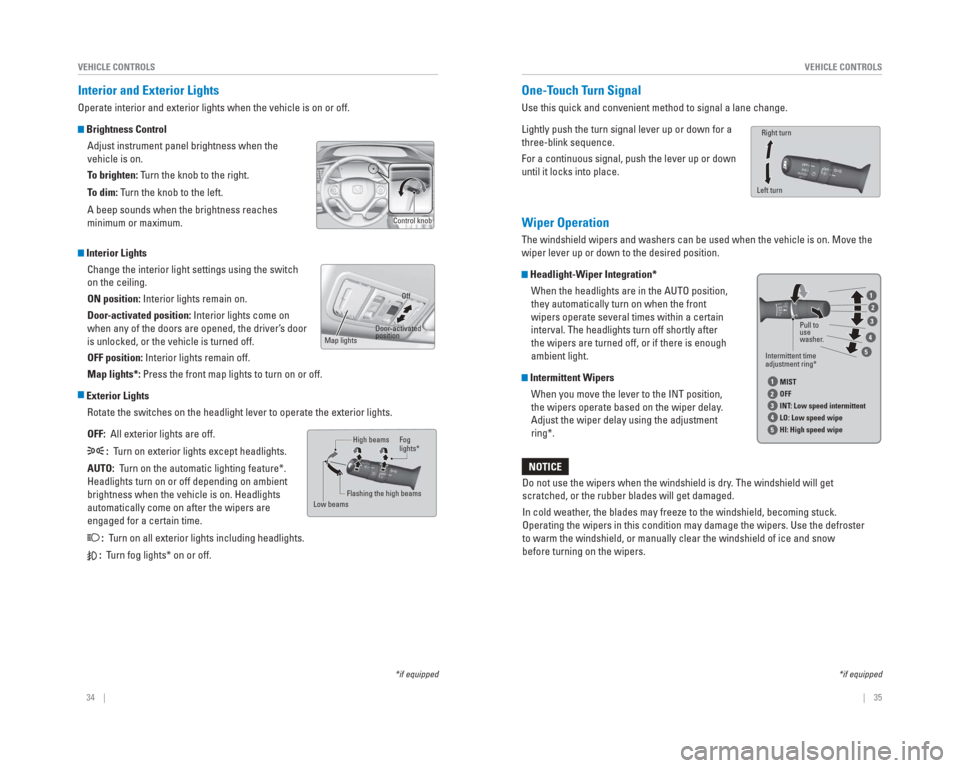
Interior and Exterior Lights
Operate interior and exterior lights when the vehicle is on or off.
Brightness Control
Adjust instrument panel brightness when the
vehicle is on.
To brighten: Turn the knob to the right.
To dim: Turn the knob to the left.
A beep sounds when the brightness reaches
minimum or maximum.
Interior LightsChange the interior light settings using the switch
on the ceiling.
ON position: Interior lights remain on.
Door-activated position: Interior lights come on
when any of the doors are opened, the driver’s door
is unlocked, or the vehicle is turned off.
OFF position: Interior lights remain off.
Map lights*: Press the front map lights to turn on or off.
Exterior LightsRotate the switches on the headlight lever to operate the exterior light\
s.
OFF: All exterior lights are off.
: Turn on exterior lights except headlights.
AUTO: Turn on the automatic lighting feature*.
Headlights turn on or off depending on ambient
brightness when the vehicle is on. Headlights
automatically come on after the wipers are
engaged for a certain time.
: Turn on all exterior lights including headlights.
: Turn fog lights* on or off.
Control knob
Off
Door -activated
position
Map lights
High beams
Low beams Flashing the high beams Fog
lights*
One-T
ouch Turn Signal
Use this quick and convenient method to signal a lane change.
Lightly push the turn signal lever up or down for a
three-blink sequence.
For a continuous signal, push the lever up or down
until it locks into place.
Wiper Operation
The windshield wipers and washers can be used when the vehicle is on. Mo\
ve the
wiper lever up or down to the desired position.
Headlight-Wiper Integration*
When the headlights are in the AUTO position,
they automatically turn on when the front
wipers operate several times within a certain
interval. The headlights turn off shortly after
the wipers are turned off, or if there is enough
ambient light.
Intermittent WipersWhen you move the lever to the INT position,
the wipers operate based on the wiper delay.
Adjust the wiper delay using the adjustment
ring*.
Left turn Right turn
Do not use the wipers when the windshield is dry
. The windshield will get
scratched, or the rubber blades will get damaged.
In cold weather , the blades may freeze to the windshield, becoming stuck.
Operating the wipers in this condition may damage the wipers. Use the de\
froster
to warm the windshield, or manually clear the windshield of ice and snow\
before turning on the wipers.
NOTICE
*if equipped
Intermittent time
adjustment ring* Pull to
use
washer
.
MIST
OFF
INT : Low speed intermittent
LO: Low speed wipe
HI: High speed wipe
1
1
2
2
3
3
4
4
5
5
*if equipped
Page 51 of 79

94 || 95
DRIVING
DRIVING
Eco Assist System*
Can help improve fuel economy by adjusting the performance of the engine\
,
transmission, climate control system, and cruise control.
ECON Button
Press the ECON button to turn the system on or
off. The ECON Mode indicator appears when
the system is turned on.
Ambient MeterColor-coded bars change based on your driving style and brake or accelerator \
pedal operation.
Green: Fuel effi cient driving
Blue-green: Moderate acceleration/deceleration
Blue: Aggressive acceleration/deceleration
Vehicle Stability Assist (VSA®), aka Electronic Stability Control
(ESC) System
Helps to stabilize the vehicle during cornering if the vehicle turns mor\
e or less
than what was intended. It assists in maintaining traction on slippery s\
urfaces by
regulating engine output and selectively applying the brakes.
Turning VSA On or Off
VSA is turned on every time you start the engine,
even if you previously turned it off. If you turn
VSA off, your vehicle has normal braking and
cornering ability, but not VSA traction and stability
enhancement.
Press and hold the VSA OFF button until you hear a
beep to turn VSA on or off. The VSA OFF indicator
appears when the system is off.
Traction control stops functioning, which may make
it easier when trying to free your vehicle if it is stuck
in mud or snow.
*if equipped
VSA OFF
indicator
VSA OFF
button
Ambient meter
Cruise Control*
Maintain a constant vehicle speed without having to keep your foot on th\
e
accelerator pedal. Use cruise control on freeways or open roads where yo\
u can
travel at a constant speed with little acceleration or deceleration.
Activating and Setting the Vehicle Speed 1. Press CRUISE. The CRUISE MAIN indicator appears.
2. Accelerate to the desired speed (above 25 mph/ 40 km/h). Press -/SET and take your foot off the
pedal to set the speed. The CRUISE CONTROL
indicator appears.
Adjusting the Vehicle Speed
Press RES/+ to increase or -/SET to decrease.
Each time you press the button, the vehicle speed is
increased or decreased by about 1 mph (1.6 km/h). If you
keep the button pressed, the vehicle speed increases or
decreases until you release it.
Canceling Cruise ControlPress CANCEL or the brake pedal. The CRUISE CONTROL
indicator goes off.
After cruise control has been canceled, you can still
resume the prior set speed by pressing RES/+ while
driving at a speed of at least 25 mph (40 km/h).
Press CRUISE to turn the system off.
Improper use of the cruise control can lead to a crash.
Use cruise control only when traveling on open highways in good weather .
WARNING
*if equipped
CRUISE button
RES/+ button
-/SET button CANCEL button
Page 52 of 79
96 || 97
DRIVING
DRIVING
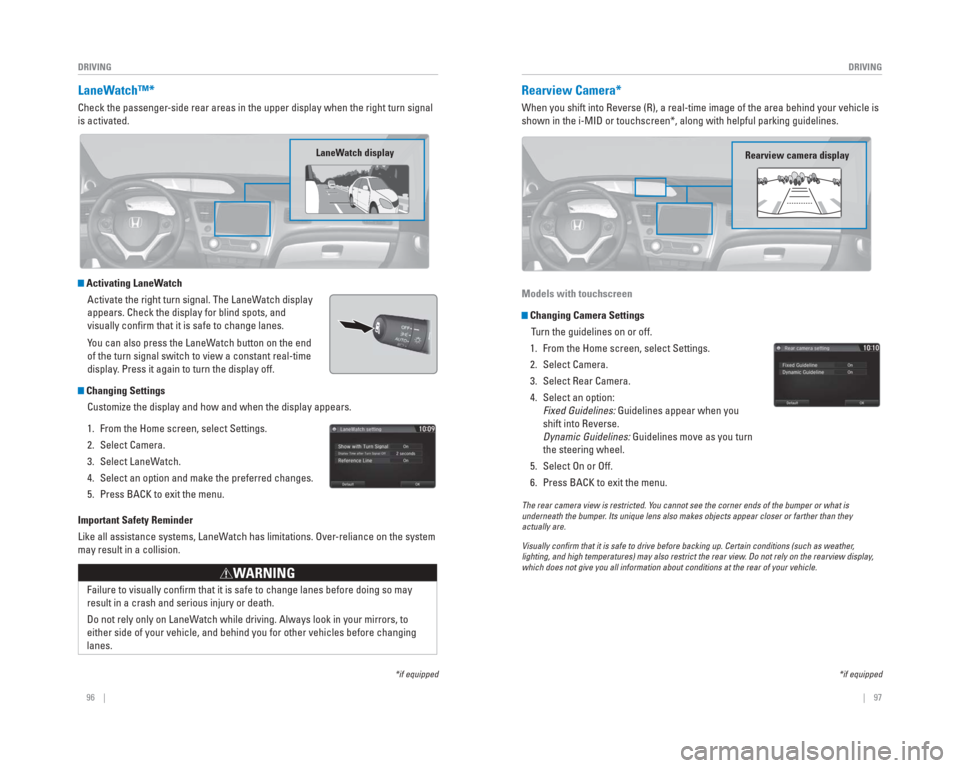
LaneWatch™*
Check the passenger-side rear areas in the upper display when the right turn signal
is activated.
Activating LaneWatch
Activate the right turn signal. The LaneWatch display
appears. Check the display for blind spots, and
visually confi rm that it is safe to change lanes.
You can also press the LaneWatch button on the end
of the turn signal switch to view a constant real-time
display. Press it again to turn the display off.
Changing SettingsCustomize the display and how and when the display appears.
1. From the Home screen, select Settings.
2. Select Camera.
3. Select LaneWatch.
4. Select an option and make the preferred changes.
5. Press BACK to exit the menu.
Important Safety Reminder
Like all assistance systems, LaneWatch has limitations. Over-reliance on the system
may result in a collision.
Failure to visually confi rm that it is safe to change lanes before doing so may
result in a crash and serious injury or death.
Do not rely only on LaneWatch while driving. Always look in your mirrors, to
either side of your vehicle, and behind you for other vehicles before ch\
anging
lanes.
WARNING
*if equipped
LaneWatch display
Rearview Camera*
When you shift into Reverse (R), a real-time image of the area behind \
your vehicle is
shown in the i-MID or touchscreen*, along with helpful parking guideline\
s.
Models with touchscreen
Changing Camera Settings
Turn the guidelines on or off.
1. From the Home screen, select Settings.
2. Select Camera.
3. Select Rear Camera.
4. Select an option: Fixed Guidelines: Guidelines appear when you
shift into Reverse.
Dynamic Guidelines: Guidelines move as you turn
the steering wheel.
5. Select On or Off.
6. Press BACK to exit the menu.
The rear camera view is restricted. Y ou cannot see the corner ends of the bumper or what is
underneath the bumper . Its unique lens also makes objects appear closer or farther than they \
actually are.
Visually con rm that it is safe to drive before backing up. Certain conditions (such\
as weather ,
lighting, and high temperatures) may also restrict the rear view . Do not rely on the rearview display,
which does not give you all information about conditions at the rear of \
your vehicle.
*if equipped
Rearview camera display
Page 53 of 79
, a real-time image of the area behind \
your vehicle is
shown in the display, along with helpful parking")
98 || 99
DRIVING
DRIVING
Multi-View Rear Camera*
When you shift into Reverse (R), a real-time image of the area behind \
your vehicle is
shown in the display, along with helpful parking guidelines.
Changing Camera Settings
Turn the guidelines on or off. Use the interface dial to make and enter s\
elections.
1. From the Home screen, select Settings.
2. Select Camera.
3. Select an option: Fixed Guidelines: Guidelines appear when you
shift into Reverse.
Dynamic Guidelines: Guidelines move as you turn
the steering wheel.
4. Select On or Off.
5. Press BACK to exit the menu.
The rear camera view is restricted. You cannot see the corner ends of the bumper or what is
underneath the bumper. Its unique lens also makes objects appear closer or farther than they \
actually are.
Visually con rm that it is safe to drive before backing up. Certain conditions (such\
as weather,
lighting, and high temperatures) may also restrict the rear view. Do not rely on the rearview display,
which does not give you all information about conditions at the rear of \
your vehicle.
*if equipped
Wide view
Press icons on the screen to change views.
Normal viewTop down view
Refueling
Use the proper fuel and refueling procedure to ensure the best performan\
ce and
safety of your vehicle.
Sedan, Coupe, and Si models
Fuel Information
Use of unleaded gasoline of 87 octane or higher is recommended.
For Civic Si models, 91 octane or higher is recommended.
• Honda recommends TOP TIER Detergent Gasoline where available.
• Do NOT use gasoline containing more than 15% ethanol.
• Do NOT use gasoline containing methanol.
• Do NOT use gasoline containing MMT.
How to Refuel
1. The fuel fi ll door is located at the left rear of the vehicle. Park next to the service pump that is
most accessible.
2. Turn off the engine.
3. Push the fuel fi ll door release handle near the bottom of the driver’s seat. The fuel fi ll door
opens.
4. Turn the fuel fi ll cap slowly to open. Place the fuel fi ll cap in the holder.
5. Insert the fi ller nozzle fully. When the tank is full, the fuel nozzle clicks off automatically.
6. Replace the fuel fi ll cap. Tighten it until you hear at least one click. Close the fuel fi ll door.
We recommend quality gasoline containing detergent additives that help
prevent fuel system and engine deposits. In addition, in order to mainta\
in good
performance, fuel economy, and emissions control, we strongly recommend the
use of gasoline that does NOT contain harmful manganese-based fuel addit\
ives
such as MMT, if such gasoline is available.
NOTICE
Gasoline is highly fl ammable and explosive. You can be burned or seriously
injured when handling fuel.
• Stop the engine, and keep heat, sparks, and fl ame away.
• Handle fuel only outdoors.
• Wipe up spills immediately.
WARNING
Push Cap
Holder
Page 57 of 79
106 || 107
HANDLING THE UNEXPECTED
HANDLING THE UNEXPECTED
Emergency Engine Stop*
The ENGINE START/STOP button may be used to stop the engine due to an
emergency situation even while driving. If you must stop the engine, cho\
ose one of
the following operations:
• Press and hold the ENGINE START/STOP button for
two seconds, or
• Firmly press the ENGINE START/STOP button two times.
The steering wheel will not lock. The power mode changes to ACCESSORY, unless
the shift lever is in Park (P), in which case the power mode changes t\
o VEHICLE OFF.
Because turning off the engine also disables the power assist the engine\
provides
to the steering and braking systems, it will require signifi cantly more physical effort
and time to steer and slow the vehicle. Downshift gears and use both fee\
t on the
brake pedal, if necessary, to slow the vehicle and stop immediately in a safe place
Do not press the button while driving unless it is absolutely necessary \
for the engine
to be switched off.
Emergency Towing
Call a professional towing service if you need to tow your vehicle.
Flat bed equipment: The operator loads your vehicle on the back of a tru\
ck. This is
the best way to transport your vehicle.
Wheel lift equipment: The tow truck uses two pivoting arms that go under\
the front
tires and lift them off the ground. The rear tires remain on the ground.\
This is an
acceptable way to tow your vehicle.
Trying to lift or tow your vehicle by the bumpers will cause serious dama\
ge. The
bumpers are not designed to support the vehicle’s weight.
Improper towing such as towing behind a motorhome or other motor vehicle\
can
damage the transmission.
NOTICE
*if equipped
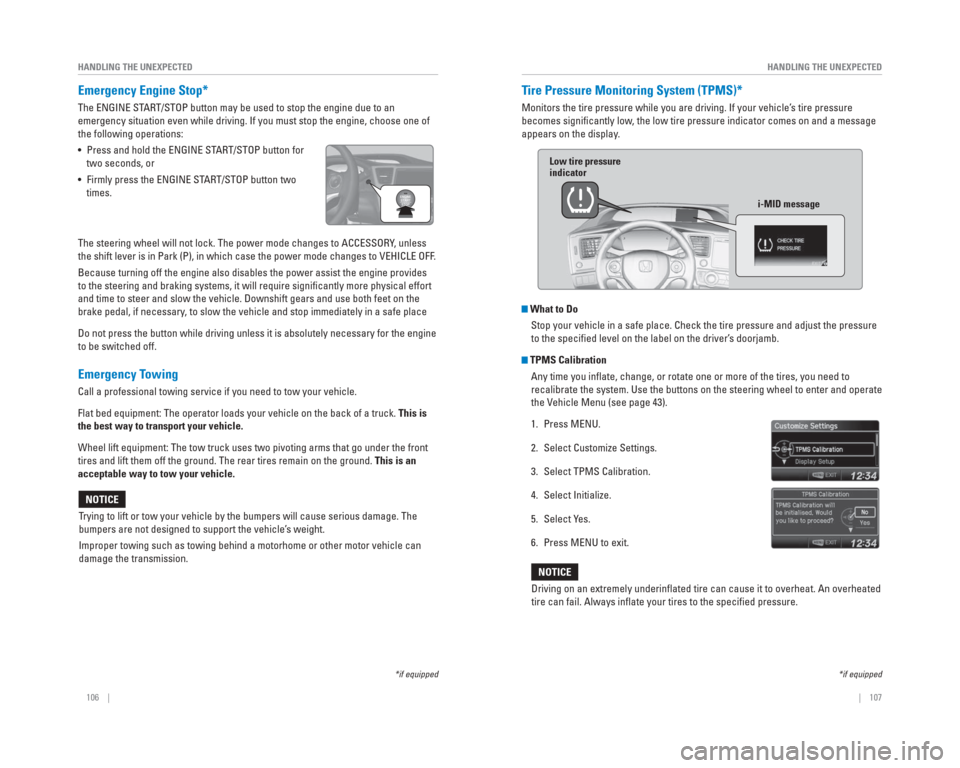
Tire Pressure Monitoring System ( TPMS)*
Monitors the tire pressure while you are driving. If your vehicle’s tire pressure
becomes signifi cantly low, the low tire pressure indicator comes on and a message
appears on the display.
What to Do Stop your vehicle in a safe place. Check the tire pressure and adjust th\
e pressure
to the specifi ed level on the label on the driver’s doorjamb.
TPMS CalibrationAny time you infl ate, change, or rotate one or more of the tires, you need to
recalibrate the system. Use the buttons on the steering wheel to enter a\
nd operate
the Vehicle Menu (see page 43).
1. Press MENU.
2. Select Customize Settings.
3. Select TPMS Calibration.
4. Select Initialize.
5. Select Yes.
6. Press MENU to exit.
Driving on an extremely underinfl ated tire can cause it to overheat. An overheated
tire can fail. Always infl ate your tires to the specifi ed pressure.
NOTICE
*if equipped
Low tire pressure
indicator
i-MID message
Page 62 of 79
116 || 117
MAINTENANCE
MAINTENANCE
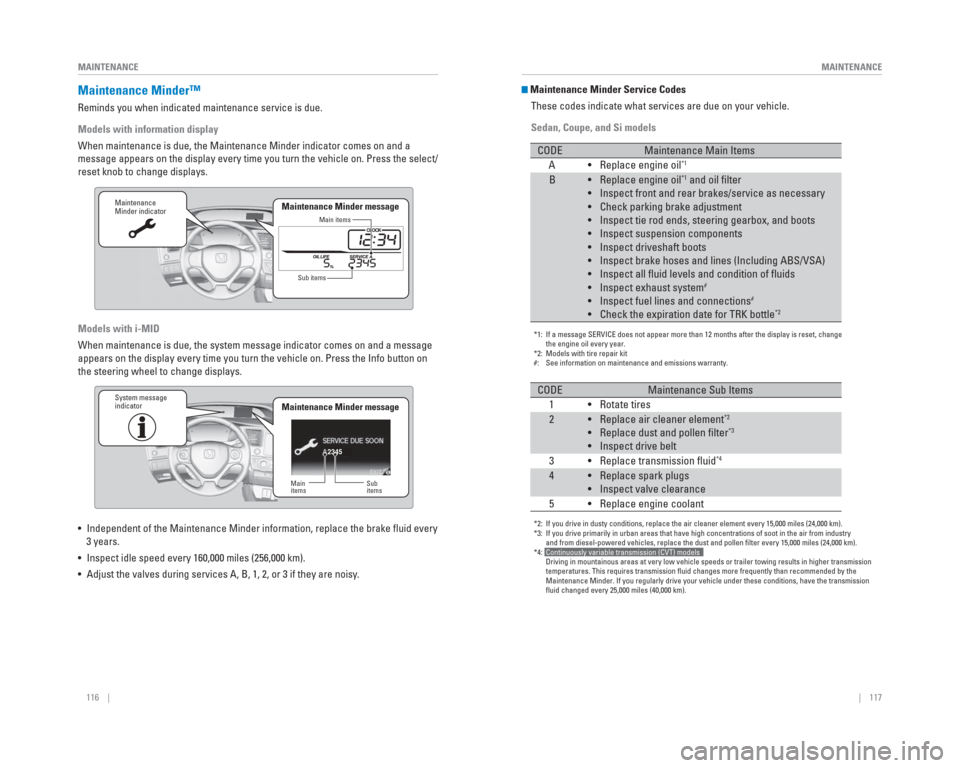
Maintenance Minder™
Reminds you when indicated maintenance service is due.
Models with information display
When maintenance is due, the Maintenance Minder indicator comes on and a\
message appears on the display every time you turn the vehicle on. Press\
the select/
reset knob to change displays.
Models with i-MID
When maintenance is due, the system message indicator comes on and a mes\
sage
appears on the display every time you turn the vehicle on. Press the Inf\
o button on
the steering wheel to change displays.
• Independent of the Maintenance Minder information, replace the brake fl\
uid every
3 years.
• Inspect idle speed every 160,000 miles (256,000 km).
• Adjust the valves during services A, B, 1, 2, or 3 if they are noisy.
Maintenance
Minder indicator
Main items
Sub items
Maintenance Minder message
2345
Maintenance
Minder indicator
Main
items Sub
items
Maintenance Minder messageSystem message
indicator
Maintenance Minder Service Codes
These codes indicate what services are due on your vehicle.
Sedan, Coupe, and Si models
*1: If a message SERVICE does not appear more than 12 months after the displ\
ay is reset, change
the engine oil every year.
*2: Models with tire repair kit
#: See information on maintenance and emissions warranty.
CODEMaintenance Main Items
A • Replace engine oil*1
B• Replace engine oil*1 and oil filter
• Inspect front and rear brakes/service as necessary
• Check parking brake adjustment
• Inspect tie rod ends, steering gearbox, and boots
• Inspect suspension components
• Inspect driveshaft boots
• Inspect brake hoses and lines (Including ABS/VSA)
• Inspect all fluid levels and condition of fluids
• Inspect exhaust system
#
• Inspect fuel lines and connections#
• Check the expiration date for TRK bottle*2
*2: If you drive in dusty conditions, replace the air cleaner element every \
15,000 miles (24,000 km).
*3: If you drive primarily in urban areas that have high concentrations of s\
oot in the air from industry
and from diesel-powered vehicles, replace the dust and pollen filter e\
very 15,000 miles (24,000 km).
*4: Continuously variable transmission (CVT) models
Driving in mountainous areas at very low vehicle speeds or trailer towin\
g results in higher transmission
temperatures. This requires transmission fluid changes more frequently\
than recommended by the
Maintenance Minder. If you regularly drive your vehicle under these cond\
itions, have the transmission
fluid changed every 25,000 miles (40,000 km).
CODEMaintenance Sub Items
1 • Rotate tires
2• Replace air cleaner element*2
• Replace dust and pollen filter*3
• Inspect drive belt
3 • Replace transmission fluid*4
4• Replace spark plugs
• Inspect valve clearance
5 • Replace engine coolant
Page 67 of 79

126 || 127
MAINTENANCE
MAINTENANCE
Changing Wiper Blades
If the wiper blades leave streaks across the windshield, try cleaning th\
em fi rst with a
paper towel or soft cloth and wiper fl uid. If the wiper blade rubber has deteriorated,
you should change the wiper blades.
1. Lift the driver side wiper arm fi rst, then the
passenger side.
2. Place a cloth on the edge of the lock tab. Push the lock tab up with a fl at-tip screwdriver.
3. Slide the blade from the wiper arm.
4. Slide the wiper blade out from its holder by pulling the tabbed end out.
5. Remove the retainers from the rubber blade that has been removed, and mount to a new rubber
blade. Correctly align the rubber protrusion and the
retainer grooves.
6. Slide the new wiper blade onto the holder from the bottom end. The tab on the holder should fi t in the
indent of the wiper blade.
7. Slide the wiper blade onto the wiper arm, then push down the lock tab.
8. Lower the passenger side wiper arm fi rst, then the driver side.
Avoid dropping the wiper arm, as it may damage the windshield.
NOTICE
Tire Information
To safely operate your vehicle, your tires must be of the proper type and\
size, in good
condition with adequate tread, and properly infl ated.
Inflation Guidelines • Properly infl ated tires provide the best combination of handling, tread life, and comfort. Refer to the driver’s doorjamb label or the specifi cations (see page
135) for the specifi ed pressure.
• Underinfl ated tires wear unevenly, adversely affect handling and fuel economy, and are more likely to fail from overheating.
• Overinfl ated tires make your vehicle ride harshly, are more prone to road hazards, and wear unevenly.
• Every day before you drive, look at each of the tires. If one looks lowe\
r than the others, check the pressure with a tire gauge.
• Measure the air pressure when tires are cold. This means the vehicle has\
been parked for at least 3 hours, or driven less than 1 mile (1.6 km). If n\
ecessary, add
or release air until the specifi ed pressure is reached, and then calibrate the
system (see page 107). If checked when hot, tire pressure can be as mu\
ch as
4–6 psi (30–40 kPa, 0.3–0.5 kgf/cm
2) higher than checked when cold.
• At least once a month or before long trips, use a gauge to measure the p\
ressure in all tires, including the spare*. Even tires in good condition can los\
e 1–2 psi
(10–20 kPa, 0.1–0.2 kgf/cm
2) per month.
Inspection Guidelines
Every time you infl ate the tires, check for the following:
• Any damage to tires, including bumps, bulges, cuts, splits, or cracks in\
the side or tread. Remove any foreign objects and inspect for air leaks. Replace \
tires if
you see fabric or cord.
• Uneven or excessive tread wear. Have a dealer check the wheel alignment.
• Cracks or other damage around the valve stems.
Wear Indicators The groove where the wear indicator is located is
1/16 inch (1.6 mm) shallower than elsewhere on the
tire. If the tread has worn so low that the indicator is
exposed, replace the tire. Worn out tires have poor
traction on wet roads.
Example of a wear
indicator mark
*if equipped
End cap at
the bottom
Holder
Holder Cap
Lock tab
Blade
To p
Blade
Retainer
Indent
Ta b
Page 68 of 79
128 || 129
MAINTENANCE
MAINTENANCE
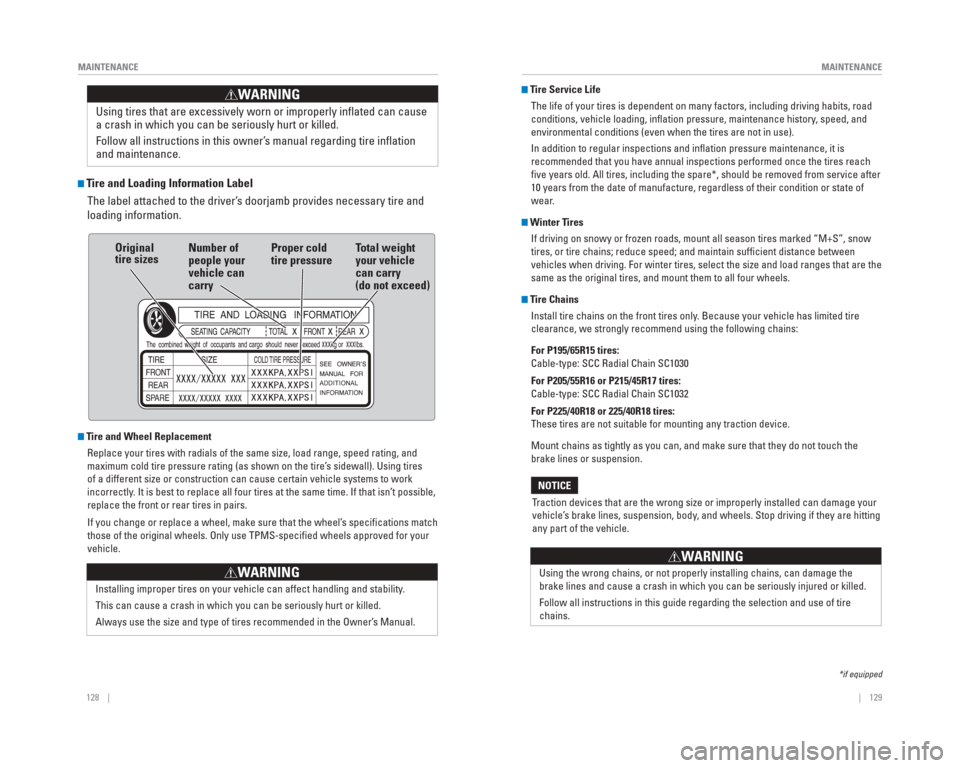
Tire and Loading Information Label
The label attached to the driver’s doorjamb provides necessary tire and
loading information.
Tire and Wheel Replacement
Replace your tires with radials of the same size, load range, speed rati\
ng, and
maximum cold tire pressure rating (as shown on the tire’s sidewall). Using tires
of a different size or construction can cause certain vehicle systems to\
work
incorrectly. It is best to replace all four tires at the same time. If that isn’\
t possible,
replace the front or rear tires in pairs.
If you change or replace a wheel, make sure that the wheel’s specifi cations match
those of the original wheels. Only use TPMS-specifi ed wheels approved for your
vehicle.
Installing improper tires on your vehicle can affect handling and stabil\
ity.
This can cause a crash in which you can be seriously hurt or killed.
Always use the size and type of tires recommended in the Owner’s Manual.
WARNING
Using tires that are excessively worn or improperly infl ated can cause
a crash in which you can be seriously hurt or killed.
Follow all instructions in this owner’s manual regarding tire infl ation
and maintenance
.
WARNING
Original
tire sizes Number of
people your
vehicle can
carry Proper cold
tire pressure
Total weight
your vehicle
can carry
(do not exceed)
Tire Service Life
The life of your tires is dependent on many factors, including driving h\
abits, road
conditions, vehicle loading, infl ation pressure, maintenance history, speed, and
environmental conditions (even when the tires are not in use).
In addition to regular inspections and infl ation pressure maintenance, it is
recommended that you have annual inspections performed once the tires re\
ach
fi ve years old. All tires, including the spare*, should be removed from se\
rvice after
10 years from the date of manufacture, regardless of their condition or \
state of
wear.
Winter TiresIf driving on snowy or frozen roads, mount all season tires marked “M\
+S”, snow
tires, or tire chains; reduce speed; and maintain suffi cient distance between
vehicles when driving. For winter tires, select the size and load ranges\
that are the
same as the original tires, and mount them to all four wheels.
Tire ChainsInstall tire chains on the front tires only. Because your vehicle has limited tire
clearance, we strongly recommend using the following chains:
For P195/65R15 tires:
Cable-type: SCC Radial Chain SC1030
For P205/55R16 or P215/45R17 tires:
Cable-type: SCC Radial Chain SC1032
For P225/40R18 or 225/40R18 tires:
These tires are not suitable for mounting any traction device.
Mount chains as tightly as you can, and make sure that they do not touch\
the
brake lines or suspension.
Traction devices that are the wrong size or improperly installed can dama\
ge your
vehicle’s brake lines, suspension, body, and wheels. Stop driving if they are hitting
any part of the vehicle.
NOTICE
Using the wrong chains, or not properly installing chains, can damage th\
e
brake lines and cause a crash in which you can be seriously injured or k\
illed.
Follow all instructions in this guide regarding the selection and use of\
tire
chains.
WARNING
*if equipped