ECO mode HONDA CIVIC 2016 10.G Owners Manual
[x] Cancel search | Manufacturer: HONDA, Model Year: 2016, Model line: CIVIC, Model: HONDA CIVIC 2016 10.GPages: 590
Page 530 of 590
529
Maintenance
Heating System*/Climate Control System* Maintenance
Air Conditioning
To ensure proper and safe operation, the Society of Automotive Engineers (SAE
J2845) recommends that the refrigerant system only be serviced by trained and
certified technicians.
Never repair or replace the air conditio ning evaporator (cooling coil) with one
removed from a used or salvaged vehicle.
New replacement mobile air conditioning evaporators must be certified (and
labeled) as meeting SAE Standard J2842.
Dust and Pollen Filter
The heating system*/climate control system* is equipped with a dust and pollen filter
that collects pollen, dust, and other de bris in the air. The Maintenance MinderTM
messages will let you know when to replace the filter.
We recommend that you repl ace the dust and pollen filter sooner when using your
vehicle in areas with high concentrations of dust.
1 Heating System*/Climate Control System* Maintenance
NOTICE
Vented refrigerant is harmful to the environment.
To avoid refrigerant from venting, never replace the
evaporator with one removed from a used or
salvaged vehicle.
Refrigerant in your vehicle’s air conditioning system is
flammable and can be igni ted during servicing if
proper procedures are not followed.
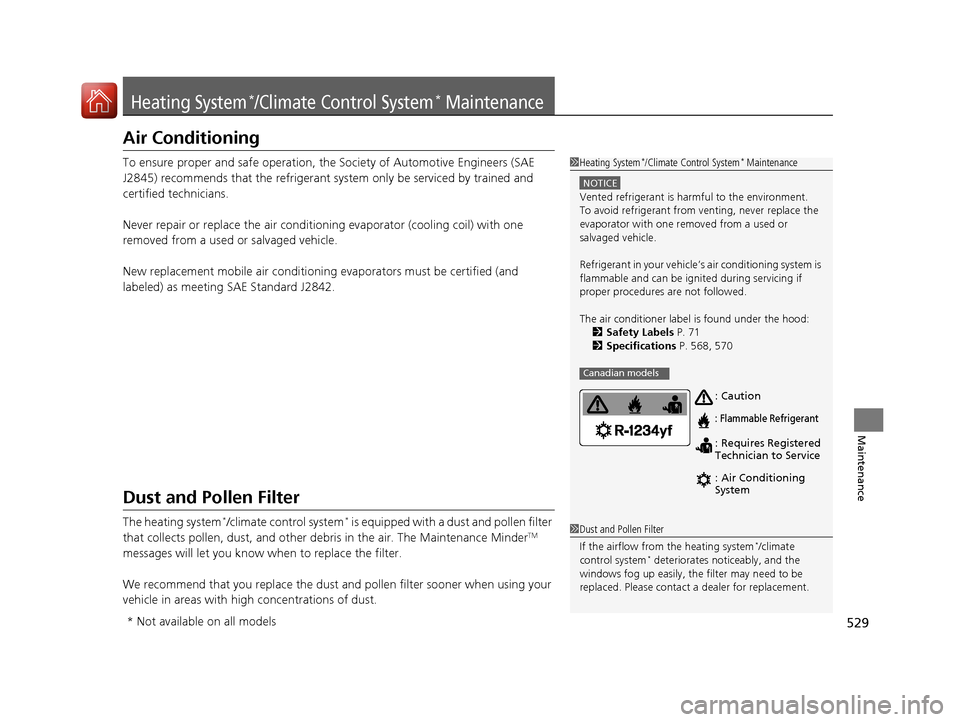
The air conditioner labe l is found under the hood:
2 Safety Labels P. 71
2 Specifications P. 568, 570
Canadian models
: Caution
: Flammable Refrigerant
: Requires Registered
Technician to Service
: Air Conditioning
System
1Dust and Pollen Filter
If the airflow from the heating system
*/climate
control system* deteriorates noticeably, and the
windows fog up easily, the filter may need to be
replaced. Please contact a dealer for replacement.
* Not available on all models
16 CIVIC 4D-31TBA6000.book 529 ページ 2015年8月31日 月曜日 午後5時56分
Page 545 of 590
544
uuEngine Does Not Start uIf the Smart Entry Remote Battery is Weak
Handling the Unexpected
If the Smart Entry Remote Battery is Weak
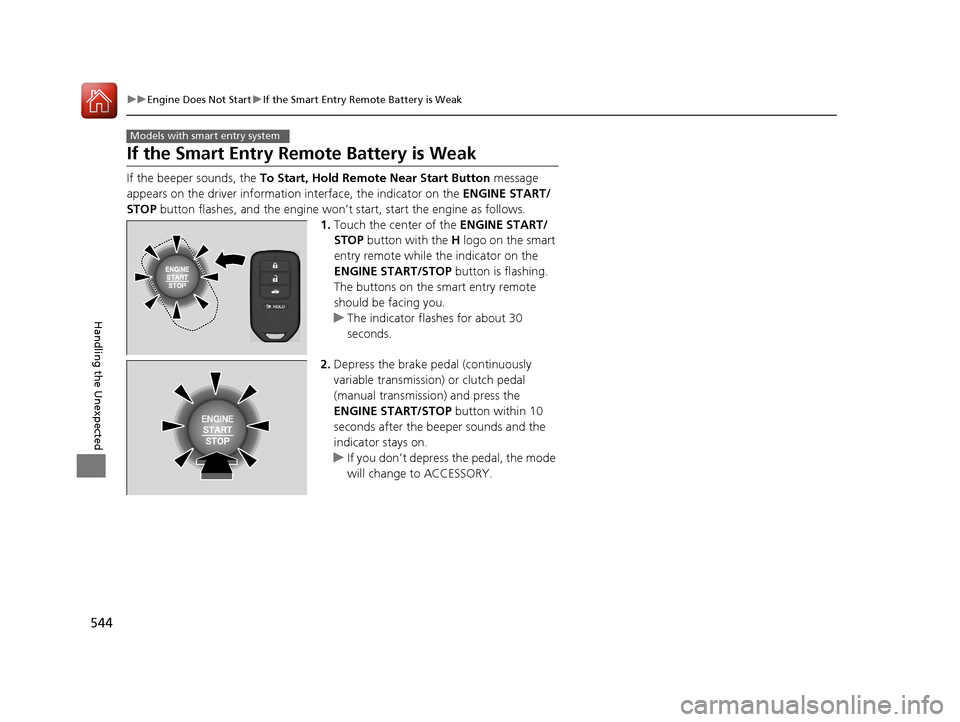
If the beeper sounds, the To Start, Hold Remote Near Start Button message
appears on the driver information interface, the indicator on the ENGINE START/
STOP button flashes, and the engine won’t start, start the engine as follows.
1.Touch the center of the ENGINE START/
STOP button with the H logo on the smart
entry remote while the indicator on the
ENGINE START/STOP button is flashing.
The buttons on the smart entry remote
should be facing you.
u The indicator flashes for about 30
seconds.
2. Depress the brake pedal (continuously
variable transmission) or clutch pedal
(manual transmission) and press the
ENGINE START/STOP button within 10
seconds after the beeper sounds and the
indicator stays on.
u If you don’t depress the pedal, the mode
will change to ACCESSORY.
Models with smart entry system
16 CIVIC 4D-31TBA6000.book 544 ページ 2015年8月31日 月曜日 午後5時56分
Page 546 of 590
545
uuEngine Does Not StartuEmergency Engine Stop
Handling the Unexpected
Emergency Engine Stop
The ENGINE START/STOP button may be used to stop the engine due to an
emergency situation even while driving. If you must stop the engine, do either of the
following operations:
• Press and hold the ENGINE START/STOP button for about two seconds.
• Firmly press the ENGINE START/STOP button twice.
The steering wheel will not lock. However, because turning off the engine disables
the power assist the engine provides to the steering and braking systems, it will
require significantly more physical effort an d time to steer and slow the vehicle. Use
both feet on the brake pedal to slow down the vehicle and stop immediately in a
safe place. With manual transmission models you can also downshift the
transmission to utilize engine braking.
The power mode is in ACCESSORY when the engine is stopped.
To change the mode to VEHICLE OFF, move the shift lever to
(P after the vehicle
comes to a complete stop.
Then press the ENGINE START/STOP button twice without depressing the brake
pedal.
The power mode changes to VEHICLE OFF.
Models with smart entry system
1 Emergency Engine Stop
Do not press the button while driving unless it is
absolutely necessary for th e engine to be switched
off.
Continuously variable transmission models
Canadian continuously variable transmission models
Manual transmission models
16 CIVIC 4D-31TBA6000.book 545 ページ 2015年8月31日 月曜日 午後5時56分
Page 547 of 590
546
Handling the Unexpected
Jump Starting
Jump Starting Procedure
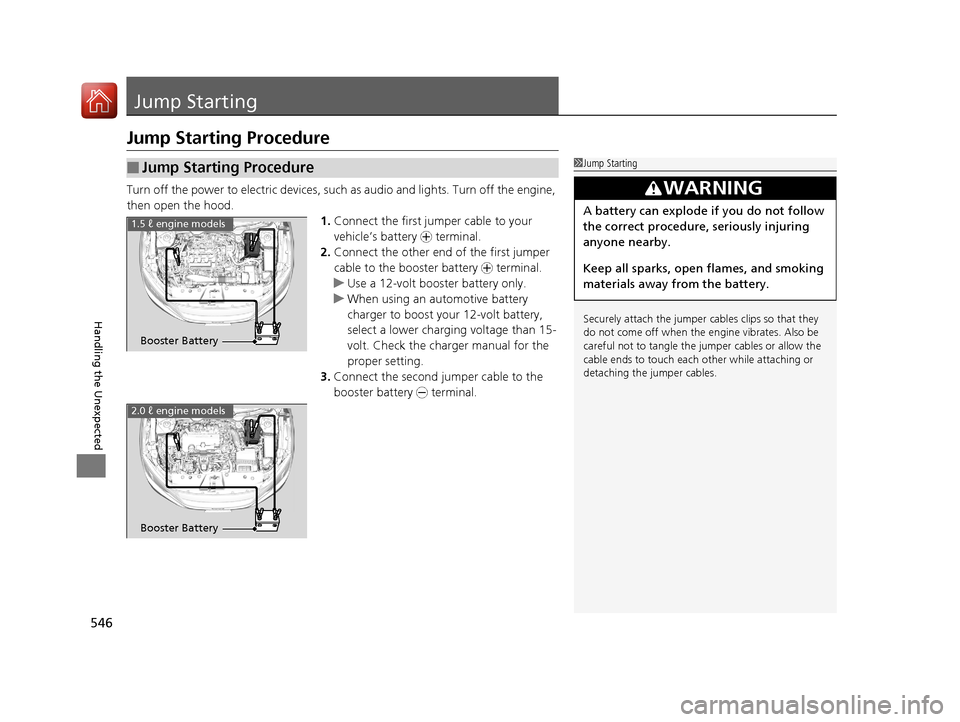
Turn off the power to electric devices, such as audio and lights. Turn off the engine,
then open the hood. 1.Connect the first jump er cable to your
vehicle’s battery + terminal.
2. Connect the other end of the first jumper
cable to the booster battery + terminal.
u Use a 12-volt booster battery only.
u When using an automotive battery
charger to boost your 12-volt battery,
select a lower charging voltage than 15-
volt. Check the charger manual for the
proper setting.
3. Connect the second jumper cable to the
booster battery - terminal.
■Jump Starting Procedure1Jump Starting
Securely attach the jumper cables clips so that they
do not come off when the e ngine vibrates. Also be
careful not to tangle the jumper cables or allow the
cable ends to touch each other while attaching or
detaching the jumper cables.
3WARNING
A battery can explode if you do not follow
the correct procedure, seriously injuring
anyone nearby.
Keep all sparks, open flames, and smoking
materials away from the battery.
Booster Battery
1.5 ℓ engine models
2.0 ℓ engine models
Booster Battery
16 CIVIC 4D-31TBA6000.book 546 ページ 2015年8月31日 月曜日 午後5時56分
Page 548 of 590
Continued547
uuJump Starting uJump Starting Procedure
Handling the Unexpected
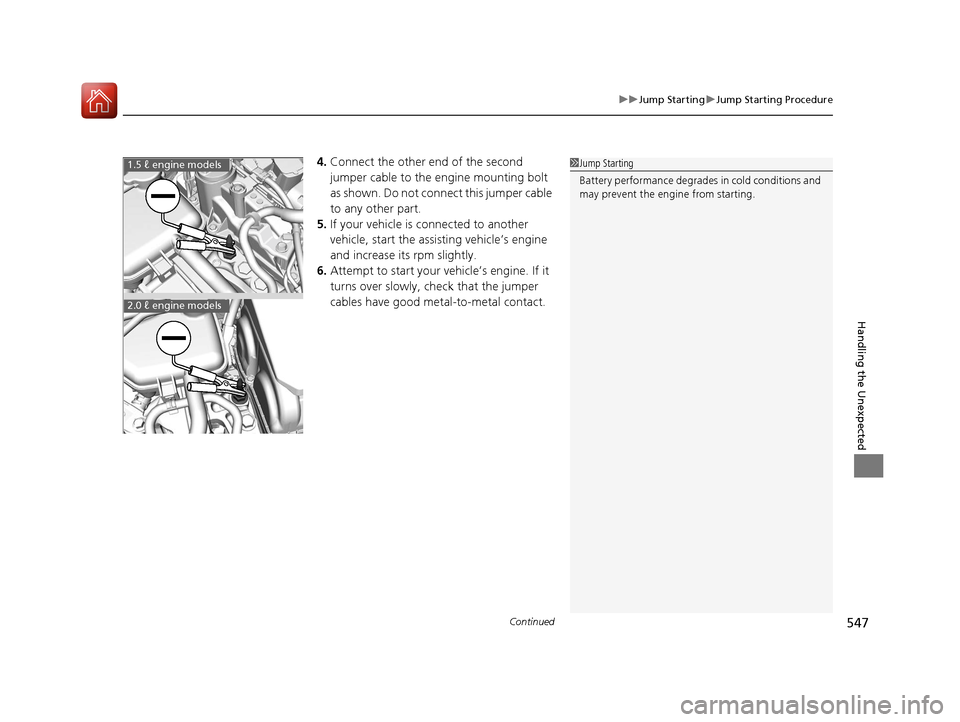
4. Connect the other end of the second
jumper cable to the engine mounting bolt
as shown. Do not connect this jumper cable
to any other part.
5. If your vehicle is connected to another
vehicle, start the assisting vehicle’s engine
and increase its rpm slightly.
6. Attempt to start your ve hicle’s engine. If it
turns over slowly, check that the jumper
cables have good metal-to-metal contact.1 Jump Starting
Battery performance degrades in cold conditions and
may prevent the engi ne from starting.1.5 ℓ engine models
2.0 ℓ engine models
16 CIVIC 4D-31TBA6000.book 547 ページ 2015年8月31日 月曜日 午後5時56分
Page 553 of 590
552
Handling the Unexpected
Indicator, Coming On/Blinking
If the Low Oil Pressure Indicator Comes On
■Reasons for the indicator to come on
Comes on when the engine oil pressure is low.
■What to do as soon as the indicator comes on
1. Immediately park the vehicle on level ground in a safe place.
2. If necessary, turn the ha zard warning lights on.
■What to do after parking the vehicle
1. Stop the engine and let it sit for about three minute.
2. Open the hood and check the oil level.
u Add oil as necessary.
2 Oil Check P. 493
3.Start the engine and check th e low oil pressure indicator.
u The indicator goes off: Start driving again.
u The indicator does not go off within 10 seconds: Stop the engine
and contact a dealer for repairs immediately.
If the Charging System Indicator Comes On
■Reasons for the indicator to come on
Comes on when the battery is not being charged.
■What to do when the indicator comes on
Turn off the heating system*/climate control system*, rear defogger, and
other electrical systems, and immedi ately contact a dealer for repairs.
1If the Low Oil Pressure Indicator Comes On
NOTICE
Running the engine with low oil pressure can cause
serious mechanical damage almost immediately.
1If the Charging System Indicator Comes On
If you need to stop temporarily, do not turn off the
engine. Restarting the engi ne may rapidly discharge
the battery.
* Not available on all models
16 CIVIC 4D-31TBA6000.book 552 ページ 2015年8月31日 月曜日 午後5時56分
Page 557 of 590
556
uuIndicator, Coming On/Blinking uIf the Electric Power Steering (EPS) System Indicator Comes On
Handling the Unexpected
If the Electric Power Steeri ng (EPS) System Indicator
Comes On
■Reasons for the indicator to come on
• Comes on when there is a problem with the EPS system.
• If you depress the accelerator pedal repeatedly to increase the engine
speed while the engine is idling, the indicator comes on, and
sometimes the steering wheel becomes harder to operate.
• Comes on when EPS steering angle cent er point memory is lost. This
could be due to a number of problems to include: battery disconnect,
main fuse blow, low battery causing reset of the EPS system, wire
damage to EPS harness. Vehi cle Stability Assist (VSA®), VSA® OFF,
Collision Mitigation Braking System
TM (CMBSTM)*, and low tire
pressure/TPMS* indicators also come on with EPS indicator.
The Drive Carefully Systems Initializing... message appears on the
driver information interface.
■What to do when the indicator comes on
• Stop the vehicle in a safe place and restart the engine.
If the indicator comes on and stays on, immediately have your vehicle
inspected by a dealer.
• If the EPS indicator, VSA ® indicator, VSA® OFF indicator, CMBS
TM
indicator*, and low tire pressure/TPMS indicator* come on
simultaneously, you need to ca librate the VSA and EPS systems.
Drive straight at speed more than approximately 6.8 mph (11 km/h)
for less than 10 seconds to calib rate the VSA and EPS systems.
If the indicators come on and stay on, park your vehicle in a safe
place, turn off and restart the engine, then repeat the above
operation.
If the indicators still come on and stay on, immediately have your
vehicle inspected by a dealer.
Models with driver information interface
* Not available on all models
16 CIVIC 4D-31TBA6000.book 556 ページ 2015年8月31日 月曜日 午後5時56分
Page 570 of 590
569
uuSpecifications u
Continued
Information
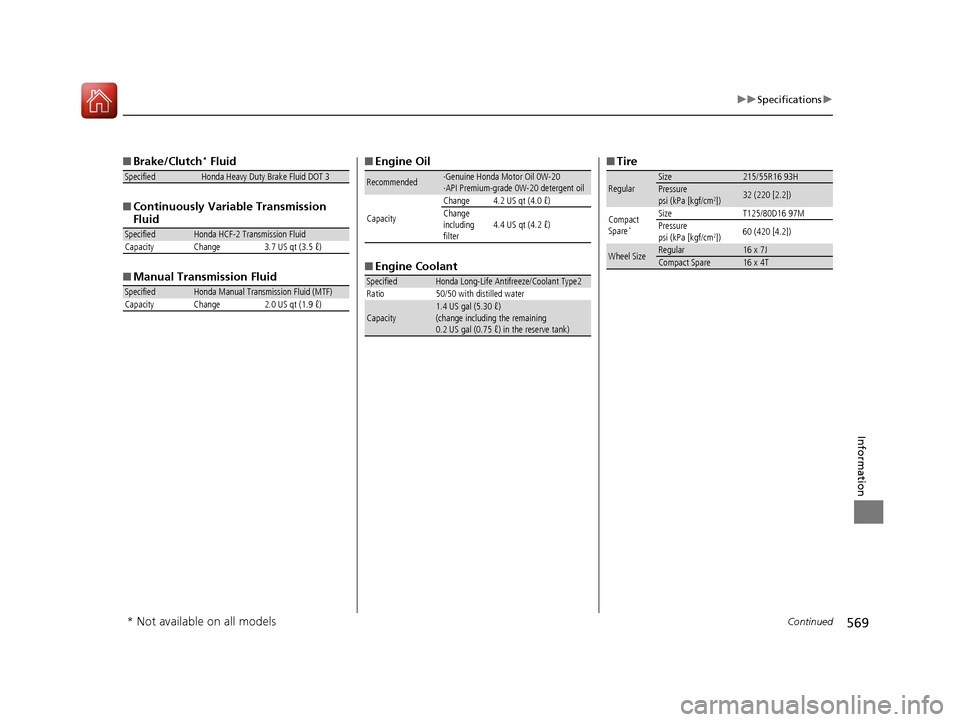
■Brake/Clutch* Fluid
■ Continuously Variable Transmission
Fluid
■ Manual Transmission Fluid
SpecifiedHonda Heavy Duty Brake Fluid DOT 3
SpecifiedHonda HCF-2 Transmission Fluid
Capacity Change 3.7 US qt (3.5 ℓ)
SpecifiedHonda Manual Transmission Fluid (MTF)
Capacity Change 2.0 US qt (1.9 ℓ)
■ Engine Oil
■ Engine Coolant
Recommended·Genuine Honda Motor Oil 0W-20
·API Premium-grade 0W-20 detergent oil
Capacity Change 4.2 US qt (4.0 ℓ)
Change
including
filter
4.4 US qt (4.2 ℓ)
SpecifiedHonda Long-Life Antifreeze/Coolant Type2
Ratio 50/50 with distilled water
Capacity1.4 US gal (5.30 ℓ)
(change including the remaining
0.2 US gal (0.75 ℓ) in the reserve tank)
■ Tire
RegularSize215/55R16 93HPressure
psi (kPa [kgf/cm2])32 (220 [2.2])
Compact
Spare
*
Size T125/80D16 97M
Pressure
psi (kPa [kgf/cm
2]) 60 (420 [4.2])
Wheel SizeRegular16 x 7JCompact Spare16 x 4T
* Not available on all models
16 CIVIC 4D-31TBA6000.book 569 ページ 2015年8月31日 月曜日 午後5時56分
Page 576 of 590
575Continued
Information
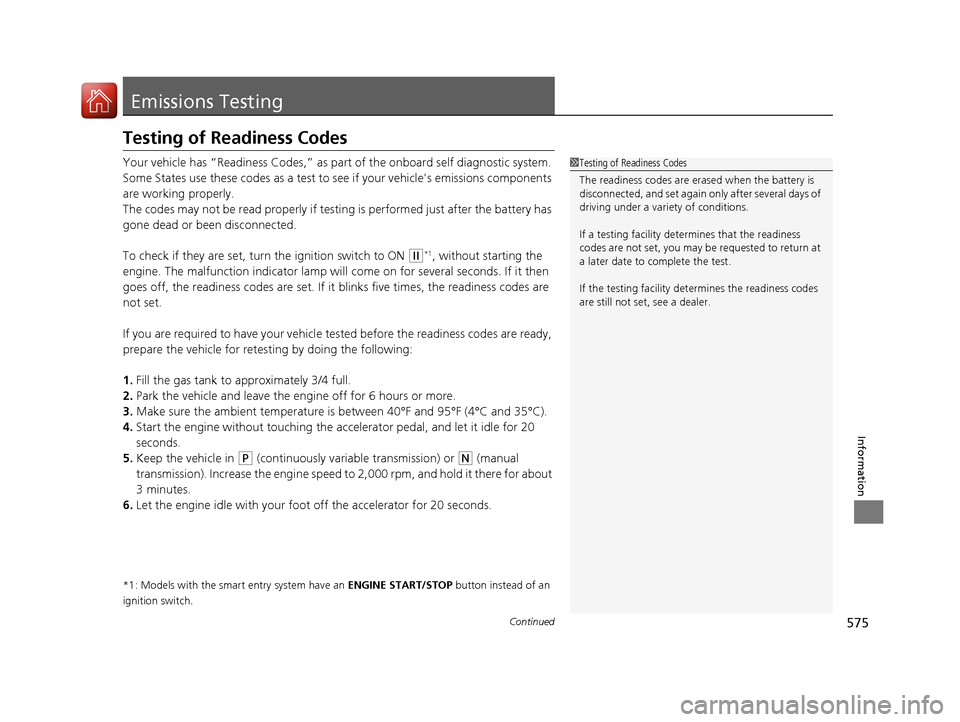
Emissions Testing
Testing of Readiness Codes
Your vehicle has “Readiness Codes,” as part of the onboard self diagnostic system.
Some States use these codes as a test to see if your vehicle's emissions components
are working properly.
The codes may not be read properly if testing is performed just after the battery has
gone dead or been disconnected.
To check if they are set, turn the ignition switch to ON
(w*1, without starting the
engine. The malfunction indicator lamp will co me on for several seconds. If it then
goes off, the readiness codes are set. If it blinks five times, the readiness codes are
not set.
If you are required to have your vehicle te sted before the readiness codes are ready,
prepare the vehicle for retest ing by doing the following:
1. Fill the gas tank to approximately 3/4 full.
2. Park the vehicle and leave the engine off for 6 hours or more.
3. Make sure the ambient temperature is between 40°F and 95°F (4°C and 35°C).
4. Start the engine without touching the ac celerator pedal, and let it idle for 20
seconds.
5. Keep the vehicle in
(P (continuously variable transmission) or (N (manual
transmission). Increase the engine speed to 2,000 rpm, and hold it there for about
3 minutes.
6. Let the engine idle with your foot off the accelerator for 20 seconds.
*1: Models with the smart entry system have an ENGINE START/STOP button instead of an
ignition switch.
1 Testing of Readiness Codes
The readiness codes are erased when the battery is
disconnected, and set again only after several days of
driving under a vari ety of conditions.
If a testing facility determines that the readiness
codes are not set, you may be requested to return at
a later date to complete the test.
If the testing facility determines the readiness codes
are still not set, see a dealer.
16 CIVIC 4D-31TBA6000.book 575 ページ 2015年8月31日 月曜日 午後5時56分
Page 582 of 590
Index
581
Index
Index
A
ABS (Anti-lock Brake System).................. 457
Accessories and Modifications ................ 474
Accessory Power Socket ........................... 181
Adaptive Cruise Control (ACC) with Low
Speed Follow (LSF) ........................... 87, 416
Adding the Coolant ................................. 500
Additives
Coolant .................................................. 499
Engine Oil ............................................... 492
Washer ................................................... 503
Additives, Engine Oil ............................... 492
Adjusting Armrest .................................................. 174
Clock ...................................................... 122
Front Head Restraints .............................. 170
Front Seats.............................................. 167
Mirrors.................................................... 165
Rear Seats ............................................... 173
Steering Wheel ....................................... 164
Temperature ................................... 106, 110
Adjusting the Clock ................................. 122
Adjusting the Sound ................................ 210
Agile Handling Assist System .................. 443
Aha
TM........................................................ 272
Air Conditioning System (Climate Control System) .................................................... 190
Changing the Mode........................ 188, 192
Defrosting the Windshield and Windows ...................................... 188, 193 Dust and Pollen Filter ............................... 529
Recirculation/Fresh Air Mode ........... 188, 192
Sensor ..................................................... 196
Synchronized Mode ................................. 195
Using Automatic Climate Control ............ 190
Air Conditioning System (Heating System) .................................................... 187
Sensor ..................................................... 189
Using Automatic Heating ......................... 187
Air Pressure ............................... 517, 569, 571
Airbags ........................................................ 44
Advanced Airbags ..................................... 50
After a Collision ......................................... 47
Airbag Care ............................................... 57
Event Data Recorder .................................... 0
Front Airbags (SRS) .................................... 47
Indicator .............................................. 55, 79
Passenger Airbag Off Indicator .................. 56
Sensors ...................................................... 44
Side Airbags .............................................. 51
Side Curtain Airbags .................................. 53
AM/FM Radio ............................................ 252
Android Auto ............................................ 289
Anti-lock Brake System (ABS) .................. 457
Indicator .................................................... 79
Apple CarPlay ........................................... 286
Armrest ..................................................... 174
Audio Remote Controls ............................ 201
Audio System .................................... 198, 223
Adjusting the Sound ........................ 210, 245
Audio/Information Screen ........................ 224 Changing the Home Screen Icon
Layout ................................................... 228
Changing the Screen Interface ................ 242
Closing Apps ........................................... 244
Customizing the Meter............................ 229
Display Setup .......................................... 246
Error Messages ........................................ 293
General Information ................................ 296
Home Screen........................................... 235
iPod ........................................................ 214
Limitations for Manual Operation ............ 247
Menu Customize ..................................... 243
MP3/WMA/AAC .............................. 217, 273
Reactivating ............................................ 200
Recommended Devices............................ 297
Remote Controls ..................................... 201
Security Code .......................................... 200
Selecting an Audio Source ....................... 247
Status Area ............................................. 241
Theft Protection ...................................... 200
USB Flash Drives ...................................... 297
USB Port(s) .............................................. 199
Wallpaper Setup...................................... 233
Audio/Information Screen ............... 206, 224
Authorized Manuals ................................ 579
Auto Door Locking/Unlocking ................. 137
Customize ....................................... 117, 138
Automatic Brake Hold ............................. 454
Indicator............................................ 76, 454
Automatic Brake Hold System Indicator............................................ 76, 454
16 CIVIC 4D-31TBA6000.book 581 ページ 2015年8月31日 月曜日 午後5時56分