ignition HONDA CIVIC 2016 10.G Repair Manual
[x] Cancel search | Manufacturer: HONDA, Model Year: 2016, Model line: CIVIC, Model: HONDA CIVIC 2016 10.GPages: 590
Page 310 of 590
Continued309
uuCustomized Features u
Features
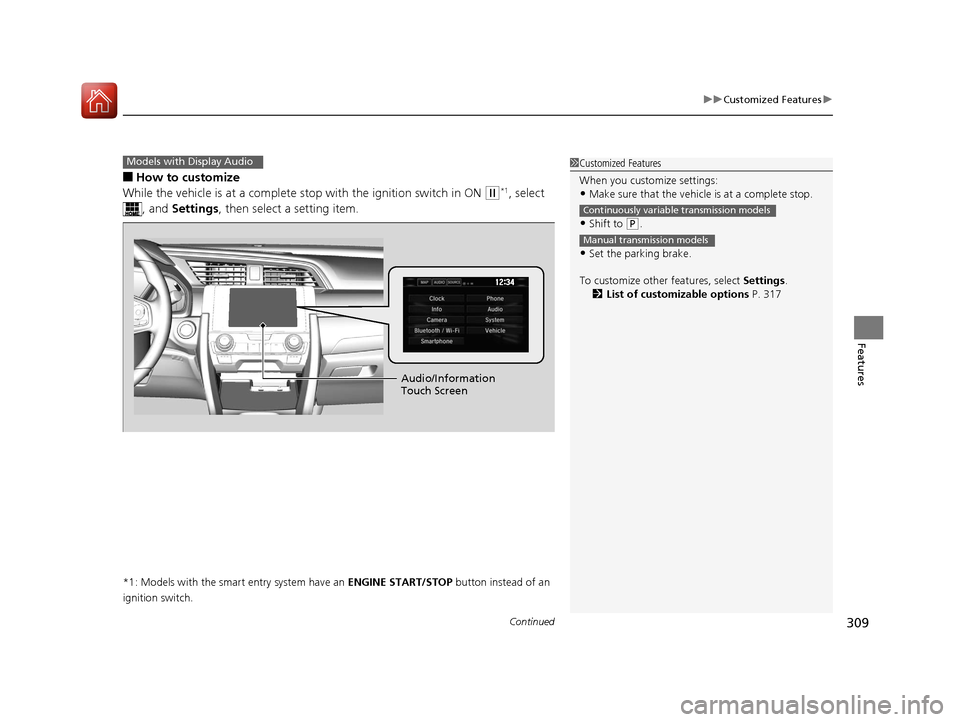
■How to customize
While the vehicle is at a complete st op with the ignition switch in ON
(w*1, select
, and Settings , then select a setting item.
*1: Models with the smart entry system have an ENGINE START/STOP button instead of an
ignition switch.
Models with Display Audio1 Customized Features
When you customize settings:
•Make sure that the vehicle is at a complete stop.
•Shift to (P.
•Set the parking brake.
To customize other features, select Settings.
2 List of customizable options P. 317
Continuously variable transmission models
Manual transmission models
Audio/Information
Touch Screen
16 CIVIC 4D-31TBA6000.book 309 ページ 2015年8月31日 月曜日 午後5時56分
Page 328 of 590
327
uuCustomized Features u
Continued
Features
*1:Default Setting
*2:Models with the smart entry system have an ENGINE START/STOP button instead of an ignition switch.
*3:Does not appear when you chan ge the screen interface design.
Setup
Group Customizable Features Description
Selectable Settings
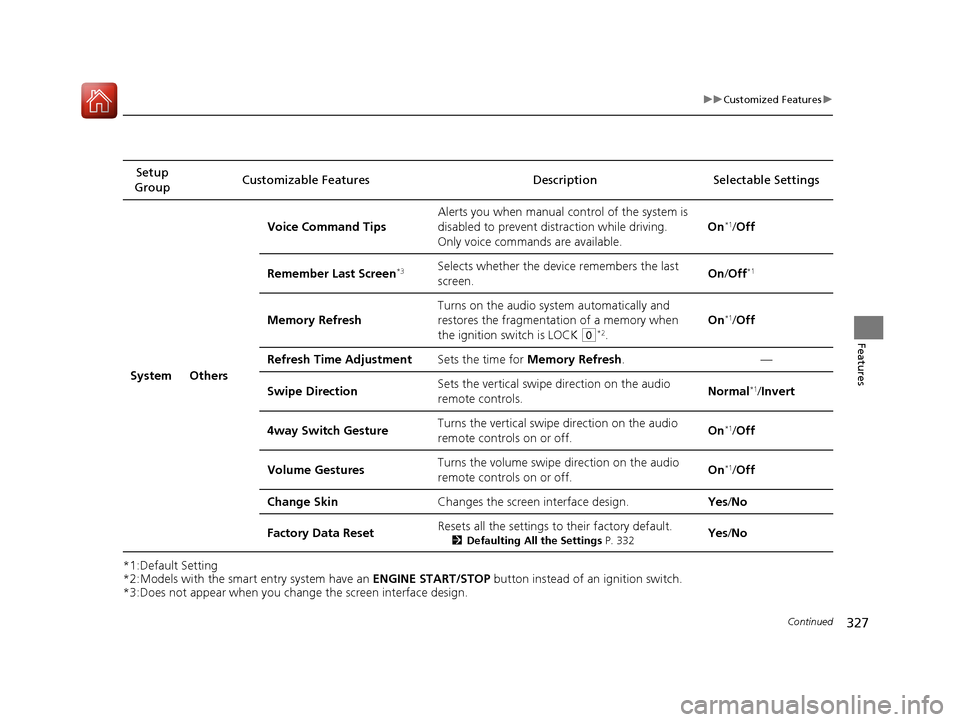
System Others Voice Command Tips
Alerts you when manual co
ntrol of the system is
disabled to prevent distraction while driving.
Only voice commands are available. On
*1/
Off
Remember Last Screen
*3Selects whether the device remembers the last
screen. On
/Off*1
Memory Refresh Turns on the audio system automatically and
restores the fragmentation of a memory when
the ignition switch is LOCK
(0*2.On
*1/
Off
Refresh Time Adjustment Sets the time for Memory Refresh . —
Swipe Direction Sets the vertical swipe direction on the audio
remote controls. Normal
*1/
Invert
4way Switch Gesture Turns the vertical swipe direction on the audio
remote controls on or off. On
*1/
Off
Volume Gestures Turns the volume swipe direction on the audio
remote controls on or off.
On
*1/
Off
Change Skin Changes the screen interface design. Yes/No
Factory Data Reset Resets all the settings to their factory default.
2
Defaulting All the Settings P. 332Yes/No
16 CIVIC 4D-31TBA6000.book 327 ページ 2015年8月31日 月曜日 午後5時56分
Page 336 of 590
335
uuBluetooth ® HandsFreeLink ®*uHFL Menus
Continued
Features
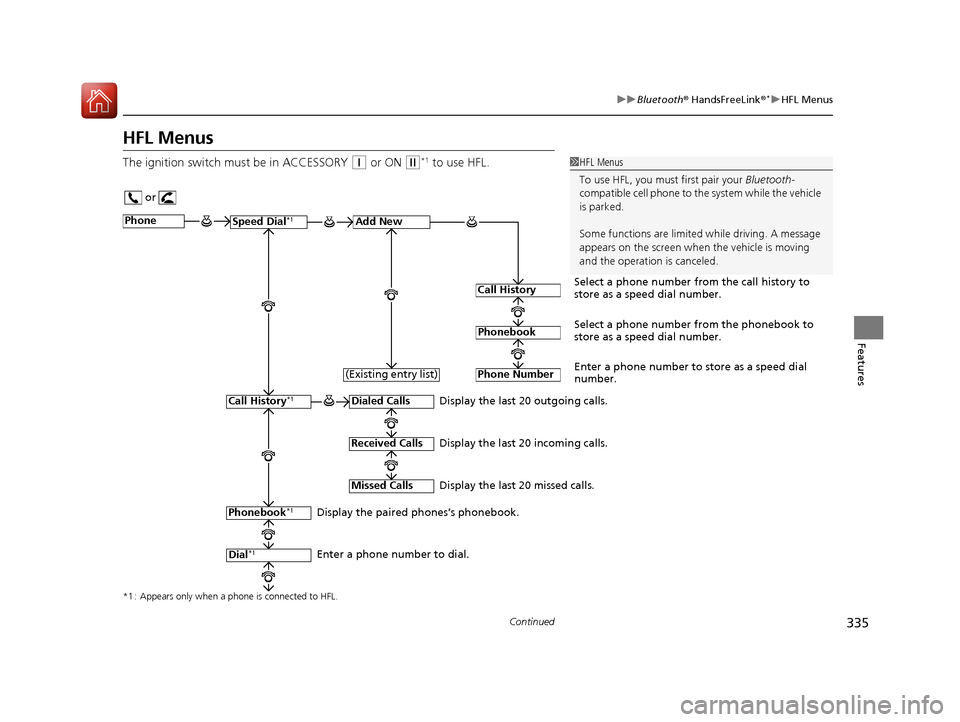
HFL Menus
The ignition switch mu st be in ACCESSORY (q or ON (w*1 to use HFL.1HFL Menus
To use HFL, you must first pair your Bluetooth-
compatible cell phone to th e system while the vehicle
is parked.
Some functions are limited while driving. A message
appears on the screen when the vehicle is moving
and the operation is canceled.
or
Display the last 20 outgoing calls.
Display the last 20 incoming calls.
Display the last 20 missed calls.
*1 : Appears only when a phone is connected to HFL.
PhoneSpeed Dial*1Add New
Select a phone number from the call history to
store as a speed dial number.
Call History
PhonebookSelect a phone number from the phonebook to
store as a speed dial number.
Phone Number
Enter a phone number to store as a speed dial
number.
Dialed Calls
Received Calls
Missed Calls
Phonebook*1
Dial*1
Call History*1
Display the paired phones’s phonebook.
Enter a phone number to dial. (Existing entry list)
16 CIVIC 4D-31TBA6000.book 335 ページ 2015年8月31日 月曜日 午後5時56分
Page 398 of 590
397
uuWhen Driving uStarting the Engine
Driving
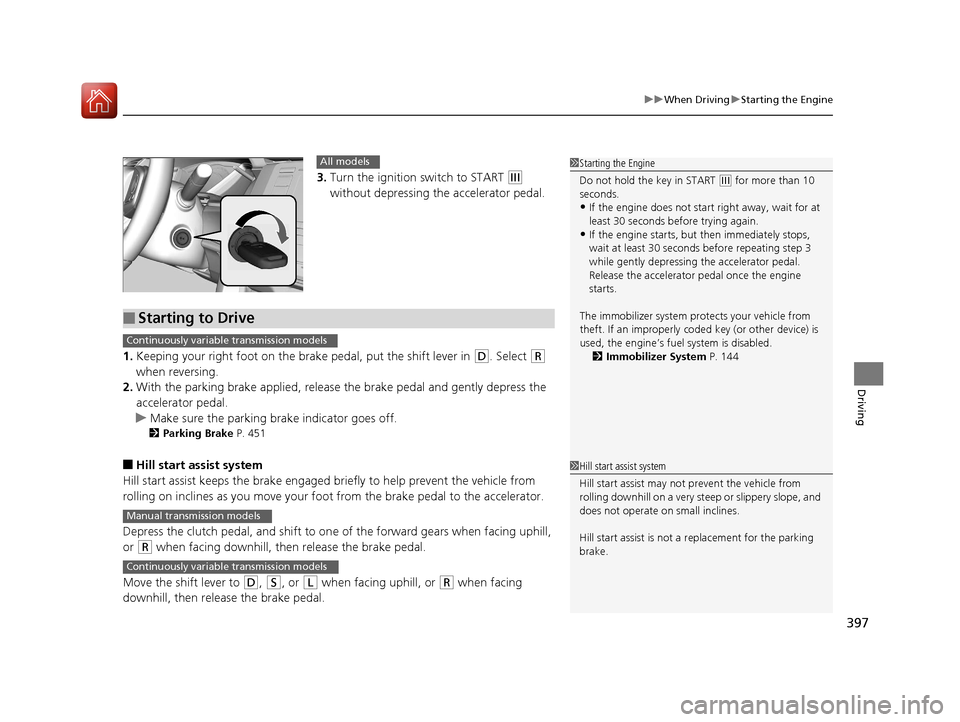
3. Turn the ignition switch to START (e
without depressing the accelerator pedal.
1. Keeping your right foot on the br ake pedal, put the shift lever in
(D. Select (R
when reversing.
2. With the parking brake applied, release the brake pedal and gently depress the
accelerator pedal.
u Make sure the parking brake indicator goes off.
2 Parking Brake P. 451
■Hill start assist system
Hill start assist keeps the brake engaged br iefly to help prevent the vehicle from
rolling on inclines as you move your foot from the brake pedal to the accelerator.
Depress the clutch pedal, and shift to on e of the forward gears when facing uphill,
or
(R when facing downhill, th en release the brake pedal.
Move the shift lever to
(D, (S, or (L when facing uphill, or (R when facing
downhill, then release the brake pedal.
1 Starting the Engine
Do not hold the key in START
(e for more than 10
seconds.
•If the engine does not start right away, wait for at
least 30 seconds before trying again.
•If the engine starts, but then immediately stops,
wait at least 30 seconds before repeating step 3
while gently depressing the accelerator pedal.
Release the accelerator pedal once the engine
starts.
The immobilizer system pr otects your vehicle from
theft. If an improperly code d key (or other device) is
used, the engine’s fuel system is disabled.
2 Immobilizer System P. 144
All models
■Starting to Drive
Continuously variable transmission models
Manual transmission models
Continuously variable transmission models
1Hill start assist system
Hill start assist may not prevent the vehicle from
rolling downhill on a very st eep or slippery slope, and
does not operate on small inclines.
Hill start assist is not a replacement for the parking
brake.
16 CIVIC 4D-31TBA6000.book 397 ページ 2015年8月31日 月曜日 午後5時56分
Page 404 of 590
403
uuWhen Driving uPrecautions While Driving
Driving
Precautions While Driving
Avoid driving in deep water and on flooded roads. This can damage the engine or
driveline, or cause electrical component failure.
If there is a strong impact with something under the vehicle, stop in a safe location.
Check the underside of the vehicle for damage or any fluid leaks.
*1: Models with the smart entry system have an ENGINE START/STOP button instead of an
ignition switch.
■In Rain
■Other Precautions
1 Precautions While Driving
NOTICE
Do not operate the shift lever while pressing the
accelerator pedal. You could damage the
transmission.
If the ignition switch is turned to ACCESSORY
( q*1
while driving, the engine will shut down and all
steering and brake power a ssist functions will stop,
making it difficult to control the vehicle.
Do not put the shift lever in
( N, as you will lose
engine braking (and acceleration) pe rformance.
During the first 600 miles (1,000 km) of operation,
avoid sudden acceleration or full throttle operation so
as not to damage the engine or powertrain.
Avoid hard braking for the first 200 miles (300 km).
You should also follow this when the brake pads are
replaced.
NOTICE
If you repeatedly turn the steering wheel at an
extremely low speed, or hold the steering wheel on
the full left or right position for a while, the electric
power steering (EPS) system heats up. The system
goes into a protective mode, and limits its
performance. The steering wheel becomes harder
and harder to operate. Once the system cools down,
the EPS system is restored.
Repeated operation under these conditions can
eventually damage the system.
16 CIVIC 4D-31TBA6000.book 403 ページ 2015年8月31日 月曜日 午後5時56分
Page 406 of 590
405
uuWhen Driving uShifting
Continued
Driving
Shifting
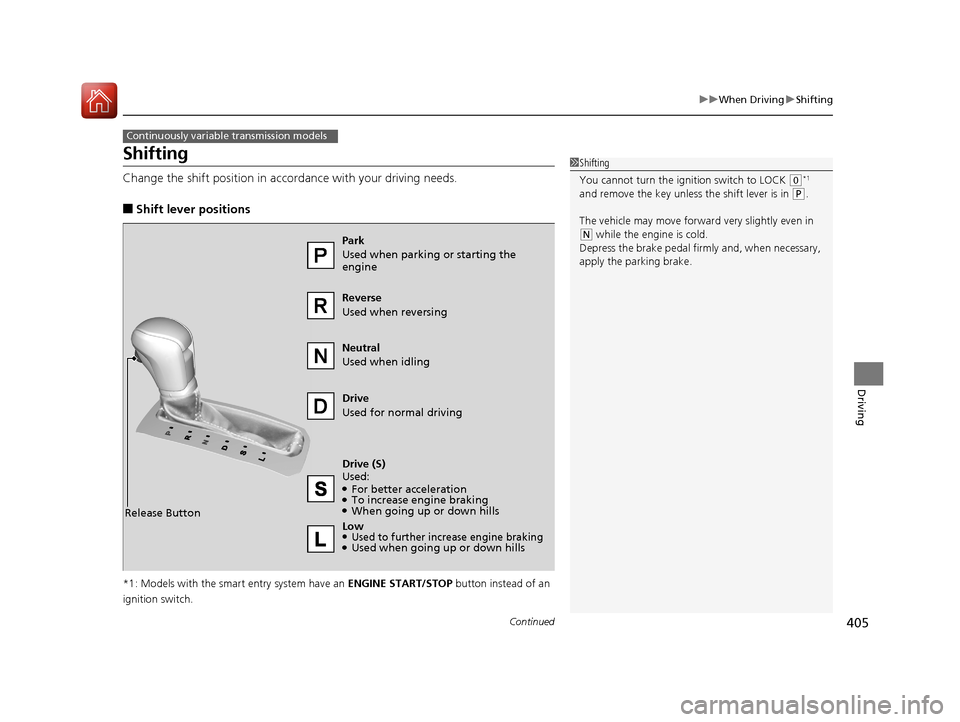
Change the shift position in accordance with your driving needs.
■Shift lever positions
*1: Models with the smart entry system have an ENGINE START/STOP button instead of an
ignition switch.
Continuously variable transmission models
1 Shifting
You cannot turn the ignition switch to LOCK
(0*1
and remove the key unless the shift lever is in
( P.
The vehicle may move forwar d very slightly even in
(N while the engine is cold.
Depress the brake pedal firm ly and, when necessary,
apply the parking brake.
Reverse
Used when reversing
Drive
Used for normal driving
Park
Used when parking or starting the
engine
Neutral
Used when idling
Release Button
Drive (S)
Used:
●For better acceleration●To increase engine braking●When going up or down hills
Low
●Used to further increase engine braking●Used when going up or down hills
16 CIVIC 4D-31TBA6000.book 405 ページ 2015年8月31日 月曜日 午後5時56分
Page 410 of 590
409
uuWhen Driving uShifting
Driving
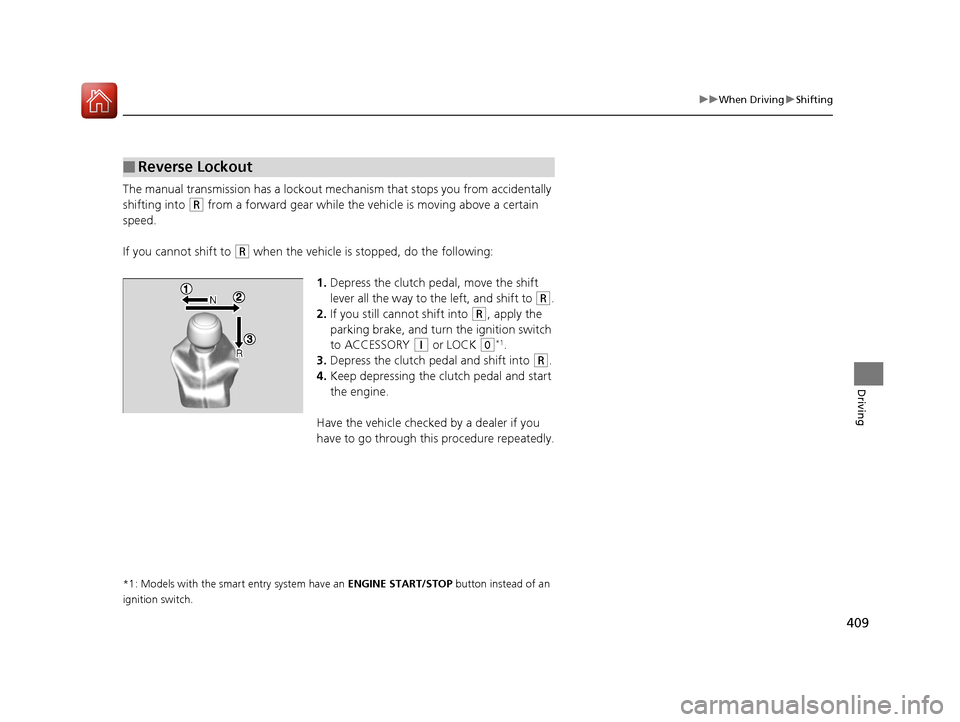
The manual transmission has a lockout mech anism that stops you from accidentally
shifting into
(R from a forward gear while the ve hicle is moving above a certain
speed.
If you cannot shift to
(R when the vehicle is stopped, do the following:
1.Depress the clutch pedal, move the shift
lever all the way to the left, and shift to
(R.
2. If you still cannot shift into
(R, apply the
parking brake, and turn the ignition switch
to ACCESSORY
(q or LOCK (0*1.
3. Depress the clutch pedal and shift into
(R.
4. Keep depressing the clutch pedal and start
the engine.
Have the vehicle checked by a dealer if you
have to go through this procedure repeatedly.
*1: Models with the smart entry system have an ENGINE START/STOP button instead of an
ignition switch.
■Reverse Lockout
16 CIVIC 4D-31TBA6000.book 409 ページ 2015年8月31日 月曜日 午後5時56分
Page 447 of 590
446
uuWhen Driving uTire Pressure Monitoring System (TPMS)
Driving
Tire Pressure Monitoring System (TPMS)
Instead of directly measuring the pressu re in each tire, the TPMS on this vehicle
monitors and compares the rolling radius and rotational characteristics of each
wheel and tire while you are driving to determine if one or more tires are
significantly under-inflated. This will caus e the low tire pressure/TPMS indicator to
come on and a message to appear on the driver information interface
*.
You must start TPMS calibration every time you:
• Adjust the pressure in one or more tires.
• Rotate the tires.
• Replace one or more tires.
Before calibrating the TPMS:
• Set the cold tire pressu re in all four tires.
2Checking Tires P. 516
Make sure:
•The vehicle is at a complete stop.
• The shift lever is in
(N.
• The shift lever is in
(P.
• The ignition switch is in ON
(w*1.
*1: Models with the smart entry system have an ENGINE START/STOP button instead of an
ignition switch.
■TPMS Calibration
U.S. models
1 Tire Pressure Monitoring System (TPMS)
The system does not monitor the tires when driving
at low speed.
Conditions such as low ambient temperature and
altitude change directly a ffect tire pressure and can
trigger the low tire pressure/TPMS indicator to come on.
Tire pressure checked and inflated in:
•Warm weather can beco me under-inflated in
colder weather.
•Cold weather can become over-inflated in warmer
weather.
The low tire pressure indica tor will not come on as a
result of over inflation.
The TPMS may not function pr operly if tire type and
size are mixed. Make sure to use the same size and
type of tire. 2 Checking and Maintaining Tires P. 516
The low tire pressure/TPMS indicator may come on
with a delay or may not come on at all when:
•You rapidly accelerate, decelerate, or turn the
steering wheel.
•You drive on snowy or slippery roads.•Snow chains are used.
The low tire pressure/TPMS indicator may come on
under the following conditions:
•A compact spare tire is used.•There is a heavier and une ven load on the tires,
such as when towing a trailer, than the condition at
calibration.
•Snow chains are used.
Manual transmission models
Continuously variable transmission models
All models
* Not available on all models
16 CIVIC 4D-31TBA6000.book 446 ページ 2015年8月31日 月曜日 午後5時56分
Page 448 of 590
Continued447
uuWhen Driving uTire Pressure Monitoring System (TPMS)
Driving
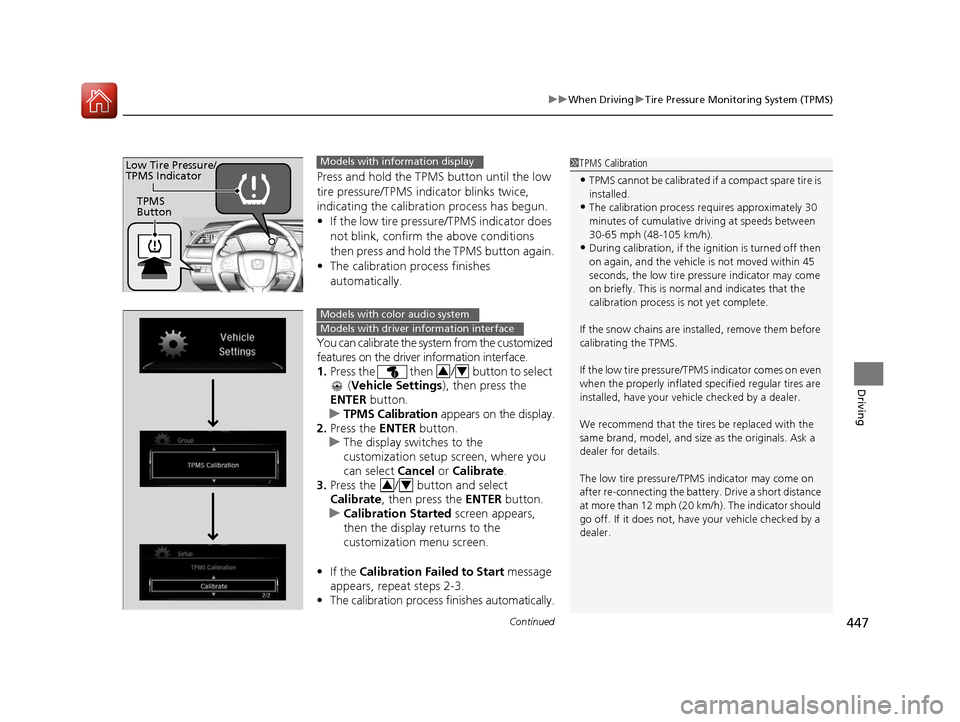
Press and hold the TPMS button until the low
tire pressure/TPMS indicator blinks twice,
indicating the calibration process has begun.
• If the low tire pressure/TPMS indicator does
not blink, confirm the above conditions
then press and hold the TPMS button again.
• The calibration process finishes
automatically.
You can calibrate the system from the customized
features on the driver information interface.
1. Press the then / button to select
(Vehicle Settings ), then press the
ENTER button.
u TPMS Calibration appears on the display.
2. Press the ENTER button.
u The display swit ches to the
customization setup screen, where you
can select Cancel or Calibrate .
3. Press the / button and select
Calibrate , then press the ENTER button.
u Calibration Started screen appears,
then the display returns to the
customization menu screen.
• If the Calibration Failed to Start message
appears, repeat steps 2-3.
• The calibration process finishes automatically.
1TPMS Calibration
•TPMS cannot be calibrated if a compact spare tire is
installed.
•The calibration process requires approximately 30
minutes of cumulative dr iving at speeds between
30-65 mph (48-105 km/h).
•During calibration, if the ignition is turned off then
on again, and the vehicle is not moved within 45
seconds, the low tire pres sure indicator may come
on briefly. This is norma l and indicates that the
calibration process is not yet complete.
If the snow chains are installed, remove them before
calibrating the TPMS.
If the low tire pressure/TPMS indicator comes on even
when the properly inflated specified regular tires are
installed, have your vehi cle checked by a dealer.
We recommend that the tires be replaced with the
same brand, model, and size as the originals. Ask a
dealer for details.
The low tire pressure/TPMS indicator may come on
after re-connecting the batter y. Drive a short distance
at more than 12 mph (20 km/h). The indicator should
go off. If it does not, have your vehicle checked by a
dealer.
TPMS
Button
Low Tire Pressure/
TPMS IndicatorModels with info rmation display
Models with color audio system
Models with driver information interface
34
34
16 CIVIC 4D-31TBA6000.book 447 ページ 2015年8月31日 月曜日 午後5時56分
Page 449 of 590
448
uuWhen Driving uTire Pressure Monitoring System (TPMS)
Driving
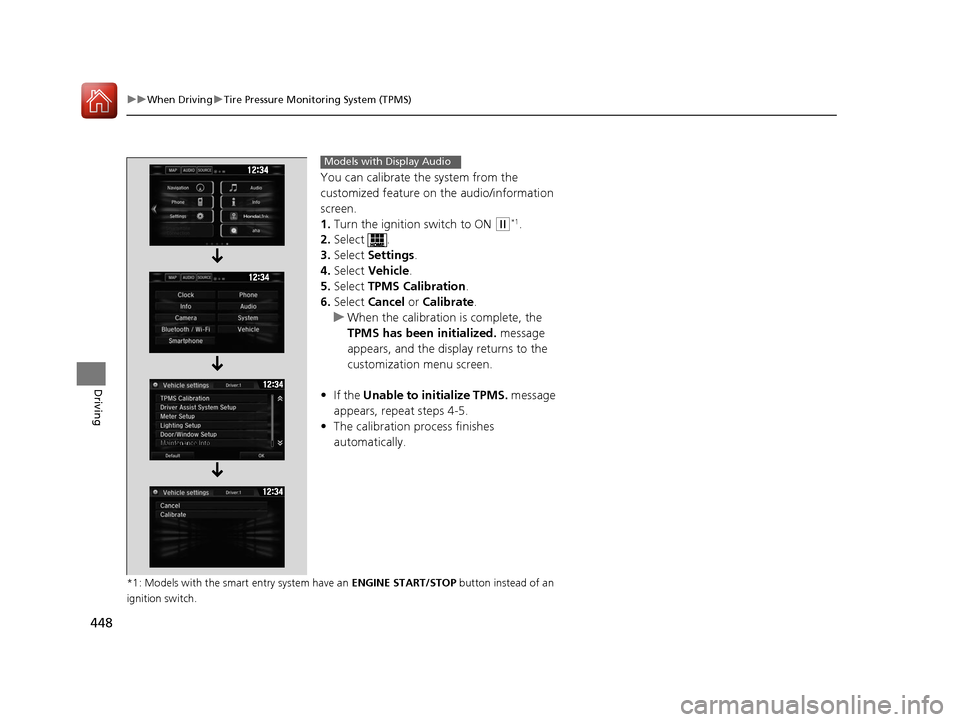
You can calibrate the system from the
customized feature on the audio/information
screen.
1. Turn the ignition switch to ON
(w*1.
2. Select .
3. Select Settings .
4. Select Vehicle .
5. Select TPMS Calibration .
6. Select Cancel or Calibrate .
u When the calibration is complete, the
TPMS has been initialized. message
appears, and the display returns to the
customization menu screen.
• If the Unable to initialize TPMS. message
appears, repeat steps 4-5.
• The calibration pr ocess finishes
automatically.
*1: Models with the smart entry system have an ENGINE START/STOP button instead of an
ignition switch.
Models with Display Audio
16 CIVIC 4D-31TBA6000.book 448 ページ 2015年8月31日 月曜日 午後5時56分