air condition HONDA CIVIC 2016 10.G Quick Guide
[x] Cancel search | Manufacturer: HONDA, Model Year: 2016, Model line: CIVIC, Model: HONDA CIVIC 2016 10.GPages: 82, PDF Size: 5.52 MB
Page 68 of 82
128 || 129
M
AINTENANCEMAINTENANCE
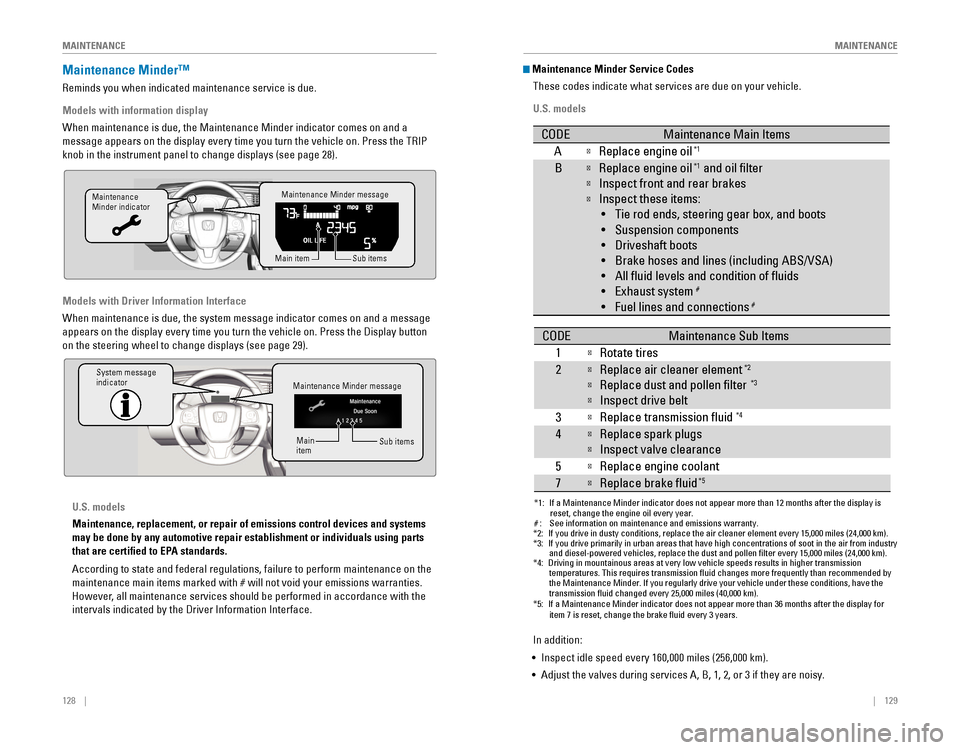
Maintenance Minder™
reminds you when indicated maintenance service is due.
Models with information display
When maintenance is due, the Maintenance Minder indicator comes on and a\
message appears on the display every time you turn the vehicle on. Press\
the TrIP
knob in the instrument panel to change displays (see page 28).
Models with Driver Information Interface
When maintenance is due, the system message indicator comes on and a mes\
sage
appears on the display every time you turn the vehicle on. Press the Dis\
play button
on the steering wheel to change displays (see page 29).
Maintenance Minder message
Maintenance
Minder indicator
Sub items
Main item
Maintenance Minder message
System message
indicator
Sub items
Main
item
U.S. models
Maintenance, replacement, or repair of emissions control devices and sys\
tems
may be done by any automotive repair establishment or individuals using \
parts
that are certified to EPA standards.
According to state and federal regulations, failure to perform maintenan\
ce on the
maintenance main items marked with # will not void your emissions warranties.
However, all maintenance services should be performed in accordance with the
intervals indicated by the Driver Information Interface.
Maintenance Minder Service Codes
These codes indicate what services are due on your vehicle.
U.S. models
*1: If a Maintenance Minder indicator does not appear more than 12 months af\
ter the display is reset, change the engine oil every year.
#: See information on maintenance and emissions warranty.
CODEMaintenance Main Items
AReplace engine oi l*1
BReplace engine oil*1 and oil lter
Inspect front and rear brakes
Inspect these items:
• Tie rod ends, steering gear box, and boots
•S uspension components
• Driveshaft boots
• Brake hoses and lines (including ABS/VSA)
• All uid levels and condition of uids
• Exhaust system
#
•F uel lines and connection s#
*2:If you drive in dusty conditions, replace the air cleaner element every \
15,000 miles (24,000 km).*3:If you drive primarily in urban areas that have high concentrations of s\
oot in the air from industryand diesel-powered vehicles, replace the dust and pollen lter every \
15,000 miles (24,000 km).*4:Driving in mountainous areas at very low vehicle speeds results in highe\
r transmission
temperatures. This requires transmission uid changes more frequently\
than recommended by
the Maintenance Minder. If you regularly drive your vehicle under these conditions, have the
transmission uid changed every 25,000 miles (40,000 km).
CODEMaintenance Sub Items
1
Rotate tires
2Replace air cleaner element*2
Replace dust and pollen lter*3
Inspect drive belt
3
Replace transmission uid*4
4Replace spark plug s
Inspect valve clearance
5
Replace engine coolant
7Replace brake uid*5
*5:If a Maintenance Minder indicator does not appear more than 36 months af\
ter the display for item 7 is reset, change the brake uid every 3 years.
In addition:
• Inspect idle speed every 160,000 miles (256,000 km).
• Adjust the valves during services A, B, 1, 2, or 3 if they are noisy.
Page 69 of 82

130 || 131
M
AINTENANCEMAINTENANCE
*1: If a Maintenance Minder message does not appear more than 12 months afte\
r the display is
reset, change the engine oil every year.
*2: If you drive in dusty conditions, replace the air cleaner element every \
24,000 km (15,000 miles).
*3:
If you drive primarily in urban areas that have high concentrations of s\
oot in the air from industryand diesel-powered vehicles, replace the dust and pollen lter every \
24,000 km (15,000 miles).
*4: Driving in mountainous areas at very low vehicle speeds results in highe\
r transmission
temperatures. This requires transmission uid changes more frequently\
than recommended by
the Maintenance Minder. If you regularly drive your vehicle under these conditions, have the
transmission uid changed every 40,000 km (25,000 miles).
*5: If a Maintenance Minder Indicator does not appear more than 36 months after the display for
item7 is reset, change the brake uid every 3 years.#: See information on maintenance and emissions warranty.
CODEMaintenance Main Items
AReplace engine oi l*1
0Replace engine oil*1 and oil lter
CODEMaintenance Sub Items
1
Rotate tires
2Replace air cleaner element*2
Replace dust and pollen lte r*3
Inspect drive belt
3
Replace transmission uid*4
4Replace spark plug s
Inspect valve clearance
5
Replace engine coolant
7Replace brake uid*5
9Inspect front and rear brakes
Inspect these items: •T ie rod ends, steering gearbox, and boots
•S uspension components
•D riveshaft boots
•B rake hoses and lines (including ABS/VSA)
•A ll uid levels and condition of uids
•E xhaust system
#
•Fuel lines and connections#
Canadian models
In addition:
• Inspect idle speed every 256,000 km (160,000 miles).
• Adjust the valves during services A, B, 1, 2, or 3 if they are noisy.Under the Hood
1.5 engine model\
s
Brake uid
(black cap)
Reserve \fank Washer uid
(blue cap)
\bngine oil dips\fick\v
(orange) \bngine oil ll cap Ba\f\fery
Reserve \fank cap
U.S. modelsWasher uid
(blue cap)Canadian models
2.0 engine model\/s
Brake/\flut\fh\b uid
(Bla\fk \fap)
Reserve tank Washer uid
(blue \fap) Engine oil dipsti\fk\/
(orange)
Engine oil ll \fap Battery
Reserve tank \fap
*if equipped
Page 74 of 82

140 || 141
M
AINTENANCEMAINTENANCE
Tire Information
To safely operate your vehicle, your tires must be of the proper type and\
size, in good
condition with adequate tread, and properly inflated.
Inflation Guidelines
• Properly inflated tires provide the best combination of handling, trea\
d life, and
comfort. refer to the driver’s doorjamb label or the specifications (see page
147) for the specified pressure.
• Underinflated tires wear unevenly, adversely affect handling and fuel economy,
and are more likely to fail from overheating.
•
overinflated tires make your vehicle ride harshly, are more prone to road
hazards, and wear unevenly.
•
every day before you drive, look at each of the tires. If one looks lower\
than the
others, check the pressure with a tire gauge.
• Measure the air pressure when tires are cold. This means the vehicle has been
parked for at least 3 hours, or driven less than 1 mile (1.6 km). If n\
ecessary, add
or release air until the specified pressure is reached, and then calib\
rate the
system (see page 118). If checked when hot, tire pressure can be as mu\
ch as
4–6 psi (30–40 kPa, 0.3–0.5 kgf/cm
2) higher than checked when cold.
• At least once a month or before long trips, use a gauge to measure the p\
ressure
in all tires, including the spare. even tires in good condition can lose 1–2 psi
(10–20 kPa, 0.1–0.2 kgf/cm2) per month.
Inspection Guidelines
every time you inflate the tires, check for the following:
• Any damage to tires, including bumps, bulges, cuts, splits, or cracks in\
the side
or tread. remove any foreign objects and inspect for air leaks. replace tires if
you see fabric or cord.
• Uneven or excessive tread wear. Have a dealer check the wheel alignment.
• Cracks or other damage around the valve stems.
Wear Indicators
The groove where the wear indicator is located is
1/16 inch (1.6 mm) shallower than elsewhere on the
tire. If the tread has worn so low that the indicator is
exposed, replace the tire. Worn out tires have poor
traction on wet roads.
Example of a wear
indicator mark
Tire and Loading Information LabelThe label attached to the driver’s doorjamb provides necessary tire and
loading information.
Tire and Wheel Replacement
replace your tires with radials of the same size, load range, speed ratin\
g, and
maximum cold tire pressure rating (as shown on the tire’s sidewall). Using tires
of a different size or construction can cause certain vehicle systems to\
work
incorrectly. It is best to replace all four tires at the same time. If that isn’\
t possible,
replace the front or rear tires in pairs.
If you change or replace a wheel, make sure that the wheel’s specifications match
those of the original wheels. only use TPMS-specified wheels approved for your
vehicle.
Using tires that are excessively worn or improperly inflated can cause\
a crash in which you can be seriously hurt or killed.
Follow all instructions in this owner’s manual regarding tire inflation
and maintenance
.
WARNING
Original
tire sizes Number of
people your
vehicle can
carry Proper cold
tire pressure
Total weight
your vehicle
can carry
(do not exceed)
Installing improper tires on your vehicle can affect handling and stabil\
ity.
This can cause a crash in which you can be seriously hurt or killed.
Always use the size and type of tires recommended in the owner’s Manual.
WARNING
Page 75 of 82

142 || 143
M
AINTENANCEMAINTENANCE
Tire Service Life
The life of your tires is dependent on many factors, including driving h\
abits, road
conditions, vehicle loading, inflation pressure, maintenance history, speed, and
environmental conditions (even when the tires are not in use).
In addition to regular inspections and inflation pressure maintenance,\
it is
recommended that you have annual inspections performed once the tires re\
ach
five years old. All tires, including the spare, should be removed from\
service after
10 years from the date of manufacture, regardless of their condition or \
state of
wear.
Winter TiresIf driving on snowy or frozen roads, mount all season tires marked “M\
+S”, snow
tires, or tire chains; reduce speed; and maintain sufficient distance \
between
vehicles when driving. For winter tires, select the size and load ranges\
that are the
same as the original tires, and mount them to all four wheels.
Tire ChainsBecause your vehicle has limited tire clearance, we strongly recommend u\
sing
the following chains:
For 215/55R16 tires:
Cable-type: Autotrac 0154505
For 215/50R17 tires:
Cable-type: Autotrac 0154005
Install tire chains on the front tires only. Mount chains as tightly as you can, and
make sure that they do not touch the brake lines or suspension.
Using the wrong chains, or not properly installing chains, can damage th\
e
brake lines and cause a crash in which you can be seriously injured or k\
illed.
Follow all instructions in this guide regarding the selection and use of\
tire
chains.
WARNING
Traction devices that are the wrong size or improperly installed can dama\
ge your
vehicle’s brake lines, suspension, body, and wheels. Stop driving if they are hitting
any part of the vehicle.
NOTICE
Tire Labeling
The tires that came on your vehicle have a number of markings. Those you\
should be aware of are described below.
Here is an example of what each marking means: P205/55R16 89H
P: vehicle type (passenger)
205: tire width in millimeters
55: aspect ratio (tire section height as a
percentage of its width)
r: tire construction code (radial)
16: rim diameter in inches
89: load index (code indicating maximum load
tire can carry)
H: speed symbol (code indicating maximum
speed rating)
Tire Identification Number (TIN)The tire identification number
(TIN) is a group of numbers
and letters that look like the
example below. TIN is located
on the sidewall of the tire.
Glossary of Tire TerminologyCold Tire Pressure – The tire air pressure when the vehicle has been
parked for at least three hours or driven less than 1 mile (1.6 km).
Load rating – The maximum load that a tire is rated to carry for a given
inflation pressure.
Maximum Inflation Pressure – The maximum tire air pressure that the\
tire
can hold.
Maximum Load rating – The load rating for a tire at the maximum
permissible inflation pressure for that tire.
recommended Inflation Pressure – The cold tire inflation pressure \
recommended by the manufacturer.
Treadwear Indicators (TWI) – The projections within the principal gr\
ooves
designed to give a visual indication of the degrees of wear of the tread\
.
Tire size
Tire
identication
number (TIN)
Maximum
tire load
Maximu m
tire pressure
Tire siz e
DOT B97R FW6X 2209
DOT: This indicates that the tire meets all
requirements of the U.S. Department of
Transportation.
B97R: Manufacturer’s identication mark
FW6X: Tire type code
22 09: Date of Transportation
Year
Week
Page 76 of 82
144 || 145
M
AINTENANCEMAINTENANCE
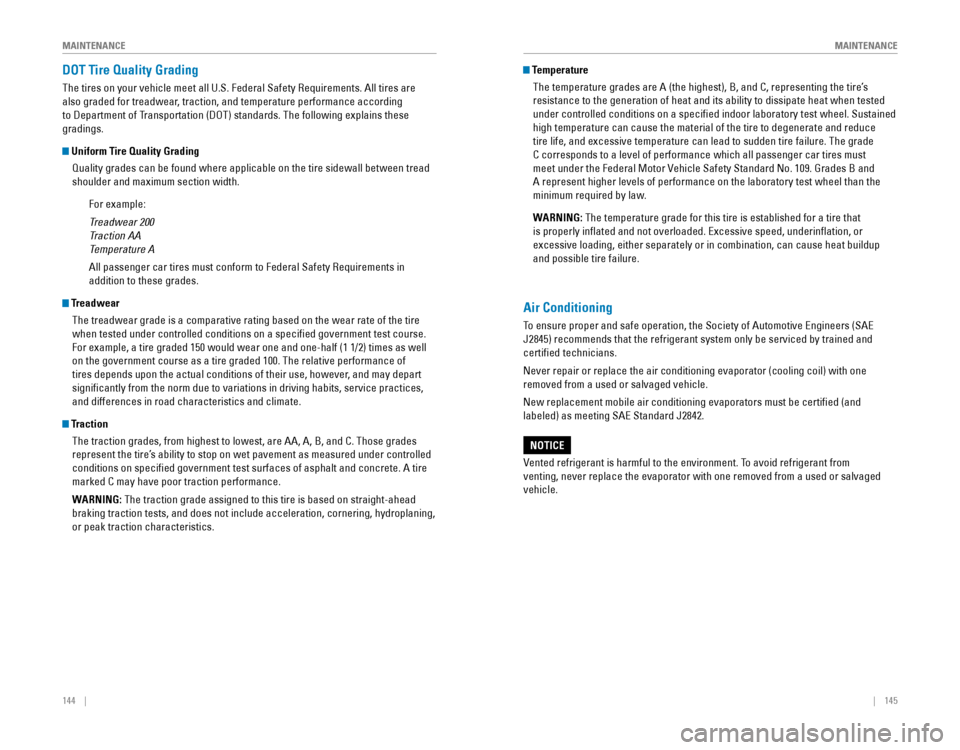
DOT Tire Quality Grading
The tires on your vehicle meet all U.S. Federal Safety requirements. All tires are
also graded for treadwear, traction, and temperature performance according
to Department of Transportation (DoT) standards. The following explains these
gradings.
Uniform Tire Quality Grading
Quality grades can be found where applicable on the tire sidewall betwee\
n tread
shoulder and maximum section width.
For example:
Treadwear 200
Traction AA
Temperature A
All passenger car tires must conform to Federal Safety requirements in
addition to these grades.
TreadwearThe treadwear grade is a comparative rating based on the wear rate of th\
e tire
when tested under controlled conditions on a specified government test\
course.
For example, a tire graded 150 would wear one and one-half (1 1/2) tim\
es as well
on the government course as a tire graded 100. The relative performance \
of
tires depends upon the actual conditions of their use, however, and may depart
significantly from the norm due to variations in driving habits, servi\
ce practices,
and differences in road characteristics and climate.
TractionThe traction grades, from highest to lowest, are AA, A, B, and C. Those \
grades
represent the tire’s ability to stop on wet pavement as measured under controlled
conditions on specified government test surfaces of asphalt and concre\
te. A tire
marked C may have poor traction performance.
WARNING: The traction grade assigned to this tire is based on straight-ahead
braking traction tests, and does not include acceleration, cornering, hy\
droplaning,
or peak traction characteristics.
Temperature
The temperature grades are A (the highest), B, and C, representing the\
tire’s
resistance to the generation of heat and its ability to dissipate heat w\
hen tested
under controlled conditions on a specified indoor laboratory test whee\
l. Sustained
high temperature can cause the material of the tire to degenerate and re\
duce
tire life, and excessive temperature can lead to sudden tire failure. Th\
e grade
C corresponds to a level of performance which all passenger car tires must
meet under the Federal Motor vehicle Safety Standard No. 109. Grades B and
A represent higher levels of performance on the laboratory test wheel th\
an the
minimum required by law.
WARNING: The temperature grade for this tire is established for a tire that
is properly inflated and not overloaded. excessive speed, underinflation, or
excessive loading, either separately or in combination, can cause heat b\
uildup
and possible tire failure.
Air Conditioning
To ensure proper and safe operation, the Society of Automotive engineers (SAe
J2845) recommends that the refrigerant system only be serviced by train\
ed and
certified technicians.
Never repair or replace the air conditioning evaporator (cooling coil)\
with one
removed from a used or salvaged vehicle.
New replacement mobile air conditioning evaporators must be certified \
(and
labeled) as meeting SAe Standard J2842.
vented refrigerant is harmful to the environment. To avoid refrigerant from
venting, never replace the evaporator with one removed from a used or sa\
lvaged
vehicle.
NOTICE
Page 77 of 82

146 || 147
SPECIFICATIONS
M
AINTENANCE
Testing of Readiness Codes
Your vehicle has “readiness codes” as part of the onboard self-diag\
nostic system.
Some states refer to these codes as a test to see if your vehicle’s emissions
components are working properly. The codes may not be read if you go through the
testing just after the battery has gone dead or been disconnected.
To check if they are set, turn the vehicle on without starting the engine\
. The
malfunction indicator lamp will come on for several seconds. If it goes \
off, the
readiness codes are set. If it blinks five times, the readiness codes \
are not set.
If you are required to have your vehicle tested before the readiness cod\
es are set,
prepare the vehicle for retesting by doing the following:
1. Fill the gas tank to approximately 3/4 full.
2. Park the vehicle and leave the engine off for 6 hours or more.
3. Make sure the ambient temperature is between 40°F and 95°F (4°\
C and 35°C).
4. Start the engine without touching the accelerator pedal, and let it idle\
for 20
seconds.
5. Keep the vehicle in Park (P) or Neutral for manual transmission. Incre\
ase the
engine speed to 2,000 rpm, and hold it there for about 3 minutes.
6. Let the engine idle with your foot off the accelerator for 20 seconds.
7. Select a nearby, lightly traveled major highway where you can maintain a speed
of 50 to 60 mph (80 to 97 km/h) for at least 20 minutes. Drive on the \
highway
with the vehicle in Drive (D) or 5th gear. Do not use cruise control. When traffic
allows, drive for 90 seconds without using the accelerator pedal. (vehicle speed
may vary slightly; this is oK.) If you cannot do this for a continuous 90 seconds
because of traffic conditions, drive for at least 30 seconds, then rep\
eat two more
times (for a total of 90 seconds).
8. Drive in city/suburban traffic for at least 10 minutes. When traffic\
conditions
allow, let the vehicle coast for several seconds without using the accelerator
pedal or the brake pedal.
9. Park the vehicle and leave the engine off for 30 minutes.
The readiness codes are erased when the battery is disconnected, and set\
again
only after several days of driving under a variety of conditions.
If a testing facility determines that the readiness codes are not set, y\
ou may be
requested to return at a later date to complete the test, or see your de\
aler.
SPECIFICATIONS
1.5-L engine models
Vehicle
ModelHonda Civic 4-Doo r
No. of Passengers :
Front2
Rear 3
Tota l5
Weights:Gross Vehicle
Weight Rating U.S.: 3,902 lbs (1,770 kg )
Canada: 1,770 kg
Gross Axle Weight
Rating (Front )U.S.: 2,105 lbs (955 kg )
Canada: 955 kg
Gross Axle Weight
Rating (Rear)U.S.: 1,808 lbs (820 kg )
Canada: 820 kg
Light Bulbs
*1:Except Touring models*2: Touring models
Headlights (Low Beam )55W (H11)*1LED*2
Headlights (High Beam )60W (HB3)*1LE
D*2Fog Lights35W (H8)
Parking/Da ytime Running Light sLED
Front Side Marker Lights3W
Front Turn Signal Lights 21W (Amber
)*1LED*2Side Turn Signal Lights
(on Door Mirrors)*LE D
Brake Light s2 1W
Rear Turn Signal Lights21W (Amber)
Rear Side Marker Lights LED
Back-Up Lights16W
DEL
sthgilliaT
High- Mount Brak e Light21W
Rear License Plate Light LED
Trunk Light5W
In terior Lights
Map Lights8 W
Ceiling Ligh t8 W
Engine and Fuel
Engine
FuelDisplacemen t91.26 cu-in (1,496 cm3)
Spark Plug sN GKILZKAR8H8S
Fuel:
TypeUnleaded gasoline, Pump octane number
of 87 or highe r
Fuel Tank Capacity 12.39 US gal (46.9 )
Fluids
Air ConditioningRefrigerant TypeHFO-1234yf (R-1234yf)
Charge Quantity 13.2 – 15.0 oz (375 – 425 g)
Lubricant TypeRL85HM (POE)
Quantity 2.7 – 3.6 oz (77 – 103 g)
Washer Fluid
Tank CapacityU.S.: 2.6 US qt (2.5 )
Canada: 4.8 US qt (4.5 )
Brake Fluid
Continuously Variable Transmission Fluid
SpecifedHonda Heavy Duty Brake Fluid DOT 3
SpecifedHonda HCF-2 Transmission Flui d
Capacity Change 3.9 US qt (3.7 )
Engine Oil
Engine Coolan
t
Recommended·Genuine Honda Motor Oil 0W-20
·API Premium-grade 0W-20 detergent oi l
Capacity Change
3.4 US qt (3.2 )
Change
including
flter 3.7 US qt (3.5 )
SpecifedHonda Long Life Anti
freeze/Coolant Type 2
Ratio 50/50 with distilled wate r
Capacity1.34 US gal (5.09 )
(change including the remaining
0.2 US gal (0.75 ) in the reserve tank )
Tires
RegularSize215/50R17 91HPressure
psi (kPa [kgf/cm2])32 (220 [2.2])
Compact
Spar e Size
T125/80D16 97M
Pressure
psi (kPa [kgf/cm
2]) 60 (420 [4.2])
Wheel SizeRegula
r17 x 7JCompact Spar e16 x 4T
Page 78 of 82
148 || 149
CUSTOMER INFORMATION
SPECIFICATIONS
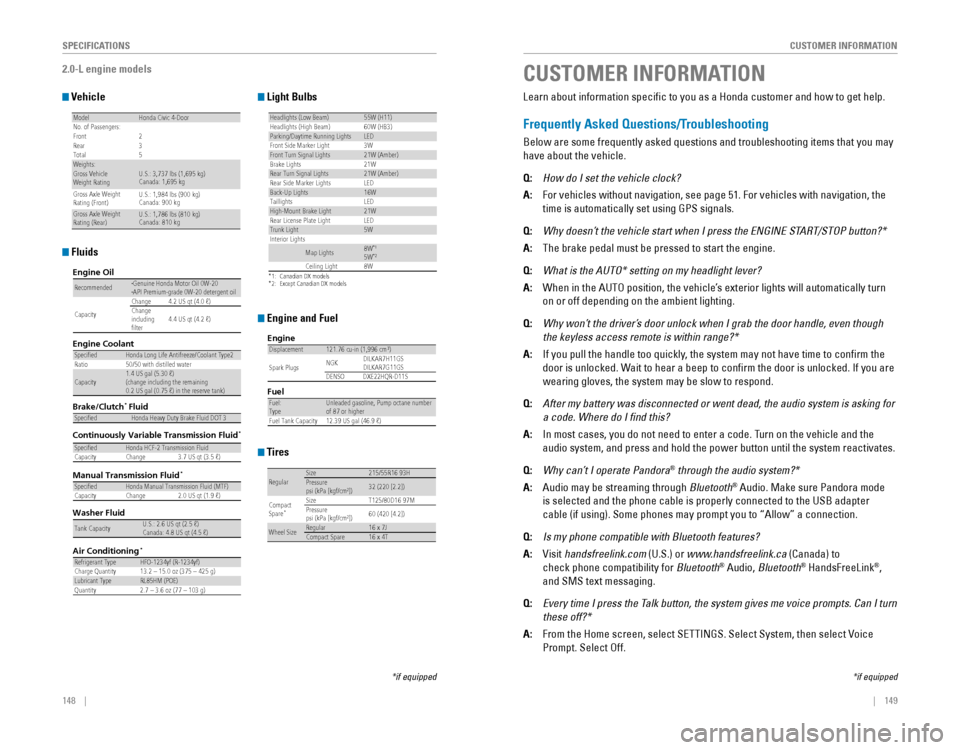
2.0-L engine models
Vehicle
ModelHonda Civic 4-Doo r
No. of Passengers :
Front2
Rear 3
Tota l5
Weights:Gross Vehicle
Weight Rating U.S.: 3,737 lbs (1,695 kg )
Canada: 1,695 kg
Gross Axle Weight
Rating (Front)U.S.: 1,984 lbs (900 kg )
Canada: 900 kg
Gross Axle Weight
Rating (Rear)U.S.: 1,786 lbs (810 kg )
Canada: 810 kg
Light Bulbs
*1:Canadian DX models*2: Except Canadian DX models
Headlights (Low Beam)55W (H11)Headlights (High Beam )60W (HB3)Parking/Daytime Running Light sLED
Front Side Marker Ligh t
Front Turn Signal Lights21W (Amber )
Brake Light s2 1W
Rear Turn Signal Lights21W (Amber)
Rear Side Marker Lights LED
Back-Up Lights16W
DEL
sthgilliaT
High-M ount Brake Light21W
Rear License Plate Light LED
Trunk Light5W
In terior Lights
Map Lights8W*15W*2Ceiling Ligh t8 W
3W
Engine and Fuel
Engine
FuelDisplacemen t121.76 cu-in (1,996 cm3)
Spark Plug s NG
K DILKAR7H11GS
DILKAR7G11GS
DENSO DXE22HQR-D11 S
Fuel:
TypeUnleaded gasoline, Pump octane number
of 87 or highe r
Fuel Tank Capacity 12.39 US gal (46.9 )
Fluids
Air Conditioning*
Refrigerant TypeHFO-1234yf (R-1234yf)
Charge Quantity 13.2 – 15.0 oz (375 – 425 g)
Lubricant TypeRL85HM (POE)
Quantity 2.7 – 3.6 oz (77 – 103 g)
Washer Fluid
Tank CapacityU.S.: 2.6 US qt (2.5 )
Canada: 4.8 US qt (4.5 )
Brake/Clutch Fluid
Continuously Variable Transmission Fluid
Manual Transmission Fluid
SpecifedHonda Heavy Duty Brake Fluid DOT 3
SpecifedHonda HCF-2 Transmission Flui d
Capacity Change 3.7 US qt (3.5 )
SpecifedHonda Manual Transmission Fluid (MTF )
Capacity Change 2.0 US qt (1.9 )
Engine Oil
Engine Coolan
t
Recommended·Genuine Honda Motor Oil 0W-20
·API Premium-grade 0W-20 detergent oi l
Capacity Change
4.2 US qt (4.0 )
Change
including
flter 4.4 US qt (4.2 )
SpecifedHonda Long Life Anti
freeze/Coolant Type 2
Ratio 50/50 with distilled wate r
Capacity1.4 US gal (5.30 )
(change including the remaining
0.2 US gal (0.75 ) in the reserve tank )
*
*
*
Tires
RegularSize215/55R16 93HPressure
psi (kPa [kgf/cm2])32 (220 [2.2])
Compact
Spar e
*Size T125/80D16 97M
Pressure
psi (kPa [kgf/cm
2]) 60 (420 [4.2])
Wheel SizeRegula
r16 x 7JCompact Spar e16 x 4T
*if equipped
CUSTOMER INFORMATION
*if equipped
Learn about information specific to you as a Honda customer and how to\
get help.
Frequently Asked Questions/Troubleshooting
Below are some frequently asked questions and troubleshooting items that\
you may
have about the vehicle.
Q:
How do I set the vehicle clock?
A: For vehicles without navigation, see page 51. For vehicles with navigati\
on, the
time is automatically set using GPS signals.
Q: Why doesn’t the vehicle start when I press the ENGINE START/STOP button?*
A: The brake pedal must be pressed to start the engine.
Q: What is the AUTO* setting on my headlight lever?
A: When in the AUTo position, the vehicle’s exterior lights will automatically turn
on or off depending on the ambient lighting.
Q: Why won’t the driver’s door unlock when I grab the door handle, even though
the keyless access remote is within range?*
A: If you pull the handle too quickly, the system may not have time to confirm the
door is unlocked. Wait to hear a beep to confirm the door is unlocked. If you are
wearing gloves, the system may be slow to respond.
Q: After my battery was disconnected or went dead, the audio system is asking for
a code. Where do I find this?
A: In most cases, you do not need to enter a code. Turn on the vehicle and the
audio system, and press and hold the power button until the system react\
ivates.
Q: Why can’t I operate Pandora® through the audio system?*
A: Audio may be streaming through Bluetooth® Audio. Make sure Pandora mode
is selected and the phone cable is properly connected to the USB adapter\
cable (if using). Some phones may prompt you to “Allow” a connec\
tion.
Q: Is my phone compatible with Bluetooth features?
A: visit handsfreelink.com (U.S.) or www.handsfreelink.ca (Canada) to
check phone compatibility for Bluetooth® Audio, Bluetooth® HandsFreeLink®,
and SMS text messaging.
Q: Every time I press the Talk button, the system gives me voice prompts. Can I turn
these off?*
A: From the Home screen, select SeTTINGS. Select System, then select voice
Prompt. Select off.
Page 80 of 82
152 || 153
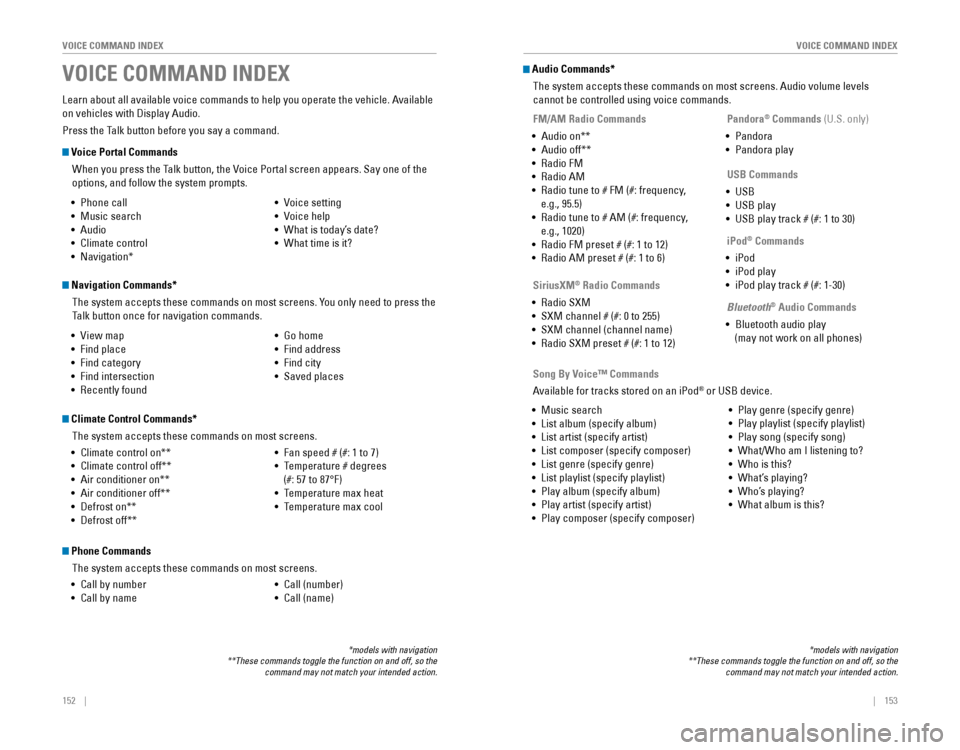
VOICE COMMAND INDEX
VOICE COMMAND INDEX
Voice Portal Commands
When you press the Talk button, the voice Portal screen appears. Say one of the
options, and follow the system prompts.
Navigation Commands*
The system accepts these commands on most screens. You only need to press the
Talk button once for navigation commands.
Learn about all available voice commands to help you operate the vehicle\
. Available
on vehicles with Display Audio.
Press the Talk button before you say a command.
VOICE COMMAND INDEX
•
Phone call
• Music search
• Audio
• Climate control
• Navigation* • voice setting
• voice help
•
What is today’s date?
• What time is it?
•
view map
• Find place
• Find category
• Find intersection
•
recently found
• Go home
• Find address
• Find city
• Saved places
*models with navigation**These commands toggle the function on and off, so the command may not match your intended action.
Climate Control Commands*
The system accepts these commands on most screens.
• Climate control on**
• Climate control off**
• Air conditioner on**
• Air conditioner off**
• Defrost on**
• Defrost off** •
Fan speed # (#: 1 to 7)
• Temperature # degrees
(#: 57 to 87°F)
• Temperature max heat
• Temperature max cool
Phone Commands
The system accepts these commands on most screens.
• Call by number
• Call by name •
Call (number)
• Call (name)
Audio Commands*
The system accepts these commands on most screens. Audio volume levels
cannot be controlled using voice commands.
FM/AM Radio Commands
• Audio on**
• Audio off**
•
radio FM
• radio AM
• radio tune to # FM (#: frequency,
e.g., 95.5)
•
radio tune to # AM (#: frequency,
e.g., 1020)
•
radio FM preset # (#: 1 to 12)
• radio AM preset # (#: 1 to 6)
SiriusXM® Radio Commands
•
radio SXM
• SXM channel # (#: 0 to 255)
• SXM channel (channel name)
•
radio SXM preset # (#: 1 to 12)
USB Commands
• USB
• USB play
• USB play track # (#: 1 to 30)
Pandora
® Commands (U.S. only)
• Pandora
• Pandora play
iPod
® Commands
• iPod
• iPod play
• iPod play track # (#: 1-30)
Bluetooth
® Audio Commands
• Bluetooth audio play
(may not work on all phones)
• Music search
• List album (specify album)
• List artist (specify artist)
• List composer (specify composer)
• List genre (specify genre)
• List playlist (specify playlist)
• Play album (specify album)
• Play artist (specify artist)
• Play composer (specify composer) •
Play genre (specify genre)
• Play playlist (specify playlist)
• Play song (specify song)
• What/Who am I listening to?
• Who is this?
• What’s playing?
• Who’s playing?
• What album is this?
Song By Voice™ Commands
Available for tracks stored on an iPod
® or USB device.
*models with navigation**These commands toggle the function on and off, so the command may not match your intended action.
Page 81 of 82
154 || 155
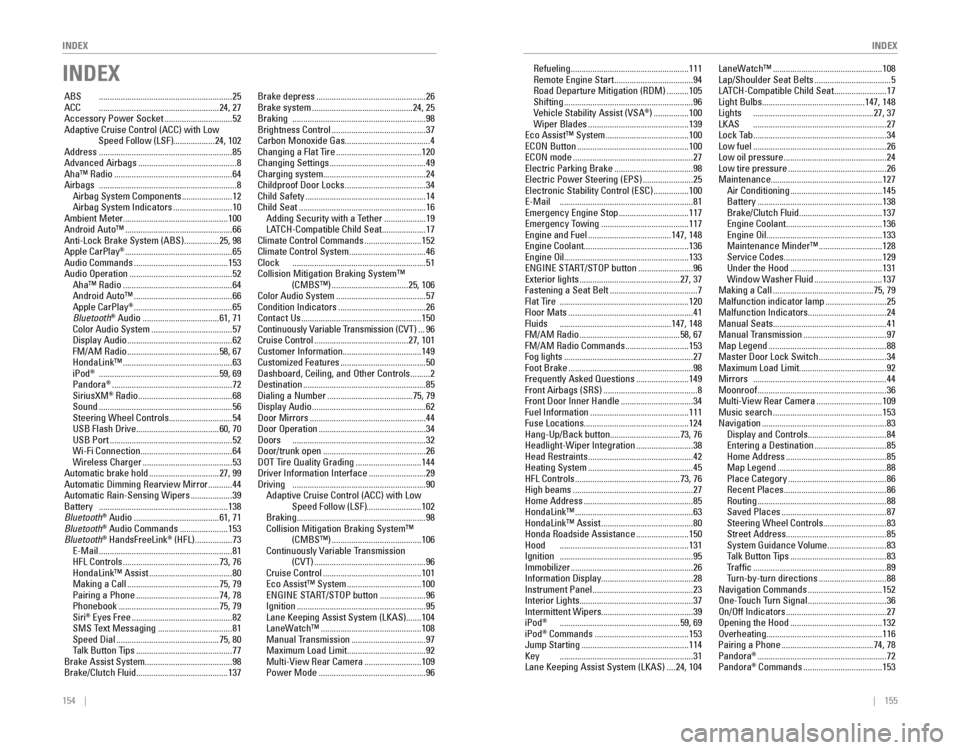
INDEX
INDEX
INDEX
ABS .............................................................25ACC .......................................................24, 27
Accessory Power Socket ...............................52Adaptive Cruise Control (ACC) with Low Speed Follow (LSF) ...................24, 102Address .............................................................85
Advanced Airbags .............................................8Aha™ radio ......................................................64Airbags ...............................................................8
Airbag System Components .......................12
Airbag System Indicators ...........................10
Ambient Meter ................................................ 100
Android Auto™
.................................................66
Anti-Lock Brake System (ABS) ................25, 98
Apple CarPlay® .................................................65
Audio Commands ...........................................153Audio operation ...............................................52Aha™ radio ..................................................64
Android Auto™ .............................................66
Apple CarPlay® .............................................65
Bluetooth® Audio ...................................61, 71
Color Audio System .....................................57
Display Audio ................................................62FM/AM radio ..........................................58, 67
HondaLink™ ..................................................63
iPod® .......................................................59, 69
Pandora® .......................................................72
SiriusXM® radio ...........................................68Sound .............................................................56
Steering Wheel Controls .............................54
USB Flash Drive ......................................60, 70
USB Port ........................................................52
Wi-Fi Connection ..........................................64
Wireless Charger .........................................53
Automatic brake hold ................................27, 99Automatic Dimming rearview Mirror ...........44Automatic rain-Sensing Wipers ...................39Battery ...........................................................138
Bluetooth® Audio .......................................61, 71
Bluetooth® Audio Commands ......................153
Bluetooth® HandsFreeLink® (HFL) .................73e-Mail .............................................................81
HFL Controls ............................................73, 76
HondaLink™ Assist ......................................80
Making a Call ..........................................75, 79
Pairing a Phone ......................................74, 78
Phonebook ..............................................75, 79
Siri® eyes Free ..............................................82
SMS Text Messaging ..................................81
Speed Dial ...............................................75, 80
Talk Button Tips ............................................77
Brake Assist System ........................................ 98
Brake/Clutch Fluid .......................................... 137Brake depress
..................................................26
Brake system ..............................................24, 25Braking .............................................................98
Brightness Control ...........................................37
Carbon Monoxide Gas .......................................4
Changing a Flat Tire
.......................................120
Changing Settings ............................................49
Charging system ............................................... 24
Childproof Door Locks
.....................................34
Child Safety .......................................................14
Child Seat ..........................................................16
Adding Security with a Tether ...................19
LATCH-Compatible Child Seat ....................17
Climate Control Commands ..........................152
Climate Control System ...................................46Clock .............................................................51
Collision Mitigation Braking System™ (CMBS™)
...................................25, 106
Color Audio System .........................................57
Condition Indicators ........................................26
Contact Us .......................................................150Continuously variable Transmission (CvT) ...96
Cruise Control ...........................................27, 101
Customer Information ....................................149
Customized Features
.......................................50Dashboard, Ceiling, and other Controls .........2
Destination ........................................................85
Dialing a Number .......................................75, 79
Display Audio ....................................................62
Door Mirrors .....................................................44Door operation .................................................34Doors .............................................................32
Door/trunk open ...............................................26DoT Tire Quality Grading ..............................144
Driver Information Interface ..........................29Driving .............................................................90Adaptive Cruise Control (ACC) with Low Speed Follow (LSF) .........................102
Braking ...........................................................98
Collision Mitigation Braking System™ (CMBS™)
.........................................106Continuously variable Transmission (CvT) ...................................................96
Cruise Control .............................................101eco Assist™ System ..................................100eNGINe STArT/SToP button .....................96
Ignition ...........................................................95
Lane Keeping Assist System (LKAS) .......104
LaneWatch™ ..............................................108
Manual Transmission ..................................97
Maximum Load Limit ....................................92Multi-view rear Camera ..........................109
Power Mode .................................................96
refueling ......................................................111remote engine Start ....................................94road Departure Mitigation (rDM) ..........105
Shifting ...........................................................96vehicle Stability Assist (vSA®) ................100
Wiper Blades ..............................................139eco Assist™ System ......................................100eCoN Button ...................................................100eCoN mode .......................................................27electric Parking Brake ....................................98electric Power Steering (ePS) .......................25electronic Stability Control (eSC) ................100e-Mail .............................................................81emergency engine Stop ................................117emergency Towing ........................................117engine and Fuel ......................................147, 148engine Coolant................................................ 136engine oil......................................................... 133eNGINe STArT/SToP button .........................96exterior lights ..............................................27, 37
Fastening a Seat Belt ........................................7Flat Tire ...........................................................120
Floor Mats .........................................................41Fluids ...................................................147, 148FM/AM radio ..............................................58, 67FM/AM radio Commands .............................153
Fog lights ...........................................................27
Foot Brake .........................................................98
Frequently Asked Questions ........................149Front Airbags (SrS) ...........................................8
Front Door Inner Handle .................................34
Fuel Information .............................................111
Fuse Locations ................................................ 124
Hang-Up/Back button ................................73, 76
Headlight-Wiper Integration
..........................38Head restraints ................................................42
Heating System ................................................45
HFL Controls ................................................73, 76
High beams .......................................................27
Home Address ..................................................85
HondaLink™ ......................................................63
HondaLink™ Assist ..........................................80Honda roadside Assistance ........................150Hood ...........................................................131Ignition .............................................................95
Immobilizer ........................................................26
Information Display .......................................... 28
Instrument Panel
..............................................23
Interior Lights .................................................... 37
Intermittent Wipers .......................................... 39
iPod
® .......................................................59, 69
iPod® Commands ...........................................153
Jump Starting .................................................114Key .............................................................31
Lane Keeping Assist System (LKAS) ....24, 104 LaneWatch™
..................................................108
Lap/Shoulder Seat Belts ...................................5
LATCH-Compatible Child Seat ........................17
Light Bulbs ............................................... 147, 148
Lights .......................................................27, 37LKAS .............................................................27
Lock Tab .............................................................34Low fuel .............................................................26
Low oil pressure ...............................................24
Low tire pressure .............................................26
Maintenance ................................................... 127
Air Conditioning
..........................................145
Battery .........................................................138
Brake/Clutch Fluid ......................................137engine Coolant ............................................136engine oil .....................................................133
Maintenance Minder™ .............................128
Service Codes .............................................129
Under the Hood ..........................................131
Window Washer Fluid ...............................137
Making a Call ..............................................75, 79
Malfunction indicator lamp ............................25
Malfunction Indicators ....................................24
Manual Seats .................................................... 41
Manual Transmission
......................................97
Map Legend ......................................................88
Master Door Lock Switch ...............................34
Maximum Load Limit ........................................ 92
Mirrors .............................................................44
Moonroof ...........................................................36Multi-view rear Camera ..............................109
Music search ..................................................153
Navigation .........................................................83
Display and Controls ....................................84entering a Destination .................................85
Home Address ..............................................85
Map Legend ..................................................88
Place Category .............................................86recent Places ...............................................86routing ...........................................................88
Saved Places ................................................87
Steering Wheel Controls .............................83
Street Address ..............................................85System Guidance volume ...........................83
Talk Button Tips ............................................83Traffic .............................................................89
Turn-by-turn directions ...............................88
Navigation Commands ..................................152one-Touch Turn Signal ....................................36on/off Indicators ..............................................27opening the Hood ..........................................132overheating..................................................... 116
Pairing a Phone ..........................................74, 78
Pandora® ...........................................................72
Pandora® Commands ....................................153