brake HONDA CIVIC 2016 10.G Quick Guide
[x] Cancel search | Manufacturer: HONDA, Model Year: 2016, Model line: CIVIC, Model: HONDA CIVIC 2016 10.GPages: 82, PDF Size: 5.52 MB
Page 55 of 82
 with Low Speed Follow (LSF)*
Helps maintain a constant vehicle speed and a set following interval beh\
ind a
vehicle detected ahe")
102 || 103
DRIVING
DRIVING
Adaptive Cruise Control (ACC) with Low Speed Follow (LSF)*
Helps maintain a constant vehicle speed and a set following interval beh\
ind a
vehicle detected ahead of yours.
reS/+ button
CANCeL button
Distance button
-/SeT button
MAIN button
Activating and Setting the Vehicle Speed
1. Press the MAIN button. The ACC indicator appears.
2. Accelerate to the desired speed.
Above 25 mph (40 km/h): Take your foot off the pedal
and press the -/SeT button to set the speed.
Below 25 mph (40 km/h) (Low Speed Follow): Press
the -/SeT button to set the speed at 25 mph (40 km/h)
if a vehicle is detected in front of you.
Adjusting the Vehicle Speed
Press the reS/+ button to increase speed, or the -/SeT
button to decrease speed.
each time you press the switch up or down, the vehicle
speed is increased or decreased by about 1 mph or
1 km/h. If you keep the switch pressed up or down, the
vehicle speed increases or decreases by 5 mph or
5 km/h until you release it.
Adjusting the Following Interval
Press the Distance button to change the following
interval. each time you press the button, the following-
interval setting cycles through short, middle, long, and
extra long.
Switching to Standard Cruise ControlPress and hold the Distance button.
Cruise mode appears in the Driver Information Interface. Press and hold \
the
button again to switch back to ACC.
*if equipped
When in OperationIf a vehicle is detected ahead of you when ACC is turned on, the system \
maintains,
accelerates, or decelerates your vehicle’s set speed to keep the vehicle’s set
following interval from the vehicle ahead.
If a vehicle detected ahead of you slows down
abruptly, or if another vehicle cuts in front of you,
a beep sounds and BrAKe appears on the Driver
Information Interface to alert you.
When a vehicle detected ahead is within range and
stops, your vehicle also stops. The Stopped message
appears on the Driver Information Interface.
When the vehicle ahead of you starts again, the vehicle icon on the Driv\
er
Information Interface blinks. Press the reS/+ button or the -/SeT button, or press
the accelerator pedal to resume the prior set speed.
Canceling ACC
Press the CANCeL button the brake pedal. The ACC
indicator goes off.
Certain conditions may cause ACC to cancel
automatically. When this happens, a message
appears on Driver Information Interface.
After adaptive cruise control has been canceled,
you can still resume the prior set speed by pressing
the reS/+ button.
Press the MAIN button to turn the system off.
exiting a vehicle that has been stopped while the ACC with LSF system is
operating can result in the vehicle moving without operator control.
A vehicle that moves without operator control can cause a crash, resulti\
ng in
serious injury or death.
Never exit a vehicle when the vehicle is stopped by ACC with LSF.
WARNING
ACC with LSF has limited braking capability and may not stop your vehicl\
e in
time to avoid a collision with a vehicle that quickly stops in front of \
you.
Always be prepared to apply the brake pedal when conditions require.
WARNING
Beep
Improper use of ACC with LSF can lead to a crash.
Use ACC with LSF only when driving on expressways or freeways and in goo\
d
weather conditions.
WARNING
Page 56 of 82
*
Provides steering input to help keep the vehicle in the middle of a dete\
cted lane and
visual and tactile alerts if the veh")
104 || 105
DRIVING
DRIVING
Lane Keeping Assist System (LKAS)*
Provides steering input to help keep the vehicle in the middle of a dete\
cted lane and
visual and tactile alerts if the vehicle is detected drifting out of its\
lane while driving
between 45–90 mph (72–145 km/h).
If your vehicle is getting too close to detected left or
right side lane markings without a turn signal activated,
a message appears on the Driver Information Interface,
and the steering wheel vibrates. Steering torque is also
applied to help keep your vehicle within your driving
lane.
Turning the System On or Off
1. Press the MAIN button. LKAS appears in the
Driver Information Interface.
2. Press the LKAS button. Lane outlines appear
in the Driver Information Interface. Dotted lane
lines turn solid when the system starts operating.
3. Press the MAIN button or the LKAS button to turn
the system off.
Important Safety Reminder
LKAS is for your convenience only. It is not a substitute for your vehicle control. The
system does not work if you take your hands off the steering wheel or fa\
il to steer
the vehicle.
Do not place an object on the top of the instrument panel. It may refl\
ect onto the
windshield and prevent the system from detecting lane lines properly.
MAIN button
*if equipped
Steering assistance
LKAS button
Road Departure Mitigation (RDM)*
Alerts and helps to assist you if the system determines a possibility of\
your vehicle
unintentionally crossing over detected lane markings while driving betwe\
en 45–90
mph (72–145 km/h).
If your vehicle is getting too close to detected lane
markings without a turn signal activated, a message
appears in the Driver Information Interface. Steering
wheel torque and vibrations are applied to help your
vehicle stay in the lane.
Braking may also be applied if the lane lines are solid
and continuous.
If the system operates several times without detecting
driver response, the system beeps to alert you.
Changing Settings Determine the warning type.
1. From the HoMe screen, select Settings.
2. Select vehicle. The vehicle must be in Park (P).
3. Select Driver Assist System Setup.
4. Select road Departure Mitigation Setting.
5. Select from the options.
Normal (default): Steering control starts from inside the lane edge.
Wide: Steering control starts from outside the lane edge.
Warning Only: The system only provides a BrAKe message and steering wheel
vibrations, but does not apply steering torque or braking.
6. Press BACK to exit the menu.
Important Safety Reminder
The rDM system has limitations. over-reliance on it may result in a collision. It is
always your responsibility to keep your vehicle within the driving lane.\
*if equipped
Turning the System On or Off
Press the rDM button to turn the system on or off.
A green indicator appears on the button when the
system is on.
RDM button
Indicator
Steering assistance
Page 57 of 82
*
Can assist you when there is a possibility of your vehicle colliding wit\
h a vehicle or a
pedestrian detecte")
106 || 107
DRIVING
DRIVING
Collision Mitigation Braking System™ (CMBS™)*
Can assist you when there is a possibility of your vehicle colliding wit\
h a vehicle or a
pedestrian detected in front of yours.
The system can give you visual, audible, and tactile
alerts when a potential collision is determined, and
reduce your vehicle speed to help minimize collision
severity when a collision is deemed unavoidable.
When a potential collision with a detected oncoming
vehicle is determined, the system also alerts you with
rapid vibrations on the steering wheel.
The system activates when:
• The speed difference between your vehicle and a vehicle or pedestrian de\
tected
in front of you is about 3 mph (5 km/h) and over with a chance of a co\
llision.
• Your vehicle speed is about 62 mph (100 km/h) or less and there is a ch\
ance of a
collision with an oncoming detected vehicle or a pedestrian in front of \
you.
Changing Settings
Determine the warning timing.
1. From the HoMe screen, select Settings.
2. Select vehicle. The vehicle must be in Park (P).
3. Select Driver Assist System Setup.
4. Select Forward Collision Warning Distance.
5. Select Long, Normal, or Short.
6. Press BACK to exit the menu.
*if equipped
Alert StagesThe system has three alert stages for a possible collision. Depending on\
the
circumstances or CMBS settings, CMBS may not go through all of the stage\
s
before initiating the last stage.
Stage 1:
visual and audible warning, steering wheel vibrations
Stage 2: visual and audible warning and light brake application
Stage 3: visual and audible warning and strong brake application
Beep
Steering vibrationsImportant Safety Reminder
CMBS is designed to reduce the severity of an unavoidable collision. It \
does not
prevent collisions nor stop the vehicle automatically. It is still your responsibility to
operate the brake pedal and steering wheel appropriately according to th\
e driving
conditions.
Turning CMBS On or Off
Press and hold the CMBS oFF button. A beep sounds
and a message appears in the MID. The CMBS
indicator appears when the system is off.
Page 60 of 82
112 || 113
HANDLING THE UNEXPECTED
DRIVING
Refueling from a Portable Fuel Container
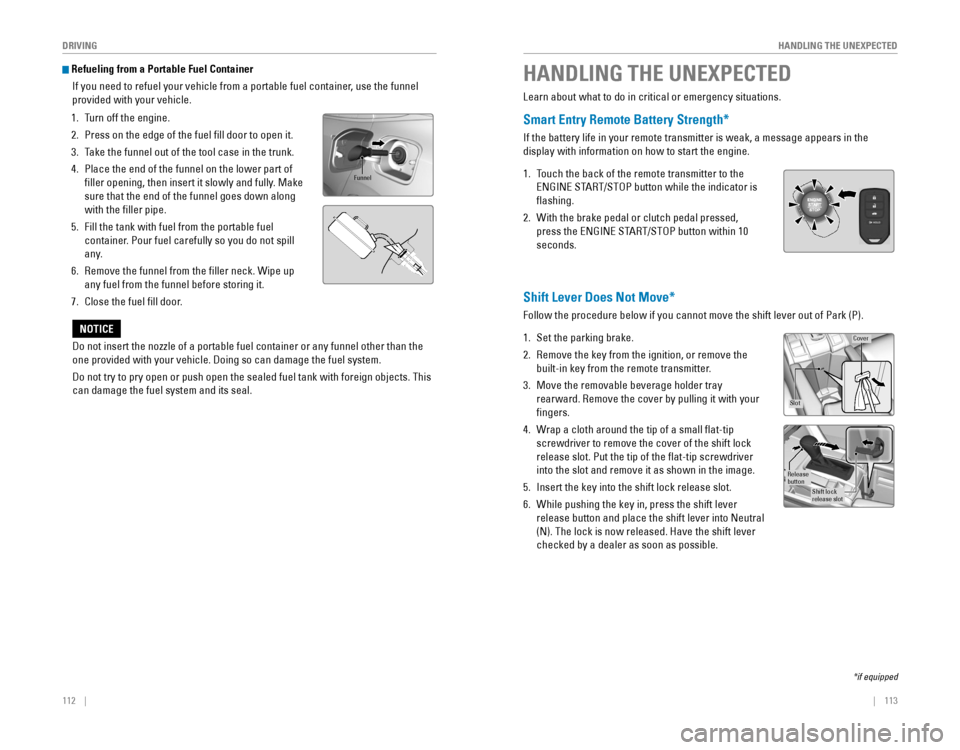
If you need to refuel your vehicle from a portable fuel container, use the funnel
provided with your vehicle.
1. Turn off the engine.
2. Press on the edge of the fuel fill door to open it.
3. Take the funnel out of the tool case in the trunk.
4. Place the end of the funnel on the lower part of
filler opening, then insert it slowly and fully. Make
sure that the end of the funnel goes down along
with the filler pipe.
5. Fill the tank with fuel from the portable fuel
container. Pour fuel carefully so you do not spill
any.
6. remove the funnel from the filler neck. Wipe up
any fuel from the funnel before storing it.
7. Close the fuel fill door.
Funnel
Do not insert the nozzle of a portable fuel container or any funnel othe\
r than the
one provided with your vehicle. Doing so can damage the fuel system.
Do not try to pry open or push open the sealed fuel tank with foreign ob\
jects. This
can damage the fuel system and its seal.
NOTICE
HANDLING THE UNEXPECTED
Learn about what to do in critical or emergency situations.
Smart Entry Remote Battery Strength*
If the battery life in your remote transmitter is weak, a message appear\
s in the
display with information on how to start the engine.
1. Touch the back of the remote transmitter to the
eNGINe STArT/SToP button while the indicator is
flashing.
2. With the brake pedal or clutch pedal pressed,
press the eNGINe STArT/SToP button within 10
seconds.
Shift Lever Does Not Move*
Follow the procedure below if you cannot move the shift lever out of Par\
k (P).
1. Set the parking brake.
2. remove the key from the ignition, or remove the
built-in key from the remote transmitter.
3. Move the removable beverage holder tray
rearward. remove the cover by pulling it with your
fingers.
4. Wrap a cloth around the tip of a small flat-tip
screwdriver to remove the cover of the shift lock
release slot. Put the tip of the flat-tip screwdriver
into the slot and remove it as shown in the image.
5. Insert the key into the shift lock release slot.
6. While pushing the key in, press the shift lever
release button and place the shift lever into Neutral
(N). The lock is now released. Have the shift lever
checked by a dealer as soon as possible.
*if equipped
Slo t
Cove r
Release
butto n
Shift lock
release slot
Page 61 of 82
114 || 115
HANDLING THE UNEXPECTED
HANDLING THE UNEXPECTED
Jump Starting
Turn off the power to electric devices, such as audio and lights. Turn off the engine,
then open the hood.
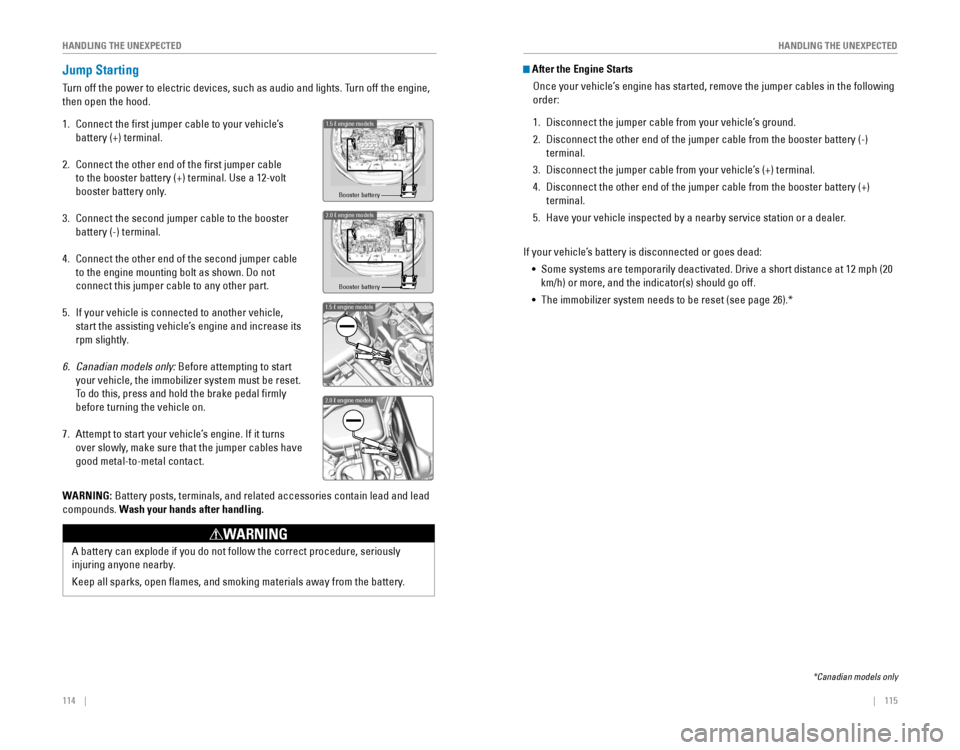
1. Connect the first jumper cable to your vehicle’s
battery (+) terminal.
2. Connect the other end of the first jumper cable
to the booster battery (+) terminal. Use a 12-volt
booster battery only.
3. Connect the second jumper cable to the booster
battery (-) terminal.
4. Connect the other end of the second jumper cable
to the engine mounting bolt as shown. Do not
connect this jumper cable to any other part.
5. If your vehicle is connected to another vehicle,
start the assisting vehicle’s engine and increase its
rpm slightly.
6. Canadian models only: Before attempting to start
your vehicle, the immobilizer system must be reset.
To do this, press and hold the brake pedal firmly
before turning the vehicle on.
7. Attempt to start your vehicle’s engine. If it turns
over slowly, make sure that the jumper cables have
good metal-to-metal contact.
Booster battery
1.5 engine models
2.0 engine model\as
Booster batter\f
1.5 engine model\
s
2.0 engine model\
s
WARNING: Battery posts, terminals, and related accessories contain lead and lead\
compounds. Wash your hands after handling.
A battery can explode if you do not follow the correct procedure, seriou\
sly
injuring anyone nearby.
Keep all sparks, open flames, and smoking materials away from the batt\
ery.
WARNING
After the Engine Starts
once your vehicle’s engine has started, remove the jumper cables in the following
order:
1. Disconnect the jumper cable from your vehicle’s ground.
2. Disconnect the other end of the jumper cable from the booster battery (\
-)
terminal.
3. Disconnect the jumper cable from your vehicle’s (+) terminal.
4. Disconnect the other end of the jumper cable from the booster battery (\
+)
terminal.
5. Have your vehicle inspected by a nearby service station or a dealer.
If your vehicle’s battery is disconnected or goes dead: • Some systems are temporarily deactivated. Drive a short distance at 12 mph (20
km/h) or more, and the indicator(s) should go off.
• The immobilizer system needs to be reset (see page 26).*
*Canadian models only
Page 62 of 82

116 || 117
HANDLING THE UNEXPECTED
HANDLING THE UNEXPECTED
Overheating
If the temperature gauge pointer is at the H mark, the engine suddenly l\
oses power,
or steam or spray comes out from under the hood, your engine is overheat\
ing.
1. Immediately park the vehicle in a safe place. Turn
off all accessories and turn on the hazard warning
lights.
2. If steam or spray is not present: Keep the engine
running and open the hood.
If steam or spray is present: Turn off the engine and
wait until it subsides. Then, open the hood.
3. Check that the cooling fan is operating and stop the engine once the tem\
perature
gauge needle comes down. If the cooling fan is not operating, immediatel\
y stop
the engine.
4. once the engine has cooled down, inspect the coolant level and check the \
cooling system components for leaks. If the coolant level in the expansi\
on tank
is low, or no coolant is in the tank, check that the radiator is cool. Cover t\
he
expansion tank cap with a heavy cloth and open the cap. Add coolant unti\
l it
reaches the MAX mark, and put the cap back on.
once the engine has cooled sufficiently, restart it and check the temperature gauge.
If the temperature gauge pointer has gone down, resume driving. If it ha\
s not gone
down, contact a dealer for repairs.
MAX
Expansion tankMIN
Steam and spray from an overheated engine can seriously scald you.
Do not open the hood if steam is coming out.
WARNING
removing the radiator cap while the engine is hot can cause the coolant t\
o
spray out, seriously scalding you.
Always let the engine and radiator cool down before removing the radiato\
r cap.
WARNING
Continuing to drive with the temperature gauge pointer at the H mark may\
damage
the engine.
NOTICE
Emergency Engine Stop*
The eNGINe STArT/SToP button may be used to stop the engine due to an
emergency situation even while driving. If you must stop the engine, cho\
ose one of
the following operations:
•
Press and hold the eNGINe STArT/SToP button for
two seconds, or
•
Firmly press the eNGINe STArT/SToP button two
times.
The steering wheel will not lock. Because turning off the engine also di\
sables the
power assist the engine provides to the steering and braking systems, it\
will require
significantly more physical effort and time to steer and slow the vehi\
cle. Downshift
gears and use both feet on the brake pedal, if necessary, to slow the vehicle and
stop immediately in a safe place
Do not press the button while driving unless it is absolutely necessary \
for the engine
to be switched off.
*if equipped
Emergency Towing
Call a professional towing service if you need to tow your vehicle.
Flat bed equipment: The operator loads your vehicle on the back of a tru\
ck. This is
the best way to transport your vehicle.
Wheel lift equipment: The tow truck uses two pivoting arms that go under the front
tires and lift them off the ground. The rear tires remain on the ground.\
This is an
acceptable way to tow your vehicle.
For CvT models: If you cannot shift the transmission or turn on the engine, your
vehicle must be transported with the front wheels off the ground. Make s\
ure the
parking brake is released. If you cannot release the parking brake, your\
vehicle must
be transported by flat bed equipment.
Trying to lift or tow your vehicle by the bumpers will cause serious dama\
ge. The
bumpers are not designed to support the vehicle’s weight.
Improper towing such as towing behind a motorhome or other motor vehicle\
can
damage the transmission.
NOTICE
Page 64 of 82
120 || 121
HANDLING THE UNEXPECTED
HANDLING THE UNEXPECTED
Changing a Flat Tire
If a tire goes flat while driving, grasp the steering wheel firmly, and brake gradually
to reduce speed. Then, stop in a safe place. replace the flat tire with the compact
spare tire. Go to a dealer as soon as possible to have the full-size tir\
e repaired or
replaced.
Getting Ready to Change the Tire
Park the vehicle on a firm, level, non-slippery surface. Apply the par\
king brake,
shift to Park (P), and turn the vehicle off. Turn on the hazard warning lights.
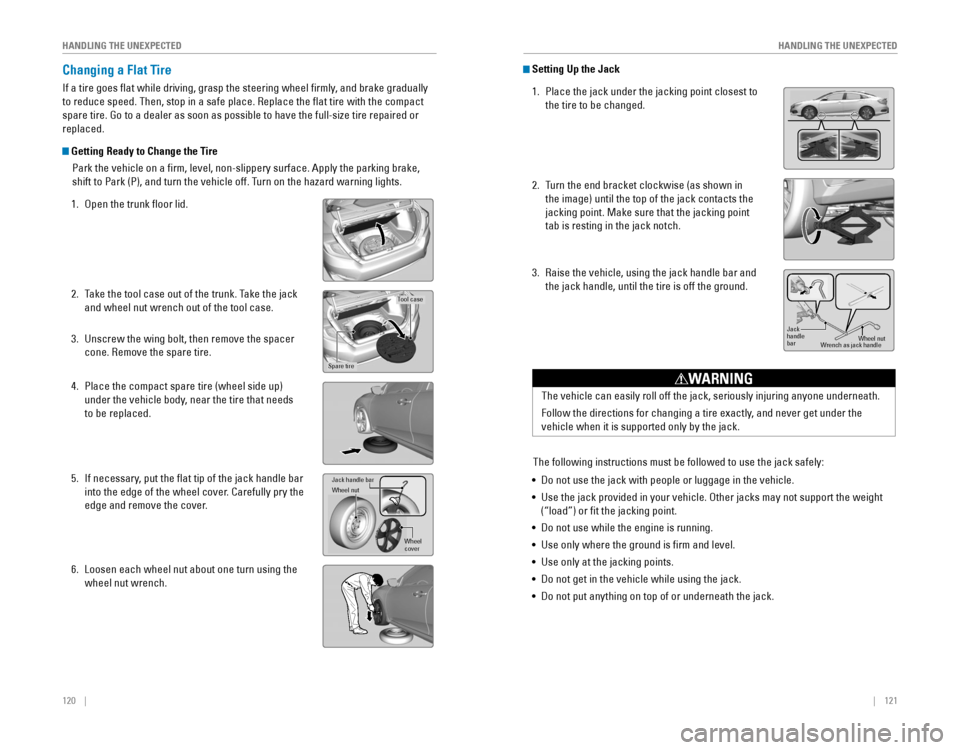
1. open the trunk floor lid.
2. Take the tool case out of the trunk. Take the jack
and wheel nut wrench out of the tool case.
3. Unscrew the wing bolt, then remove the spacer
cone. remove the spare tire.
4. Place the compact spare tire (wheel side up)
under the vehicle body, near the tire that needs
to be replaced.
5. If necessary, put the flat tip of the jack handle bar
into the edge of the wheel cover. Carefully pry the
edge and remove the cover.
6. Loosen each wheel nut about one turn using the
wheel nut wrench.
Tool case
Spare tire
Jack handle ba r
Wheel nu t
Wheel
cover
Setting Up the Jack
1. Place the jack under the jacking point closest to
the tire to be changed.
2. Turn the end bracket clockwise (as shown in
the image) until the top of the jack contacts the
jacking point. Make sure that the jacking point
tab is resting in the jack notch.
3. raise the vehicle, using the jack handle bar and
the jack handle, until the tire is off the ground.
Jack
handle
bar Wheel nut
Wrench as jack handle
The vehicle can easily roll off the jack, seriously injuring anyone unde\
rneath.
Follow the directions for changing a tire exactly, and never get under the
vehicle when it is supported only by the jack.
WARNING
The following instructions must be followed to use the jack safely:
• Do not use the jack with people or luggage in the vehicle.
•
Use the jack provided in your vehicle. other jacks may not support the weight
(“load”) or fit the jacking point.
• Do not use while the engine is running.
• Use only where the ground is firm and level.
• Use only at the jacking points.
• Do not get in the vehicle while using the jack.
• Do not put anything on top of or underneath the jack.
Page 67 of 82
126 || 127
M
AINTENANCEHANDLING THE UNEXPECTED
Inspecting and Changing Fuses
1. Turn the vehicle off, including all lights and
accessories.
2. remove the fuse box cover.
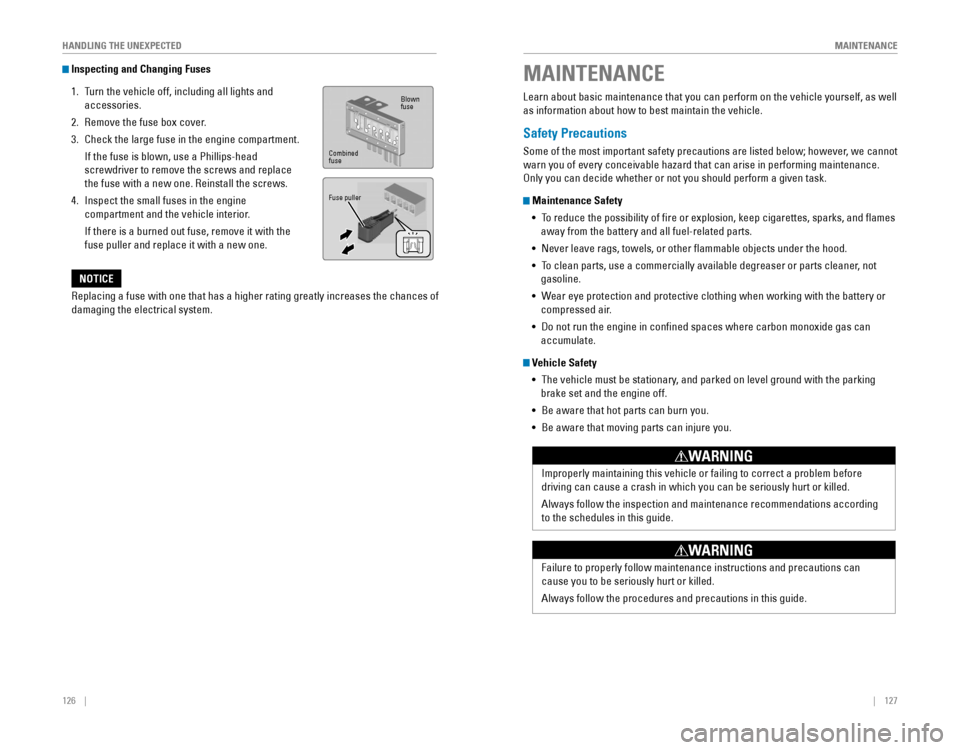
3. Check the large fuse in the engine compartment.
If the fuse is blown, use a Phillips-head
screwdriver to remove the screws and replace
the fuse with a new one. reinstall the screws.
4. Inspect the small fuses in the engine
compartment and the vehicle interior.
If there is a burned out fuse, remove it with the
fuse puller and replace it with a new one.
Blown
fuse
Combined
fuse
Fuse puller
replacing a fuse with one that has a higher rating greatly increases the \
chances of
damaging the electrical system.
NOTICE
MAINTENANCE
Learn about basic maintenance that you can perform on the vehicle yourse\
lf, as well
as information about how to best maintain the vehicle.
Safety Precautions
Some of the most important safety precautions are listed below; however, we cannot
warn you of every conceivable hazard that can arise in performing mainte\
nance.
only you can decide whether or not you should perform a given task.
Maintenance Safety • To reduce the possibility of fire or explosion, keep cigarettes, sparks\
, and flames
away from the battery and all fuel-related parts.
• Never leave rags, towels, or other flammable objects under the hood.
• To clean parts, use a commercially available degreaser or parts cleaner, not
gasoline.
• Wear eye protection and protective clothing when working with the battery\
or
compressed air.
• Do not run the engine in confined spaces where carbon monoxide gas can\
accumulate.
Vehicle Safety
• The vehicle must be stationary, and parked on level ground with the parking
brake set and the engine off.
• Be aware that hot parts can burn you.
• Be aware that moving parts can injure you.
Improperly maintaining this vehicle or failing to correct a problem befo\
re
driving can cause a crash in which you can be seriously hurt or killed. \
Always follow the inspection and maintenance recommendations according
to the schedules in this guide.
WARNING
Failure to properly follow maintenance instructions and precautions can \
cause you to be seriously hurt or killed.
Always follow the procedures and precautions in this guide.
WARNING
Page 68 of 82
128 || 129
M
AINTENANCEMAINTENANCE
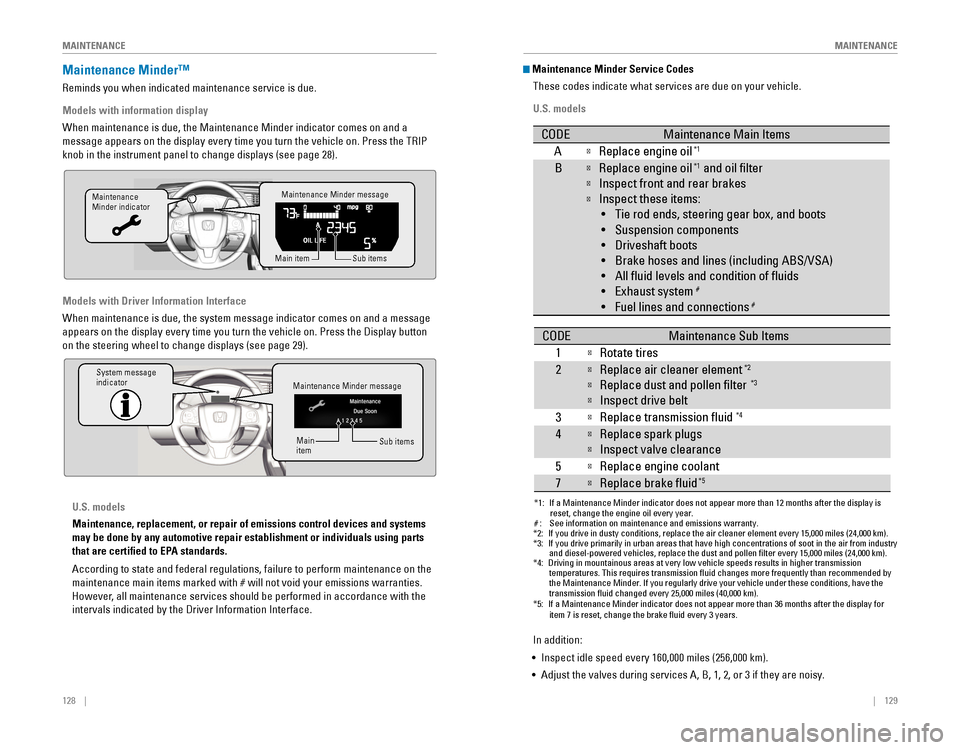
Maintenance Minder™
reminds you when indicated maintenance service is due.
Models with information display
When maintenance is due, the Maintenance Minder indicator comes on and a\
message appears on the display every time you turn the vehicle on. Press\
the TrIP
knob in the instrument panel to change displays (see page 28).
Models with Driver Information Interface
When maintenance is due, the system message indicator comes on and a mes\
sage
appears on the display every time you turn the vehicle on. Press the Dis\
play button
on the steering wheel to change displays (see page 29).
Maintenance Minder message
Maintenance
Minder indicator
Sub items
Main item
Maintenance Minder message
System message
indicator
Sub items
Main
item
U.S. models
Maintenance, replacement, or repair of emissions control devices and sys\
tems
may be done by any automotive repair establishment or individuals using \
parts
that are certified to EPA standards.
According to state and federal regulations, failure to perform maintenan\
ce on the
maintenance main items marked with # will not void your emissions warranties.
However, all maintenance services should be performed in accordance with the
intervals indicated by the Driver Information Interface.
Maintenance Minder Service Codes
These codes indicate what services are due on your vehicle.
U.S. models
*1: If a Maintenance Minder indicator does not appear more than 12 months af\
ter the display is reset, change the engine oil every year.
#: See information on maintenance and emissions warranty.
CODEMaintenance Main Items
AReplace engine oi l*1
BReplace engine oil*1 and oil lter
Inspect front and rear brakes
Inspect these items:
• Tie rod ends, steering gear box, and boots
•S uspension components
• Driveshaft boots
• Brake hoses and lines (including ABS/VSA)
• All uid levels and condition of uids
• Exhaust system
#
•F uel lines and connection s#
*2:If you drive in dusty conditions, replace the air cleaner element every \
15,000 miles (24,000 km).*3:If you drive primarily in urban areas that have high concentrations of s\
oot in the air from industryand diesel-powered vehicles, replace the dust and pollen lter every \
15,000 miles (24,000 km).*4:Driving in mountainous areas at very low vehicle speeds results in highe\
r transmission
temperatures. This requires transmission uid changes more frequently\
than recommended by
the Maintenance Minder. If you regularly drive your vehicle under these conditions, have the
transmission uid changed every 25,000 miles (40,000 km).
CODEMaintenance Sub Items
1
Rotate tires
2Replace air cleaner element*2
Replace dust and pollen lter*3
Inspect drive belt
3
Replace transmission uid*4
4Replace spark plug s
Inspect valve clearance
5
Replace engine coolant
7Replace brake uid*5
*5:If a Maintenance Minder indicator does not appear more than 36 months af\
ter the display for item 7 is reset, change the brake uid every 3 years.
In addition:
• Inspect idle speed every 160,000 miles (256,000 km).
• Adjust the valves during services A, B, 1, 2, or 3 if they are noisy.
Page 69 of 82

130 || 131
M
AINTENANCEMAINTENANCE
*1: If a Maintenance Minder message does not appear more than 12 months afte\
r the display is
reset, change the engine oil every year.
*2: If you drive in dusty conditions, replace the air cleaner element every \
24,000 km (15,000 miles).
*3:
If you drive primarily in urban areas that have high concentrations of s\
oot in the air from industryand diesel-powered vehicles, replace the dust and pollen lter every \
24,000 km (15,000 miles).
*4: Driving in mountainous areas at very low vehicle speeds results in highe\
r transmission
temperatures. This requires transmission uid changes more frequently\
than recommended by
the Maintenance Minder. If you regularly drive your vehicle under these conditions, have the
transmission uid changed every 40,000 km (25,000 miles).
*5: If a Maintenance Minder Indicator does not appear more than 36 months after the display for
item7 is reset, change the brake uid every 3 years.#: See information on maintenance and emissions warranty.
CODEMaintenance Main Items
AReplace engine oi l*1
0Replace engine oil*1 and oil lter
CODEMaintenance Sub Items
1
Rotate tires
2Replace air cleaner element*2
Replace dust and pollen lte r*3
Inspect drive belt
3
Replace transmission uid*4
4Replace spark plug s
Inspect valve clearance
5
Replace engine coolant
7Replace brake uid*5
9Inspect front and rear brakes
Inspect these items: •T ie rod ends, steering gearbox, and boots
•S uspension components
•D riveshaft boots
•B rake hoses and lines (including ABS/VSA)
•A ll uid levels and condition of uids
•E xhaust system
#
•Fuel lines and connections#
Canadian models
In addition:
• Inspect idle speed every 256,000 km (160,000 miles).
• Adjust the valves during services A, B, 1, 2, or 3 if they are noisy.Under the Hood
1.5 engine model\
s
Brake uid
(black cap)
Reserve \fank Washer uid
(blue cap)
\bngine oil dips\fick\v
(orange) \bngine oil ll cap Ba\f\fery
Reserve \fank cap
U.S. modelsWasher uid
(blue cap)Canadian models
2.0 engine model\/s
Brake/\flut\fh\b uid
(Bla\fk \fap)
Reserve tank Washer uid
(blue \fap) Engine oil dipsti\fk\/
(orange)
Engine oil ll \fap Battery
Reserve tank \fap
*if equipped