brake HONDA CIVIC 2016 10.G Quick Guide
[x] Cancel search | Manufacturer: HONDA, Model Year: 2016, Model line: CIVIC, Model: HONDA CIVIC 2016 10.GPages: 82, PDF Size: 5.52 MB
Page 4 of 82
| 1
VISUAL INDEX
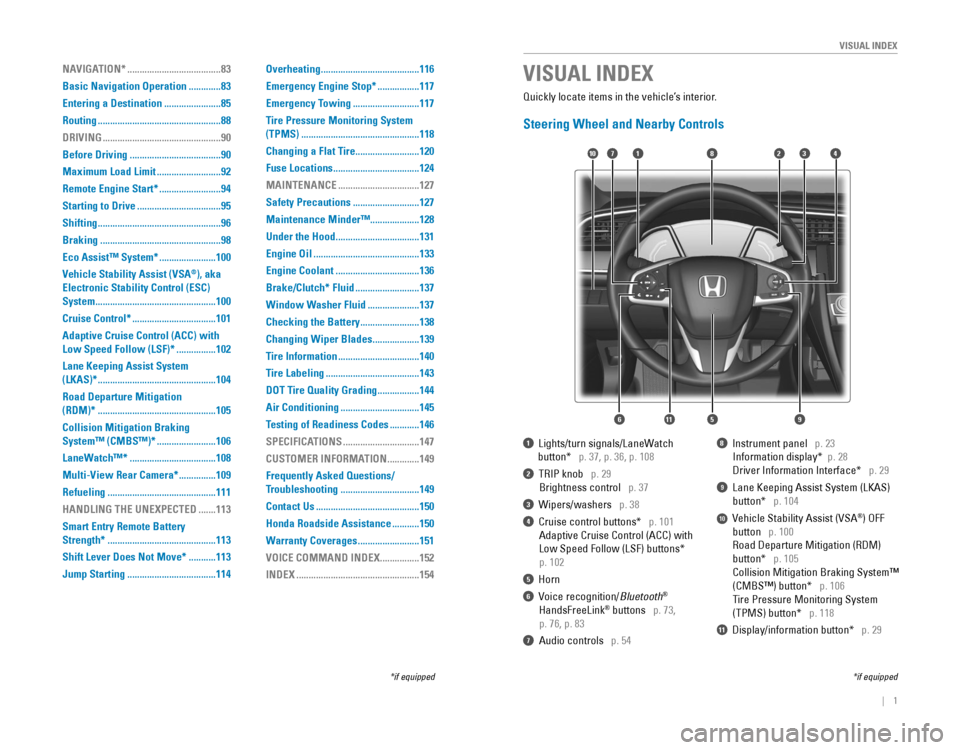
1 Lights/turn signals/LaneWatch
button* p. 37, p. 36, p. 108
2 TrIP knob p. 29
Brightness control p. 37
3 Wipers/washers p. 38
4 Cruise control buttons* p. 101
Adaptive Cruise Control (ACC) with
Low Speed Follow (LSF) buttons*
p. 102
5 Horn
6 voice recognition/Bluetooth®
HandsFreeLink® buttons p. 73,
p. 76, p. 83
7 Audio controls p. 54
8 Instrument panel p. 23
Information display* p. 28
Driver Information Interface* p. 29
9 Lane Keeping Assist System (LKAS)
button* p. 104
10 vehicle Stability Assist (vSA®) oFF
button p. 100
road Departure Mitigation (rDM)
button* p. 105
Collision Mitigation Braking System™
(CMBS™) button* p. 106
Tire Pressure Monitoring System
(TPMS) button* p. 118
11 Display/information button* p. 29
VISUAL INDEX
*if equipped*if equipped
Quickly locate items in the vehicle’s interior.
Steering Wheel and Nearby Controls
2
5
71310
6
48
911
NAVIGATION* ......................................83
Basic Navigation Operation
.............83
Entering a Destination
.......................85
Routing
..................................................88
DRIVING
................................................90
Before Driving
.....................................90
Maximum Load Limit
..........................92
Remote Engine Start*
.........................94
Starting to Drive
..................................95
Shifting
..................................................96
Braking
.................................................98
Eco Assist™ System*
.......................100
Vehicle Stability Assist (VSA
®), aka
Electronic Stability Control (ESC)
System
.................................................100
Cruise Control*
..................................101
Adaptive Cruise Control (ACC) with
Low Speed Follow (LSF)* ................102
Lane Keeping Assist System
(LKAS)*
................................................104
Road Departure Mitigation
(RDM)*
................................................105
Collision Mitigation Braking
System™ (CMBS™)*
........................106
LaneWatch™*
...................................108
Multi-View Rear Camera*
...............109
Refueling
............................................111
HANDLING THE UNEXPECTED
.......113
Smart Entry Remote Battery
Strength*
............................................113
Shift Lever Does Not Move*
...........113
Jump Starting
....................................114 Overheating
........................................116
Emergency Engine Stop*
.................117
Emergency Towing
...........................117
Tire Pressure Monitoring System
(TPMS)
................................................118
Changing a Flat Tire
..........................120
Fuse Locations
...................................124
MAINTENANCE
.................................127
Safety Precautions
...........................127
Maintenance Minder™ ....................128
Under the Hood
..................................131
Engine Oil
...........................................133
Engine Coolant
..................................136
Brake/Clutch* Fluid
..........................137
Window Washer Fluid
.....................137
Checking the Battery
........................138
Changing Wiper Blades
...................139
Tire Information
.................................140
Tire Labeling
......................................143
DOT Tire Quality Grading
.................144
Air Conditioning
................................145
Testing of Readiness Codes
............146
SPECIFICATIONS
...............................147
CUSTOMER INFORMATION
.............149
Frequently Asked Questions/
Troubleshooting
................................149
Contact Us
..........................................150
Honda Roadside Assistance
...........150
Warranty Coverages
.........................151
VOICE COMMAND INDEX
................152
INDEX
..................................................154
Page 5 of 82
2 || 3
S
AFETYVISUAL INDEX
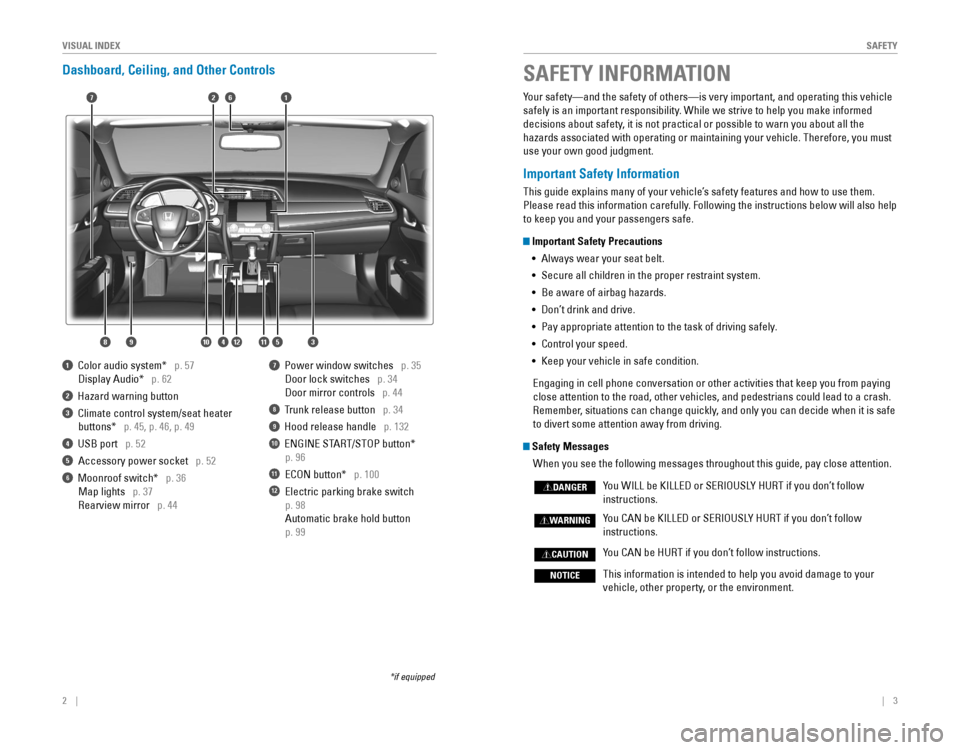
Dashboard, Ceiling, and Other Controls
1 Color audio system* p. 57
Display Audio* p. 62
2 Hazard warning button
3 Climate control system/seat heater
buttons* p. 45, p. 46, p. 49
4 USB port p. 52
Accessory power socket p. 52
6 Moonroof switch* p. 36
Map lights p. 37
rearview mirror p. 44
7 Power window switches p. 35
Door lock switches p. 34
Door mirror controls p. 44
8 Trunk release button p. 34
9 Hood release handle p. 132
10 eNGINe STArT/SToP button*
p. 96
11 eCoN button* p. 100
12 electric parking brake switch
p. 98
Automatic brake hold button
p. 99
*if equipped
SAFETY INFORMATION
2
3
71
8
6
4
Your safety—and the safety of others—is very important, and operati\
ng this vehicle
safely is an important responsibility. While we strive to help you make informed
decisions about safety, it is not practical or possible to warn you about all the
hazards associated with operating or maintaining your vehicle. Therefore\
, you must
use your own good judgment.
Important Safety Information
This guide explains many of your vehicle’s safety features and how to use them.
Please read this information carefully. Following the instructions below will also help
to keep you and your passengers safe.
Important Safety Precautions
• Always wear your seat belt.
• Secure all children in the proper restraint system.
• Be aware of airbag hazards.
• Don’t drink and drive.
• Pay appropriate attention to the task of driving safely.
• Control your speed.
• Keep your vehicle in safe condition.
engaging in cell phone conversation or other activities that keep you fro\
m paying
close attention to the road, other vehicles, and pedestrians could lead \
to a crash.
remember, situations can change quickly, and only you can decide when it is safe
to divert some attention away from driving.
Safety Messages
When you see the following messages throughout this guide, pay close att\
ention.
You WILL be KILLeD or SerIoUSLY HUrT if you don’t follow
instructions.
You CAN be KILLeD or SerIoUSLY HUrT if you don’t follow
instructions.
You CAN be HUrT if you don’t follow instructions.
This information is intended to help you avoid damage to your
vehicle, other property, or the environment.
DANGER
WARNING
CAUTION
NOTICE
5
59101112
Page 16 of 82
24 || 25
I
NSTRUMENT PANELINSTRUMENT PANEL
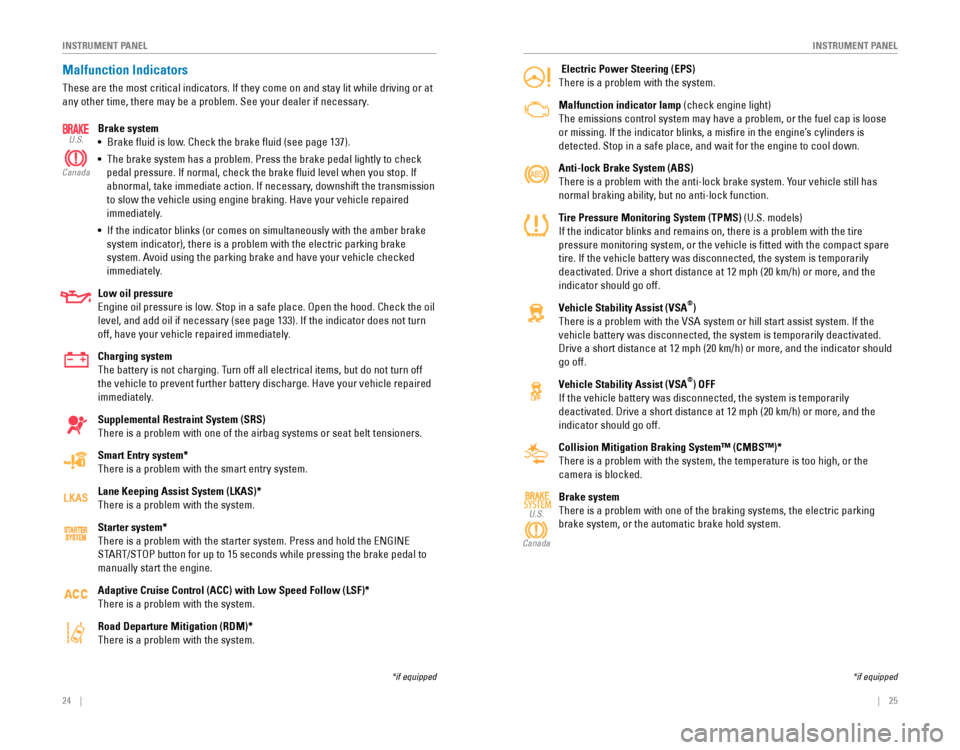
Electric Power Steering (EPS)
There is a problem with the system.
Malfunction indicator lamp (check engine light)
The emissions control system may have a problem, or the fuel cap is loos\
e
or missing. If the indicator blinks, a misfire in the engine’s cylinders is
detected. Stop in a safe place, and wait for the engine to cool down.
Anti-lock Brake System (ABS)
There is a problem with the anti-lock brake system. Your vehicle still has
normal braking ability, but no anti-lock function.
Tire Pressure Monitoring System (TPMS) (U.S. models)
If the indicator blinks and remains on, there is a problem with the tire\
pressure monitoring system, or the vehicle is fitted with the compact \
spare
tire. If the vehicle battery was disconnected, the system is temporarily\
deactivated. Drive a short distance at 12 mph (20 km/h) or more, and t\
he
indicator should go off.
Vehicle Stability Assist (VSA
®)
There is a problem with the vSA system or hill start assist system. If the
vehicle battery was disconnected, the system is temporarily deactivated.
Drive a short distance at 12 mph (20 km/h) or more, and the indicator \
should
go off.
Vehicle Stability Assist (VSA
®) OFF
If the vehicle battery was disconnected, the system is temporarily
deactivated. Drive a short distance at 12 mph (20 km/h) or more, and t\
he
indicator should go off.
Collision Mitigation Braking System™ (CMBS™)*
There is a problem with the system, the temperature is too high, or the \
camera is blocked.
Brake system
There is a problem with one of the braking systems, the electric parking\
brake system, or the automatic brake hold system.
SYSTEMU.S.
Canada
*if equipped
Malfunction Indicators
These are the most critical indicators. If they come on and stay lit whi\
le driving or at
any other time, there may be a problem. See your dealer if necessary. Brake system
• Brake fluid is low. Check the brake fluid (see page 137).
• The brake system has a problem. Press the brake pedal lightly to check
pedal pressure. If normal, check the brake fluid level when you stop. \
If
abnormal, take immediate action. If necessary, downshift the transmission
to slow the vehicle using engine braking. Have your vehicle repaired
immediately.
• If the indicator blinks (or comes on simultaneously with the amber brak\
e
system indicator), there is a problem with the electric parking brake
system. Avoid using the parking brake and have your vehicle checked
immediately.
Low oil pressure
engine oil pressure is low. Stop in a safe place. open the hood. Check the oil
level, and add oil if necessary (see page 133). If the indicator does \
not turn
off, have your vehicle repaired immediately.
Charging system
The battery is not charging. Turn off all electrical items, but do not turn off
the vehicle to prevent further battery discharge. Have your vehicle repa\
ired
immediately.
Supplemental Restraint System (SRS)
There is a problem with one of the airbag systems or seat belt tensioner\
s.
Smart Entry system*
There is a problem with the smart entry system.
Lane Keeping Assist System (LKAS)*
There is a problem with the system.
Starter system*
There is a problem with the starter system. Press and hold the eNGINe
STArT/SToP button for up to 15 seconds while pressing the brake pedal to
manually start the engine.
Adaptive Cruise Control (ACC) with Low Speed Follow (LSF)*
There is a problem with the system.
Road Departure Mitigation (RDM)*
There is a problem with the system.
U.S.
Canada
*if equipped
Page 17 of 82
26 || 27
I
NSTRUMENT PANELINSTRUMENT PANEL
Condition Indicators
These indicators may require you to perform an action.
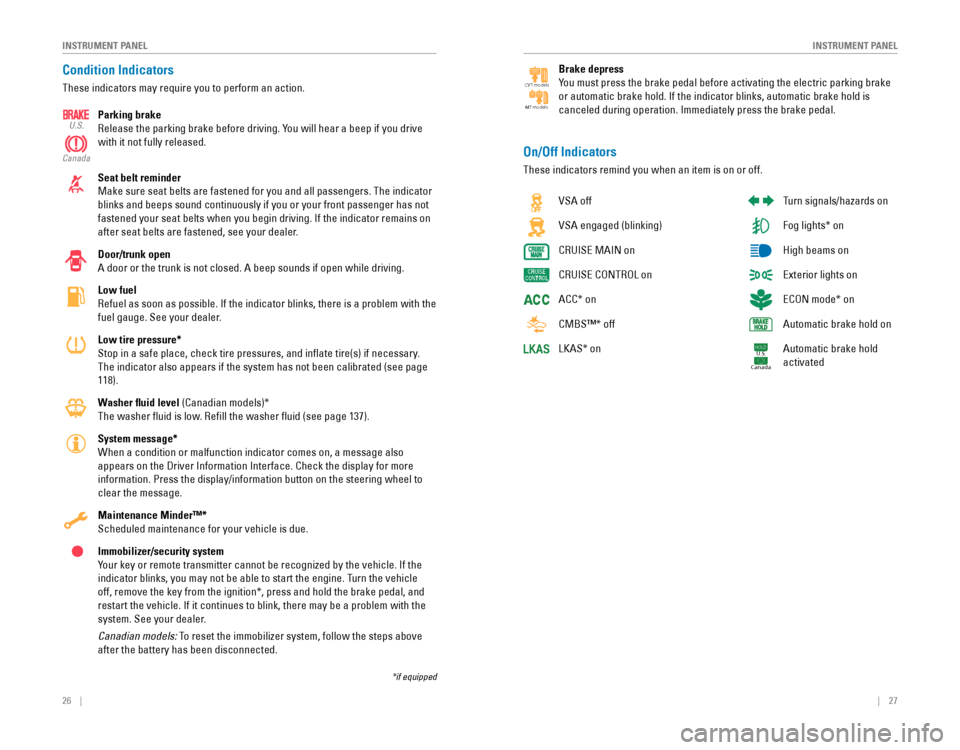
Parking brake
release the parking brake before driving. You will hear a beep if you drive
with it not fully released.
Seat belt reminder
Make sure seat belts are fastened for you and all passengers. The indica\
tor
blinks and beeps sound continuously if you or your front passenger has not
fastened your seat belts when you begin driving. If the indicator remain\
s on
after seat belts are fastened, see your dealer.
Door/trunk open
A door or the trunk is not closed. A beep sounds if open while driving.
Low fuel
refuel as soon as possible. If the indicator blinks, there is a problem w\
ith the
fuel gauge. See your dealer.
Low tire pressure*
Stop in a safe place, check tire pressures, and inflate tire(s) if n\
ecessary.
The indicator also appears if the system has not been calibrated (see p\
age
118).
Washer fluid level (Canadian models)*
The washer fluid is low. refill the washer fluid (see page 137).
System message*
When a condition or malfunction indicator comes on, a message also
appears on the Driver Information Interface. Check the display for more \
information. Press the display/information button on the steering wheel \
to
clear the message.
Maintenance Minder™*
Scheduled maintenance for your vehicle is due.
Immobilizer/security system
Your key or remote transmitter cannot be recognized by the vehicle. If th\
e
indicator blinks, you may not be able to start the engine. Turn the vehicle
off, remove the key from the ignition*, press and hold the brake pedal, \
and
restart the vehicle. If it continues to blink, there may be a problem wi\
th the
system. See your dealer.
Canadian models: To reset the immobilizer system, follow the steps above
after the battery has been disconnected.
U.S.
Canada
*if equipped
vSA off
vSA engaged (blinking)
CrUISe MAIN on
CrUISe CoNTroL on
ACC* on
CMBS™* off
LKAS* on
Turn signals/hazards on
Fog lights* on
High beams on
exterior lights on
eCoN mode* on
Automatic brake hold on
Automatic brake hold
activated
U.S.
Canada
On/Off Indicators
These indicators remind you when an item is on or off.
Brake depress
You must press the brake pedal before activating the electric parking bra\
ke
or automatic brake hold. If the indicator blinks, automatic brake hold i\
s
canceled during operation. Immediately press the brake pedal.
CV T models
MT models
Page 25 of 82

42 || 43
V
EHICLE CONTROLSVEHICLE CONTROLS
Adjusting the Head Restraints
Your vehicle is equipped with head restraints in all seating positions. H\
ead
restraints are most effective for protection against whiplash and other \
rear-impact
crash injuries.
The center of the back of the occupant’s head
should rest against the center of the restraint. The
tops of the occupant’s ears should be level with the
center height of the restraint.
To raise the head restraint: Pull it upward.
To lower the head restraint: Push it down while
pressing the release button.
To remove the head restraint: Pull the restraint up
as far as it will go. Then push the release button,
and pull the restraint up and out.
To reinstall a head restraint: Insert the legs back in place, then adjust the head
restraint to an appropriate height while pressing the release button. Pu\
ll up on the
restraint to make sure it is locked in position.
In order for the head restraint system to work properly:
• Do not hang any items on the head restraints, or from the restraint legs\
.
• Do not place any object between an occupant and the seat-back.
• Install each restraint in its proper location.
Position head in the
center of the head
restraint.
Improperly positioning head restraints reduces their effectiveness and
increases the likelihood of serious injury in a crash.
Make sure head restraints are in place and positioned properly before dr\
iving.
WARNING
Failure to reinstall, or correctly reinstall, the head restraints can re\
sult in
severe injury during a crash.
Always replace the head restraints before driving.
WARNING
Folding Down the Rear Seats
The rear seat-back(s*) can be folded down to make room for large items\
in the
trunk.
1. Pull the release lever in the trunk to release the
lock.
2. Fold down the seat-back.
Push the seat-back up firmly until it locks into
place to return it to its original position.
Make sure all items in the trunk or items
extending through the opening into the rear
seats are properly secured. Loose items can fly
forward if you have to brake hard.
*if equipped
Release
lever*
Release lever
Adjusting the Steering Wheel
The steering wheel height and distance from your body can be adjusted so\
that you
can comfortably grip the steering wheel in an appropriate driving postur\
e.
1. Pull up the steering wheel adjustment lever.
2. Move the steering wheel up or down, and in or out.
3. Push down the steering wheel adjustment lever to
lock the steering wheel in position.
Adjusting the steering wheel position while driving may cause you to los\
e
control of the vehicle and be seriously injured in a crash.
Adjust the steering wheel only when the vehicle is stopped.
WARNING
To adjust
To lock Lever
Page 49 of 82
90 || 91
DRIVING
DRIVING
DRIVING
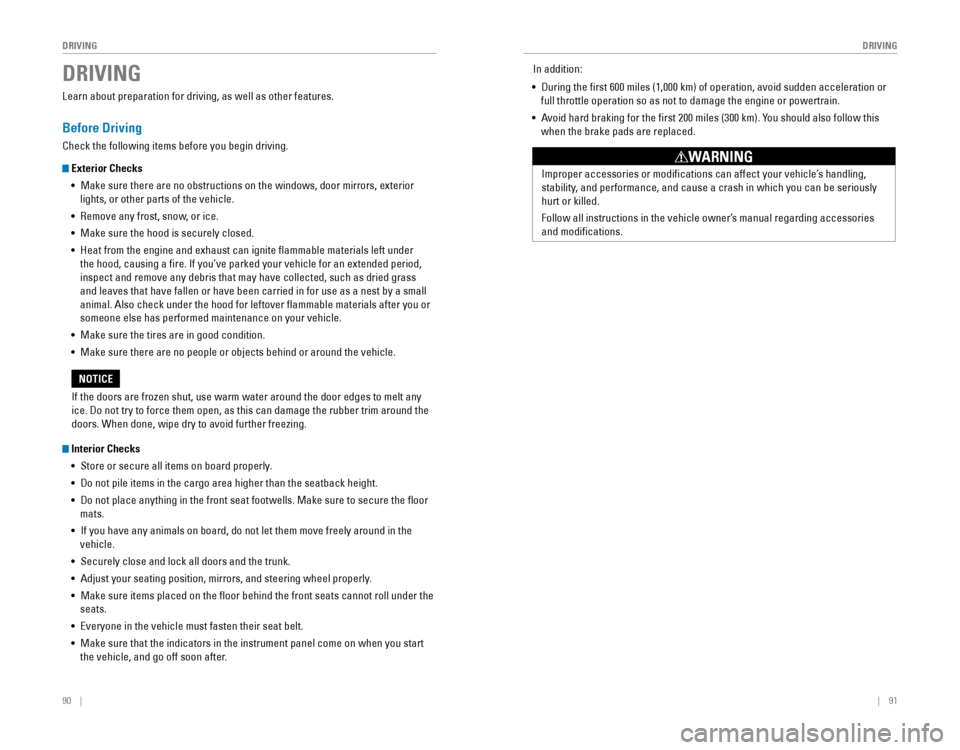
Learn about preparation for driving, as well as other features.
Before Driving
Check the following items before you begin driving.
Exterior Checks
• Make sure there are no obstructions on the windows, door mirrors, exterior
lights, or other parts of the vehicle.
•
remove any frost, snow, or ice.
• Make sure the hood is securely closed.
• Heat from the engine and exhaust can ignite flammable materials left u\
nder
the hood, causing a fire. If you’ve parked your vehicle for an exte\
nded period,
inspect and remove any debris that may have collected, such as dried grass
and leaves that have fallen or have been carried in for use as a nest by\
a small
animal. Also check under the hood for leftover flammable materials aft\
er you or
someone else has performed maintenance on your vehicle.
• Make sure the tires are in good condition.
• Make sure there are no people or objects behind or around the vehicle.
Interior Checks
• Store or secure all items on board properly.
• Do not pile items in the cargo area higher than the seatback height.
• Do not place anything in the front seat footwells. Make sure to secure t\
he floor
mats.
• If you have any animals on board, do not let them move freely around in \
the
vehicle.
• Securely close and lock all doors and the trunk.
• Adjust your seating position, mirrors, and steering wheel properly.
• Make sure items placed on the floor behind the front seats cannot roll\
under the
seats.
•
everyone in the vehicle must fasten their seat belt.
• Make sure that the indicators in the instrument panel come on when you s\
tart
the vehicle, and go off soon after.
If the doors are frozen shut, use warm water around the door edges to me\
lt any
ice. Do not try to force them open, as this can damage the rubber trim a\
round the
doors. When done, wipe dry to avoid further freezing.
NOTICE In addition:
• During the first 600 miles (1,000 km) of operation, avoid sudden acc\
eleration or
full throttle operation so as not to damage the engine or powertrain.
• Avoid hard braking for the first 200 miles (300 km). You should also follow this
when the brake pads are replaced.
Improper accessories or modifications can affect your vehicle’s handling,
stability, and performance, and cause a crash in which you can be seriously
hurt or killed.
Follow all instructions in the vehicle owner’s manual regarding accessories
and modifications.
WARNING
Page 51 of 82
94 || 95
DRIVING
DRIVING
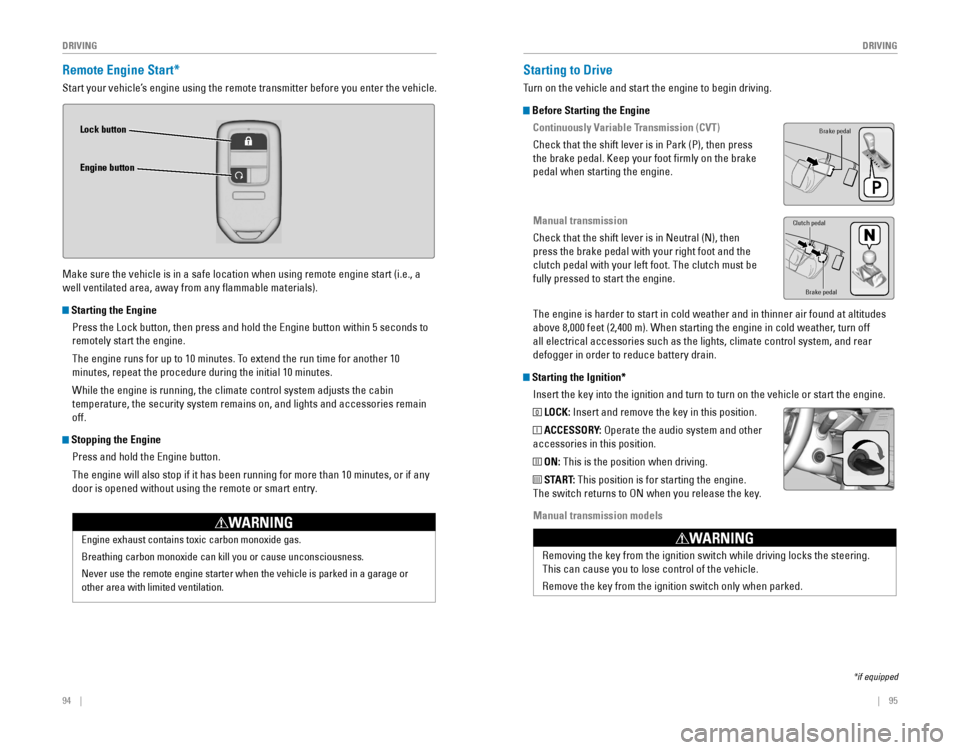
Remote Engine Start*
Start your vehicle’s engine using the remote transmitter before you enter the vehicle.
Make sure the vehicle is in a safe location when using remote engine start (i.e., a
well ventilated area, away from any flammable materials).
Starting the Engine
Press the Lock button, then press and hold the engine button within 5 seconds to
remotely start the engine.
The engine runs for up to 10 minutes. To extend the run time for another 10
minutes, repeat the procedure during the initial 10 minutes.
While the engine is running, the climate control system adjusts the cabi\
n
temperature, the security system remains on, and lights and accessories remain
off.
Stopping the Engine
Press and hold the engine button.
The engine will also stop if it has been running for more than 10 minute\
s, or if any
door is opened without using the remote or smart entry.
engine exhaust contains toxic carbon monoxide gas.
Breathing carbon monoxide can kill you or cause unconsciousness.
Never use the remote engine starter when the vehicle is parked in a gara\
ge or
other area with limited ventilation.
WARNING
Lock button
Engine button
Starting to Drive
Turn on the vehicle and start the engine to begin driving.
Before Starting the Engine
Continuously Variable Transmission (CVT)
Check that the shift lever is in Park (P), then press
the brake pedal. Keep your foot firmly on the brake
pedal when starting the engine.
Manual transmission
Check that the shift lever is in Neutral (N), then
press the brake pedal with your right foot and the
clutch pedal with your left foot. The clutch must be
fully pressed to start the engine.
The engine is harder to start in cold weather and in thinner air found a\
t altitudes
above 8,000 feet (2,400 m). When starting the engine in cold weather, turn off
all electrical accessories such as the lights, climate control system, a\
nd rear
defogger in order to reduce battery drain.
Starting the Ignition*Insert the key into the ignition and turn to turn on the vehicle or star\
t the engine.
0 LOCK: Insert and remove the key in this position.
I ACCESSORY: operate the audio system and other
accessories in this position.
II ON: This is the position when driving.
III START: This position is for starting the engine.
The switch returns to oN when you release the key.
Manual transmission models
*if equipped
Brake pedal
Brake pedal
Clutch pedal
removing the key from the ignition switch while driving locks the steerin\
g.
This can cause you to lose control of the vehicle.
remove the key from the ignition switch only when parked.
WARNING
Page 52 of 82
96 || 97
DRIVING
DRIVING
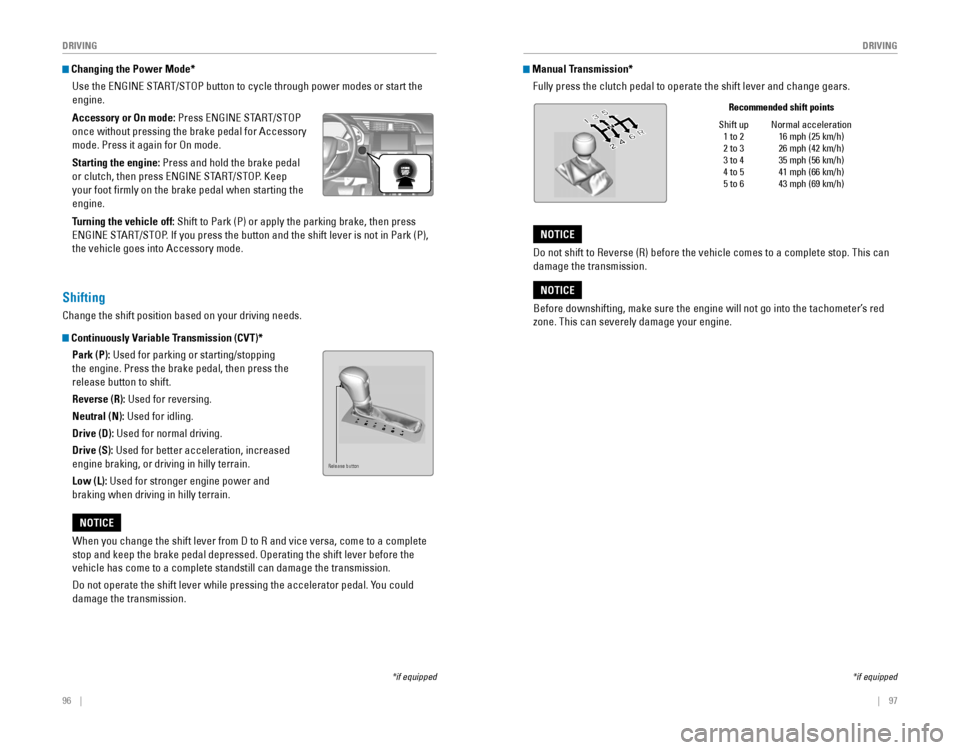
Changing the Power Mode*
Use the
eNGINe STArT/SToP button to cycle through power modes or start the
engine.
Accessory or On mode:
Press eNGINe STArT/SToP
once without pressing the brake pedal for Accessory
mode. Press it again for on mode.
Starting the engine: Press and hold the brake pedal
or clutch, then press eNGINe STArT/SToP. Keep
your foot firmly on the brake pedal when starting the
engine.
Turning the vehicle off: Shift to Park (P) or apply the parking brake, then press
eNGINe STArT/SToP. If you press the button and the shift lever is not in Park (P),
the vehicle goes into Accessory mode.
*if equipped
When you change the shift lever from D to r and vice versa, come to a complete
stop and keep the brake pedal depressed. operating the shift lever before the
vehicle has come to a complete standstill can damage the transmission.
Do not operate the shift lever while pressing the accelerator pedal. You could
damage the transmission.
NOTICE
Shifting
Change the shift position based on your driving needs.
Continuously Variable Transmission (CVT)*Park (P): Used for parking or starting/stopping
the engine. Press the brake pedal, then press the
release button to shift.
Reverse (R): Used for reversing.
Neutral (N): Used for idling.
Drive (D): Used for normal driving.
Drive (S): Used for better acceleration, increased
engine braking, or driving in hilly terrain.
Low (L): Used for stronger engine power and
braking when driving in hilly terrain.
Release button
Manual Transmission*Fully press the clutch pedal to operate the shift lever and change gears\
.
*if equipped
Shift up 1 to 2
2 to 3
3 to 4
4 to 5
5 to 6 Normal acceleration
16 mph (25 km/h)
26 mph (42 km/h)
35 mph (56 km/h)
41 mph (66 km/h)
43 mph (69 km/h)
Recommended shift points
Before downshifting, make sure the engine will not go into the tachomete\
r’s red
zone. This can severely damage your engine.
NOTICE
Do not shift to reverse (r) before the vehicle comes to a complete stop. This can
damage the transmission.
NOTICE
Page 53 of 82
98 || 99
DRIVING
DRIVING
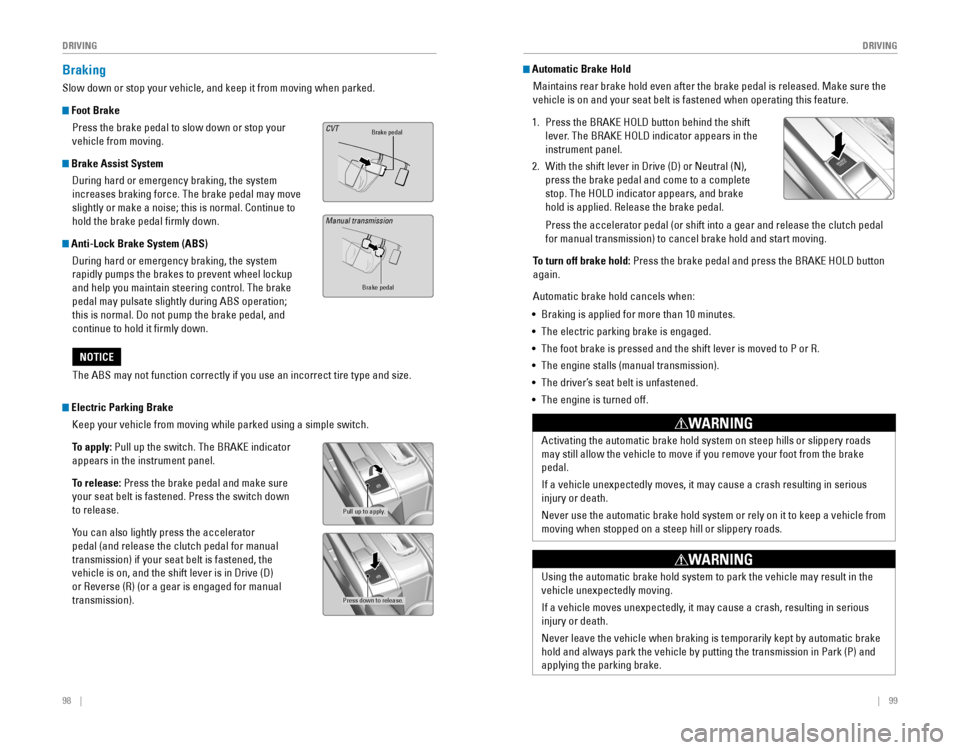
Braking
Slow down or stop your vehicle, and keep it from moving when parked.
Foot Brake
Press the brake pedal to slow down or stop your
vehicle from moving.
Brake Assist System During hard or emergency braking, the system
increases braking force. The brake pedal may move
slightly or make a noise; this is normal. Continue to
hold the brake pedal firmly down.
Anti-Lock Brake System (ABS) During hard or emergency braking, the system
rapidly pumps the brakes to prevent wheel lockup
and help you maintain steering control. The brake
pedal may pulsate slightly during ABS operation;
this is normal. Do not pump the brake pedal, and
continue to hold it firmly down.
Brake pedalCVT
Brake pedal
The ABS may not function correctly if you use an incorrect tire type and\
size.
NOTICE
Electric Parking Brake Keep your vehicle from moving while parked using a simple switch.
To apply:
Pull up the switch. The BrAKe indicator
appears in the instrument panel.
To release: Press the brake pedal and make sure
your seat belt is fastened. Press the switch down
to release.
You can also lightly press the accelerator
pedal (and release the clutch pedal for manual
transmission) if your seat belt is fastened, the
vehicle is on, and the shift lever is in Drive (D)
or reverse (r) (or a gear is engaged for manual
transmission).
Pull up to apply.
Press down to release.
Manual transmission
Automatic Brake Hold Maintains rear brake hold even after the brake pedal is released. Make sure the
vehicle is on and your seat belt is fastened when operating this feature\
.
1. Press the BrAKe HoLD button behind the shift
lever. The BrAKe HoLD indicator appears in the
instrument panel.
2. With the shift lever in Drive (D) or Neutral (N),
press the brake pedal and come to a complete
stop. The HoLD indicator appears, and brake
hold is applied. release the brake pedal.
Press the accelerator pedal (or shift into a gear and release the clutc\
h pedal
for manual transmission) to cancel brake hold and start moving.
To turn off brake hold:
Press the brake pedal and press the BrAKe HoLD button
again.
Automatic brake hold cancels when:
• Braking is applied for more than 10 minutes.
• The electric parking brake is engaged.
•
The foot brake is pressed and the shift lever is moved to P or r.
• The engine stalls (manual transmission).
• The driver’s seat belt is unfastened.
• The engine is turned off.
Activating the automatic brake hold system on steep hills or slippery ro\
ads
may still allow the vehicle to move if you remove your foot from the bra\
ke
pedal.
If a vehicle unexpectedly moves, it may cause a crash resulting in serio\
us
injury or death.
Never use the automatic brake hold system or rely on it to keep a vehicl\
e from
moving when stopped on a steep hill or slippery roads.
WARNING
Using the automatic brake hold system to park the vehicle may result in \
the
vehicle unexpectedly moving.
If a vehicle moves unexpectedly, it may cause a crash, resulting in serious
injury or death.
Never leave the vehicle when braking is temporarily kept by automatic brake
hold and always park the vehicle by putting the transmission in Park (P\
) and
applying the parking brake.
WARNING
Page 54 of 82

100 || 101
DRIVING
DRIVING
Eco Assist™ System*
Can help improve fuel economy by adjusting the performance of the engine\
,
transmission, climate control system, and cruise control.
ECON Button
Press the eCoN button behind the shift lever to
turn the system on or off. The eCoN Mode indicator
appears when the system is turned on.
Ambient Meter
Color-coded bars change based on your driving
style and brake or accelerator pedal operation.
Green: Fuel-efficient driving
Light green: Moderate acceleration/deceleration
White: Aggressive acceleration/deceleration
*if equipped
Ambient meter
Vehicle Stability Assist (VSA®), aka Electronic Stability Control
(ESC) System
Helps to stabilize the vehicle during cornering if the vehicle turns mor\
e or less
than what was intended. It assists in maintaining traction on slippery s\
urfaces by
regulating engine output and selectively applying the brakes.
Turning VSA On or Off
Press and hold the vSA oFF button until you hear a
beep to turn vSA on or off. The vSA oFF indicator
appears when the system is off.
Traction control stops fully functioning, which may
make it easier when trying to free your vehicle if it is
stuck in mud or snow.
vSA is turned on every time you start the engine, even if you previously \
turned it
off. If you turn vSA off, your vehicle has normal braking and cornering ability, but
traction and stability enhancement become less effective.
VSA OFF
indicator
Cruise Control*
Maintain a constant vehicle speed without having to keep your foot on th\
e
accelerator pedal. Use cruise control on highways or open roads where yo\
u can
travel at a constant speed with little acceleration or deceleration.
*if equipped
reS/+ button
CANCeL button
CrUISe button
-/SeT button
Improper use of cruise control can lead to a crash.
Use cruise control only when traveling on open highways in good weather.
WARNING
Activating and Setting the Vehicle Speed
1. Press the CrUISe button. The CrUISe MAIN
indicator appears.
2. Accelerate to the desired speed (above 25 mph/
40 km/h). Take your foot off the pedal and press
the -/SeT button to set the speed. The CrUISe
CoNTroL indicator appears.
Adjusting the Vehicle Speed
Press the reS/+ button to increase speed, or the -/SeT
button to decrease speed.
each time you press the button, the vehicle speed is
increased or decreased by about 1 mph (1.6 km/h). If you
keep the button pressed, the vehicle speed increases or
decreases until you release it.
Canceling Cruise Control
Press the CANCeL button or the brake pedal. The CrUISe
CoNTroL indicator goes off.
After cruise control has been canceled, you can still
resume the prior set speed by pressing reS/+ while
driving at a speed of at least 25 mph (40 km/h).
Press the CrUISe button to turn the system off.