cvt HONDA CIVIC 2016 10.G Quick Guide
[x] Cancel search | Manufacturer: HONDA, Model Year: 2016, Model line: CIVIC, Model: HONDA CIVIC 2016 10.GPages: 82, PDF Size: 5.52 MB
Page 51 of 82
94 || 95
DRIVING
DRIVING
Remote Engine Start*
Start your vehicle’s engine using the remote transmitter before you enter the vehicle.
Make sure the vehicle is in a safe location when using remote engine start (i.e., a
well ventilated area, away from any flammable materials).
Starting the Engine
Press the Lock button, then press and hold the engine button within 5 seconds to
remotely start the engine.
The engine runs for up to 10 minutes. To extend the run time for another 10
minutes, repeat the procedure during the initial 10 minutes.
While the engine is running, the climate control system adjusts the cabi\
n
temperature, the security system remains on, and lights and accessories remain
off.
Stopping the Engine
Press and hold the engine button.
The engine will also stop if it has been running for more than 10 minute\
s, or if any
door is opened without using the remote or smart entry.
engine exhaust contains toxic carbon monoxide gas.
Breathing carbon monoxide can kill you or cause unconsciousness.
Never use the remote engine starter when the vehicle is parked in a gara\
ge or
other area with limited ventilation.
WARNING
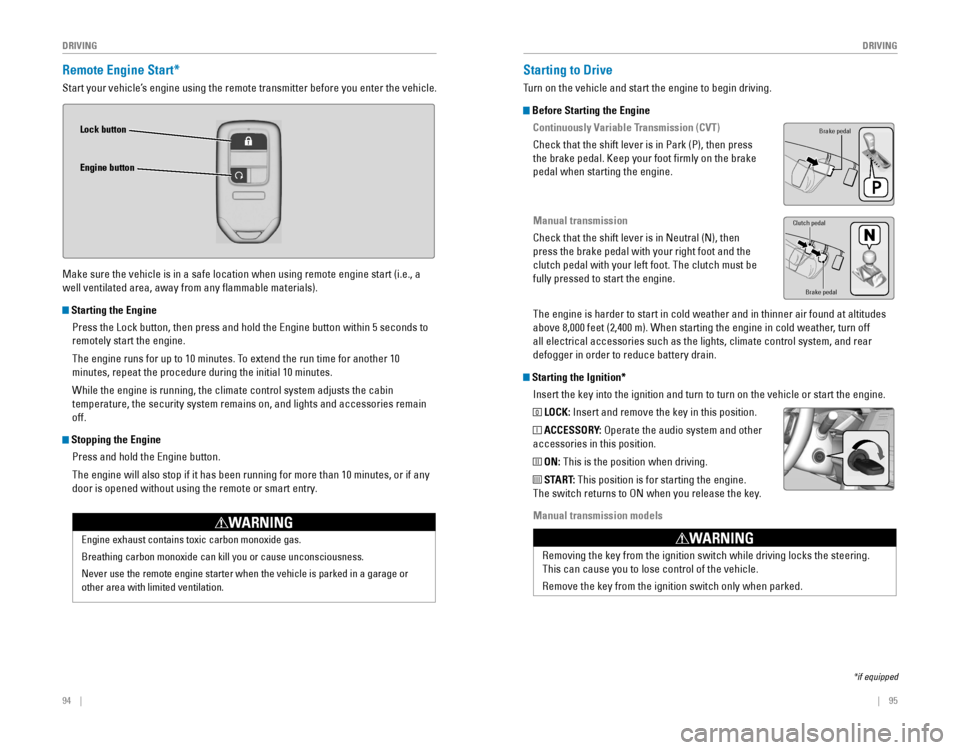
Lock button
Engine button
Starting to Drive
Turn on the vehicle and start the engine to begin driving.
Before Starting the Engine
Continuously Variable Transmission (CVT)
Check that the shift lever is in Park (P), then press
the brake pedal. Keep your foot firmly on the brake
pedal when starting the engine.
Manual transmission
Check that the shift lever is in Neutral (N), then
press the brake pedal with your right foot and the
clutch pedal with your left foot. The clutch must be
fully pressed to start the engine.
The engine is harder to start in cold weather and in thinner air found a\
t altitudes
above 8,000 feet (2,400 m). When starting the engine in cold weather, turn off
all electrical accessories such as the lights, climate control system, a\
nd rear
defogger in order to reduce battery drain.
Starting the Ignition*Insert the key into the ignition and turn to turn on the vehicle or star\
t the engine.
0 LOCK: Insert and remove the key in this position.
I ACCESSORY: operate the audio system and other
accessories in this position.
II ON: This is the position when driving.
III START: This position is for starting the engine.
The switch returns to oN when you release the key.
Manual transmission models
*if equipped
Brake pedal
Brake pedal
Clutch pedal
removing the key from the ignition switch while driving locks the steerin\
g.
This can cause you to lose control of the vehicle.
remove the key from the ignition switch only when parked.
WARNING
Page 52 of 82
96 || 97
DRIVING
DRIVING
Changing the Power Mode*
Use the
eNGINe STArT/SToP button to cycle through power modes or start the
engine.
Accessory or On mode:
Press eNGINe STArT/SToP
once without pressing the brake pedal for Accessory
mode. Press it again for on mode.
Starting the engine: Press and hold the brake pedal
or clutch, then press eNGINe STArT/SToP. Keep
your foot firmly on the brake pedal when starting the
engine.
Turning the vehicle off: Shift to Park (P) or apply the parking brake, then press
eNGINe STArT/SToP. If you press the button and the shift lever is not in Park (P),
the vehicle goes into Accessory mode.
*if equipped
When you change the shift lever from D to r and vice versa, come to a complete
stop and keep the brake pedal depressed. operating the shift lever before the
vehicle has come to a complete standstill can damage the transmission.
Do not operate the shift lever while pressing the accelerator pedal. You could
damage the transmission.
NOTICE
Shifting
Change the shift position based on your driving needs.
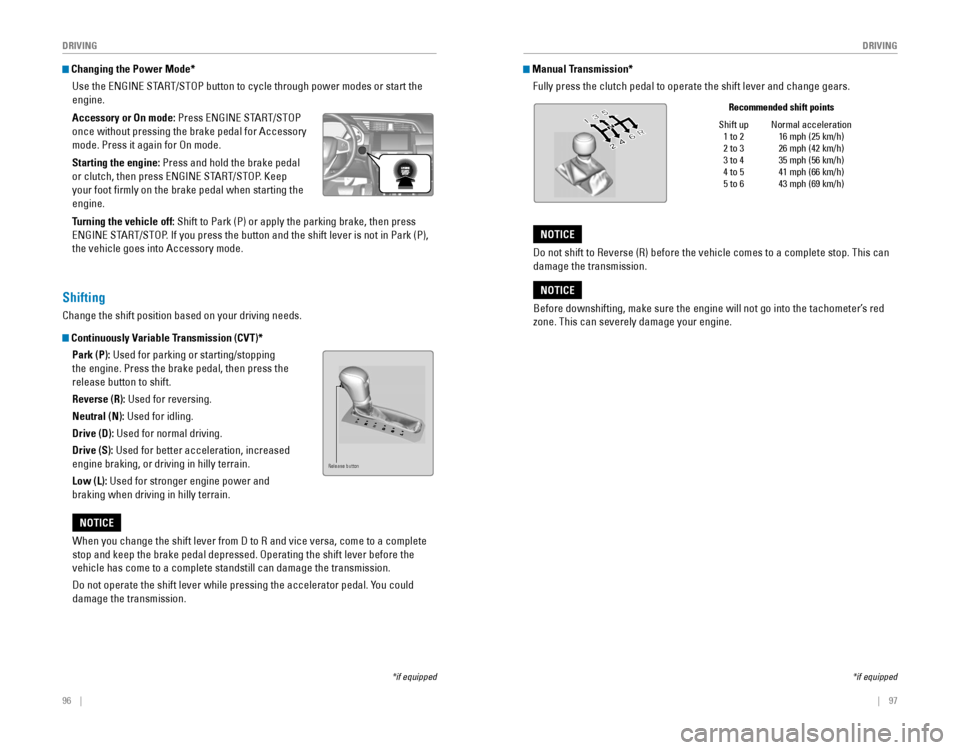
Continuously Variable Transmission (CVT)*Park (P): Used for parking or starting/stopping
the engine. Press the brake pedal, then press the
release button to shift.
Reverse (R): Used for reversing.
Neutral (N): Used for idling.
Drive (D): Used for normal driving.
Drive (S): Used for better acceleration, increased
engine braking, or driving in hilly terrain.
Low (L): Used for stronger engine power and
braking when driving in hilly terrain.
Release button
Manual Transmission*Fully press the clutch pedal to operate the shift lever and change gears\
.
*if equipped
Shift up 1 to 2
2 to 3
3 to 4
4 to 5
5 to 6 Normal acceleration
16 mph (25 km/h)
26 mph (42 km/h)
35 mph (56 km/h)
41 mph (66 km/h)
43 mph (69 km/h)
Recommended shift points
Before downshifting, make sure the engine will not go into the tachomete\
r’s red
zone. This can severely damage your engine.
NOTICE
Do not shift to reverse (r) before the vehicle comes to a complete stop. This can
damage the transmission.
NOTICE
Page 53 of 82
98 || 99
DRIVING
DRIVING
Braking
Slow down or stop your vehicle, and keep it from moving when parked.
Foot Brake
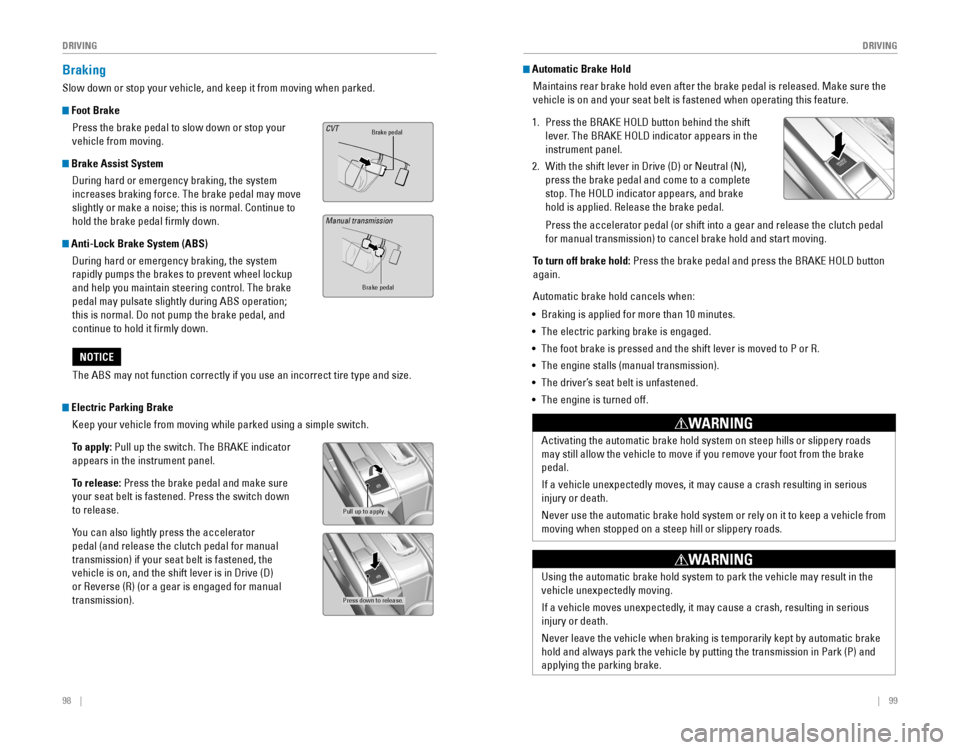
Press the brake pedal to slow down or stop your
vehicle from moving.
Brake Assist System During hard or emergency braking, the system
increases braking force. The brake pedal may move
slightly or make a noise; this is normal. Continue to
hold the brake pedal firmly down.
Anti-Lock Brake System (ABS) During hard or emergency braking, the system
rapidly pumps the brakes to prevent wheel lockup
and help you maintain steering control. The brake
pedal may pulsate slightly during ABS operation;
this is normal. Do not pump the brake pedal, and
continue to hold it firmly down.
Brake pedalCVT
Brake pedal
The ABS may not function correctly if you use an incorrect tire type and\
size.
NOTICE
Electric Parking Brake Keep your vehicle from moving while parked using a simple switch.
To apply:
Pull up the switch. The BrAKe indicator
appears in the instrument panel.
To release: Press the brake pedal and make sure
your seat belt is fastened. Press the switch down
to release.
You can also lightly press the accelerator
pedal (and release the clutch pedal for manual
transmission) if your seat belt is fastened, the
vehicle is on, and the shift lever is in Drive (D)
or reverse (r) (or a gear is engaged for manual
transmission).
Pull up to apply.
Press down to release.
Manual transmission
Automatic Brake Hold Maintains rear brake hold even after the brake pedal is released. Make sure the
vehicle is on and your seat belt is fastened when operating this feature\
.
1. Press the BrAKe HoLD button behind the shift
lever. The BrAKe HoLD indicator appears in the
instrument panel.
2. With the shift lever in Drive (D) or Neutral (N),
press the brake pedal and come to a complete
stop. The HoLD indicator appears, and brake
hold is applied. release the brake pedal.
Press the accelerator pedal (or shift into a gear and release the clutc\
h pedal
for manual transmission) to cancel brake hold and start moving.
To turn off brake hold:
Press the brake pedal and press the BrAKe HoLD button
again.
Automatic brake hold cancels when:
• Braking is applied for more than 10 minutes.
• The electric parking brake is engaged.
•
The foot brake is pressed and the shift lever is moved to P or r.
• The engine stalls (manual transmission).
• The driver’s seat belt is unfastened.
• The engine is turned off.
Activating the automatic brake hold system on steep hills or slippery ro\
ads
may still allow the vehicle to move if you remove your foot from the bra\
ke
pedal.
If a vehicle unexpectedly moves, it may cause a crash resulting in serio\
us
injury or death.
Never use the automatic brake hold system or rely on it to keep a vehicl\
e from
moving when stopped on a steep hill or slippery roads.
WARNING
Using the automatic brake hold system to park the vehicle may result in \
the
vehicle unexpectedly moving.
If a vehicle moves unexpectedly, it may cause a crash, resulting in serious
injury or death.
Never leave the vehicle when braking is temporarily kept by automatic brake
hold and always park the vehicle by putting the transmission in Park (P\
) and
applying the parking brake.
WARNING
Page 62 of 82

116 || 117
HANDLING THE UNEXPECTED
HANDLING THE UNEXPECTED
Overheating
If the temperature gauge pointer is at the H mark, the engine suddenly l\
oses power,
or steam or spray comes out from under the hood, your engine is overheat\
ing.
1. Immediately park the vehicle in a safe place. Turn
off all accessories and turn on the hazard warning
lights.
2. If steam or spray is not present: Keep the engine
running and open the hood.
If steam or spray is present: Turn off the engine and
wait until it subsides. Then, open the hood.
3. Check that the cooling fan is operating and stop the engine once the tem\
perature
gauge needle comes down. If the cooling fan is not operating, immediatel\
y stop
the engine.
4. once the engine has cooled down, inspect the coolant level and check the \
cooling system components for leaks. If the coolant level in the expansi\
on tank
is low, or no coolant is in the tank, check that the radiator is cool. Cover t\
he
expansion tank cap with a heavy cloth and open the cap. Add coolant unti\
l it
reaches the MAX mark, and put the cap back on.
once the engine has cooled sufficiently, restart it and check the temperature gauge.
If the temperature gauge pointer has gone down, resume driving. If it ha\
s not gone
down, contact a dealer for repairs.
MAX
Expansion tankMIN
Steam and spray from an overheated engine can seriously scald you.
Do not open the hood if steam is coming out.
WARNING
removing the radiator cap while the engine is hot can cause the coolant t\
o
spray out, seriously scalding you.
Always let the engine and radiator cool down before removing the radiato\
r cap.
WARNING
Continuing to drive with the temperature gauge pointer at the H mark may\
damage
the engine.
NOTICE
Emergency Engine Stop*
The eNGINe STArT/SToP button may be used to stop the engine due to an
emergency situation even while driving. If you must stop the engine, cho\
ose one of
the following operations:
•
Press and hold the eNGINe STArT/SToP button for
two seconds, or
•
Firmly press the eNGINe STArT/SToP button two
times.
The steering wheel will not lock. Because turning off the engine also di\
sables the
power assist the engine provides to the steering and braking systems, it\
will require
significantly more physical effort and time to steer and slow the vehi\
cle. Downshift
gears and use both feet on the brake pedal, if necessary, to slow the vehicle and
stop immediately in a safe place
Do not press the button while driving unless it is absolutely necessary \
for the engine
to be switched off.
*if equipped
Emergency Towing
Call a professional towing service if you need to tow your vehicle.
Flat bed equipment: The operator loads your vehicle on the back of a tru\
ck. This is
the best way to transport your vehicle.
Wheel lift equipment: The tow truck uses two pivoting arms that go under the front
tires and lift them off the ground. The rear tires remain on the ground.\
This is an
acceptable way to tow your vehicle.
For CvT models: If you cannot shift the transmission or turn on the engine, your
vehicle must be transported with the front wheels off the ground. Make s\
ure the
parking brake is released. If you cannot release the parking brake, your\
vehicle must
be transported by flat bed equipment.
Trying to lift or tow your vehicle by the bumpers will cause serious dama\
ge. The
bumpers are not designed to support the vehicle’s weight.
Improper towing such as towing behind a motorhome or other motor vehicle\
can
damage the transmission.
NOTICE
Page 81 of 82
154 || 155
INDEX
INDEX
INDEX
ABS .............................................................25ACC .......................................................24, 27
Accessory Power Socket ...............................52Adaptive Cruise Control (ACC) with Low Speed Follow (LSF) ...................24, 102Address .............................................................85
Advanced Airbags .............................................8Aha™ radio ......................................................64Airbags ...............................................................8
Airbag System Components .......................12
Airbag System Indicators ...........................10
Ambient Meter ................................................ 100
Android Auto™
.................................................66
Anti-Lock Brake System (ABS) ................25, 98
Apple CarPlay® .................................................65
Audio Commands ...........................................153Audio operation ...............................................52Aha™ radio ..................................................64
Android Auto™ .............................................66
Apple CarPlay® .............................................65
Bluetooth® Audio ...................................61, 71
Color Audio System .....................................57
Display Audio ................................................62FM/AM radio ..........................................58, 67
HondaLink™ ..................................................63
iPod® .......................................................59, 69
Pandora® .......................................................72
SiriusXM® radio ...........................................68Sound .............................................................56
Steering Wheel Controls .............................54
USB Flash Drive ......................................60, 70
USB Port ........................................................52
Wi-Fi Connection ..........................................64
Wireless Charger .........................................53
Automatic brake hold ................................27, 99Automatic Dimming rearview Mirror ...........44Automatic rain-Sensing Wipers ...................39Battery ...........................................................138
Bluetooth® Audio .......................................61, 71
Bluetooth® Audio Commands ......................153
Bluetooth® HandsFreeLink® (HFL) .................73e-Mail .............................................................81
HFL Controls ............................................73, 76
HondaLink™ Assist ......................................80
Making a Call ..........................................75, 79
Pairing a Phone ......................................74, 78
Phonebook ..............................................75, 79
Siri® eyes Free ..............................................82
SMS Text Messaging ..................................81
Speed Dial ...............................................75, 80
Talk Button Tips ............................................77
Brake Assist System ........................................ 98
Brake/Clutch Fluid .......................................... 137Brake depress
..................................................26
Brake system ..............................................24, 25Braking .............................................................98
Brightness Control ...........................................37
Carbon Monoxide Gas .......................................4
Changing a Flat Tire
.......................................120
Changing Settings ............................................49
Charging system ............................................... 24
Childproof Door Locks
.....................................34
Child Safety .......................................................14
Child Seat ..........................................................16
Adding Security with a Tether ...................19
LATCH-Compatible Child Seat ....................17
Climate Control Commands ..........................152
Climate Control System ...................................46Clock .............................................................51
Collision Mitigation Braking System™ (CMBS™)
...................................25, 106
Color Audio System .........................................57
Condition Indicators ........................................26
Contact Us .......................................................150Continuously variable Transmission (CvT) ...96
Cruise Control ...........................................27, 101
Customer Information ....................................149
Customized Features
.......................................50Dashboard, Ceiling, and other Controls .........2
Destination ........................................................85
Dialing a Number .......................................75, 79
Display Audio ....................................................62
Door Mirrors .....................................................44Door operation .................................................34Doors .............................................................32
Door/trunk open ...............................................26DoT Tire Quality Grading ..............................144
Driver Information Interface ..........................29Driving .............................................................90Adaptive Cruise Control (ACC) with Low Speed Follow (LSF) .........................102
Braking ...........................................................98
Collision Mitigation Braking System™ (CMBS™)
.........................................106Continuously variable Transmission (CvT) ...................................................96
Cruise Control .............................................101eco Assist™ System ..................................100eNGINe STArT/SToP button .....................96
Ignition ...........................................................95
Lane Keeping Assist System (LKAS) .......104
LaneWatch™ ..............................................108
Manual Transmission ..................................97
Maximum Load Limit ....................................92Multi-view rear Camera ..........................109
Power Mode .................................................96
refueling ......................................................111remote engine Start ....................................94road Departure Mitigation (rDM) ..........105
Shifting ...........................................................96vehicle Stability Assist (vSA®) ................100
Wiper Blades ..............................................139eco Assist™ System ......................................100eCoN Button ...................................................100eCoN mode .......................................................27electric Parking Brake ....................................98electric Power Steering (ePS) .......................25electronic Stability Control (eSC) ................100e-Mail .............................................................81emergency engine Stop ................................117emergency Towing ........................................117engine and Fuel ......................................147, 148engine Coolant................................................ 136engine oil......................................................... 133eNGINe STArT/SToP button .........................96exterior lights ..............................................27, 37
Fastening a Seat Belt ........................................7Flat Tire ...........................................................120
Floor Mats .........................................................41Fluids ...................................................147, 148FM/AM radio ..............................................58, 67FM/AM radio Commands .............................153
Fog lights ...........................................................27
Foot Brake .........................................................98
Frequently Asked Questions ........................149Front Airbags (SrS) ...........................................8
Front Door Inner Handle .................................34
Fuel Information .............................................111
Fuse Locations ................................................ 124
Hang-Up/Back button ................................73, 76
Headlight-Wiper Integration
..........................38Head restraints ................................................42
Heating System ................................................45
HFL Controls ................................................73, 76
High beams .......................................................27
Home Address ..................................................85
HondaLink™ ......................................................63
HondaLink™ Assist ..........................................80Honda roadside Assistance ........................150Hood ...........................................................131Ignition .............................................................95
Immobilizer ........................................................26
Information Display .......................................... 28
Instrument Panel
..............................................23
Interior Lights .................................................... 37
Intermittent Wipers .......................................... 39
iPod
® .......................................................59, 69
iPod® Commands ...........................................153
Jump Starting .................................................114Key .............................................................31
Lane Keeping Assist System (LKAS) ....24, 104 LaneWatch™
..................................................108
Lap/Shoulder Seat Belts ...................................5
LATCH-Compatible Child Seat ........................17
Light Bulbs ............................................... 147, 148
Lights .......................................................27, 37LKAS .............................................................27
Lock Tab .............................................................34Low fuel .............................................................26
Low oil pressure ...............................................24
Low tire pressure .............................................26
Maintenance ................................................... 127
Air Conditioning
..........................................145
Battery .........................................................138
Brake/Clutch Fluid ......................................137engine Coolant ............................................136engine oil .....................................................133
Maintenance Minder™ .............................128
Service Codes .............................................129
Under the Hood ..........................................131
Window Washer Fluid ...............................137
Making a Call ..............................................75, 79
Malfunction indicator lamp ............................25
Malfunction Indicators ....................................24
Manual Seats .................................................... 41
Manual Transmission
......................................97
Map Legend ......................................................88
Master Door Lock Switch ...............................34
Maximum Load Limit ........................................ 92
Mirrors .............................................................44
Moonroof ...........................................................36Multi-view rear Camera ..............................109
Music search ..................................................153
Navigation .........................................................83
Display and Controls ....................................84entering a Destination .................................85
Home Address ..............................................85
Map Legend ..................................................88
Place Category .............................................86recent Places ...............................................86routing ...........................................................88
Saved Places ................................................87
Steering Wheel Controls .............................83
Street Address ..............................................85System Guidance volume ...........................83
Talk Button Tips ............................................83Traffic .............................................................89
Turn-by-turn directions ...............................88
Navigation Commands ..................................152one-Touch Turn Signal ....................................36on/off Indicators ..............................................27opening the Hood ..........................................132overheating..................................................... 116
Pairing a Phone ..........................................74, 78
Pandora® ...........................................................72
Pandora® Commands ....................................153