lock HONDA CIVIC 2017 10.G Owners Manual
[x] Cancel search | Manufacturer: HONDA, Model Year: 2017, Model line: CIVIC, Model: HONDA CIVIC 2017 10.GPages: 601, PDF Size: 32.51 MB
Page 314 of 601
313
uuCustomized Features u
Continued
Features
*1:Default Setting
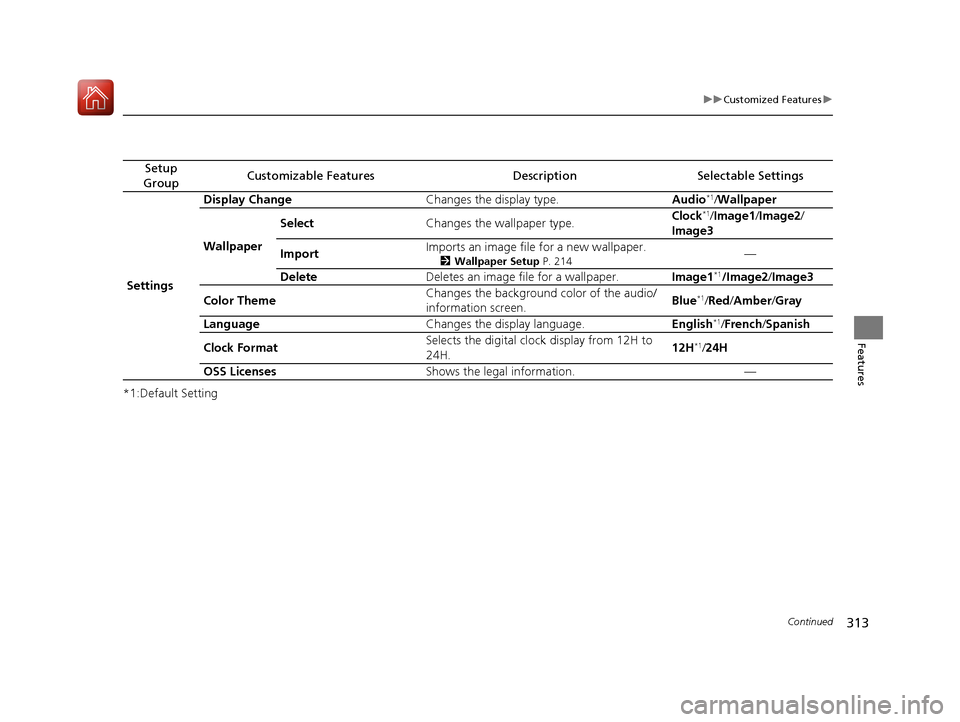
Setup
GroupCustomizable FeaturesDescriptionSelectable Settings
Settings Display Change
Changes the display type. Audio
*1/Wallpaper
Wallpaper Select
Changes the wallpaper type. Clock*1/
Image1/ Image2/
Image3
Import Imports an image file for a new wallpaper.
2
Wallpaper Setup P. 214—
Delete Deletes an image file for a wallpaper. Image1
*1/Image2/Image3
Color Theme Changes the background color of the audio/
information screen.
Blue
*1/
Red /Amber /Gray
Language Changes the display language. English
*1/French /Spanish
Clock Format Selects the digital clock display from 12H to
24H. 12H
*1/
24H
OSS Licenses Shows the legal information. —
17 CIVIC 4D HCM (KA KC KL)-31TBA6100.book 313 ページ 2016年8月31日 水曜日 午後6時5分
Page 317 of 601
316
uuCustomized Features u
Features
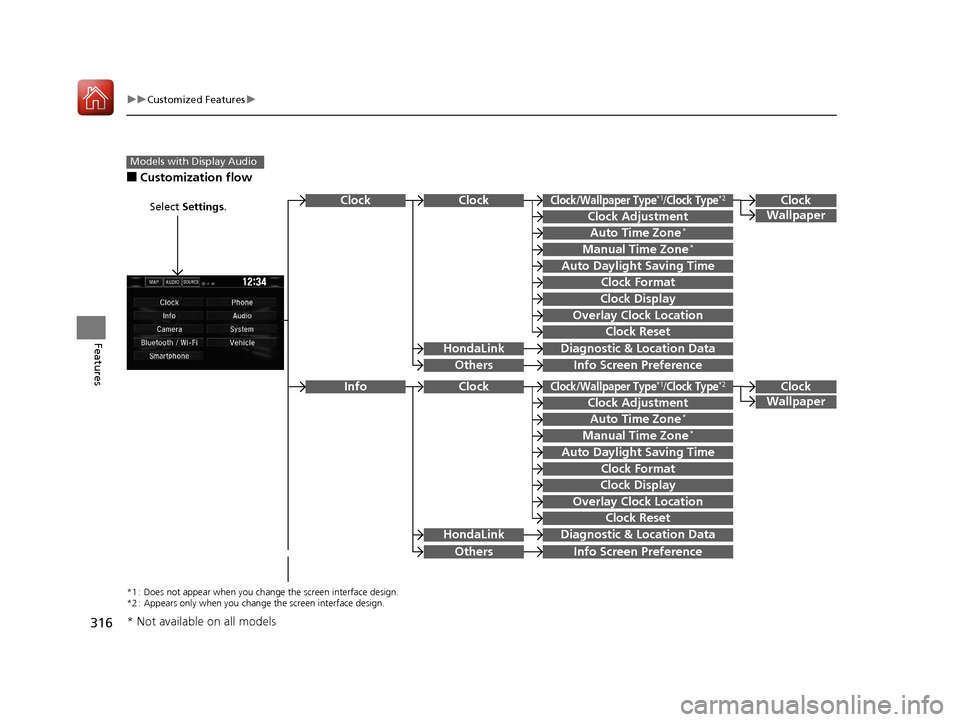
■Customization flow
Models with Display Audio
Select Settings.Clock
Wallpaper
Others
Clock/Wallpaper Type*1/Clock Type*2
Clock Adjustment
Clock Format
ClockClock
Auto Time Zone*
Manual Time Zone*
Auto Daylight Saving Time
Clock Display
Overlay Clock Location
Clock Reset
Info Screen Preference
Clock
Wallpaper
Others
Clock/Wallpaper Type*1/Clock Type*2
Clock Adjustment
Clock Format
Clock
Auto Time Zone*
Manual Time Zone*
Auto Daylight Saving Time
Clock Display
Overlay Clock Location
Clock Reset
Info Screen Preference
Info
HondaLinkDiagnostic & Location Data
HondaLinkDiagnostic & Location Data
*1 : Does not appear when you chang e the screen interface design.
*2 : Appears only when you change the screen interface design.
* Not available on all models
17 CIVIC 4D HCM (KA KC KL)-31TBA6100.book 316 ページ 2016年8月31日 水曜日 午後6時5分
Page 321 of 601
320
uuCustomized Features u
Features
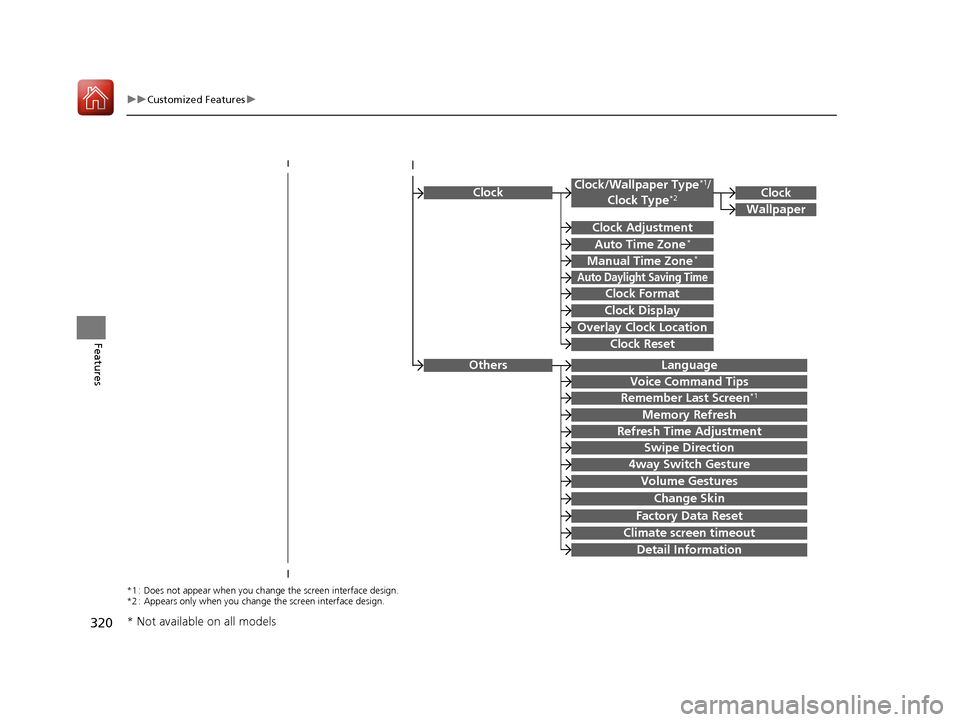
ClockClock/Wallpaper Type*1/
Clock Type*2
Clock Adjustment
Clock Format
Auto Time Zone*
Manual Time Zone*
Auto Daylight Saving Time
Clock Display
Overlay Clock Location
Clock Reset
Clock
Wallpaper
*1 : Does not appear when you chang e the screen interface design.
*2 : Appears only when you change the screen interface design.
OthersLanguage
Voice Command Tips
Remember Last Screen*1
Memory Refresh
Refresh Time Adjustment
Swipe Direction
Change Skin
Factory Data Reset
Climate screen timeout
4way Switch Gesture
Volume Gestures
Detail Information
* Not available on all models
17 CIVIC 4D HCM (KA KC KL)-31TBA6100.book 320 ページ 2016年8月31日 水曜日 午後6時5分
Page 323 of 601
322
uuCustomized Features u
Features
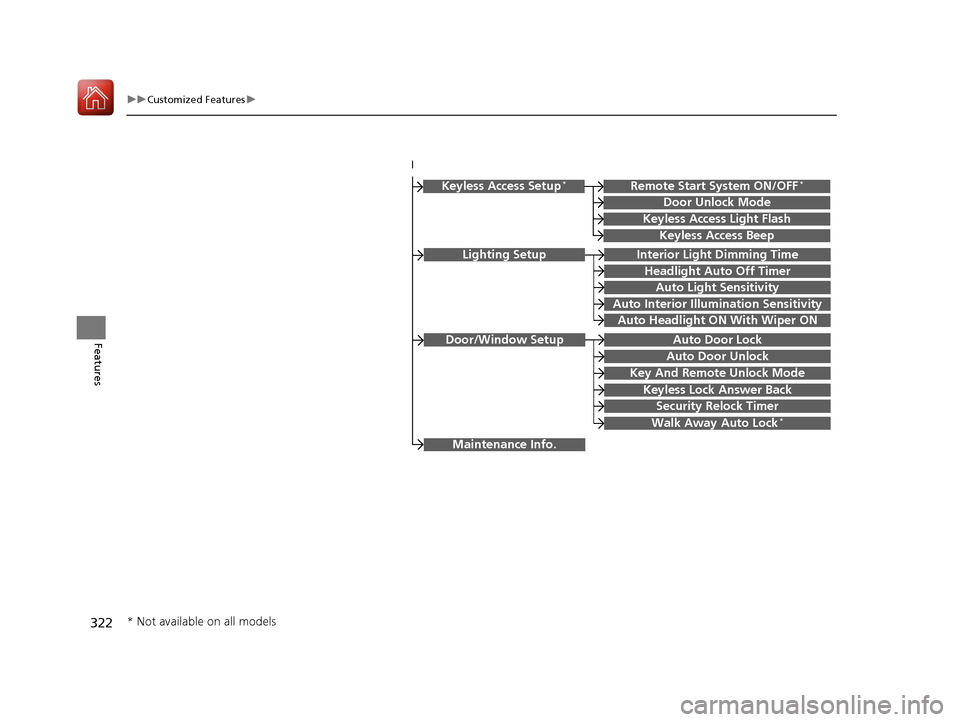
Lighting SetupInterior Light Dimming Time
Headlight Auto Off Timer
Auto Light Sensitivity
Auto Interior Illumination Sensitivity
Auto Door Lock
Key And Remote Unlock Mode
Door/Window Setup
Maintenance Info.
Auto Headlight ON With Wiper ON
Keyless Lock Answer Back
Security Relock Timer
Walk Away Auto Lock*
Keyless Access Setup*
Door Unlock Mode
Keyless Access Light Flash
Keyless Access Beep
Remote Start System ON/OFF*
Auto Door Unlock
* Not available on all models
17 CIVIC 4D HCM (KA KC KL)-31TBA6100.book 322 ページ 2016年8月31日 水曜日 午後6時5分
Page 324 of 601
323
uuCustomized Features u
Continued
Features
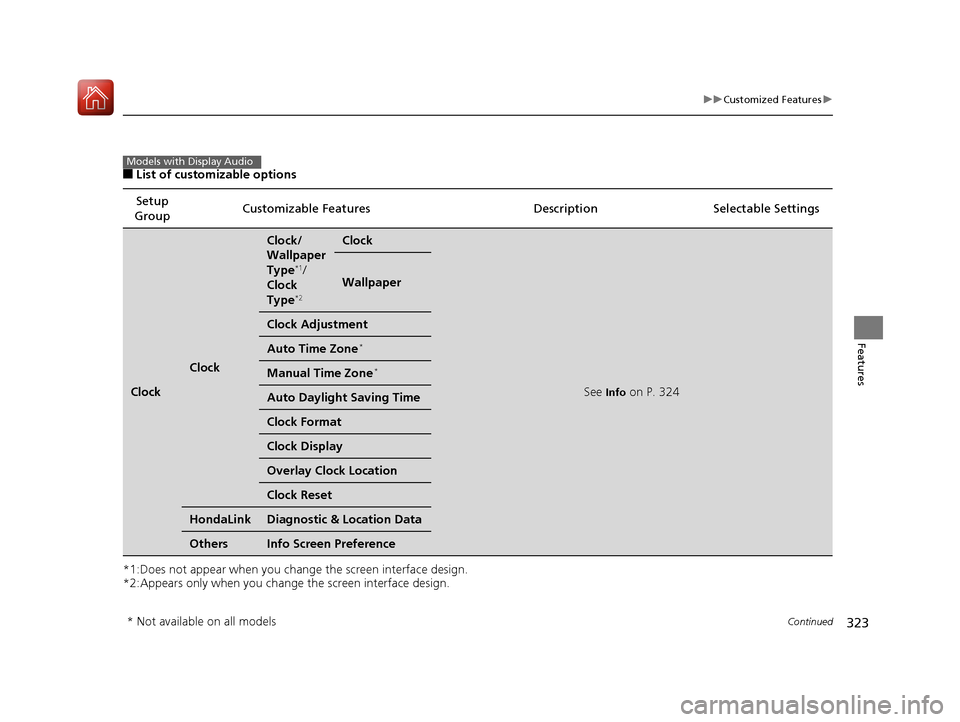
■List of customizable options
*1:Does not appear when you chan ge the screen interface design.
*2:Appears only when you change the screen interface design. Setup
Group Customizable Features
Description Selectable Settings
Clock
Clock
Clock/
Wallpaper
Type
*1/
Clock
Type
*2
Clock
See Info on P. 324
Wallpaper
Clock Adjustment
Auto Time Zone*
Manual Time Zone*
Auto Daylight Saving Time
Clock Format
Clock Display
Overlay Clock Location
Clock Reset
HondaLinkDiagnostic & Location Data
OthersInfo Screen Preference
Models with Display Audio
* Not available on all models
17 CIVIC 4D HCM (KA KC KL)-31TBA6100.book 323 ページ 2016年8月31日 水曜日 午後6時5分
Page 325 of 601
324
uuCustomized Features u
Features
*1:Default Setting
*2:Does not appear when you change the screen interface design.
*3:Appears only when you change the screen interface design.Setup
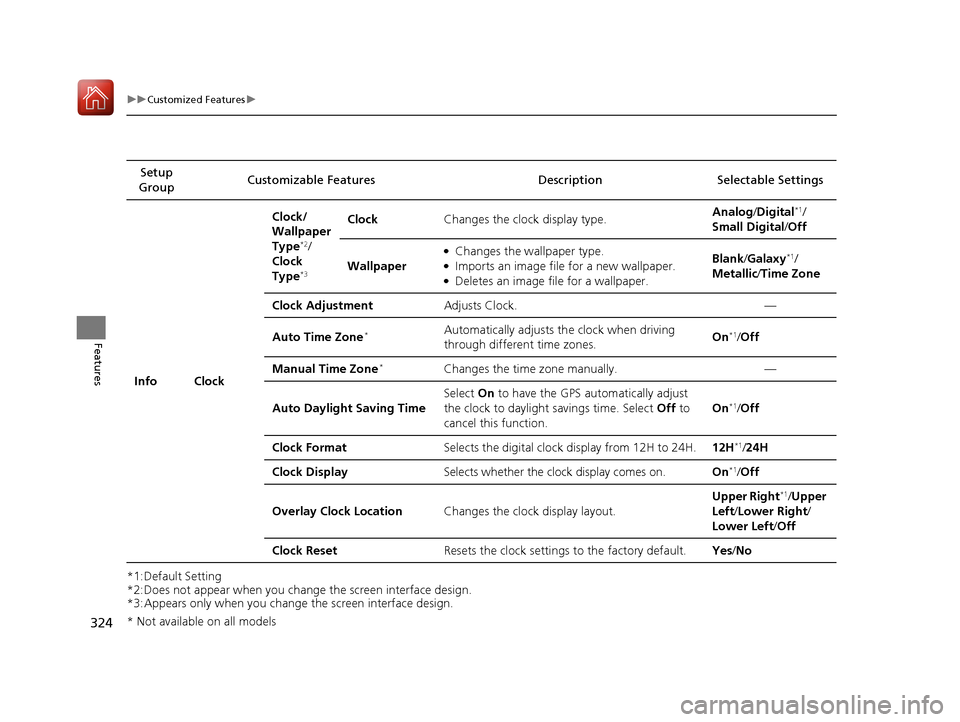
Group Customizable Features Desc
ription Selectable Settings
Info Clock Clock/
Wallpaper
Type
*2/
Clock
Type
*3
Clock Changes the clock display type. Analog
/Digital*1/
Small Digital /Off
Wallpaper
●Changes the wallpaper type.●Imports an image file for a new wallpaper.●Deletes an image file for a wallpaper. Blank
/Galaxy
*1/
Metallic /Time Zone
Clock Adjustment Adjusts Clock. —
Auto Time Zone
*Automatically adjusts th e clock when driving
through different time zones. On*1/
Off
Manual Time Zone
*Changes the time zone manually. —
Auto Daylight Saving Time Select
On to have the GPS automatically adjust
the clock to daylight savings time. Select Off to
cancel this function. On
*1/
Off
Clock Format Selects the digital clock display from 12H to 24H. 12H
*1/24H
Clock Display Selects whether the clock display comes on. On
*1/Off
Overlay Clock Location Changes the clock display layout. Upper Right
*1/
Upper
Left/ Lower Right/
Lower Left /Off
Clock Reset Resets the clock settings to the factory default. Yes/No
* Not available on all models
17 CIVIC 4D HCM (KA KC KL)-31TBA6100.book 324 ページ 2016年8月31日 水曜日 午後6時5分
Page 333 of 601
332
uuCustomized Features u
Features
*1:Default Setting
*2:Does not appear when you change the screen interface design.
*3:Appears only when you change the screen interface design.Setup
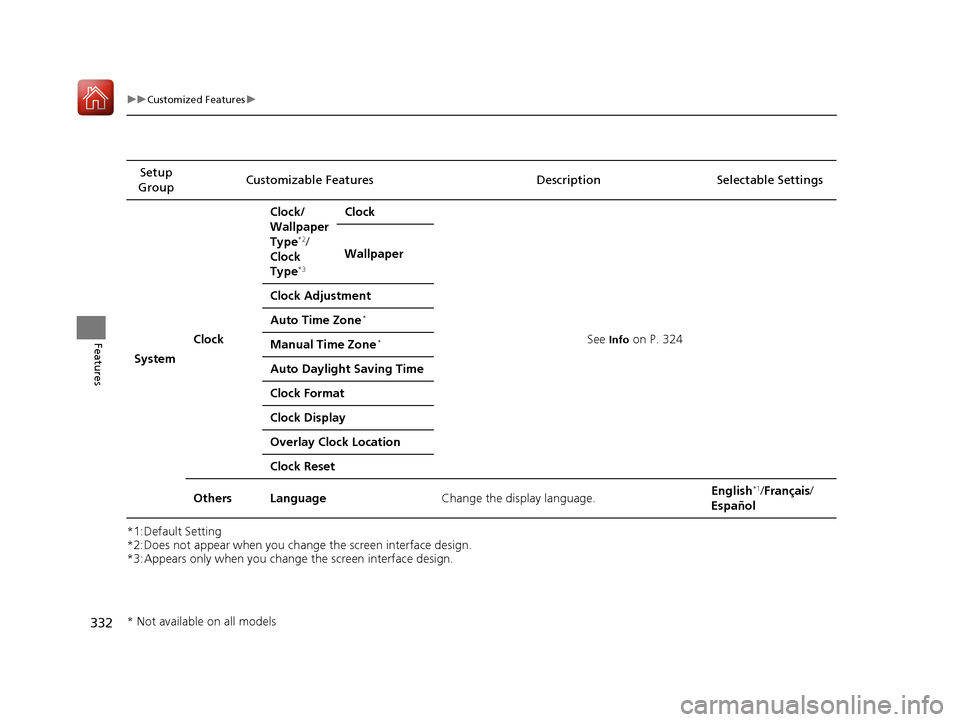
Group Customizable Features Description Selectable Settings
System Clock Clock/
Wallpaper
Type
*2/
Clock
Type
*3
Clock
See
Info on P. 324
Wallpaper
Clock Adjustment
Auto Time Zone
*
Manual Time Zone*
Auto Daylight Saving Time
Clock Format
Clock Display
Overlay Clock Location
Clock Reset
Others Language Change the display language. English
*1/
Français /
Español
* Not available on all models
17 CIVIC 4D HCM (KA KC KL)-31TBA6100.book 332 ページ 2016年8月31日 水曜日 午後6時5分
Page 334 of 601
333
uuCustomized Features u
Continued
Features
*1:Default Setting
*2:Models with the smart entry system have an ENGINE START/STOP button instead of an ignition switch.
*3:Does not appear when you chan ge the screen interface design.
Setup
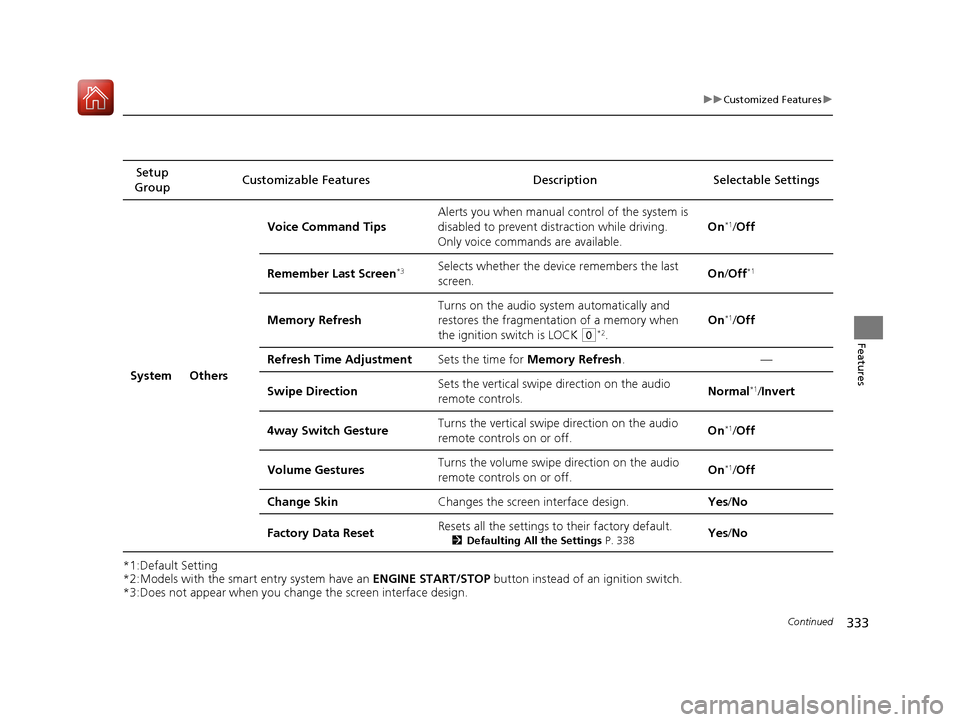
Group Customizable Features Description
Selectable Settings
System Others Voice Command Tips
Alerts you when manual c
ontrol of the system is
disabled to prevent distraction while driving.
Only voice comman ds are available. On
*1/
Off
Remember Last Screen
*3Selects whether the device remembers the last
screen. On
/Off*1
Memory Refresh Turns on the audio system automatically and
restores the fragmentation of a memory when
the ignition switch is LOCK
(0*2.On
*1/
Off
Refresh Time Adjustment Sets the time for Memory Refresh . —
Swipe Direction Sets the vertical swipe
direction on the audio
remote controls. Normal
*1/
Invert
4way Switch Gesture Turns the vertical swipe direction on the audio
remote controls on or off. On
*1/
Off
Volume Gestures Turns the volume swipe
direction on the audio
remote controls on or off. On
*1/
Off
Change Skin Changes the screen interface design. Yes/No
Factory Data Reset Resets all the settings to their factory default.
2
Defaulting All the Settings P. 338Yes/No
17 CIVIC 4D HCM (KA KC KL)-31TBA6100.book 333 ページ 2016年8月31日 水曜日 午後6時5分
Page 337 of 601
336
uuCustomized Features u
Features
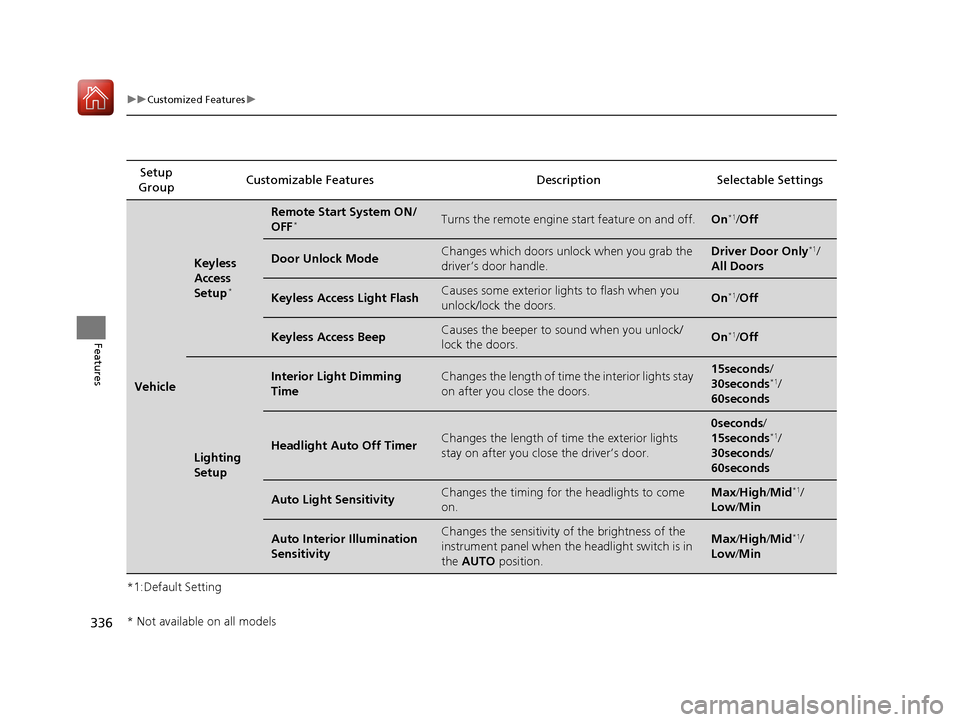
*1:Default SettingSetup
Group Customizable Features Desc
ription Selectable Settings
Vehicle
Keyless
Access
Setup
*
Remote Start System ON/
OFF*Turns the remote engine start feature on and off.On*1/Off
Door Unlock ModeChanges which doors unlock when you grab the
driver’s door handle.Driver Door Only*1/
All Doors
Keyless Access Light FlashCauses some exterior lights to flash when you
unlock/lock the doors.On*1/ Off
Keyless Access BeepCauses the beeper to sound when you unlock/
lock the doors.On*1/Off
Lighting
Setup
Interior Light Dimming
TimeChanges the length of time the interior lights stay
on after you close the doors.15seconds /
30seconds*1/
60seconds
Headlight Auto Off TimerChanges the length of ti me the exterior lights
stay on after you close the driver’s door.
0seconds /
15seconds*1/
30seconds /
60seconds
Auto Light SensitivityChanges the timing for the headlights to come
on.Max /High/ Mid*1/
Low/ Min
Auto Interior Illumination
SensitivityChanges the sensitivity of the brightness of the
instrument panel when the headlight switch is in
the AUTO position.Max/High/ Mid*1/
Low/ Min
* Not available on all models
17 CIVIC 4D HCM (KA KC KL)-31TBA6100.book 336 ページ 2016年8月31日 水曜日 午後6時5分
Page 338 of 601
337
uuCustomized Features u
Features
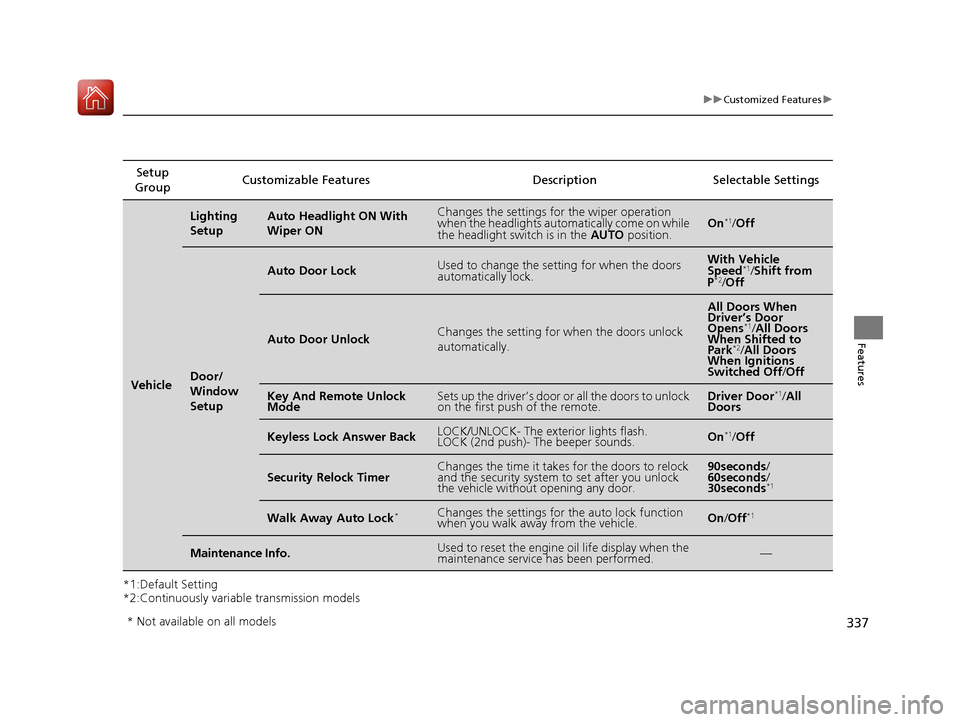
*1:Default Setting
*2:Continuously variable transmission modelsSetup
Group Customizable Features
DescriptionSelectable Settings
Vehicle
Lighting
SetupAuto Headlight ON With
Wiper ONChanges the settings for the wiper operation
when the headlights automatically come on while
the headlight switch is in the AUTO position.On*1/Off
Door/
Window
Setup
Auto Door LockUsed to change the sett ing for when the doors
automatically lock.With Vehicle
Speed*1/ Shift from
P*2/ Off
Auto Door UnlockChanges the setting for when the doors unlock
automatically.
All Doors When
Driver’s Door
Opens
*1/ All Doors
When Shifted to
Park
*2/ All Doors
When Ignitions
Switched Off /Off
Key And Remote Unlock
ModeSets up the driver’s door or all the doors to unlock
on the first push of the remote.Driver Door*1/ All
Doors
Keyless Lock Answer BackLOCK/UNLOCK- The exterior lights flash.
LOCK (2nd push)- The beeper sounds.On*1/ Off
Security Relock TimerChanges the time it takes for the doors to relock
and the security system to set after you unlock
the vehicle without opening any door.90seconds /
60seconds /
30seconds
*1
Walk Away Auto Lock*Changes the settings for the auto lock function
when you walk away from the vehicle.On /Off*1
Maintenance Info.Used to reset the engine oil life display when the
maintenance service has been performed.—
* Not available on all models
17 CIVIC 4D HCM (KA KC KL)-31TBA6100.book 337 ページ 2016年8月31日 水曜日 午後6時5分