lock HONDA CIVIC 2017 10.G Owners Manual
[x] Cancel search | Manufacturer: HONDA, Model Year: 2017, Model line: CIVIC, Model: HONDA CIVIC 2017 10.GPages: 601, PDF Size: 32.51 MB
Page 522 of 601
521
uuChecking and Maintaining Wiper Blades uChanging the Wiper Blade Rubber
Maintenance
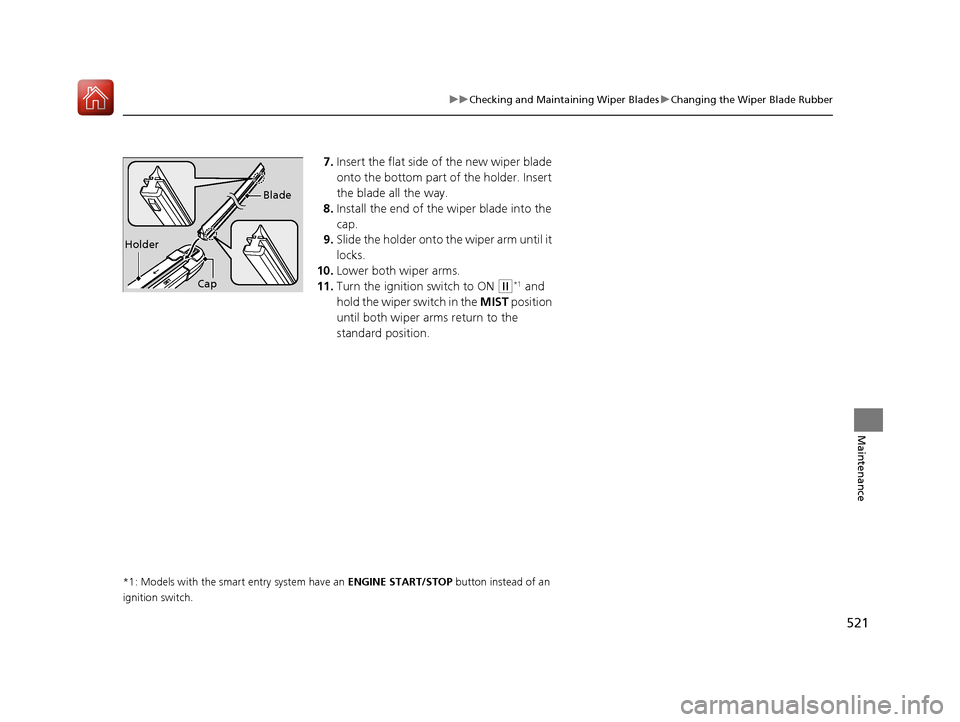
7. Insert the flat side of the new wiper blade
onto the bottom part of the holder. Insert
the blade all the way.
8. Install the end of the wiper blade into the
cap.
9. Slide the holder onto the wiper arm until it
locks.
10. Lower both wiper arms.
11. Turn the ignition switch to ON
(w*1 and
hold the wiper switch in the MIST position
until both wiper arms return to the
standard position.
*1: Models with the smart entry system have an ENGINE START/STOP button instead of an
ignition switch.
Holder Blade
Cap
17 CIVIC 4D HCM (KA KC KL)-31TBA6100.book 521 ページ 2016年8月31日 水曜日 午後6時5分
Page 532 of 601
531
Maintenance
Battery
Checking the Battery
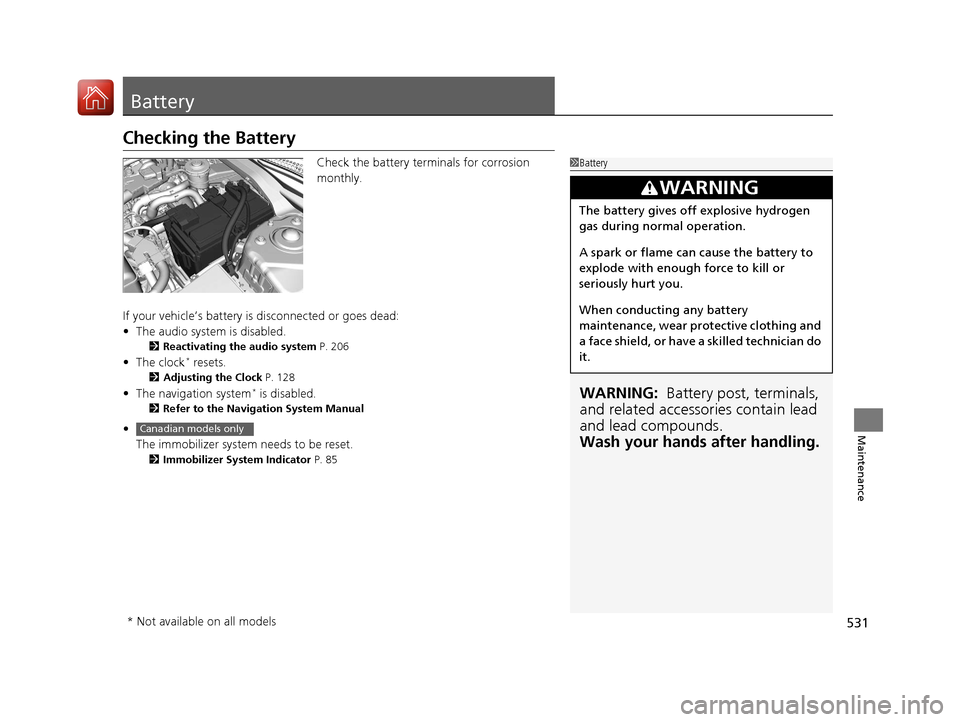
Check the battery terminals for corrosion
monthly.
If your vehicle’s battery is disconnected or goes dead:
• The audio system is disabled.
2 Reactivating the audio system P. 206
•The clock* resets.
2 Adjusting the Clock P. 128
•The navigation system* is disabled.
2 Refer to the Navigation System Manual
•
The immobilizer system needs to be reset.
2 Immobilizer System Indicator P. 85
1Battery
WARNING: Battery post, terminals,
and related accessories contain lead
and lead compounds.
Wash your hands after handling.
3WARNING
The battery gives off explosive hydrogen
gas during normal operation.
A spark or flame can cause the battery to
explode with enough force to kill or
seriously hurt you.
When conducting any battery
maintenance, wear prot ective clothing and
a face shield, or have a skilled technician do
it.
Canadian models only
* Not available on all models
17 CIVIC 4D HCM (KA KC KL)-31TBA6100.book 531 ページ 2016年8月31日 水曜日 午後6時5分
Page 538 of 601
537
uuCleaning uInterior Care
Maintenance
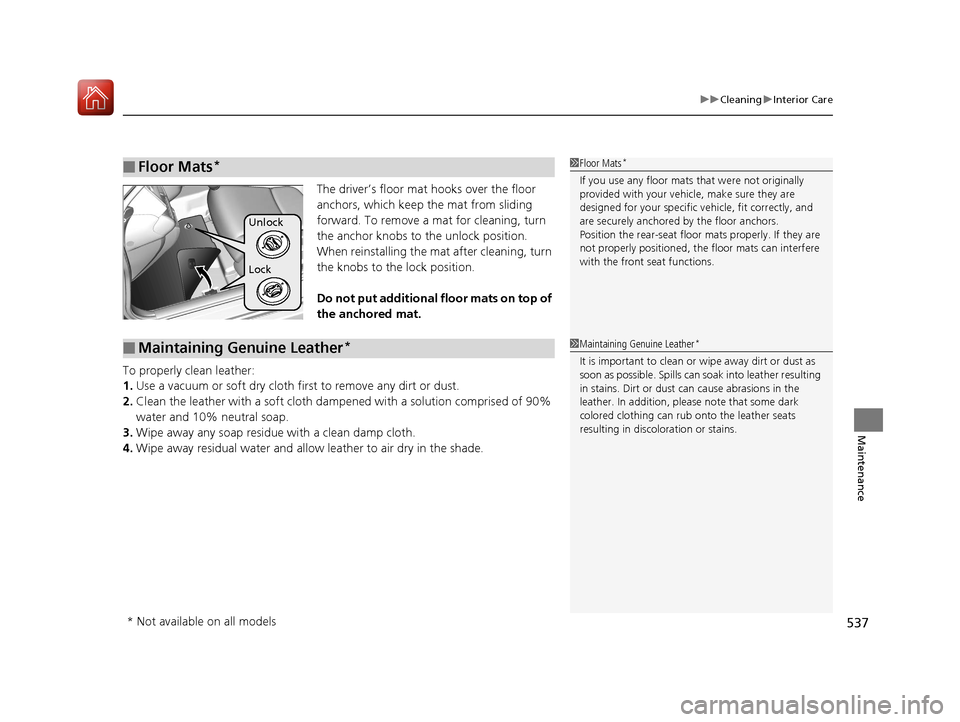
The driver’s floor mat hooks over the floor
anchors, which keep the mat from sliding
forward. To remove a mat for cleaning, turn
the anchor knobs to the unlock position.
When reinstalling the mat after cleaning, turn
the knobs to the lock position.
Do not put additional floor mats on top of
the anchored mat.
To properly clean leather:
1. Use a vacuum or soft dry cloth first to remove any dirt or dust.
2. Clean the leather with a soft cloth dampen ed with a solution comprised of 90%
water and 10% neutral soap.
3. Wipe away any soap residu e with a clean damp cloth.
4. Wipe away residual water and allo w leather to air dry in the shade.
■Floor Mats*1Floor Mats*
If you use any floor mats that were not originally
provided with your vehicle, make sure they are
designed for your specific ve hicle, fit correctly, and
are securely anchored by the floor anchors.
Position the rear-seat floor mats properly. If they are
not properly positioned, the floor mats can interfere
with the front seat functions.
Lock Unlock
■Maintaining Genuine Leather*1 Maintaining Genuine Leather*
It is important to clean or wipe away dirt or dust as
soon as possible. Spills can soak into leather resulting
in stains. Dirt or dust ca n cause abrasions in the
leather. In addition, pl ease note that some dark
colored clothing can rub onto the leather seats
resulting in discol oration or stains.
* Not available on all models
17 CIVIC 4D HCM (KA KC KL)-31TBA6100.book 537 ページ 2016年8月31日 水曜日 午後6時5分
Page 544 of 601
543
Handling the Unexpected
This chapter explains how to handle unexpected troubles.
ToolsTypes of Tools .................................. 544
If a Tire Goes Flat
Changing a Flat Tire ......................... 545
Engine Does Not Start Checking the Engine ........................ 552
If the Smart Entry Remote Battery is Weak .......................................... 553
Emergency Engine Stop ................... 554
Jump Starting .................................... 555
Shift Lever Does Not Move .............. 558
Overheating
How to Handle Overheating ............. 559 Indicator, Coming On/Blinking
If the Low Oil Pressure Indicator Comes
On ............................................. 561
If the Charging System Indicator Comes
On ................................................. 561
If the Malfunction Indicator Lamp Comes
On or Blinks ................................... 562
If the Brake System Indicator (Red) Comes On or Blinks ................................... 563
If the Brake System Indicator (Red) Comes On or Blinks at the Same Time When the
Brake System Indicator (Amber) Comes
On ................................................. 564 If the Electric Power Steering (EPS) System
Indicator Comes On ....................... 565
If the Low Tire Pressure/TPMS Indicator Comes On or Blinks ....................... 566
Fuses Fuse Locations ................................. 567
Inspecting and Changing Fuses ........ 570
Emergency Towing ........................... 571
When You Cannot Unlock the Fuel Fill Door ................................................. 572
When You Cannot Open the Trunk.....573
Refueling ........................................... 574
17 CIVIC 4D HCM (KA KC KL)-31TBA6100.book 543 ページ 2016年8月31日 水曜日 午後6時5分
Page 546 of 601
545Continued
Handling the Unexpected
If a Tire Goes Flat
Changing a Flat Tire
If a tire goes flat while driving, grasp the steering wheel firmly, and brake gradually
to reduce speed. Then, stop in a safe plac e. Replace the flat tire with a compact
spare tire. Go to a dealer as soon as possib le to have the full-size tire repaired or
replaced.
1. Park the vehicle on firm, level, and non-slippery surface, and apply the parking
brake.
2. Move the shift lever to
(P.
2. Move the shift lever to
(R.
3. Turn on the hazard warning lights an d turn the ignition switch to LOCK
(0*1.
*1: Models with the smart entry system have an ENGINE START/STOP button instead of an
ignition switch.
1 Changing a Flat Tire
Follow compact spare precautions:
Periodically check the tire pressure of the compact
spare. It should be set to the specified pressure.
Specified Pressure: 60 psi (420 kPa, 4.2 kgf/cm
2)
When driving with the compact spare tire, keep the
vehicle speed under 50 mph (80 km/h). Replace with
a full-size tire as soon as possible.
The compact spare tire and wheel in your vehicle are
specifically for this model. Do not use them with
another vehicle. Do not us e another type of compact
spare tire or wheel with your vehicle.
Do not mount tire chains on a compact spare tire.
If a chain-mounted front tire goes flat, remove one of
the full-size rear tires and replace it with the compact
spare tire. Remove the flat front tire and replace it
with the full-size tire that was removed from the rear.
Mount the tire chains on the front tire.
NOTICE
Do not use the jack if it doesn’t work properly. Call
your dealer or a prof essional towing service.
Continuously variable transmission models
Manual transmission models
All models
17 CIVIC 4D HCM (KA KC KL)-31TBA6100.book 545 ページ 2016年8月31日 水曜日 午後6時5分
Page 547 of 601
uuIf a Tire Goes Flat uChanging a Flat Tire
546
Handling the Unexpected
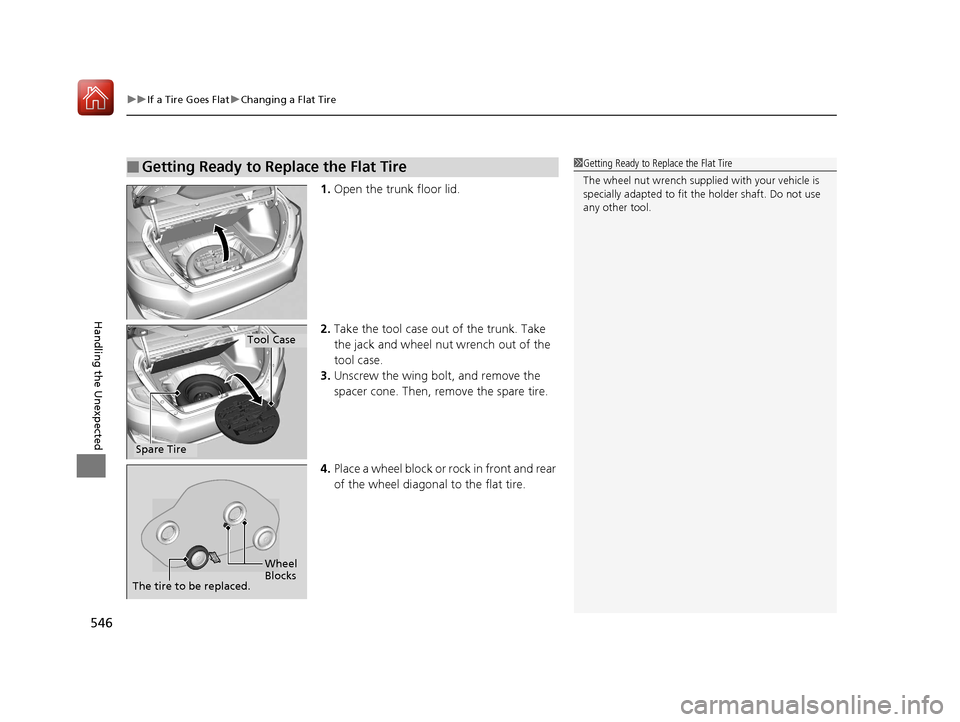
1. Open the trunk floor lid.
2. Take the tool case out of the trunk. Take
the jack and wheel nut wrench out of the
tool case.
3. Unscrew the wing bolt, and remove the
spacer cone. Then, remove the spare tire.
4. Place a wheel block or ro ck in front and rear
of the wheel diagonal to the flat tire.
■Getting Ready to Replace the Flat Tire1 Getting Ready to Replace the Flat Tire
The wheel nut wrench supplied with your vehicle is
specially adapted to fit th e holder shaft. Do not use
any other tool.
Tool Case
Spare Tire
Wheel
Blocks
The tire to be replaced.
17 CIVIC 4D HCM (KA KC KL)-31TBA6100.book 546 ページ 2016年8月31日 水曜日 午後6時5分
Page 555 of 601
554
uuEngine Does Not StartuEmergency Engine Stop
Handling the Unexpected
Emergency Engine Stop
The ENGINE START/STOP button may be used to stop the engine due to an
emergency situation even while driving. If you must stop the engine, do either of the
following operations:
• Press and hold the ENGINE START/STOP button for about two seconds.
• Firmly press the ENGINE START/STOP button twice.
The steering wheel will not lock. However, because turning off the engine disables
the power assist the engine provides to the steering and braking systems, it will
require significantly more physical effort an d time to steer and slow the vehicle. Use
both feet on the brake pedal to slow down the vehicle and stop immediately in a
safe place. With manual transmission models you can also downshift the
transmission to utilize engine braking.
The power mode is in ACCESSORY when the engine is stopped.
To change the mode to VEHICLE OFF, move the shift lever to
(P after the vehicle
comes to a complete stop.
Then press the ENGINE START/STOP button twice without depressing the brake
pedal.
The power mode changes to VEHICLE OFF.
Models with smart entry system
1 Emergency Engine Stop
Do not press the button while driving unless it is
absolutely necessary for th e engine to be switched
off.
Continuously variable transmission models
Canadian continuously variable transmission models
Manual transmission models
17 CIVIC 4D HCM (KA KC KL)-31TBA6100.book 554 ページ 2016年8月31日 水曜日 午後6時5分
Page 559 of 601
558
Handling the Unexpected
Shift Lever Does Not Move
Follow the procedure below if you cannot move the shift lever out of the (P
position.
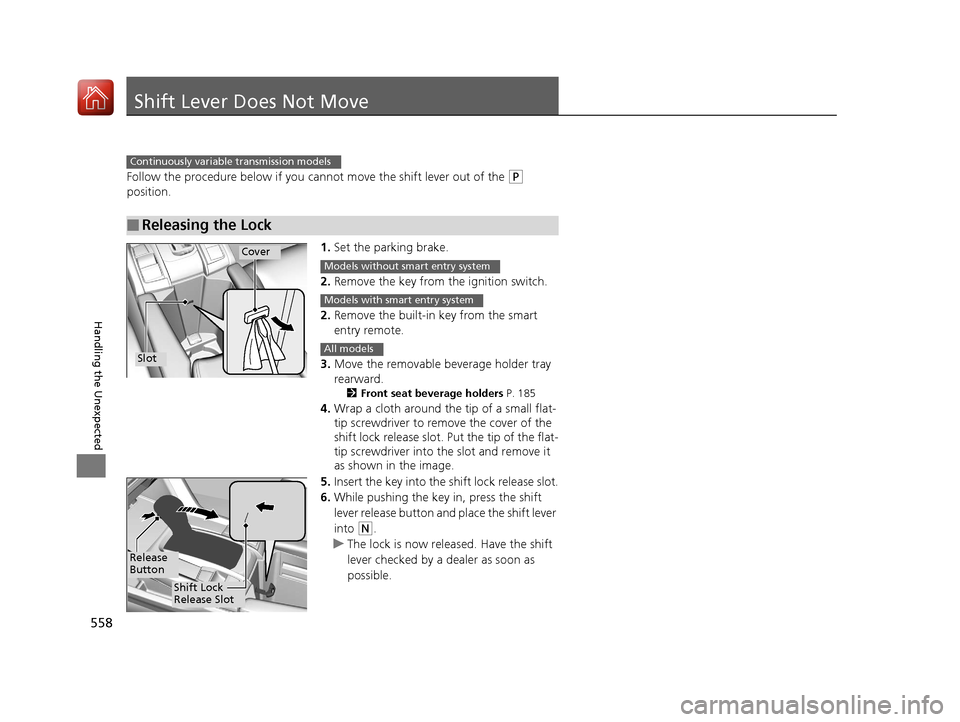
1.Set the parking brake.
2. Remove the key from the ignition switch.
2. Remove the built-in key from the smart
entry remote.
3. Move the removable beverage holder tray
rearward.
2 Front seat beverage holders P. 185
4.Wrap a cloth around the tip of a small flat-
tip screwdriver to remove the cover of the
shift lock release slot. Put the tip of the flat-
tip screwdriver into th e slot and remove it
as shown in the image.
5. Insert the key into the sh ift lock release slot.
6. While pushing the key in, press the shift
lever release button and place the shift lever
into
(N.
u The lock is now released. Have the shift
lever checked by a dealer as soon as
possible.
■Releasing the Lock
Continuously variable transmission models
Slot
Cover
Models without smart entry system
Models with smart entry system
All models
Release
Button
Shift Lock
Release Slot
17 CIVIC 4D HCM (KA KC KL)-31TBA6100.book 558 ページ 2016年8月31日 水曜日 午後6時5分
Page 568 of 601
567Continued
Handling the Unexpected
Fuses
Fuse Locations
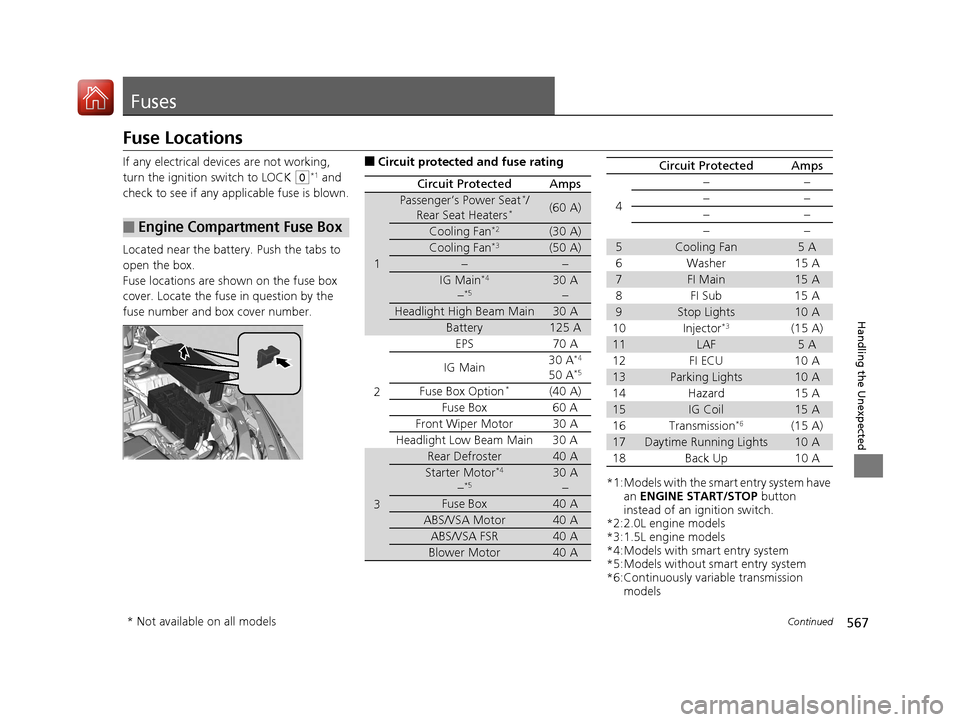
If any electrical devices are not working,
turn the ignition switch to LOCK
(0*1 and
check to see if any appl icable fuse is blown.
Located near the battery. Push the tabs to
open the box.
Fuse locations are shown on the fuse box
cover. Locate the fuse in question by the
fuse number and box cover number.
■Engine Compartment Fuse Box
■Circuit protected and fuse rating
Circuit ProtectedAmps
1
Passenger’s Power Seat*/
Rear Seat Heaters*(60 A)
Cooling Fan*2(30 A)
Cooling Fan*3(50 A)
−−
IG Main*4
−*530 A −
Headlight High Beam Main30 A
Battery125 A
2
EPS70 A
IG Main 30 A*4
50 A*5
Fuse Box Option*(40 A)
Fuse Box 60 A
Front Wiper Motor30 A
Headlight Low Beam Main 30 A
3
Rear Defroster40 A
Starter Motor*4
−*530 A −
Fuse Box40 A
ABS/VSA Motor40 A
ABS/VSA FSR40 A
Blower Motor40 A
*1:Models with the smart entry system have an ENGINE START/STOP button
instead of an ignition switch.
*2:2.0L engine models
*3:1.5L engine models
*4:Models with smart entry system
*5:Models without smart entry system
*6:Continuously variable transmission models
4
−−
−−
−−
−−
5Cooling Fan5A
6Washer 15A
7FI Main15 A
8FI Sub 15A
9Stop Lights10 A
10 Injector*3(15 A)
11LAF5A
12 FI ECU 10 A
13Parking Lights10 A
14 Hazard 15 A
15IG Coil15 A
16 Transmission*6(15 A)
17Daytime Running Lights10 A
18 Back Up 10 A
Circuit ProtectedAmps
* Not available on all models
17 CIVIC 4D HCM (KA KC KL)-31TBA6100.book 567 ページ 2016年8月31日 水曜日 午後6時5分
Page 569 of 601
568
uuFuses uFuse Locations
Handling the Unexpected
*3:1.5L engine models
Circuit ProtectedAmps
19Audio15 A
20 Audio AMP*(30 A)
21Interior Lights10 A
22 Front Fog Lights*(15 A)
23A/C Compressor*(10 A)
24 Horn 10 A
25Left Headlight Low Beam10 A
26 Right Headlight Low Beam 10 A
27VB ACT*3(10 A)
28 Left Headlight High Beam 10 A
29Right Headlight High Beam10 A
30 − −
31Rear Seat Heaters*(15 A)
32 Passenger’s Power Seat
Sliding
*(20 A)
33Passenger’s Power Seat Reclining*(20 A)
34 − −
35−−
36 − −
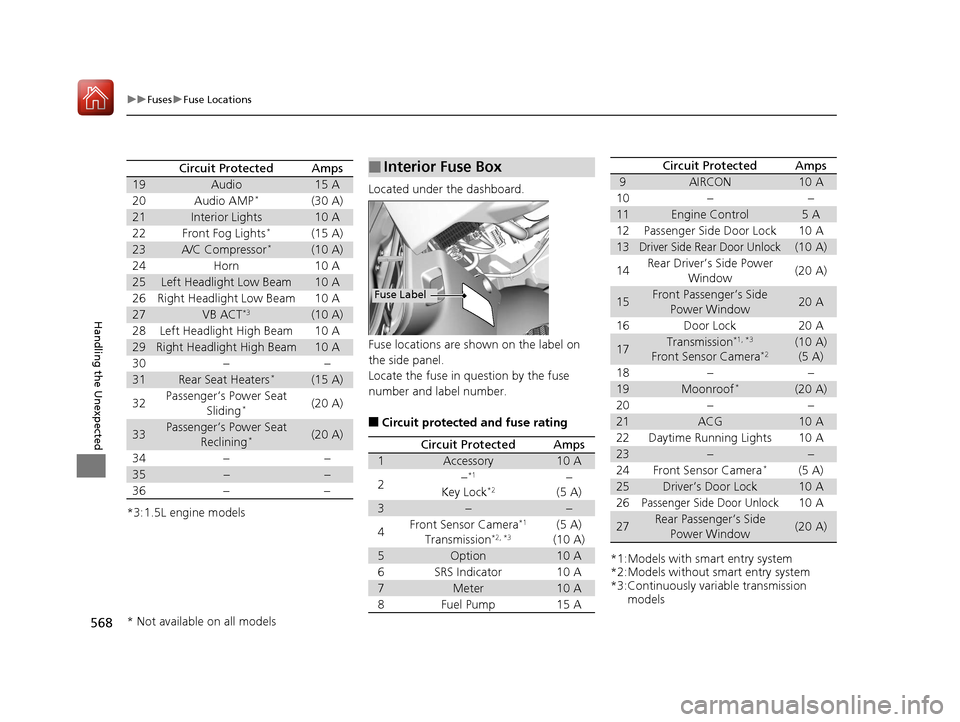
Located under the dashboard.
Fuse locations are shown on the label on
the side panel.
Locate the fuse in question by the fuse
number and label number.
■Circuit protected and fuse rating
■Interior Fuse Box
Fuse Label
Circuit ProtectedAmps
1Accessory10 A
2−*1
Key Lock*2−
(5 A)
3−−
4Front Sensor Camera*1
Transmission*2, *3(5 A)
(10 A)
5Option10 A
6SRS Indicator10 A
7Meter10 A
8Fuel Pump15 A
*1:Models with smart entry system
*2:Models without smart entry system
*3:Continuously variable transmission models
9AIRCON10 A
10−−
11Engine Control5A
12Passenger Side Door Lock10 A
13Driver Side Rear Door Unlock(10 A)
14Rear Driver’s Side Power
Window(20 A)
15Front Passenger’s Side Power Window20 A
16Door Lock20 A
17Transmission*1, *3
Front Sensor Camera*2(10 A)(5 A)
18−−
19Moonroof*(20 A)
20−−
21ACG10 A
22Daytime Running Lights10 A
23−−
24Front Sensor Camera*(5 A)
25Driver’s Door Lock10 A
26Passenger Side Door Unlock10 A
27Rear Passenger’s Side
Power Window(20 A)
Circuit ProtectedAmps
* Not available on all models
17 CIVIC 4D HCM (KA KC KL)-31TBA6100.book 568 ページ 2016年8月31日 水曜日 午後6時5分