change HONDA CIVIC 2017 10.G User Guide
[x] Cancel search | Manufacturer: HONDA, Model Year: 2017, Model line: CIVIC, Model: HONDA CIVIC 2017 10.GPages: 601, PDF Size: 32.51 MB
Page 85 of 601
84
uuIndicators u
Instrument Panel
*1:Models with the smart entry system have an ENGINE START/STOP button instead of an ignition switch.
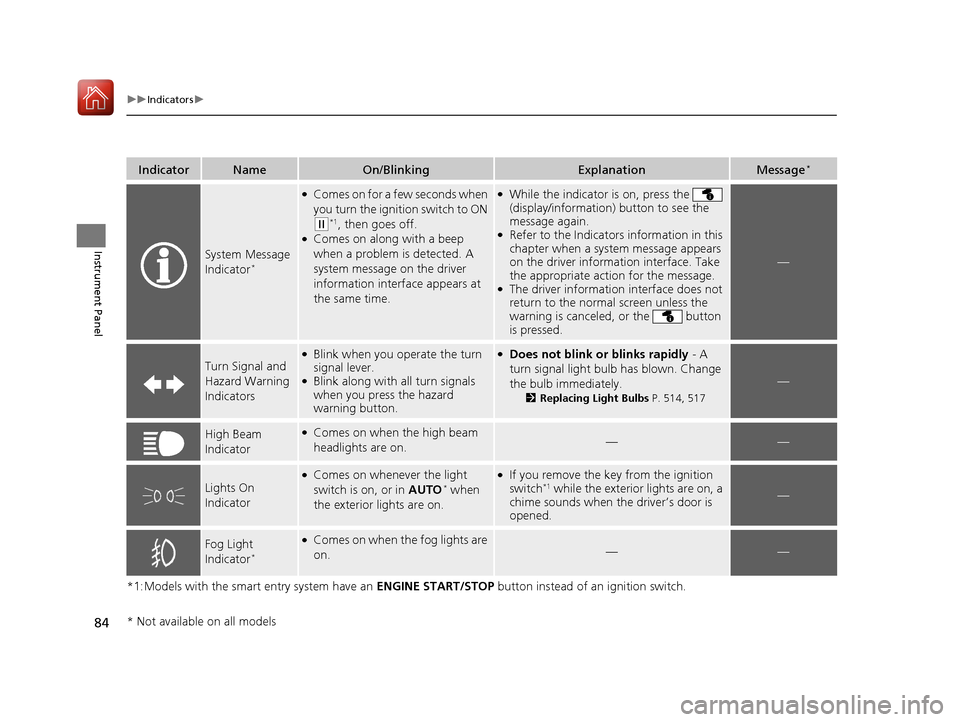
IndicatorNameOn/BlinkingExplanationMessage*
System Message
Indicator*
●Comes on for a few seconds when
you turn the igniti on switch to ON
(w*1, then goes off.●Comes on along with a beep
when a problem is detected. A
system message on the driver
information interface appears at
the same time.
●While the indicator is on, press the
(display/information ) button to see the
message again.
●Refer to the Indicators information in this
chapter when a system message appears
on the driver information interface. Take
the appropriate action for the message.
●The driver information interface does not
return to the normal screen unless the
warning is canceled, or the button
is pressed.
—
Turn Signal and
Hazard Warning
Indicators
●Blink when you op erate the turn
signal lever.
●Blink along with all turn signals
when you press the hazard
warning button.
●Does not blink or blinks rapidly - A
turn signal light bulb has blown. Change
the bulb immediately.
2 Replacing Light Bulbs P. 514, 517
—
High Beam
Indicator●Comes on when the high beam
headlights are on.——
Lights On
Indicator
●Comes on whenever the light
switch is on, or in AUTO* when
the exterior lights are on.
●If you remove the key from the ignition
switch*1 while the exterior lights are on, a
chime sounds when the driver’s door is
opened.—
Fog Light
Indicator*
●Comes on when the fog lights are
on.——
* Not available on all models
17 CIVIC 4D HCM (KA KC KL)-31TBA6100.book 84 ページ 2016年8月31日 水曜日 午後6時5分
Page 100 of 601
99
uuIndicators uDriver Information Interface Wa rning and Information Messages*
Continued
Instrument Panel
MessageConditionExplanation
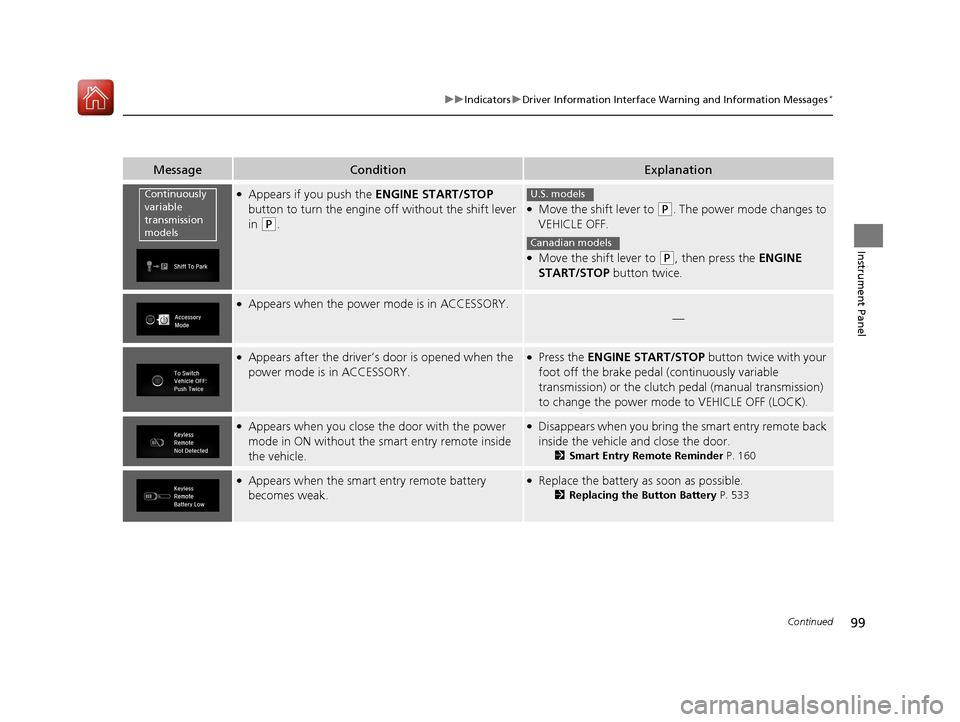
●Appears if you push the ENGINE START/STOP
button to turn the engine off without the shift lever
in
(P.
●Move the shift lever to (P. The power mode changes to
VEHICLE OFF.
●Move the shift lever to (P, then press the ENGINE
START/STOP button twice.
●Appears when the power mode is in ACCESSORY.
—
●Appears after the driver’s door is opened when the
power mode is in ACCESSORY.●Press the ENGINE START/STOP button twice with your
foot off the brake pedal (continuously variable
transmission) or the clutch pedal (manual transmission)
to change the power mode to VEHICLE OFF (LOCK).
●Appears when you close the door with the power
mode in ON without the smart entry remote inside
the vehicle.●Disappears when you bring the smart entry remote back
inside the vehicle and close the door.
2Smart Entry Remote Reminder P. 160
●Appears when the smart entry remote battery
becomes weak.●Replace the battery as soon as possible.
2Replacing the Button Battery P. 533
Continuously
variable
transmission
modelsU.S. models
Canadian models
17 CIVIC 4D HCM (KA KC KL)-31TBA6100.book 99 ページ 2016年8月31日 水曜日 午後6時5分
Page 106 of 601
105
uuIndicators uDriver Information Interface Wa rning and Information Messages*
Continued
Instrument Panel
MessageConditionExplanation
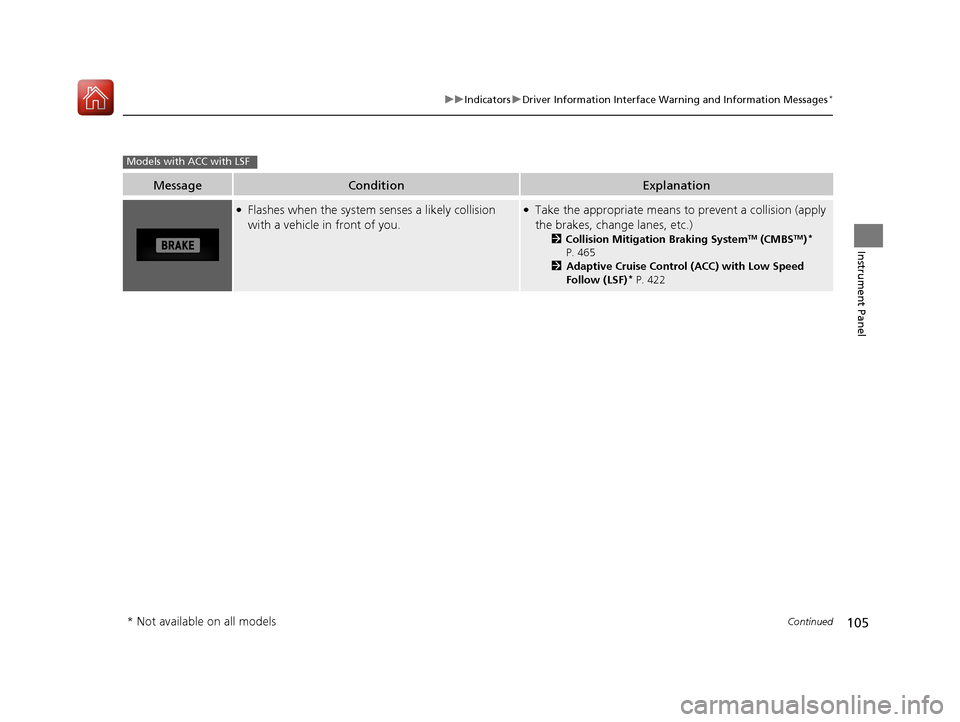
●Flashes when the system senses a likely collision
with a vehicle in front of you.●Take the appropriate means to prevent a collision (apply
the brakes, change lanes, etc.)
2 Collision Mitigation Braking SystemTM (CMBSTM)*
P. 465
2 Adaptive Cruise Control (ACC) with Low Speed
Follow (LSF)
* P. 422
Models with ACC with LSF
* Not available on all models
17 CIVIC 4D HCM (KA KC KL)-31TBA6100.book 105 ページ 2016年8月31日 水曜日 午後6時5分
Page 107 of 601
106
uuIndicators uDriver Information Interface Wa rning and Information Messages*
Instrument Panel
MessageConditionExplanation
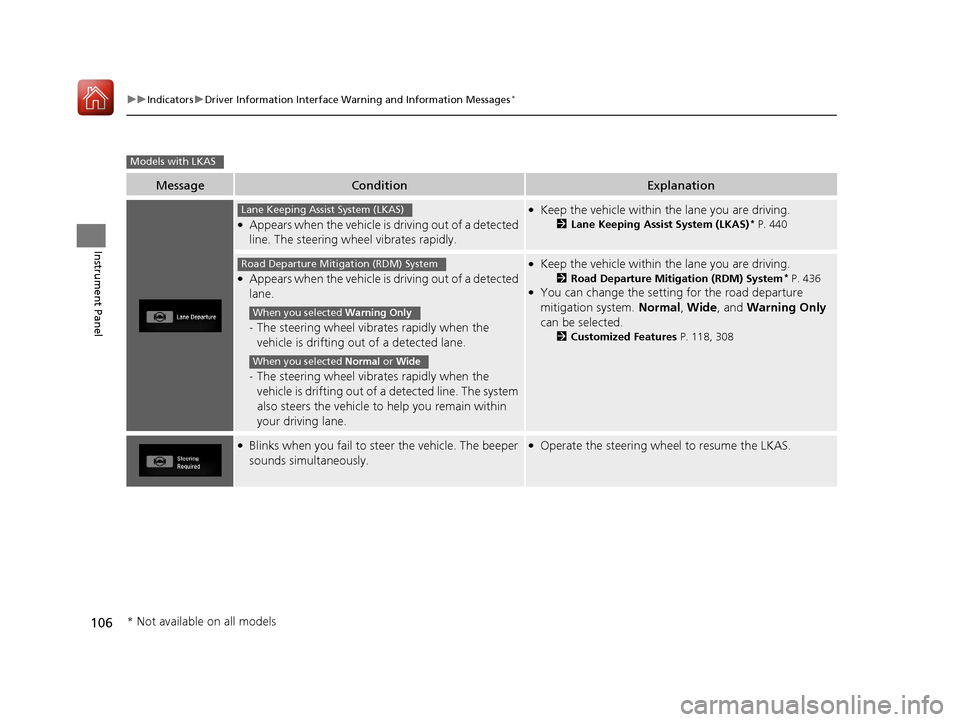
●Appears when the vehicle is driving out of a detected
line. The steering wheel vibrates rapidly.
●Keep the vehicle within the lane you are driving.
2Lane Keeping Assist System (LKAS)* P. 440
●Appears when the vehicle is driving out of a detected
lane.
-The steering wheel vibrates rapidly when the
vehicle is drifting out of a detected lane.
- The steering wheel vibrates rapidly when the
vehicle is drifting out of a detected line. The system
also steers the vehicle to help you remain within
your driving lane.
●Keep the vehicle within the lane you are driving.
2 Road Departure Mitigation (RDM) System* P. 436●You can change the setting for the road departure
mitigation system. Normal, Wide , and Warning Only
can be selected.
2 Customized Features P. 118, 308
●Blinks when you fail to st eer the vehicle. The beeper
sounds simultaneously.●Operate the steering whee l to resume the LKAS.
Models with LKAS
Lane Keeping Assist System (LKAS)
Road Departure Mitigation (RDM) System
When you selected Warning Only
When you selected Normal or Wide
* Not available on all models
17 CIVIC 4D HCM (KA KC KL)-31TBA6100.book 106 ページ 2016年8月31日 水曜日 午後6時5分
Page 109 of 601
108
Instrument Panel
Gauges and Displays
Gauges
Gauges include the speedometer, tachometer, fuel gauge, and related indicators.
They are displayed when the ignition switch is in ON
(w*1.
Displays your driving speed in mph or km/h.
Shows the number of engine revolutions per minute.
*1: Models with the smart entry system have an ENGINE START/STOP button instead of an
ignition switch.
■Speedometer
■Tachometer
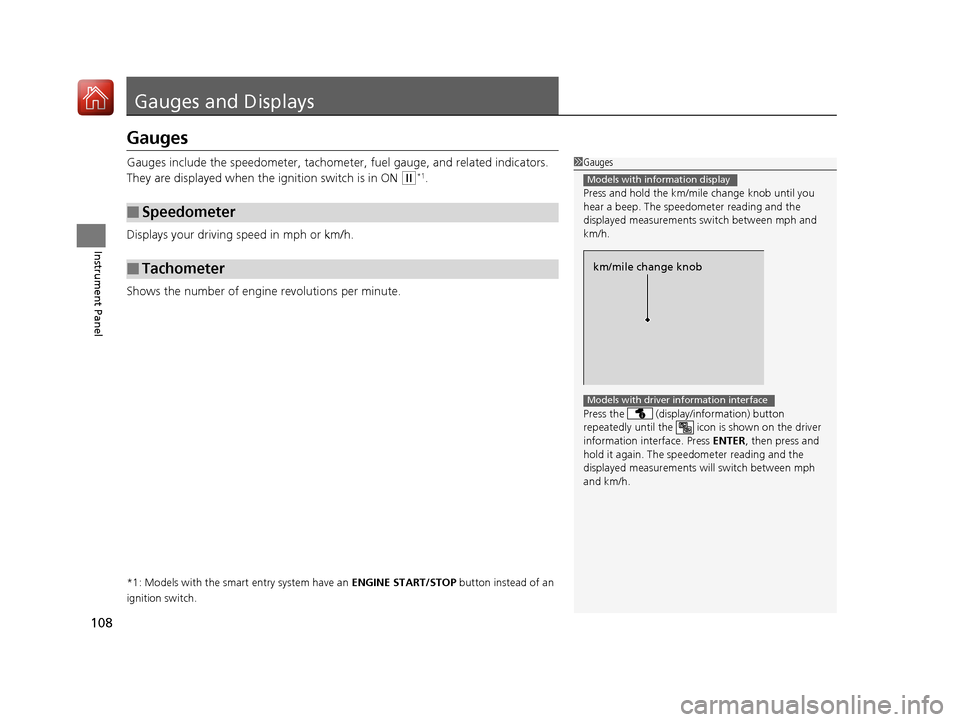
1 Gauges
Press and hold the km/mil e change knob until you
hear a beep. The speedometer reading and the
displayed measurements switch between mph and
km/h.
Press the (display /information) button
repeatedly until the ic on is shown on the driver
information interface. Press ENTER , then press and
hold it again. The spee dometer reading and the
displayed measurements wi ll switch between mph
and km/h.
Models with information display
km/mile change knob
Models with driver information interface
17 CIVIC 4D HCM (KA KC KL)-31TBA6100.book 108 ページ 2016年8月31日 水曜日 午後6時5分
Page 111 of 601
110
uuGauges and Displays uInformation Display*
Instrument Panel
Information Display*
The information display shows the odome ter, trip meter, engine oil life and
maintenance service item codes, and other gauges.
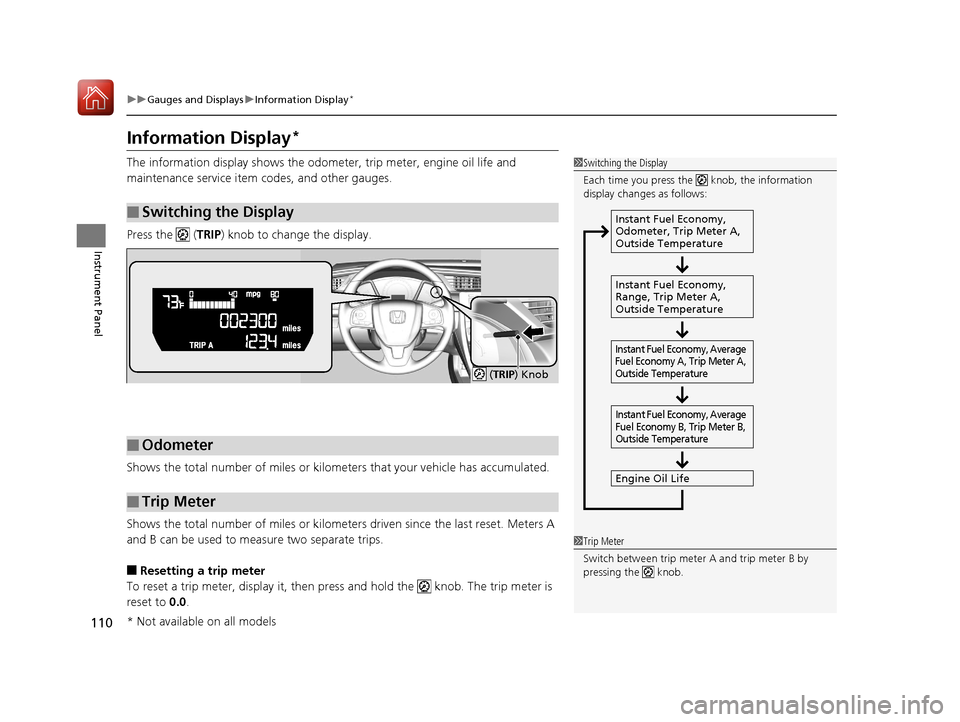
Press the ( TRIP) knob to change the display.
Shows the total number of miles or kilome ters that your vehicle has accumulated.
Shows the total number of miles or kilomete rs driven since the last reset. Meters A
and B can be used to measure two separate trips.
■Resetting a trip meter
To reset a trip meter, display it, then pr ess and hold the knob. The trip meter is
reset to 0.0 .
■Switching the Display
1Switching the Display
Each time you press the knob, the information
display changes as follows:
Instant Fuel Economy,
Odometer, Trip Meter A,
Outside Temperature
Instant Fuel Economy,
Range, Trip Meter A,
Outside Temperature
Engine Oil Life
Instant Fuel Economy, Average
Fuel Economy A, Trip Meter A,
Outside Temperature Instant Fuel Economy, Average
Fuel Economy B, Trip Meter B,
Outside Temperature
■Odometer
■Trip Meter
( TRIP ) Knob
1Trip Meter
Switch between trip meter A and trip meter B by
pressing the knob.
* Not available on all models
17 CIVIC 4D HCM (KA KC KL)-31TBA6100.book 110 ページ 2016年8月31日 水曜日 午後6時5分
Page 112 of 601
Continued111
uuGauges and Displays uInformation Display*
Instrument Panel
Shows the estimated average fuel economy of each trip meter in mpg or l/100 km.
The display is updated at set intervals. Wh en a trip meter is reset, the average fuel
economy is also reset.
Shows the instant fuel economy as a bar graph in mpg or l/100km.
Shows the remaining oil life and Maintenance Minder
TM.
2 Maintenance MinderTM P. 485
Shows the estimated distance you can travel on the remaining fuel. This distance is
estimated from the fuel economy of your previous trips.
■Average Fuel Economy
■Instant Fuel Economy Gauge
■Engine Oil Life
■Range
1Average Fuel Economy
Press and hold the km/mile change knob to switch
the measurement.
1Instant Fuel Economy Gauge
Press and hold the km/mile change knob to switch
the measurement.
1 Range
Press and hold the km/mile change knob to switch
the measurement.
17 CIVIC 4D HCM (KA KC KL)-31TBA6100.book 111 ページ 2016年8月31日 水曜日 午後6時5分
Page 114 of 601
113
uuGauges and Displays uDriver Information Interface*
Continued
Instrument Panel
Driver Information Interface*
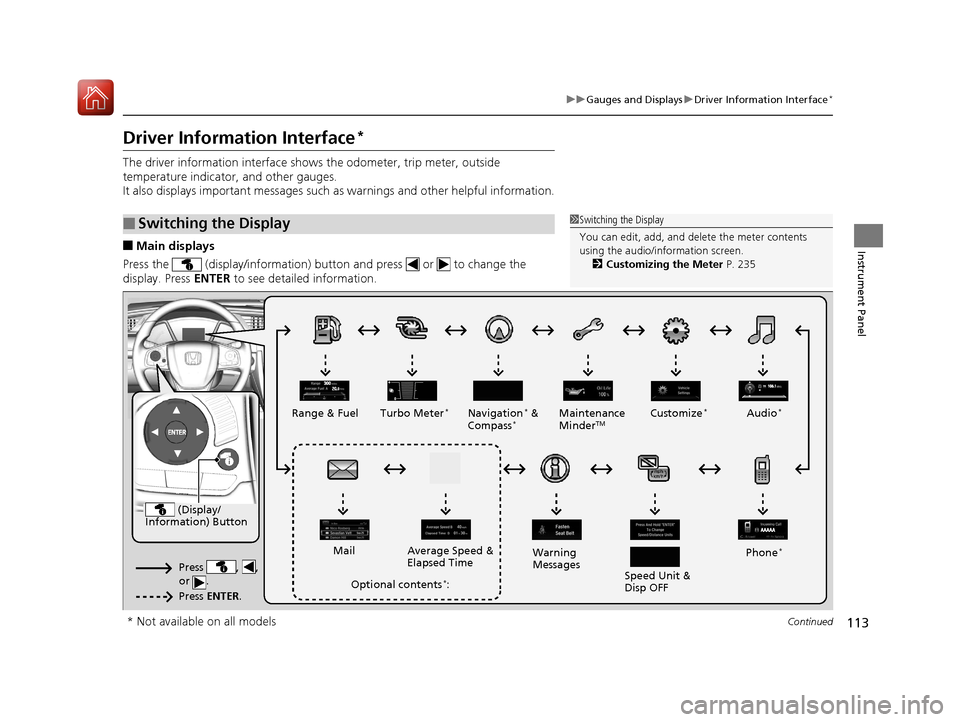
The driver information interface show s the odometer, trip meter, outside
temperature indicator, and other gauges.
It also displays important messages such as warnings and other helpful information.
■Main displays
Press the (display/information) button and press or to change the
display. Press ENTER to see detailed information.
■Switching the Display1Switching the Display
You can edit, add, and de lete the meter contents
using the audio/information screen. 2 Customizing the Meter P. 235
(Display/
Information) Button
Press , ,
or .
Press ENTER .
Range & Fuel Turbo Meter*Navigation* &
Compass*Maintenance
MinderTMCustomize*Audio*
Phone*
Speed Unit &
Disp OFF
Warning
Messages
Average Speed &
Elapsed Time
Mail
Optional contents*:
* Not available on all models
17 CIVIC 4D HCM (KA KC KL)-31TBA6100.book 113 ページ 2016年8月31日 水曜日 午後6時5分
Page 115 of 601
uuGauges and Displays uDriver Information Interface*
114
Instrument Panel
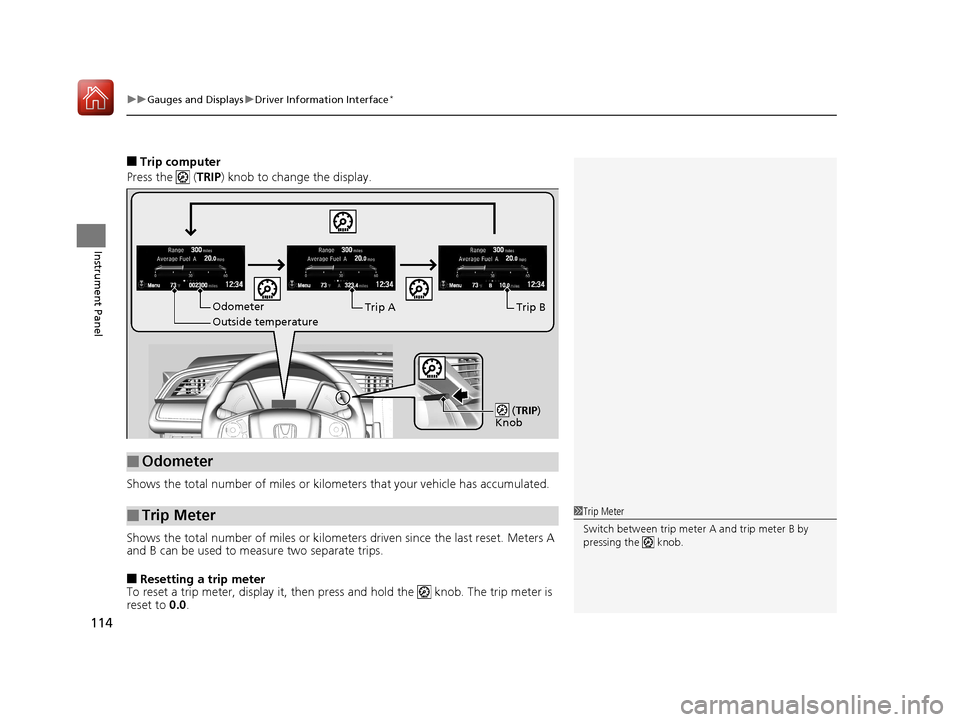
■Trip computer
Press the ( TRIP) knob to change the display.
Shows the total number of miles or kilome ters that your vehicle has accumulated.
Shows the total number of miles or kilomete rs driven since the last reset. Meters A
and B can be used to measure two separate trips.
■Resetting a trip meter
To reset a trip meter, display it, then pr ess and hold the knob. The trip meter is
reset to 0.0 .
■Odometer
■Trip Meter
Menu Menu Menu
Odometer
Outside temperatureTrip ATrip B
(
TRIP)
Knob
1 Trip Meter
Switch between trip meter A and trip meter B by
pressing the knob.
17 CIVIC 4D HCM (KA KC KL)-31TBA6100.book 114 ページ 2016年8月31日 水曜日 午後6時5分
Page 116 of 601
Continued115
uuGauges and Displays uDriver Information Interface*
Instrument Panel
Shows the estimated average fuel economy of each trip meter in mpg or l/100 km.
The display is updated at set intervals. Wh en a trip meter is reset, the average fuel
economy is also reset.
Shows the estimated distance you can travel on the remaining fuel. This distance is
estimated from the fuel economy of your previous trips.
Shows the time elapsed since Trip A or Trip B was reset.
Shows the average speed in mph or km/h since Trip A or Trip B was reset.
Shows the remaining oil life and Maintenance Minder
TM.
2 Maintenance MinderTM P. 485
■Average Fuel Economy
■Range
■Elapsed Time
■Average Speed
■Engine Oil Life
1Average Fuel Economy
You can change when to reset the average fuel
economy.
2 Customized Features P. 118, 308
1Elapsed Time
You can change when to reset the elapsed time.
2 Customized Features P. 118, 308
1Average Speed
You can change when to reset the average speed.
2 Customized Features P. 118, 308
17 CIVIC 4D HCM (KA KC KL)-31TBA6100.book 115 ページ 2016年8月31日 水曜日 午後6時5分