change HONDA CIVIC 2017 10.G Owners Manual
[x] Cancel search | Manufacturer: HONDA, Model Year: 2017, Model line: CIVIC, Model: HONDA CIVIC 2017 10.GPages: 601, PDF Size: 32.51 MB
Page 3 of 601
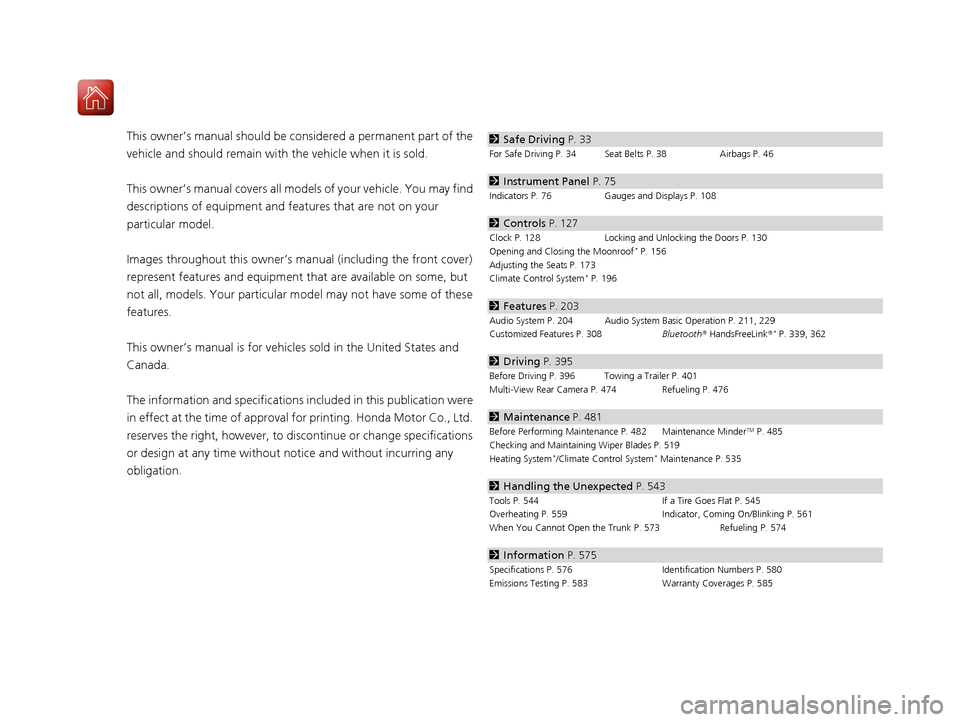
Contents
This owner’s manual should be considered a permanent part of the
vehicle and should remain with the vehicle when it is sold.
This owner’s manual covers all models of your vehicle. You may find
descriptions of equipment and features that are not on your
particular model.
Images throughout this owner’s manual (including the front cover)
represent features and equipment that are available on some, but
not all, models. Your particular mo del may not have some of these
features.
This owner’s manual is for vehicles sold in the United States and
Canada.
The information and specifications in cluded in this publication were
in effect at the time of approval for printing. Honda Motor Co., Ltd.
reserves the right, however, to discontinue or change specifications
or design at any time without notice and without incurring any
obligation.2 Safe Driving P. 33
For Safe Driving P. 34 Seat Belts P. 38 Airbags P. 46
2Instrument Panel P. 75
Indicators P. 76 Gauges and Displays P. 108
2Controls P. 127
Clock P. 128 Locking and Unlocking the Doors P. 130
Opening and Closing the Moonroof* P. 156
Adjusting the Seats P. 173
Climate Control System
* P. 196
2 Features P. 203
Audio System P. 204 Audio System Basic Operation P. 211, 229
Customized Features P. 308 Bluetooth® HandsFreeLink ®* P. 339, 362
2Driving P. 395
Before Driving P. 396 Towing a Trailer P. 401
Multi-View Rear Camera P. 474 Refueling P. 476
2Maintenance P. 481
Before Performing Maintenance P. 482 Maintenance MinderTM P. 485
Checking and Maintaining Wiper Blades P. 519
Heating System
*/Climate Control System* Maintenance P. 535
2 Handling the Unexpected P. 543
Tools P. 544 If a Tire Goes Flat P. 545
Overheating P. 559 Indicator, Coming On/Blinking P. 561
When You Cannot Open the Trunk P. 573 Refueling P. 574
2Information P. 575
Specifications P. 576 Identification Numbers P. 580
Emissions Testing P. 583 Warranty Coverages P. 585
17 CIVIC 4D HCM (KA KC KL)-31TBA6100.book 2 ページ 2016年8月31日 水曜日 午後6時5分
Page 6 of 601
5
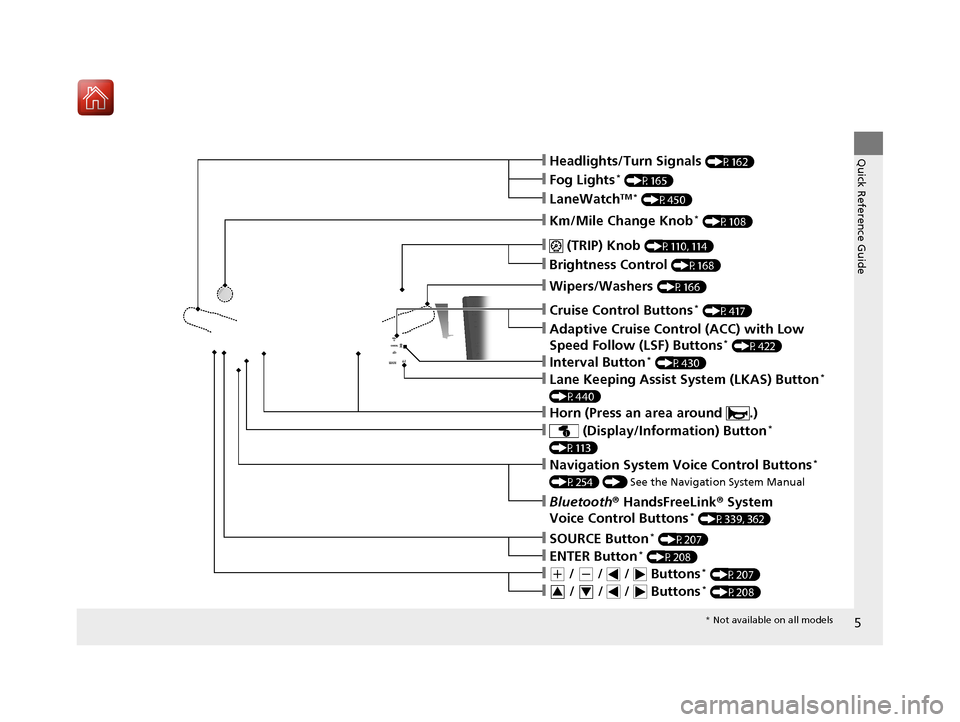
Quick Reference Guide❙Headlights/Turn Signals (P162)
❙Km/Mile Change Knob* (P108)
❙ (TRIP) Knob (P110, 114)
❙SOURCE Button* (P207)
❙Brightness Control (P168)
❙LaneWatchTM * (P450)
❙Fog Lights* (P165)
❙Wipers/Washers (P166)
❙Cruise Control Buttons* (P417)
❙Adaptive Cruise Control (ACC) with Low
Speed Follow (LSF) Buttons* (P422)
❙Lane Keeping Assist System (LKAS) Button*
(P440)
❙ (Display/Information) Button*
(P113)
❙Navigation System Voice Control Buttons*
(P254) () See the Navigation System Manual
❙Bluetooth® HandsFreeLink ® System
Voice Control Buttons* (P339, 362)
❙ENTER Button* (P208)
❙(+ / (- / / Buttons* (P207)
❙ / / / Buttons* (P208)34
❙Interval Button* (P430)
❙Horn (Press an area around .)
* Not available on all models
17 CIVIC 4D HCM (KA KC KL)-31TBA6100.book 5 ページ 2016年8月31日 水曜日 午後6時5分
Page 10 of 601
9
Quick Reference Guide
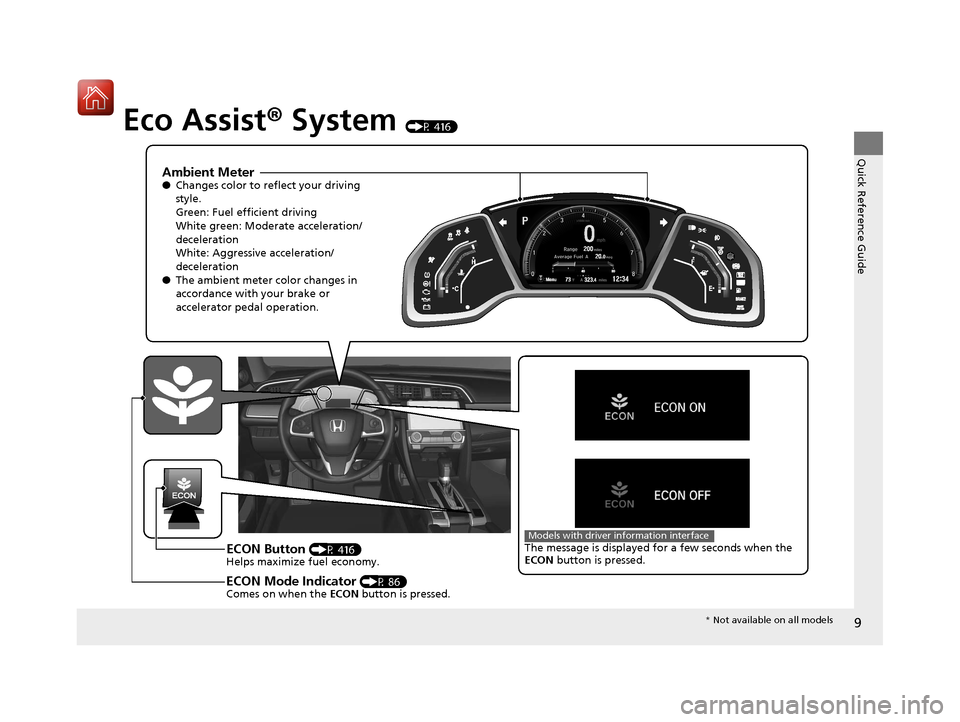
Eco Assist® System (P 416)
Ambient Meter●Changes color to re flect your driving
style.
Green: Fuel efficient driving
White green: Moderate acceleration/
deceleration
White: Aggressive acceleration/
deceleration
● The ambient meter color changes in
accordance with your brake or
accelerator pedal operation.
ECON Button (P 416)
Helps maximize fuel economy.
ECON Mode Indicator (P 86)
Comes on when the ECON button is pressed.
The message is displayed for a few seconds when the
ECON button is pressed.Models with driver information interface
* Not available on all models
17 CIVIC 4D HCM (KA KC KL)-31TBA6100.book 9 ページ 2016年8月31日 水曜日 午後6時5分
Page 14 of 601
13
Quick Reference Guide
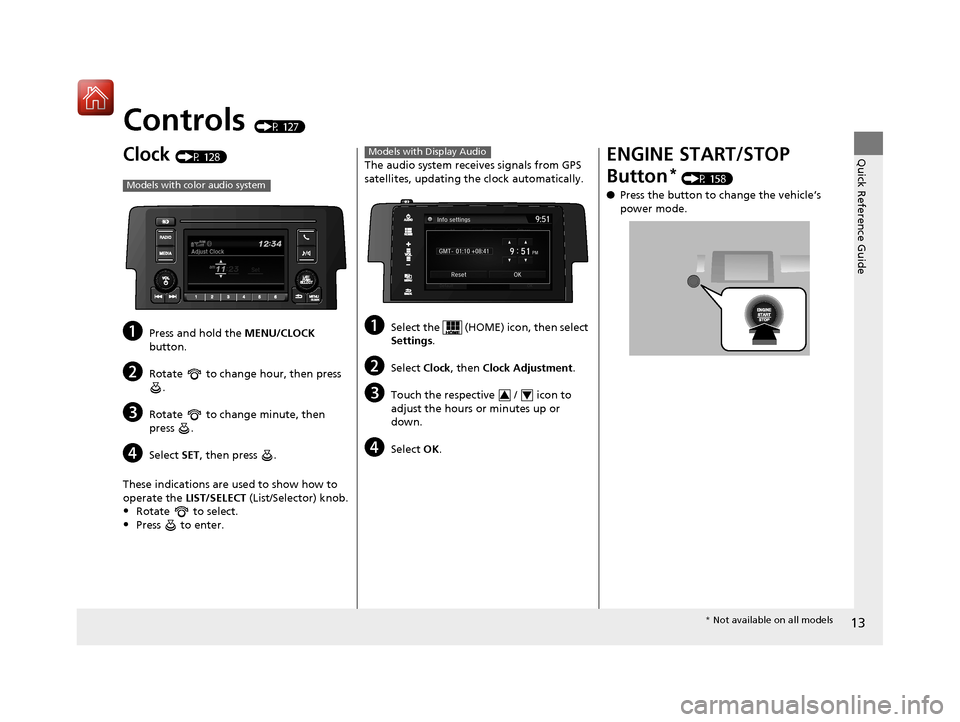
Controls (P 127)
Clock (P 128)
aPress and hold the MENU/CLOCK
button.
bRotate to change hour, then press .
cRotate to change minute, then
press .
dSelect SET, then press .
These indications are used to show how to
operate the LIST/SELECT (List/Selector) knob.
•Rotate to select.
•Press to enter.
Models with color audio system
The audio system receives signals from GPS
satellites, updating the clock automatically.
aSelect the (HOME) icon, then select
Settings.
bSelect Clock, then Clock Adjustment .
cTouch the respective / icon to
adjust the hours or minutes up or
down.
dSelect OK.
Models with Display Audio
34
ENGINE START/STOP
Button
* (P 158)
● Press the button to change the vehicle’s
power mode.
* Not available on all models
17 CIVIC 4D HCM (KA KC KL)-31TBA6100.book 13 ページ 2016年8月31日 水曜日 午後6時5分
Page 21 of 601
20
Quick Reference Guide
Features (P 203)
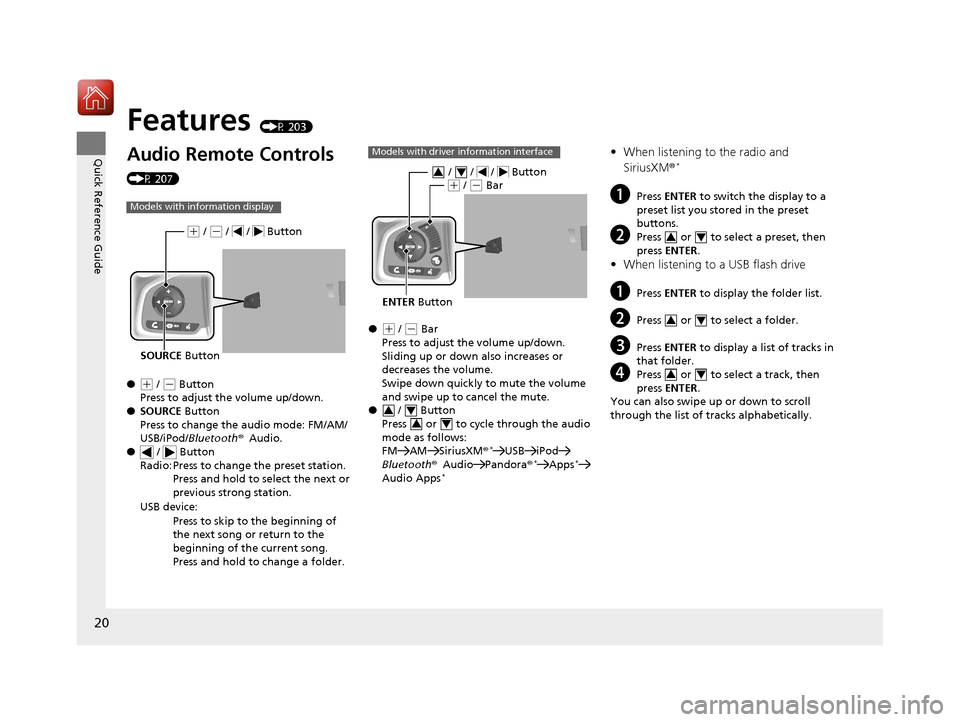
Audio Remote Controls
(P 207)
●
(+ / ( - Button
Press to adjust the volume up/down.
● SOURCE Button
Press to change the audio mode: FM/AM/
USB/iPod/ Bluetooth ®Audio.
● / Button
Radio: Press to change the preset station.
Press and hold to select the next or
previous strong station.
USB device: Press to skip to the beginning of
the next song or return to the
beginning of the current song.
Press and hold to change a folder.
Models with information display
SOURCE Button
(+ / (- / / Button
●(+ / (- Bar
Press to adjust the volume up/down.
Sliding up or down also increases or
decreases the volume.
Swipe down quickly to mute the volume
and swipe up to cancel the mute.
● / Button
Press or to cycle through the audio
mode as follows:
FM AM SiriusXM ®
*USB iPod
Bluetooth ®Audio Pandora ®*Apps*
Audio Apps*
Models with driver information interface
ENTER Button
/ / / Button34(+ / (- Bar
34
34
• When listening to the radio and
SiriusXM ®*
aPress ENTER to switch the display to a
preset list you stored in the preset
buttons.
bPress or to select a preset, then
press ENTER .
•When listening to a USB flash drive
aPress ENTER to display the folder list.
bPress or to select a folder.
cPress ENTER to display a list of tracks in
that folder.
dPress or to select a track, then
press ENTER .
You can also swipe up or down to scroll
through the list of tra cks alphabetically.
34
34
34
17 CIVIC 4D HCM (KA KC KL)-31TBA6100.book 20 ページ 2016年8月31日 水曜日 午後6時5分
Page 22 of 601
21
Quick Reference Guide
•When listening to an iPod
aPress ENTER to display the iPod music
list.
bPress or to select a category.
cPress ENTER to display a list of items in
the category.
dPress or to select an item, then
press ENTER .
uPress ENTER and press or
repeatedly until a desired item you
want to listen is displayed.
You can also swipe up or down to scroll
through the list of tracks alphabetically.
• When listening to Internet Radio*
aPress ENTER to display the station list.
bPress or to select an item, then
press ENTER .
•When listening to Bluetooth ®Audio
aPress ENTER to display the track list.
bPress or to select a track, then
press ENTER .
34
34
34
34
34
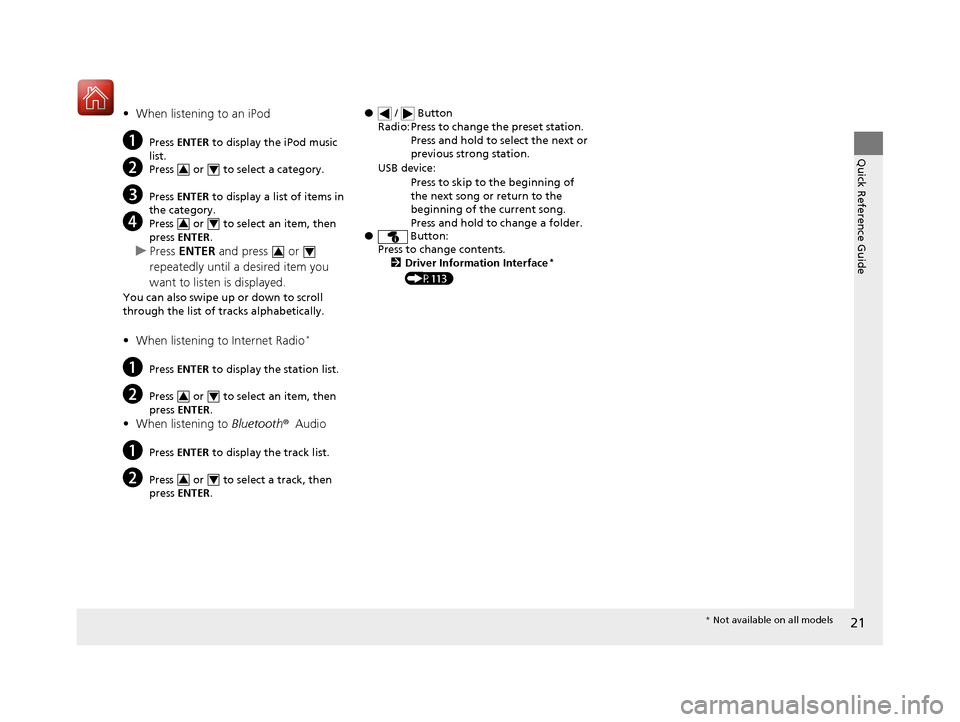
● / Button
● Button:
Press to change contents.
2 Driver Information Interface
*
(P113)
Radio: Press to change the preset station.
Press and hold to select the next or
previous strong station.
USB device: Press to skip to the beginning of
the next song or return to the
beginning of the current song.
Press and hold to change a folder.
* Not available on all models
17 CIVIC 4D HCM (KA KC KL)-31TBA6100.book 21 ページ 2016年8月31日 水曜日 午後6時5分
Page 26 of 601
25
Quick Reference Guide
VSA® On and Off (P 448)
●The vehicle stability assist (VSA®) system helps
stabilize the vehicle during cornering, and
helps maintain traction while accelerating on
loose or slippery road surfaces.
● VSA ® comes on automatically every time
you start the engine.
● To partially disable or fully restore VSA ®
function, press and ho ld the button until
you hear a beep.
Cruise Control* (P 417)
● Cruise control allows you to maintain a
set speed without keeping your foot on
the accelerator pedal.
● To use cruise control, press the CRUISE
button, then press the –/SET button once
you have achieved the desired speed
(above 25 mph or 40 km/h).
Collision Mitigation
Braking System
TM (CMBSTM)
OFF Button
* (P 465)
●When a possible collision is likely unavoidable,
the CMBSTM can help you to reduce the vehicle
speed and the severity of the collision.
● To turn the CMBSTM on or off, press and
hold the button until you hear a beep.
Tire Pressure Monitoring
System (TPMS)
(P 452)
●Detects a change in tire conditions and overall
dimensions due to decrease in tire pressures.
● The TPMS is turned on automatically
every time you start the engine.
● A calibration procedure must be
performed when certain conditions arise.
U.S. models
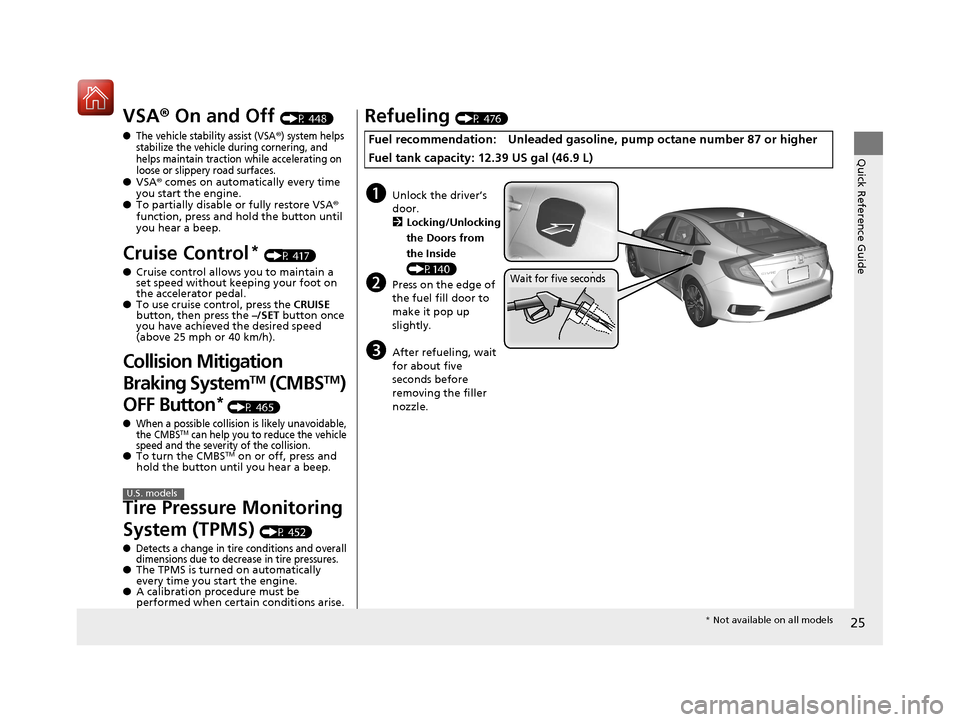
Refueling (P 476)
Fuel recommendation: Unlead ed gasoline, pump octane number 87 or higher
Fuel tank capacity: 12.39 US gal (46.9 L)
aUnlock the driver’s
door. 2 Locking/Unlocking
the Doors from
the Inside
(P140)
bPress on the edge of
the fuel fill door to
make it pop up
slightly.
cAfter refueling, wait
for about five
seconds before
removing the filler
nozzle.
Wait for five seconds
* Not available on all models
17 CIVIC 4D HCM (KA KC KL)-31TBA6100.book 25 ページ 2016年8月31日 水曜日 午後6時5分
Page 30 of 601
29
Quick Reference Guide
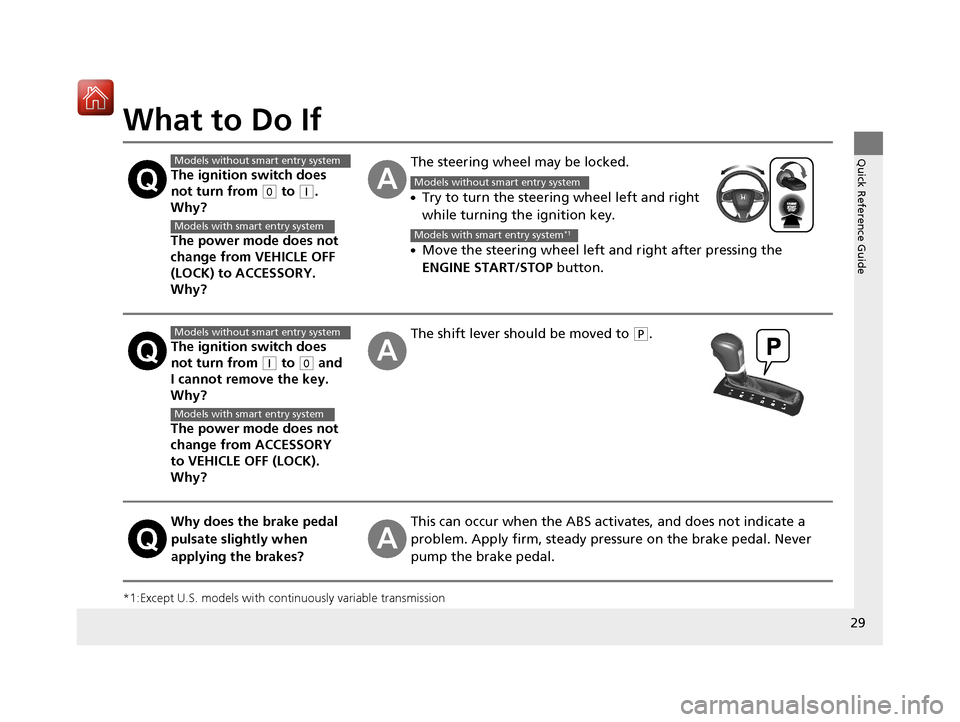
What to Do If
*1:Except U.S. models with continuously variable transmission
The ignition switch does
not turn from
(0 to (q.
Why?
The power mode does not
change from VEHICLE OFF
(LOCK) to ACCESSORY.
Why?
The steering wheel may be locked.
●Try to turn the steering wheel left and right
while turning the ignition key.
●Move the steering wheel left and right after pressing the
ENGINE START/STOP button.
The ignition switch does
not turn from
(q to (0 and
I cannot remove the key.
Why?
The power mode does not
change from ACCESSORY
to VEHICLE OFF (LOCK).
Why?
The shift lever should be moved to (P.
Why does the brake pedal
pulsate slightly when
applying the brakes?This can occur when the ABS activates, and does not indicate a
problem. Apply firm, steady pressure on the brake pedal. Never
pump the brake pedal.
Models without smart entry system
Models with smart entry system
Models without smart entry system
Models with smart entry system*1
Models without smart entry system
Models with smart entry system
17 CIVIC 4D HCM (KA KC KL)-31TBA6100.book 29 ページ 2016年8月31日 水曜日 午後6時5分
Page 36 of 601
35
uuFor Safe Driving uImportant Safety Precautions
Safe Driving
■Pay appropriate attention to the task of driving safely
Engaging in cell phone conversation or other activities that keep you from paying
close attention to the road, other vehicles, and pedestrians could lead to a crash.
Remember, situations can change quickly, and only you can decide when it is safe to
divert some attention away from driving.
■Control your speed
Excessive speed is a major factor in crash injuries and deaths. Generally, the higher
the speed, the greater the risk, but serious injuries can also occur at lower speeds.
Never drive faster than is safe for current conditions, regardless of the maximum
speed posted.
■Keep your vehicle in safe condition
Having a tire blowout or a mechanical failure can be extremely hazardous.
To reduce the possibility of such problems, check your tire pressures and condition
frequently, and perform all regul arly scheduled maintenance.
17 CIVIC 4D HCM (KA KC KL)-31TBA6100.book 35 ページ 2016年8月31日 水曜日 午後6時5分
Page 73 of 601
72
Safe Driving
Exhaust Gas Hazard
Carbon Monoxide Gas
The engine exhaust from this vehicle contains carbon monoxide, a colorless,
odorless, and highly toxic gas. As long as you properly maintain your vehicle, carbon
monoxide gas will not get into the interior.
■Have the exhaust system inspected for leaks whenever
• The exhaust system is m aking an unusual noise.
• The exhaust system may have been damaged.
• The vehicle is raised for an oil change.
When you operate a vehicle with the trunk open, airflow can pull exhaust gas into
the interior and create a hazardous condition. If you must drive with the trunk open,
open all the windows and set the heating system
*/climate control system* as shown
below.
1. Select the fresh air mode.
2. Select the mode.
3. Set the fan speed to high.
4. Set the temperature control to a comfortable setting.
Adjust the heating system
*/climate control system* in the same manner if you sit in
your parked vehicle with the engine running.
1 Carbon Monoxide Gas
An enclosed area such as a garage can quickly fill up
with carbon monoxide gas.
Do not run the engine with the garage door closed.
Even when the garage door is open, drive out of the
garage immediat ely after starting the engine.
3WARNING
Carbon monoxide gas is toxic.
Breathing it can cause unconsciousness and
even kill you.
Avoid any enclosed areas or activities that
expose you to carbon monoxide.
* Not available on all models
17 CIVIC 4D HCM (KA KC KL)-31TBA6100.book 72 ページ 2016年8月31日 水曜日 午後6時5分