fog lights HONDA CIVIC 2017 10.G User Guide
[x] Cancel search | Manufacturer: HONDA, Model Year: 2017, Model line: CIVIC, Model: HONDA CIVIC 2017 10.GPages: 601, PDF Size: 32.51 MB
Page 423 of 601
422
uuWhen Driving uAdaptive Cruise Control (ACC) with Low Speed Follow (LSF)*
Driving
Adaptive Cruise Control (ACC) with Low Speed Follow (LSF)*
Helps maintain a constant vehicle speed an d a set following interval behind a vehicle
detected ahead of yours and, if the detect ed vehicle comes to a stop, can decelerate
and stop your vehicle, without you having to keep your foot on the brake or the
accelerator.
When ACC with LSF slows your vehicle by applying the brakes, your vehicle’s brake
lights will illuminate.1 Adaptive Cruise Control (ACC) with Low Speed Follow (LSF)*
Important Reminder
As with any system, there are limits to ACC with LSF.
Use the brake pedal whenever necessary, and always
keep a safe interval between your vehicle and other
vehicles.
3WARNING
Improper use of ACC with LSF can lead
to a crash.
Use ACC with LSF only when driving on
expressways or freeways and in good
weather conditions.
3WARNING
ACC with LSF has limited braking
capability and may not stop your vehicle
in time to avoid a co llision with a vehicle
that quickly stops in front of you.
Always be prepared to apply the brake
pedal if the cond itions require.
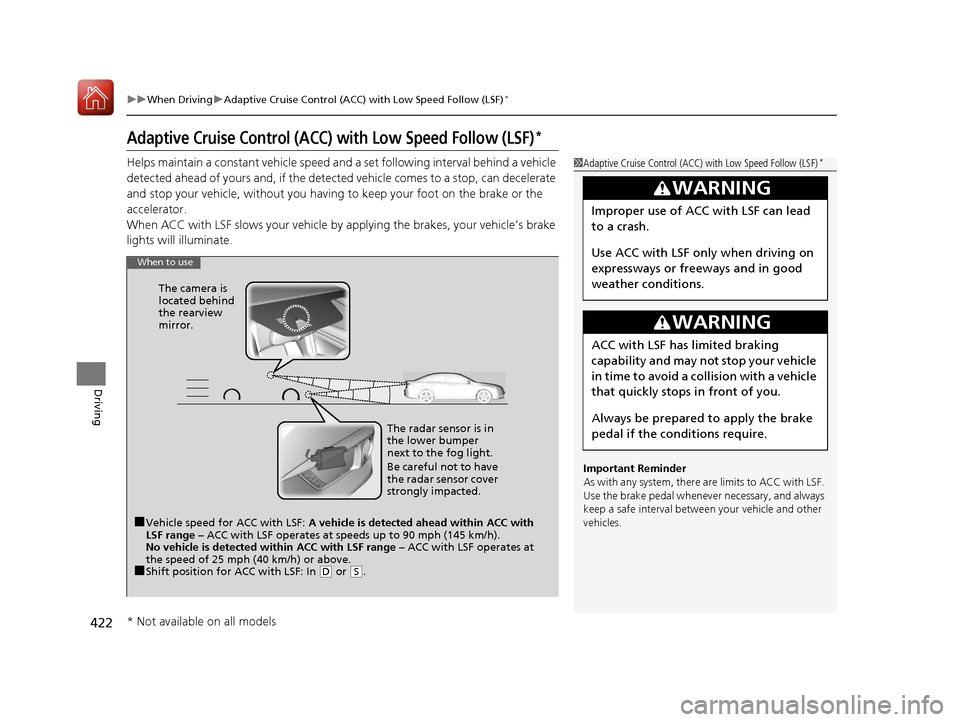
When to use
■Vehicle speed for ACC with LSF: A vehicle is detected ahead within ACC with
LSF range – ACC with LSF operates at speeds up to 90 mph (145 km/h).
No vehicle is detected within ACC with LSF range – ACC with LSF operates at
the speed of 25 mph (40 km/h) or above.
■Shift position for ACC with LSF: In ( D or (S. The radar sensor is in
the lower bumper
next to the fog light.
Be careful not to have
the radar sensor cover
strongly impacted.
The camera is
located behind
the rearview
mirror.
* Not available on all models
17 CIVIC 4D HCM (KA KC KL)-31TBA6100.book 422 ページ 2016年8月31日 水曜日 午後6時5分
Page 428 of 601
Continued427
uuWhen Driving uAdaptive Cruise Control (ACC) with Low Speed Follow (LSF)*
Driving
The system may automatically shut off and the ACC indicator will come on under
certain conditions. Some examples of these conditions are listed below. Other
conditions may reduce some of the ACC functions.
2 Front Sensor Camera* P. 420
■Environmental conditions
• Driving in bad weather (rain, fog, snow, etc.).
■Roadway conditions
• Driving on a snowy or wet roadway (obs cured lane marking, vehicle tracks,
reflected lights, road spray, high contrast).
■Vehicle conditions
• The outside of the windshield is blocked by dirt, mud, leaves, wet snow, etc.
• An abnormal tire or wheel condition (Wrong size, varied size or construction,
improperly inflated, co mpact spare tire, etc.).
• The camera temperature gets too high.
• The parking brake is applied.
• When the lower bumper next to the fog light is dirty.
• When the front of the vehicle tilts up due to heavy cargo in the trunk or rear seats.
• When tire chains are installed.
■ACC with LSF Conditions and Limitations1ACC with LSF Conditions and Limitations
The radar sensor for ACC with LSF is shared with the
collision mitigation braking system
TM (CMBSTM).
2 Collision Mitigation Braking SystemTM
(CMBSTM)* P. 465
You can read about handling information for the
camera equipped with this system. 2 Front Sensor Camera
* P. 420
Do not put a sticker on the radar sensor cover or
replace the radar sensor cover.
Have your vehicle checked by a dealer if you find any
unusual behavior of the system (e.g., the warning
message appears too frequently).
If the front of the vehicle is impacted in any of the
following situations, the ra dar sensor may not work
properly. Have your vehi cle checked by a dealer:
•The vehicle mounted onto a bump, curb, chock,
embankment, etc.
•You drive the vehicle where the water is deep.
•Your vehicle has a frontal collision.
* Not available on all models
17 CIVIC 4D HCM (KA KC KL)-31TBA6100.book 427 ページ 2016年8月31日 水曜日 午後6時5分
Page 440 of 601
439
uuWhen Driving uRoad Departure Mitigation (RDM) System*
Driving
■Roadway conditions
• Driving on a snowy or wet roadway (obs cured lane marking, vehicle tracks,
reflected lights, road spray, high contrast).
• Driving on a road with temporary lane markings.
• Faint, multiple, or varied lane markings are visible on the roadway due to road
repairs or old lane markings.
• The roadway has merging, split, or crossing lines (e.g., such as at an intersection
or crosswalk).
• The lane markings are extremely narrow, wide, or changing.
• The vehicle in front of you is driving near the lane lines.
• The road is hilly or the vehicle is approaching the crest of a hill.
• Driving on rough or unpaved roads, or over bumpy surfaces.
• When objects on the road (curb, guard rail, pylons, etc.) are recognized as white
lines (or yellow lines).
• Driving on roads with double lines.
■Vehicle conditions
• Headlight lenses are dirty or the h eadlights are not properly adjusted.
• The outside of the windshield is streaked or blocked by dirt, mud, leaves, wet
snow, etc.
• The inside of the windshield is fogged.
• The camera temperature gets too high.
• An abnormal tire or wheel condition (wrong sized, varied size or construction,
improperly inflated, co mpact spare tire, etc.).
• The vehicle is tilted due to a heavy load or suspension modifications.
• When tire chains are installed.
17 CIVIC 4D HCM (KA KC KL)-31TBA6100.book 439 ページ 2016年8月31日 水曜日 午後6時5分
Page 447 of 601
446
uuWhen Driving uLane Keeping Assist System (LKAS)*
Driving
■Roadway conditions
• Driving on a snowy or wet roadway (obs cured lane marking, vehicle tracks,
reflected lights, road spray, high contrast).
• Driving on a road with temporary lane markings.
• Faint, multiple, or varied lane markings are visible on the roadway due to road
repairs or old lane markings.
• The roadway has merging, split, or crossing lines (e.g., such as at an intersection
or crosswalk).
• The lane markings are extremely narrow, wide, or changing.
• The vehicle in front of you is driving near the lane lines.
• The road is hilly or the vehicle is approaching the crest of a hill.
• Driving on rough or unpaved roads, or over bumpy surfaces.
• When objects on the road (curb, guard rail, pylons, etc.) are recognized as white
lines (or yellow lines).
• Driving on roads with double lines.
■Vehicle conditions
• Headlight lenses are dirty or the headlights are not properly adjusted.
• The outside of the windshield is streake d or blocked by dirt, mud, leaves, wet
snow, etc.
• The inside of the windshield is fogged.
• The camera temperature gets too high.
• An abnormal tire or wheel condition (wrong size, varied size or construction,
improperly inflated, comp act spare tire, etc.).
• The vehicle is tilted due to a heav y load or suspension modifications.
17 CIVIC 4D HCM (KA KC KL)-31TBA6100.book 446 ページ 2016年8月31日 水曜日 午後6時5分
Page 470 of 601
Continued469
uuBraking uCollision Mitigation Braking SystemTM (CMBSTM)*
Driving
The system may automatically shut off and the CMBSTM indicator will come on under
certain conditions. Some examples of these conditions are listed below. Other
conditions may reduce some of the CMBS
TM functions.
2 Front Sensor Camera* P. 420
■Environmental conditions
• Driving in bad weather (rain, fog, snow, etc.).
• Sudden changes in ambient light, such as an entrance or exit of a tunnel.
• There is little contrast between objects and the background.
• Driving into low sunlight (e.g., at dawn or dusk).
• Strong light is reflec ted onto the roadway.
• Driving in the shadows of trees, buildings, etc.
• Roadway objects or structures are misinterpreted as vehicles and pedestrians.
• Reflections on the interi or of the windshield.
■Roadway conditions
• Driving on a snowy or wet roadway (obs cured lane marking, vehicle tracks,
reflected lights, road spray, high co ntrast on a snowy or wet roadway).
• Driving on curvy, winding, or undulating roads.
• The road is hilly or the vehicle is approaching the crest of a hill.
■CMBSTM Conditions and Limitations1CMBSTM Conditions and Limitations
Do not put a sticker on the radar sensor cover or
replace the radar sensor cover.
If you need the radar sensor to be repaired, or
removed, or the radar se nsor cover is strongly
impacted, turn off the system by pressing the
CMBS
TM off button and take your vehicle to a dealer.
* Not available on all models
17 CIVIC 4D HCM (KA KC KL)-31TBA6100.book 469 ページ 2016年8月31日 水曜日 午後6時5分
Page 471 of 601
470
uuBraking uCollision Mitigation Braking SystemTM (CMBSTM)*
Driving
■Vehicle conditions
• Headlight lenses are dirty or the headlights are not properly adjusted.
• The outside of the windshie ld is blocked by dirt, mud, leaves, wet snow, etc.
• The inside of the windshield is fogged.
• An abnormal tire or wheel condition (wrong size, varied size or construction,
improperly inflated, comp act spare tire, etc.).
• When tire chains are installed.
• The vehicle is tilted due to a heav y load or suspension modifications.
• The camera temperature gets too high.
• Driving with the parking brake applied.
• When the radar sensor in the lower bumper gets dirty.
■Detection limitations
• A vehicle or pedestrian suddenly crosses in front of you.
• The distance between your vehicle and the vehicle or pedestrian ahead of you is
too short.
• A vehicle cuts in front of you at a slow speed, and it brakes suddenly.
• When you accelerate rapidly and approach the vehicle or pedestrian ahead of you
at high speed.
• The vehicle ahead of you is a motorcycle, bicycle, mobility scooter or other small
vehicle.
• When there are animals in front of your vehicle.
• When you drive on a curved, wi nding or undulating road that makes it difficult for
the sensor to properly detect a vehicle in front of you.
• The speed difference between your vehicle an d a vehicle or pedestrian in front of
you is significantly large.
• An oncoming vehicle suddenly comes in front of you.
• Another vehicle suddenly comes in front of you at an intersection, etc.
• Your vehicle abruptly crosses over in front of an oncoming vehicle.
• When driving through a narrow iron bridge.
• When the lead vehicle suddenly slows down.
17 CIVIC 4D HCM (KA KC KL)-31TBA6100.book 470 ページ 2016年8月31日 水曜日 午後6時5分
Page 541 of 601
540
uuCleaning uExterior Care
Maintenance
The inside lenses of exterior lights (headlig hts, brake lights, etc.) may fog temporarily
if you have driven in the rain, or after the vehicle has been run through a car wash.
Dew condensation also may build up inside the lenses when there is a significant
enough difference between the ambient and inside-lens temperatures (similar to
vehicle windows fogging up in rainy conditions). These conditions are natural
processes, not structural design problems in the exterior lights.
Lens design characteristics may result in moisture developing on the lens frame
surfaces. This also is not a malfunction. However, if you see large amounts of water
accumulation, or large water drops building up inside the lenses, have your vehicle
inspected by a dealer.
■Fogged Exterior Light Lenses
17 CIVIC 4D HCM (KA KC KL)-31TBA6100.book 540 ページ 2016年8月31日 水曜日 午後6時5分
Page 562 of 601
561
Handling the Unexpected
Indicator, Coming On/Blinking
If the Low Oil Pressure Indicator Comes On
■Reasons for the indicator to come on
Comes on when the engine oil pressure is low.
■What to do as soon as the indicator comes on
1. Immediately park the vehicle on level ground in a safe place.
2. If necessary, turn the hazard warning lights on.
■What to do after parking the vehicle
1. Stop the engine and let it sit for about three minute.
2. Open the hood and check the oil level.
u Add oil as necessary.
2 Oil Check P. 499
3.Start the engine and check th e low oil pressure indicator.
u The indicator goes off: Start driving again.
u The indicator does not go off within 10 seconds: Stop the engine
and contact a dealer for repairs immediately.
If the Charging System Indicator Comes On
■Reasons for the indicator to come on
Comes on when the battery is not being charged.
■What to do when th e indicator comes on
Turn off the heating system*/climate control system*, rear defogger, and
other electrical systems, and immedi ately contact a dealer for repairs.
1If the Low Oil Pressure Indicator Comes On
NOTICE
Running the engine with low oil pressure can cause
serious mechanical damage almost immediately.
1If the Charging System Indicator Comes On
If you need to stop temporarily, do not turn off the
engine. Restarting the engi ne may rapidly discharge
the battery.
* Not available on all models
17 CIVIC 4D HCM (KA KC KL)-31TBA6100.book 561 ページ 2016年8月31日 水曜日 午後6時5分
Page 569 of 601
568
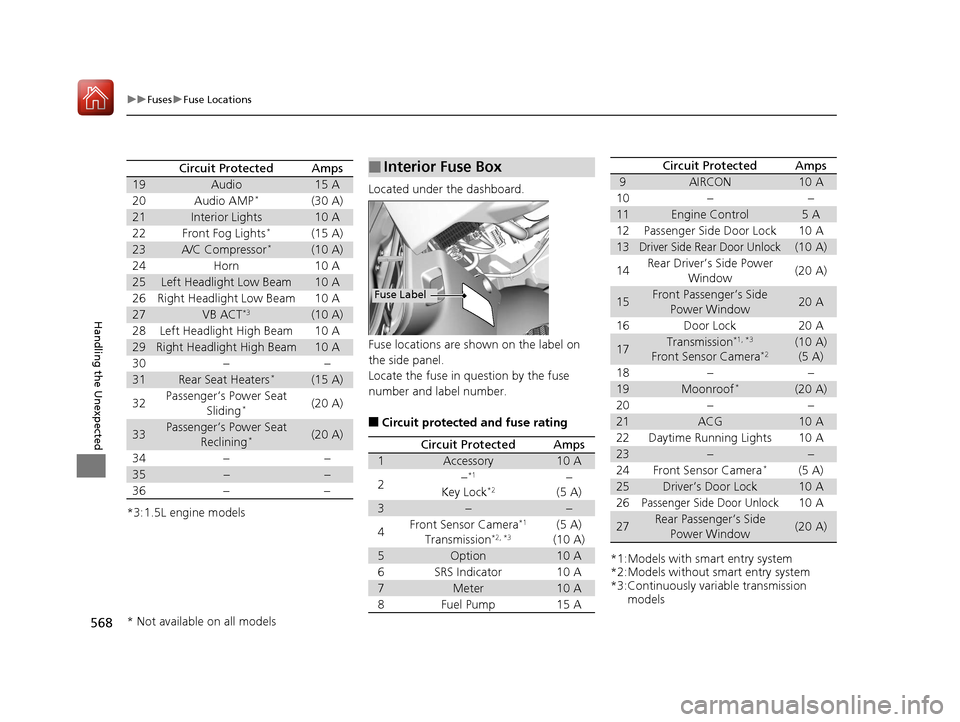
uuFuses uFuse Locations
Handling the Unexpected
*3:1.5L engine models
Circuit ProtectedAmps
19Audio15 A
20 Audio AMP*(30 A)
21Interior Lights10 A
22 Front Fog Lights*(15 A)
23A/C Compressor*(10 A)
24 Horn 10 A
25Left Headlight Low Beam10 A
26 Right Headlight Low Beam 10 A
27VB ACT*3(10 A)
28 Left Headlight High Beam 10 A
29Right Headlight High Beam10 A
30 − −
31Rear Seat Heaters*(15 A)
32 Passenger’s Power Seat
Sliding
*(20 A)
33Passenger’s Power Seat Reclining*(20 A)
34 − −
35−−
36 − −
Located under the dashboard.
Fuse locations are shown on the label on
the side panel.
Locate the fuse in question by the fuse
number and label number.
■Circuit protected and fuse rating
■Interior Fuse Box
Fuse Label
Circuit ProtectedAmps
1Accessory10 A
2−*1
Key Lock*2−
(5 A)
3−−
4Front Sensor Camera*1
Transmission*2, *3(5 A)
(10 A)
5Option10 A
6SRS Indicator10 A
7Meter10 A
8Fuel Pump15 A
*1:Models with smart entry system
*2:Models without smart entry system
*3:Continuously variable transmission models
9AIRCON10 A
10−−
11Engine Control5A
12Passenger Side Door Lock10 A
13Driver Side Rear Door Unlock(10 A)
14Rear Driver’s Side Power
Window(20 A)
15Front Passenger’s Side Power Window20 A
16Door Lock20 A
17Transmission*1, *3
Front Sensor Camera*2(10 A)(5 A)
18−−
19Moonroof*(20 A)
20−−
21ACG10 A
22Daytime Running Lights10 A
23−−
24Front Sensor Camera*(5 A)
25Driver’s Door Lock10 A
26Passenger Side Door Unlock10 A
27Rear Passenger’s Side
Power Window(20 A)
Circuit ProtectedAmps
* Not available on all models
17 CIVIC 4D HCM (KA KC KL)-31TBA6100.book 568 ページ 2016年8月31日 水曜日 午後6時5分
Page 579 of 601
578
uuSpecifications u
Information
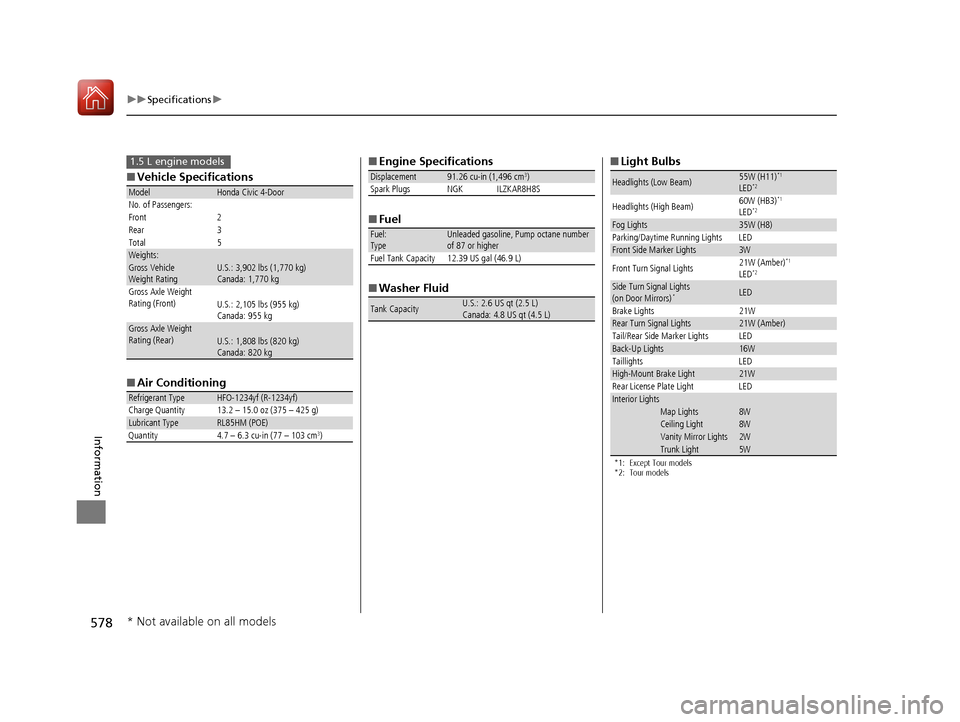
■Vehicle Specifications
■ Air Conditioning
ModelHonda Civic 4-Door
No. of Passengers:
Front 2
Rear 3
Total 5
Weights:Gross Vehicle
Weight Rating U.S.: 3,902 lbs (1,770 kg)
Canada: 1,770 kg
Gross Axle Weight
Rating (Front)U.S.: 2,105 lbs (955 kg)
Canada: 955 kg
Gross Axle Weight
Rating (Rear)U.S.: 1,808 lbs (820 kg)
Canada: 820 kg
Refrigerant TypeHFO-1234yf (R-1234yf)
Charge Quantity 13.2 – 15.0 oz (375 – 425 g)
Lubricant TypeRL85HM (POE)
Quantity 4.7 – 6.3 cu-in (77 – 103 cm3)
1.5 L engine models■ Engine Specifications
■ Fuel
■ Washer Fluid
Displacement91.26 cu-in (1,496 cm3)
Spark Plugs NGK ILZKAR8H8S
Fuel:
TypeUnleaded gasoline, Pump octane number
of 87 or higher
Fuel Tank Capacity 12.39 US gal (46.9 L)
Tank CapacityU.S.: 2.6 US qt (2.5 L)
Canada: 4.8 US qt (4.5 L)
■ Light Bulbs
*1: Except Tour models
*2: Tour models
Headlights (Low Beam)55W (H11)*1
LED*2
Headlights (High Beam) 60W (HB3)*1
LED*2
Fog Lights35W (H8)
Parking/Daytime Running Lights LED
Front Side Marker Lights3W
Front Turn Signal Lights 21W (Amber)*1
LED*2
Side Turn Signal Lights
(on Door Mirrors)*LED
Brake Lights 21W
Rear Turn Signal Lights21W (Amber)
Tail/Rear Side Marker Lights LED
Back-Up Lights16W
Taillights LED
High-Mount Brake Light21W
Rear License Plate Light LED
Interior LightsMap Lights8WCeiling Light8WVanity Mirror Lights2WTrunk Light5W
* Not available on all models
17 CIVIC 4D HCM (KA KC KL)-31TBA6100.book 578 ページ 2016年8月31日 水曜日 午後6時5分