fuel HONDA CIVIC 2017 10.G User Guide
[x] Cancel search | Manufacturer: HONDA, Model Year: 2017, Model line: CIVIC, Model: HONDA CIVIC 2017 10.GPages: 601, PDF Size: 32.51 MB
Page 111 of 601
110
uuGauges and Displays uInformation Display*
Instrument Panel
Information Display*
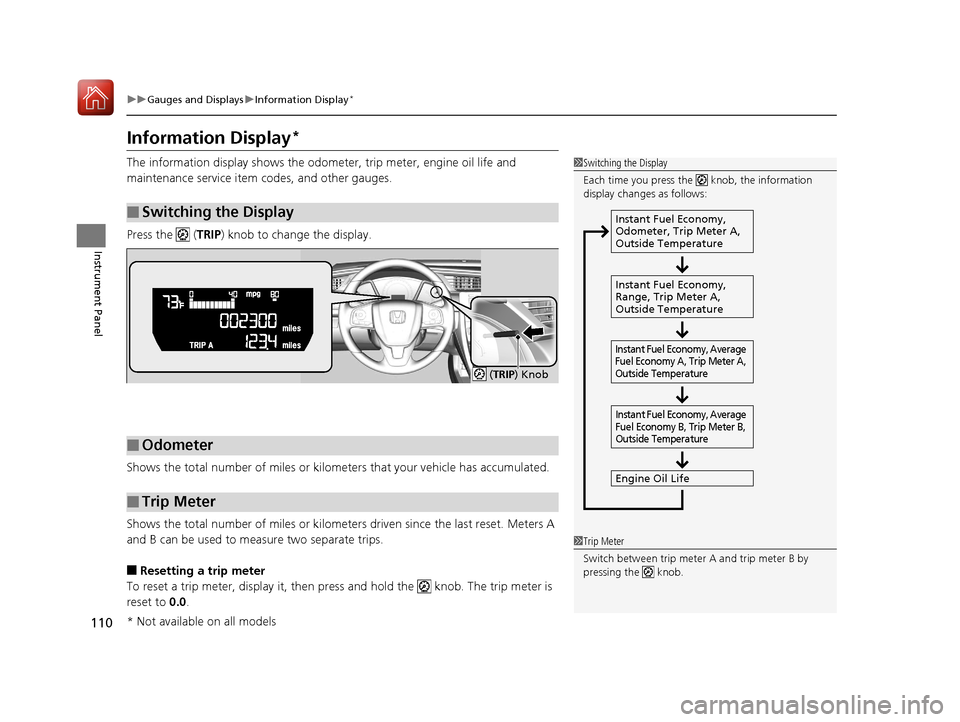
The information display shows the odome ter, trip meter, engine oil life and
maintenance service item codes, and other gauges.
Press the ( TRIP) knob to change the display.
Shows the total number of miles or kilome ters that your vehicle has accumulated.
Shows the total number of miles or kilomete rs driven since the last reset. Meters A
and B can be used to measure two separate trips.
■Resetting a trip meter
To reset a trip meter, display it, then pr ess and hold the knob. The trip meter is
reset to 0.0 .
■Switching the Display
1Switching the Display
Each time you press the knob, the information
display changes as follows:
Instant Fuel Economy,
Odometer, Trip Meter A,
Outside Temperature
Instant Fuel Economy,
Range, Trip Meter A,
Outside Temperature
Engine Oil Life
Instant Fuel Economy, Average
Fuel Economy A, Trip Meter A,
Outside Temperature Instant Fuel Economy, Average
Fuel Economy B, Trip Meter B,
Outside Temperature
■Odometer
■Trip Meter
( TRIP ) Knob
1Trip Meter
Switch between trip meter A and trip meter B by
pressing the knob.
* Not available on all models
17 CIVIC 4D HCM (KA KC KL)-31TBA6100.book 110 ページ 2016年8月31日 水曜日 午後6時5分
Page 112 of 601
Continued111
uuGauges and Displays uInformation Display*
Instrument Panel
Shows the estimated average fuel economy of each trip meter in mpg or l/100 km.
The display is updated at set intervals. Wh en a trip meter is reset, the average fuel
economy is also reset.
Shows the instant fuel economy as a bar graph in mpg or l/100km.
Shows the remaining oil life and Maintenance Minder
TM.
2 Maintenance MinderTM P. 485
Shows the estimated distance you can travel on the remaining fuel. This distance is
estimated from the fuel economy of your previous trips.
■Average Fuel Economy
■Instant Fuel Economy Gauge
■Engine Oil Life
■Range
1Average Fuel Economy
Press and hold the km/mile change knob to switch
the measurement.
1Instant Fuel Economy Gauge
Press and hold the km/mile change knob to switch
the measurement.
1 Range
Press and hold the km/mile change knob to switch
the measurement.
17 CIVIC 4D HCM (KA KC KL)-31TBA6100.book 111 ページ 2016年8月31日 水曜日 午後6時5分
Page 114 of 601
113
uuGauges and Displays uDriver Information Interface*
Continued
Instrument Panel
Driver Information Interface*
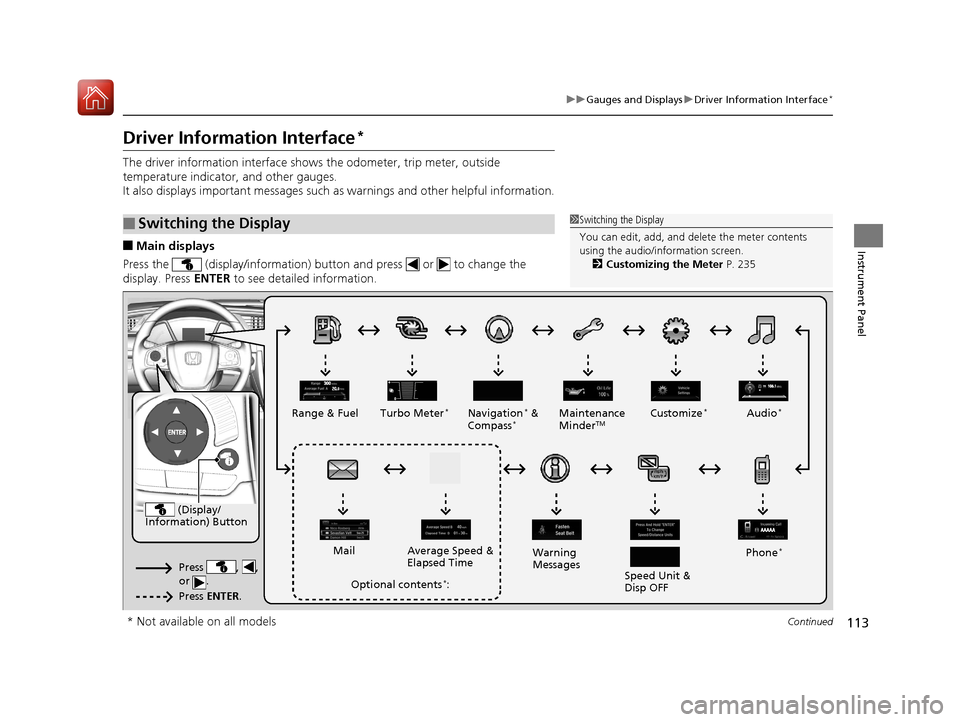
The driver information interface show s the odometer, trip meter, outside
temperature indicator, and other gauges.
It also displays important messages such as warnings and other helpful information.
■Main displays
Press the (display/information) button and press or to change the
display. Press ENTER to see detailed information.
■Switching the Display1Switching the Display
You can edit, add, and de lete the meter contents
using the audio/information screen. 2 Customizing the Meter P. 235
(Display/
Information) Button
Press , ,
or .
Press ENTER .
Range & Fuel Turbo Meter*Navigation* &
Compass*Maintenance
MinderTMCustomize*Audio*
Phone*
Speed Unit &
Disp OFF
Warning
Messages
Average Speed &
Elapsed Time
Mail
Optional contents*:
* Not available on all models
17 CIVIC 4D HCM (KA KC KL)-31TBA6100.book 113 ページ 2016年8月31日 水曜日 午後6時5分
Page 116 of 601
Continued115
uuGauges and Displays uDriver Information Interface*
Instrument Panel
Shows the estimated average fuel economy of each trip meter in mpg or l/100 km.
The display is updated at set intervals. Wh en a trip meter is reset, the average fuel
economy is also reset.
Shows the estimated distance you can travel on the remaining fuel. This distance is
estimated from the fuel economy of your previous trips.
Shows the time elapsed since Trip A or Trip B was reset.
Shows the average speed in mph or km/h since Trip A or Trip B was reset.
Shows the remaining oil life and Maintenance Minder
TM.
2 Maintenance MinderTM P. 485
■Average Fuel Economy
■Range
■Elapsed Time
■Average Speed
■Engine Oil Life
1Average Fuel Economy
You can change when to reset the average fuel
economy.
2 Customized Features P. 118, 308
1Elapsed Time
You can change when to reset the elapsed time.
2 Customized Features P. 118, 308
1Average Speed
You can change when to reset the average speed.
2 Customized Features P. 118, 308
17 CIVIC 4D HCM (KA KC KL)-31TBA6100.book 115 ページ 2016年8月31日 水曜日 午後6時5分
Page 117 of 601
uuGauges and Displays uDriver Information Interface*
116
Instrument Panel
Shows the outside temperature in Fahr enheit (U.S.) or Celsius (Canada).
■Adjusting the outside temperature display
Adjust the temperature reading up to ±5°F or ±3°C if the temperature reading
seems incorrect.
Use the driver information interface’s customized features or audio/information
screen to correct the temperature.
2 Customized Features P. 118, 308
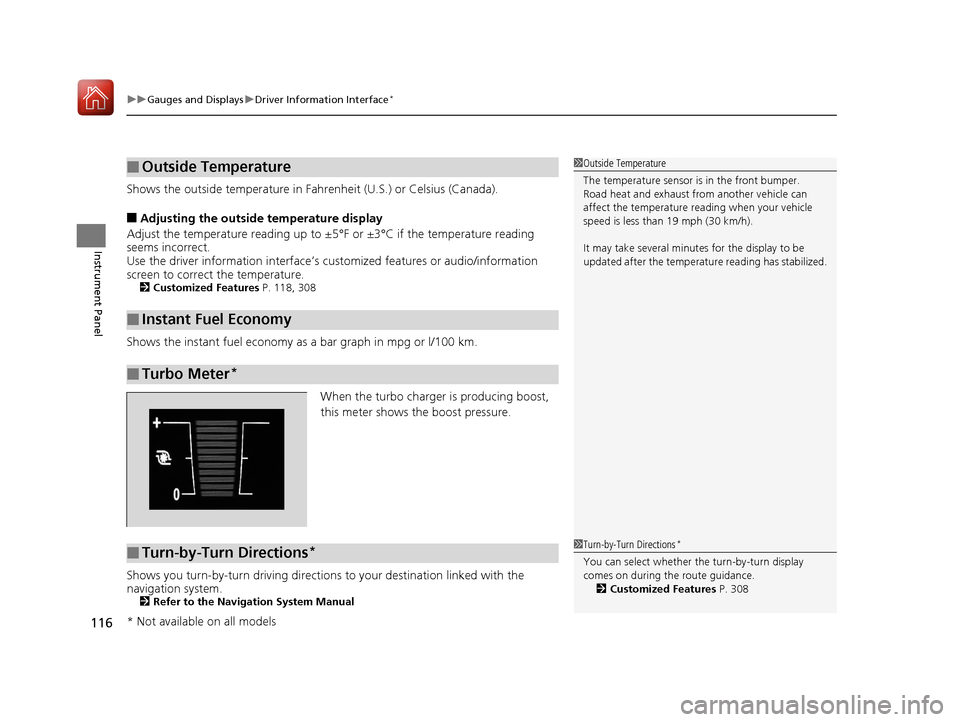
Shows the instant fuel economy as a bar graph in mpg or l/100 km.
When the turbo charger is producing boost,
this meter shows th e boost pressure.
Shows you turn-by-turn driving directions to your destination linked with the
navigation system.
2 Refer to the Navigation System Manual
■Outside Temperature
■Instant Fuel Economy
■Turbo Meter*
1Outside Temperature
The temperature sensor is in the front bumper.
Road heat and exhaust from another vehicle can
affect the temperature reading when your vehicle
speed is less than 19 mph (30 km/h).
It may take several minutes for the display to be
updated after the temperature reading has stabilized.
■Turn-by-Turn Directions*1Turn-by-Turn Directions*
You can select whether th e turn-by-turn display
comes on during the route guidance. 2 Customized Features P. 308
* Not available on all models
17 CIVIC 4D HCM (KA KC KL)-31TBA6100.book 116 ページ 2016年8月31日 水曜日 午後6時5分
Page 120 of 601
119
uuGauges and Displays uDriver Information Interface*
Continued
Instrument Panel
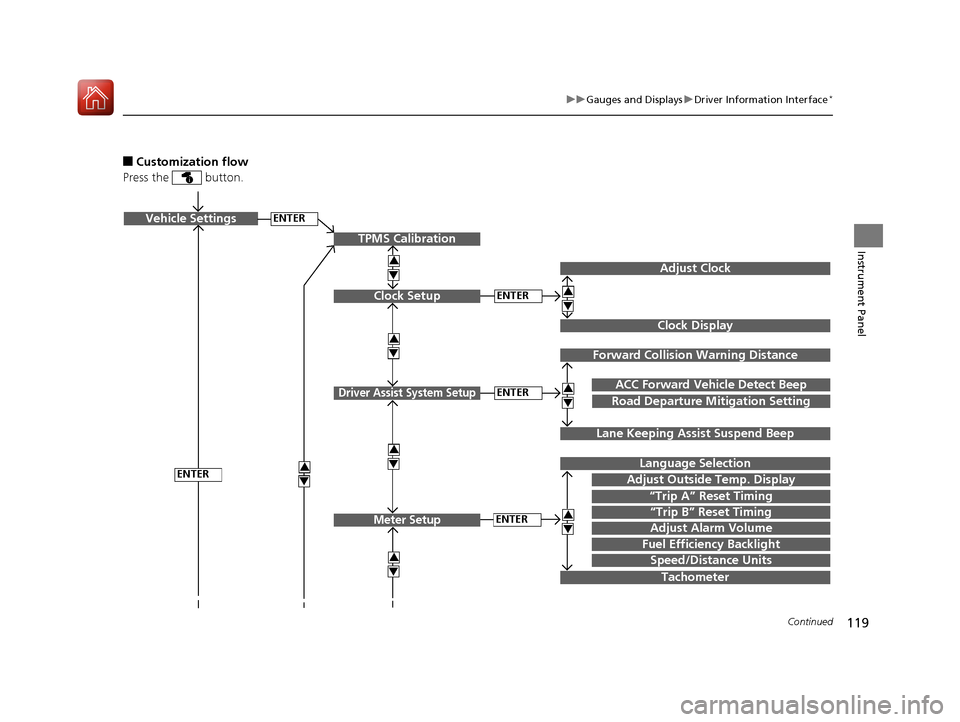
■Customization flow
Press the button.
ENTERVehicle Settings
“Trip A” Reset Timing
Language Selection
Adjust Outside Temp. Display
3
4
3
4
TPMS Calibration
ENTER
“Trip B” Reset Timing
Fuel Efficiency Backlight
3
4
ACC Forward Vehicle Detect Beep
3
4Tachometer
ENTER
Forward Collision Warning Distance
3
4
3
4
Lane Keeping Assi st Suspend Beep
Road Departure Mi tigation Setting
Adjust Alarm Volume
Speed/Distance Units
Adjust Clock
3
4
Clock Display
3
4
ENTER
ENTERClock Setup
Driver Assist System Setup
Meter Setup
17 CIVIC 4D HCM (KA KC KL)-31TBA6100.book 119 ページ 2016年8月31日 水曜日 午後6時5分
Page 123 of 601
122
uuGauges and Displays uDriver Information Interface*
Instrument Panel
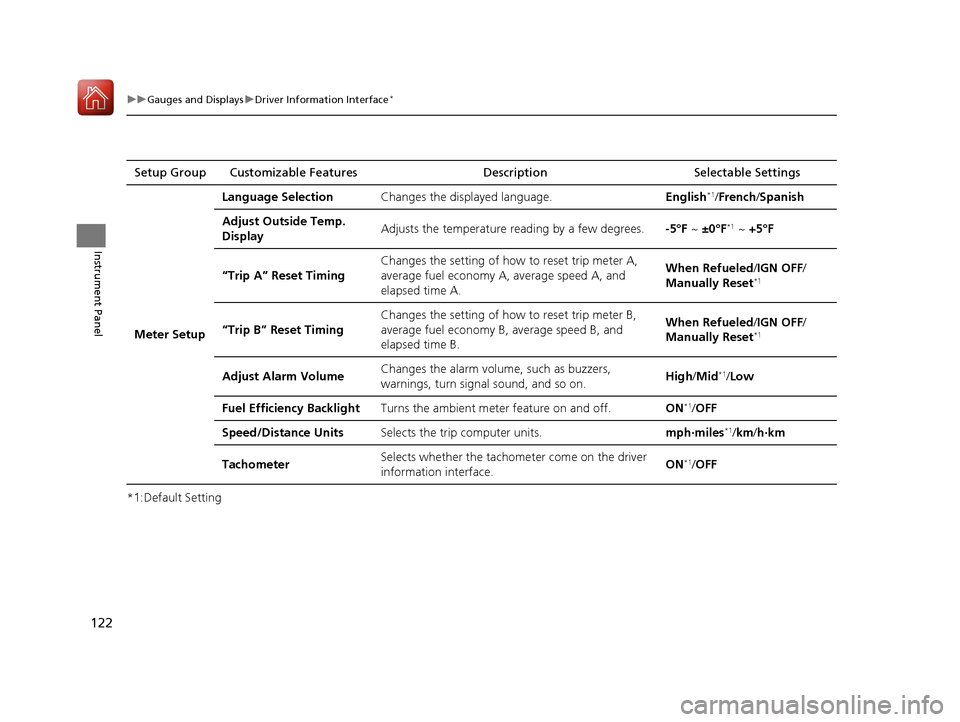
*1:Default SettingSetup Group Customizable Features Description Selectable Settings
Meter Setup Language Selection
Changes the displayed language. English
*1/French /Spanish
Adjust Outside Temp.
Display Adjusts the temperature reading by a few degrees.
-5°F ~ ±0°F
*1 ~ +5°F
“Trip A” Reset Timing Changes the setting of how to reset trip meter A,
average fuel economy A,
average speed A, and
elapsed time A. When Refueled
/IGN OFF /
Manually Reset
*1
“Trip B” Reset Timing Changes the setting of how to reset trip meter B,
average fuel economy B,
average speed B, and
elapsed time B. When Refueled
/IGN OFF /
Manually Reset*1
Adjust Alarm Volume Changes the alarm volume, such as buzzers,
warnings, turn signal sound, and so on.
High
/Mid*1/Low
Fuel Efficien cy Backlight Turns the ambient meter feature on and off. ON
*1/OFF
Speed/Distance Units Selects the trip computer units. mph∙miles
*1/km/ h∙km
Tachometer Selects whether the tachometer come on the driver
information interface. ON
*1/
OFF
17 CIVIC 4D HCM (KA KC KL)-31TBA6100.book 122 ページ 2016年8月31日 水曜日 午後6時5分
Page 126 of 601
125
uuGauges and Displays uDriver Information Interface*
Continued
Instrument Panel
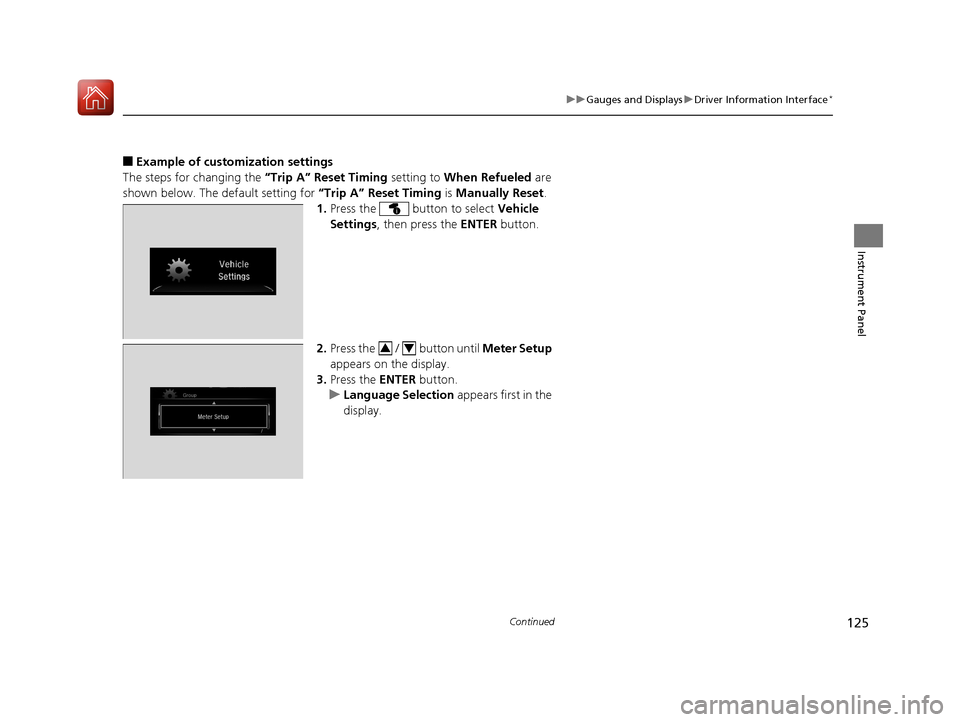
■Example of customization settings
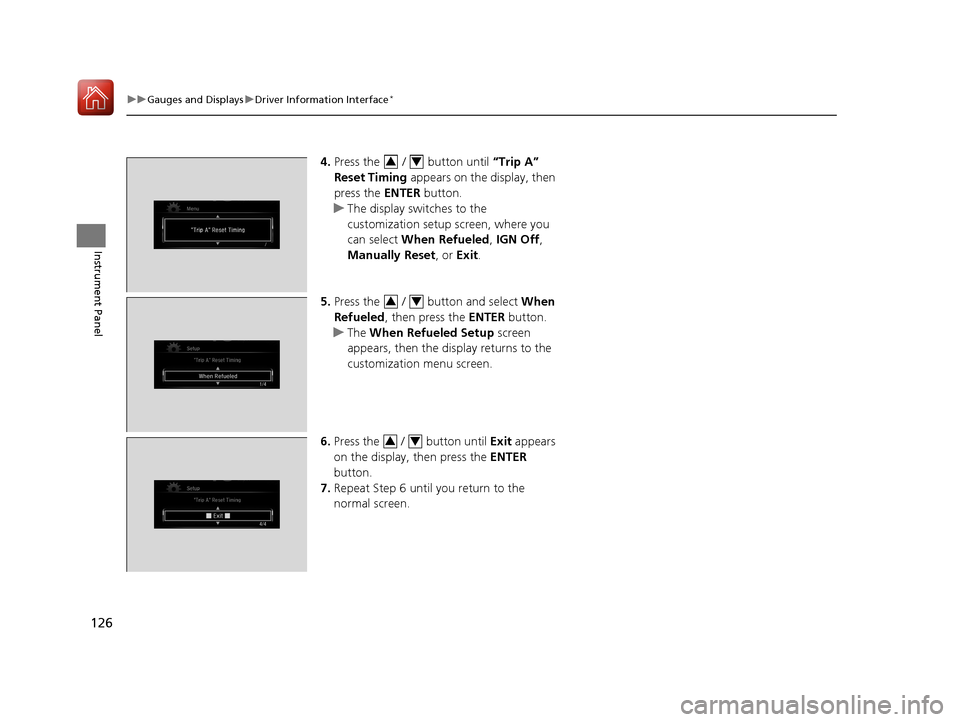
The steps for changing the “Trip A” Reset Timing setting to When Refueled are
shown below. The default setting for “Trip A” Reset Timing is Manually Reset .
1. Press the button to select Vehicle
Settings , then press the ENTER button.
2. Press the / button until Meter Setup
appears on the display.
3. Press the ENTER button.
u Language Selection appears first in the
display.
34
17 CIVIC 4D HCM (KA KC KL)-31TBA6100.book 125 ページ 2016年8月31日 水曜日 午後6時5分
Page 127 of 601
126
uuGauges and Displays uDriver Information Interface*
Instrument Panel
4. Press the / button until “Trip A”
Reset Timing appears on the display, then
press the ENTER button.
u The display switches to the
customization setup screen, where you
can select When Refueled , IGN Off,
Manually Reset , or Exit .
5. Press the / button and select When
Refueled , then press the ENTER button.
u The When Refueled Setup screen
appears, then the di splay returns to the
customization menu screen.
6. Press the / button until Exit appears
on the display, then press the ENTER
button.
7. Repeat Step 6 until you return to the
normal screen.34
34
34
17 CIVIC 4D HCM (KA KC KL)-31TBA6100.book 126 ページ 2016年8月31日 水曜日 午後6時5分
Page 133 of 601
132
uuLocking and Unlocking the Doors uLow Smart Entry Remote Signal Strength*
Controls
Low Smart Entry Remo te Signal Strength*
The vehicle transmits radio waves to loca te the smart entry remote when locking/
unlocking the doors and fuel fill door, opening the trunk, or starting the engine.
In the following cases, locking/unlocking the doors, opening the trunk, or starting
the engine may be inhibited or operation may be unstable:
• Strong radio waves are being tra nsmitted by nearby equipment.
• You are carrying the smart entry remote together with telecommunications
equipment, laptop computers, ce ll phones, or wireless devices.
• A metallic object is touching or covering the smart entry remote.1Low Smart Entry Remote Signal Strength*
Communication between the smart entry remote and
the vehicle consumes the smart entry remote’s
battery.
Battery life is about two years, but this varies
depending on re gularity of use.
The battery is consumed whenever the smart entry
remote is receivi ng strong radio wave s. Avoid placing
it near electrical appliances such as televisions and
personal computers.
* Not available on all models
17 CIVIC 4D HCM (KA KC KL)-31TBA6100.book 132 ページ 2016年8月31日 水曜日 午後6時5分