fuel HONDA CIVIC 2017 10.G Owner's Manual
[x] Cancel search | Manufacturer: HONDA, Model Year: 2017, Model line: CIVIC, Model: HONDA CIVIC 2017 10.GPages: 601, PDF Size: 32.51 MB
Page 134 of 601
133
uuLocking and Unlocking the Doors uLocking/Unlocking the Doors from the Outside
Continued
Controls
Locking/Unlocking the Doors from the Outside
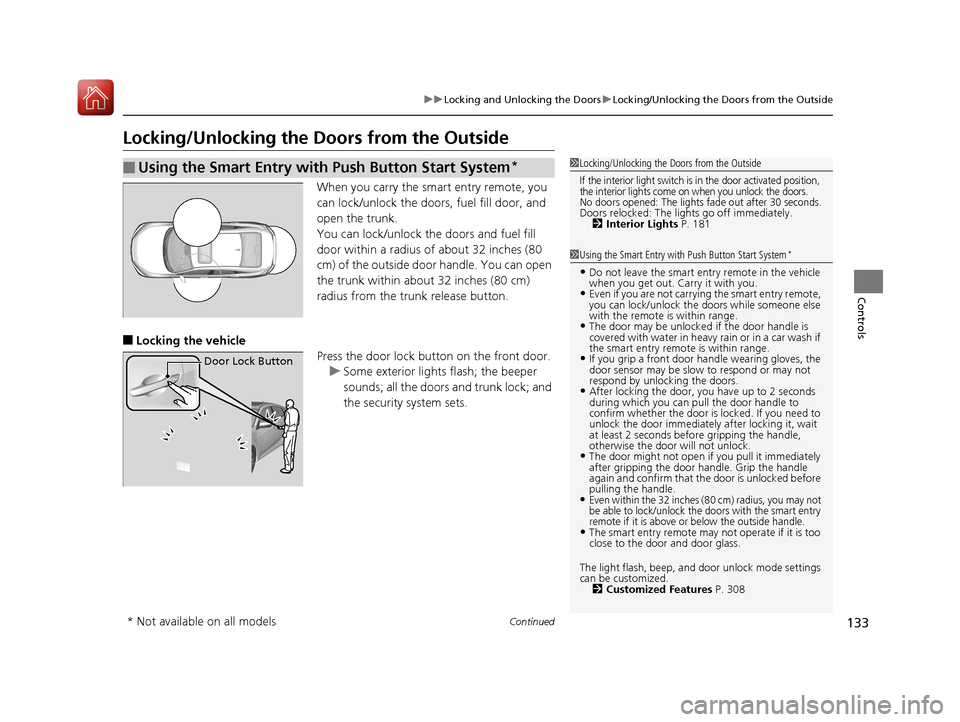
When you carry the sm art entry remote, you
can lock/unlock the doors, fuel fill door, and
open the trunk.
You can lock/unlock the doors and fuel fill
door within a radius of about 32 inches (80
cm) of the outside door handle. You can open
the trunk within about 32 inches (80 cm)
radius from the trunk release button.
■Locking the vehicle Press the door lock button on the front door.u Some exterior lights flash; the beeper
sounds; all the doors and trunk lock; and
the security system sets.
■Using the Smart Entry with Push Button Start System*1Locking/Unlocking the Doors from the Outside
If the interior light switch is in the door activated position,
the interior lights come on when you unlock the doors.
No doors opened: The lights fade out after 30 seconds.Doors relocked: The li ghts go off immediately.
2 Interior Lights P. 181
1Using the Smart Entry with Push Button Start System*
•Do not leave the smart entry remote in the vehicle
when you get out. Carry it with you.
•Even if you are not carrying the smart entry remote,
you can lock/unlock the doors while someone else
with the remote is within range.
•The door may be unlocked if the door handle is
covered with water in heavy rain or in a car wash if
the smart entry remote is within range.
•If you grip a front door handle wearing gloves, the
door sensor may be slow to respond or may not
respond by unlocking the doors.
•After locking the door, you have up to 2 seconds
during which you can pull the door handle to
confirm whether the door is locked. If you need to
unlock the door immediately after locking it, wait
at least 2 seconds befo re gripping the handle,
otherwise the door will not unlock.
•The door might not open if you pull it immediately
after gripping the door ha ndle. Grip the handle
again and confirm that th e door is unlocked before
pulling the handle.
•Even within the 32 inches (80 cm) radius, you may not
be able to lock/unlock the doors with the smart entry
remote if it is above or below the outside handle.
•The smart entry remote may not operate if it is too
close to the door and door glass.
The light flash, beep, a nd door unlock mode settings
can be customized.
2 Customized Features P. 308
Door Lock Button
* Not available on all models
17 CIVIC 4D HCM (KA KC KL)-31TBA6100.book 133 ページ 2016年8月31日 水曜日 午後6時5分
Page 137 of 601
uuLocking and Unlocking the Doors uLocking/Unlocking the Doors from the Outside
136
Controls
■Unlocking the vehicle
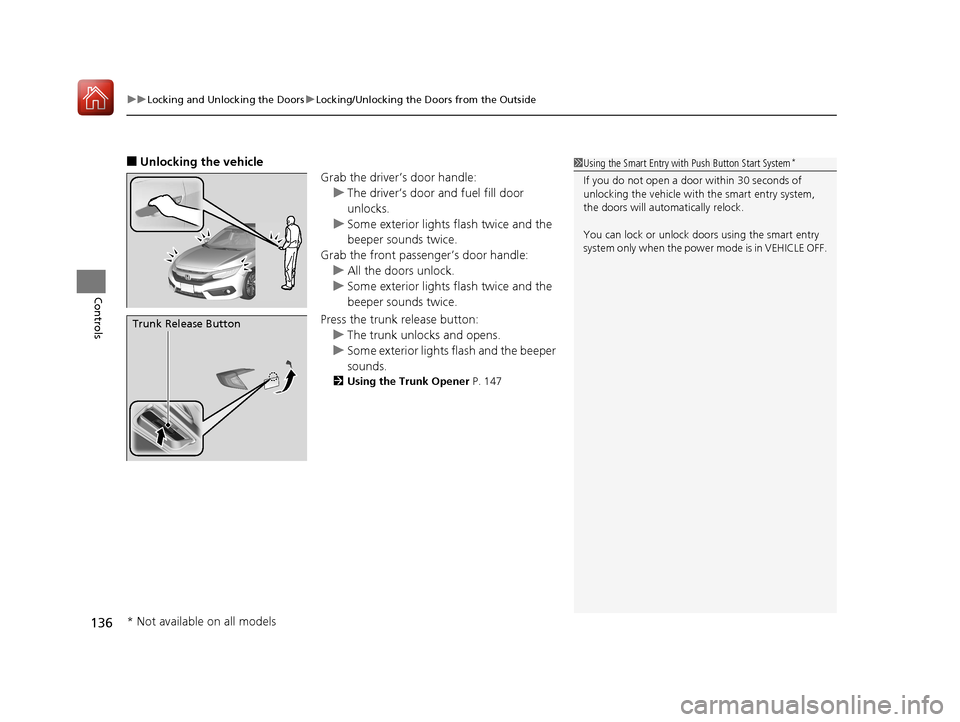
Grab the driver’s door handle:u The driver’s door and fuel fill door
unlocks.
u Some exterior lights flash twice and the
beeper sounds twice.
Grab the front passenger’s door handle: u All the doors unlock.
u Some exterior lights flash twice and the
beeper sounds twice.
Press the trunk release button: u The trunk unlocks and opens.
u Some exterior lights flash and the beeper
sounds.
2 Using the Trunk Opener P. 147
1Using the Smart Entry with Push Button Start System*
If you do not open a door within 30 seconds of
unlocking the vehicle with the smart entry system,
the doors will automatically relock.
You can lock or unlock doors using the smart entry
system only when the power mode is in VEHICLE OFF.
Trunk Release Button
* Not available on all models
17 CIVIC 4D HCM (KA KC KL)-31TBA6100.book 136 ページ 2016年8月31日 水曜日 午後6時5分
Page 138 of 601
Continued137
uuLocking and Unlocking the Doors uLocking/Unlocking the Doors from the Outside
Controls
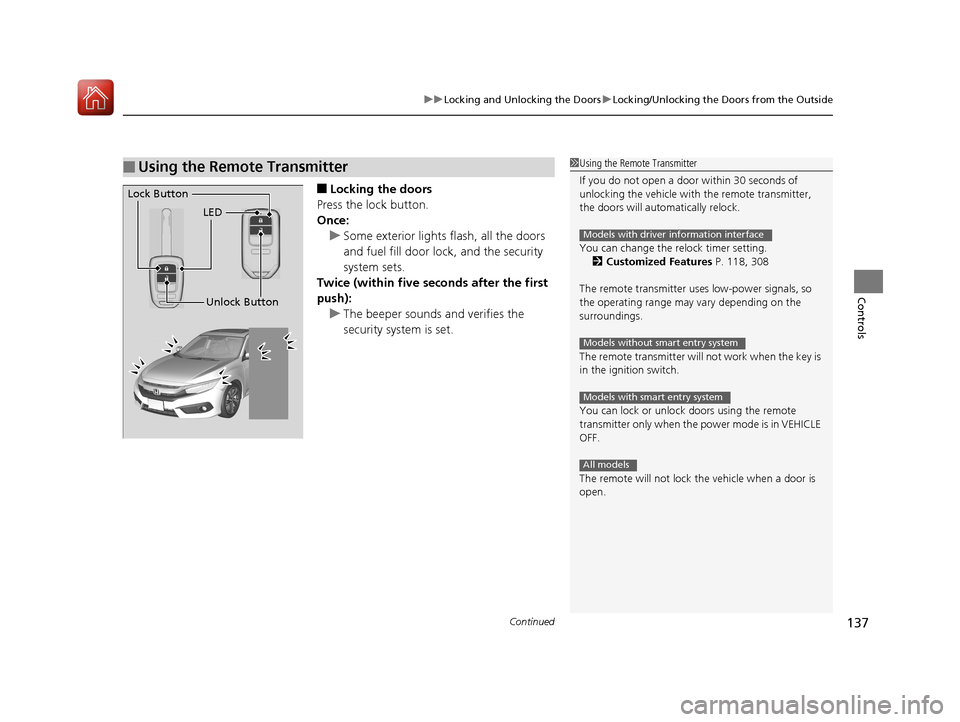
■Locking the doors
Press the lock button.
Once: u Some exterior lights flash, all the doors
and fuel fill door lock , and the security
system sets.
Twice (within five se conds after the first
push):
u The beeper sounds and verifies the
security system is set.
■Using the Remote Transmitter1Using the Remote Transmitter
If you do not open a door within 30 seconds of
unlocking the vehicle with the remote transmitter,
the doors will automatically relock.
You can change the relock timer setting. 2 Customized Features P. 118, 308
The remote transmitter us es low-power signals, so
the operating range may vary depending on the
surroundings.
The remote transmitter will not work when the key is
in the ignition switch.
You can lock or unlock doors using the remote
transmitter only when the power mode is in VEHICLE
OFF.
The remote will not lock the vehicle when a door is
open.
Models with driver information interface
Models without smart entry system
Models with smart entry system
All models
LED
Unlock Button
Lock Button
17 CIVIC 4D HCM (KA KC KL)-31TBA6100.book 137 ページ 2016年8月31日 水曜日 午後6時5分
Page 139 of 601
uuLocking and Unlocking the Doors uLocking/Unlocking the Doors from the Outside
138
Controls
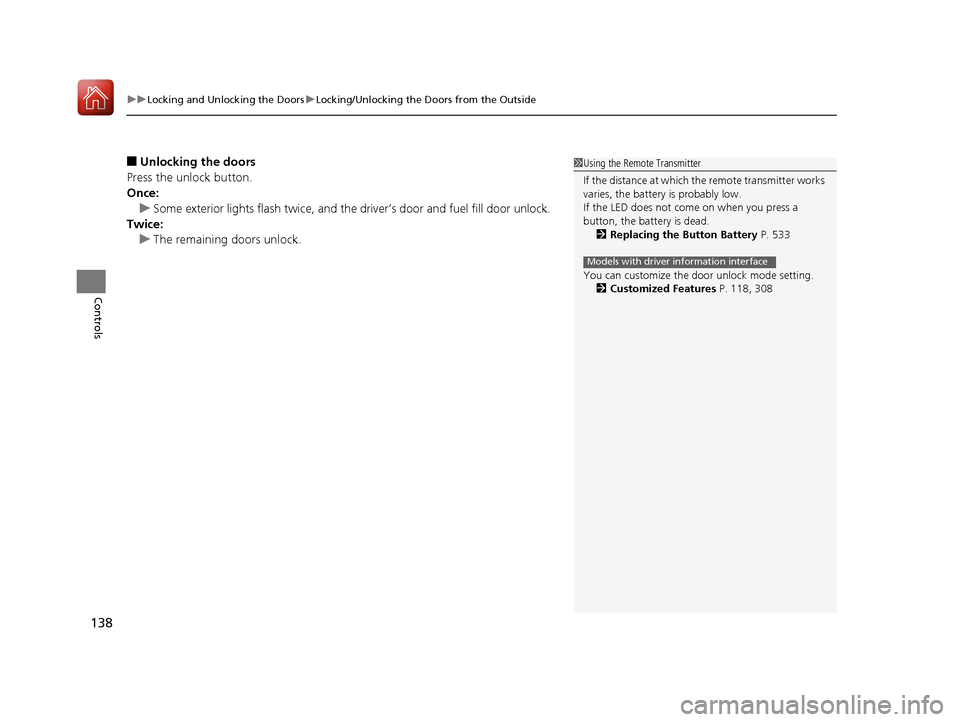
■Unlocking the doors
Press the unlock button.
Once: u Some exterior lights flash twice, and the driver’s door and fuel fill door unlock.
Twice: u The remaining doors unlock.1Using the Remote Transmitter
If the distance at which the remote transmitter works
varies, the batter y is probably low.
If the LED does not come on when you press a
button, the battery is dead.
2 Replacing the Button Battery P. 533
You can customize the door unlock mode setting. 2 Customized Features P. 118, 308
Models with driver information interface
17 CIVIC 4D HCM (KA KC KL)-31TBA6100.book 138 ページ 2016年8月31日 水曜日 午後6時5分
Page 322 of 601
321
uuCustomized Features u
Continued
Features
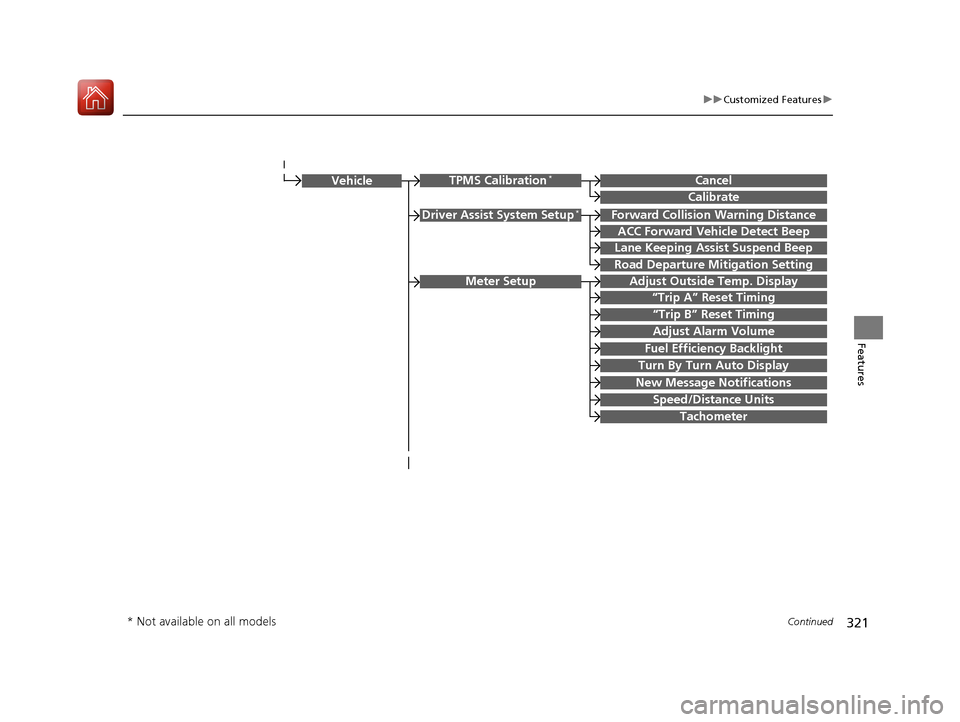
Driver Assist System Setup*Forward Collision Warning Distance
ACC Forward Vehicle Detect Beep
Lane Keeping Assist Suspend Beep
Road Departure Mi tigation Setting
Adjust Outside Temp. Display
“Trip A” Reset Timing
“Trip B” Reset Timing
Vehicle
Meter Setup
Adjust Alarm Volume
Speed/Distance Units
Fuel Efficiency Backlight
New Message Notifications
Tachometer
CancelTPMS Calibration*
Calibrate
Turn By Turn Auto Display
* Not available on all models
17 CIVIC 4D HCM (KA KC KL)-31TBA6100.book 321 ページ 2016年8月31日 水曜日 午後6時5分
Page 336 of 601
335
uuCustomized Features u
Continued
Features
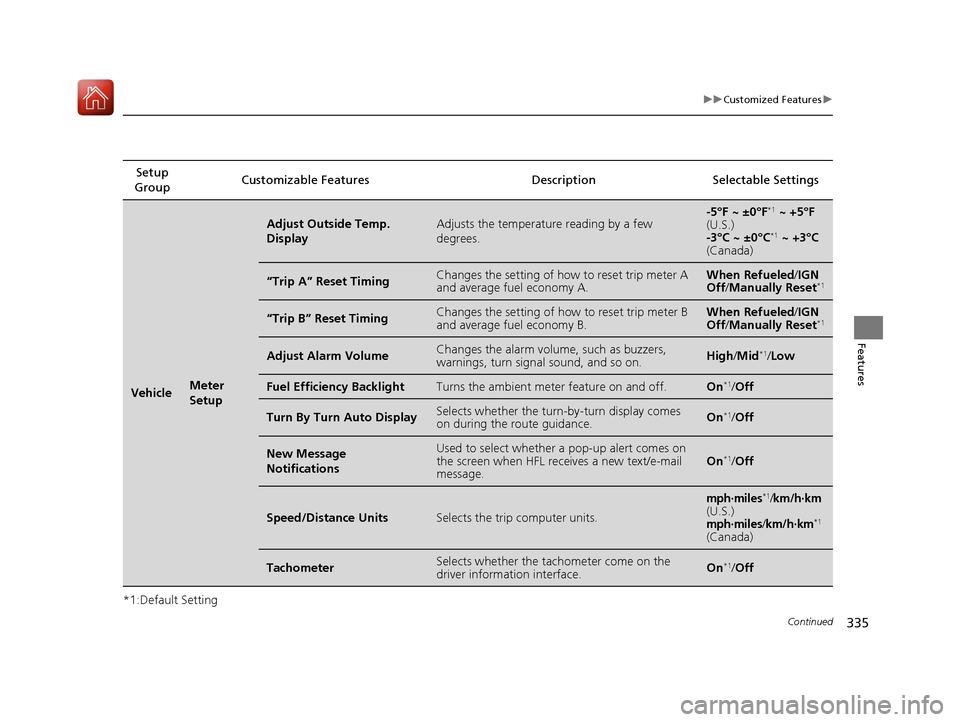
*1:Default SettingSetup
Group Customizable Features Description Selectable Settings
VehicleMeter
Setup
Adjust Outside Temp.
DisplayAdjusts the temperature reading by a few
degrees.-5°F ~ ±0°F*1
~ +5°F
(U.S.)
-3°C ~ ±0°C
*1 ~ +3°C
(Canada)
“Trip A” Reset TimingChanges the setting of how to reset trip meter A
and average fuel economy A.When Refueled /IGN
Off /Manually Reset*1
“Trip B” Reset TimingChanges the setting of how to reset trip meter B
and average fuel economy B.When Refueled /IGN
Off /Manually Reset*1
Adjust Alarm VolumeChanges the alarm volu me, such as buzzers,
warnings, turn signal sound, and so on.High /Mid*1/ Low
Fuel Efficiency BacklightTurns the ambient meter feature on and off.On*1/Off
Turn By Turn Auto DisplaySelects whether the turn -by-turn display comes
on during the route guidance.On*1/ Off
New Message
NotificationsUsed to select whether a pop-up alert comes on
the screen when HFL receives a new text/e-mail
message.On*1/Off
Speed/Distance UnitsSelects the trip computer units.
mph∙miles*1/km/h∙km(U.S.)mph∙miles/km/h∙km*1
(Canada)
TachometerSelects whether the tach ometer come on the
driver information interface.On*1/ Off
17 CIVIC 4D HCM (KA KC KL)-31TBA6100.book 335 ページ 2016年8月31日 水曜日 午後6時5分
Page 396 of 601
395
Driving
This chapter discusses driving, refueling, and information on items such as accessories.
Before Driving
Driving Preparation .......................... 396
Maximum Load Limit........................ 399
Towing a Trailer ................................ 401
When Driving Starting the Engine .................. 402, 404
Precautions While Driving................. 409
Continuously Variable Transmission*... 410
Shifting .................................... 411, 413
ECON Button ................................... 416
Cruise Control
*................................ 417
Front Sensor Camera*...................... 420 Adaptive Cruise Control (ACC) with Low
Speed Follow (LSF)
*....................... 422Road Departure Mitigation (RDM) System*...... 436Lane Keeping Assist System (LKAS)*.... 440
Vehicle Stabilit y Assist (VSA®), aka Electronic
Stability Control (ESC), System........... 447
LaneWatchTM*.................................. 450Tire Pressure Monitoring System (TPMS) ...... 452Tire Pressure Monitoring System (TPMS) -
Required Federal Explanation ......... 455
Braking Brake System ................................... 457
Anti-lock Brake System (ABS) ........... 463 Brake Assist System ......................... 464
Collision Mitigation Braking System
TM
(CMBSTM)*..................................... 465
Parking Your Vehicle When Stopped ................................ 473
Multi-View Rear Camera .................. 474
Refueling Fuel Information .............................. 476
How to Refuel ................................. 477
Fuel Economy and CO
2 Emissions
Improving Fuel Economy and Reducing
CO
2 Emissions ................................ 479
Turbo Engine Vehicle*
Handling Precautions ....................... 480
* Not available on all models
17 CIVIC 4D HCM (KA KC KL)-31TBA6100.book 395 ページ 2016年8月31日 水曜日 午後6時5分
Page 404 of 601
403
uuWhen Driving uStarting the Engine
Driving
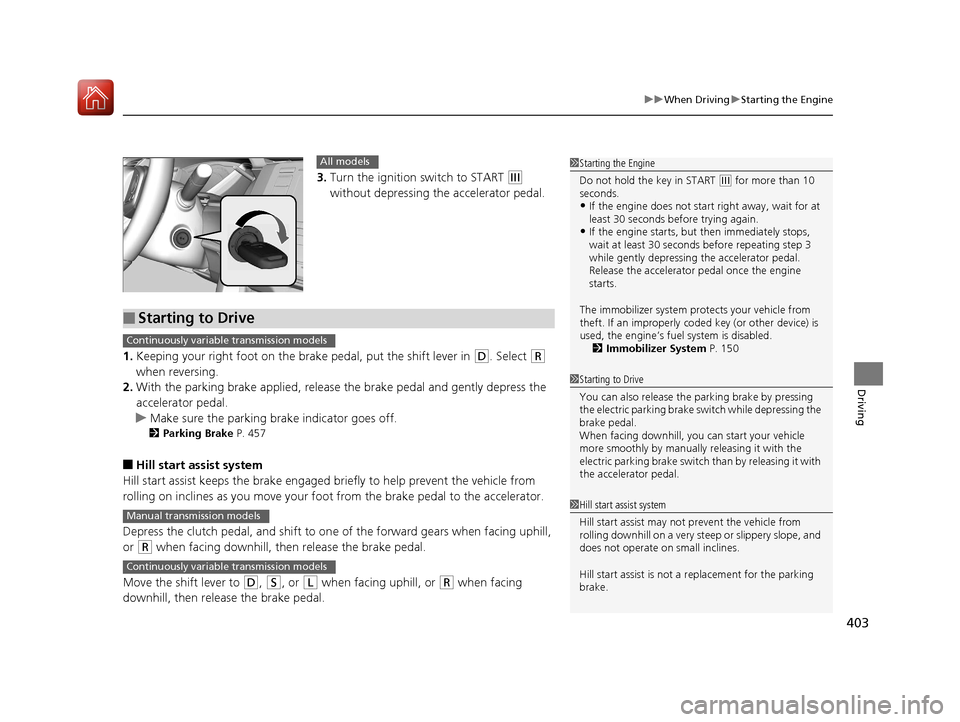
3. Turn the ignition switch to START (e
without depressing the accelerator pedal.
1. Keeping your right foot on the br ake pedal, put the shift lever in
(D. Select (R
when reversing.
2. With the parking brake applied, release the brake pedal and gently depress the
accelerator pedal.
u Make sure the parking brake indicator goes off.
2 Parking Brake P. 457
■Hill start assist system
Hill start assist keeps the brake engaged br iefly to help prevent the vehicle from
rolling on inclines as you move your foot from the brake pedal to the accelerator.
Depress the clutch pedal, and shift to on e of the forward gears when facing uphill,
or
(R when facing downhill, th en release the brake pedal.
Move the shift lever to
(D, (S, or (L when facing uphill, or (R when facing
downhill, then release the brake pedal.
1 Starting the Engine
Do not hold the key in START
(e for more than 10
seconds.
•If the engine does not start right away, wait for at
least 30 seconds before trying again.
•If the engine starts, but then immediately stops,
wait at least 30 seconds before repeating step 3
while gently depressing the accelerator pedal.
Release the accelerator pedal once the engine
starts.
The immobilizer system pr otects your vehicle from
theft. If an improperly code d key (or other device) is
used, the engine’s fuel system is disabled.
2 Immobilizer System P. 150
All models
■Starting to Drive
1Starting to Drive
You can also release the parking brake by pressing
the electric parking brake sw itch while depressing the
brake pedal.
When facing downhill, y ou can start your vehicle
more smoothly by manually releasing it with the
electric parking brake switch than by releasing it with
the accelerator pedal.
Continuously variable transmission models
1 Hill start assist system
Hill start assist may not prevent the vehicle from
rolling downhill on a very st eep or slippery slope, and
does not operate on small inclines.
Hill start assist is not a replacement for the parking
brake.Manual transmission models
Continuously variable transmission models
17 CIVIC 4D HCM (KA KC KL)-31TBA6100.book 403 ページ 2016年8月31日 水曜日 午後6時5分
Page 405 of 601
404
uuWhen Driving uStarting the Engine
Driving
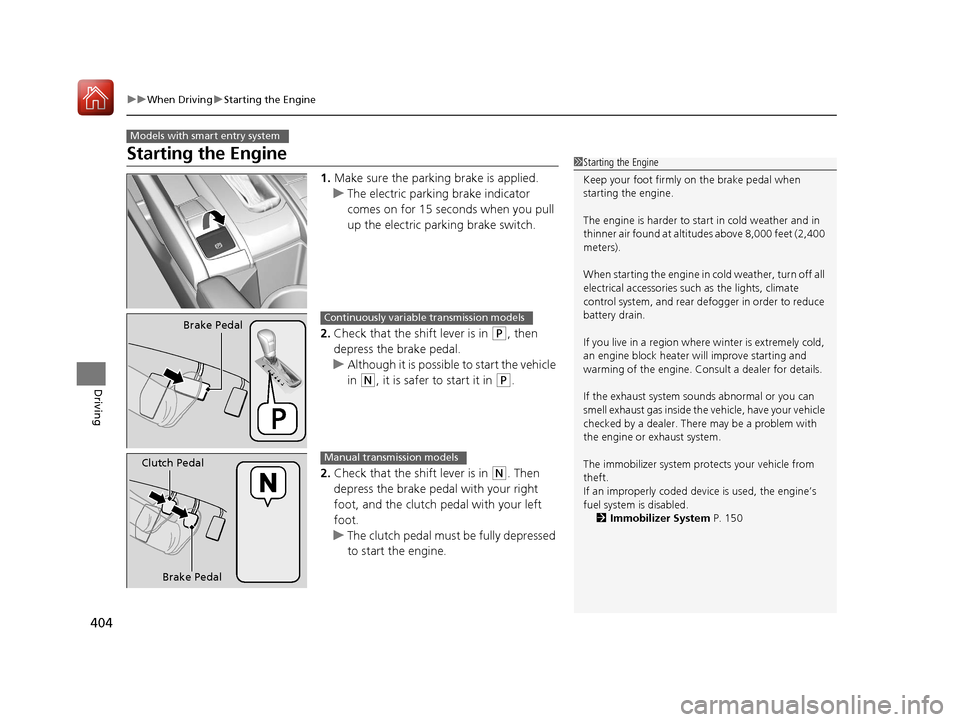
Starting the Engine
1. Make sure the parking brake is applied.
u The electric parking brake indicator
comes on for 15 seconds when you pull
up the electric parking brake switch.
2. Check that the shift lever is in
(P, then
depress the brake pedal.
u Although it is possible to start the vehicle
in
(N, it is safer to start it in (P.
2. Check that the shift lever is in
(N. Then
depress the brake pedal with your right
foot, and the clutch pedal with your left
foot.
u The clutch pedal must be fully depressed
to start the engine.
Models with smart entry system
1Starting the Engine
Keep your foot firmly on the brake pedal when
starting the engine.
The engine is harder to st art in cold weather and in
thinner air found at altitudes above 8,000 feet (2,400
meters).
When starting the engine in cold weather, turn off all
electrical accessories such as the lights, climate
control system, and rear de fogger in order to reduce
battery drain.
If you live in a region where winter is extremely cold,
an engine block heater will improve starting and
warming of the engine. Cons ult a dealer for details.
If the exhaust system sounds abnormal or you can
smell exhaust gas inside the vehicle, have your vehicle
checked by a dealer. There may be a problem with
the engine or exhaust system.
The immobilizer system pr otects your vehicle from
theft.
If an improperly c oded device is used, the engine’s
fuel system is disabled. 2 Immobilizer System P. 150
Brake PedalContinuously variable transmission models
Brake Pedal
Clutch Pedal
Manual transmission models
17 CIVIC 4D HCM (KA KC KL)-31TBA6100.book 404 ページ 2016年8月31日 水曜日 午後6時5分
Page 413 of 601
uuWhen Driving uShifting
412
Driving
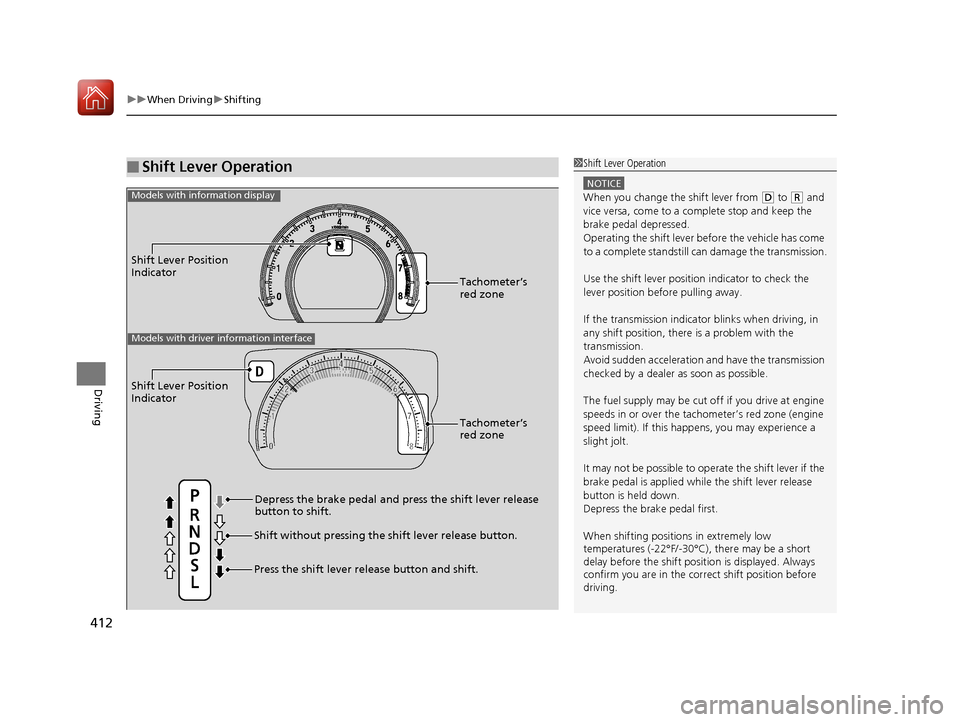
■Shift Lever Operation1Shift Lever Operation
NOTICE
When you change the shift lever from (D to (R and
vice versa, come to a complete stop and keep the
brake pedal depressed.
Operating the shift lever be fore the vehicle has come
to a complete standstill can damage the transmission.
Use the shift lever position indicator to check the
lever position befo re pulling away.
If the transmission indicator blinks when driving, in
any shift position, there is a problem with the
transmission.
Avoid sudden acceleration and have the transmission
checked by a dealer as soon as possible.
The fuel supply may be cut of f if you drive at engine
speeds in or over the tac hometer’s red zone (engine
speed limit). If this happe ns, you may experience a
slight jolt.
It may not be possible to operate the shift lever if the
brake pedal is applied while the shift lever release
button is held down.
Depress the brake pedal first.
When shifting positions in extremely low
temperatures (-22°F/-30°C), there may be a short
delay before the shift posit ion is displayed. Always
confirm you are in the corr ect shift position before
driving.
Shift Lever Position
Indicator
Depress the brake pedal and press the shift lever release
button to shift.
Shift without pressing the shift lever release button.
Press the shift lever re lease button and shift.Tachometer’s
red zone
Shift Lever Position
Indicator
Tachometer’s
red zone
Models with driver information interface
Models with information display
17 CIVIC 4D HCM (KA KC KL)-31TBA6100.book 412 ページ 2016年8月31日 水曜日 午後6時5分