audio HONDA CIVIC 2017 10.G Owner's Manual
[x] Cancel search | Manufacturer: HONDA, Model Year: 2017, Model line: CIVIC, Model: HONDA CIVIC 2017 10.GPages: 601, PDF Size: 32.51 MB
Page 144 of 601
143
uuLocking and Unlocking the Doors uAuto Door Locking/Unlocking
Controls
Auto Door Locking/Unlocking
Your vehicle locks and unlocks all doors automatically when a certain condition is
met.
■Drive lock mode
All doors lock when the vehicle’s sp eed reaches about 10 mph (15 km/h).
■Driver’s door open mode
All doors unlock when the driver’s door is opened.
■Auto Door Locking
■Auto Door Unlocking
1 Auto Door Locking/Unlocking
You can turn off or cha nge to another auto door
locking/unlocking setting us ing the master door lock
switch. 2 Customizing the Auto Door Locking/
Unlocking Setting P. 144
You can turn off or cha nge to another auto door
locking/unlocking sett ing using the driver
information interface or audio/information screen.
2 Customized Features P. 118, 308
Models without driver information interface
Models with driver information interface
17 CIVIC 4D HCM (KA KC KL)-31TBA6100.book 143 ページ 2016年8月31日 水曜日 午後6時5分
Page 151 of 601
150
Controls
Security System
Immobilizer System
The immobilizer system prevents a key that has not been pre-registered from
starting the engine. Each key contains el ectronic transmitters that use electronic
signals to verify the key.
Pay attention to the following when inserti ng the key into the ignition switch or
pressing the ENGINE START/STOP button:
• Do not allow objects that emit strong radio waves near the ignition switch or the
ENGINE START/STOP button.
• Make sure the key is not covered by or touching a metal object.
• Do not bring a key from anot her vehicle’s immobilizer system near the ignition
switch or the ENGINE START/STOP button.
• Do not put the key near magnetic items. Electronic devices, such as televisions
and audio systems emit strong magnetic fields. Note that even a key chain can
become magnetic.
Security System Alarm
The security system alarm activates wh en the trunk, hood or doors are forcibly
opened. The alarm does not go off if the trunk or doors are opened with the key,
remote transmitter or smart entry system
*.
However, the alarm activates if a door is opened with the key and then the shift lever
is moved out of
(P (continuously variable transmission models) or the hood is
opened before the ignition switch is turned to ON (w*1.
■When the security system alarm activates
The horn sounds intermittently and all the exterior lights flash.
■To deactivate the security system alarm
Unlock the vehicle using remote transmitter, or smart entry system*. The system,
along with the horn and flashing lights, is deactivated.
*1: Models with the smart entry system have an ENGINE START/STOP button instead of an
ignition switch.
1 Immobilizer System
NOTICE
Leaving the key in the vehicl e can result in theft or
accidental movement of the vehicle.
Always take the key with you whenever you leave the
vehicle unattended.
Do not alter the system or add other devices to it.
Doing so may damage the system and make your
vehicle inoperable.
Canadian models only: Apply and hold the brake
pedal before turning the vehicle on the first time after
the battery has been disconnected.
1 Security System Alarm
The security alarm continues for a maximum of two
minutes until the security system deactivates.
* Not available on all models
17 CIVIC 4D HCM (KA KC KL)-31TBA6100.book 150 ページ 2016年8月31日 水曜日 午後6時5分
Page 158 of 601
157
Controls
Operating the Switches Around the Steering Wheel
Ignition Switch*
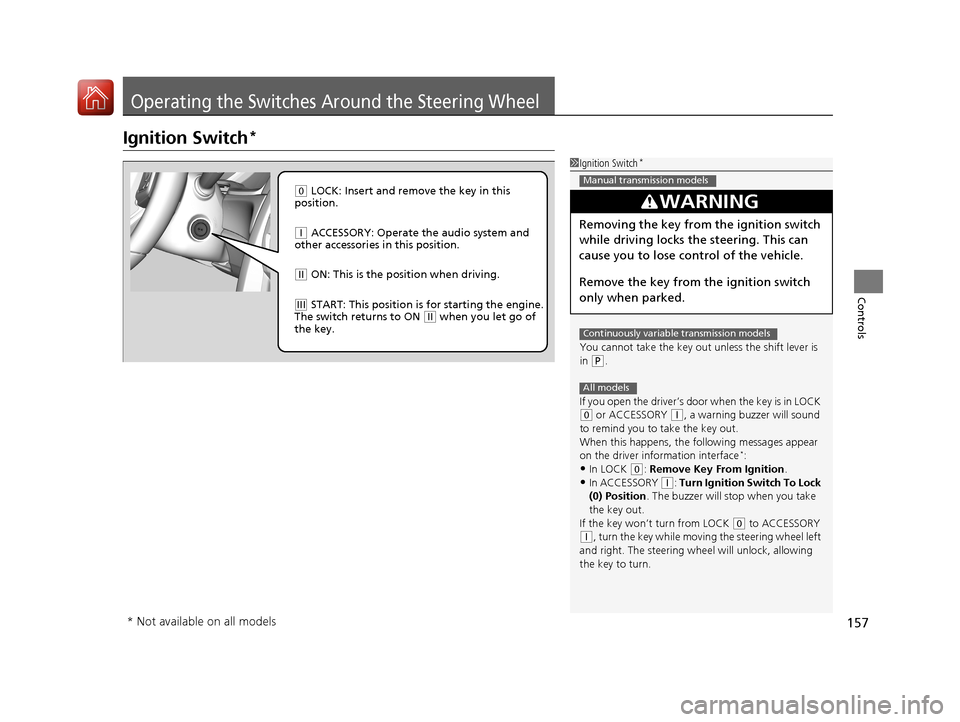
1Ignition Switch*
You cannot take the key out unless the shift lever is
in
( P.
If you open the driver’s door when the key is in LOCK
(0 or ACCESSORY (q, a warning buzzer will sound
to remind you to take the key out.
When this happens, the following messages appear
on the driver information interface
*:•In LOCK ( 0: Remove Key From Ignition.
•In ACCESSORY (q: Turn Ignition Switch To Lock
(0) Position . The buzzer will stop when you take
the key out.
If the key won’t turn from LOCK
( 0 to ACCESSORY
(q, turn the key while moving the steering wheel left
and right. The steering wh eel will unlock, allowing
the key to turn.
3WARNING
Removing the key from the ignition switch
while driving locks the steering. This can
cause you to lose control of the vehicle.
Remove the key from the ignition switch
only when parked.
Manual transmission models
Continuously variable transmission models
All models
( 0 LOCK: Insert and remove the key in this
position.
( q ACCESSORY: Operate the audio system and
other accessories in this position.
( w ON: This is the position when driving.
(e START: This position is for starting the engine.
The switch returns to ON ( w when you let go of
the key.
* Not available on all models
17 CIVIC 4D HCM (KA KC KL)-31TBA6100.book 157 ページ 2016年8月31日 水曜日 午後6時5分
Page 159 of 601
158
uuOperating the Switches Around the Steering Wheel uENGINE START/STOP Button*
Controls
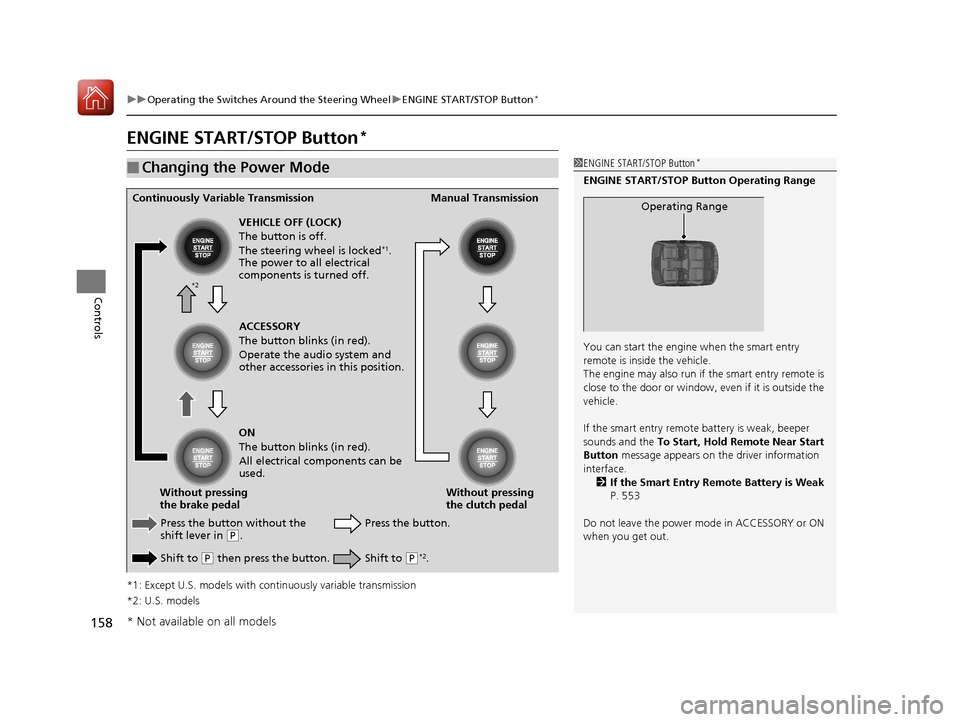
ENGINE START/STOP Button*
*1: Except U.S. models with c ontinuously variable transmission
*2: U.S. models
■Changing the Power Mode1 ENGINE START/STOP Button*
ENGINE START/STOP Button Operating Range
You can start the engine when the smart entry
remote is inside the vehicle.
The engine may also run if the smart entry remote is
close to the door or window, ev en if it is outside the
vehicle.
If the smart entry remote battery is weak, beeper
sounds and the To Start, Hold Remote Near Start
Button message appears on th e driver information
interface. 2 If the Smart Entry Remote Battery is Weak
P. 553
Do not leave the power mode in ACCESSORY or ON
when you get out.
Operating RangeContinuously Variable Transmission Manual Transmission
VEHICLE OFF (LOCK)
The button is off.
The steering wheel is locked
*1.
The power to all electrical
components is turned off.
Press the button without the
shift lever in
( P.
Shift to
( P then press the button. Press the button.
Without pressing
the clutch pedal
Without pressing
the brake pedal ACCESSORY
The button blinks (in red).
Operate the audio system and
other accessories in this position.
ON
The button blinks (in red).
All electrical components can be
used.
Shift to (P*2.
*2
* Not available on all models
17 CIVIC 4D HCM (KA KC KL)-31TBA6100.book 158 ページ 2016年8月31日 水曜日 午後6時5分
Page 162 of 601
161
uuOperating the Switches Around the Steering Wheel uIgnition Switch and Power Mode Comparison
Controls
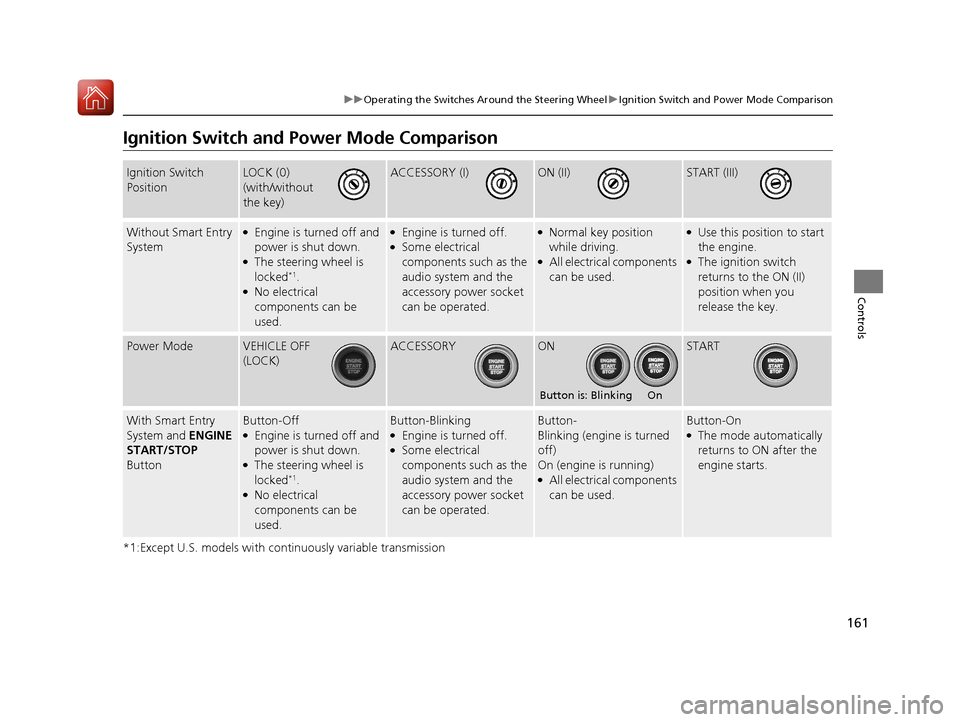
Ignition Switch and Po wer Mode Comparison
*1:Except U.S. models with continuously variable transmission
Ignition Switch
PositionLOCK (0)
(with/without
the key)ACCESSORY (I)ON (II)START (III)
Without Smart Entry
System●Engine is turned off and
power is shut down.
●The steering wheel is
locked*1.●No electrical
components can be
used.
●Engine is turned off.●Some electrical
components such as the
audio system and the
accessory power socket
can be operated.
●Normal key position
while driving.
●All electrical components
can be used.
●Use this position to start
the engine.
●The ignition switch
returns to the ON (II)
position when you
release the key.
Power ModeVEHICLE OFF
(LOCK)ACCESSORYONSTART
With Smart Entry
System and ENGINE
START/STOP
ButtonButton-Off●Engine is turned off and
power is shut down.
●The steering wheel is
locked*1.●No electrical
components can be
used.
Button-Blinking●Engine is turned off.●Some electrical
components such as the
audio system and the
accessory power socket
can be operated.
Button-
Blinking (engine is turned
off)
On (engine is running)
●All electrical components
can be used.
Button-On●The mode automatically
returns to ON after the
engine starts.
Button is: Blinking On
17 CIVIC 4D HCM (KA KC KL)-31TBA6100.book 161 ページ 2016年8月31日 水曜日 午後6時5分
Page 170 of 601
169
uuOperating the Switches Around the Steering Wheel uRear Defogger/Heated Door Mirror* Button
Controls
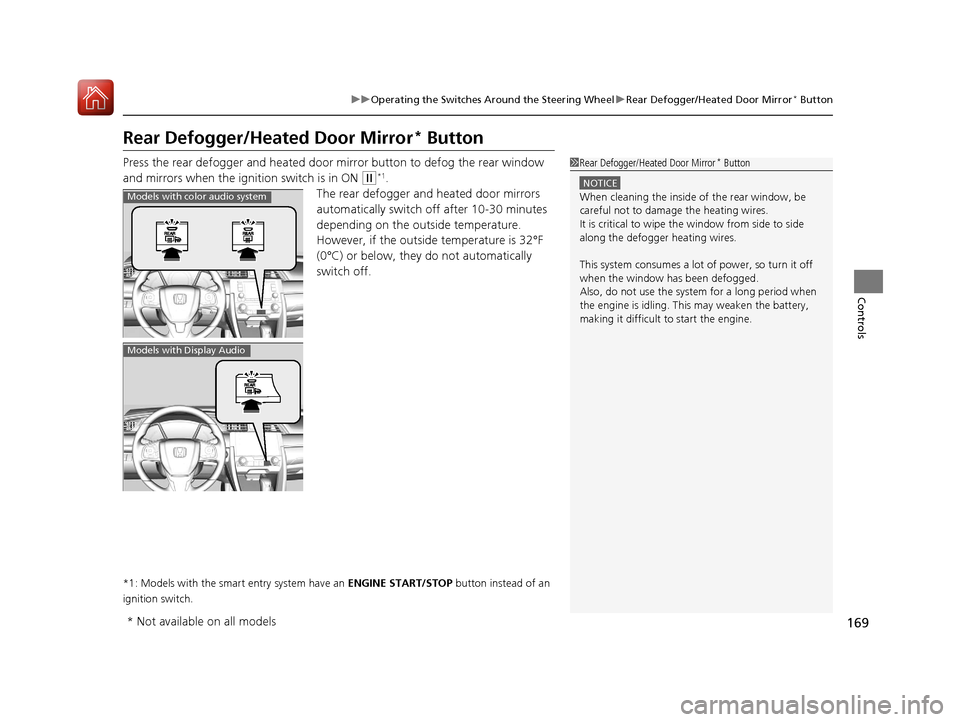
Rear Defogger/Heated Door Mirror* Button
Press the rear defogger and heated door mirror button to defog the rear window
and mirrors when the ignition switch is in ON
(w*1.
The rear defogger and heated door mirrors
automatically switch of f after 10-30 minutes
depending on the outside temperature.
However, if the outsid e temperature is 32°F
(0°C) or below, they do not automatically
switch off.
*1: Models with the smart entry system have an ENGINE START/STOP button instead of an
ignition switch.
1 Rear Defogger/Heated Door Mirror* Button
NOTICE
When cleaning the inside of the rear window, be
careful not to damage the heating wires.
It is critical to wipe the window from side to side
along the defogger heating wires.
This system consumes a lot of power, so turn it off
when the window has been defogged.
Also, do not use the system for a long period when
the engine is idling. This may weaken the battery,
making it difficult to start the engine.Models with color audio system
Models with Display Audio
* Not available on all models
17 CIVIC 4D HCM (KA KC KL)-31TBA6100.book 169 ページ 2016年8月31日 水曜日 午後6時5分
Page 197 of 601
196
Controls
Climate Control System*
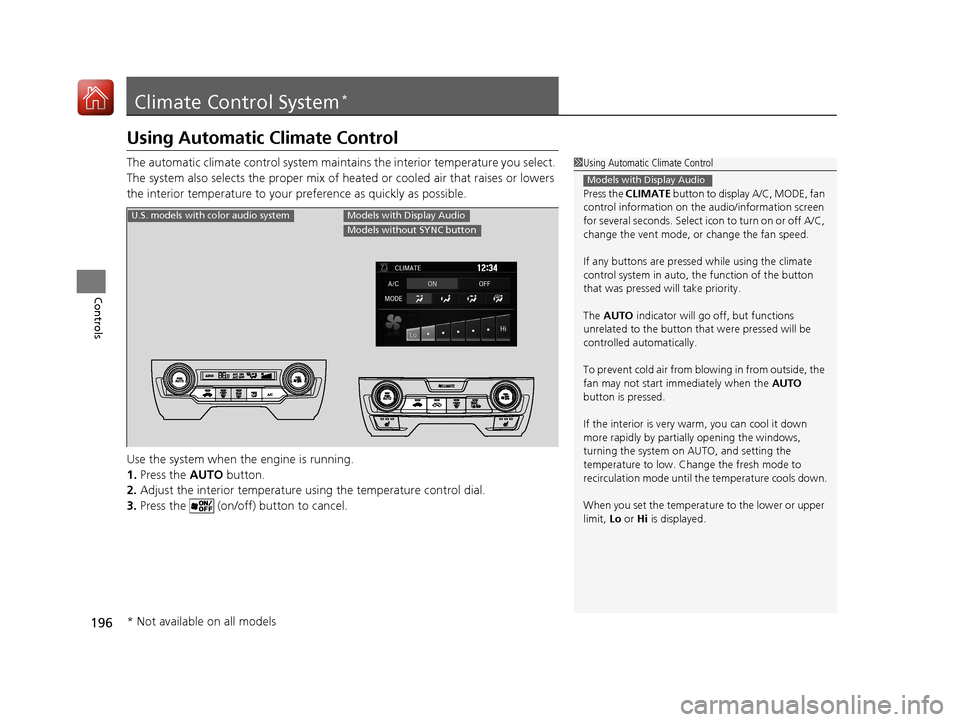
Using Automatic Climate Control
The automatic climate control system maintains the interior temperature you select.
The system also selects the proper mix of heated or cooled air that raises or lowers
the interior temperature to your preference as quickly as possible.
Use the system when the engine is running.
1. Press the AUTO button.
2. Adjust the interior temperature us ing the temperature control dial.
3. Press the (on/off) button to cancel.1Using Automatic Climate Control
Press the CLIMATE button to display A/C, MODE, fan
control information on the audio/information screen
for several seconds. Select ic on to turn on or off A/C,
change the vent mode, or change the fan speed.
If any buttons are presse d while using the climate
control system in auto, the function of the button
that was pressed wi ll take priority.
The AUTO indicator will go off, but functions
unrelated to the button that were pressed will be
controlled automatically.
To prevent cold air from bl owing in from outside, the
fan may not start i mmediately when the AUTO
button is pressed.
If the interior is very warm, you can cool it down
more rapidly by partial ly opening the windows,
turning the system on AUTO, and setting the
temperature to low. Change the fresh mode to
recirculation mode until the temperature cools down.
When you set the temperat ure to the lower or upper
limit, Lo or Hi is displayed.
Models with Display Audio
U.S. models with color audio systemModels with Display Audio
Models without SYNC button
* Not available on all models
17 CIVIC 4D HCM (KA KC KL)-31TBA6100.book 196 ページ 2016年8月31日 水曜日 午後6時5分
Page 198 of 601
Continued197
uuClimate Control System*uUsing Automatic Climate Control
Controls
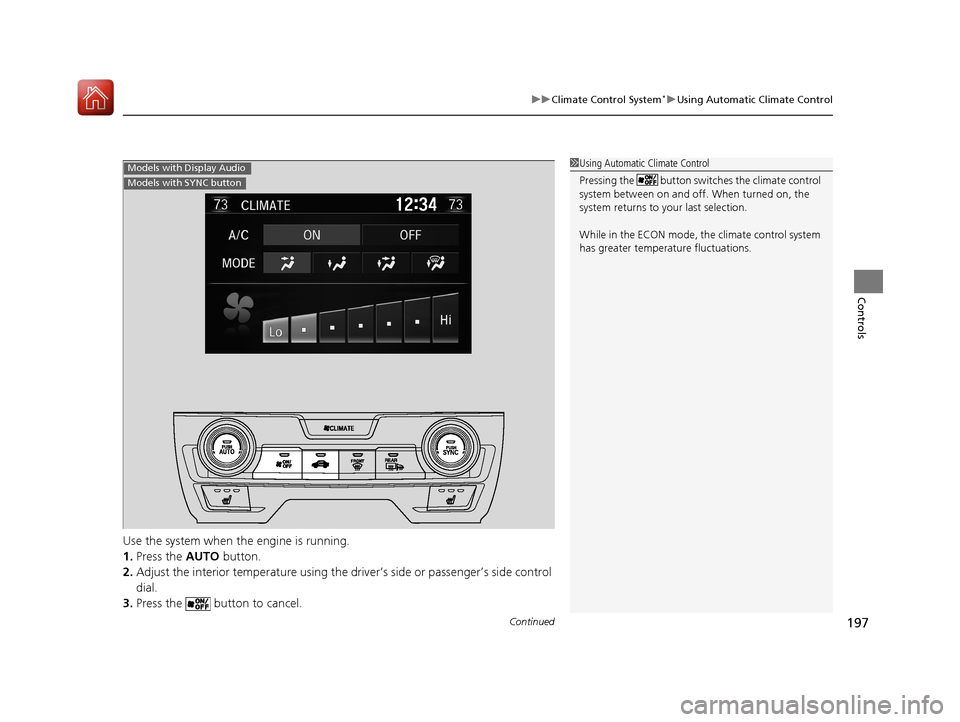
Use the system when the engine is running.
1. Press the AUTO button.
2. Adjust the interior temperature using the dr iver’s side or passenger’s side control
dial.
3. Press the button to cancel.
1Using Automatic Climate Control
Pressing the button switches the climate control
system between on and off. When turned on, the
system returns to your last selection.
While in the ECON mode, the climate control system
has greater temperat ure fluctuations.Models with Display Audio
Models with SYNC button
17 CIVIC 4D HCM (KA KC KL)-31TBA6100.book 197 ページ 2016年8月31日 水曜日 午後6時5分
Page 199 of 601
198
uuClimate Control System*uUsing Automatic Climate Control
Controls
■Switching between the recirculation and fresh air modes
Press the (recirculation) button and switch the mode depending on
environmental conditions.
Recirculation mode (indicator on): Recirculat es air from the vehicle’s interior through
the system.
Fresh air mode (indicator off): Maintains out side ventilation. Keep the system in
fresh air mode in normal situations.
Press the (recirculation) or (fre sh air) button to switch the mode
depending on environmental conditions. Recirculation mode (indicator on): Recirculates air from the vehicle’s interior
through the system. Fresh air mode (indicator on): Maintains outside ventilation. Keep the system
in fresh air mode in normal situations.
U.S. models with color audio system
Models with Display Audio
Models with SYNC button
Models with Display Audio
Models without SYNC button
17 CIVIC 4D HCM (KA KC KL)-31TBA6100.book 198 ページ 2016年8月31日 水曜日 午後6時5分
Page 204 of 601
203
Features
This chapter describes how to operate technology features.
Audio SystemAbout Your Audio System ................ 204
USB Port(s) ....................................... 205
Audio System Theft Protection ......... 206
Audio Remote Controls .................... 207
Audio System Basic Operation ........ 211
Audio/Information Screen ................ 212
Adjusting the Sound ........................ 216
Display Setup ................................... 217
Playing the AM/FM Radio ................. 218
Playing an iPod ................................ 220
Models with color audio system
Playing a USB Flash Drive ................. 223
Playing Bluetooth ® Audio................. 226
Audio System Basic Operation ........ 229
Audio/Information Screen ................ 230
Adjusting the Sound ........................ 251
Display Setup ................................... 252
Voice Control Operation .................. 254
Playing AM/FM Radio ....................... 258
Playing SiriusXM ® Radio
*................. 262
Playing an iPod ................................ 270
Song By Voice
TM (SBV) ...................... 273
Playing Pandora ®*............................ 277
Models with Display Audio
Playing a USB Flash Drive ................. 279
Playing Bluetooth ® Audio ................ 282
HondaLink ®..................................... 284
Wi-Fi Connection ............................. 289
Siri Eyes Free .................................... 291
Apple CarPlay .................................. 292
Android Auto .................................. 295
Audio Error Messages ...................... 299
General Information on the Audio System ............................................. 302
Customized Features ........................ 308
Bluetooth® HandsFreeLink®
*... 339, 362
* Not available on all models
17 CIVIC 4D HCM (KA KC KL)-31TBA6100.book 203 ページ 2016年8月31日 水曜日 午後6時5分